climate HYUNDAI KONA EV 2023 Owner's Manual
[x] Cancel search | Manufacturer: HYUNDAI, Model Year: 2023, Model line: KONA EV, Model: HYUNDAI KONA EV 2023Pages: 548, PDF Size: 49.14 MB
Page 254 of 548
Convenient features
5-70
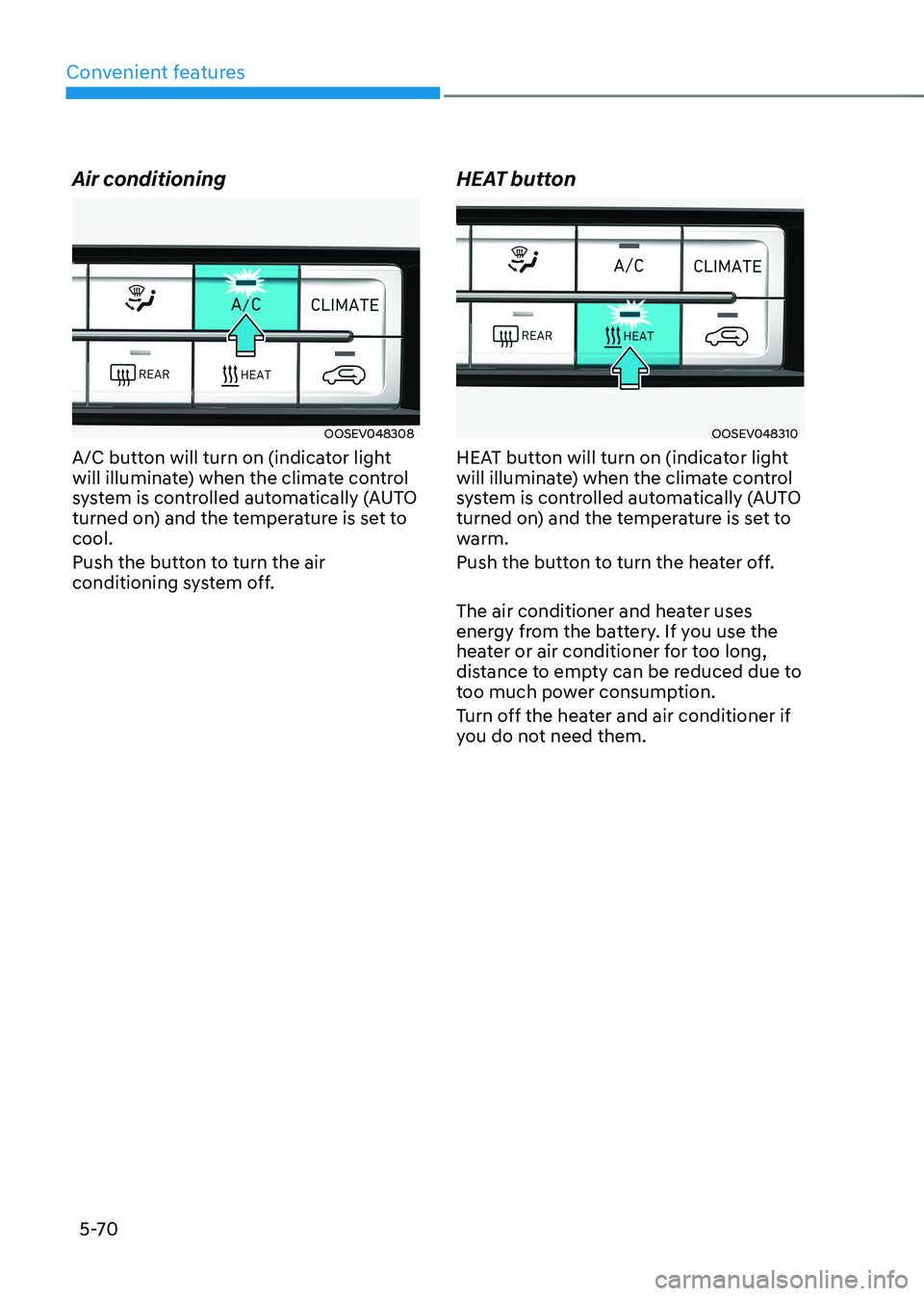
Air conditioning
OOSEV048308
A/C button will turn on (indicator light
will illuminate) when the climate control
system is controlled automatically (AUTO
turned on) and the temperature is set to cool.
Push the button to turn the air
conditioning system off. HEAT buttonOOSEV048310
HEAT button will turn on (indicator light
will illuminate) when the climate control
system is controlled automatically (AUTO
turned on) and the temperature is set to
warm.
Push the button to turn the heater off.
The air conditioner and heater uses
energy from the battery. If you use the
heater or air conditioner for too long,
distance to empty can be reduced due to
too much power consumption.
Turn off the heater and air conditioner if
you do not need them.
Page 255 of 548
05
5-71
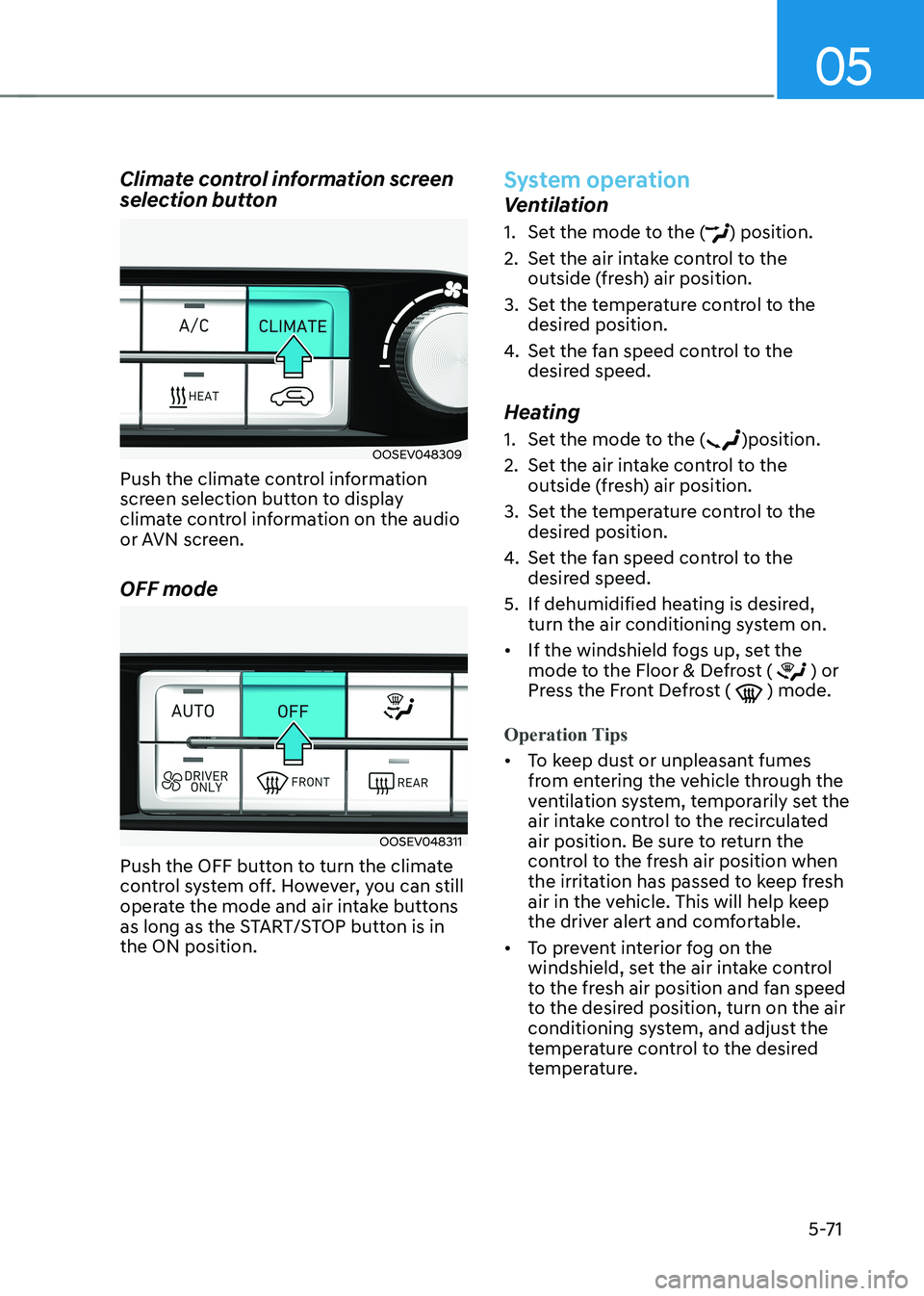
Climate control information screen
selection button
OOSEV048309
Push the climate control information
screen selection button to display
climate control information on the audio
or AVN screen. OFF mode
OOSEV048311
Push the OFF button to turn the climate
control system off. However, you can still
operate the mode and air intake buttons
as long as the START/STOP button is in the ON position.
System operation
Ventilation
1. Set the mode to the (
) position.
2. Set the air intake control to the outside (fresh) air position.
3. Set the temperature control to the desired position.
4. Set the fan speed control to the
desired speed.
Heating
1. Set the mode to the (
)position.
2. Set the air intake control to the outside (fresh) air position.
3. Set the temperature control to the desired position.
4. Set the fan speed control to the
desired speed.
5. If dehumidified heating is desired, turn the air conditioning system on.
• If the windshield fogs up, set the
mode to the Floor & Defrost (
) or
Press the Front Defrost ( ) mode.
Operation Tips
• To keep dust or unpleasant fumes
from entering the vehicle through the
ventilation system, temporarily set the
air intake control to the recirculated
air position. Be sure to return the
control to the fresh air position when
the irritation has passed to keep fresh
air in the vehicle. This will help keep
the driver alert and comfortable.
• To prevent interior fog on the
windshield, set the air intake control
to the fresh air position and fan speed
to the desired position, turn on the air
conditioning system, and adjust the
temperature control to the desired
temperature.
Page 257 of 548
05
5-73
Air conditioning system operation tips
• If the vehicle has been parked in
direct sunlight during hot weather,
open the windows for a short time
to let the hot air inside the vehicle escape.
• After sufficient cooling has been
achieved, switch back from the
recirculated air to the fresh outside air position.
• To help reduce moisture inside of
the windows on rainy or humid
days, decrease the humidity inside
the vehicle by operating the air
conditioning system with the windows
and sunroof closed.
• Use the air conditioning system every
month for a few minutes to ensure
maximum system performance.
• If you operate the air conditioner
excessively, the difference between
the temperature of the outside air and
that of the windshield could cause
the outer surface of the windshield to
fog up, causing loss of visibility. In this
case, set the mode selection button
to the (
) position and set the fan
speed control knob to the lowest
speed setting.
System maintenance
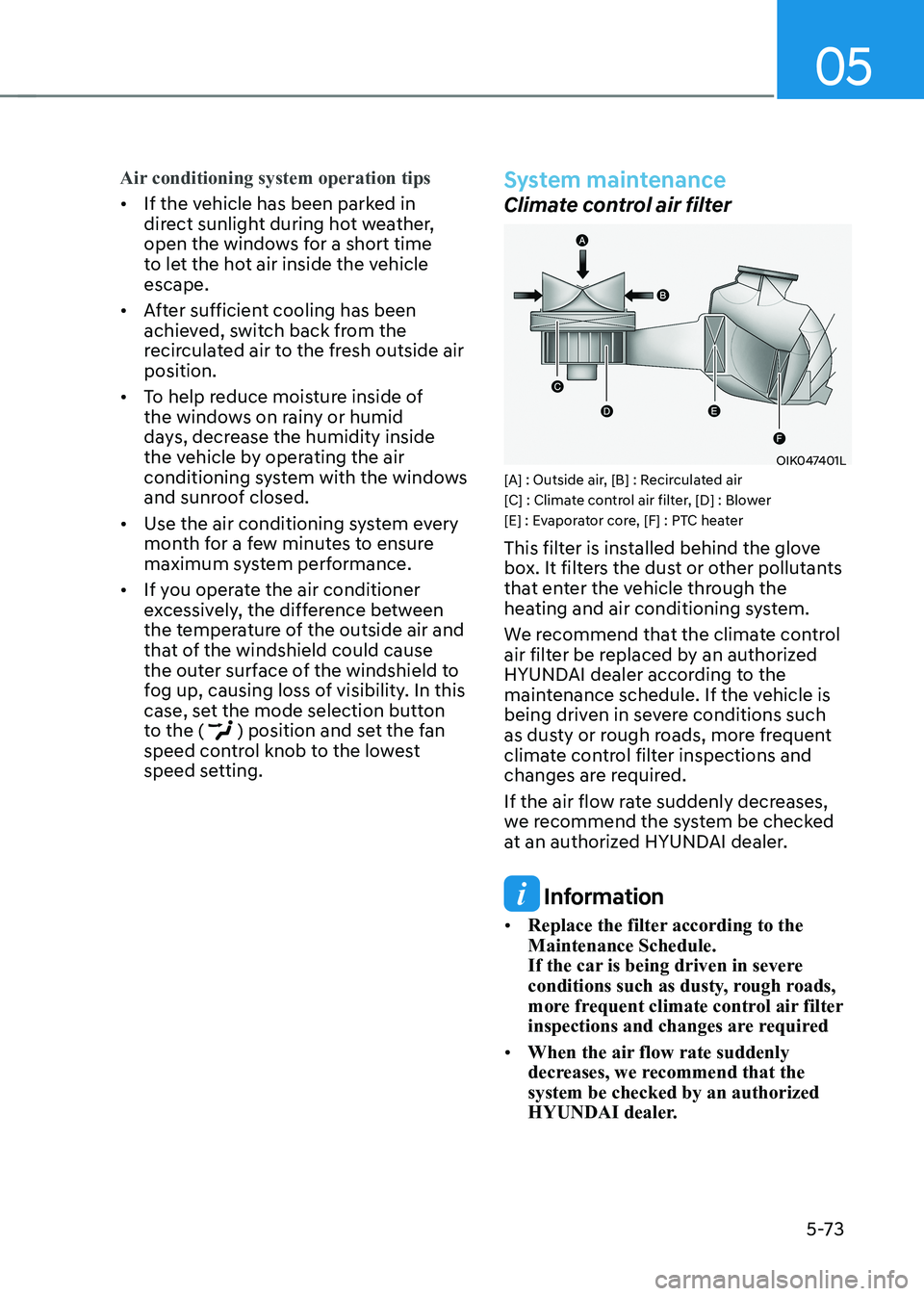
Climate control air filter
OIK047401L
[A] : Outside air, [B] : Recirculated air
[C] : Climate control air filter, [D] : Blower
[E] : Evaporator core, [F] : PTC heater
This filter is installed behind the glove
box. It filters the dust or other pollutants
that enter the vehicle through the
heating and air conditioning system.
We recommend that the climate control
air filter be replaced by an authorized
HYUNDAI dealer according to the
maintenance schedule. If the vehicle is
being driven in severe conditions such
as dusty or rough roads, more frequent
climate control filter inspections and
changes are required.
If the air flow rate suddenly decreases,
we recommend the system be checked
at an authorized HYUNDAI dealer.
Information
• Replace the filter according to the Maintenance Schedule.
If the car is being driven in severe
conditions such as dusty, rough roads,
more frequent climate control air filter
inspections and changes are required
• When the air flow rate suddenly
decreases, we recommend that the system be checked by an authorized
HYUNDAI dealer.
Page 260 of 548
Convenient features
5 -76
WARNING
Windshield heating
Do not use the (
) or () position
during cooling operation in extremely
humid weather. The difference between
the temperature of the outside air and
that of the windshield could cause the
outer surface of the windshield to fog
up, causing loss of visibility. In this case,
set the mode selection knob or button
to the (
) position and fan speed
control knob or button to lower speed. • For maximum windshield defrosting,
set the temperature control knob to
the highest temperature setting and
the fan control knob to the highest fan
speed. Select the front defrost button
on the climate control display.
• If warm air to the floor is desired while
defrosting or defogging, set the mode
to the floor-defrost position.
• Before driving, clear all snow and ice
from the windshield, rear window,
outside rear view mirrors, and all side
windows.
• Clear all snow and ice from the
hood and air inlet in the cowl grill
to improve heater and defroster
efficiency and to reduce the
probability of fogging up inside of the windshield.
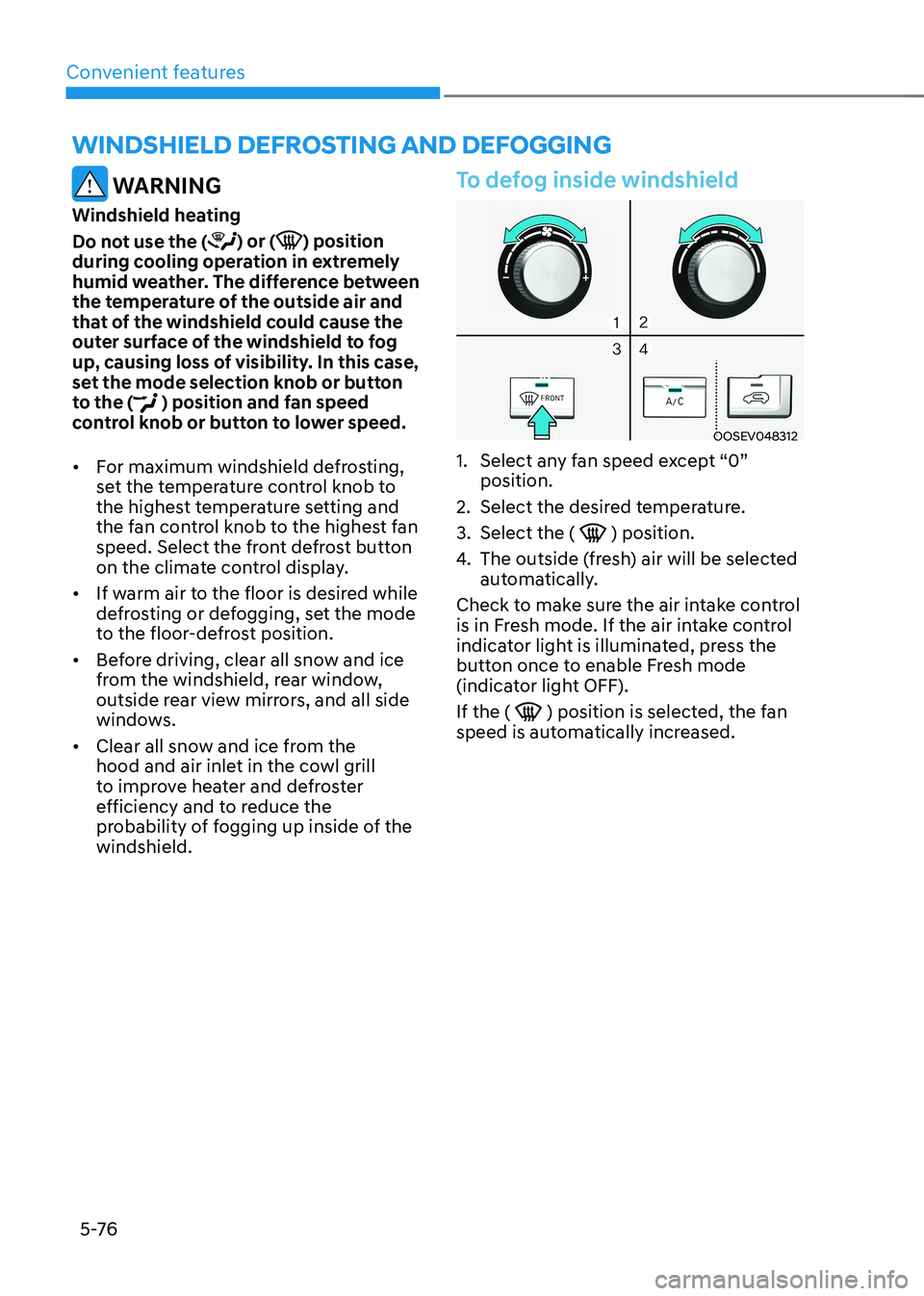
To defog inside windshield
OOSEV048312
1. Select any fan speed except “0” position.
2. Select the desired temperature.
3. Select the (
) position.
4. The outside (fresh) air will be selected
automatically.
Check to make sure the air intake control
is in Fresh mode. If the air intake control
indicator light is illuminated, press the
button once to enable Fresh mode
(indicator light OFF). If the (
) position is selected, the fan
speed is automatically increased.
winDshielD DeFrosting AnD DeFogging
Page 262 of 548
Convenient features
5-78
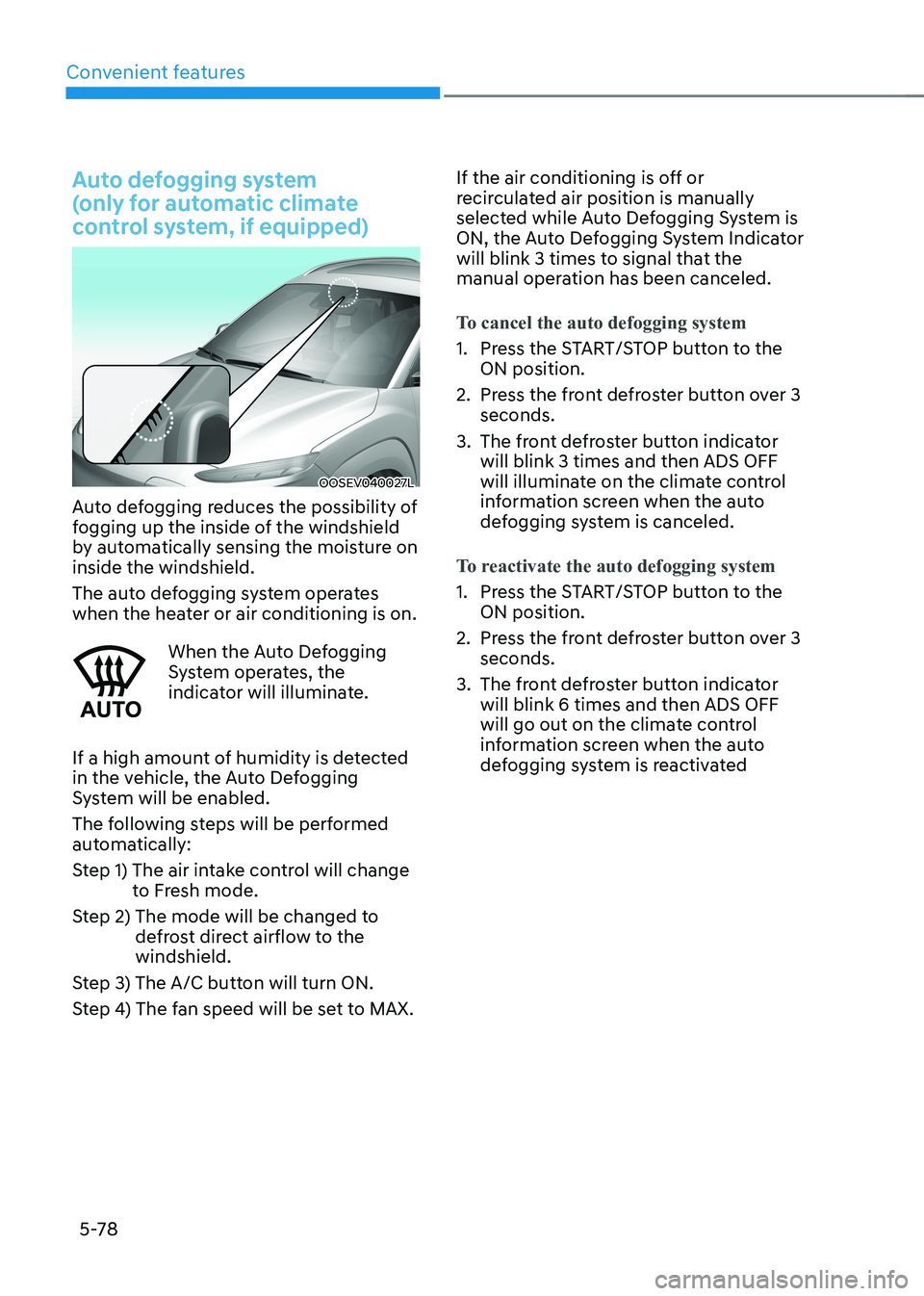
Auto defogging system
(only for automatic climate
control system, if equipped)
OOSEV040027L
Auto defogging reduces the possibility of
fogging up the inside of the windshield
by automatically sensing the moisture on inside the windshield.
The auto defogging system operates
when the heater or air conditioning is on.
When the Auto Defogging
System operates, the
indicator will illuminate.
If a high amount of humidity is detected
in the vehicle, the Auto Defogging
System will be enabled.
The following steps will be performed
automatically:
Step 1) The air intake control will change to Fresh mode.
Step 2) The mode will be changed to defrost direct airflow to the windshield.
Step 3) The A/C button will turn ON.
Step 4) The fan speed will be set to MAX. If the air conditioning is off or
recirculated air position is manually
selected while Auto Defogging System is
ON, the Auto Defogging System Indicator
will blink 3 times to signal that the
manual operation has been canceled.
To cancel the auto defogging system
1. Press the START/STOP button to the
ON position.
2. Press the front defroster button over 3 seconds.
3. The front defroster button indicator will blink 3 times and then ADS OFF
will illuminate on the climate control
information screen when the auto
defogging system is canceled.
To reactivate the auto defogging system
1. Press the START/STOP button to the ON position.
2. Press the front defroster button over 3 seconds.
3. The front defroster button indicator will blink 6 times and then ADS OFF
will go out on the climate control
information screen when the auto
defogging system is reactivated
Page 264 of 548
Convenient features
5-80
Cluster ionizer (if equipped)
When the START/STOP button is in the ON position, the clean air function turns
on automatically.
Also, the clean air function turns off
automatically, when the START/STOP
button is in the OFF position.
Automatic ventilation (if equipped)
To increase cabin air quality and reduce
windscreen misting, air recirculation
mode switches off automatically after
5 minutes, depending on outside
temperature, A/C state, air direction
mode, and the air intake will change to
outside (fresh) mode.
To cancel or reactivate the
Automatic Ventilation
When the air conditioning system is on,
select Face level mode (
) and set the
air intake control to the outside (fresh)
air position. Then, while pressing the
A/C button, press air recirculation mode
button five times within 3 seconds.
When the automatic ventilation is set,
the air recirculation indicator will blink 6
times. When canceled, the indicator will blink 3 times.
ClimaTe ConTrol addiTional feaTures
Page 302 of 548
Driving your vehicle
6-22
Power brakes
Your vehicle has power-assisted brakes
that adjust automatically through normal usage.
If power is not supplied to your vehicle
such as when the battery is discharged
or the vehicle is turned off while driving,
the power assist for the brakes will not
work. You can still stop your vehicle by
applying greater force to the brake pedal
than typical. The stopping distance,
however, will be longer than with power
brakes.
Do not pump the brake pedal when the
power assist has been interrupted.
WARNING
Take the following precautions: • Do not drive with your foot resting
on the brake pedal. This will create
abnormal high brake temperatures,
excessive brake lining and pad wear,
and increased stopping distances.
• When descending a long or steep
hill, shift to a lower gear and avoid
continuous application of the brakes.
Applying the brakes continuously
will cause the brakes to overheat and
could result in a temporary loss of
braking performance.
• Wet brakes may impair the vehicle’s
ability to safely slow down; the
vehicle may also pull to one side when
the brakes are applied. Applying the
brakes lightly will indicate whether
they have been affected in this way.
Always test your brakes in this fashion
after driving through deep water. To
dry the brakes, lightly tap the brake
pedal to heat up the brakes while
maintaining a safe forward speed
until brake performance returns to
normal.
Avoid driving at high speeds until the
brakes function correctly.
NOTICE
• Do not continue depressing the
brake pedal if the "" indicator is
OFF. The battery may be discharged.
• Noise and vibration generated
during braking is normal.
• Under normal operation, electric
brake pump noise and motor
vibration may occur temporarily in
below cases.
- When the pedal is depressed
suddenly.
- When the pedal is repeatedly
depressed in short intervals.
- When the ABS function is activated
while braking.
Disc brakes wear indicator
When your brake pads are worn and new
pads are required, you will hear a high
pitched warning sound from your front
or rear brakes. You may hear this sound
come and go or it may occur whenever
you depress the brake pedal.
Note that some driving conditions or
climates may cause a brake squeal
when you first apply (or lightly apply)
the brakes. This is normal and does not
indicate a problem with your brakes.
NOTICE
To avoid costly brake repairs, do not
continue to drive with worn brake pads.
Information
Always replace brake pads as complete
front or rear axle sets.
BRAkING SySTEm
Page 477 of 548
9
9. Maintenance
Motor compartment ......................................................................................... 9-3
Maintenance services ....................................................................................... 9-4
Owner’s responsibility ................................................................................................ 9-4
Owner maintenance precautions............................................................................... 9-4
Owner maintenance ......................................................................................... 9-5
Owner maintenance schedule .................................................................................... 9-5
Scheduled maintenance services ..................................................................... 9 -7
Maintenance Schedule ................................................................................................ 9 -7
Explanation of scheduled maintenance items ...............................................9-9
Cooling system ............................................................................................................ 9-9
Coolant ......................................................................................................................... 9-9
Reduction gear fluid.................................................................................................... 9-9
Brake hoses and lines.................................................................................................. 9-9Brake fluid ................................................................................................................... 9-9
Brake pads, calipers and rotors .................................................................................. 9-9
Suspension mounting bolts ........................................................................................ 9-9
Drive shafts and boots ................................................................................................ 9-9
Air conditioning refrigerant/compressor................................................................... 9-9
Coolant ............................................................................................................. 9-10
Brake fluid ......................................................................................................... 9-11
Checking the brake fluid level .................................................................................... 9-11
Washer fluid ..................................................................................................... 9-12
Checking the washer fluid level ................................................................................ 9-12
Climate control air filter................................................................................... 9-13
Filter inspection ............................................................................................... 9-13
Filter replacement ...................................................................................................... 9-13
Wiper blades .................................................................................................... 9-14
Blade inspection ......................................................................................................... 9-14
Blade replacement ................................................................................................... 9-14
Battery (12 Volt) ................................................................................................ 9-17
Battery usage.............................................................................................................. 9-18 Battery capacity label ................................................................................................ 9-18
Battery recharging ..................................................................................................... 9-18
Reset items ................................................................................................................. 9-19
Page 484 of 548
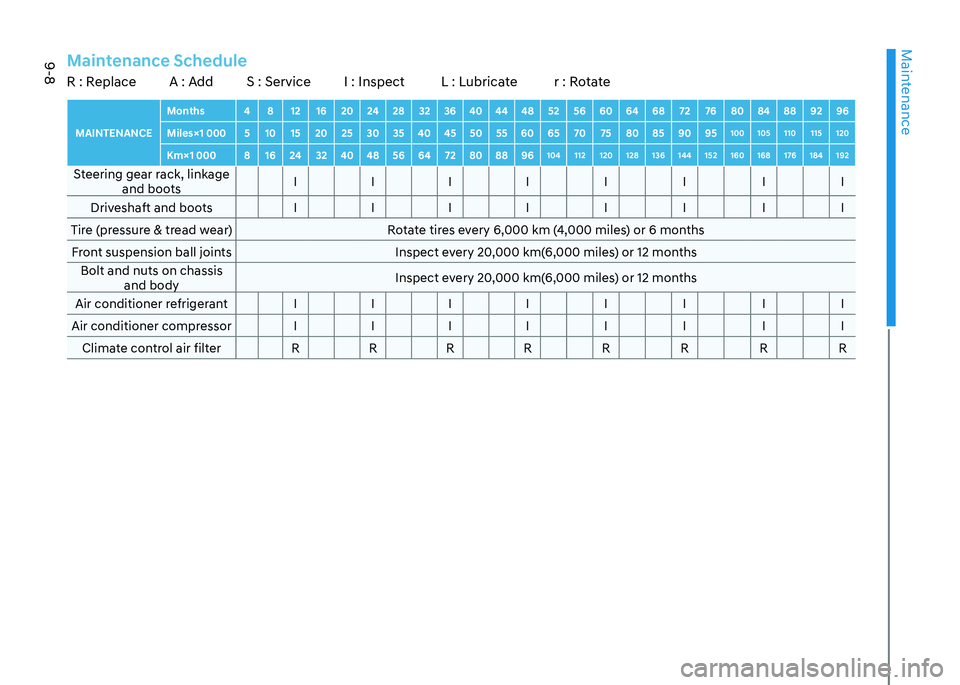
Maintenance
9-8
MAINTENANCEMonths 4 8 12 16 20 24 28 32 36 40 44 48 52 56 60 64 68 72 76 80 84 88 92 96
Miles×1 000 5 10 15 20 25 30 35 40 45 50 55 60 65 70 75 80 85 90 95 100 105 110 115 120
Km×1 000 8 16 24 32 40 48 56 64 72 80 88 96 104 112 120 128 136 144 152 160 168 176 184 192Steering gear rack, linkage
and boots I I I I I I I I
Driveshaft and boots I I I I I I I I
Tire (pressure & tread wear) Rotate tires every 6,000 km (4,000 miles) or 6 months Front suspension ball joints Inspect every 20,000 km(6,000 miles) or 12 months Bolt and nuts on chassis and body Inspect every 20,000 km(6,000 miles) or 12 months
Air conditioner refrigerant I I I I I I I I
Air conditioner compressor I I I I I I I I Climate control air filter R R R R R R R RMaintenance ScheduleR : Replace A : Add S : Service I : Inspect L : Lubricate r : Rotate
Page 488 of 548
Maintenance
9-12
WASHER FLUID
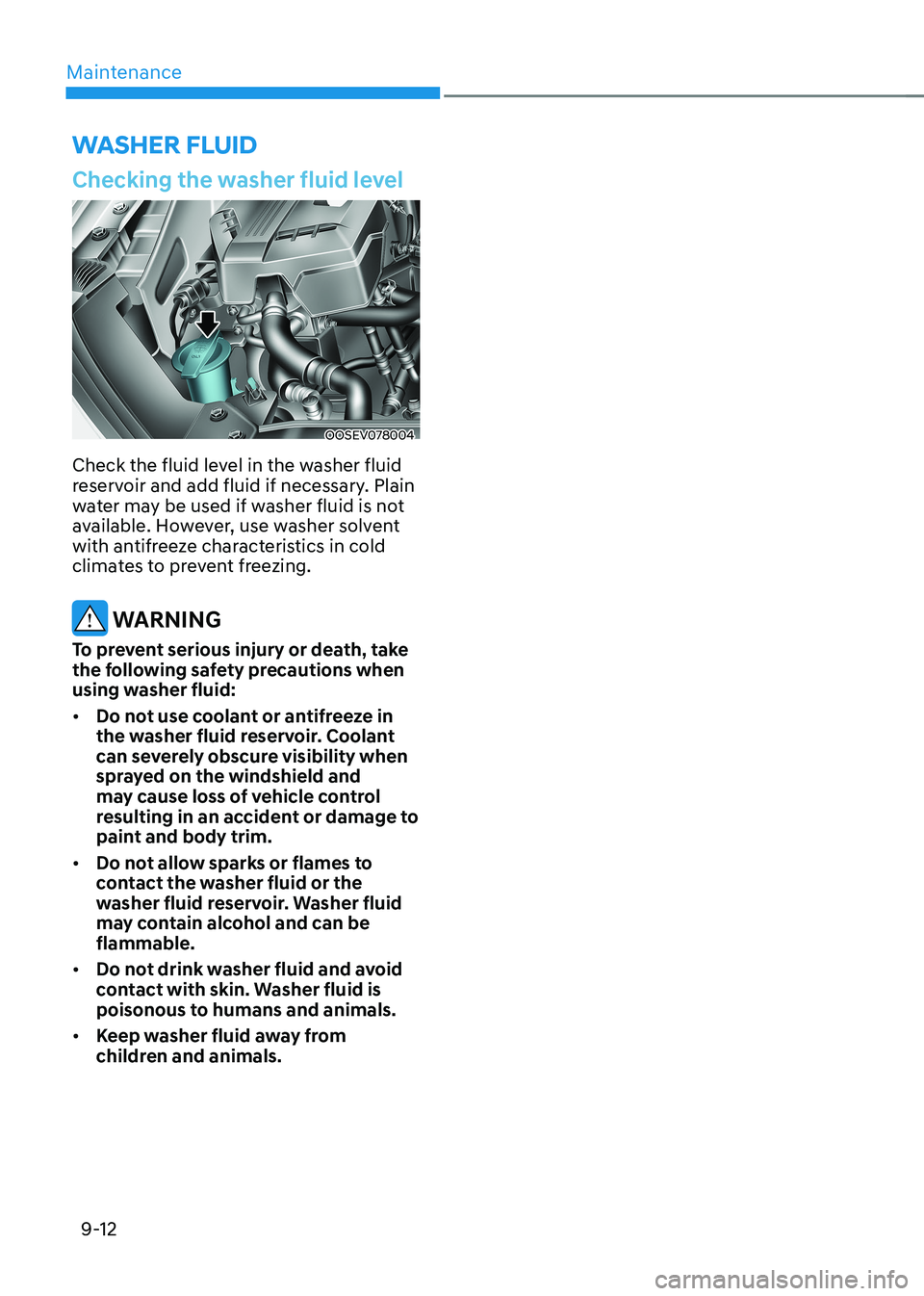
Checking the washer fluid level
OOSEV078004
Check the fluid level in the washer fluid
reservoir and add fluid if necessary. plain
water may be used if washer fluid is not
available. However, use washer solvent
with antifreeze characteristics in cold
climates to prevent freezing.
WARNING
To prevent serious injury or death, take
the following safety precautions when
using washer fluid: • Do not use coolant or antifreeze in
the washer fluid reservoir. Coolant
can severely obscure visibility when
sprayed on the windshield and
may cause loss of vehicle control
resulting in an accident or damage to
paint and body trim.
• Do not allow sparks or flames to
contact the washer fluid or the
washer fluid reservoir. Washer fluid
may contain alcohol and can be flammable.
• Do not drink washer fluid and avoid
contact with skin. Washer fluid is
poisonous to humans and animals.
• Keep washer fluid away from
children and animals.