climate HYUNDAI KONA EV 2023 Owners Manual
[x] Cancel search | Manufacturer: HYUNDAI, Model Year: 2023, Model line: KONA EV, Model: HYUNDAI KONA EV 2023Pages: 548, PDF Size: 49.14 MB
Page 6 of 548
1
1. Foreword / Electric Vehicle System Overview
Foreword ............................................................................................................ 1-3
Hyundai Auto Canada ........................................................................................ 1-3
How to use this manual ..................................................................................... 1-4
Safety messages ................................................................................................ 1-4
Vehicle modifications ........................................................................................ 1-5
Electric Vehicle................................................................................................... 1-6 Electric Vehicle ............................................................................................................. 1-6
Characteristics of Electric Vehicles ............................................................................. 1-6
Battery Information ...................................................................................................... 1-6
Main Components of Electric Vehicle .............................................................. 1 -7
Main Components of Electric Vehicle ......................................................................... 1 -7
High Voltage Battery (lithium-ion polymer) ................................................................1 -7
High Voltage Battery Warmer System ........................................................................ 1-8
EV Mode ............................................................................................................. 1-9
Nearby Stations ............................................................................................................ 1-9
Energy Information ..................................................................................................... 1-10
Battery information .................................................................................................. 1-10
Energy consumption ............................................................................................... 1-10
Charge Management ................................................................................................... 1-11
Charging and climate ................................................................................................ 1-11
Charging limit ............................................................................................................ 1-12
Charging current ....................................................................................................... 1-13
ECO Driving ................................................................................................................. 1-13
CO2 reduction ........................................................................................................... 1-13
Driving history ........................................................................................................... 1-13
EV Settings ................................................................................................................... 1-14
Utility Mode ............................................................................................................... 1-14
Winter mode ............................................................................................................. 1-15
Warning ..................................................................................................................... 1-16
EV route ..................................................................................................................... 1-16
Charge Types for Electric Vehicle .................................................................... 1-16
Charging Information .................................................................................................. 1-16
Charging Time Information ........................................................................................ 1-17
Charging Types ............................................................................................................ 1-18
Charge Indicator Lamp for Electric Vehicle ....................................................1-19
Charging Status ........................................................................................................... 1-19
Page 15 of 548
Foreword / Electric Vehicle System Overview
1-10
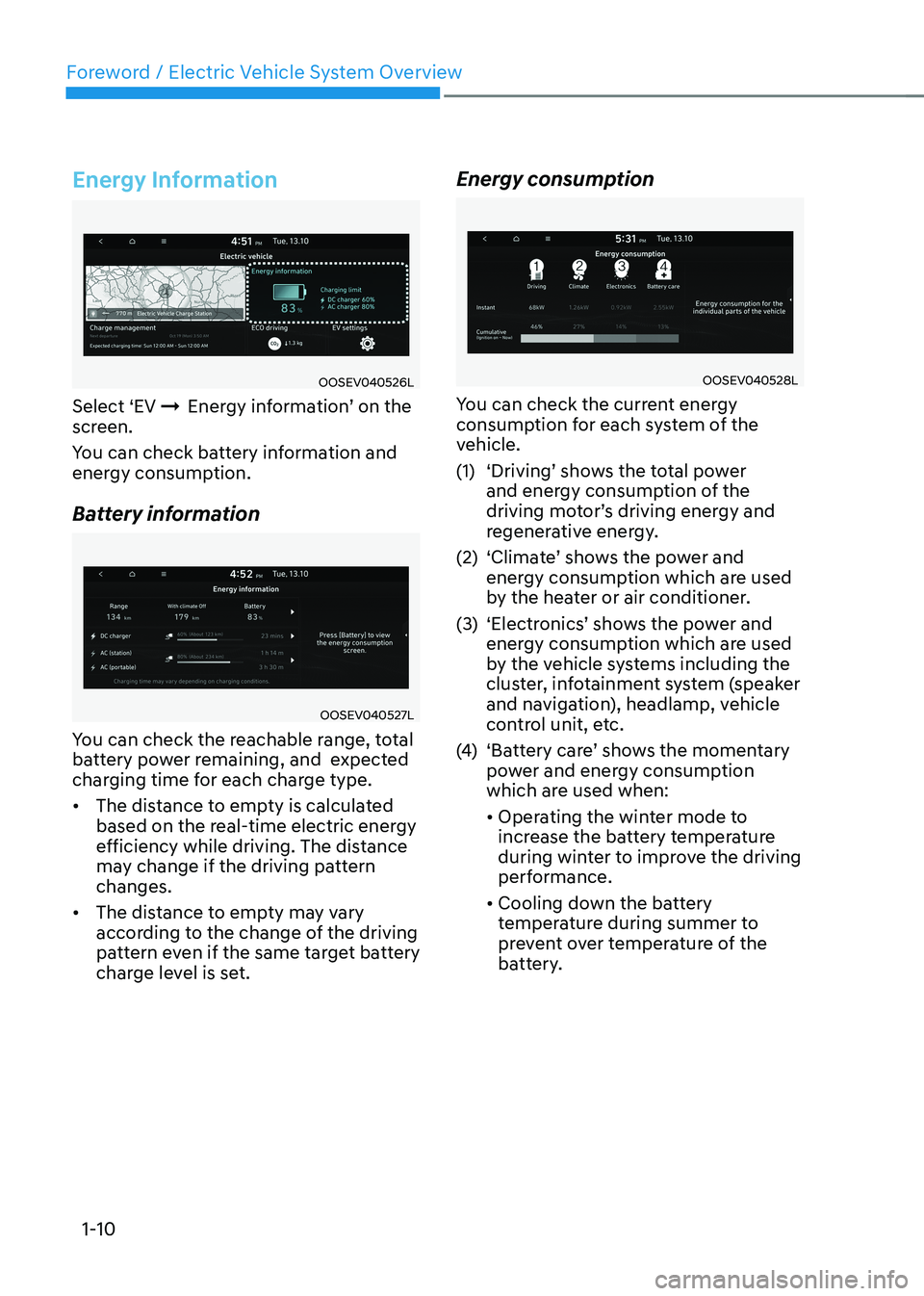
Energy Information
OOSEV040526L
Select ‘EV ÞEnergy information’ on the
screen.
You can check battery information and
energy consumption.
Battery information
OOSEV040527L
You can check the reachable range, total
battery power remaining, and expected
charging time for each charge type. • The distance to empty is calculated
based on the real-time electric energy
efficiency while driving. The distance
may change if the driving pattern changes.
• The distance to empty may vary
according to the change of the driving
pattern even if the same target battery
charge level is set. Energy consumption
OOSEV040528L
You can check the current energy
consumption for each system of the
vehicle.
(1) ‘Driving’ shows the total power and energy consumption of the
driving motor’s driving energy and
regenerative energy.
(2) ‘Climate’ shows the power and energy consumption which are used
by the heater or air conditioner.
(3) ‘Electronics’ shows the power and energy consumption which are used
by the vehicle systems including the
cluster, infotainment system (speaker
and navigation), headlamp, vehicle
control unit, etc.
(4) ‘Battery care’ shows the momentary
power and energy consumption
which are used when: • Operating the winter mode to
increase the battery temperature
during winter to improve the driving
performance.
• Cooling down the battery
temperature during summer to
prevent over temperature of the
battery.
Page 16 of 548
01
1-11
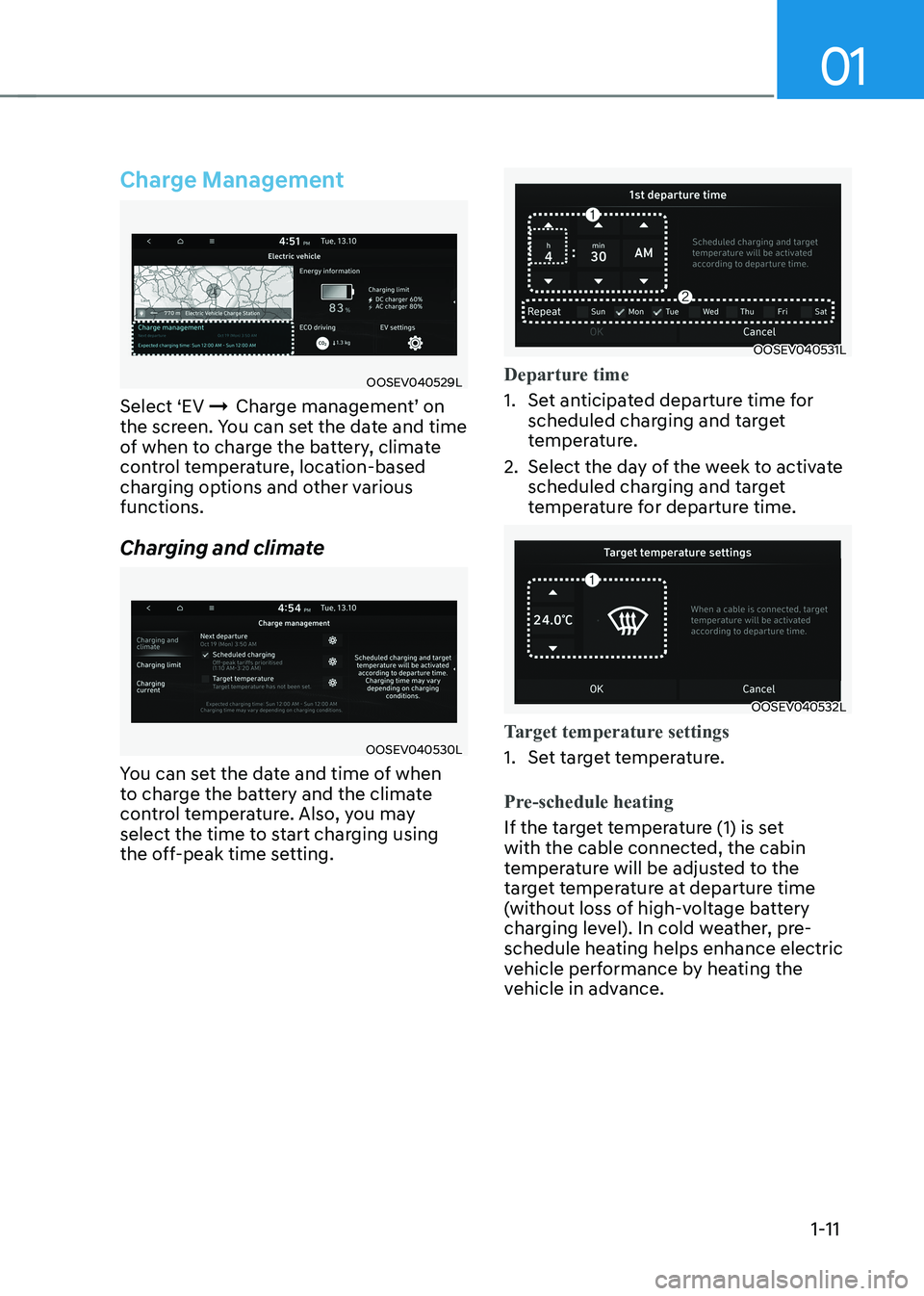
Charge Management
OOSEV040529L
Select ‘EV ÞCharge management’ on
the screen. You can set the date and time
of when to charge the battery, climate
control temperature, location-based
charging options and other various functions.
Charging and climate
OOSEV040530L
You can set the date and time of when
to charge the battery and the climate
control temperature. Also, you may
select the time to start charging using
the off-peak time setting.
OOSEV040531L
Departure time
1. Set anticipated departure time for scheduled charging and target
temperature.
2. Select the day of the week to activate scheduled charging and target
temperature for departure time.
OOSEV040532L
Target temperature settings
1. Set target temperature.
Pre-schedule heating
If the target temperature (1) is set
with the cable connected, the cabin
temperature will be adjusted to the
target temperature at departure time
(without loss of high-voltage battery
charging level). In cold weather, pre-
schedule heating helps enhance electric
vehicle performance by heating the
vehicle in advance.
Page 20 of 548

01
1-15
OOSEV040494L
System Setting and Activation
System setting
The driver can activate the Utility mode
function when the following conditions
are satisfied. • The vehicle is in the ready (
) mode
and the gear is shifted to P (Park).
• The EPB (Electronic Parking Brake) is applied.
• ‘EV settings
ÞUtility mode’ is
selected on the infotainment system
screen.
System Activation
When the system is activated:• The (
) indicator will turn off and
the () indicator will illuminate on
the cluster.
• All electric devices are usable but the
vehicle cannot be driven.
• The EPB can be cancelled by pressing
the EPB switch.
Gear cannot be shifted out of P (Park).
If a shift attempt is made, a message
“Shifting conditions not met” will be
displayed on the infotainment system
screen.
System Deactivation
The Utility mode can be deactivated by
pressing the START/STOP button to the
OFF position. The function cannot be
deactivated from the EV settings. Winter mode
OOSEV040540L
In cold climates and during winter
months, electric vehicle range may
reduce and charging times may increase.
This is primarily due to reduced
performance of the EV battery when
exposed to cold temperatures.
Some vehicles may come equipped with
Winter mode selectable option. The
Winter mode feature can be selected in
the EV Settings menu.
When selected, Winter mode enables
the use of the EV battery coolant heater.
This mode is recommended to improve
EV battery performance in cold climate conditions.
Note that EV range may reduce when
Winter mode is enabled, as electrical
energy is used to maintain the EV battery
temperature.
Winter mode enables operation of the
EV battery coolant heater. While driving
your vehicle, if the battery temperature
is low or the A/C and/or heater is turned
ON, the EV battery coolant heater will be used.
Note that the EV battery coolant heater
will not be used when the EV battery
SOC is low.
à This mode is available for the vehicles
equipped with the battery heater.
Page 25 of 548
Foreword / Electric Vehicle System Overview
1-20
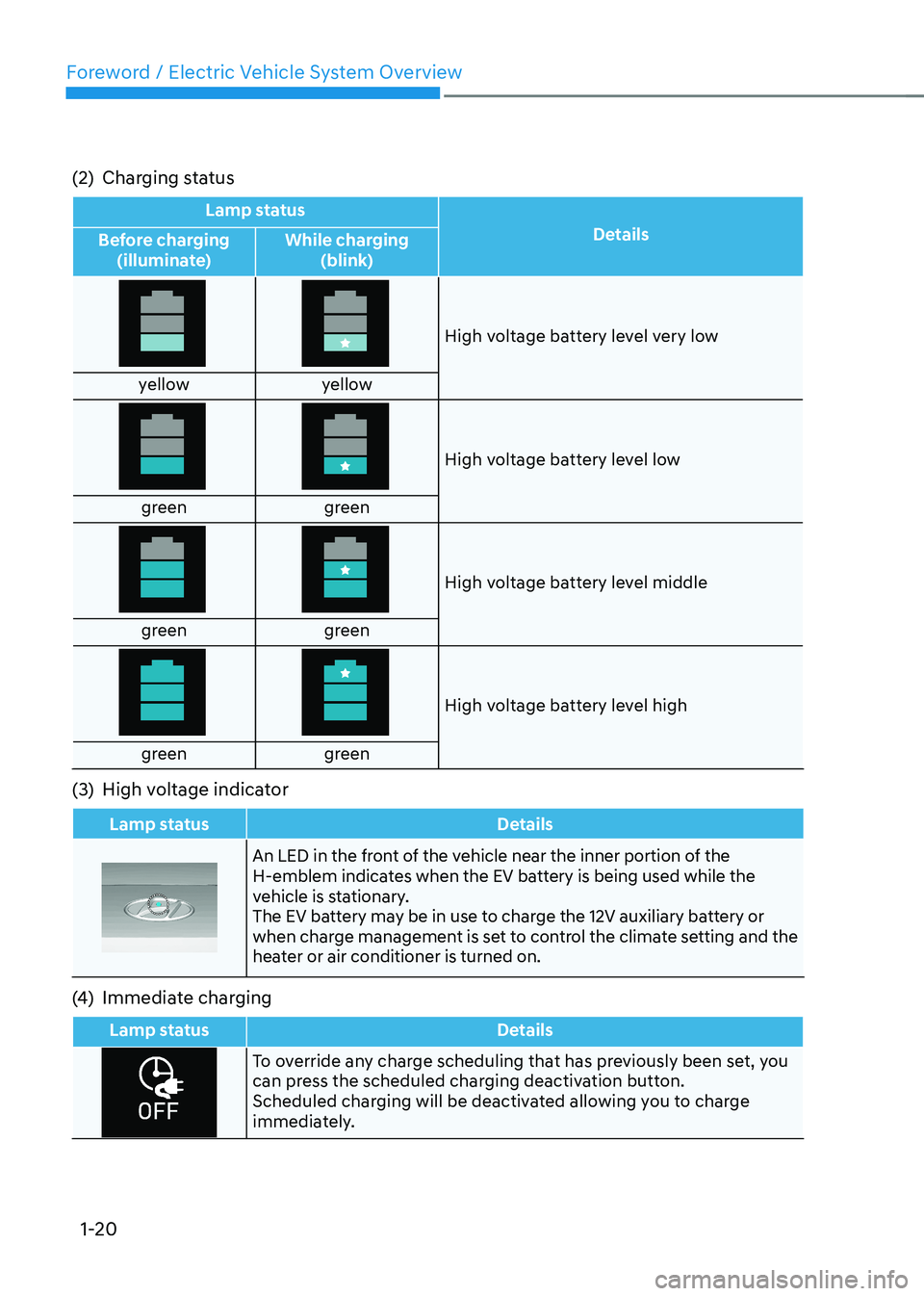
(2) Charging status
Lamp status
Details
Before charging
(illuminate) While charging
(blink)
High voltage battery level very low
yellow yellow
High voltage battery level low
green green
High voltage battery level middle
green green
High voltage battery level high
green green
(3) High voltage indicator
Lamp status Details
An LED in the front of the vehicle near the inner portion of the
H-emblem indicates when the EV battery is being used while the
vehicle is stationary.
The EV battery may be in use to charge the 12V auxiliary battery or
when charge management is set to control the climate setting and the
heater or air conditioner is turned on.
(4) Immediate charging
Lamp status Details
To override any charge scheduling that has previously been set, you
can press the scheduled charging deactivation button.
Scheduled charging will be deactivated allowing you to charge
immediately.
Page 52 of 548
01
1-47
•
The range that is displayed on the
instrument cluster after completing
a recharge may vary significantly
depending on previous driving
patterns.
When the previous driving patterns
include aggressive or high speed
driving (e.g. predominantly highway
miles, etc.), the estimated range on
the next full charge will be lower than normal.
When the previous driving patterns
are predominantly mild or economical
(e.g. city driving), the estimated
range on the next full charge will be
increased.
• Calculated range may depend on
many factors such as the charge
amount of the high voltage battery,
weather, temperature, durability of
the battery, geographical features,
and driving style.
• Natural degradation may occur with
the high voltage battery depending
on the number of years the vehicle
is used. This may reduce the vehicle
range.
Navigation - When a Destination is
Set
When a destination is set using the
vehicle navigation system (if equipped),
the vehicle range may change. The
vehicle range is recalculated using the
destination route information. While
driving, the range may vary based on
traffic conditions, driving pattern and
vehicle settings, etc.
Tips for Improving Range When
Using the Climate Control
System
• Operating the climate control system
consumes electrical energy from
the EV battery. Continuous use may
reduce the vehicle range.
When using the climate control
system, it is recommended to set
the control to 22°C (72°F) AUTO. The
climate control system has been
optimized to operate at this setting for
maximum comfort and efficiency.
• When possible, use the DRIVER ONLY
feature on the climate control system.
This will discontinue airflow to the
passenger side and reduces climate
control power consumption.
Tips for Improving Range While Driving
• Depress and hold the accelerator
pedal to maintain speed and drive
economically.
• Gradually depress and release the
accelerator pedal when accelerating
or decelerating.
• Always maintain specified tire
pressures.
• Do not use unnecessary electrical
components while driving.
• Do not load unnecessary items in the
vehicle.
• Do not mount parts that may increase
air resistance.
Page 70 of 548
2-5
02
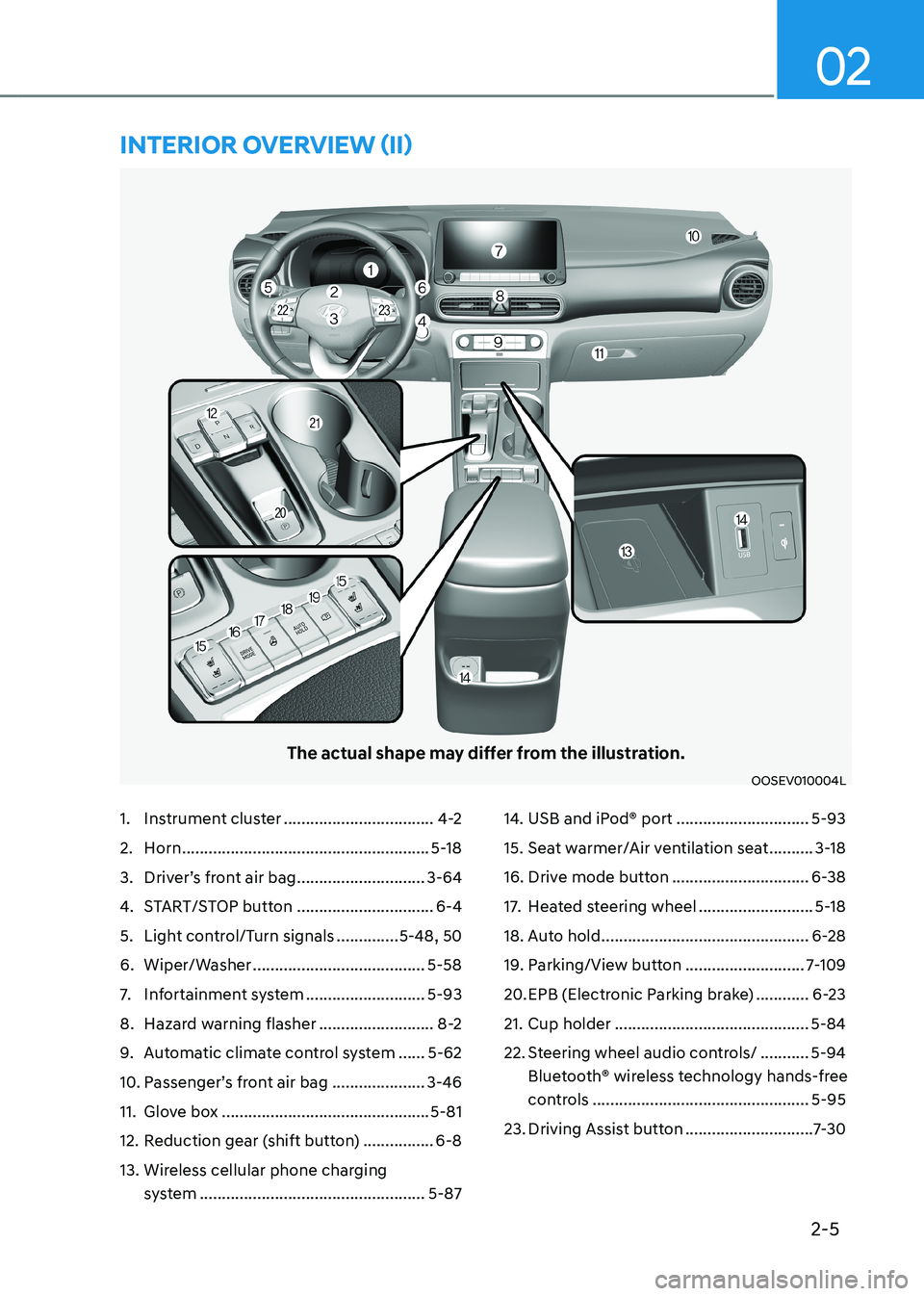
The actual shape may differ from the illustration.
OOSEV010004L
1. Instrument cluster ..................................4-2
2. Horn ........................................................ 5-18
3. Driver’s front air bag .............................3-64
4. START/STOP button ...............................6-4
5. Light control/Turn signals ..............5-48, 50
6. Wiper/Washer ....................................... 5-58
7. Infortainment system ...........................5-93
8. Hazard warning flasher ..........................8-2
9. Automatic climate control system ......5-62
10. Passenger’s front air bag ..................... 3-46
11. Glove box ............................................... 5-81
12. Reduction gear (shift button) ................6-8
13. Wireless cellular phone charging system ................................................... 5-8714. USB and iPod® port
..............................5-93
15. Seat warmer/Air ventilation seat ..........3-18
16. Drive mode button ...............................6-38
17. Heated steering wheel ..........................5-18
18. Auto hold ............................................... 6-28
19. Parking/View button ...........................7-109
20. EPB (Electronic Parking brake) ............6-23
21. Cup holder ............................................ 5-84
22. Steering wheel audio controls/ ...........5-94
Bluetooth® wireless technology hands-free
controls ................................................. 5-95
23. Driving Assist button .............................7-30
intErior ovErviEw (ii)
Page 75 of 548
Vehicle information
2-10
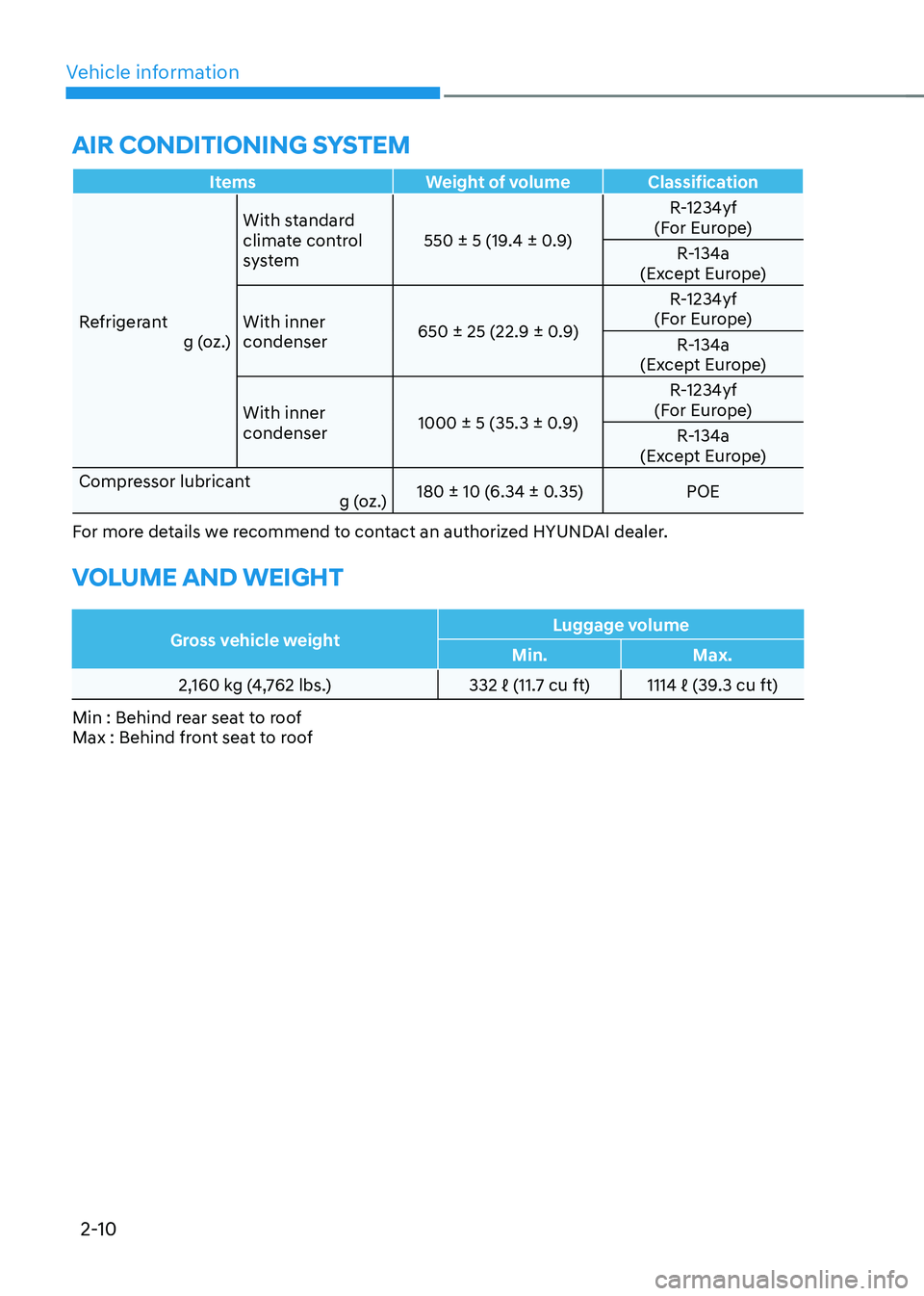
air conDitioning systeM
Items Weight of volume Classification
Refrigerant g (oz.)With standard
climate control
system
550 ± 5 (19.4 ± 0.9) R-1234yf
(For Europe)
R-134a
(Except Europe)
With inner condenser 650 ± 25 (22.9 ± 0.9) R-1234yf
(For Europe)
R-134a
(Except Europe)
With inner condenser 1000 ± 5 (35.3 ± 0.9) R-1234yf
(For Europe)
R-134a
(Except Europe)
Compressor lubricant g (oz.) 180 ± 10 (6.34 ± 0.35) POE
For more details we recommend to contact an authorized HYUNDAI dealer.
VoLuMe anD weigHt
Gross vehicle weight Luggage volume
Min. Max.
2,160 kg (4,762 lbs.) 332 ℓ (11.7 cu ft) 1114 ℓ (39.3 cu ft)
Min : Behind rear seat to roof
Max : Behind front seat to roof
Page 98 of 548
03
3-19
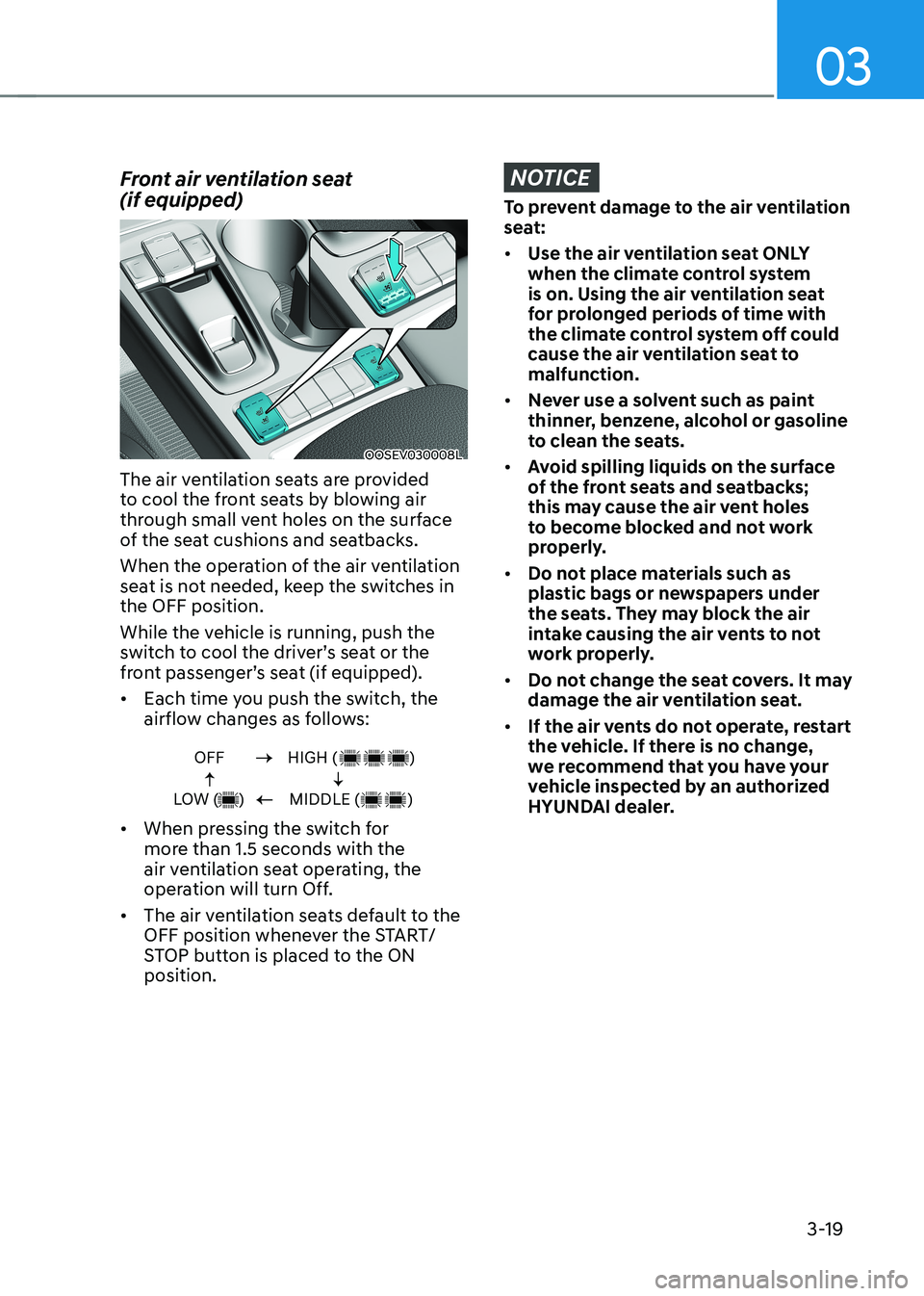
Front air ventilation seat (if equipped)
OOSEV030008L
The air ventilation seats are provided
to cool the front seats by blowing air
through small vent holes on the surface
of the seat cushions and seatbacks.
When the operation of the air ventilation
seat is not needed, keep the switches in the OFF position.
While the vehicle is running, push the
switch to cool the driver’s seat or the
front passenger’s seat (if equipped). • Each time you push the switch, the
airflow changes as follows:
OFF
LOW ( )HIGH ( )
MIDDLE ( )
• When pressing the switch for
more than 1.5 seconds with the
air ventilation seat operating, the
operation will turn Off.
• The air ventilation seats default to the
OFF position whenever the START/
STOP button is placed to the ON position.
NOTICE
To prevent damage to the air ventilation
seat: • Use the air ventilation seat ONLY
when the climate control system
is on. Using the air ventilation seat
for prolonged periods of time with
the climate control system off could
cause the air ventilation seat to malfunction.
• Never use a solvent such as paint
thinner, benzene, alcohol or gasoline
to clean the seats.
• Avoid spilling liquids on the surface
of the front seats and seatbacks;
this may cause the air vent holes
to become blocked and not work
properly.
• Do not place materials such as
plastic bags or newspapers under
the seats. They may block the air
intake causing the air vents to not
work properly.
• Do not change the seat covers. It may
damage the air ventilation seat.
• If the air vents do not operate, restart
the vehicle. If there is no change,
we recommend that you have your
vehicle inspected by an authorized
HYUNDAI dealer.
Page 147 of 548
Instrument cluster
4-4
State of Charge (SOC) gauge for high
voltage battery
OOSEV040475L
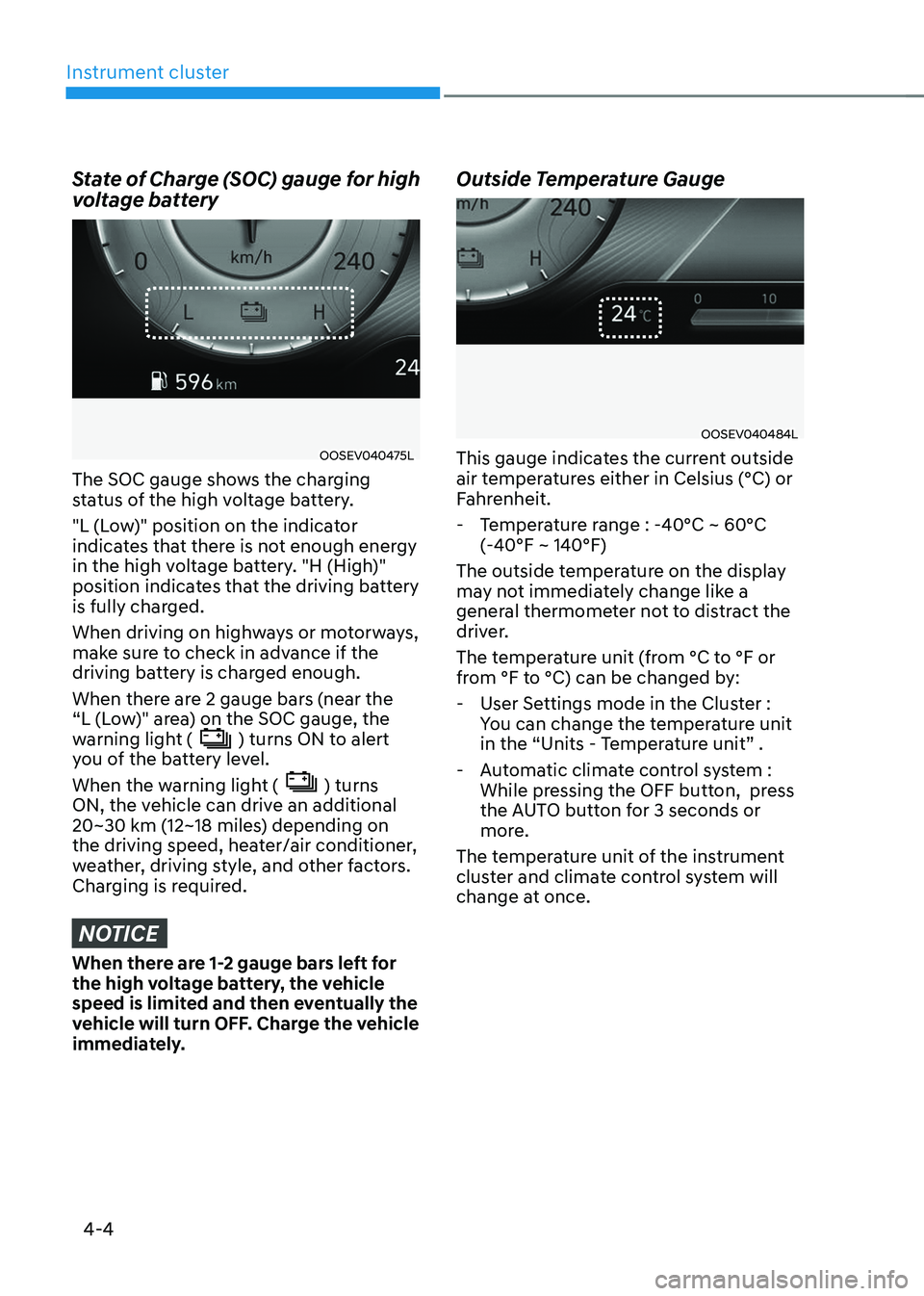
The SOC gauge shows the charging
status of the high voltage battery.
"L (Low)" position on the indicator
indicates that there is not enough energy
in the high voltage battery. "H (High)"
position indicates that the driving battery
is fully charged.
When driving on highways or motorways,
make sure to check in advance if the
driving battery is charged enough.
When there are 2 gauge bars (near the
“L (Low)" area) on the SOC gauge, the
warning light (
) turns ON to alert
you of the battery level.
When the warning light (
) turns
ON, the vehicle can drive an additional
20~30 km (12~18 miles) depending on
the driving speed, heater/air conditioner,
weather, driving style, and other factors.
Charging is required.
NOTICE
When there are 1-2 gauge bars left for
the high voltage battery, the vehicle
speed is limited and then eventually the
vehicle will turn OFF. Charge the vehicle
immediately. Outside Temperature Gauge
OOSEV040484L
This gauge indicates the current outside
air temperatures either in Celsius (°C) or
Fahrenheit.
- Temperature range : -40°C ~ 60°C (-40°F ~ 140°F)
The outside temperature on the display
may not immediately change like a
general thermometer not to distract the
driver.
The temperature unit (from °C to °F or
from °F to °C) can be changed by: - User Settings mode in the Cluster : You can change the temperature unit
in the “Units - Temperature unit” .
- Automatic climate control system : While pressing the OFF button, press
the AUTO button for 3 seconds or
more.
The temperature unit of the instrument
cluster and climate control system will
change at once.