sensor HYUNDAI KONA EV 2023 Owner's Manual
[x] Cancel search | Manufacturer: HYUNDAI, Model Year: 2023, Model line: KONA EV, Model: HYUNDAI KONA EV 2023Pages: 548, PDF Size: 49.14 MB
Page 204 of 548
![HYUNDAI KONA EV 2023 Owners Manual Convenient features
5-20
Electric Chromic Mirror (ECM) (if equipped)
OOSEV048006L
[A] : Indicator
The electric chromic rearview mirror
automatically controls the glare from
the headlamp of the v](/img/35/56170/w960_56170-203.png "HYUNDAI KONA EV 2023 Owners Manual Convenient features
5-20
Electric Chromic Mirror (ECM) (if equipped)
OOSEV048006L
[A] : Indicator
The electric chromic rearview mirror
automatically controls the glare from
the headlamp of the v")
Convenient features
5-20
Electric Chromic Mirror (ECM) (if equipped)
OOSEV048006L
[A] : Indicator
The electric chromic rearview mirror
automatically controls the glare from
the headlamp of the vehicle behind
you in nighttime or low light driving
conditions. When the vehicle is ON, the
glare is automatically controlled by the
sensor mounted in the rearview mirror.
The sensor detects the light level around
the vehicle, and automatically adjusts
to control the headlamp glare from
vehicles behind you. Whenever the gear
is shifted to R (Reverse), the mirror will
automatically go to the brightest setting
in order to improve the driver’s view
behind the vehicle. Electrochromic mirror (ECM) with
HomeLink® system and Genesis
Connected Service (if equipped)
Your vehicle may be equipped with
a Gentex Automatic-Dimming Mirror
with an Integrated HomeLink® Wireless
Control System.
During nighttime driving, this feature will
automatically detect and help reduce
rearview mirror glare. The HomeLink®
Universal Transceiver allows you to
activate your garage door(s), electric
gate, home lighting, etc.
OOS040477N
(1) HomeLink Channel 1
(2) HomeLink Channel 2
(3) HomeLink Channel 3
(4) Garage Door Opener Status Indicator : Closing or Closed
(5) HomeLink Operation Indicator
(6) Garage Door Opener Status Indicator : Opening or Opened
(7) HomeLink User Interface Indicator
Page 205 of 548
05
5-21
Automatic-Dimming Night Vision Safety™
(NVS®) Mirror (if equipped)
The NVS® Mirror automatically helps
reduce glare by monitoring light levels in
the front and the rear of the vehicle. Any
object that obstructs either light sensor
will degrade the automatic dimming
control feature.
For more information regarding NVS®
mirrors and other applications, please
refer to the Gentex website:
www.gentex.com
Your mirror will automatically dim
upon detecting glare from the vehicles
traveling behind you.
The mirror defaults to the ON position
each time the vehicle is started.
Integrated HomeLink® Wireless Control System
The HomeLink® Wireless Control System
provides a convenient way to replace
up to three hand held radio-frequency
transmitters used to activate compatible
devices such as gate operators, garage
door openers, entry door locks, security
systems, and home lighting.
NOTICE
HomeLink® operates while the ignition
switch is in the ACC or ON position
for safety reasons. It is to prevent
unintentional security problems from
happening when the vehicle is parked
outside the garage.
WARNING
Before programming HomeLink® to a
garage door opener or gate operator,
make sure people and objects are out
of the way of the device to prevent
potential harm or damage. Do not
use the HomeLink® with any garage
door opener that lacks the safety
stop and reverse features required
by U.S. federal safety standards (this
includes any garage door opener model
manufactured before April 1, 1982).
A garage door that cannot detect an
object - signaling the door to stop and
reverse - does not meet current U.S.
federal safety standards. Using a garage
door opener without these features
increases the risk of serious injury or
death.
For more information, contact
HomeLink® at www.homelink.com, or
call Home-Link customer support at
1-800-355-3515.
It is also recommended that a new
battery be replaced in the handheld
transmitter of the device being trained
to HomeLink® for quicker training and
accurate transmission of the radio
frequency.
1. Programming HomeLink ®
The following steps show how to
program HomeLink. If you have any
questions or are having difficulty
programming your HomeLink buttons,
refer to the HomeLink website or call the
HomeLink customer support toll-free
number. Do this, before going back to
the dealer who sold you the car.
Page 232 of 548
Convenient features
5-48
Exterior lights
Lighting control
OOS047404N
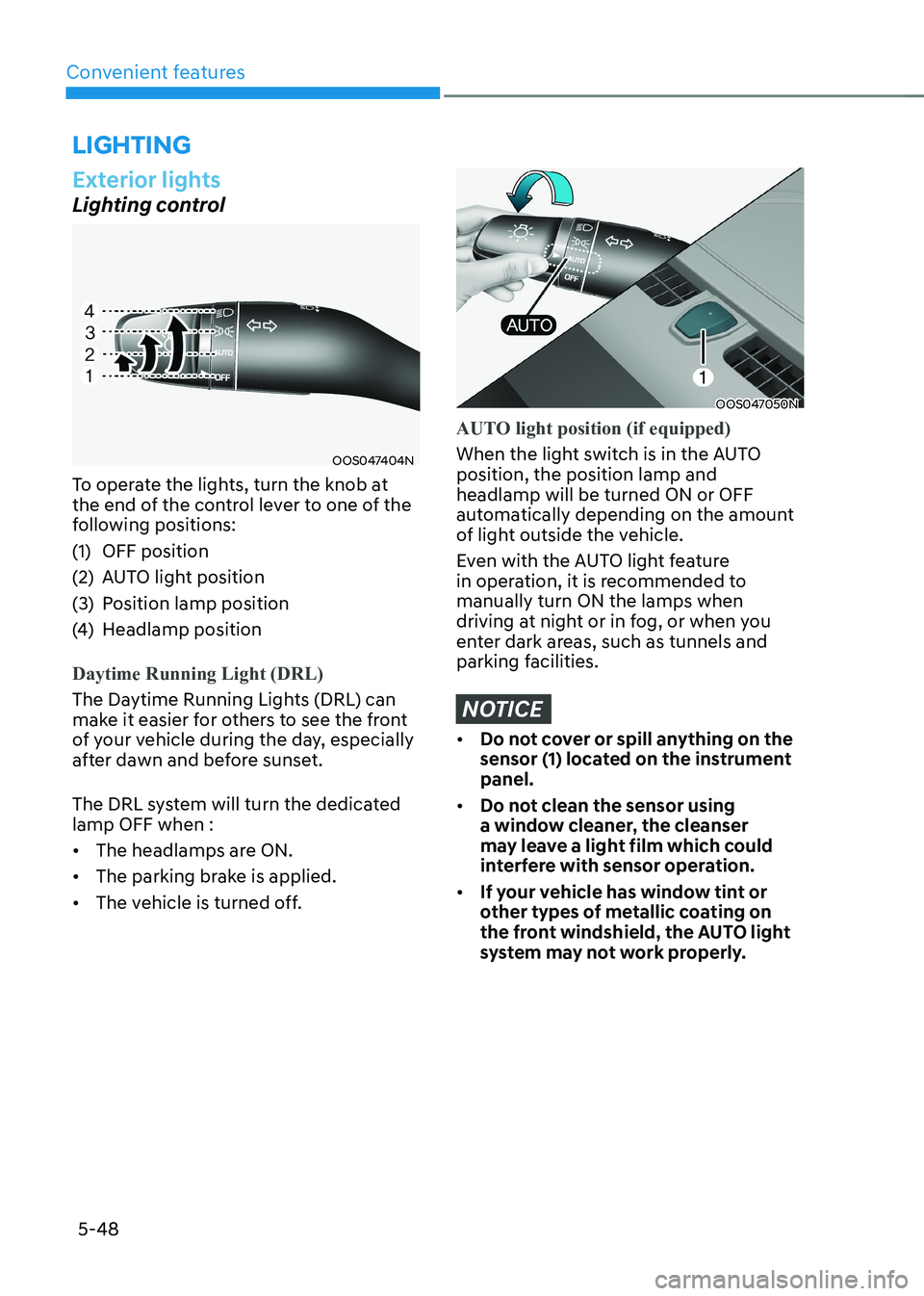
To operate the lights, turn the knob at
the end of the control lever to one of the
following positions:
(1) OFF position
(2) AUTO light position
(3) Position lamp position
(4) Headlamp position
Daytime Running Light (DRL)
The Daytime Running Lights (DRL) can
make it easier for others to see the front
of your vehicle during the day, especially
after dawn and before sunset.
The DRL system will turn the dedicated lamp OFF when : • The headlamps are ON.
• The parking brake is applied.
• The vehicle is turned off.
OOS047050N
AUTO light position (if equipped)
When the light switch is in the AUTO position, the position lamp and headlamp will be turned ON or OFF
automatically depending on the amount
of light outside the vehicle.
Even with the AUTO light feature
in operation, it is recommended to manually turn ON the lamps when
driving at night or in fog, or when you
enter dark areas, such as tunnels and
parking facilities.
NOTICE
• Do not cover or spill anything on the
sensor (1) located on the instrument panel.
• Do not clean the sensor using
a window cleaner, the cleanser
may leave a light film which could
interfere with sensor operation.
• If your vehicle has window tint or
other types of metallic coating on
the front windshield, the AUTO light
system may not work properly.
lighting
Page 239 of 548
05
5-55
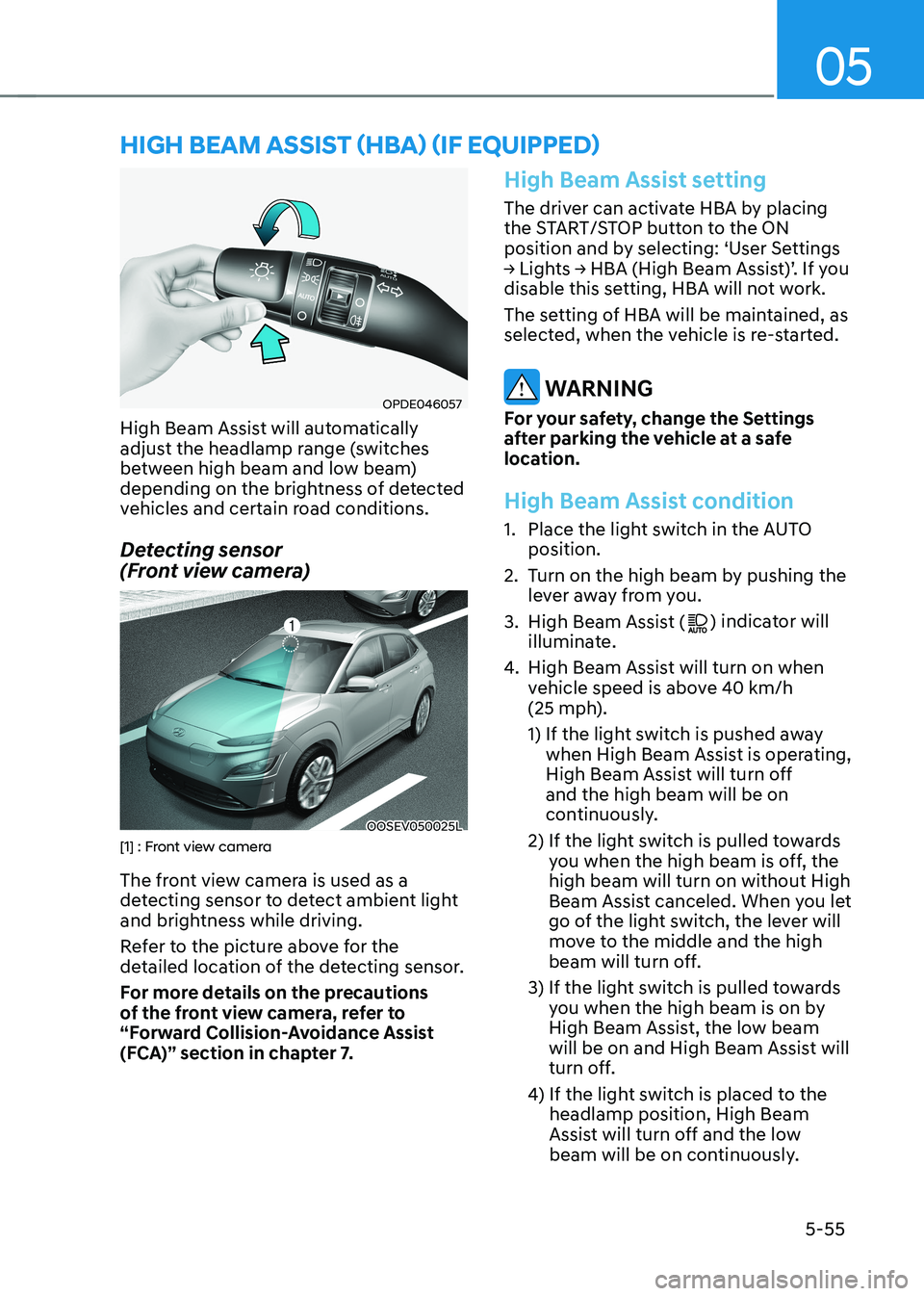
OPDE046057
High Beam Assist will automatically
adjust the headlamp range (switches
between high beam and low beam)
depending on the brightness of detected
vehicles and certain road conditions.
Detecting sensor
(Front view camera)
OOSEV050025L[1] : Front view camera
The front view camera is used as a
detecting sensor to detect ambient light
and brightness while driving.
Refer to the picture above for the
detailed location of the detecting sensor.
For more details on the precautions
of the front view camera, refer to
“Forward Collision-Avoidance Assist
(FCA)” section in chapter 7.
High Beam Assist setting
The driver can activate HBA by placing
the START/STOP button to the ON
position and by selecting: ‘User Settings
→ Lights → HBA (High Beam Assist)’. If you
disable this setting, HBA will not work.
The setting of HBA will be maintained, as
selected, when the vehicle is re-started.
WARNING
For your safety, change the Settings
after parking the vehicle at a safe
location.
High Beam Assist condition
1. Place the light switch in the AUTO position.
2. Turn on the high beam by pushing the lever away from you.
3. High Beam Assist (
) indicator will
illuminate.
4. High Beam Assist will turn on when
vehicle speed is above 40 km/h
(25 mph).
1) If the light switch is pushed away
when High Beam Assist is operating,
High Beam Assist will turn off and the high beam will be on
continuously.
2) If the light switch is pulled towards you when the high beam is off, the high beam will turn on without High
Beam Assist canceled. When you let
go of the light switch, the lever will
move to the middle and the high
beam will turn off.
3) If the light switch is pulled towards you when the high beam is on by
High Beam Assist, the low beam
will be on and High Beam Assist will
turn off.
4) If the light switch is placed to the headlamp position, High Beam
Assist will turn off and the low
beam will be on continuously.
high Beam assisT (hBa) (if equipped)
Page 242 of 548
Convenient features
5-58
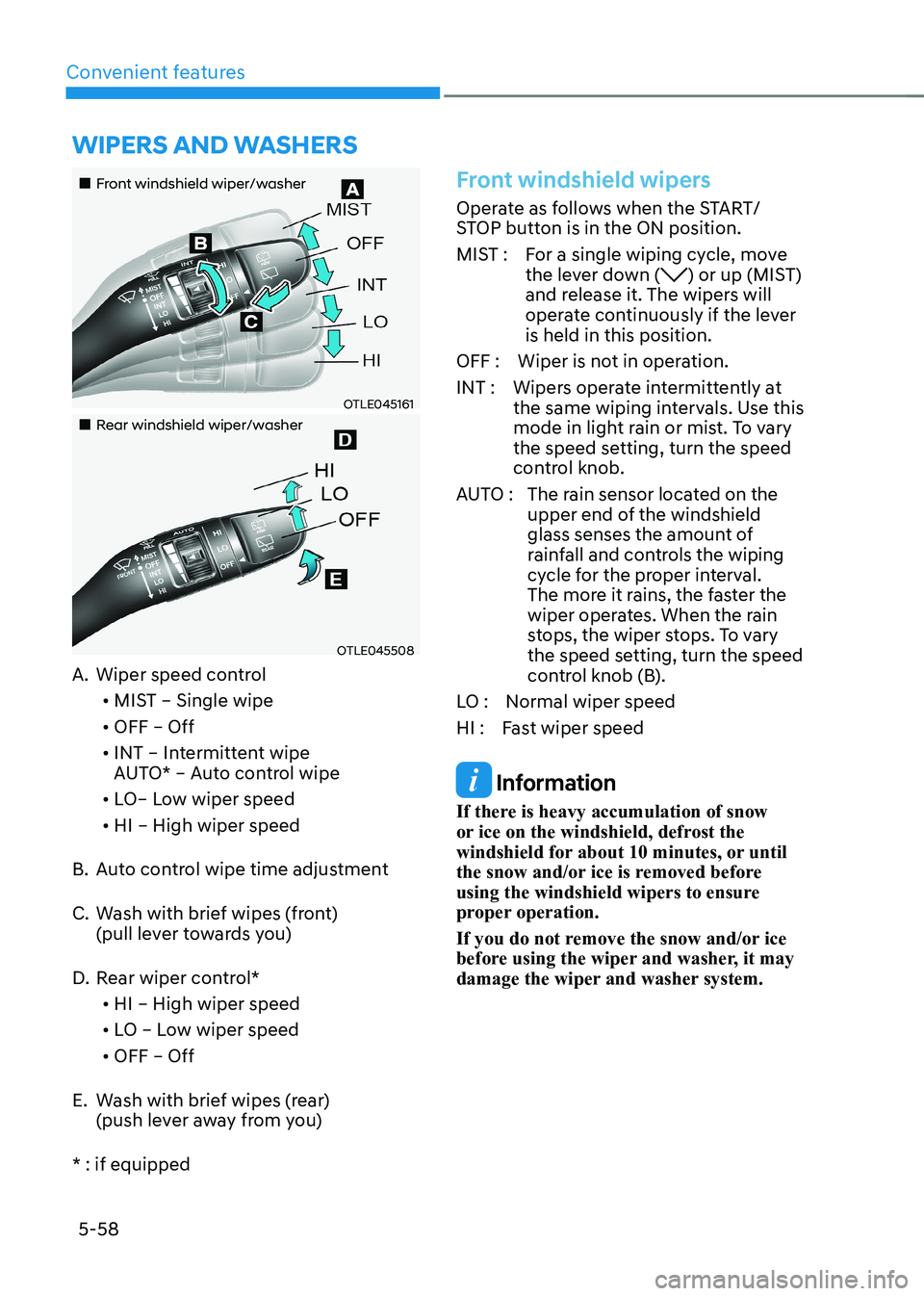
„„Front windshield wiper/washer
OTLE045161
„„Rear windshield wiper/washer
OTLE045508
A. Wiper speed control
• MIST – Single wipe
• OFF – Off
• INT – Intermittent wipe
AUTO* – Auto control wipe
• LO– Low wiper speed
• HI – High wiper speed
B. Auto control wipe time adjustment
C. Wash with brief wipes (front)
(pull lever towards you)
D. Rear wiper control*
• HI – High wiper speed
• LO – Low wiper speed
• OFF – Off
E. Wash with brief wipes (rear) (push lever away from you)
* : if equipped
Front windshield wipers
Operate as follows when the START/
STOP button is in the ON position.
MIST : For a single wiping cycle, move the lever down (
) or up (MIST)
and release it. The wipers will
operate continuously if the lever is held in this position.
OFF : Wiper is not in operation.
INT : Wipers operate intermittently at the same wiping intervals. Use this
mode in light rain or mist. To vary
the speed setting, turn the speed
control knob.
AUTO : The rain sensor located on the
upper end of the windshield
glass senses the amount of
rainfall and controls the wiping
cycle for the proper interval.
The more it rains, the faster the
wiper operates. When the rain
stops, the wiper stops. To vary
the speed setting, turn the speed
control knob (B).
LO : Normal wiper speed
HI : Fast wiper speed
Information
If there is heavy accumulation of snow
or ice on the windshield, defrost the
windshield for about 10 minutes, or until
the snow and/or ice is removed before
using the windshield wipers to ensure
proper operation.
If you do not remove the snow and/or ice
before using the wiper and washer, it may
damage the wiper and washer system.
Wipers and Washers
Page 243 of 548
05
5-59
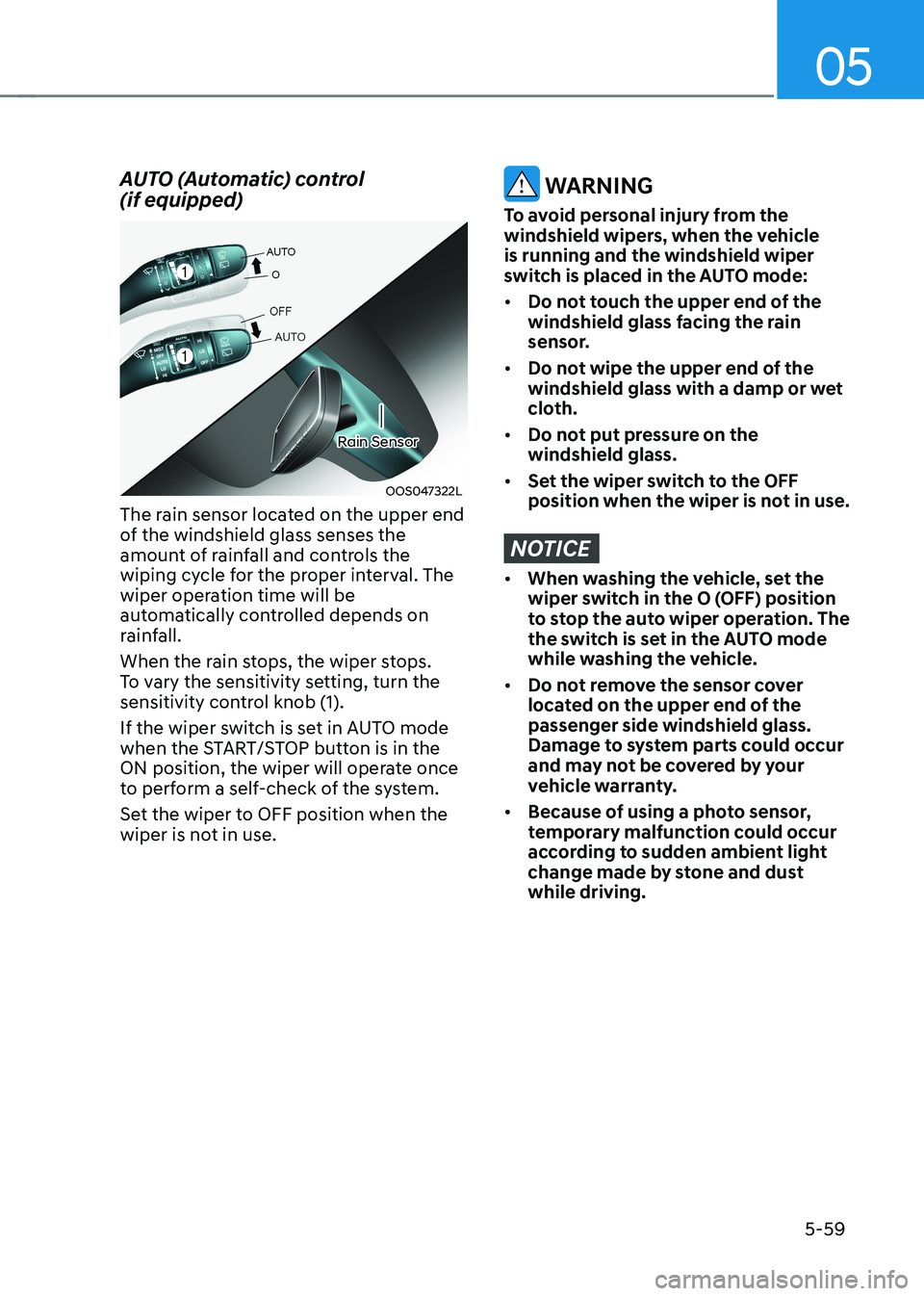
AUTO (Automatic) control (if equipped)
OOS047322L
Rain Sensor
The rain sensor located on the upper end
of the windshield glass senses the
amount of rainfall and controls the
wiping cycle for the proper interval. The
wiper operation time will be
automatically controlled depends on
rainfall.
When the rain stops, the wiper stops.
To vary the sensitivity setting, turn the
sensitivity control knob (1).
If the wiper switch is set in AUTO mode
when the START/STOP button is in the
ON position, the wiper will operate once
to perform a self-check of the system.
Set the wiper to OFF position when the
wiper is not in use.
WARNING
To avoid personal injury from the
windshield wipers, when the vehicle is running and the windshield wiper
switch is placed in the AUTO mode: • Do not touch the upper end of the
windshield glass facing the rain
sensor.
• Do not wipe the upper end of the
windshield glass with a damp or wet
cloth.
• Do not put pressure on the windshield glass.
• Set the wiper switch to the OFF
position when the wiper is not in use.
NOTICE
• When washing the vehicle, set the
wiper switch in the O (OFF) position
to stop the auto wiper operation. The
the switch is set in the AUTO mode
while washing the vehicle.
• Do not remove the sensor cover
located on the upper end of the passenger side windshield glass.
Damage to system parts could occur
and may not be covered by your
vehicle warranty.
• Because of using a photo sensor,
temporary malfunction could occur
according to sudden ambient light
change made by stone and dust while driving.
Page 248 of 548
Convenient features
5-64
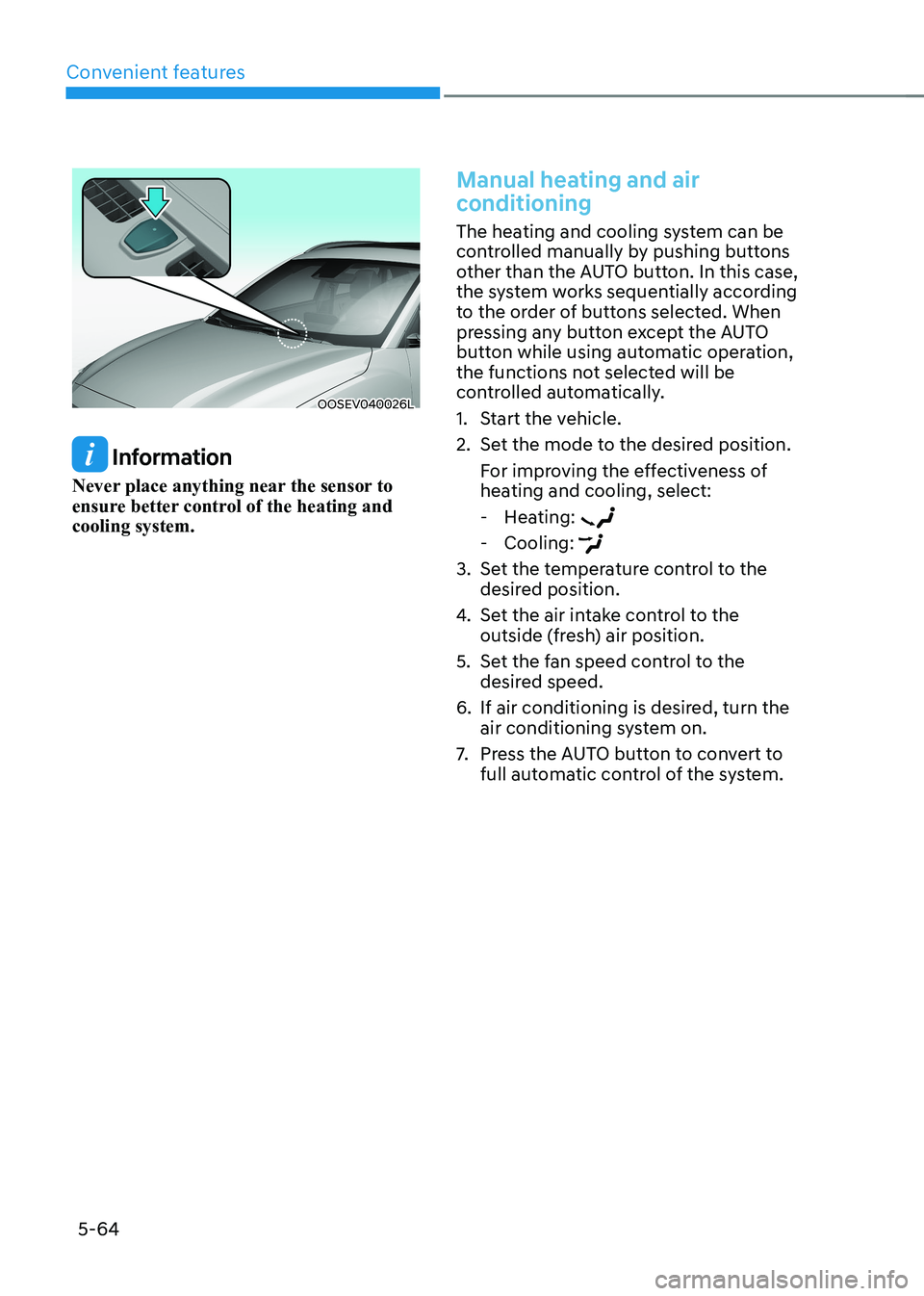
OOSEV040026L
Information
Never place anything near the sensor to
ensure better control of the heating and cooling system.
Manual heating and air
conditioning
The heating and cooling system can be
controlled manually by pushing buttons
other than the AUTO button. In this case,
the system works sequentially according
to the order of buttons selected. When
pressing any button except the AUTO
button while using automatic operation,
the functions not selected will be
controlled automatically.
1. Start the vehicle.
2. Set the mode to the desired position. For improving the effectiveness of
heating and cooling, select: - Heating:
- Cooling:
3. Set the temperature control to the desired position.
4. Set the air intake control to the
outside (fresh) air position.
5. Set the fan speed control to the desired speed.
6. If air conditioning is desired, turn the air conditioning system on.
7. Press the AUTO button to convert to
full automatic control of the system.
Page 263 of 548
05
5-79
Information
• When the air conditioning is turned
on by Auto defogging system, if you
try to turn off the air conditioning,
the indicator will blink 3 times and
the air conditioning will not be
turned off.
• To maintain the effectiveness and
efficiency of the Auto Defogging
System, do not select Recirculation
mode while the system is operating.
• When the Auto Defogging System is
operating, the fan speed adjustment
knob, the temperature adjustment
knob, and the air intake control
button are all disabled.
NOTICE
Do not remove the sensor cover located
on the top of the windshield glass.
Damage to system parts could occur
and may not be covered by your vehicle
warranty.
Defroster
NOTICE
To prevent damage to the conductors
bonded to the inside surface of the rear
window, never use sharp instruments or
window cleaners containing abrasives
to clean the window.
Information
If you want to defrost and defog the
front windshield, refer to “Windshield
Defrosting and Defogging” in this chapter.
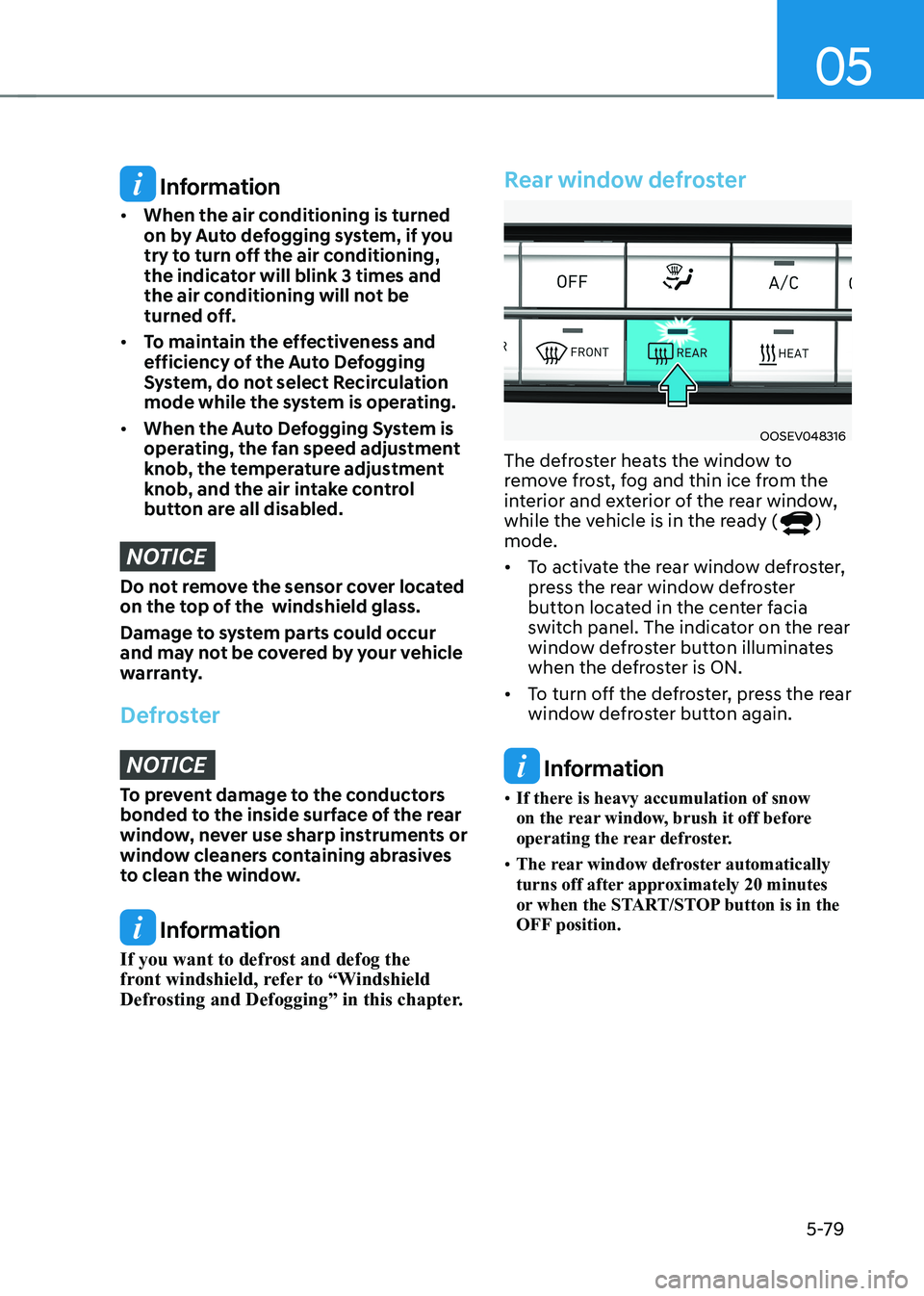
Rear window defroster
OOSEV048316
The defroster heats the window to
remove frost, fog and thin ice from the
interior and exterior of the rear window,
while the vehicle is in the ready (
)
mode. • To activate the rear window defroster,
press the rear window defroster
button located in the center facia
switch panel. The indicator on the rear
window defroster button illuminates
when the defroster is ON.
• To turn off the defroster, press the rear
window defroster button again.
Information
• If there is heavy accumulation of snow
on the rear window, brush it off before
operating the rear defroster.
• The rear window defroster automatically
turns off after approximately 20 minutes
or when the START/STOP button is in the
OFF position.
Page 281 of 548
6
Before driving .................................................................................................... 6-3
Before entering the vehicle ........................................................................................ 6-3
Before starting ............................................................................................................. 6-3
START/STOP button .......................................................................................... 6-4
START/STOP button positions ..................................................................................... 6-5
Starting the vehicle ..................................................................................................... 6-6
Turning off the vehicle ................................................................................................. 6 -7
Reduction gear .................................................................................................. 6-8
Reduction gear operation .......................................................................................... 6-8
LCD display messages ............................................................................................... 6-10
Good driving practices ............................................................................................... 6-13
Regenerative braking system .......................................................................... 6-14
Regenerative braking (Paddle shifter) ...................................................................... 6-14
One pedal driving ....................................................................................................... 6-15
Smart recuperation system
(if equipped with smart cruise control system) ............................................6-16
System setting ............................................................................................................ 6-16
To activate smart recuperation system..................................................................... 6-16
Smart recuperation system will be temporarily cancelled when: ..........................6-18
To resume smart recuperation system ..................................................................... 6-18
To turn smart recuperation system off ..................................................................... 6-18
Vehicle-to-vehicle distance recognition sensor (front radar) .................................6-18
System malfunction ................................................................................................... 6-19
Limitations of the system .......................................................................................... 6-19
Braking system ................................................................................................ 6-22
Power brakes ............................................................................................................. 6-22
Disc brakes wear indicator ........................................................................................ 6-22
Electronic Parking Brake (EPB) .................................................................................. 6-23
Auto Hold .................................................................................................................... 6-27
Anti-Lock Brake System (ABS) ................................................................................... 6-31
Electronic Stability Control (ESC) ............................................................................. 6-32
Vehicle Stability Management (VSM) ....................................................................... 6-35
Hill-Start Assist Control (FAC) .................................................................................. 6-36
Good braking practices ............................................................................................. 6-37
Drive mode integrated control system ..........................................................6-38
Initial setting for each drive mode ............................................................................ 6-39
6. Driving your vehicle
Page 298 of 548
Driving your vehicle
6-18
Smart Recuperation System will
be temporarily cancelled when:
• Cancelled manually
Pulling and holding the right side
paddle shifter for more than 1 second.
The Smart Recuperation System turns
off temporarily and AUTO for the
regenerative braking level disappears
from the cluster.
• Cancelled automatically
- The vehicle is shifted to N (Neutral), R (Reverse) or P (Park).
- Cruise Control system (including Smart Cruise Control system) is in
activation.
- The ESC (Electronic Stability Control) or ABS is operating.
WARNING
When the Smart Recuperation System
is cancelled automatically, adjust the
vehicle speed directly by depressing the
accelerator or brake pedal according to
the road condition ahead and driving
condition.
To resume Smart Recuperation
System
To re-activate the Smart Recuperation
System while driving, pull and hold the
right side paddle shifter for more than
1 second again. Then, AUTO for the
regenerative braking level will appear on
the cluster.
To turn Smart Recuperation
System off
To turn off the system, shift to P (Park)
and deselect 'User settings → ECO
vehicle → Smart recuperation' on the
User Settings mode.
Vehicle-to-Vehicle Distance
recognition sensor (Front radar)
In order for the Smart Recuperation
System to operate properly, always make
sure the radar sensor cover is clean and
free of dirt, snow, and debris. Dirt, snow,
or foreign substances on the lens may
adversely affect the sensing performance
of the sensor. In this case, the system
operation may stop temporarily and not
operate normally.