stop start HYUNDAI KONA EV 2023 Workshop Manual
[x] Cancel search | Manufacturer: HYUNDAI, Model Year: 2023, Model line: KONA EV, Model: HYUNDAI KONA EV 2023Pages: 548, PDF Size: 49.14 MB
Page 231 of 548
05
5-47
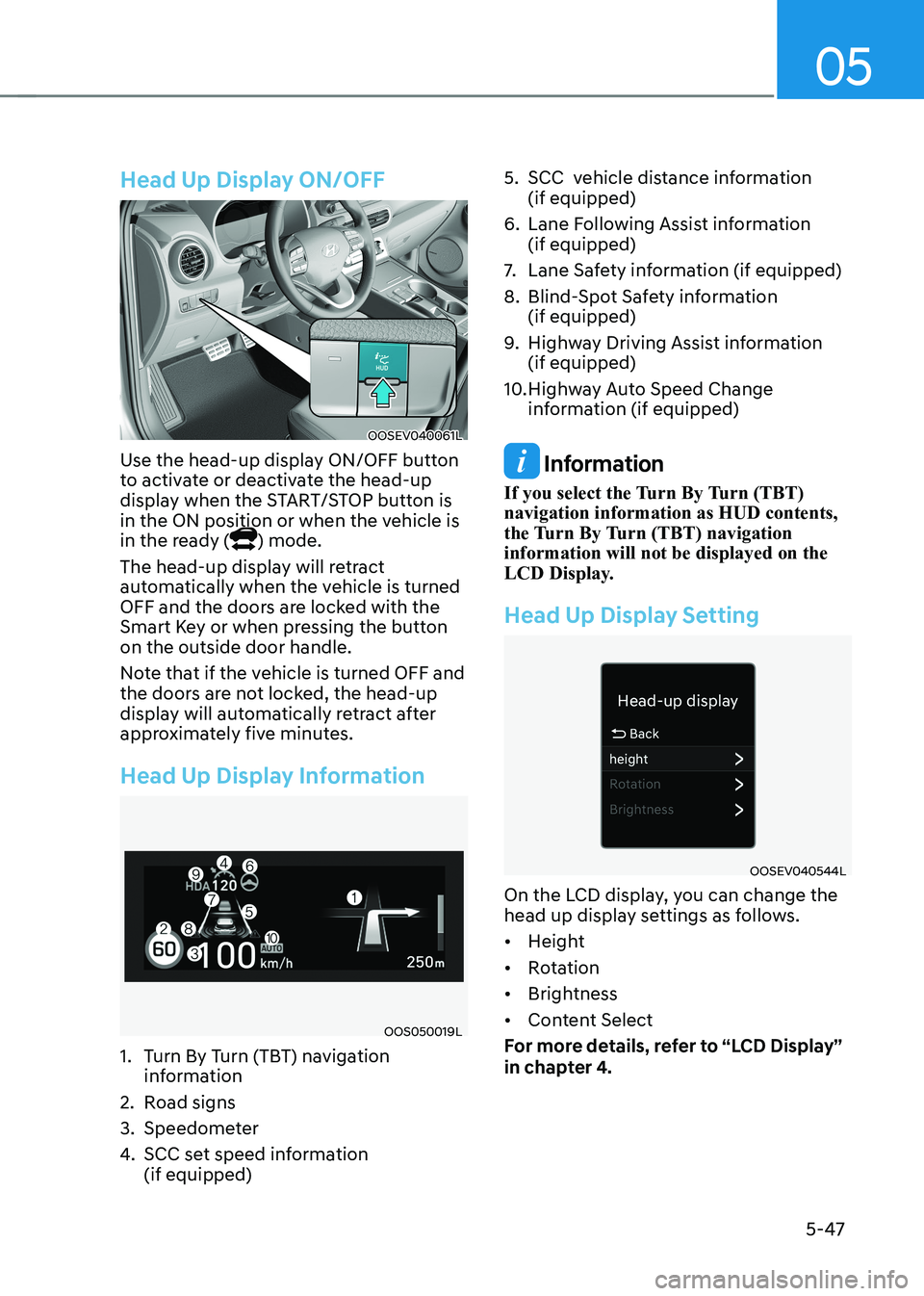
Head Up Display ON/OFF
OOSEV040061L
Use the head-up display ON/OFF button
to activate or deactivate the head-up
display when the START/STOP button is
in the ON position or when the vehicle is
in the ready (
) mode.
The head-up display will retract
automatically when the vehicle is turned
OFF and the doors are locked with the
Smart Key or when pressing the button on the outside door handle.
Note that if the vehicle is turned OFF and
the doors are not locked, the head-up
display will automatically retract after
approximately five minutes.
Head Up Display Information
OOS050019L
1. Turn By Turn (TBT) navigation information
2. Road signs
3. Speedometer
4. SCC set speed information (if equipped) 5. SCC vehicle distance information
(if equipped)
6. Lane Following Assist information (if equipped)
7. Lane Safety information (if equipped)
8. Blind-Spot Safety information (if equipped)
9. Highway Driving Assist information (if equipped)
10. Highway Auto Speed Change information (if equipped)
Information
If you select the Turn By Turn (TBT) navigation information as HUD contents,
the Turn By Turn (TBT) navigation information will not be displayed on the
LCD Display.
Head Up Display Setting
OOSEV040544L
On the LCD display, you can change the
head up display settings as follows. • Height
• Rotation
• Brightness
• Content Select
For more details, refer to “LCD Display”
in chapter 4.
Page 233 of 548
05
5-49
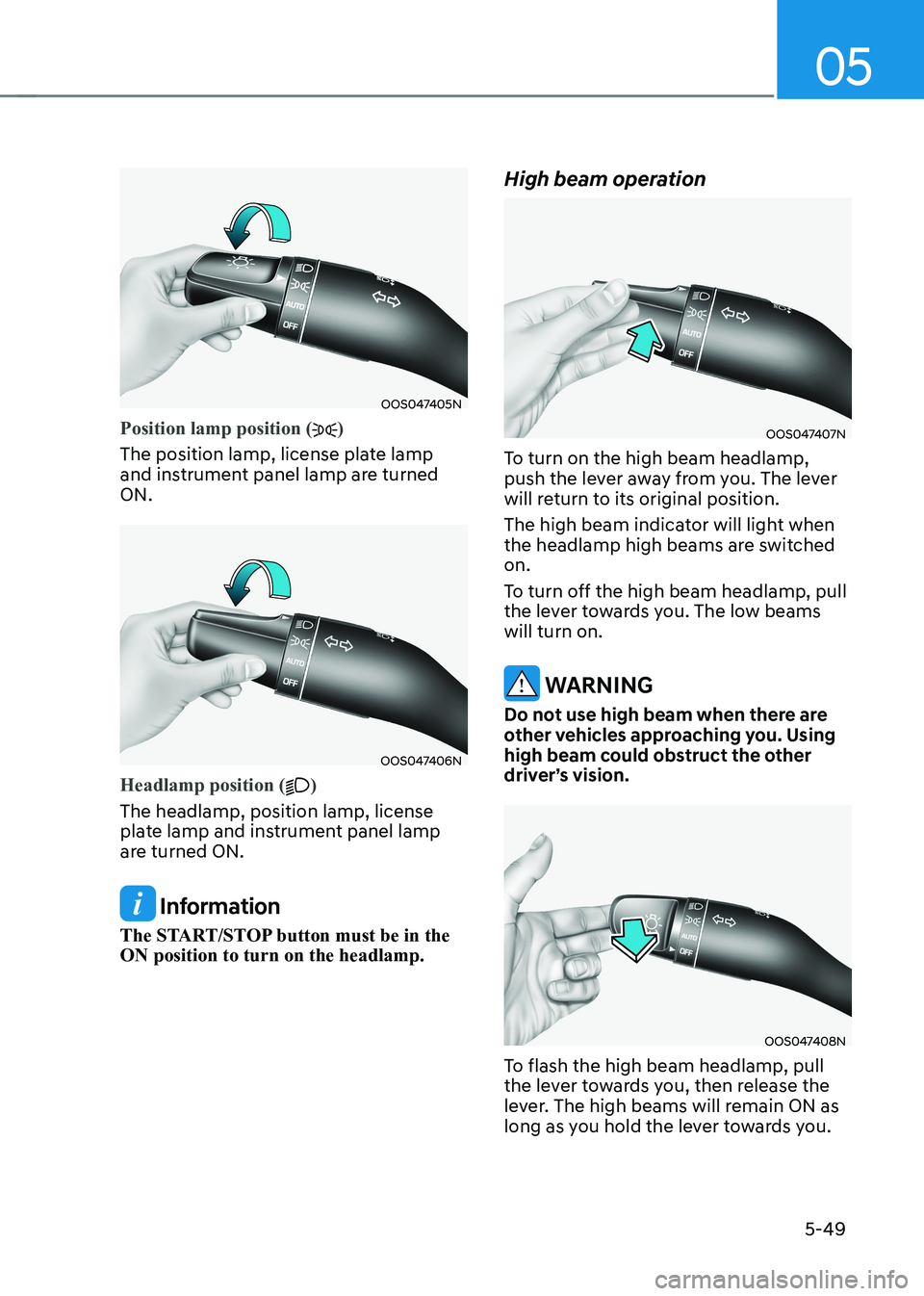
OOS047405N
Position lamp position ()
The position lamp, license plate lamp
and instrument panel lamp are turned ON.
OOS047406N
Headlamp position ()
The headlamp, position lamp, license
plate lamp and instrument panel lamp
are turned ON.
Information
The START/STOP button must be in the ON position to turn on the headlamp. High beam operation
OOS047407N
To turn on the high beam headlamp,
push the lever away from you. The lever
will return to its original position.
The high beam indicator will light when
the headlamp high beams are switched on.
To turn off the high beam headlamp, pull
the lever towards you. The low beams will turn on.
WARNING
Do not use high beam when there are
other vehicles approaching you. Using
high beam could obstruct the other
driver’s vision.
OOS047408N
To flash the high beam headlamp, pull
the lever towards you, then release the
lever. The high beams will remain ON as
long as you hold the lever towards you.
Page 235 of 548
05
5-51
Headlamp delay function (if equipped)
If you place the START/STOP button
to the ACC or OFF position with the
headlamps ON, the headlamps (and/or
position lamps) remain on for about 5
minutes. However, with the vehicle off if
the driver’s door is opened and closed,
the headlamps (and/or position lamps)
are turned off after 15 seconds.
The headlamps (and/or position lamps)
can be turned off by pressing the lock
button on the smart key twice or turning
the light switch to the OFF or AUTO
position. However, if you turn the light
switch to the AUTO position when it is
dark outside, the headlamps will not be
turned off.
You can activate or deactivate the
Headlamp Delay function from the User
Settings mode on the LCD display. For
more details, refer to “LCD Display” in
chapter 4.
NOTICE
If the driver gets out of the vehicle
through other doors (except driver’s
door), the battery saver function
does not operate and the headlamp
delay function does not turn off
automatically. Therefore, It causes the
battery to be discharged. In this case,
make sure to turn off the headlamps
before getting out of the vehicle.
Welcome system (if equipped)
Headlamp and position lamp
When the headlamp (lamp switch in the
headlamp or AUTO position) is on and
all doors (and tailgate) are locked and closed, the position lamp and headlamp
will come on for 15 seconds when the
door unlock button is pressed on the
smart key.
At this time, if you press the door lock
or unlock button, the position lamp and
headlamp will turn off immediately
Interior lamp
When the interior lamp switch is in
the DOOR position and all doors (and
tailgate) are closed and locked, the room
lamp will come on for 30 seconds if any
of the below is performed. • When the door unlock button is
pressed on the smart key.
• When the button of the outside door
handle is pressed with the smart key in possession.
At this time, if you press the door lock or
unlock button, the room lamp will turn
off immediately.
Page 237 of 548
05
5-53
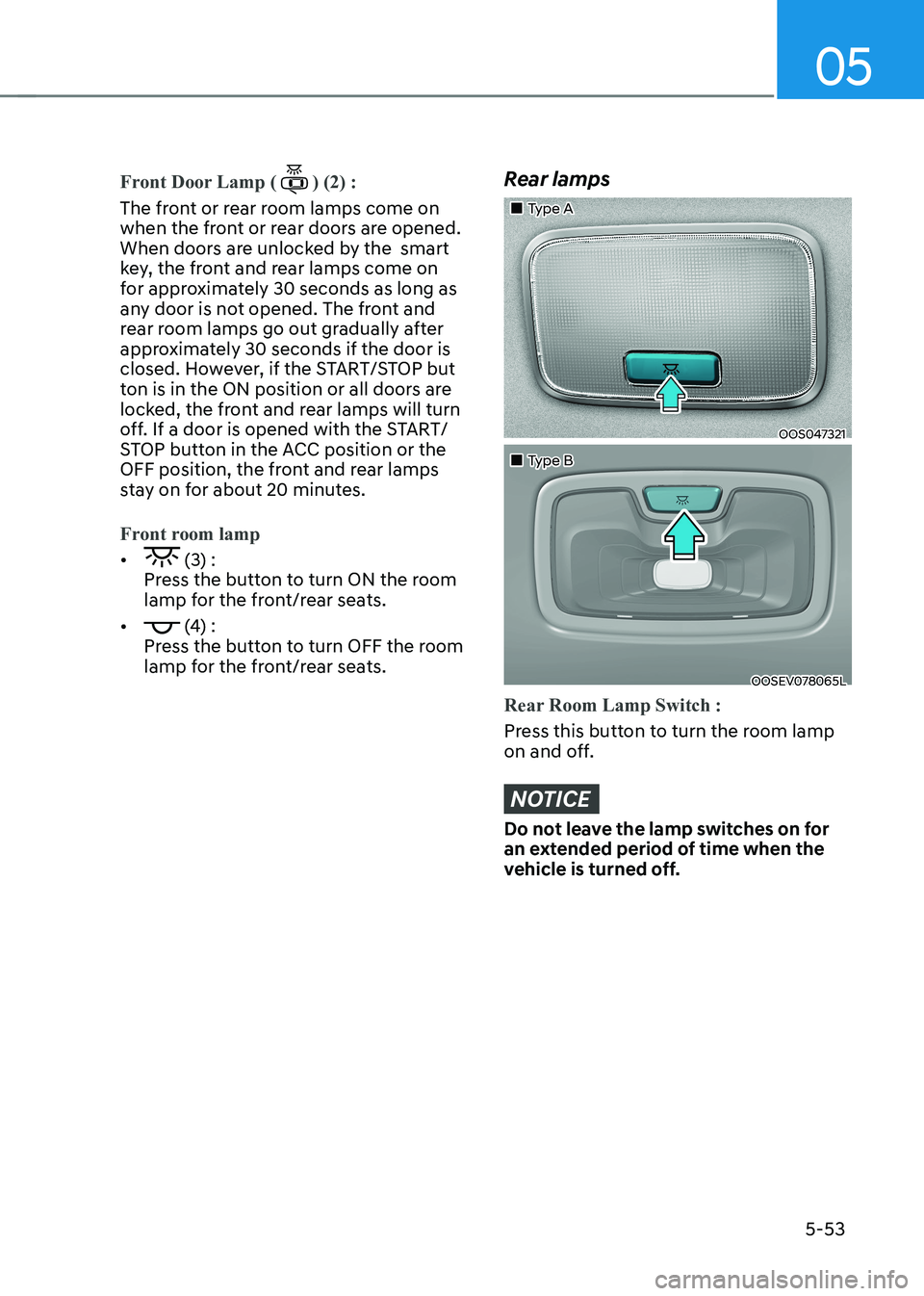
Front Door Lamp () (2) :
The front or rear room lamps come on
when the front or rear doors are opened.
When doors are unlocked by the smart
key, the front and rear lamps come on
for approximately 30 seconds as long as
any door is not opened. The front and
rear room lamps go out gradually after
approximately 30 seconds if the door is
closed. However, if the START/STOP but
ton is in the ON position or all doors are
locked, the front and rear lamps will turn
off. If a door is opened with the START/
STOP button in the ACC position or the
OFF position, the front and rear lamps
stay on for about 20 minutes.
Front room lamp
• (3) :
Press the button to turn ON the room
lamp for the front/rear seats.
•
(4) :
Press the button to turn OFF the room
lamp for the front/rear seats.
Rear lamps
„„Type A
OOS047321
„„Type B
OOSEV078065L
Rear Room Lamp Switch :
Press this button to turn the room lamp
on and off.
NOTICE
Do not leave the lamp switches on for
an extended period of time when the
vehicle is turned off.
Page 239 of 548
05
5-55
OPDE046057
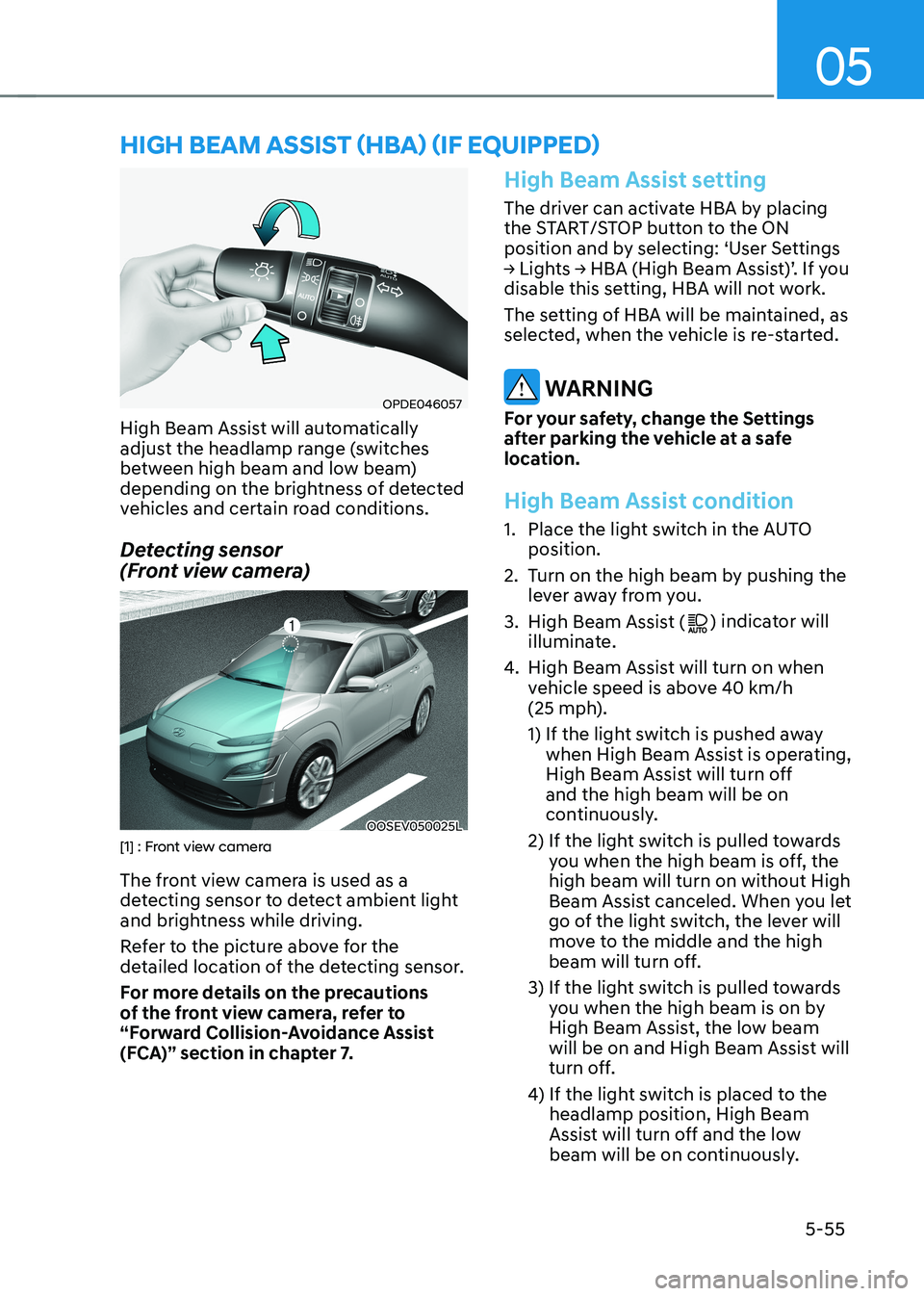
High Beam Assist will automatically
adjust the headlamp range (switches
between high beam and low beam)
depending on the brightness of detected
vehicles and certain road conditions.
Detecting sensor
(Front view camera)
OOSEV050025L[1] : Front view camera
The front view camera is used as a
detecting sensor to detect ambient light
and brightness while driving.
Refer to the picture above for the
detailed location of the detecting sensor.
For more details on the precautions
of the front view camera, refer to
“Forward Collision-Avoidance Assist
(FCA)” section in chapter 7.
High Beam Assist setting
The driver can activate HBA by placing
the START/STOP button to the ON
position and by selecting: ‘User Settings
→ Lights → HBA (High Beam Assist)’. If you
disable this setting, HBA will not work.
The setting of HBA will be maintained, as
selected, when the vehicle is re-started.
WARNING
For your safety, change the Settings
after parking the vehicle at a safe
location.
High Beam Assist condition
1. Place the light switch in the AUTO position.
2. Turn on the high beam by pushing the lever away from you.
3. High Beam Assist (
) indicator will
illuminate.
4. High Beam Assist will turn on when
vehicle speed is above 40 km/h
(25 mph).
1) If the light switch is pushed away
when High Beam Assist is operating,
High Beam Assist will turn off and the high beam will be on
continuously.
2) If the light switch is pulled towards you when the high beam is off, the high beam will turn on without High
Beam Assist canceled. When you let
go of the light switch, the lever will
move to the middle and the high
beam will turn off.
3) If the light switch is pulled towards you when the high beam is on by
High Beam Assist, the low beam
will be on and High Beam Assist will
turn off.
4) If the light switch is placed to the headlamp position, High Beam
Assist will turn off and the low
beam will be on continuously.
high Beam assisT (hBa) (if equipped)
Page 242 of 548
Convenient features
5-58
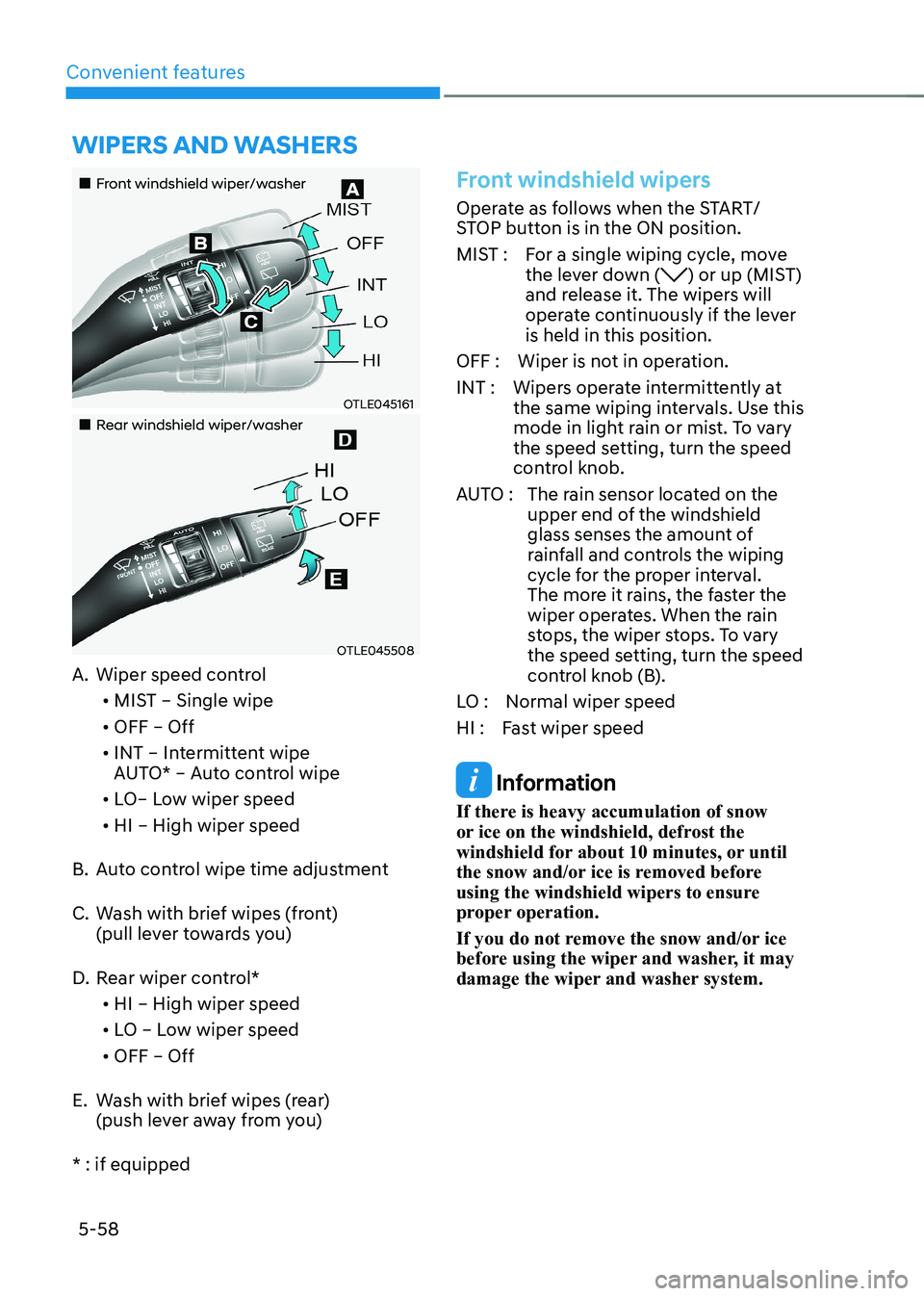
„„Front windshield wiper/washer
OTLE045161
„„Rear windshield wiper/washer
OTLE045508
A. Wiper speed control
• MIST – Single wipe
• OFF – Off
• INT – Intermittent wipe
AUTO* – Auto control wipe
• LO– Low wiper speed
• HI – High wiper speed
B. Auto control wipe time adjustment
C. Wash with brief wipes (front)
(pull lever towards you)
D. Rear wiper control*
• HI – High wiper speed
• LO – Low wiper speed
• OFF – Off
E. Wash with brief wipes (rear) (push lever away from you)
* : if equipped
Front windshield wipers
Operate as follows when the START/
STOP button is in the ON position.
MIST : For a single wiping cycle, move the lever down (
) or up (MIST)
and release it. The wipers will
operate continuously if the lever is held in this position.
OFF : Wiper is not in operation.
INT : Wipers operate intermittently at the same wiping intervals. Use this
mode in light rain or mist. To vary
the speed setting, turn the speed
control knob.
AUTO : The rain sensor located on the
upper end of the windshield
glass senses the amount of
rainfall and controls the wiping
cycle for the proper interval.
The more it rains, the faster the
wiper operates. When the rain
stops, the wiper stops. To vary
the speed setting, turn the speed
control knob (B).
LO : Normal wiper speed
HI : Fast wiper speed
Information
If there is heavy accumulation of snow
or ice on the windshield, defrost the
windshield for about 10 minutes, or until
the snow and/or ice is removed before
using the windshield wipers to ensure
proper operation.
If you do not remove the snow and/or ice
before using the wiper and washer, it may
damage the wiper and washer system.
Wipers and Washers
Page 243 of 548
05
5-59
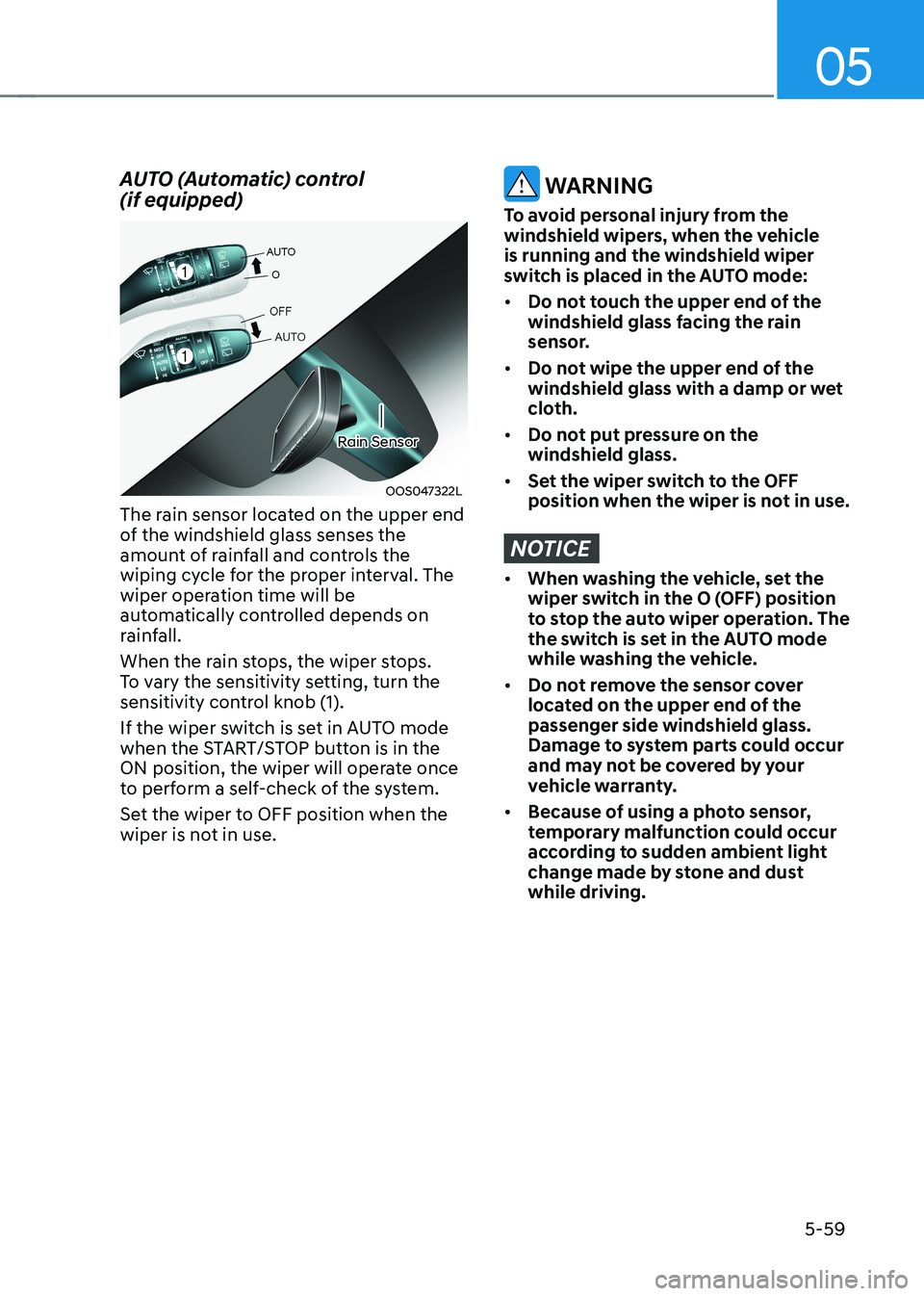
AUTO (Automatic) control (if equipped)
OOS047322L
Rain Sensor
The rain sensor located on the upper end
of the windshield glass senses the
amount of rainfall and controls the
wiping cycle for the proper interval. The
wiper operation time will be
automatically controlled depends on
rainfall.
When the rain stops, the wiper stops.
To vary the sensitivity setting, turn the
sensitivity control knob (1).
If the wiper switch is set in AUTO mode
when the START/STOP button is in the
ON position, the wiper will operate once
to perform a self-check of the system.
Set the wiper to OFF position when the
wiper is not in use.
WARNING
To avoid personal injury from the
windshield wipers, when the vehicle is running and the windshield wiper
switch is placed in the AUTO mode: • Do not touch the upper end of the
windshield glass facing the rain
sensor.
• Do not wipe the upper end of the
windshield glass with a damp or wet
cloth.
• Do not put pressure on the windshield glass.
• Set the wiper switch to the OFF
position when the wiper is not in use.
NOTICE
• When washing the vehicle, set the
wiper switch in the O (OFF) position
to stop the auto wiper operation. The
the switch is set in the AUTO mode
while washing the vehicle.
• Do not remove the sensor cover
located on the upper end of the passenger side windshield glass.
Damage to system parts could occur
and may not be covered by your
vehicle warranty.
• Because of using a photo sensor,
temporary malfunction could occur
according to sudden ambient light
change made by stone and dust while driving.
Page 253 of 548
05
5-69
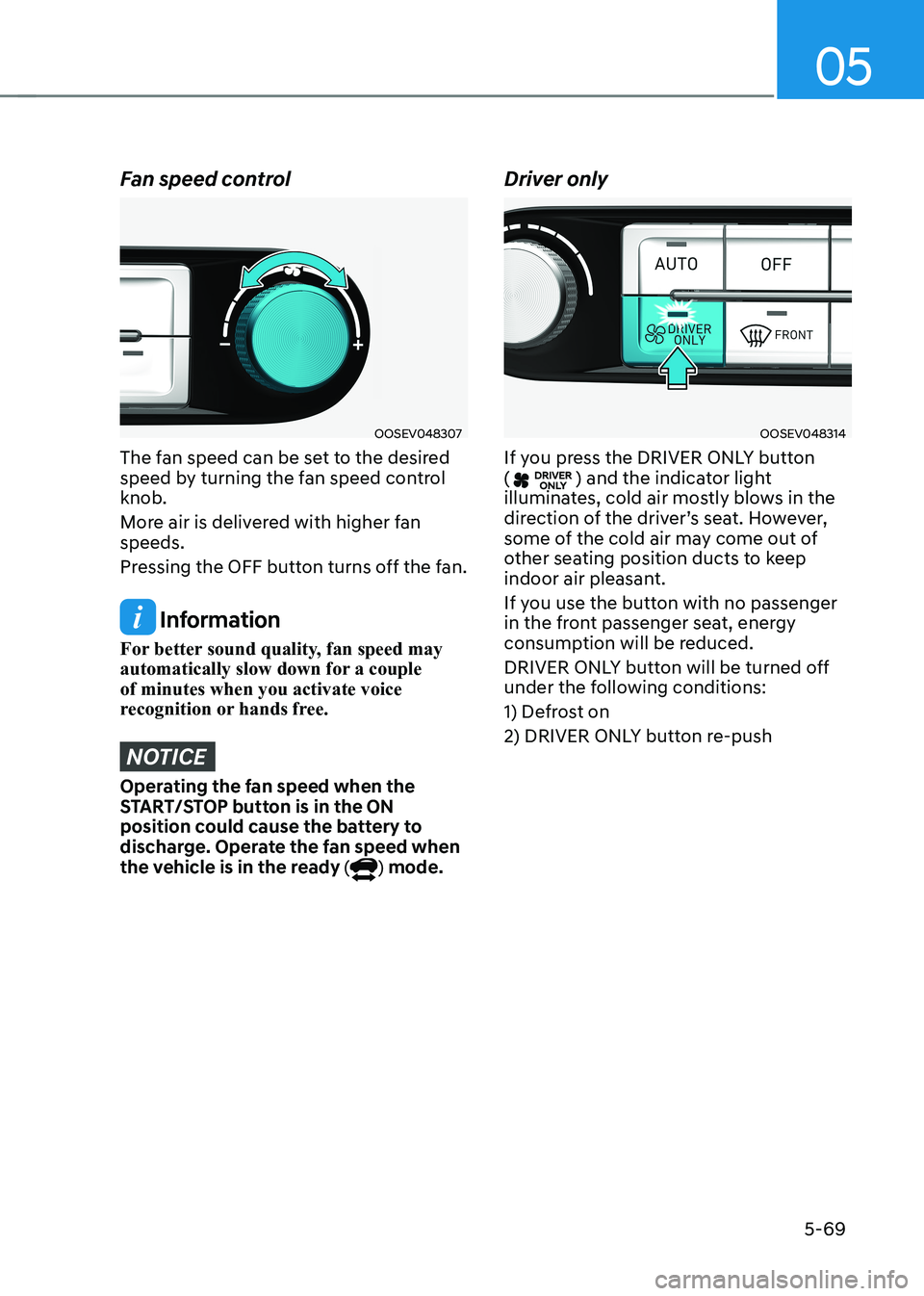
Fan speed control
OOSEV048307
The fan speed can be set to the desired
speed by turning the fan speed control knob.
More air is delivered with higher fan speeds.
Pressing the OFF button turns off the fan.
Information
For better sound quality, fan speed may
automatically slow down for a couple of minutes when you activate voice
recognition or hands free.
NOTICE
Operating the fan speed when the
START/STOP button is in the ON
position could cause the battery to
discharge. Operate the fan speed when
the vehicle is in the ready (
) mode. Driver only
OOSEV048314
If you press the DRIVER ONLY button (
) and the indicator light
illuminates, cold air mostly blows in the
direction of the driver’s seat. However,
some of the cold air may come out of
other seating position ducts to keep
indoor air pleasant.
If you use the button with no passenger
in the front passenger seat, energy
consumption will be reduced.
DRIVER ONLY button will be turned off
under the following conditions:
1) Defrost on
2) DRIVER ONLY button re-push
Page 255 of 548
05
5-71
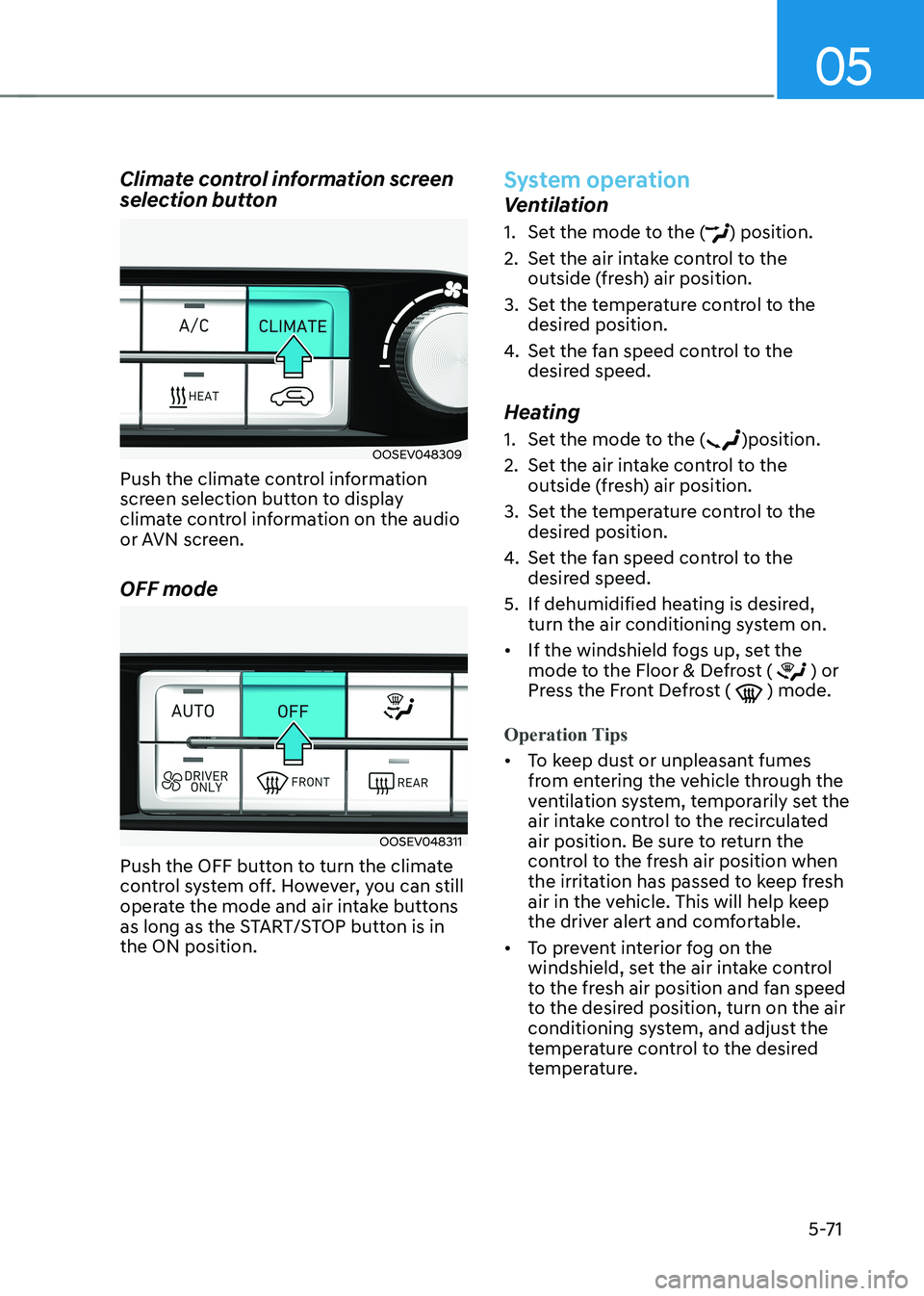
Climate control information screen
selection button
OOSEV048309
Push the climate control information
screen selection button to display
climate control information on the audio
or AVN screen. OFF mode
OOSEV048311
Push the OFF button to turn the climate
control system off. However, you can still
operate the mode and air intake buttons
as long as the START/STOP button is in the ON position.
System operation
Ventilation
1. Set the mode to the (
) position.
2. Set the air intake control to the outside (fresh) air position.
3. Set the temperature control to the desired position.
4. Set the fan speed control to the
desired speed.
Heating
1. Set the mode to the (
)position.
2. Set the air intake control to the outside (fresh) air position.
3. Set the temperature control to the desired position.
4. Set the fan speed control to the
desired speed.
5. If dehumidified heating is desired, turn the air conditioning system on.
• If the windshield fogs up, set the
mode to the Floor & Defrost (
) or
Press the Front Defrost ( ) mode.
Operation Tips
• To keep dust or unpleasant fumes
from entering the vehicle through the
ventilation system, temporarily set the
air intake control to the recirculated
air position. Be sure to return the
control to the fresh air position when
the irritation has passed to keep fresh
air in the vehicle. This will help keep
the driver alert and comfortable.
• To prevent interior fog on the
windshield, set the air intake control
to the fresh air position and fan speed
to the desired position, turn on the air
conditioning system, and adjust the
temperature control to the desired
temperature.
Page 261 of 548
05
5-77
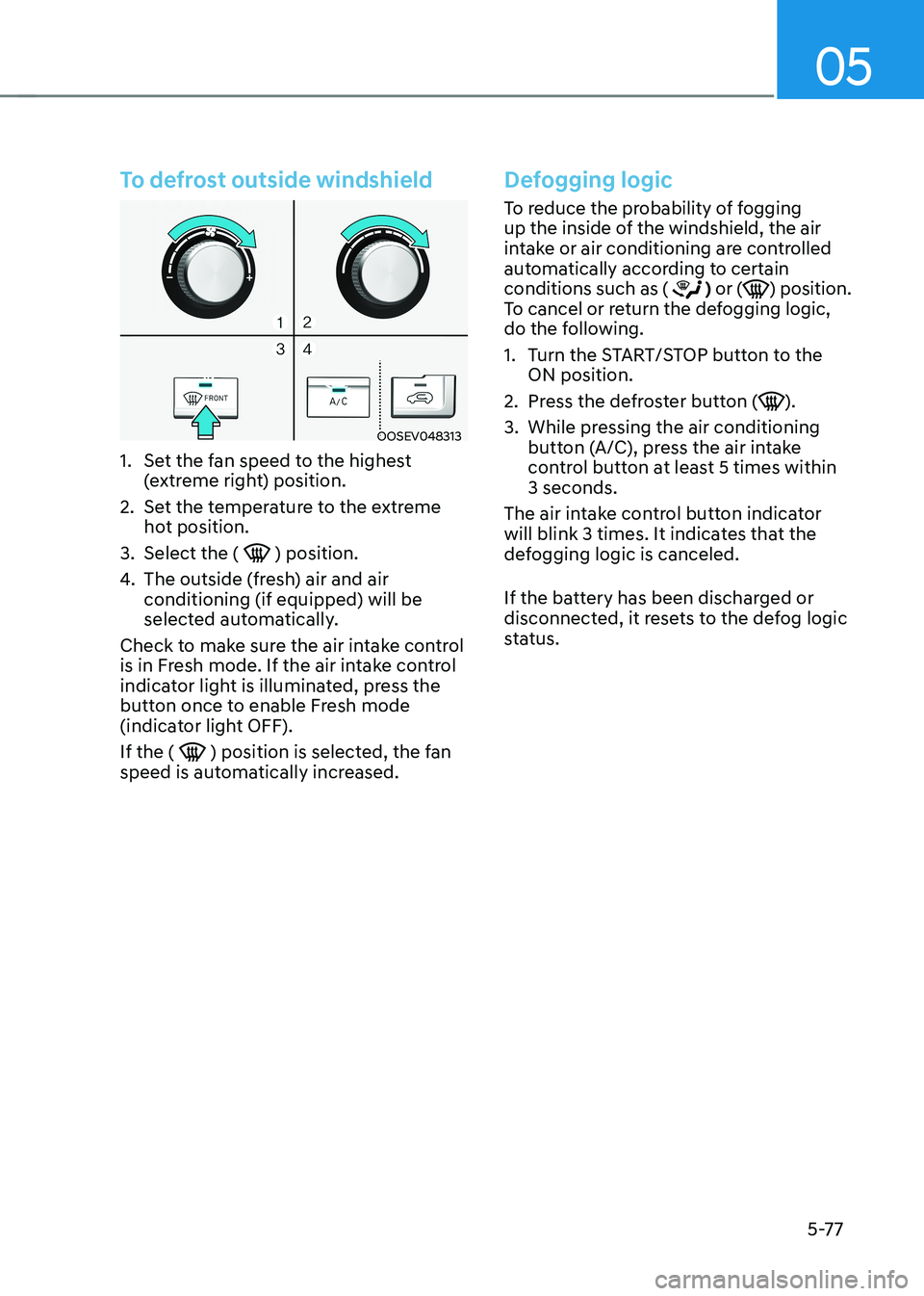
To defrost outside windshield
OOSEV048313
1. Set the fan speed to the highest (extreme right) position.
2. Set the temperature to the extreme hot position.
3. Select the (
) position.
4. The outside (fresh) air and air conditioning (if equipped) will be
selected automatically.
Check to make sure the air intake control
is in Fresh mode. If the air intake control
indicator light is illuminated, press the
button once to enable Fresh mode
(indicator light OFF). If the (
) position is selected, the fan
speed is automatically increased.
Defogging logic
To reduce the probability of fogging
up the inside of the windshield, the air
intake or air conditioning are controlled
automatically according to certain conditions such as (
) or () position.
To cancel or return the defogging logic,
do the following.
1. Turn the START/STOP button to the ON position.
2. Press the defroster button (
).
3. While pressing the air conditioning button (A/C), press the air intake
control button at least 5 times within 3 seconds.
The air intake control button indicator
will blink 3 times. It indicates that the
defogging logic is canceled.
If the battery has been discharged or
disconnected, it resets to the defog logic
status.