radio Hyundai Matrix 2005 Owner's Guide
[x] Cancel search | Manufacturer: HYUNDAI, Model Year: 2005, Model line: Matrix, Model: Hyundai Matrix 2005Pages: 407, PDF Size: 10.31 MB
Page 275 of 407
1
FEATURES OF YOUR HYUNDAI
111
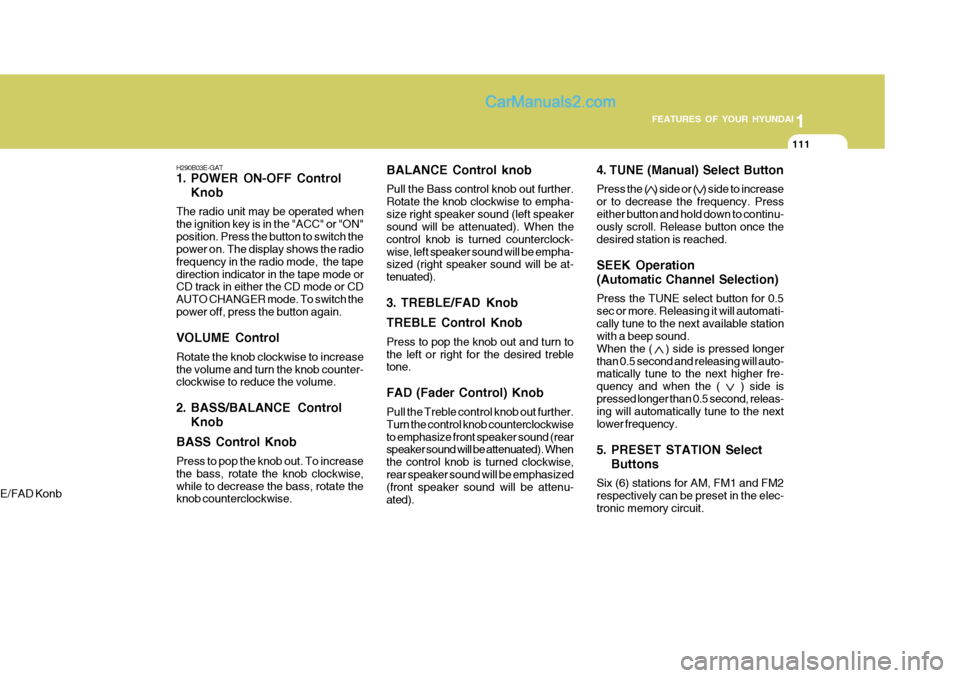
4. TUNE (Manual) Select Button Press the ( ) side or ( ) side to increase or to decrease the frequency. Presseither button and hold down to continu- ously scroll. Release button once the desired station is reached. SEEK Operation (Automatic Channel Selection) Press the TUNE select button for 0.5 sec or more. Releasing it will automati-cally tune to the next available station with a beep sound. When the ( ) side is pressed longerthan 0.5 second and releasing will auto- matically tune to the next higher fre- quency and when the ( ) side ispressed longer than 0.5 second, releas- ing will automatically tune to the next lower frequency.
5. PRESET STATION Select Buttons
Six (6) stations for AM, FM1 and FM2 respectively can be preset in the elec-tronic memory circuit.
BALANCE Control knob Pull the Bass control knob out further. Rotate the knob clockwise to empha-size right speaker sound (left speaker sound will be attenuated). When the control knob is turned counterclock-wise, left speaker sound will be empha- sized (right speaker sound will be at- tenuated).
3. TREBLE/FAD Knob TREBLE Control Knob Press to pop the knob out and turn to the left or right for the desired treble tone. FAD (Fader Control) Knob Pull the Treble control knob out further. Turn the control knob counterclockwiseto emphasize front speaker sound (rear speaker sound will be attenuated). When the control knob is turned clockwise,rear speaker sound will be emphasized (front speaker sound will be attenu- ated).
H290B03E-GAT
1. POWER ON-OFF Control
Knob
The radio unit may be operated when the ignition key is in the "ACC" or "ON"position. Press the button to switch the power on. The display shows the radio frequency in the radio mode, the tapedirection indicator in the tape mode or CD track in either the CD mode or CD AUTO CHANGER mode. To switch thepower off, press the button again. VOLUME Control Rotate the knob clockwise to increase the volume and turn the knob counter- clockwise to reduce the volume.
2. BASS/BALANCE Control Knob
BASS Control Knob Press to pop the knob out. To increase the bass, rotate the knob clockwise,while to decrease the bass, rotate the knob counterclockwise.
E/FAD Konb
Page 276 of 407
1FEATURES OF YOUR HYUNDAI
112
FM/AM
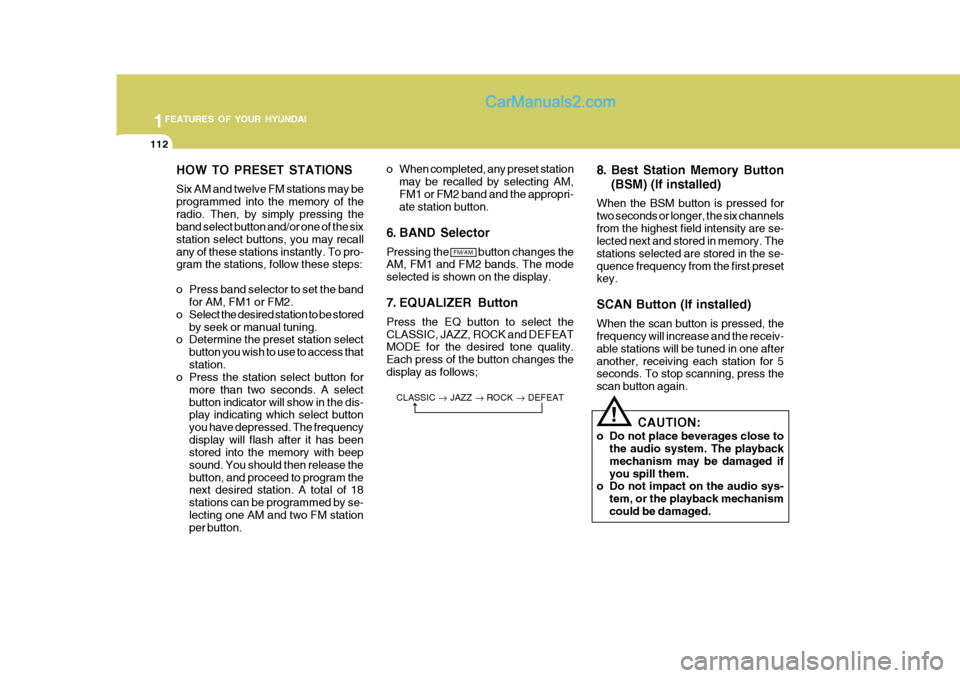
HOW TO PRESET STATIONS Six AM and twelve FM stations may be programmed into the memory of theradio. Then, by simply pressing the band select button and/or one of the six station select buttons, you may recallany of these stations instantly. To pro- gram the stations, follow these steps:
o Press band selector to set the band
for AM, FM1 or FM2.
o Select the desired station to be stored by seek or manual tuning.
o Determine the preset station select
button you wish to use to access that station.
o Press the station select button for
more than two seconds. A selectbutton indicator will show in the dis- play indicating which select button you have depressed. The frequencydisplay will flash after it has been stored into the memory with beep sound. You should then release thebutton, and proceed to program the next desired station. A total of 18 stations can be programmed by se-lecting one AM and two FM station per button. 8. Best Station Memory Button
(BSM) (If installed)
When the BSM button is pressed for two seconds or longer, the six channelsfrom the highest field intensity are se- lected next and stored in memory. The stations selected are stored in the se-quence frequency from the first preset key. SCAN Button (If installed) When the scan button is pressed, the frequency will increase and the receiv- able stations will be tuned in one afteranother, receiving each station for 5 seconds. To stop scanning, press the scan button again.
o When completed, any preset station
may be recalled by selecting AM,FM1 or FM2 band and the appropri- ate station button.
6. BAND Selector Pressing the button changes the AM, FM1 and FM2 bands. The mode selected is shown on the display.
7. EQUALIZER Button Press the EQ button to select the CLASSIC, JAZZ, ROCK and DEFEAT MODE for the desired tone quality. Each press of the button changes thedisplay as follows;
CLASSIC JAZZ ROCK DEFEAT
CAUTION:
o Do not place beverages close to the audio system. The playback mechanism may be damaged ifyou spill them.
o Do not impact on the audio sys-
tem, or the playback mechanismcould be damaged.
!
Page 280 of 407

1FEATURES OF YOUR HYUNDAI
116
H290F02O-GAT
1. CD Select Button
o Insert the CD with the label facingupward.
o Insert the CD to start CD playback, during radio operation or cassette tape playing.
o When a disc is in the CD deck, if you
press the CD button the CD playerwill begin playing even if the radio or cassette player is being used.
o The CD player can be used when the ignition switch is in either the "ON" or"ACC" position.
2. FF/REW ( / ) If you want to fast forward or reverse through the compact disc track, push and hold in the FF ( ) or REW ( ) button.When you release the button, the com- pact disc player will resume playing. 3. TRACK UP/DOWN
o The desired track on the disc cur-
rently being played can be selected using the track number.
o Press button once to skip for- ward to the beginning of the nexttrack. Press button once to skipback to the beginning of the track.
4. REPEAT
o To repeat the track you are currently listening to, press the RPT button. To cancel , press again.
o If you do not release RPT operation when the track ends, it will automati- cally be replayed.This process will be continued until you push the button again.
5. EQUALIZER Button Press the EQ button to select the CLASSIC, JAZZ, ROCK and DEFEAT MODE for the desired tone quality.Each press of the button changes the display as follows; 6. CD EJECT Button When the button is pressed with a CD loaded, the CD will eject.
7. SCAN Button (If installed)
o Press the SCAN button to playback
the first 10 seconds of each track.
o Press the SCAN button again within
10 sec. for the desired track.
NOTE:
o To assure proper operation of the unit, keep the vehicle interior tem- perature within a normal range by using the vehicle's air condition-ing or heating system.
o When replacing the fuse, replace
it with a fuse having the correctcapacity.
o The preset station frequencies are
all erased when the car battery isdisconnected. Therefore, all data will have to be set again if this should occur.
o Do not add any oil to the rotating parts. Keep magnets, screwdriv-ers and other metallic objects awayfrom the tape mechanism and head.
CLASSIC
JAZZ ROCK DEFEAT
Page 283 of 407
1
FEATURES OF YOUR HYUNDAI
119
B290H03FC-GAT The CD auto changer is located under the front passenger seat.
o To use the CD auto changer.
1. Open the sliding lid of the CD autochanger.
2. To eject the compact disc maga-
zine, press the EJECT button lo- cated inside the CD auto changer.
3. Insert the discs into the maga-
zine.
4. Push the magazine into the CD
auto changer and close the sliding lid.
o The CD auto changer can be used when the ignition switch is in either "ON" or "ACC" position.
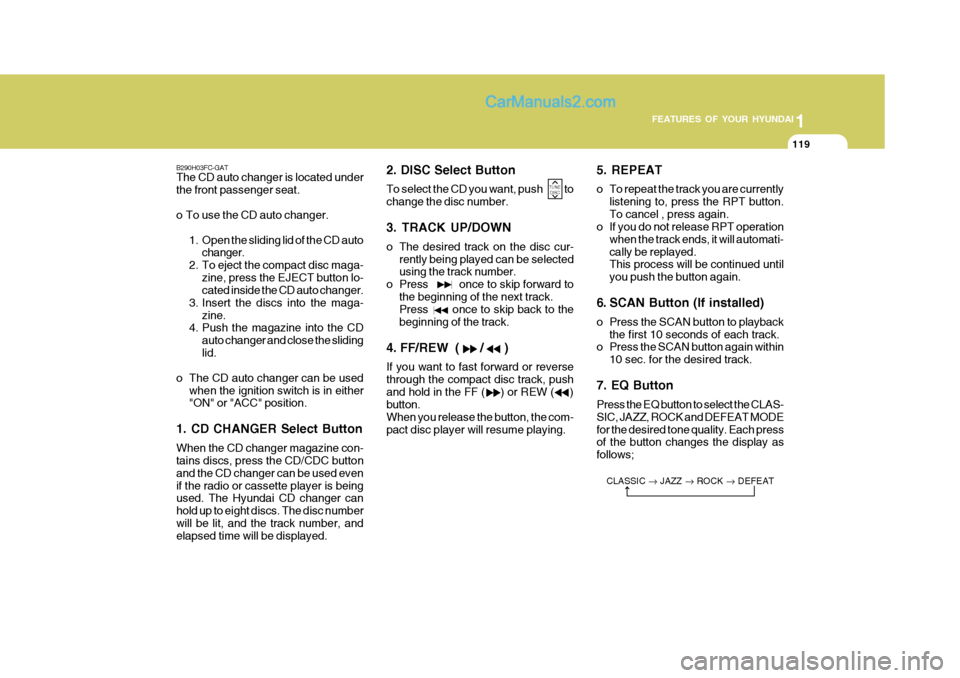
1. CD CHANGER Select Button When the CD changer magazine con- tains discs, press the CD/CDC button and the CD changer can be used evenif the radio or cassette player is being used. The Hyundai CD changer can hold up to eight discs. The disc numberwill be lit, and the track number, and elapsed time will be displayed. 2. DISC Select Button To select the CD you want, push to change the disc number. 3. TRACK UP/DOWN
o The desired track on the disc cur-
rently being played can be selected using the track number.
o Press once to skip forward to
the beginning of the next track.Press once to skip back to the beginning of the track.
4. FF/REW ( / ) If you want to fast forward or reverse through the compact disc track, pushand hold in the FF ( ) or REW ( ) button. When you release the button, the com-pact disc player will resume playing. 5. REPEAT
o To repeat the track you are currently
listening to, press the RPT button. To cancel , press again.
o If you do not release RPT operation
when the track ends, it will automati-cally be replayed. This process will be continued until you push the button again.
6. SCAN Button (If installed)
o Press the SCAN button to playback the first 10 seconds of each track.
o Press the SCAN button again within
10 sec. for the desired track.
7. EQ ButtonPress the EQ button to select the CLAS- SIC, JAZZ, ROCK and DEFEAT MODEfor the desired tone quality. Each press of the button changes the display as follows; CLASSIC JAZZ ROCK DEFEAT
TUNE
DISC
Page 293 of 407

2 DRIVING YOUR HYUNDAI
4
!
KEY POSITIONS
C070C01E
C070C01A-AAT To remove the ignition key
1. Turn the ignition key to the "ACC"
position.
2. Simultaneously push and turn the
ignition key counterclockwise from the "ACC" position to the "LOCK" position.
3. The key can be removed in the "LOCK" position.LOCK
ACC
ON
o "ON" When the key is in the "ON position, the ignition is on and all accessories may be turned on. If the engine is notrunning, the key should not be left in the "ON" position. This will discharge the battery and may also damage theignition system.
o "ACC" With the key in the "ACC" position, the some electrical accessories (radio, etc.) may be operated.
o "LOCK" The key can be removed or inserted in this position. To protect against theft, the steering wheel locks by removing the key. NOTE: To unlocking the steering wheel, insert the key, and then turn thesteering wheel and key simulta- neously.
C040A01A-AAT
C040A01E
LOCK
ACC
ON
START
WARNING:
The engine should not be turned off or the key removed from the ignition key cylinder while the ve- hicle is in motion. The steeringwheel is locked by removing the key.
o "START" The engine is started in this position. It will crank until you release the key. NOTE: Do not hold the key in the "START" position for more than 15 seconds. START
Page 360 of 407
6
DO-IT-YOURSELF MAINTENANCE
15
!
SPARK PLUGS
WARNING:
The cooling fan is controlled by engine coolant temperature and may sometimes operate even when the engine is not running. Useextreme caution when working near the blades of the cooling fan so that you are not injured by arotating fan blade. As the engine coolant temperature decreases, the fan will automatically shut off. Thisis a normal condition. G060A01L
G060B02S-GAT
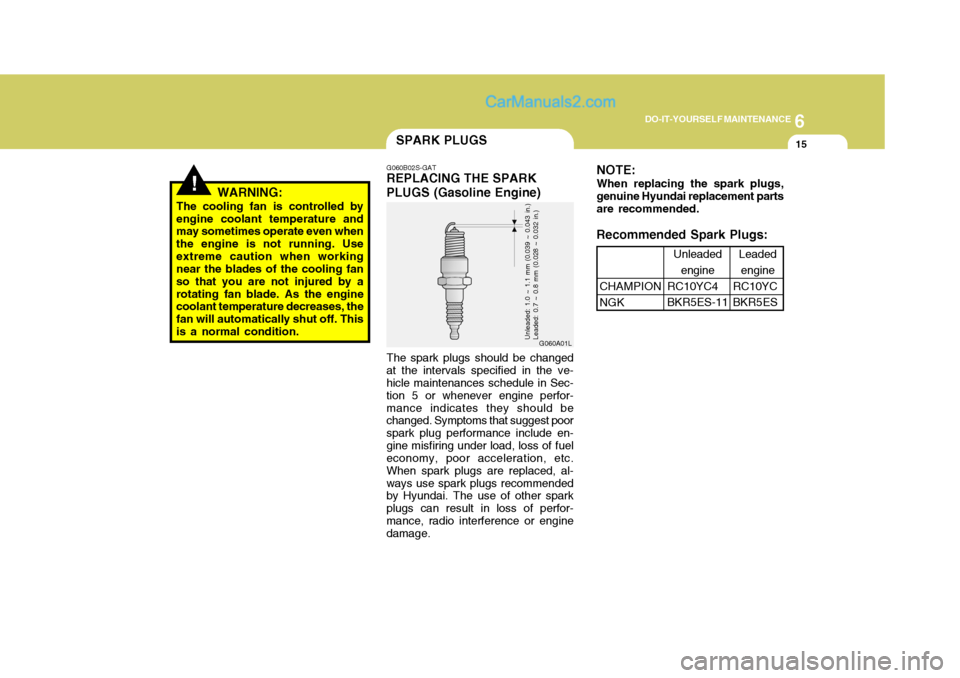
REPLACING THE SPARK PLUGS (Gasoline Engine)
The spark plugs should be changed
at the intervals specified in the ve- hicle maintenances schedule in Sec- tion 5 or whenever engine perfor-mance indicates they should be changed. Symptoms that suggest poor spark plug performance include en-gine misfiring under load, loss of fuel economy, poor acceleration, etc. When spark plugs are replaced, al-ways use spark plugs recommended by Hyundai. The use of other spark plugs can result in loss of perfor-mance, radio interference or engine damage.
Unleaded: 1.0 ~ 1.1 mm (0.039 ~ 0.043 in.) Leaded: 0.7 ~ 0.8 mm (0.028 ~ 0.032 in.)
NOTE: When replacing the spark plugs, genuine Hyundai replacement partsare recommended.
Recommended Spark Plugs:
CHAMPION NGK Leaded
engine
RC10YCBKR5ES
Unleaded
engine
RC10YC4BKR5ES-11
Page 375 of 407
6 DO-IT-YOURSELF MAINTENANCE
30
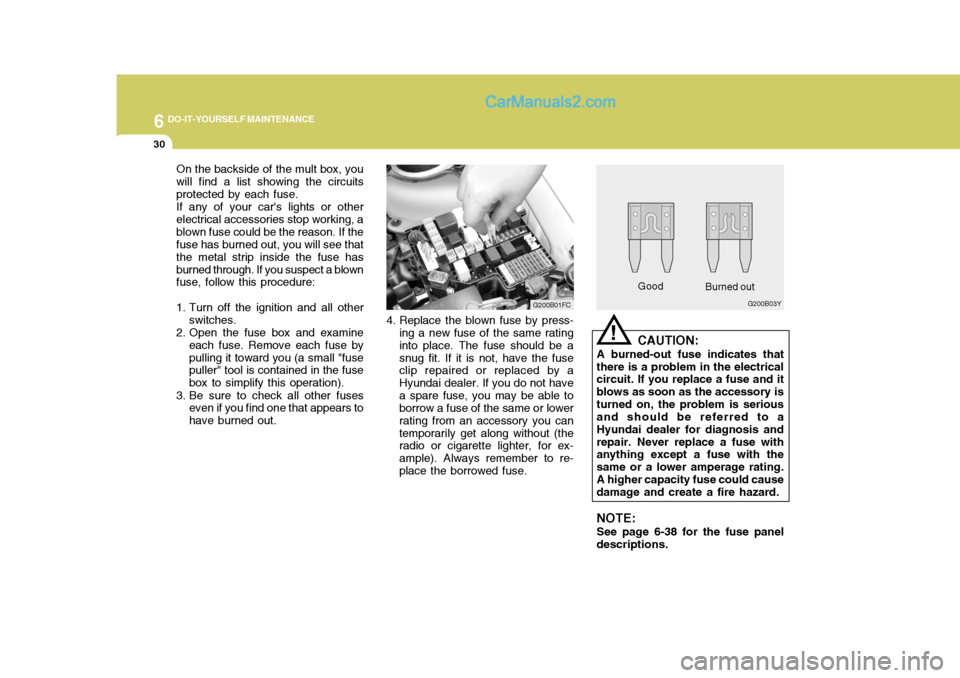
On the backside of the mult box, you will find a list showing the circuitsprotected by each fuse.If any of your car's lights or otherelectrical accessories stop working, ablown fuse could be the reason. If the fuse has burned out, you will see that the metal strip inside the fuse hasburned through. If you suspect a blown fuse, follow this procedure:
1. Turn off the ignition and all other switches.
2. Open the fuse box and examine
each fuse. Remove each fuse by pulling it toward you (a small "fuse puller" tool is contained in the fuse box to simplify this operation).
3. Be sure to check all other fuses even if you find one that appears tohave burned out. Good
G200B03Y
Burned out
CAUTION:
A burned-out fuse indicates that
there is a problem in the electrical circuit. If you replace a fuse and it blows as soon as the accessory isturned on, the problem is serious and should be referred to a Hyundai dealer for diagnosis andrepair. Never replace a fuse with anything except a fuse with the same or a lower amperage rating.A higher capacity fuse could cause damage and create a fire hazard.
NOTE: See page 6-38 for the fuse panel
descriptions.
!
G200B01FC
4. Replace the blown fuse by press- ing a new fuse of the same rating into place. The fuse should be a snug fit. If it is not, have the fuse clip repaired or replaced by a Hyundai dealer. If you do not havea spare fuse, you may be able to borrow a fuse of the same or lower rating from an accessory you cantemporarily get along without (the radio or cigarette lighter, for ex- ample). Always remember to re-place the borrowed fuse.
Page 406 of 407

10
INDEX
5
R Rear Fog Audible Warning Sound ............................1-52
Rear Seat
Adjustable headrests . ............................................. 1-18
Adjusting seatback angle ................. ...................... 1-17
Adjusting seat forwar d and rearward..................... 1-17
Arm Rest ................................................................ 1-67
Fold down .............................................................. 1-18
Rear Window Defroster Switch ................................ 1-62
Recommended Shift Points . ....................................... 2-8
Removal of water from the fuel fiter ........................6-34
Replacing Light Bulbs ............................................... 6-36
Replacing The Spark Plugs...................................... 6-15
Roof Rack ................................................................. 1-79
S Seat Belts 2-Point Static Type .............................................. 1-263-Point system ....................................................... 1-27
Adjustable height .................................................... 1-23
Adjusting your seat belt ............................... 1-25, 1-26
Care of seat belts .................................................. 1-23
Precautions ............................................................ 1-21
Seat Warmer ............................................................. 1-20
Spark Plugs ............................................................... 6-15
Spectacle Case ......................................................... 1-70
Speedometer ............................................................. 1-54
Starting Proce dures.................................................... 2-5 Steering Wheel
Free p lay ................................................................ 6-27
Tilt lever ................................................................. 1-80
Stereo Radio Operation (H210, H220, H260, H280) .............................................. 1-93, 1-96, 1-101, 1-110
Stereo Sound System ............................................... 1-91
Sunroof ...................................................................... 1-67
Sunshad e .................................................................. 1-67
Sun Visor .................................................................. 1-74
T Tail Gat e ................................................................... 1-77
Tail Gate Wiper And Washer Switch .......................1-61
Tachometer ............................................................... 1-54
Theft Alarm System .................................................. 1-10
Tires Balancing .................................................................. 8-5
Chains ...................................................................... 8-4
Changing a flat tire .................................................. 3-7
If you have a flat tire ............................................... 3-7
Information ............................................................... 8-3
Pressure ................................................................... 8-3
Replacement ............................................................ 8-6
Rotation .................................................................... 8-5
Snow tires ................................................................ 8-4
Spare tire ................................................................. 3-6
Traction .................................................................... 8-5