steering HYUNDAI PALISADE 2022 Owner's Guide
[x] Cancel search | Manufacturer: HYUNDAI, Model Year: 2022, Model line: PALISADE, Model: HYUNDAI PALISADE 2022Pages: 663, PDF Size: 15.74 MB
Page 376 of 663
5-42
Driving your vehicle
Trailer Stability Assist (TSA)
Trailer Stability Assist system helps
stabilize the vehicle and trailer when
the trailer sways or oscillates. There
are various reasons making the vehi-
cle sway and oscillate.
Factors of swaying are such as:
- High speed
- Strong crosswinds
- Improper overloading
- Sudden controlling of steeringwheel
- Uneven road
Trailer Stability Assist system contin-
uously analyzes the vehicle and trail-
er instability. When the Trailer
Stability Assist system detects some
sway, the brakes are applied auto-
matically to stabilize the vehicle on
the front wheel. However, if it is not
enough to stabilize, the brakes are
applied on all wheels automatically
and engine power is properly
reduced. When the vehicle is stable
from swaying, trailer stability assist
system does not operate.
Good Braking Practices
Wet brakes can be dangerous! The
brakes may get wet if the vehicle is
driven through standing water or if it
is washed. Your vehicle will not stop
as quickly if the brakes are wet. Wet
brakes may cause the vehicle to pull
to one side. To dry the brakes, apply the brakes
lightly until the braking action returns
to normal, taking care to keep the
vehicle under control at all times. If
the braking action does not return to
normal, stop as soon as it is safe to
do so and call an authorized
HYUNDAI dealer for assistance.
DO NOT drive with your foot resting
on the brake pedal. Even light, but
constant pedal pressure can result in
the brakes overheating, brake wear,
and possibly even brake failure.
If a tire goes flat while you are driv-
ing, apply the brakes gently and
keep the vehicle pointed straight
ahead while you slow down. When
you are moving slowly enough for it
to be safe to do so, pull off the road
and stop in a safe location.
Keep your foot firmly on the brake
pedal when the vehicle is stopped to
prevent the vehicle from rolling for-
ward.
Whenever leaving the vehicle or
parking, always come to a com-
plete stop and continue to
depress the brake pedal. Shift
the gear to P (Park), then apply
the parking brake, and place the
ignition switch in the LOCK/OFF
position.
Vehicles parked with the park-
ing brake not applied or not
fully engaged may roll inadver-
tently and may cause injury to
the driver and others. ALWAYS
apply the parking brake before
exiting the vehicle.
WARNING
Page 377 of 663
5-43
Driving your vehicle
5
The All Wheel Drive (AWD) system
delivers engine torque to both the
front and rear wheels for extra trac-
tion. AWD is useful when maximum
traction is required on slippery,
muddy, wet, or snow-covered roads.
Occasional off-road use such as
established unpaved roads and trails
are OK. It is always important that
the driver carefully reduces the
speed to a level that does not exceed
the safe operating speed for those
conditions. Do not drive in water if the level
is higher than the bottom of the
vehicle.
Check your brake condition once you are out of mud or
water. Depress the brake pedal
several times as you move slow-
ly until you feel normal braking
return.
Shorten your scheduled mainte- nance interval if you drive in off-
road conditions such as sand,
mud or water (see "Maintenance
Under Severe Usage Conditions"
in chapter 7).
Always wash your vehicle thor- oughly after off road use, espe-
cially the bottom of the vehicle.
Be sure to equip the vehicle with four tires of the same size and
type.
Make sure that a full time AWD vehicle is towed by a flat bed
tow truck.NOTICE
A AL LL L W W H HE EE EL L D D R RI IV V E E ( ( A A W W D D) ) ( ( I IF F E E Q Q U UI IP P P PE ED D ) )
To reduce the risk of SERIOUS
INJURY or DEATH:
Do not drive in conditions that
exceed the vehicles intended
design such as challenging
off-road conditions.
Avoid high speeds when cor-
nering or turning.
Do not make quick steering
wheel movements, such as
sharp lane changes or fast,
sharp turns.
The risk of a rollover is great-
ly increased if you lose con-
trol of your vehicle at highway
speeds.
Loss of control often occurs if
two or more wheels drop off
the roadway and the driver
over steers to reenter the
roadway.
In the event your vehicle
leaves the roadway, do not
steer sharply. Instead, slow
down before pulling back into
the travel lanes.
WARNING
Page 379 of 663
5-45
Driving your vehicle
5
For safe AWD operation
Before driving
Make sure all passengers arewearing seat belts.
Sit upright and closer to the steer- ing wheel than usual. Adjust the
steering wheel to a position com-
fortable for you to drive.
Driving on snow-covered or icy
roads
Start off slowly by applying theaccelerator pedal gently.
Use snow tires or tire chains.
Keep sufficient distance between your vehicle and the vehicle in front
of you.
Apply engine braking during decel- eration by using the paddle shifter
and manually selecting a lower gear.
Avoid speeding, rapid acceleration, sudden brake applications, and
sharp turns to prevent skids.
Driving in sand or mud
Maintain slow and constant speed.
Use tire chains driving in mud ifnecessary.
Keep sufficient distance between your vehicle and the vehicle in front
of you.
Reduce vehicle speed and always check the road condition.
Avoid speeding, rapid acceleration, sudden brake applications, and
sharp turns to prevent getting
stuck. When the vehicle is stuck in
snow, sand or mud, place a non-
slip material under the drive
wheels to provide traction OR
Slowly spin the wheels in for-
ward and reverse directions
which causes a rocking motion
that may free the vehicle.
However, avoid running the
engine continuously at high
RPM, doing so may damage the
AWD system.CAUTION
Page 381 of 663
5-47
Driving your vehicle
5
Additional driving conditions
Become familiar with the off-roadconditions before driving.
Always pay attention when driving off-road and avoid dangerous
areas.
Drive slowly when driving in heavy wind.
Reduce vehicle speed when cor- nering. The center of gravity of
AWD vehicles is higher than con-
ventional 2WD vehicles, making
them more likely to roll over when
you rapidly turn corners.
Always hold the steering wheel firmly when you are driving off-
road.
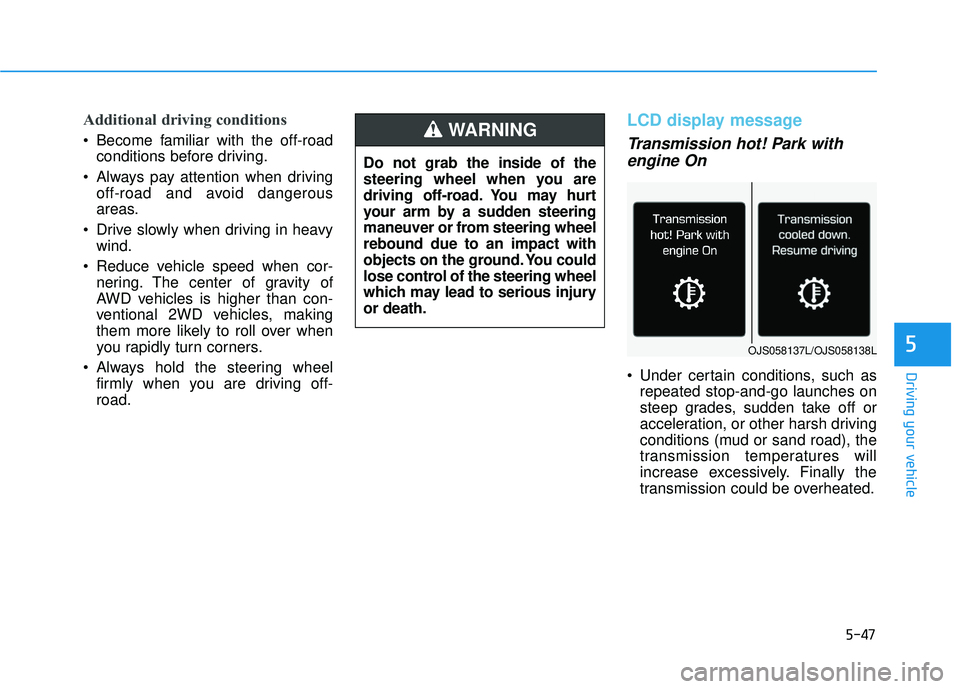
LCD display message
Transmission hot! Park withengine On
Under certain conditions, such as
repeated stop-and-go launches on
steep grades, sudden take off or
acceleration, or other harsh driving
conditions (mud or sand road), the
transmission temperatures will
increase excessively. Finally the
transmission could be overheated.
Do not grab the inside of the
steering wheel when you are
driving off-road. You may hurt
your arm by a sudden steering
maneuver or from steering wheel
rebound due to an impact with
objects on the ground. You could
lose control of the steering wheel
which may lead to serious injury
or death.
WARNING
OJS058137L/OJS058138L
Page 382 of 663
5-48
Driving your vehicle
If the vehicle continues to be driven and the automatic transmission
temperatures reach the maximum
temperature limit, the "Transmission
hot! Park with engine On" warning
will be displayed. When this occurs
the automatic transmission is dis-
abled until the automatic transmis-
sion cools to normal temperatures.
The warning will display a time to wait for the transmission to cool.
If this occurs, pull over to a safe location, stop the vehicle with the
engine running, apply the brakes
and shift the vehicle to P (Park),
and allow the transmission to cool.
When the message "Transmission cooled down. Resume driving"
appears you can continue to drive
your vehicle.
When possible, drive the vehicle smoothly.
Emergency Precautions
Tires
Do not use a tire and wheel package
with a different size and type from
the one originally installed on your
vehicle. It can affect the safety and
performance of your vehicle, which
could lead to steering failure or
rollover causing serious injury.
When replacing the tires, be sure to
equip all four tires with the tire and
wheel of the same size, type, tread,
brand and load-carrying capacity. If
you equip your vehicle with any
tire/wheel combination not recom-
mended by HYUNDAI for off-road
driving, you should not use these
tires for highway driving.
Towing
AWD vehicles must be towed with a
wheel lift and dollies or flatbed equip-
ment with all the wheels off the
ground. For more details, refer to
"Towing" in chapter 6.
Dynamometer testing
A full-time AWD vehicle must be test-
ed on a special four wheel chassis
dynamometer.
Never start or run the engine
while a full-time AWD vehicle is
raised on a jack. The vehicle can
slip or roll off of a jack causing
serious injury or death to you or
those nearby.
WARNING
Page 384 of 663
5-50
Driving your vehicle
The Idle Stop and Go (ISG) system
automatically and temporarily shuts
down the engine when the vehicle is
stopped and idling to improve fuel
efficiency and reduce exhaust gas
emissions. (i.e. red stop light, stop
sign, and traffic jam).
The engine is automatically started
upon satisfying the starting condi-
tions.
The ISG system is always active,
when the engine is running.
Information
When the engine is automatically
started by the ISG system, some warn-
ing lights (i.e. ABS, ESC, ESC OFF,
EPS, and parking brake warning
light) may illuminate for a few sec-
onds due to the low battery voltage.
However, it does not indicate a mal-
function with the ISG system.
To Activate the ISG System
Prerequisite for activation
The ISG system operates in the fol-
lowing situations.
The driver's seatbelt is fastened
The driver's door and hood are closed
The brake vacuum pressure is adequate
The battery sensor is activated and the battery is sufficiently charged
Outside temperature is not too low or too high
The vehicle is driven over a con- stant speed and stops
The climate control system satis- fies the conditions
The vehicle is sufficiently warmed up
The incline is gradual
The steering wheel is turned less than 180 degrees and then the
vehicle stops
Information
The ISG system is
not activated, when
the prerequisites to
activate the ISG sys-
tem are unsatisfied.
In this case, the ISG
OFF button indicator illuminates,
and the auto stop indicator ( )
illuminates in yellow on the instru-
ment cluster.
• When the above indicator remains illuminated on the instrument clus-
ter, we recommend that you have
the IGS system checked by an
authorized HYUNDAI dealer.
i
i
I IS S G G ( ( I ID D L LE E S S T T O O P P A A N N D D G G O O ) ) S S Y Y S ST T E EM M ( ( I IF F E E Q Q U UI IP P P PE ED D ) )
•
Page 390 of 663
5-56
Driving your vehicle
Information
• When you mildly drive the vehiclein SMART mode, the driving mode
changes to ECO mode to improve
fuel efficiency. However, the actual
fuel efficiency may differ in accor-
dance with your driving situations
(i.e. upward/downward slope, vehi-
cle deceleration/acceleration).
• When you dynamically drive the vehicle in SMART mode by abrupt-
ly decelerating or sharply turning
the driving mode changes to SPORT
mode. However, it may adversely
affect fuel economy.
Various driving situations, which
you may encounter in SMART
mode
The driving mode automaticallychanges to ECO mode after a cer-
tain period of time, when you gen-
tly depress the accelerator pedal
(Your driving is categorized to be
economical.).
The driving mode automatically changes from SMART ECO mode
to SMART COMFORT mode after
a certain period of time, when you
sharply or repetitively depress the
accelerator pedal.
The driving mode automatically changes to SMART COMFORT
mode with the same driving pat-
terns, when the vehicle starts to
drive on an upward slope of a cer-
tain angle. The driving mode auto-
matically returns to SMART ECO
mode, when the vehicle enters a
leveled road. The driving mode automatically
changes to SMART SPORT, when
you abruptly accelerate the vehicle
or repetitively operate the steering
wheel (Your driving is categorized
to be aggressive.). In this mode,
your vehicle drives in a lower gear
for abrupt accelerating/decelerat-
ing and increases the engine brake
performance.
You may still sense the engine braking performance, even when
you release the accelerator pedal
in SMART SPORT mode. It is
because your vehicle remains in
lower gear over a certain period of
time for next acceleration. Thus, it
is a normal driving situation, not
indicating any malfunction.
The driving mode automatically changes to SMART SPORT mode
only in harsh driving situations. In
most of the normal driving situa-
tions, the driving mode sets to be
either in SMART ECO mode or in
SMART COMFORT mode.
i
Page 391 of 663
5-57
Driving your vehicle
5
Limitation of SMART mode
The SMART mode may be limited in
following situations. (The OFF indica-
tor illuminates in those situations.)
The driver uses the paddle shifter(manual shift mode) :
It deactivates SMART mode. The
vehicle drives, as the driver manu-
ally changes gear with the paddle
shifter.
Smart Cruise Control is activated : Smart Cruise Control may deacti-
vate the SMART mode when the
vehicle is controlled by the set
speed of Smart Cruise Control.
(SMART mode is not deactivated
just by activating Smart Cruise
Control.)
The transmission oil temperature is either extremely low or extremely
high :
The SMART mode can be active in
most of the normal driving situa-
tions. However, an extremely high/
low transmission oil temperature
may temporarily deactivate the
SMART mode, because the trans-
mission condition is out of normal
operation condition.
SPORT
SPORT mode manages
the driving dynamics by
automatically adjusting
the steering effort, and
the engine and transmission control
logic for enhanced driver perform-
ance.
When SPORT mode is selected by rotating the DRIVE MODE selec-
tion knob, the SPORT indicator will
illuminate.
Whenever the engine is restarted, the drive mode will revert back to
COMFORT mode. If SPORT mode
is desired, re-select SPORT mode.
When SPORT mode is activated: - The engine RPM will tend toremain a little higher for a brief
time even after releasing the
accelerator. This is typical when
the SPORT mode is activated.
- Upshifts are delayed when accel- erating
Information
In SPORT mode, the fuel efficiency
may decrease.
ECO mode
When the drive mode isset to ECO mode, the
engine and transmission
control logic are changed
to maximize fuel efficien-
cy.
When ECO mode is selected by rotating the DRIVE MODE selec-
tion knob, the ECO indicator will
illuminate.
The vehicle starts in ECO mode, when the engine was turned OFF
in ECO mode.
Information
Fuel efficiency depends on the driver's
driving habit and road condition.
i
i
SPORTECO
Page 395 of 663
5-61
Driving your vehicle
5
The driving mode automaticallychanges to SMART SPORT, when
you abruptly accelerate the vehicle
or repetitively operate the steering
wheel (Your driving is categorized
to be aggressive.). In this mode,
your vehicle drives in a lower gear
for abrupt accelerating/decelerat-
ing and increases the engine brake
performance.
You may still sense the engine braking performance, even when
you release the accelerator pedal
in SMART SPORT mode. It is
because your vehicle remains in
lower gear over a certain period of
time for next acceleration. Thus, it
is a normal driving situation, not
indicating any malfunction.
The driving mode automatically changes to SMART SPORT mode
only in harsh driving situations. In
most of the normal driving situa-
tions, the driving mode sets to be
either in SMART ECO mode or in
SMART COMFORT mode.Limitation of SMART mode
The SMART mode may be limited in
following situations. (The OFF indica-
tor illuminates in those situations.)
The driver uses the paddle shifter(manual shift mode) :
It deactivates SMART mode. The
vehicle drives, as the driver manu-
ally changes gear with the paddle
shifter.
Smart Cruise Control is activated : Smart Cruise Control may deacti-
vate the SMART mode when the
vehicle is controlled by the set
speed of Smart Cruise Control.
(SMART mode is not deactivated
just by activating Smart Cruise
Control.)
The transmission oil temperature is either extremely low or extremely
high :
The SMART mode can be active in
most of the normal driving situa-
tions. However, an extremely high/
low transmission oil temperature
may temporarily deactivate the
SMART mode, because the trans-
mission condition is out of normal
operation condition.
SPORT
SPORT mode manages
the driving dynamics by
automatically adjusting
the steering effort, and
the engine and transmission control
logic for enhanced driver perform-
ance.
When SPORT mode is selected by rotating the DRIVE/TERRAIN
mode selection knob, the SPORT
indicator will illuminate.
Whenever the engine is restarted, the drive mode will revert back to
COMFORT mode. If SPORT mode
is desired, re-select SPORT mode.
When SPORT mode is activated: - The engine RPM will tend toremain a little higher for a brief
time even after releasing the
accelerator. This is typical when
the SPORT mode is activated.
- Upshifts are delayed when accel- erating
Information
In SPORT mode, the fuel efficiency
may decrease.
i
SPORT
Page 412 of 663
5-78
Driving your vehicle
Lane Keeping Assist is designed to
help detect lane markings (or road
edges) while driving over a certain
speed. Lane Keeping Assist will warn
the driver if the vehicle leaves the
lane without using the turn signal, or
will automatically assist the driver’s
steering to help prevent the vehicle
from departing the lane.
Detecting sensor
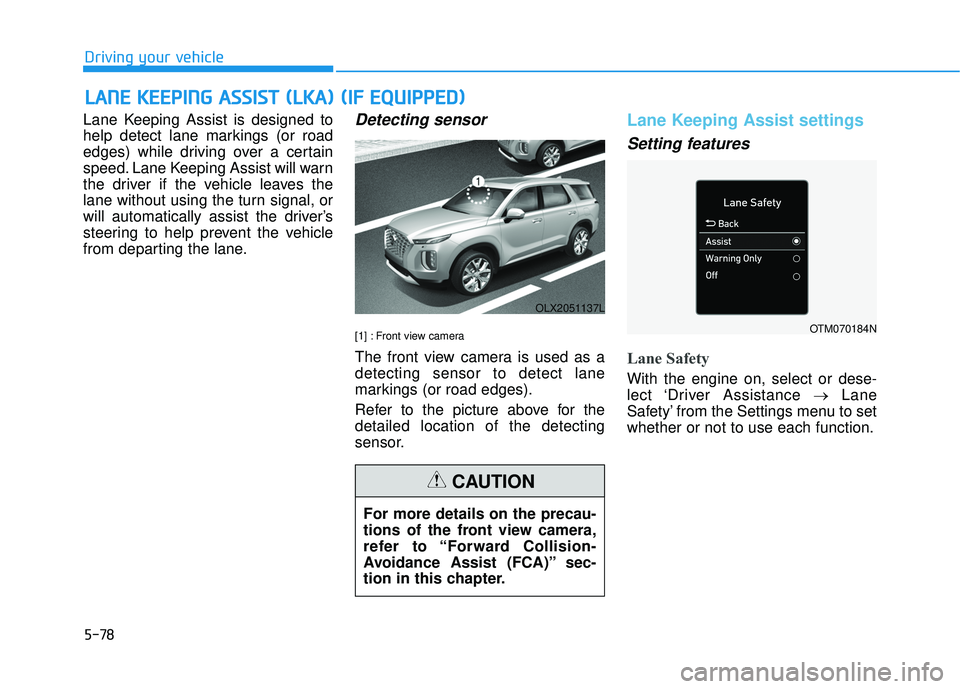
[1] : Front view camera
The front view camera is used as a
detecting sensor to detect lane
markings (or road edges).
Refer to the picture above for the
detailed location of the detecting
sensor.
Lane Keeping Assist settings
Setting features
Lane Safety
With the engine on, select or dese-
lect ‘Driver Assistance →Lane
Safety’ from the Settings menu to set
whether or not to use each function.
L L A A N N E E K K E EE EP P I IN N G G A A S SS SI IS S T T ( ( L L K K A A ) ) ( ( I IF F E E Q Q U UI IP P P PE ED D ) )
OLX2051137L
For more details on the precau-
tions of the front view camera,
refer to “Forward Collision-
Avoidance Assist (FCA)” sec-
tion in this chapter.
CAUTION
OTM070184N