ESC Hyundai Santa Fe 2007 User Guide
[x] Cancel search | Manufacturer: HYUNDAI, Model Year: 2007, Model line: Santa Fe, Model: Hyundai Santa Fe 2007Pages: 355, PDF Size: 13.03 MB
Page 169 of 355
1157157157157157157
FEATURES OF YOUR HYUNDAI
B445E02CM-AAT1. SCAN buttonStation scan function
Press the SCAN button for the tuner to
scan for radio signals in the selected fre-
quency band (AM or FM). Once the tuner
locks onto the signal of a transmitting sta-
tion, it plays that station for 5 seconds
before scanning for the next available sta-
tion in the selected frequency band.
If you want to keep listening to a particular
station and want to stop the scanning,
press the SCAN button again.
This function is useful for providing you
with a good overview of all the radio sta-
tions within range of your tuner.
Preset scan function
Press and hold the SCAN button for more
than 2 seconds. Each preset radio stations
will be automatically played for 5 seconds.
If you want to keep listening to a particular
preset station and want to stop the scan-
ning, press the SCAN button again.
2. SEEK '
∧ ∧∧ ∧
∧' and '
∨ ∨∨ ∨
∨' buttons
Automatic Station Selection function
Press the '
∧ ∧∧ ∧
∧' and '
∨ ∨∨ ∨
∨' buttons to scan up
and down the frequency range for the next
available radio station and automatically
lock on to that frequency.
The LCD screen displays the frequency of
the radio station transmitting a clear and
strong signal.
Use this function to search for a radio
station you want. If you like a particular
station, you can store it as one of 6 presets
using the Preset buttons described later.
NOTE:This function is not effective if you are
experiencing poor reception in your vi-
cinity.
3. TUNE KnobManual Station Selection
Rotate the knob clockwise or counter-clock-
wise to manually advance up or down the
frequency range. The Tune knob also gives
you fine-grain control which you can use to
manually fine-tune your frequency selec-
tion. This is useful if you are searching for
a radio signal which is not strong enough
for you to use the Automatic Station Selec-
tion functionNOTE:The speed at which you advance up or
down the frequency range depends on
how fast you turn the knob.
Page 171 of 355
1159159159159159159
FEATURES OF YOUR HYUNDAI
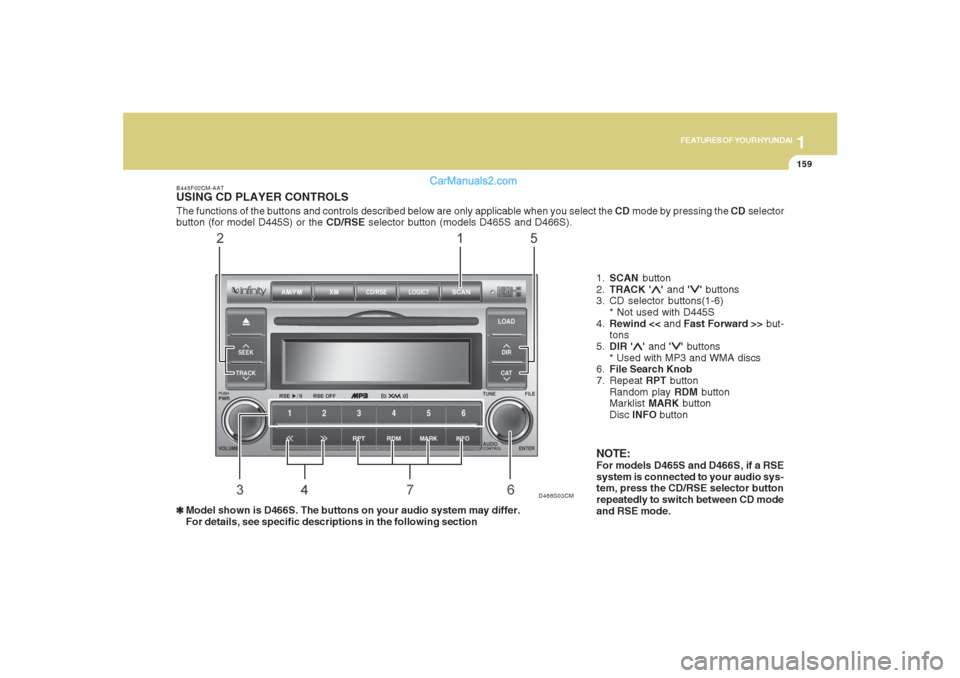
The functions of the buttons and controls described below are only applicable when you select the CD mode by pressing the CD selector
button (for model D445S) or the CD/RSE selector button (models D465S and D466S).B445F02CM-AATUSING CD PLAYER CONTROLS❃ ❃❃ ❃
❃Model shown is D466S. The buttons on your audio system may differ.
For details, see specific descriptions in the following section1.SCAN button
2.TRACK '
∧ ∧∧ ∧
∧' and '
∨ ∨∨ ∨
∨' buttons
3. CD selector buttons(1-6)
* Not used with D445S
4.Rewind << and Fast Forward >> but-
tons
5.DIR '
∧ ∧∧ ∧
∧' and '
∨ ∨∨ ∨
∨' buttons
* Used with MP3 and WMA discs
6.File Search Knob
7. Repeat RPT button
Random play RDM button
Marklist MARK button
Disc INFO button
NOTE:For models D465S and D466S, if a RSE
system is connected to your audio sys-
tem, press the CD/RSE selector button
repeatedly to switch between CD mode
and RSE mode.
D466S03CM
Page 172 of 355
1FEATURES OF YOUR HYUNDAI
160
B445G02CM-AAT1. SCAN buttonDisc Scan function
During CD playback, press the SCAN
button to play the first 10 seconds (pre-
view) of all tracks on the current CD.
Once you hear a track you want, press the
SCAN button again to resume normal play-
back2. Track UP '
∧ ∧∧ ∧
∧' and DOWN '
∨ ∨∨ ∨
∨' but-
tons
During CD playback, press the
∧ and
∨
buttons to select and play the next or pre-
vious track on the current disc. The LCD
screen displays the track number as you
press the buttons. You can press the but-
ton several times to select the track you
want.
3. CD selector buttons (1~6)Model D445S:
The CD selector buttons are not used with
Model D445.
Models D465S and D466S:
Press the CD selector button correspond-
ing to the CD you want. The CD player
automatically interrupts playback and loads
the selected CD.NOTE:If no CD is loaded in the selected posi-
tion, the LCD screen displays the No
Disc indicator.4. Rewind << and Fast Forward >>
buttonsDuring CD playback, press and hold the
<< or >> buttons to rewind or fast-forward
playback of the current track. The LCD
screen displays the elapsed time of the
track you are rewinding or fast-forwarding.
Release the << or >> button when you
have reached the point you want. Play-
back resumes automatically at the selected
point.
5. DIR '
∧ ∧∧ ∧
∧' and '
∨ ∨∨ ∨
∨' buttons (MP3 and
WMA discs)
During MP3/WMA CD playback, press the
DIR '
∧ ∧∧ ∧
∧' or '
∨ ∨∨ ∨
∨' buttons to switch to the next
or previous directory on the CD. The LCD
screen displays the name of the directory
you have switched to. You can press the
button several times to search for the direc-
tory you want. The directories are dis-
played in sequence (i.e. ascending or
descending alphabetical order).
To access the directory displayed, press
the File Search knob to ENTER your se-
lection.
NOTE:The Directory UP and DOWN buttons
can only be used when you are playing a
CD which has organized its tracks in the
form of directories. Normally, only MP3
or WMA CDs will contain a directory tree
which you can navigate using these but-
tons.
Page 174 of 355
1FEATURES OF YOUR HYUNDAI
162
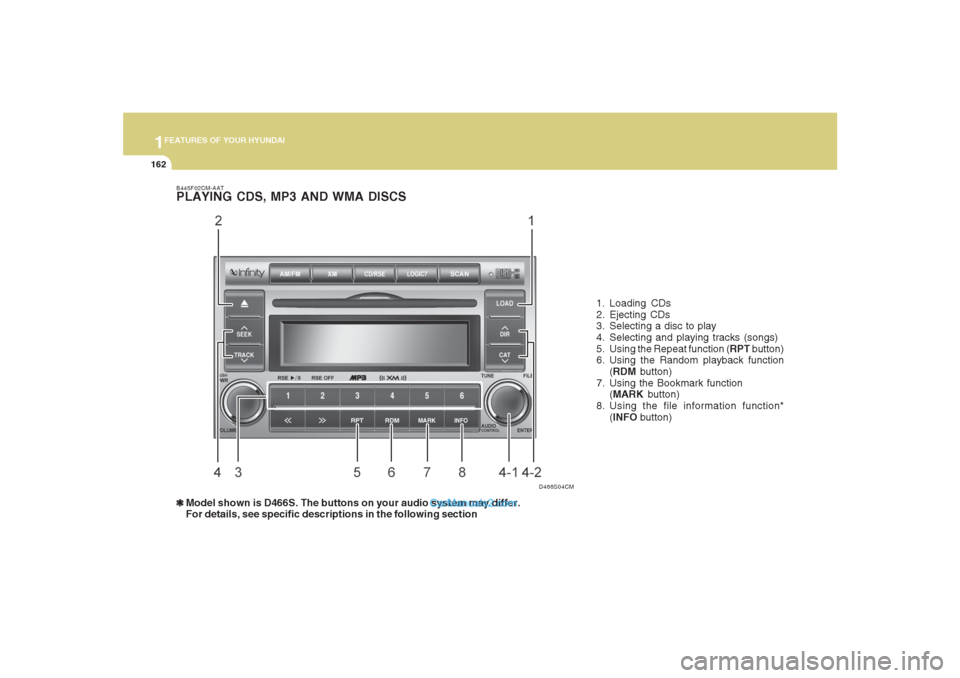
B445F02CM-AATPLAYING CDS, MP3 AND WMA DISCS❃ ❃❃ ❃
❃Model shown is D466S. The buttons on your audio system may differ.
For details, see specific descriptions in the following section1. Loading CDs
2. Ejecting CDs
3. Selecting a disc to play
4. Selecting and playing tracks (songs)
5. Using the Repeat function (RPT button)
6. Using the Random playback function
(RDM button)
7. Using the Bookmark function
(MARK button)
8. Using the file information function*
(INFO button)
D466S04CM
Page 180 of 355
1FEATURES OF YOUR HYUNDAI
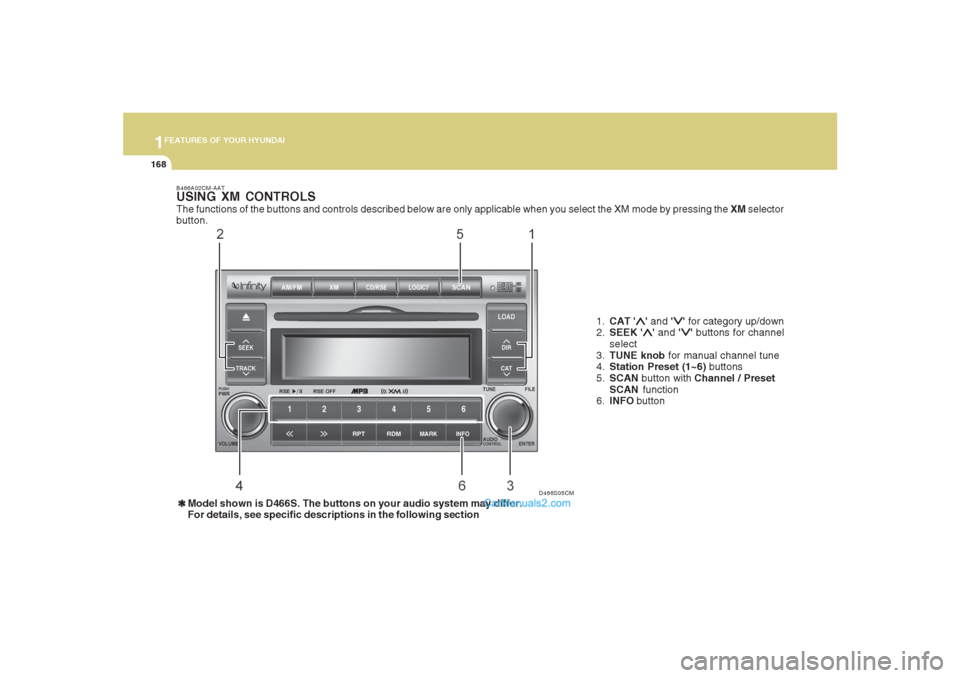
168
D466S05CM B466A02CM-AAT
USING XM CONTROLSThe functions of the buttons and controls described below are only applicable when you select the XM mode by pressing the XM selector
button.
1.CAT '
∧ ∧∧ ∧
∧' and '
∨ ∨∨ ∨
∨' for category up/down
2.SEEK '
∧ ∧∧ ∧
∧' and '
∨ ∨∨ ∨
∨' buttons for channel
select
3.TUNE knob for manual channel tune
4.Station Preset (1~6) buttons
5.SCAN button with Channel / Preset
SCAN function
6.INFO button
❃ ❃❃ ❃
❃Model shown is D466S. The buttons on your audio system may differ.
For details, see specific descriptions in the following section
Page 184 of 355
1FEATURES OF YOUR HYUNDAI
172
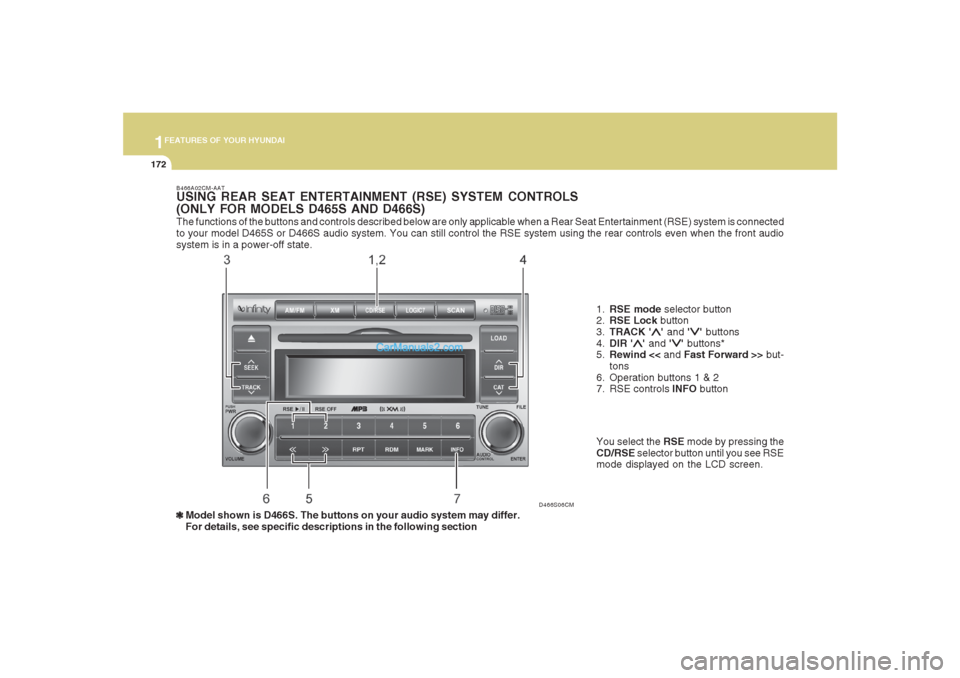
The functions of the buttons and controls described below are only applicable when a Rear Seat Entertainment (RSE) system is connected
to your model D465S or D466S audio system. You can still control the RSE system using the rear controls even when the front audio
system is in a power-off state.
D466S06CM B466A02CM-AAT
USING REAR SEAT ENTERTAINMENT (RSE) SYSTEM CONTROLS
(ONLY FOR MODELS D465S AND D466S)
1.RSE mode selector button
2.RSE Lock button
3.TRACK '
∧ ∧∧ ∧
∧' and '
∨ ∨∨ ∨
∨' buttons
4.DIR '
∧ ∧∧ ∧
∧' and '
∨ ∨∨ ∨
∨' buttons*
5.Rewind << and Fast Forward >> but-
tons
6. Operation buttons 1 & 2
7. RSE controls INFO button
❃ ❃❃ ❃
❃Model shown is D466S. The buttons on your audio system may differ.
For details, see specific descriptions in the following sectionYou select the RSE mode by pressing the
CD/RSE selector button until you see RSE
mode displayed on the LCD screen.
Page 200 of 355
1FEATURES OF YOUR HYUNDAI
188
DVD/VCD PLAYER OPERATION
Disc/Format CompatibilityYour RSE player accepts and plays all
DVDs in 4:3 (normal) and 16:9 (widescreen)
video formats. With DVDs that offer mul-
tiple formats, the default format is 16:9 and
will stay that way unless changed by the
user. See "Adjusting the LCD display" to
learn how to adjust the format.
The DVD player has the capability to play
DVD-video, DVD-R, DVD-RW, CD-DA, CD-
R, CD-RW, VCD.
The DVD player was factory programmed
with a region code for the assigned market
or country. If a DVD is inserted for a region
code that doesn’t match with the player, the
RSE player will eject the disc. An error
message will be shown on the overhead
LCD display and the RSE control panel
display.
NOTE:Because there is no universal standard
for DVD/VCD programming, your disc
may behave differently. Some DVDs may
present warning messages about unau-
thorized duplication, some will go directly
to a menu, some may have different on-
disc menu and start playing the movie
immediately, and some may be unread-
able or damaged and will be ejected.NOTE:While the player will accept DVD ROM
and CD ROM discs, the RSE cannot play
discs in these formats and will eject
them.
The player is only capable of reading the
bottom side of a disc. When inserting a
single-sided disc, the label side should be
up. When inserting a two-sided disc, the
desired play side should be down.
Press DISP on the RSE control panel or the
remote controller, then press the
∧ ∧∧ ∧
∧ NEXT
or
∨ ∨∨ ∨
∨ PREV buttons to cycle through LCD
display adjustments (SCREEN SIZE,
BRIGHTNESS, CONTRAST, CHROMA,
HUE). To adjust the SCREEN SIZE, use
the < REW or FF > buttons to select the
preferred size.1. Menu
DVDs can be controlled, and any special
programming or features accessed, by
using the menu. To access the menu while
playing a DVD, press the MENU button.
Press the button a second time to exit the
menu and return to the DVD program at the
point it was being viewed. The menu is not
available during disc initialization, the be-
ginning credits or any copyright and FBI
warnings.
While viewing the menu, press the
∧ ∧∧ ∧
∧ NEXT
button to move the cursor up and the
∨ ∨∨ ∨
∨
PREV button to move the cursor down the
menu. Press the > FWD button to move the
cursor to the right, and the < REW button to
move the cursor to the left.NOTE:You must repeatedly push any button to
move through several items. Pressing
and holding a button will not advance the
cursor beyond the first item.
Press ENTER or Play/Pause to select the
desired menu choice.
B470D01CM-AAT
Page 212 of 355
DRIVING YOUR HYUNDAI
2
Engine Exhaust Can Be Dangerous! ............................ 2-2
Before Starting the Engine ............................................ 2-4
Key Positions ................................................................ 2-5
Starting ..........................................................................2-6
Manual Transaxle ......................................................... 2-7
Automatic Transaxle...................................................2-10
Anti-Lock Brake System (ABS) ..................................2-15
Electronic Stability Control (ESC)...............................2-16
Full-Time AWD Operation ...........................................2-17
AWD Lock System.....................................................2-20
Good Braking Practices..............................................2-21
Driving for Economy...................................................2-23
Winter Driving.............................................................2-24
Trailer or Vehicle Towing ............................................2-27
Trailer Connector........................................................2-31
Vehicle Load Limit.......................................................2-32
2
Page 226 of 355
2
DRIVING YOUR HYUNDAI
15
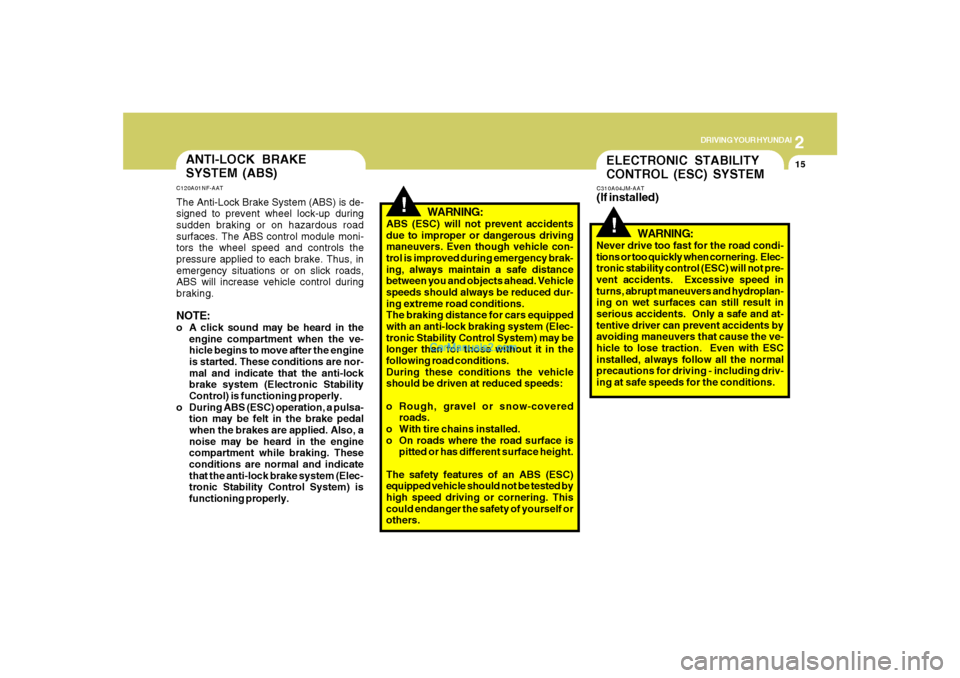
!
WARNING:
ABS (ESC) will not prevent accidents
due to improper or dangerous driving
maneuvers. Even though vehicle con-
trol is improved during emergency brak-
ing, always maintain a safe distance
between you and objects ahead. Vehicle
speeds should always be reduced dur-
ing extreme road conditions.
The braking distance for cars equipped
with an anti-lock braking system (Elec-
tronic Stability Control System) may be
longer than for those without it in the
following road conditions.
During these conditions the vehicle
should be driven at reduced speeds:
o Rough, gravel or snow-covered
roads.
o With tire chains installed.
o On roads where the road surface is
pitted or has different surface height.
The safety features of an ABS (ESC)
equipped vehicle should not be tested by
high speed driving or cornering. This
could endanger the safety of yourself or
others.
ANTI-LOCK BRAKE
SYSTEM (ABS)C120A01NF-AATThe Anti-Lock Brake System (ABS) is de-
signed to prevent wheel lock-up during
sudden braking or on hazardous road
surfaces. The ABS control module moni-
tors the wheel speed and controls the
pressure applied to each brake. Thus, in
emergency situations or on slick roads,
ABS will increase vehicle control during
braking.NOTE:o A click sound may be heard in the
engine compartment when the ve-
hicle begins to move after the engine
is started. These conditions are nor-
mal and indicate that the anti-lock
brake system (Electronic Stability
Control) is functioning properly.
o During ABS (ESC) operation, a pulsa-
tion may be felt in the brake pedal
when the brakes are applied. Also, a
noise may be heard in the engine
compartment while braking. These
conditions are normal and indicate
that the anti-lock brake system (Elec-
tronic Stability Control System) is
functioning properly.
ELECTRONIC STABILITY
CONTROL (ESC) SYSTEMC310A04JM-AAT(If installed)
!
WARNING:
Never drive too fast for the road condi-
tions or too quickly when cornering. Elec-
tronic stability control (ESC) will not pre-
vent accidents. Excessive speed in
turns, abrupt maneuvers and hydroplan-
ing on wet surfaces can still result in
serious accidents. Only a safe and at-
tentive driver can prevent accidents by
avoiding maneuvers that cause the ve-
hicle to lose traction. Even with ESC
installed, always follow all the normal
precautions for driving - including driv-
ing at safe speeds for the conditions.
Page 227 of 355
2
DRIVING YOUR HYUNDAI
16
!
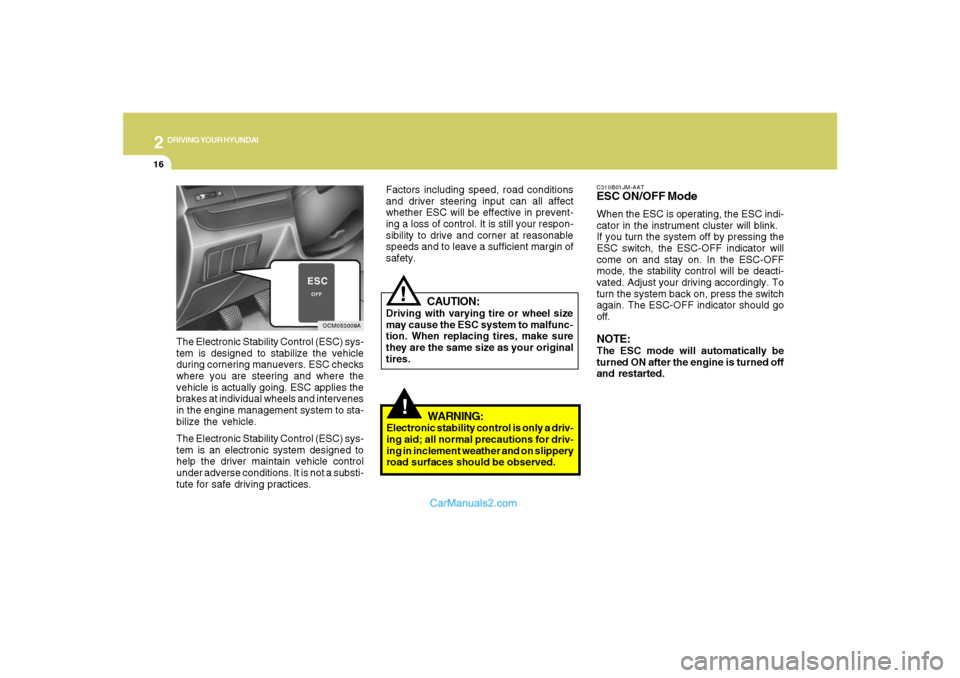
C310B01JM-AATESC ON/OFF ModeWhen the ESC is operating, the ESC indi-
cator in the instrument cluster will blink.
If you turn the system off by pressing the
ESC switch, the ESC-OFF indicator will
come on and stay on. In the ESC-OFF
mode, the stability control will be deacti-
vated. Adjust your driving accordingly. To
turn the system back on, press the switch
again. The ESC-OFF indicator should go
off.NOTE:The ESC mode will automatically be
turned ON after the engine is turned off
and restarted.
OCM053009A
The Electronic Stability Control (ESC) sys-
tem is designed to stabilize the vehicle
during cornering manuevers. ESC checks
where you are steering and where the
vehicle is actually going. ESC applies the
brakes at individual wheels and intervenes
in the engine management system to sta-
bilize the vehicle.
The Electronic Stability Control (ESC) sys-
tem is an electronic system designed to
help the driver maintain vehicle control
under adverse conditions. It is not a substi-
tute for safe driving practices.
CAUTION:
Driving with varying tire or wheel size
may cause the ESC system to malfunc-
tion. When replacing tires, make sure
they are the same size as your original
tires.
!
Factors including speed, road conditions
and driver steering input can all affect
whether ESC will be effective in prevent-
ing a loss of control. It is still your respon-
sibility to drive and corner at reasonable
speeds and to leave a sufficient margin of
safety.
WARNING:
Electronic stability control is only a driv-
ing aid; all normal precautions for driv-
ing in inclement weather and on slippery
road surfaces should be observed.