Automatic Hyundai Santa Fe 2008 Service Manual
[x] Cancel search | Manufacturer: HYUNDAI, Model Year: 2008, Model line: Santa Fe, Model: Hyundai Santa Fe 2008Pages: 355, PDF Size: 12.36 MB
Page 183 of 355
1171171171171171171
FEATURES OF YOUR HYUNDAI
To call back a preset channel:
1. Select the band (XM1, XM2 or XM3) you
want using the XM button.
2. Press the preset button you want.
The system automatically jumps to the
preset channel. The channel informa-
tion and preset number are displayed
on the LCD screen.5. SCAN buttonChannel scan function
Press the SCAN button to scan all the
channels in XM. The audio system plays
the audio of a channel for 10 seconds
before scanning for the next channel. When
the category search is on, the channel
scan is blinded within the current category.
Otherwise, it is done across the catego-
ries.
If you want to keep listening to a particular
channel and want to stop the scanning,
press the SCAN button again.
This function is useful for providing you
with a good overview of all the radio sta-
tions within range of your tuner.Preset scan function
Press and hold the SCAN button for more
than 2 seconds. Each preset channel will
be automatically played for 10 seconds. If
you want to keep listening to a particular
preset channel and want to stop the scan-
ning, press the SCAN button again.
6. INFO buttonINFO button brings out the extra channel
info of the current played channel. The
audio system shows the following extra
channel info in sequence when the INFO
is pressed several times. First, it shows the
song/program title. Then, it follows by the
name of the artist/feature. The last one is
the category name. Another press of INFO
button brings the display back to the status
of the current played channel.Checking RADIO IDEvery SDAR box comes with one unique
RADIO ID. You need ID to make subscrip-
tion with XM service provider. Do single
seek to channel 0 using SEEK '
∧ ∧∧ ∧
∧' and '
∨ ∨∨ ∨
∨'
buttons. The audio system will then dis-
play the RADIO ID of the SDAR box.
Buttons not in use in tuner modeThe following buttons and functions are
not used in XM mode.
-<< button
->> button
-RPT button
-RDM button
-MARK button
Page 185 of 355
1173173173173173173
FEATURES OF YOUR HYUNDAI
B466B02CM-AAT1. CD/RSE button (Switching to RSE
mode)Switch between RSE mode and CD mode
by pressing the CD/RSE selector button
until you see RSE mode displayed in the
LCD screen. In RSE mode, you can control
the RSE system from the controls on the
front panel of the audio system.NOTE:o If you are in Radio mode, press the
CD/RSE selector button once to switch
to CD mode and then press the CD/
RSE selector button again to switch to
RSE mode.
o If the CD changer does not contain
any CDs, you must press the CD/RSE
selector button a second time within
5 seconds of the first. Otherwise, the
audio system will automatically switch
back to radio mode.
2. RSE Lock buttonIn any mode, press and hold the CD/RSE
selector button for more than 2 seconds to
lock or release the RSE from the LOCK
mode. The LCD screen displays LOCK to
indicate that the system is in LOCK mode.
When the LOCK mode is engaged, only
the POWER ON/OFF button and the EJECT
button on the RSE system will be func-
tional.
This function is useful if you do not want
rear-seat passengers (e.g. children) to play
with the controls or otherwise interrupt disc
playback.
3. Track '
∧ ∧∧ ∧
∧' and '
∨ ∨∨ ∨
∨' buttons
If the RSE system is playing a disc and the
audio system is in RSE mode, press the
TRACK '
∧ ∧∧ ∧
∧' and '
∨ ∨∨ ∨
∨' buttons to select and
play the next or previous track on the disc
being played in the RSE.
The LCD screen displays the track status
as you press the buttons. You can press
the button several times to select the track
you want.
Page 186 of 355
1FEATURES OF YOUR HYUNDAI
174
4. Dir '
∧ ∧∧ ∧
∧' and '
∨ ∨∨ ∨
∨' buttons*
If the RSE system is playing an MP3 disc*
and the audio system is in RSE mode,
press the DIR '
∧ ∧∧ ∧
∧' or '
∨ ∨∨ ∨
∨' buttons to switch
to the next or previous directory on the CD.
The LCD screen displays the name of the
directory you have switched to and auto-
matically begins playback of the first track
in the directory.
* NOTE:The DIR '
∧ ∧∧ ∧
∧' or '
∨ ∨∨ ∨
∨' buttons can only be
used when you are playing a CD which
has organized its tracks in the form of
directories. Normally, only MP3 CDs will
contain a directory tree which you can
navigate using these buttons.
5. << and >> buttons (Rewind and
Fast Forward)If the RSE system is playing a disc and the
audio system is in RSE mode, press and
hold the << or >> button to rewind or fast-
forward playback of the current track. The
LCD screen displays the elapsed time of
the track you are rewinding or fast-for-
warding. Release the << or >> button when
you have reached the point you want.
Playback resumes automatically at the
selected point.6. Operation buttons (1-2)If a disc is loaded in the RSE system and
the audio system is in RSE mode,
o Press button 1 to play/pause the play-
back of the disc loaded in the RSE
system DVD player
o Press button 2 to power off the RSE
system but continues to play the disc in
the DVD player.
7. INFO buttonIf the RSE system is playing a disc and the
audio system is in RSE mode, press INFO
for detailed information on the assignment
of operational / playback controls to the
buttons on the audio system’s front panel.Buttons not in use in RSE modeThe following buttons and functions are
not used in RSE mode.
-RPT button
-RDM button
-MARK button
-SCAN button
- Number buttons 3, 4, 5, 6
Page 187 of 355
1175175175175175175
FEATURES OF YOUR HYUNDAI
USING EXTERNAL CONTROLSThe Dimmer controlThe Dimmer control setting determines
the brightness of the entire vehicle’s dis-
plays.
Turn the scroll wheel up or down to in-
crease or decrease the brightness of the
vehicle’s instrument panels, backlit dis-
plays and the audio system’s LCD screen
and backlit controls.
Steering wheel audio controlsSteering wheel-mounted audio controls
allow you to make adjustments to the most
frequently used audio controls without tak-
ing your eyes off the road. Control Function
MODE button Press this button to switch between the FM1/FM2/AM/XM1/
XM2/XM3/CD/RSE modes. Check the LCD screen display
to confirm if you have selected the mode you want.
NOTE:
The modes available depend on the model of your audio
system and also on whether any auxiliary/RSE device is
connected to your audio system.
-VOL+ rocker switchPress and hold to decrease (-) or increase (+) the volume.
-SEEK+ rocker switchIn Tuner mode:
Press and release + and – to switch to the next or previous
preset station. For example, to switch from preset station 1
to preset station 3, press + twice.Press and hold (about 1 second) + and – to scan up and
down the frequency range for the next available radio station
and automatically lock on to that frequency.
In CD mode:
During CD playback,
press and release – and + to select and
play the previous or next track on the disc. The LCD screen
displays the track number as you press the buttons. You can
press the button several times to select the track you want.
Page 193 of 355
1
FEATURES OF YOUR HYUNDAI
181
FEATURES OF YOUR HYUNDAI
181181181181
Adjusting the LCD Display
Press the DISP button on the RSE control
panel to adjust the LCD display. To adjust
the brightness, select Brightness, then,
press the < REW (dimmer) or FWD >
(brighter) buttons. The next time the RSE
is turned on, the LCD display will return to
the brightness level it was adjusted to
when last used. Brightness can be ad-
justed regardless of whether the RSE is
playing an audio or video source.
While the RSE is playing a video signal,
press DISP and then press the
∧ ∧∧ ∧
∧ NEXT or
∨ ∨∨ ∨
∨ PREV buttons to cycle through other
LCD display adjustments including
SCREEN SIZE, CONTRAST, CHROMA
and HUE. With any of these settings dis-
played, press the < REW or FF > buttons to
adjust the settings.
To close the LCD display, pull the bottom
edge towards you and push it up until it
clicks and locks into the stow-away posi-
tion.
Cleaning the LCD Display
If the LCD display becomes dusty or dirty,
clean it by wiping gently with a soft, dry,
clean cloth. Do not use chemical cleanser
to clean the screen.Loading a Disc
To load a disc in the player, insert it part
way into the loading slot. The player will
automatically grip the disc and pull it the
rest of the way in.
Disc Protection
The player has an Auto-Reload Disc Pro-
tection feature to protect discs from acci-
dental damage. If a disc is not removed
within 12 seconds after being ejected, it
will be pulled back into the player. The disc
will not begin playing.
Audio via Vehicle Speakers
To hear the audio from the RSE through
the vehicle's speakers, the RSE must be
selected by the radio CD/AUX button in the
front of the vehicle. Regardless of whether
RSE audio is selected for the vehicle
speakers or not, when the RSE audio is
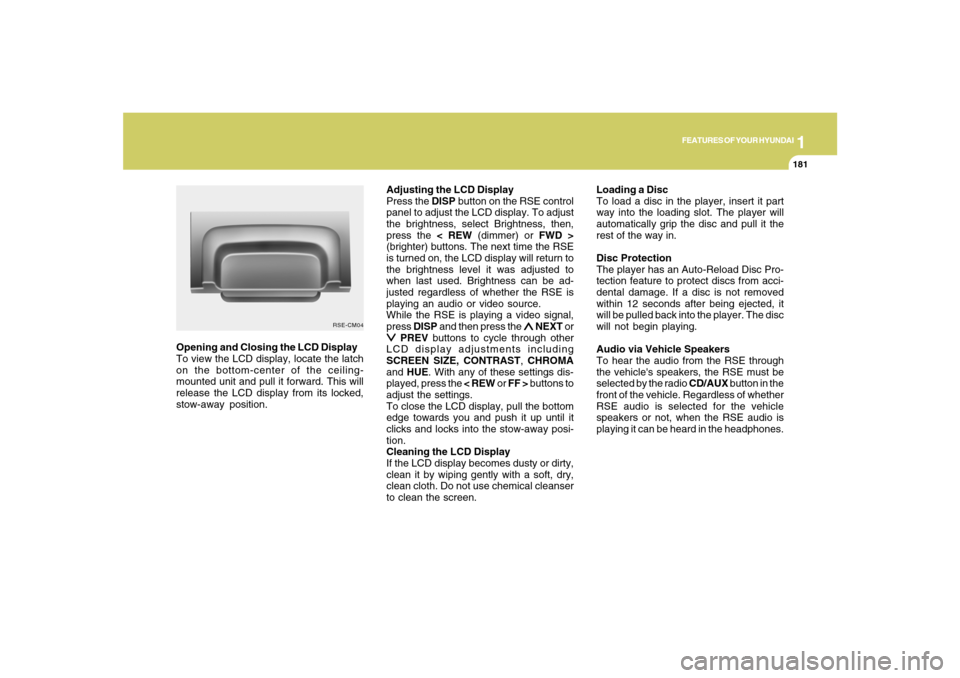
playing it can be heard in the headphones. Opening and Closing the LCD Display
To view the LCD display, locate the latch
on the bottom-center of the ceiling-
mounted unit and pull it forward. This will
release the LCD display from its locked,
stow-away position.
RSE-CM04
Page 195 of 355
1
FEATURES OF YOUR HYUNDAI
183
FEATURES OF YOUR HYUNDAI
183183183183
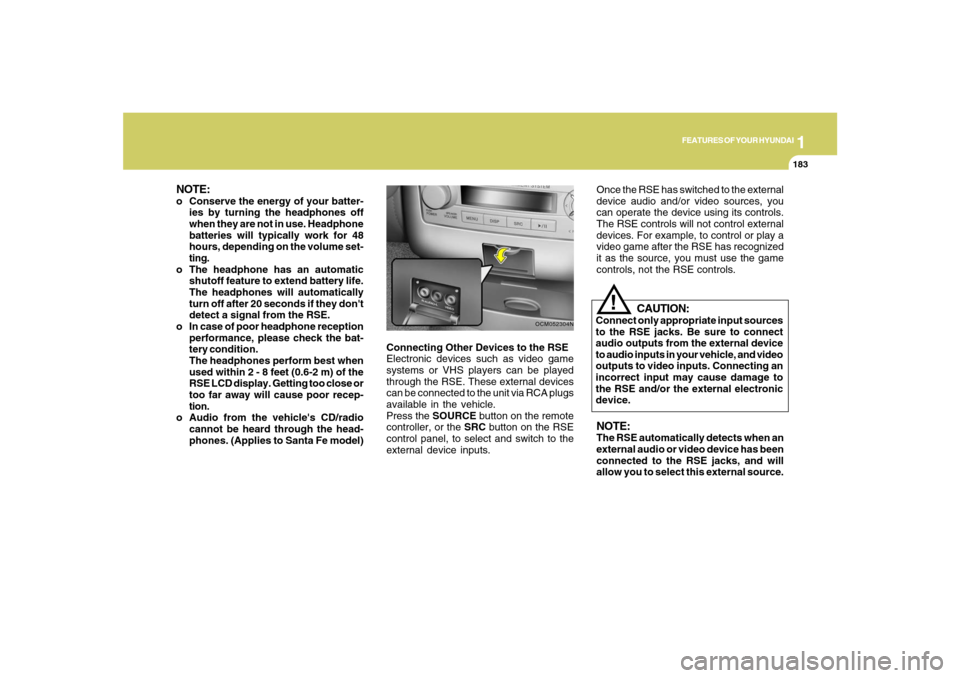
Connecting Other Devices to the RSE
Electronic devices such as video game
systems or VHS players can be played
through the RSE. These external devices
can be connected to the unit via RCA plugs
available in the vehicle.
Press the SOURCE button on the remote
controller, or the SRC button on the RSE
control panel, to select and switch to the
external device inputs.
OCM052304N
Once the RSE has switched to the external
device audio and/or video sources, you
can operate the device using its controls.
The RSE controls will not control external
devices. For example, to control or play a
video game after the RSE has recognized
it as the source, you must use the game
controls, not the RSE controls.NOTE:The RSE automatically detects when an
external audio or video device has been
connected to the RSE jacks, and will
allow you to select this external source.
CAUTION:
Connect only appropriate input sources
to the RSE jacks. Be sure to connect
audio outputs from the external device
to audio inputs in your vehicle, and video
outputs to video inputs. Connecting an
incorrect input may cause damage to
the RSE and/or the external electronic
device.
!
NOTE:o Conserve the energy of your batter-
ies by turning the headphones off
when they are not in use. Headphone
batteries will typically work for 48
hours, depending on the volume set-
ting.
o The headphone has an automatic
shutoff feature to extend battery life.
The headphones will automatically
turn off after 20 seconds if they don't
detect a signal from the RSE.
o In case of poor headphone reception
performance, please check the bat-
tery condition.
The headphones perform best when
used within 2 - 8 feet (0.6-2 m) of the
RSE LCD display. Getting too close or
too far away will cause poor recep-
tion.
o Audio from the vehicle's CD/radio
cannot be heard through the head-
phones. (Applies to Santa Fe model)
Page 199 of 355
1
FEATURES OF YOUR HYUNDAI
187
FEATURES OF YOUR HYUNDAI
187187187187
5. SRC(Source) Button
After inserting a disc in the RSE, it will
automatically use that as the source and
begin playing that disc. The RSE control
panel will display "DISC IN" when there is
disc loaded in the player.
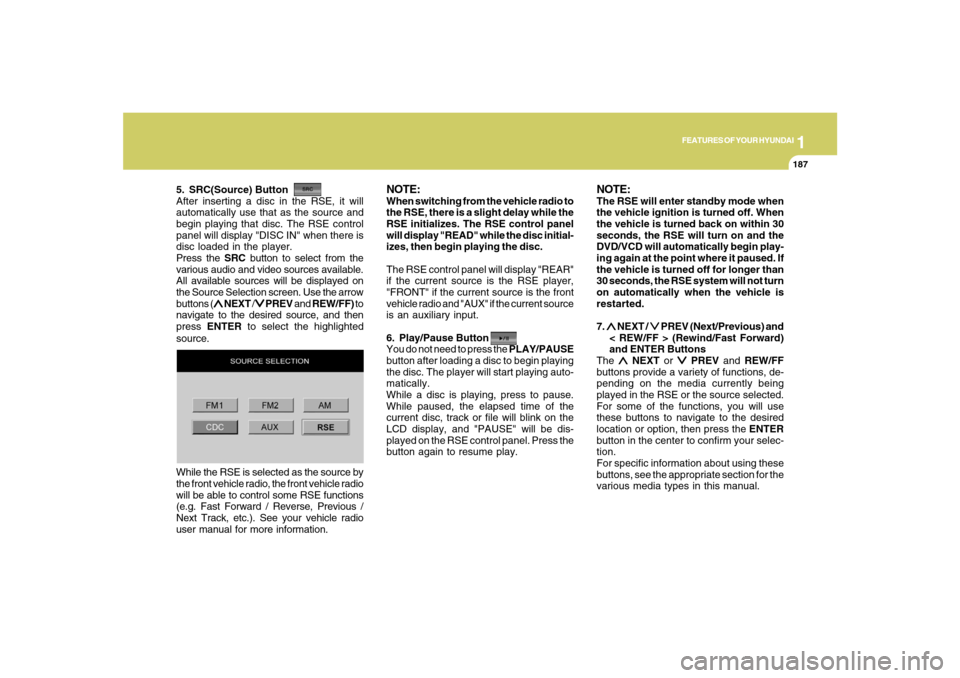
Press the SRC button to select from the
various audio and video sources available.
All available sources will be displayed on
the Source Selection screen. Use the arrow
buttons (
∧ ∧∧ ∧
∧ NEXT /
∨ ∨∨ ∨
∨ PREV and REW/FF) to
navigate to the desired source, and then
press ENTER to select the highlighted
source.
NOTE:When switching from the vehicle radio to
the RSE, there is a slight delay while the
RSE initializes. The RSE control panel
will display "READ" while the disc initial-
izes, then begin playing the disc.
The RSE control panel will display "REAR"
if the current source is the RSE player,
"FRONT" if the current source is the front
vehicle radio and "AUX" if the current source
is an auxiliary input.
6. Play/Pause Button
You do not need to press the PLAY/PAUSE
button after loading a disc to begin playing
the disc. The player will start playing auto-
matically.
While a disc is playing, press to pause.
While paused, the elapsed time of the
current disc, track or file will blink on the
LCD display, and "PAUSE" will be dis-
played on the RSE control panel. Press the
button again to resume play.
NOTE:The RSE will enter standby mode when
the vehicle ignition is turned off. When
the vehicle is turned back on within 30
seconds, the RSE will turn on and the
DVD/VCD will automatically begin play-
ing again at the point where it paused. If
the vehicle is turned off for longer than
30 seconds, the RSE system will not turn
on automatically when the vehicle is
restarted.
7. ∧ ∧∧ ∧
∧ NEXT /
∨ ∨∨ ∨
∨ PREV (Next/Previous) and
< REW/FF > (Rewind/Fast Forward)
and ENTER Buttons
The
∧ ∧∧ ∧
∧ NEXT or
∨ ∨∨ ∨
∨ PREV and REW/FF
buttons provide a variety of functions, de-
pending on the media currently being
played in the RSE or the source selected.
For some of the functions, you will use
these buttons to navigate to the desired
location or option, then press the ENTER
button in the center to confirm your selec-
tion.
For specific information about using these
buttons, see the appropriate section for the
various media types in this manual. While the RSE is selected as the source by
the front vehicle radio, the front vehicle radio
will be able to control some RSE functions
(e.g. Fast Forward / Reverse, Previous /
Next Track, etc.). See your vehicle radio
user manual for more information.
Page 201 of 355
1
FEATURES OF YOUR HYUNDAI
189
FEATURES OF YOUR HYUNDAI
189189189189
Playing a DVD/VCD
You can control your DVD or VCD by using
the buttons on the RSE control panel or by
using the remote controller. Instructions
for the controls listed below are the same
whether using the RSE control panel or the
remote controller. However, there are some
additional functions that are only available
from the remote controller. These buttons
and their functions are discussed in the
"Remote Controller" section of this manual.
1. Play/Pause Button
You do not need to press the PLAY/PAUSE
button after loading a disc to begin playing
the disc. The player will start playing auto-
matically.
While a disc is playing, press PLAY/PAUSE
to pause. While paused, the elapsed time
of the current disc, track or file will blink on
the LCD display, and "PAUSE" will be
displayed on the RSE control panel. Press
the button again to resume play.
NOTE:The RSE will enter standby mode when
the vehicle ignition is turned off. When
the vehicle is turned back on within 30
seconds, the RSE will turn on and the CD
will automatically begin playing again at
the point where it paused. If the vehicle
is turned off for longer than 30 seconds,
the RSE system will not turn on auto-
matically when the vehicle is restarted.
2. Fast Forward/Reverse
Press and hold the FF > or < REW button
and the player will fast forward or reverse
at 32 times the normal speed. Release the
FWD or < REW button to return to normal
speed play.3. Previous/Next Chapter
While a DVD/VCD is playing, press the
∧ ∧∧ ∧
∧
NEXT button to skip to the next chapter.
Press the
∨ ∨∨ ∨
∨ PREV button to jump to the
beginning of the current chapter. Press
∨ ∨ ∨ ∨
∨
PREV again to go move through earlier
chapters. Press the button repeatedly to
move quickly through chapters.NOTE:Some VCDs do not have track informa-
tion. If the VCD has no chapter informa-
tion, pressing either of these buttons will
restart the VCD.
While pressing the
∧ ∧∧ ∧
∧ NEXT or
∨ ∨∨ ∨
∨ PREV
buttons, the Status Display, including the
current medium (DVD or VCD), chapter
and title information is displayed. It will
automatically disappear after five seconds.
Page 202 of 355
1FEATURES OF YOUR HYUNDAI
190
NOTE:Some DVDs do not permit chapter navi-
gation.
Instead of using the
∨ ∨∨ ∨
∨ PREV/
∧ ∧∧ ∧
∧ NEXT
buttons, you can also enter the chapter
number using the numbers on the remote
controller. While a DVD/VCD is playing,
press the number button(s) that correspond
to the desired chapter and press ENTER.
4. Stop a Disc
The disc will automatically stop when any
other source (e.g. the vehicle radio or an
external game) is selected. When you
switch back to the DVD, it will begin playing
at the point where it stopped.
While the player is running, press the RSE
control panel POWER/VOLUME knob, or
the ON/OFF button on the remote control-
ler, to stop a disc and turn off the RSE
system and the DVD player. When the
RSE is turned on again, the disc will begin
playing at the point where it stopped.5. Eject a Disc
To eject a disc press the button. A disc
can be ejected even when the unit or the
vehicle is turned off.
NOTE:The player has an Auto-Reload Disc
Protection feature to protect discs from
accidental damage. If a disc is not re-
moved within 12 seconds after being
ejected, it will be pulled back into the
player.
CD PLAYER OPERATIONThe RSE will play audio CDs in both stan-
dard (12 cm) and mini-disc (8 cm) format.NOTE:While the player will accept DVD ROM or
CD ROM disc, the RSE cannot play disc
in this format will eject the disc.
1. Volume Control
You can adjust the volume of the audio
heard in the vehicle speakers from the
RSE control panel or the remote controller.
From the RSE control panel, rotate the
POWER/VOLUME knob. From the remote
controller, press "VOL +" to increase and
"VOL -" to decrease the volume.
Adjusting the volume in this way will not
adjust the wireless headphone volume.
To adjust the headphones, roll the VOL
control wheel.B470E01CM-AAT
Page 203 of 355
1
FEATURES OF YOUR HYUNDAI
191
FEATURES OF YOUR HYUNDAI
191191191191
2. Play/Pause
When a CD is inserted, the RSE will auto-
matically begin playing the first track. Press
the PLAY/PAUSE button to pause the CD.
Press the button again to resume play.
While paused, the elapsed time in the
Status Display at the top of the LCD display
will blink. The RSE control will display
"PAUSE."
When the player reaches the end of the
disc, the player will automatically return to
the first track and continue playing.
3. Fast Forward / Reverse
Press and hold the FF > or < REW button
and the player will fast forward or reverse
at 10 times the normal speed. Release the
button to return to normal speed play.
The audio is muted while the player fast
forwards or fast reverses.4. Previous/Next Track
While a CD is playing, press the
∨ ∨∨ ∨
∨ PREV
button to jump to the beginning of the
current track. If less than 10 seconds has
elapsed on the current track, pressing
PREV will go to the previous track. Press
the button repeatedly to continue moving
through previous tracks.
Press the
∧ ∧∧ ∧
∧ NEXT button to jump to the
beginning of the next track. Press the but-
ton repeatedly to continue moving through
the following tracks.
Instead of using the
∧ ∧∧ ∧
∧ NEXT or
∨ ∨∨ ∨
∨ PREV
buttons, you can also enter the track num-
ber using the numbers on the remote con-
troller. While a CD is playing, press the
number button(s) that correspond to the
desired track and press ENTER.
The current track number is shown in the
Status Display at the top of the LCD dis-
play.5. Stop
The CD will automatically stop when any
other source (e.g. the vehicle radio or an
external game) is selected. When you
switch back to the CD, it will begin playing
at the point where it stopped.
While a CD is playing, you can stop the CD
by pressing the ON/OFF button on the
remote controller or the POWER/VOLUME
knob on the RSE control panel. When the
RSE is turned on again, it will automati-
cally begin playing the CD at the point
where it was stopped.
Turning the vehicle off, or selecting a differ-
ent RSE Source, will also stop playing the
CD.
6. Eject
Press the EJECT button to eject the
CD. Discs can be ejected even when the
unit is not turned on.