Automatic Hyundai Santa Fe 2008 Workshop Manual
[x] Cancel search | Manufacturer: HYUNDAI, Model Year: 2008, Model line: Santa Fe, Model: Hyundai Santa Fe 2008Pages: 355, PDF Size: 12.36 MB
Page 204 of 355
1FEATURES OF YOUR HYUNDAI
192
USING THE MP3 PLAYER
Most RSE functions work the same for
audio CDs and MP3 discs. The major
difference is that audio CDs are organized
by "tracks," while MP3 discs are organized
using folders and files. Therefore, the navi-
gation functions are somewhat different
for MP3 discs.NOTE:While the player will accept DVD ROM or
CD ROM disc, the RSE cannot play disc
in this format will eject the disc.
1. Pause/Play
When an MP3 disc is inserted, the RSE will
automatically begin playing the first file in
the first folder. Press the PLAY/PAUSE
button to pause the CD. Press the button
again to resume play. While paused, the
elapsed time in the Status Display at the
top of the LCD display will blink. The RSE
control panel will display "PAUSE."
At the end of the disc, the player will auto-
matically return to the first track and con-
tinue playing.2. Fast Forward/Reverse
Press and hold the FF > or < REW button
and the player will fast forward or reverse
at 10 times the normal speed. Release the
button to return to normal speed play.
The audio is muted while the player fast
forwards or fast reverses.
Song List: Navigating Folders and Files
MP3 discs are organized by named or
numbered folders, with each folder con-
taining a collection of named or numbered
music files. You can quickly navigate
through the folders and files using the
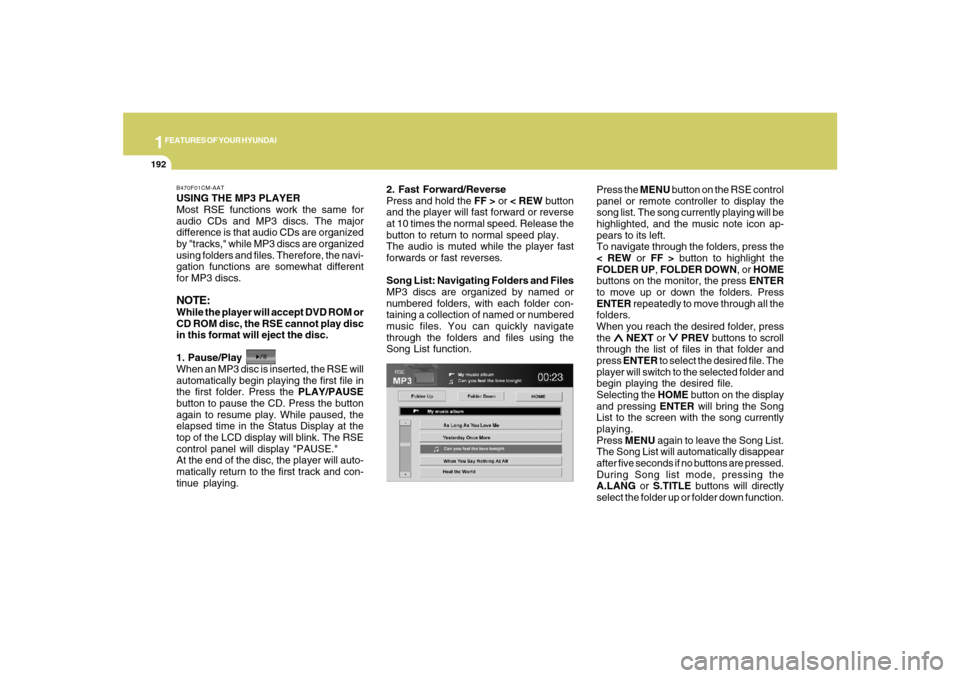
Song List function.Press the MENU button on the RSE control
panel or remote controller to display the
song list. The song currently playing will be
highlighted, and the music note icon ap-
pears to its left.
To navigate through the folders, press the
< REW or FF > button to highlight the
FOLDER UP, FOLDER DOWN, or HOME
buttons on the monitor, the press ENTER
to move up or down the folders. Press
ENTER repeatedly to move through all the
folders.
When you reach the desired folder, press
the
∧ ∧∧ ∧
∧ NEXT or
∨ ∨∨ ∨
∨ PREV buttons to scroll
through the list of files in that folder and
press ENTER to select the desired file. The
player will switch to the selected folder and
begin playing the desired file.
Selecting the HOME button on the display
and pressing ENTER will bring the Song
List to the screen with the song currently
playing.
Press MENU again to leave the Song List.
The Song List will automatically disappear
after five seconds if no buttons are pressed.
During Song list mode, pressing the
A.LANG or S.TITLE buttons will directly
select the folder up or folder down function.
B470F01CM-AAT
Page 205 of 355
1
FEATURES OF YOUR HYUNDAI
193
FEATURES OF YOUR HYUNDAI
193193193193
3. Previous/Next File
While a disc is playing, press the
∨ ∨∨ ∨
∨ PREV
button to jump to the beginning of the
current file. If less than 10 seconds has
elapsed on the current file, pressing PREV
will go to the previous file. Press it again to
select previous files. Press the button re-
peatedly to continue moving through pre-
vious files.
Press the
∧ ∧∧ ∧
∧ NEXT button to jump to the
beginning of the next file. Press the button
repeatedly to continue moving through the
following files.
Instead of using the
∧ ∧∧ ∧
∧ NEXT/
∨ ∨∨ ∨
∨ PREV
buttons, you can also enter the file number
using the numbers on the remote control-
ler. While a disc is playing, press the num-
ber button(s) that correspond to the de-
sired file and press ENTER.
The current folder name/number and file
name/number are shown in the Status
Display at the top of the LCD display.4. Stop
The disc will automatically stop when any
other source (e.g. the vehicle radio or an
external game) is selected. When you
switch back to the disc, it will begin playing
at the point where it stopped.
While a disc is playing, you can stop the
disc by pressing the ON/OFF button on the
remote controller or the POWER/VOLUME
knob on the RSE control panel. When the
RSE is turned on again, it will automati-
cally begin playing the disc at the point
where it was stopped.
Turning the vehicle off, or selecting a differ-
ent RSE Source, will also stop playing the
disc. When the vehicle is turned on again,
or the disc is again selected as the source,
the disc will begin playing at the point
where it was stopped. The player will au-
tomatically resume play at the point where
it was stopped unless the disc is ejected.
5. Eject
Press the EJECT button to eject the
disc. Disc can be ejected even when the
unit is not turned on.
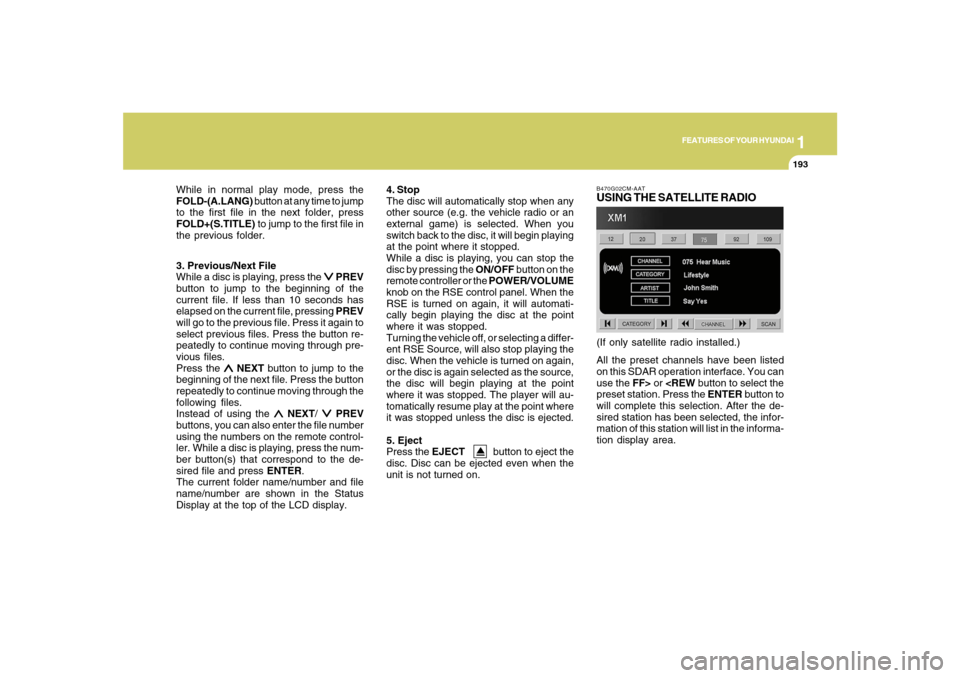
B470G02CM-AATUSING THE SATELLITE RADIOAll the preset channels have been listed
on this SDAR operation interface. You can
use the FF> or
will complete this selection. After the de-
sired station has been selected, the infor-
mation of this station will list in the informa-
tion display area.(If only satellite radio installed.) While in normal play mode, press the
FOLD-(A.LANG) button at any time to jump
to the first file in the next folder, press
FOLD+(S.TITLE) to jump to the first file in
the previous folder.
Page 209 of 355
1
FEATURES OF YOUR HYUNDAI
197
FEATURES OF YOUR HYUNDAI
197197197197
1. ON/OFF
Press the RSE control panel POWER but-
ton or the ON/OFF
button on the
remote controller to turn the RSE On or Off.
If a disc is loaded and playing when the
RSE is turned off, when the RSE is turned
back on the disc will automatically resume
playback at the point where it was stopped.
2. Mute
Press the MUTE button to mute the audio
in the vehicle speakers. The MUTE button
has no effect on the wireless headphones.
While muted, the RSE control panel, ve-
hicle radio and RSE LCD display will dis-
play "MUTE." Press the button again, or
adjust the volume at RSE control panel or
vehicle radio, to un-mute the audio.3. Number Buttons ~
The number buttons (0 through 9) can be
used to directly enter information such as
chapters in a DVD, track or file numbers for
audio CDs, and radio station presets.
To select a DVD or VCD chapter, while a
DVD/VCD is playing, press the number
button(s) that correspond to the desired
chapter and press ENTER.
To select a CD track, while a CD is playing
press the number button(s) that correspond
to the track and press ENTER.
To select an MP3 file, while an MP3 disc is
playing, press the number button(s) that
correspond to the desired file and press
ENTER.
To select a radio station preset, while the
desired band (AM, FM1 or FM2) is se-
lected, press the numbered button that
corresponds to the preset on the vehicle
radio. There is no need to press ENTER.4. Source
Press the SOURCE button to select from
the various audio and video sources avail-
able. Use the arrow buttons (
∧ ∧∧ ∧
∧ NEXT /
∨ ∨∨ ∨
∨
PREV and REW/FF) to navigate to the
desired source, then press ENTER to se-
lect the highlighted source.
The RSE control panel will display "REAR"
if the current source is the RSE player, and
will display "FRONT" if the current source
is the vehicle radio.
5. DISP (Display) Button
Pressing DISP enables you to adjust the
parameters of the LCD display. For more
information on how to make these adjust-
ments, see the "Adjusting the LCD Dis-
play" section of this manual.
Page 210 of 355
1FEATURES OF YOUR HYUNDAI
198
6. A.LANG-Alternate
Language Folder
Where alternate languages are available
on a DVD, pressing the A.LANG button will
allow you to select your preferred lan-
guage. Press the button repeatedly to cycle
through the available languages. When
the desired language is displayed, press
ENTER.
Pressing the A.LANG (or FOLD-) button
during MP3 mode will immediately bring
the player to the first file of the previous
folder.
Pressing the A.LANG (or FOLD-) button
during CD or VCD play will do nothing.
7. S.Title – Subtitles,
Folders +
The S.TITLE button allows you to display
or remove language subtitles while play-
ing DVDs. If no language subtitles are
available, the display will show an invalid
icon. Press the S. TITLE button repeatedly
to cycle through all of the available lan-
guages.
Pressing the S. TITLE (or FOLD+) button
during MP3 mode will immediately bring
the player to the first file of the NEXT folder.
Pressing the S. TITLE (or FOLD+) button
during CD or VCD play will do nothing.8. Menu
Pressing the MENU button during DVD
play will present the DVD menu.
Pressing the MENU button during MP3
disc play will display the Song List on the
LCD display.
Pressing the MENU button during CD or
VCD play has no effect.
Press the button again to return to the
program. After five seconds with no button
press, the menu will automatically close
and the program will begin playing.
9. Title/PBC
While viewing a DVD, press the TITLE
button on the remote controller to jump to
the top menu. Press the < REW / FF > or
∨ ∨∨ ∨
∨PREV/
∧ ∧∧ ∧
∧NEXT buttons to highlight the
desired selection, then press ENTER to
make your selection.
Press TITLE again to return to the DVD.
While viewing a PBC function included
VCD, pressing the TITLE/PBC button will
switch the PBC function on and off.10. Return
While view any operation, pressing the
RETURN button will return to previous
operation status.
11. Speaker Volume "VOL +" and "VOL –"
If the audio from the RSE is being played
through the vehicle speakers, you can
adjust the volume of the speakers with the
"VOL +" and "VOL –" buttons. Adjusting the
volume in this way will not adjust the wire-
less headphone volume. To adjust the
headphones, roll the VOL control wheel.
Batteries
The remote controller requires a CR2025
battery (included).
Page 211 of 355
1
FEATURES OF YOUR HYUNDAI
199
FEATURES OF YOUR HYUNDAI
199199199199
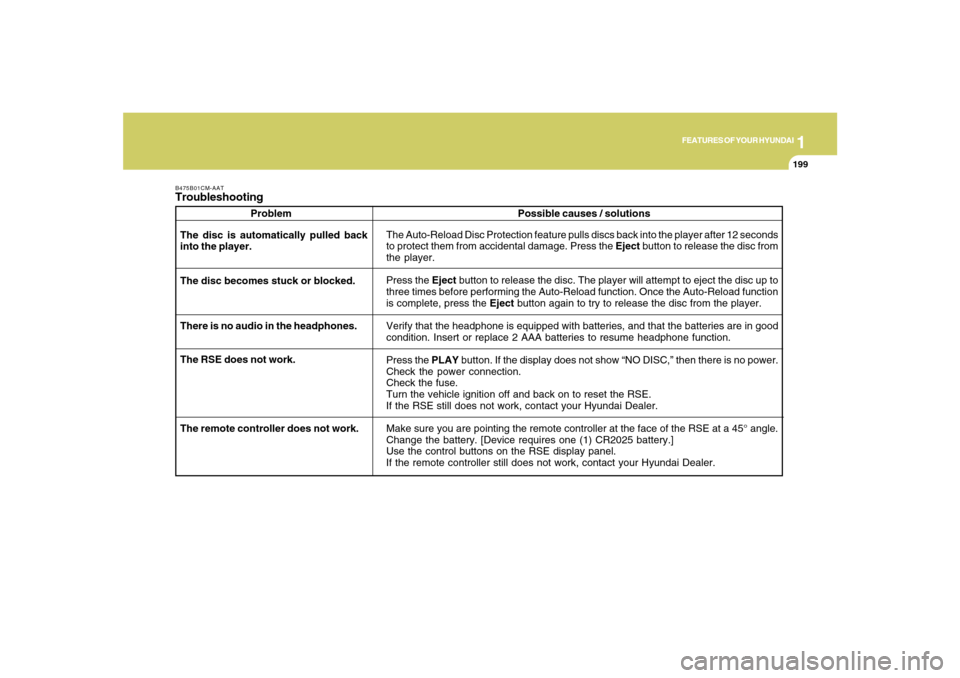
B475B01CM-AATTroubleshooting
Problem
The Auto-Reload Disc Protection feature pulls discs back into the player after 12 seconds
to protect them from accidental damage. Press the Eject button to release the disc from
the player.
Press the Eject button to release the disc. The player will attempt to eject the disc up to
three times before performing the Auto-Reload function. Once the Auto-Reload function
is complete, press the Eject button again to try to release the disc from the player.
Verify that the headphone is equipped with batteries, and that the batteries are in good
condition. Insert or replace 2 AAA batteries to resume headphone function.
Press the PLAY button. If the display does not show “NO DISC,” then there is no power.
Check the power connection.
Check the fuse.
Turn the vehicle ignition off and back on to reset the RSE.
If the RSE still does not work, contact your Hyundai Dealer.
Make sure you are pointing the remote controller at the face of the RSE at a 45° angle.
Change the battery. [Device requires one (1) CR2025 battery.]
Use the control buttons on the RSE display panel.
If the remote controller still does not work, contact your Hyundai Dealer. The disc is automatically pulled back
into the player.
The disc becomes stuck or blocked.
There is no audio in the headphones.
The RSE does not work.Possible causes / solutions
The remote controller does not work.
Page 212 of 355
DRIVING YOUR HYUNDAI
2
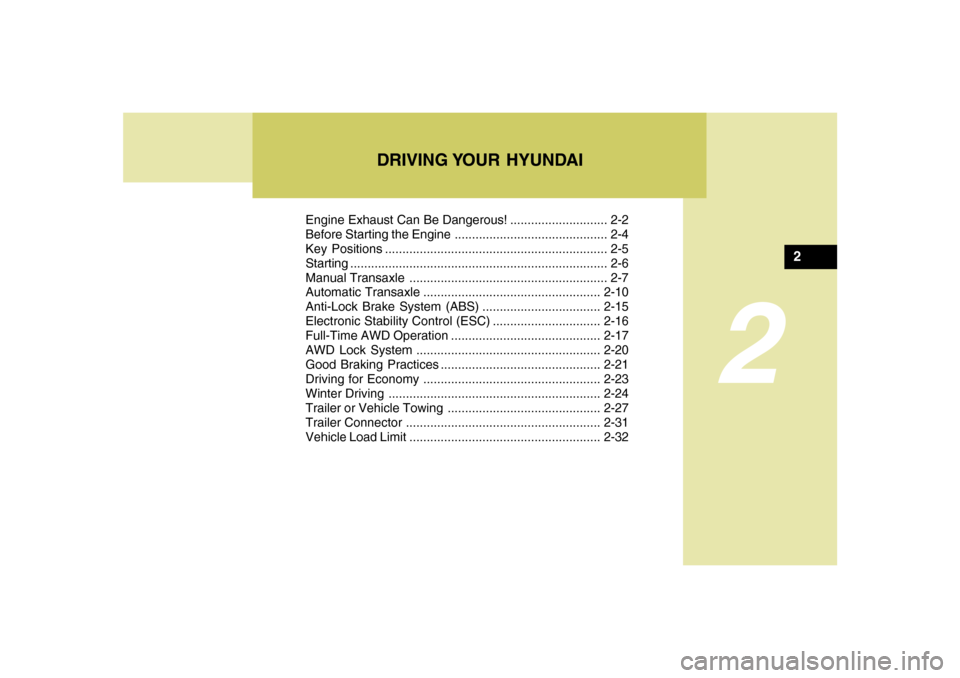
Engine Exhaust Can Be Dangerous! ............................ 2-2
Before Starting the Engine ............................................ 2-4
Key Positions ................................................................ 2-5
Starting ..........................................................................2-6
Manual Transaxle ......................................................... 2-7
Automatic Transaxle...................................................2-10
Anti-Lock Brake System (ABS) ..................................2-15
Electronic Stability Control (ESC)...............................2-16
Full-Time AWD Operation ...........................................2-17
AWD Lock System.....................................................2-20
Good Braking Practices..............................................2-21
Driving for Economy...................................................2-23
Winter Driving.............................................................2-24
Trailer or Vehicle Towing ............................................2-27
Trailer Connector........................................................2-31
Vehicle Load Limit.......................................................2-32
2
Page 216 of 355
2
DRIVING YOUR HYUNDAI
5
TO START THE ENGINEC030A02E-AATCombination Ignition Switcho If your Hyundai is equipped with a manual
transaxle, place the shift lever in neutral
and depress the clutch pedal fully.
o If your Hyundai has an automatic
transaxle, place the shift lever in "P"
(park).
o To start the engine, insert the ignition
key and turn it to the "START" position.
Release it as soon as the engine starts.
Do not hold the key in the "START"
position for more that 15 seconds.
NOTE:o The engine will not start if the clutch
pedal is not depressed fully (Manual
Transaxle) or the shift lever is not in
"P" or "N" Position (Automatic
Transaxle).
o The ignition key cannot be turned from
"ACC" position to "LOCK" position
unless the shift lever is in the "P"
(Park) position or the negative bat-
tery terminal is disconnected from
the battery. To remove the key, al-
ways confirm that the shift lever is
securely positioned in "P" (Park) (For
Automatic Transaxle).
o For additional information about start-
ing, see page 2-6.
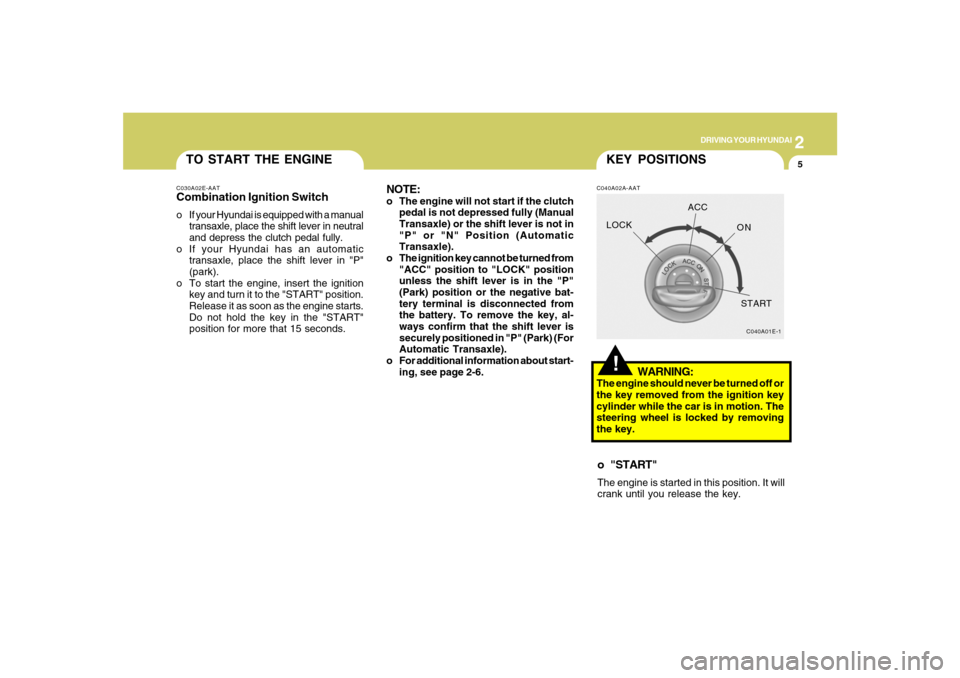
!KEY POSITIONSC040A02A-AAT
WARNING:
The engine should never be turned off or
the key removed from the ignition key
cylinder while the car is in motion. The
steering wheel is locked by removing
the key.o "START"The engine is started in this position. It will
crank until you release the key.
C040A01E-1
LOCKACC
ON
START
Page 221 of 355
2
DRIVING YOUR HYUNDAI
10
CAUTION:
Never shift into "R" or "P" position while
the vehicle is moving.
!
The indicator lights in the instrument clus-
ter indicate the selector lever position when
the ignition is switched "ON". During sports
mode operation, the gear currently in use
displays in the numeral indicator.
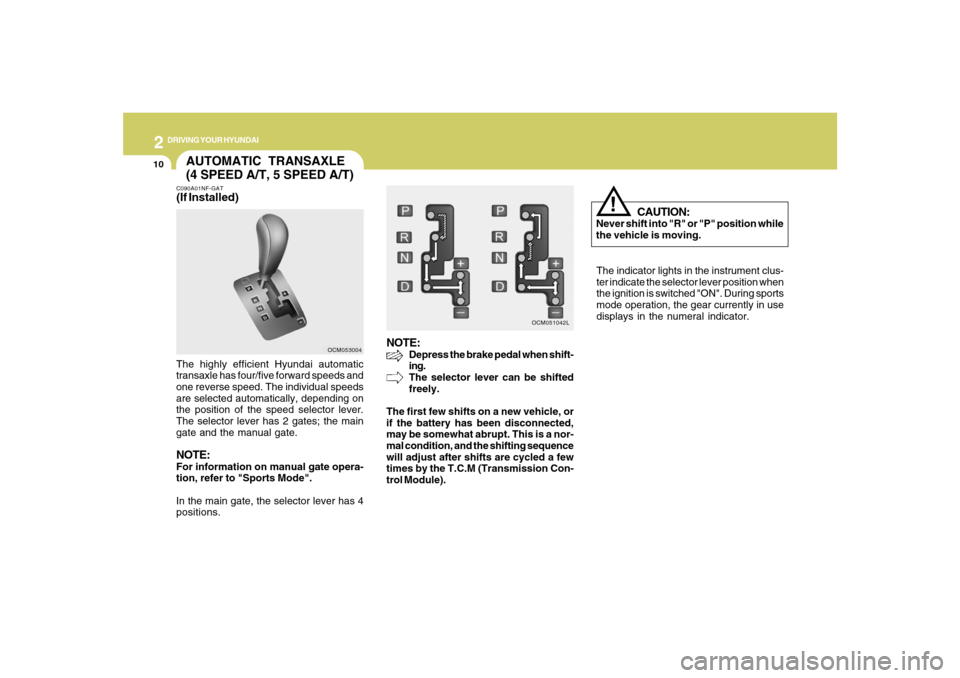
AUTOMATIC TRANSAXLE
(4 SPEED A/T, 5 SPEED A/T)C090A01NF-GAT(If Installed)The highly efficient Hyundai automatic
transaxle has four/five forward speeds and
one reverse speed. The individual speeds
are selected automatically, depending on
the position of the speed selector lever.
The selector lever has 2 gates; the main
gate and the manual gate.NOTE:For information on manual gate opera-
tion, refer to "Sports Mode".
In the main gate, the selector lever has 4
positions.
NOTE:
Depress the brake pedal when shift-
ing.
The selector lever can be shifted
freely.
The first few shifts on a new vehicle, or
if the battery has been disconnected,
may be somewhat abrupt. This is a nor-
mal condition, and the shifting sequence
will adjust after shifts are cycled a few
times by the T.C.M (Transmission Con-
trol Module).
OCM053004OCM051042L
Page 223 of 355
2
DRIVING YOUR HYUNDAI
12
C090H01L-GATNOTE:o For smooth and safe operation, de-
press the brake pedal when shifting
from "Neutral" position or "Park"
position to a forward or reverse gear.
o The ignition key must be in the "ON"
position and the brake pedal fully de-
pressed in order to move the shift
lever from the "P" (Park) position to
any of the other positions.
o It is always possible to shift from "R",
"N", or "D" position to "P" position.
The vehicle must be fully stopped to
avoid transaxle damage. DOWN (-) : Pull the lever backwards once
to shift down one gear.
SKIP : By rapidly moving the selector for-
ward or backward twice, it is possible to
skip one gear, i.e. 1st to 3rd or 3rd to 1st .
CAUTION:
o In sports mode, the driver must ex-
ecute upward shifts in accordance
with prevailing road conditions, tak-
ing care to keep the engine speed
below the red zone.
o For engine protection, upward shifts
are made automatically when the
engine rpm reaches the red zone.
o By rapidly moving the selector lever
backwards (-) twice it is possible to
skip one gear, i.e., 3rd to 1st, 4th to 2nd
or 5th to 3rd. Since sudden engine
braking and/or rapid acceleration can
cause a loss of traction, however,
downshifts must be made carefully in
accordance with the vehicle's speed.
NOTE:o In sports mode, only the four/five for-
ward gears can be selected. To re-
verse or park the vehicle, move the
selector lever to the "R" or "P" posi-
tion as required.
o In sports mode, downward shifts are
made automatically when the vehicle
slows down. When the vehicle stops,
1st gear is automatically selected.
o To maintain the required levels of
vehicle performance and safety, the
system may not execute certain gear-
shifts when the selector lever is oper-
ated.
o Before driving away from a stop on a
slippery road, push the selector lever
forward into the +(UP) position. This
causes the transaxle to shift into 2nd
gear which is better for smooth driv-
ing away on a slippery road. Push the
selector lever to the -(DOWN) side to
shift back to 1st gear.
!
Page 224 of 355
2
DRIVING YOUR HYUNDAI
13
C090I01CM-GAT
CAUTION:
o Shift into "R", "D" and "P" position
only when the vehicle has completely
stopped.
o Do not accelerate the engine in re-
verse or any of the forward positions
with the brakes applied.
o Always apply the footbrake when
shifting from "P" or "N", to "R" or
"D"position.
o Do not use the "P" (Park) position in
place of the parking brake. Always
set the parking brake, shift the
transaxle into "P" (Park) position and
turn off the ignition when you leave the
vehicle, even momentarily. Never
leave the vehicle unattended while
the engine is running.
o Check the automatic transaxle fluid
level regularly, and add fluid as nec-
essary.
o See the maintenance schedule for
the proper fluid recommendation.
!
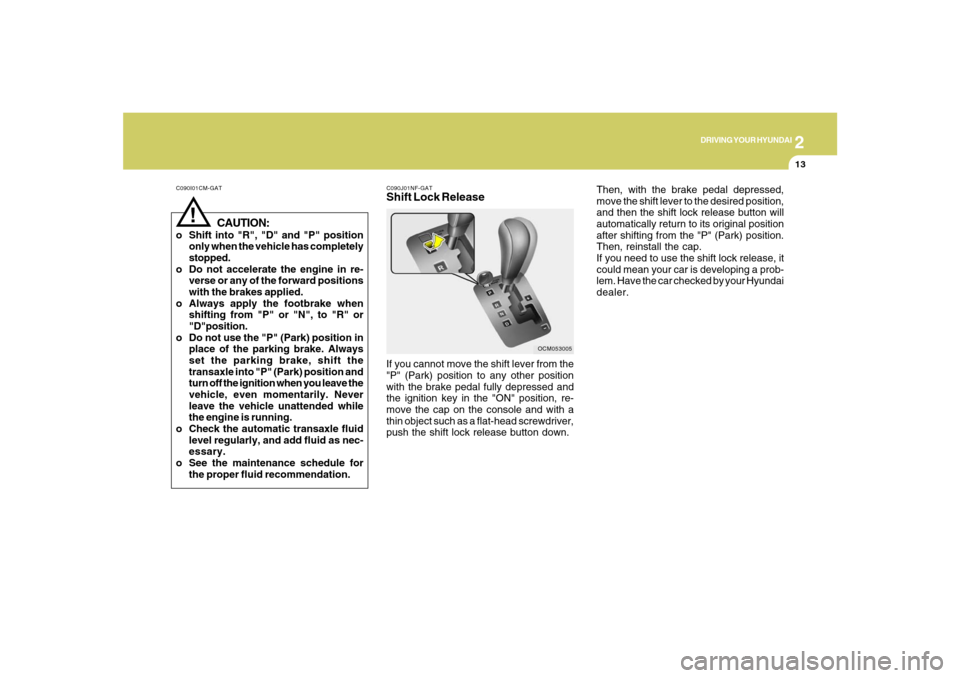
C090J01NF-GATShift Lock ReleaseIf you cannot move the shift lever from the
"P" (Park) position to any other position
with the brake pedal fully depressed and
the ignition key in the "ON" position, re-
move the cap on the console and with a
thin object such as a flat-head screwdriver,
push the shift lock release button down.
OCM053005
Then, with the brake pedal depressed,
move the shift lever to the desired position,
and then the shift lock release button will
automatically return to its original position
after shifting from the "P" (Park) position.
Then, reinstall the cap.
If you need to use the shift lock release, it
could mean your car is developing a prob-
lem. Have the car checked by your Hyundai
dealer.