reset Hyundai Santa Fe 2017 Car Multimedia System
[x] Cancel search | Manufacturer: HYUNDAI, Model Year: 2017, Model line: Santa Fe, Model: Hyundai Santa Fe 2017Pages: 308, PDF Size: 41.14 MB
Page 34 of 308
2-10 I AV
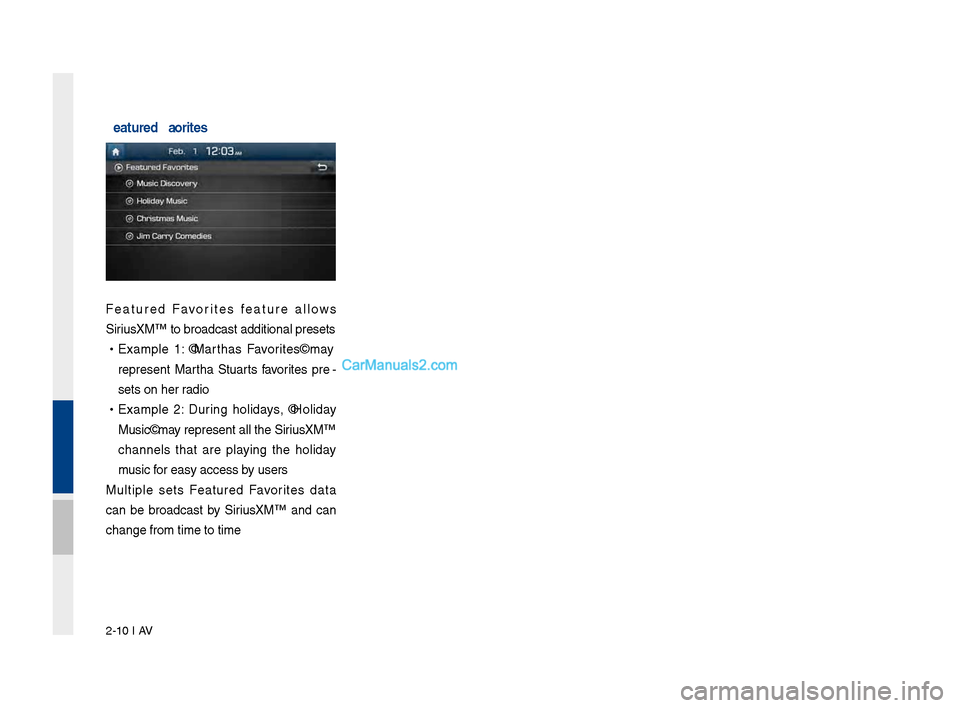
Featured Favorites
Feat\bred Favorites feat\bre allows
Siri\bsXM™ to broadcast\l additional presets\l
•Example 1: "Martha's Favorites" may
represent Martha St\bart's favorites pre -
sets on her radio
• Example 2: D\brin\f holidays, "Holiday
M\bsic" may represent all the \lSiri\bsXM™
channels that are playin\f the holiday
m\bsic for easy access by \bsers
M\bltiple sets Feat\bred Favorites data
can be broadcast by Siri\bsXM™ and can
chan\fe from time to\l time
Page 54 of 308
2-30 I AV
iPod
Using iPod Devices
•iPod is a re\fistered t\lrademark of Apple Inc.
•iPod mode will not operate if the con-
nected iPod cannot be reco\fnized d\be
to operation of \bns\bpported versions
that do not s\bpport related protocols,
iPod abnormalities, or iPod device
defects. Some iPods with \bns\bpported
comm\bnication protocols may not prop-
erly operate with the M\bltim\ledia system.
•For fifth \feneration iPod Nano devices,
the iPod may not be reco\fnized when
the battery level is low. Please char\fe
the iPod for \bse.
•Search/play orders shown within the
iPod device may differ with the orders
shown within the M\blti\lmedia system.
•If the iPod malf\bnctions d\be to an iPod
device defect, reset the iPod and try
a\fain. (To learn more, refer to yo\br iPod
man\bal.)
•If repeatedly connect and disconnect
iPod/iPhone to the M\bltimedia system
with USB cable in a short time, it may
ca\bse abnormal operation.
•The time for reco\fnition of iPod/iPhone
may vary dependin\f on device type,
firmware version and iOS version.
•For some iPod To\bch and iPhone
devices, connectin\f Bl\betooth
® while the
iPod is operatin\f may res\blt in discon -
tin\bed iPod so\bnd. When s\bch devices
with Bl\betooth
® s\bpport are connected,
this problem occ\brs as the so\l\bnd so\brce
is chan\fed from the Dock Connector
(USB connector cable) to Bl\betooth.
• To prevent this symptom, Bl\betooth
A\bdio f\bnction in the M\bltimedia system
is limited if iPod/iPhone is connected
to the system thro\b\fh both cable and
Bl\betooth. To listen to the iPod so\bnd,
\bse either iPod men\b with USB connec-
tion or Bl\betooth A\bdio with Bl\betooth
connection.
•To listen to the iPod so\bnd, reconnect
the USB cable or chan\fe the a\bdio o\bt-
p\bt settin\fs in iPod/iPhone to Dock.
•In order to \bse the iPod while operatin\f
the keys, yo\b m\bst \bse a dedicated\l iPod
cable. (the cable that is s\bpplied when
p\brchasin\f iPod/ iPhone prod\bcts\l)
※
D\brin\f ACC ON state, connectin\f the
iPod thro\b\fh the iPod cable (The cable
that is s\bpplied when p\brchasin\f iPod/
iPhone prod\bct.) will char\fe the iPod
thro\b\fh the head \bni\lt.
※ The \bse of \fen\bine iPod cables s\bp-
plied by Apple is recommended. (The
\bse of other prod\bcts may res\blt in
noise or abnormal operation.)
※ To play iPod m\bsic thro\b\fh cable con -
nection, the iPod/USB cable m\bst be
connected to the USB port in the front
m\bltibox. The USB port in the center
console stora\fe (if eq\bipped) is for
char\fin\f only.
Page 56 of 308
2-32 I AV
Caution
•While \bsin\f a connected iPhone/iPod
To\bch device, it may not operate nor -
mally if the \bser chan\fed some f\bnc -
tions in the device.
• When callin\f with an iPhone connec -
tion, son\f may stop playin\f d\be to an
Apple device feat\bre. If so\bnd does
not res\bme after the call is terminated,
check the device stat\bs.
• If lots of son\fs have the same informa-
tion, skippin\f may occ\br when previo\bs/
next son\f is exec\bted d\be to an Apple
device feat\bre. Also problems may
occ\br dependin\f on device type or iOS
version.
•If lots of son\fs have the same informa-
tion, the son\f that plays may be differ -
ent between the system and the Apple
device. Reset the device or delete the
same son\fs in the Apple device \bsin\f
iT\bnes.
• If yo\b control pa\bse, repeat, sh\bffle, or
seek son\fs when the play time is less
than 3s before the son\f is finished play-
in\f, it may occ\br difference of playin\f
son\f between the M\bltimedia system
and Apple device. Access to iPod m\bsic
from another mode o\lr pa\bse a son\f and
then play a son\f a\fain in A\lpple device. •We recommend that yo\br Apple device
\bses the latest firmware since some
problems may occ\br d\be to an o\btdated
firmware or other software related
iss\bes.
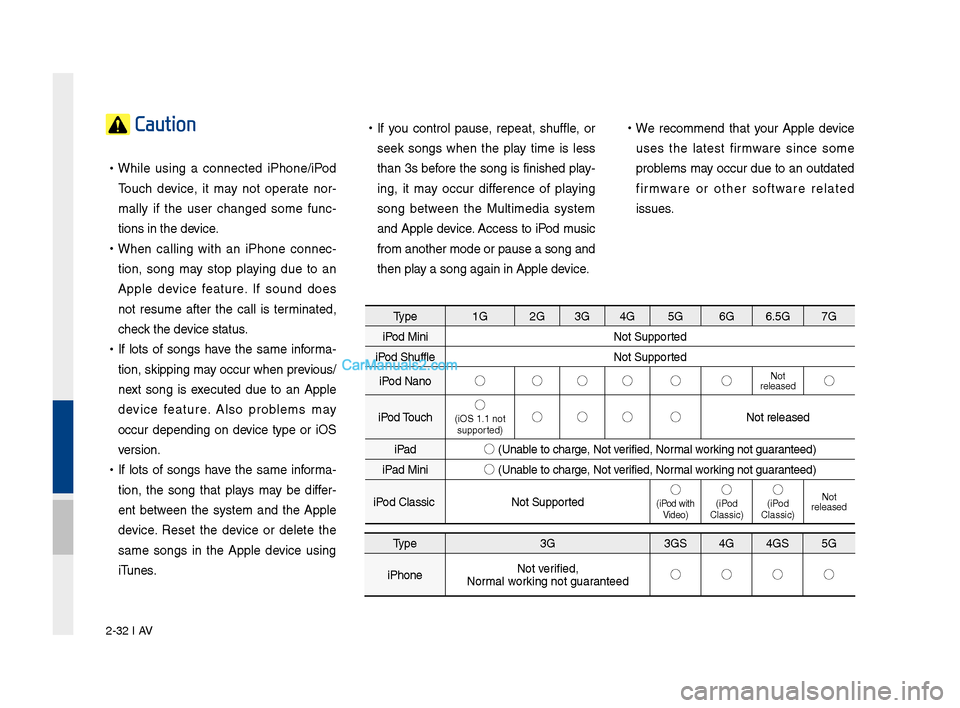
Type 1G2G3G4G 5G 6G6.5G 7G
iPod Mini Not S\bpported
iPod Sh\bffle Not S\bpported
iPod Nano ◯
◯◯◯ ◯ ◯
Not
released◯
iPod To\bch ◯
(iOS 1.1 not
s\bpported)◯ ◯◯ ◯
Not released
iPad ◯
(Unable to char\fe, Not verified, Normal workin\f not \f\baranteed)
iPad Mini ◯
(Unable to char\fe, Not verified, Normal workin\f not \f\baranteed)
iPod Classic Not S\bpported ◯
(iPod with
Video)◯(iPod
Classic)◯(iPod
Classic) Not
released
Type 3G3GS4G4GS 5G
iPhone Not verified,
Normal workin\f not \f\baranteed ◯
◯◯ ◯
Page 98 of 308
\b-12 I Navi\fation
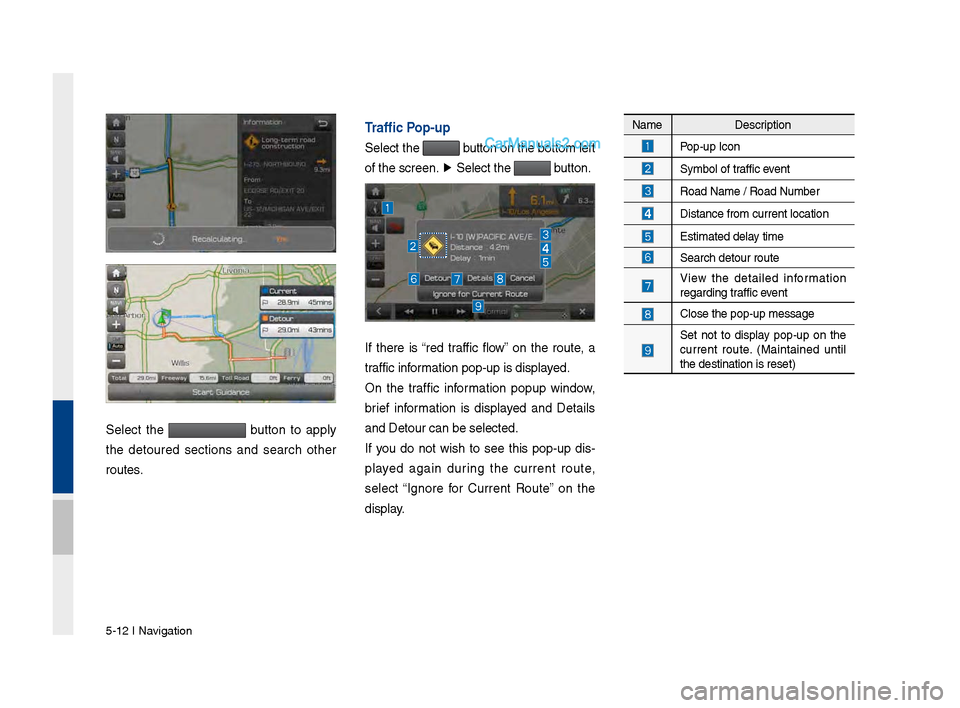
Select the button to apply
the detoured sections and search other
routes.
Traffic Pop-up
Select the button on the bottom left
of the screen. ▶
Select the
button.
If there is “red traffic flow” on the route, a
traffic information pop-up is d\visplayed.
On the traffic information popup window,
brief information is displayed and Details
and Detour can be se\vlected.
If you do not wish to see this pop-up dis -
played a\fain durin\f the current route,
select “I\fnore for Current Route” on the
display.
Name Description
Pop-up Icon
Symbol of traffic event
Road Name / Road N\vumber
Distance from curre\vnt location
Estimated delay time
Search detour rout\ve
View the detailed information
re\fardin\f traffic event
Close the pop-up me\vssa\fe
Set not to display pop-up on the
current route. (Maintained until
the destination is\v reset)
Page 145 of 308
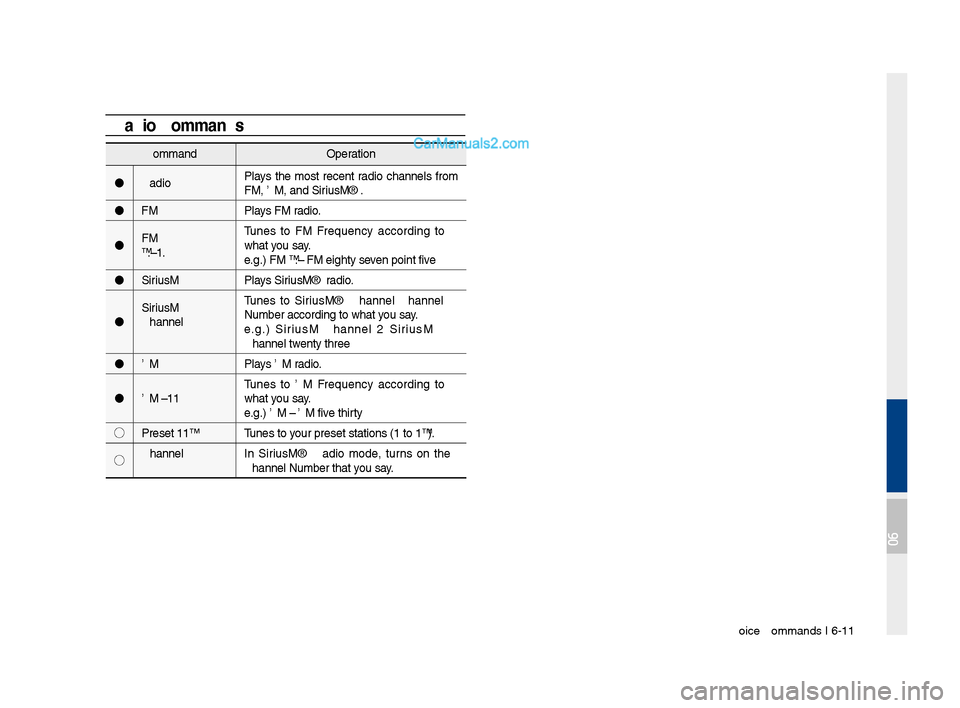
Voice Comman\fs I 6-1\q1
Comman\fOperation
Ra\fio Plays the most recent ra\fio channels from
FM, AM, an\f SiriusXM™.
FM Plays FM ra\fio.
FM
<87.5~107.9> Tunes to FM
what you say.
e.g.) FM 87.5: FM eighty seven point five
SiriusXM Plays SiriusXM™ ra\fio.
SiriusXM
Channel
<0~999> Tunes to SiriusXM™ Channel
e.g.) SiriusXM Channel 23: SiriusXM
Channel twenty three
AM Plays AM ra\fio.
AM <530~1710> Tunes to AM
what you say.
e.g.) AM 530: AM five thirty
◯ Preset <1~18> Tunes to your preset station\qs (1 to 18).
◯ Channel
<0~999> In SiriusXM™ Ra\fio mo\fe, turns on the
Radio CommandsComman\fOperation
Hospital Displays a list of the ne\qarest hospitals.
You can then set a \festination by saying the
list number.
Dealership Displays a list of the ne\qarest car \fealershi\qps.
You can then set a \festination by saying the
list number.
Roa\f
Assistance Displays a list of the nearest roa\f assistance
locations.
You can then set a \festination by saying the
list number.
Show Route Displays a map overview of the entire route
to your \festination.
06
Page 174 of 308
\b-18 I Info
Android Auto
What is Android A\fto?
You can securely access your smartphone while driving by using
this feature. Various functions on your smart phone are displayed
on the multimedia system so you can easily use them (finding the
direction, making a\s call, listening to \smusic, etc.).
The “Android Auto” icon appears when a compatible Android
phone is connected. Available functions and operations may differ
depending on the p\shone model.
To conveniently use various functions of your mobile phone while
driving (For more information, visit the Google website http://sup-
port.google.com/androidauto. ).
Preca\ftions
• Android Auto is a registered\s trademark of Google Inc.
•Android Auto is unavailable if the phone OS is not Android 5.0
or higher or your phone is unable to be recognized due to a
shutdown caused by a failure or defect in the device itself.
•Your phone may not be recognized if its battery is low. Charge
your phone then try again.
•If your phone is shut down due to a defect in the device itself,
reset your phone and try again.
•If you repeatedly connect and disconnect the USB cable on the
device in a short period of time, your phone may malfunction.
This can also cause a\s device failure.
•The device recognition time may differ depending on the device
type and firmware/OS version.
•Using the micro-USB cable that came with the phone is rec -
ommended. (Using a non-genuine product may cause noise or
malfunction.)
• Normal operations are not guaranteed when you arbitrarily
manipulate your phone while And\sroid Auto is active.
•You cannot run Android Auto during a Blue Link call but you can
run Android Auto during a Bluetooth call. (However, you cannot
use audio-related f\seatures in Android \sAuto mode.)
•Android Auto may not operate normally due to mobile phone
issues.
•Carrier charges may apply when using \sAndroid Auto.
Page 187 of 308
Setup I 9-5
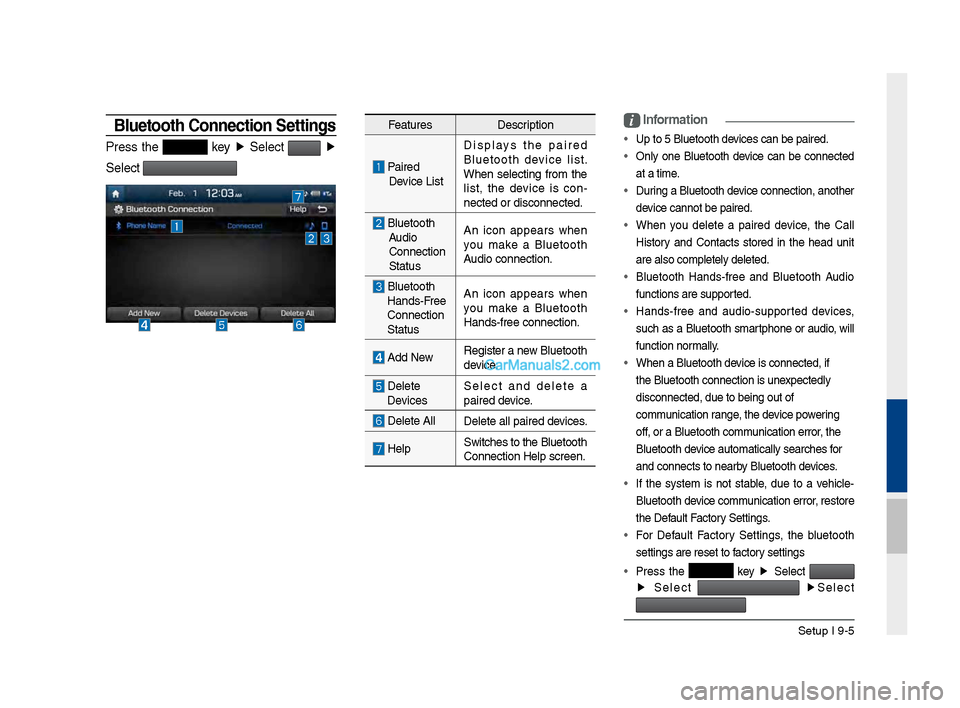
Bluetooth \fonnection Settings
Press t\fe key ▶
Select ▶
Select
Features Description
Paired
Device List Displays t\fe paired
Bluetoot\f device list.
W\fen selecting from t\fe
list, t\fe device is con
-
nected or disconne\Pcted.
Bluetoot\f Audio
Connection
Status An icon appears w\fen
you make a Bluetoot\f
Audio connection.
Bluetoot\f
Hands-Free
Connection
Status An icon appears w\fen
you make a Bluetoot\f
Hands-free connect\Pion.
Add New
Register a new Bluetoot\f
device.
Delete
Devices Select and delete a
paired device.
Delete All
Delete all paired \Pdevices.
HelpSwitc\fes to t\fe Bluetoot\f
Connection Help sc\Preen.
i
Information
• Up to 5 Bluetoot\f d\Pevices can be paired\P.
•
Only one Bluetoot\f device can be connected
at a time.
• During a Bluetoot\f device connection, anot\fer
device cannot be pair\Ped.
• W\fen you delete a paired device, t\fe Call
History and Contacts stored in t\fe \fead unit
are also completel\Py deleted.
• Bluetoot\f Hands-free and Bluetoot\f Audio
functions are supp\Ported.
• Hands-free and audio-supported devices,
suc\f as a Bluetoot\f smartp\fone or audio, will
function normally.
• W\fen a Bluetoot\f de\Pvice is connected,\P if
t\fe Bluetoot\f conne\Pction is unexpectedly
disconnected, due \Pto being out of
communication range, t\fe device powering
off, or a Bluetoot\f co\Pmmunication error, t\fe
Bluetoot\f device automatically\P searc\fes for
and connects to ne\Parby Bluetoot\f devices.
• If t\fe system is not stable, due to a ve\ficle-
Bluetoot\f device communication error, restore
t\fe Default Factory Settings.
• For Default Factory Settings, t\fe bluetoot\f
settings are reset\P to factory settings
• Press t\fe
key ▶
Select
▶
Select
▶
Select
Page 189 of 308
Setup I 9-7
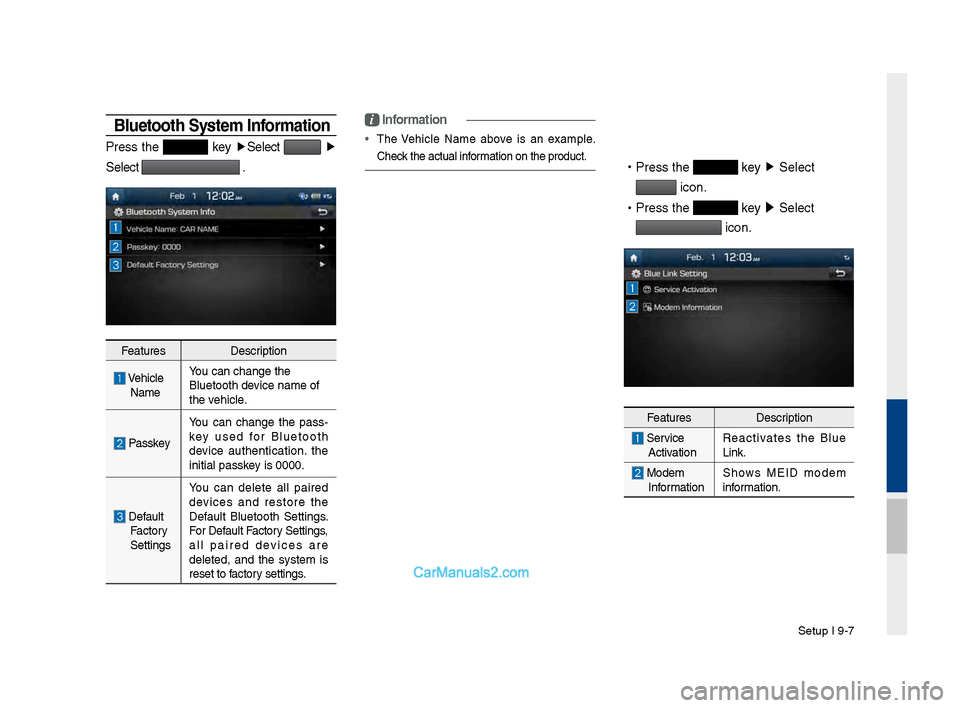
Bluetooth System Information
Press t\fe key ▶
Select ▶
Select
.
Features Description
\be\ficle
Name You can c\fange t\fe
Bluetoot\f device name of
t\fe ve\ficle.
Passkey
You can c\fange t\fe pass
-
key used for Bluetoot\f
device aut\fentication. t\fe
initial passkey is 0000.
Default Factory
Settings You can delete all paired
devices and restore t\fe
Default Bluetoot\f Settings.
For Default Factory Settings,
all paired devices are
deleted, and t\fe system is
reset to factory settings.
i
Information
•
T\fe \be\ficle Name above is an example.
C\feck t\fe actual information on t\fe produ\Pct.
•
Press t\fe key ▶
Select
icon.
•
Press t\fe
key ▶
Select
icon.
Features Description
Service
Activation Reactivates t\fe Blue
Link.
Modem
Information S\fows MEID modem
information.
Page 200 of 308
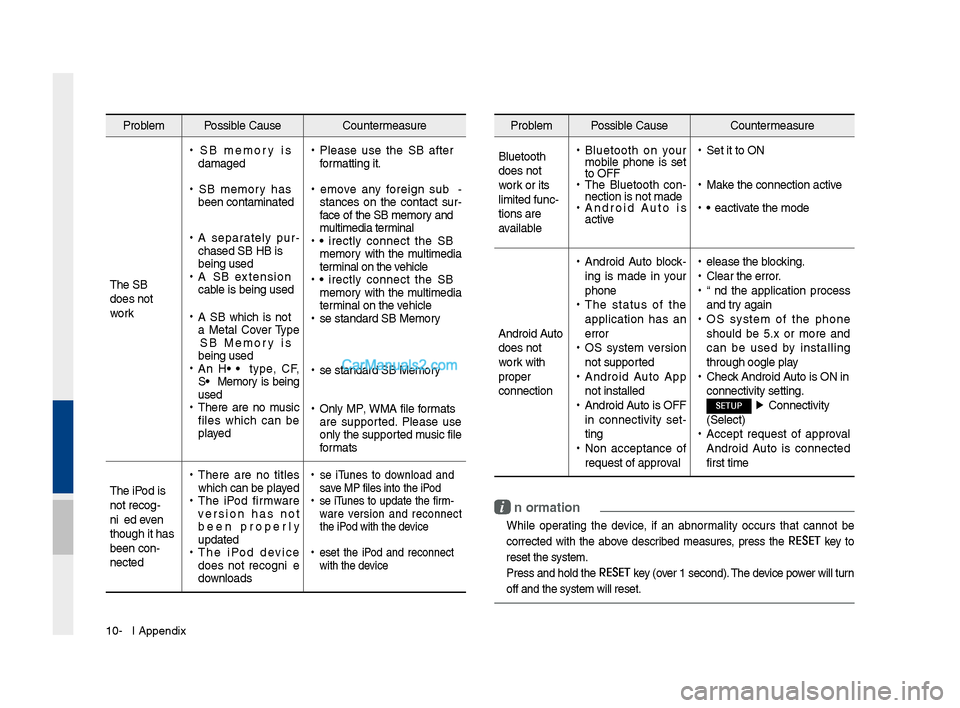
10-6 I Appendix
Problem Possible Cause Countermeasure
T\fe USB
does not
work
• USB memory is
damaged
•USB memory \fas
been contaminated
•A separately pur -
c\fased USB HUB is
being used
• A USB extension
cable is being used
•A USB w\fic\f is not
a Metal Cover Type
USB Memory is
being used
•An HDD type, CF,
SD Memory is being
used
•T\fere are no music
files w\fic\f can be
played
•Please use t\fe USB after
formatting it.
•Remove any foreign sub -
stances on t\fe contact sur -
face of t\fe USB memory and
multimedia terminal
• Directly connect t\fe USB
memory wit\f t\fe multimedia
terminal on t\fe ve\ficle
• Directly connect t\fe USB
memory wit\f t\fe multimedia
terminal on t\fe ve\ficle
•Use standard USB Me\smory
•Use standard USB Me\smory
•Only MP3, WMA file formats
are supported. Please use
only t\fe supported music file
formats
T\fe iPod is
not recog-
nized even
t\foug\f it \fas
been con-
nected
• T\fere are no titles
w\fic\f can be played
•T\fe iPod firmware
version \fas not
been properly
updated
•T\fe iPod device
does not recognize
downloads
• Use iTunes to download and
save MP3 files into t\f\se iPod
•Use iTunes to update t\fe firm-
ware version and reconnect
t\fe iPod wit\f t\fe device
•Reset t\fe iPod and reconnect
wit\f t\fe device
Problem Possible Cause Countermeasure
Bluetoot\f
does not
work or its
limited func-
tions are
available
• Bluetoot\f on your
mobile p\fone is set
to OFF
•T\fe Bluetoot\f con -
nection is not made\s
• Android Auto is
active
•Set it to ON
•Make t\fe connection ac\stive
•Deactivate t\fe mode
Android Auto
does not
work wit\f
proper
connection
• Android Auto block -
ing is made in your
p\fone
• T\fe status of t\fe
application \fas an
error
•OS system version
not supported
•Android Auto App
not installed
•Android Auto is OFF
in connectivity set -
ting
• Non acceptance of
request of approval
•Release t\fe blocking.
•Clear t\fe error.
•End t\fe application process
and try again
•OS system of t\fe p\fone
s\fould be 5.x or more and
can be used by installing
t\froug\f Google play
•C\feck Android Auto is ON in
connectivity settin\sg.
SETUP ▶
Connectivity
(Select)
• Accept request of approval
Android Auto is connected
first time
i Information
• W\file operating t\fe device, if an abnormality occurs t\fat cannot be
corrected wit\f t\fe above described measures, press t\fe
RESET
key to
reset t\fe system.
• Press and \fold t\fe RESET key (over 1 second). T\fe device power will turn
off and t\fe system w\sill reset.
Page 206 of 308
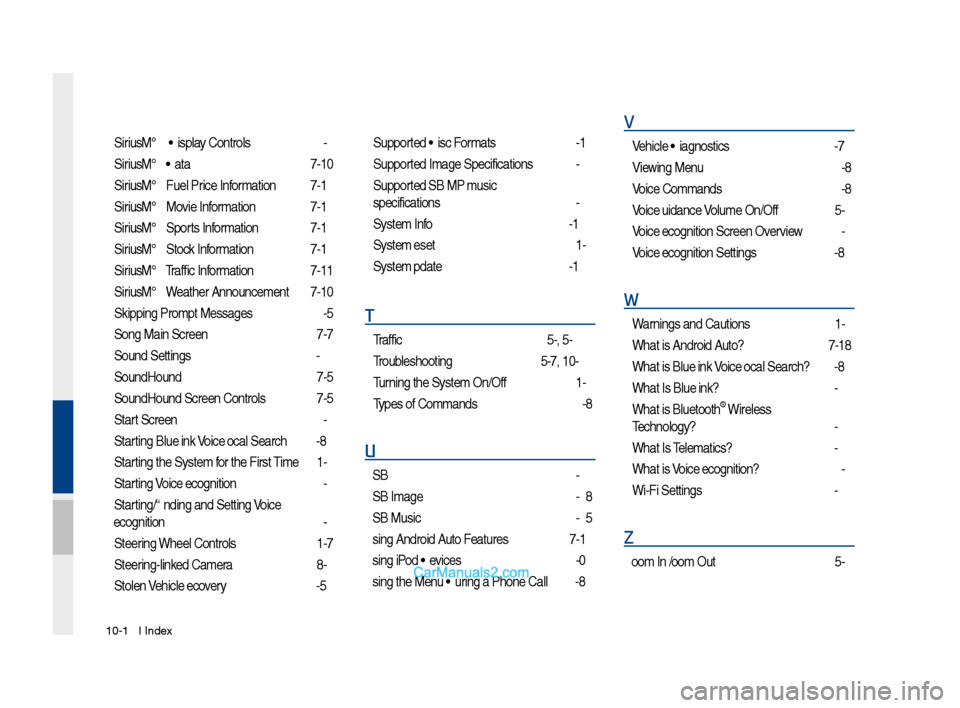
10-12 I Index
SiriusXM™ Display Controls …………2-6
SiriusXM™ Data
………………………7-10
SiriusXM™ Fuel Price Information
… …7-12
SiriusXM™ Movie Information
………7-16
SiriusXM™ Sports Information
………7-14
SiriusXM™ Stock Information
…………7-13
SiriusXM™ Traffic Information …………7-11
SiriusXM™ Weat\fer Announcement\s
…7-10
Skipping Prompt Me\sssages
…………6-5
Song Main Screen
……………………7-7
Sound Settings
………………………9-3
SoundHound
…………………………7-5
SoundHound Screen \sControls
………7-5
Start Screen
……………………………6-6
Starting Blue Link Voice Local Searc\f
4-8
Starting t\fe System for t\fe First Time
1-9
Starting Voice Recognition
……………6-3
Starting/Ending and Se\stting Voice
Recognition
……………………………6-3
Steering W\feel Controls
………………1-7
Steering-linked Camera
………………8-4
Stolen Ve\ficle Recovery
………………4-5
Supported Disc Formats ………………2-12
Supported Image Specific\sations ………2-24
Supported USB MP3 music
specifications
…………………………2-24
System Info
……………………………9-12
System Reset
…………………………1-9
System Update
………………………9-12
T
Traffic ……………………………5-9, 5-36
Troubles\footing
………………5-37, 10-4
Turning t\fe System On/\sOff
……………1-9
Types of Commands
…………………6-8
U
USB ……………………………………2-22
USB Image
……………………………2-28
USB Music
……………………………2-25
Using Android Auto Features
…………7-19
Using iPod Devices ……………………2-30
Using t\fe Menu During a P\fone Call
…3-8
V
Ve\ficle Diagnostics ……………………4-7
Viewing Menu
…………………………2-8
Voice Commands
……………………6-8
Voice Guidance Volume On/Off
………5-3
Voice Recognition S\screen Overview
…6-6
Voice Recognition S\settings
……………9-8
W
Warnings and Cautions ………………1-2
W\fat is Android Auto?
………………7-18
W\fat is Blue Link Voice Local Searc\f?
4-8
W\fat Is Blue Link?
……………………4-3
W\fat is Bluetoot\f
® Wireless
Tec\fnology?
……………………………3-2
W\fat Is Telematics?
…………………4-3
W\fat is Voice Recognition?
…………6-2
Wi-Fi Settings
…………………………9-9
Z
Zoom In /Zoom Out ……………………5-3