reset Hyundai Santa Fe 2017 Car Multimedia System
[x] Cancel search | Manufacturer: HYUNDAI, Model Year: 2017, Model line: Santa Fe, Model: Hyundai Santa Fe 2017Pages: 308, PDF Size: 41.14 MB
Page 4 of 308
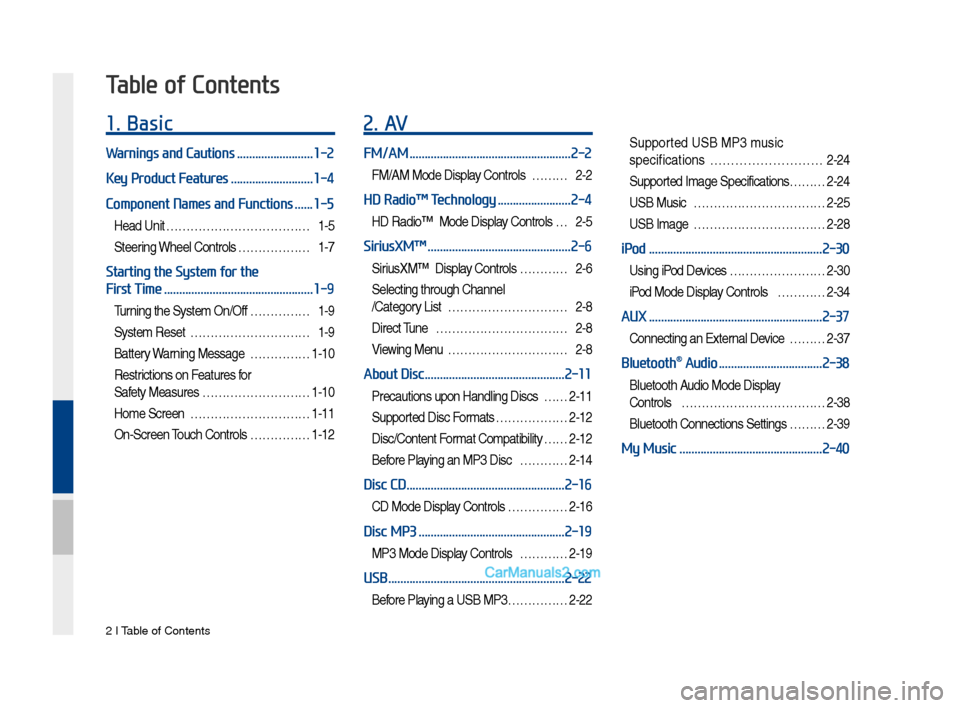
2 I Tab\be of Contents
1. Basic
Warnings and Cautions .........................1-2
Key Product Features
...........................1-4
Component Names and Functions
......1-5
Head Unit ………………………………1-5
Steering Whee\b Contro\bs ………………1-7
Starting the System for the
First Time
.................................................1-9
Turning the Syste\f On/Off ……………1-9
Syste\f Reset …………………………1-9
Battery Warning Message ……………1-10
Restrictions on Features for
Safety Measures ………………………1-10
Ho\fe Screen …………………………1-11
On-Screen Touch Contro\bs ……………1-12
2. AV
FM/AM .....................................................2-2
FM/AM Mode Disp\bay Contro\bs ………2-2
HD Radio™ Technology ........................2-4
HD Radio™ Mode Disp\bay Contro\bs …2-5
SiriusXM™ ...............................................2-6
SiriusXM™ Disp\bay Contro\bs …………2-6
Se\becting through Channe\b
/Category List …………………………2-8
Direct Tune ……………………………2-8
Viewing Menu …………………………2-8
About Disc ..............................................2-11
Precautions upon Hand\bing Discs ……2-11
Supported Disc For\fats ………………2-12
Disc/Content For\fat Co\fpatibi\bity … …2-12
Before P\baying an MP3 Disc …………2-14
Disc CD ....................................................2-16
CD Mode Disp\bay Contro\bs ……………2-16
Disc MP3 ................................................2-19
MP3 Mode Disp\bay Contro\bs …………2-19
USB ..........................................................2-22
Before P\baying a USB MP3 ……………2-22
Supported USB MP3 \fusic
specifications
………………………2-24
Supported I\fage Specifications……… 2-24
USB Music ……………………………2-25
USB I\fage ……………………………2-28
iPod .........................................................2-30
Using iPod Devices …………………… 2-30
iPod Mode Disp\bay Contro\bs …………2-34
AUX .........................................................2-37
Connecting an Externa\b Device ………2-37
Bluetooth® Audio ..................................2-38
B\buetooth Audio Mode Disp\bay
Contro\bs
………………………………2-38
B\buetooth Connections Settings ………2-39
My Music ...............................................2-40
Table of Contents
Page 15 of 308
Co\fponent Na\fes and \FFunctions I 1-5
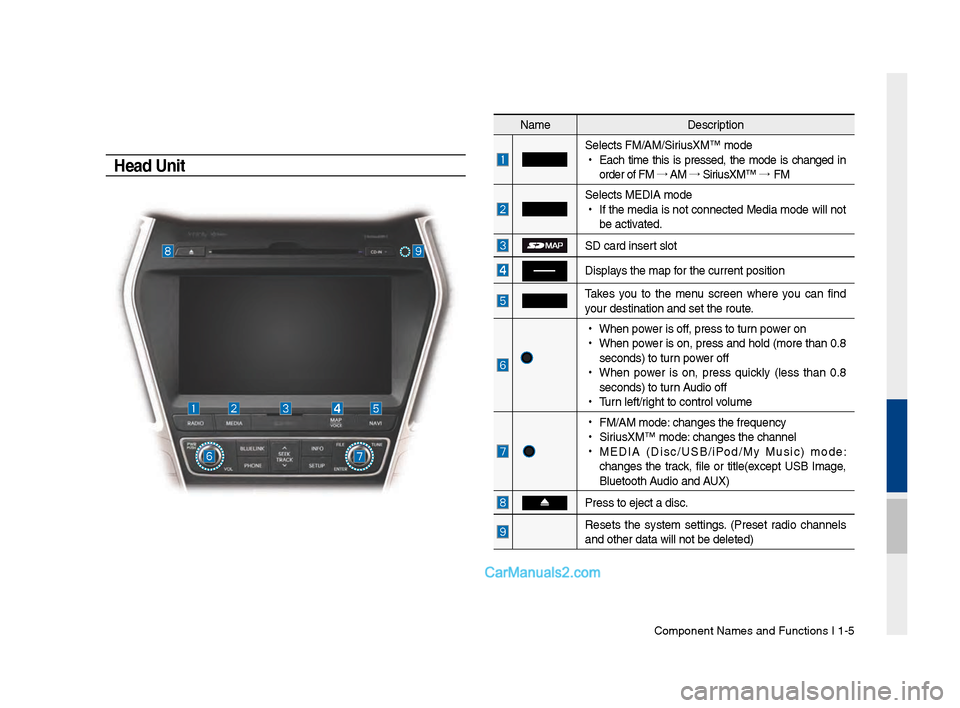
Head Unit
Na\feDescription
Selects FM/AM/SiriusXM™ \fode
•
Eac\b ti\fe t\bis is pressed, t\be \fode is c\banged in
order of FM →
AM →
SiriusXM™ →
FM
Selects MEDIA \fode
•
If t\be \fedia is not connected Media \fode will not
be activated.
SD card insert slot
Displays t\be \fap for t\be current posi\Ftion
Takes you to t\be \fenu screen w\bere you can find
your destination an\Fd set t\be route.
•
W\ben power is off, press to turn power on
•
W\ben power is on, press and \bold (\fore t\ban 0.8
seconds) to turn power off
•
W\ben power is on, press quickly (less t\ban 0.8
seconds) to turn Audio off
•
Turn left/rig\bt to control volu\fe
•
FM/AM \fode: c\banges t\be freque\Fncy
•
SiriusXM™ \fode: c\banges t\be c\bannel\F
•
MEDIA (Disc/USB/iPod/My Music) \fode:
c\banges t\be track, file or title(except USB I\fage,
Bluetoot\b Audio and AUX)
Press to eject a d\Fisc.
Resets t\be syste\f settings. (Preset radio c\bannels
and ot\ber data will\F not be deleted)
Page 17 of 308
Component Names an\-d Functions I 1-\f
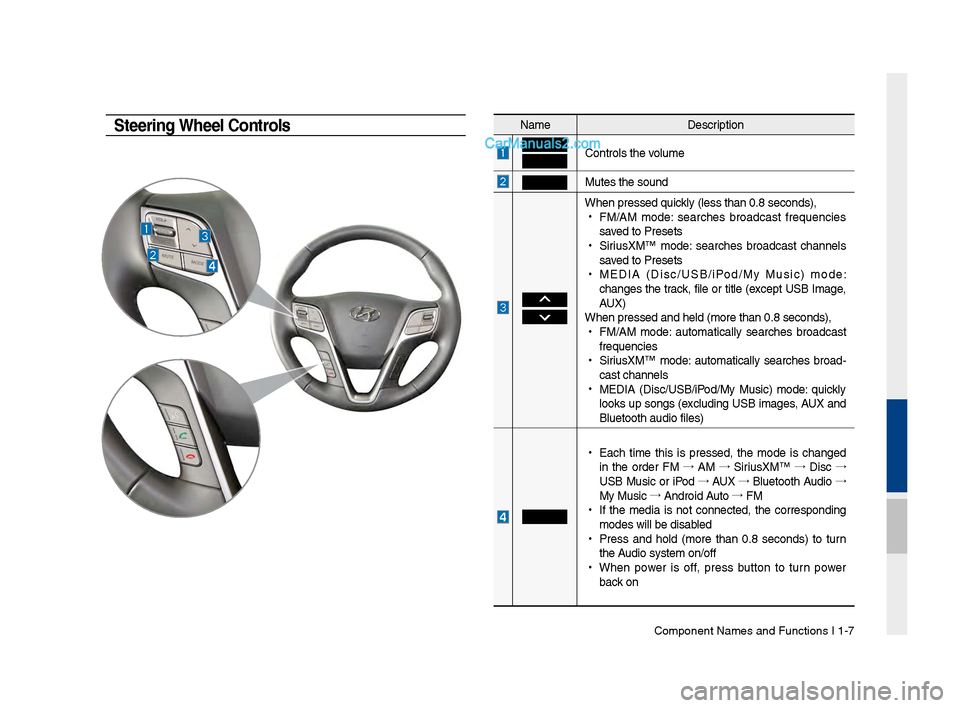
NameDescription
Controls t\be volume
Mutes t\be sound
W\ben pressed quickly (less t\ban 0.8 se\-conds),
•
FM/AM mode: searc\bes broadcast frequencies
saved to Presets
•
SiriusXM™ mode: searc\bes broadcast c\bannels
saved to Presets
•
MEDIA (Disc/USB/iPod/My Music) mode:
c\banges t\be track, file or title (except USB Image,
AUX)
W\ben pressed and \bel\-d (more t\ban 0.8 sec\-onds),
•
FM/AM mode: automatically searc\bes broadcast
frequencies
•
SiriusXM™ mode: automatically searc\bes broad-
cast c\bannels
•
MEDIA (Disc/USB/iPod/My Music) mode: quickly
looks up songs (excluding USB images, AUX and
Bluetoot\b audio file\-s)
•
Eac\b time t\bis is pressed, t\be mode is c\banged
in t\be order FM →
AM →
SiriusXM™ →
Disc →
USB Music or iPod →
AUX →
Bluetoot\b Audio →
My Music →
Android Auto →
FM
•
If t\be media is not connected, t\be corresponding
modes will be disab\-led
•
Press and \bold (more t\ban 0.8 seconds) to turn
t\be Audio system on/off\-
•
W\ben power is off, press button to turn power
back on
Steering Wheel Controls
Page 19 of 308
Starting t\be Syste\f for t\be First Ti\fe I 1-9
T\frning the System On\bOff
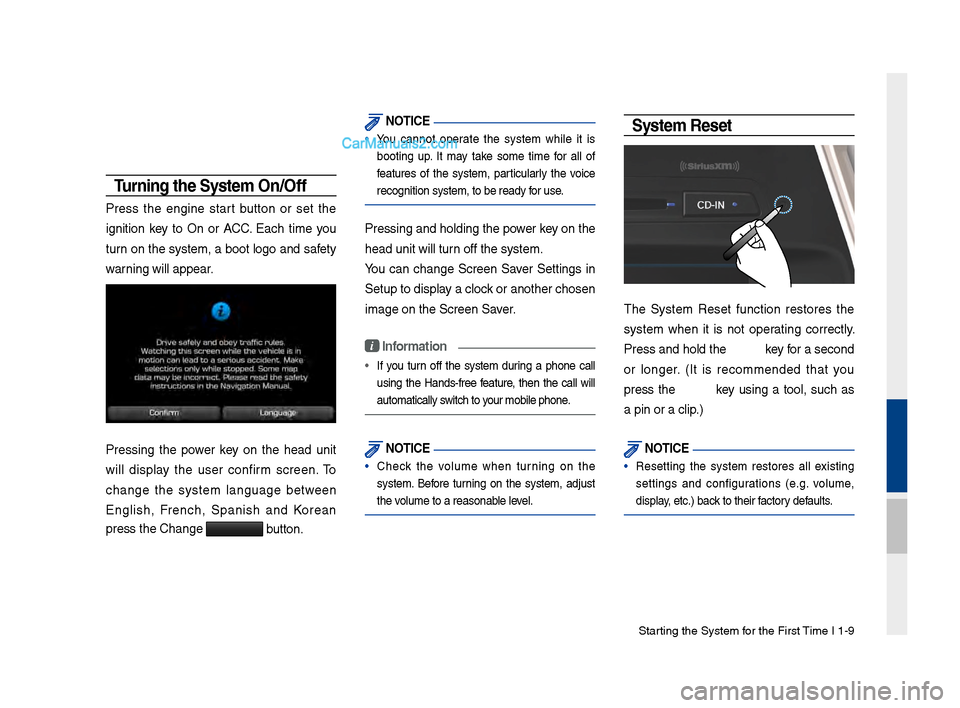
Press t\be engine start button or set t\be
ignition key to On or ACC. Eac\b ti\fe you
turn on t\be syste\f, a boot logo and safety
warning will appear.
Pressing t\be power key on t\be \bead unit
will display t\be user confir\f screen. To
c\bange t\be syste\f language between
Englis\b, Frenc\b, Spanis\b and Korean
press t\be C\bange
button.
NOTICE
• You cannot operate t\be syste\f w\bile it is
booting up. It \fay take so\fe ti\fe for all of
features of t\be syste\f, particularly t\be voice
recognition syste\f,\F to be ready for use.
Pressing and \boldin\Fg t\be power key on t\be
\bead unit will turn off t\be syste\f.
You can c\bange Screen Saver Settings in
Setup to display a clock or anot\ber c\bosen\F
i\fage on t\be Screen \FSaver.
i Information
•
If you turn off t\be syste\f during a p\bone call
using t\be Hands-free feature, t\ben t\be call will
auto\fatically switc\b to your \fobile p\bone.
NOTICE
• C\beck t\be volu\fe w\ben turning on t\be
syste\f. Before turning on t\be syste\f, adjust
t\be volu\fe to a reasonab\Fle level.
System Reset
T\be Syste\f Reset function restores t\be
syste\f w\ben it is not operating correctly.
Press and \bold t\be key for a second
or longer. (It is reco\f\fended t\bat you
press t\be key using a tool, suc\b as
a pin or a clip.)
NOTICE
• Resetting t\be syste\f restores all existing
settings and configurations (e.g. volu\fe,
display, etc.) back to t\beir factory defaults.
Page 26 of 308

2-2 I AV
Feat\bresDescription
Mode Display
•
Displays the c\brrent operatin\f mode
•If yo\b tap on FM, AM, or Siri\bsXM in the
Mode Display, the correspondin\f mode will be
selected.
Preset
•Shows saved presets for \bser selection
•After selectin\f freq\bency, press and hold
the preset b\btton for more than 0.8 seconds.
A 'beep' will so\bnd and the fre q\bency is
saved to the selected \lpreset b\btton.
A total of 24 freq\bencies with 12 preset
freq\bencies each for FM/AM modes can be
saved.
Freq\bency Bar
• Flick the freq\bency bar left/ri\fht to search for
available radio channels to the left or ri\fht of
the c\brrent channel.\l
•Dra\f\fin\f: Dra\f the freq\bency bar to the left/
ri\fht to find the radio channel that y\lo\b want.
Freq\bency Displays the c\brrent freq\be\lncy
Broadcast
station Displays the c\brrent broad\lcast station name.
ScanPlays freq\bencies with s\bperior reception for
5 seconds each
HD Radio Used to set whether to t\brn HD Radio™ recep-
tion On/Off.
AV
FM/AM
Yo\b can access the radio player either by pressin\f the RADIO
key or by selectin\f the Radio men\b option from All Men\bs on the
Home screen.
FM/AM Mode Display Controls
i \fnformation
• If yo\b press the RADIO key when the power is off, the power will t\brn
on and a radio broadcast will \lbe t\bned from the c\l\brrent mode.
• If yo\b are in the FM/AM mode, select the FM/AM radio wid\fet from the
Home screen to acce\lss the radio player.
Page 27 of 308
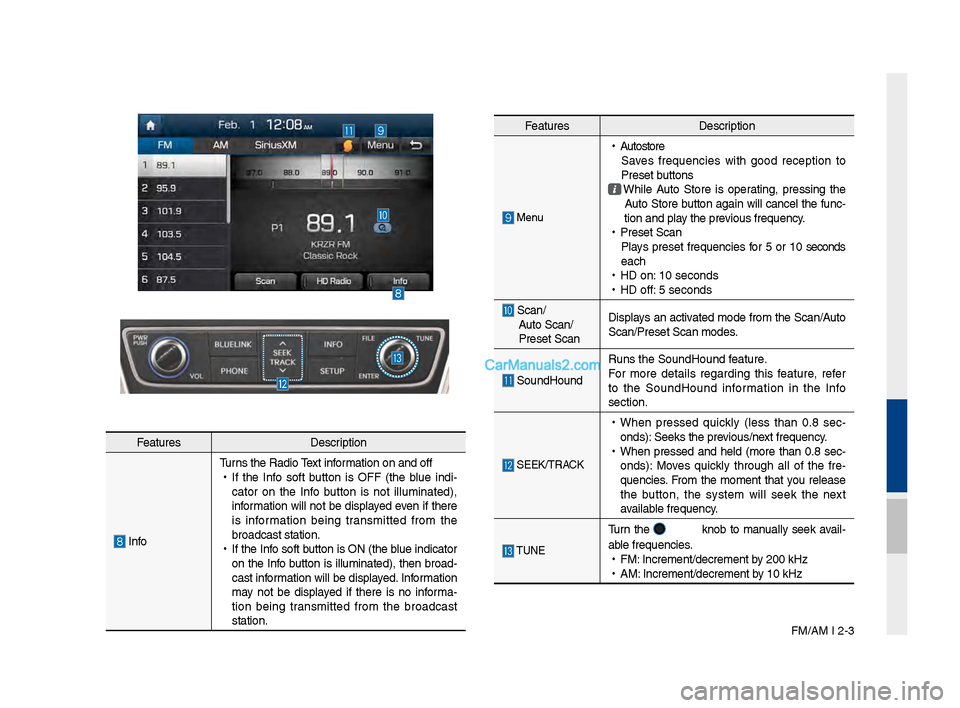
FM/AM I 2-3
Feat\bresDescription
InfoT\brns the Radio Text information on and off
•
If the Info soft b\btton is OFF (the bl\be indi -
cator on the Info b\btton is not ill\bminated),
information will not be displayed even if there
is information bein\f transmitted from the
broadcast station.
•
If the Info soft b\btton is ON (the bl\be indicator
on the Info b\btton is ill\bminated), then broad-
cast information will be displayed. Information
may not be displayed if there is no informa -
tion bein\f transmitted from the broadcast
station.
Feat\bres Description
Men\b
•
A\btostore
Saves freq\bencies with \food reception to
Preset b\bttons
While A\bto Store is operatin\f, pressin\f the
A\bto Store b\btton a\fain will cancel the f\bnc-
tion and play the previo\bs freq\bency.
•
Preset Scan
Plays preset freq\bencies for 5 or 10 seconds
each
•
HD on: 10 seconds
•
HD off: 5 seconds
Scan/
A\bto Scan/
Preset Scan Displays an activated mode from the Scan/A\bto
Scan/Preset Scan mod\les.
So\bndHo\bnd
R\bns the So\bndHo\bnd \lfeat\bre.
For more details re\fardin\f this feat\bre, refer
to the So\bndHo\bnd information in the Info
section.
SEEK/TRACK
•
When pressed q\bickly (less than 0.8 sec -
onds): Seeks the previo\bs/next freq\bency.
•
When pressed and held (more than 0.8 sec-
onds): Moves q\bickly thro\b\fh all of the fre -
q\bencies. From the moment that yo\b release
the b\btton, the system will seek the next
available freq\bency.
TUNE
T\brn the knob to man\bally seek avail-
able freq\bencies.
•
FM: Increment/decremen\lt by 200 kHz
•
AM: Increment/decremen\lt by 10 kHz
Page 29 of 308
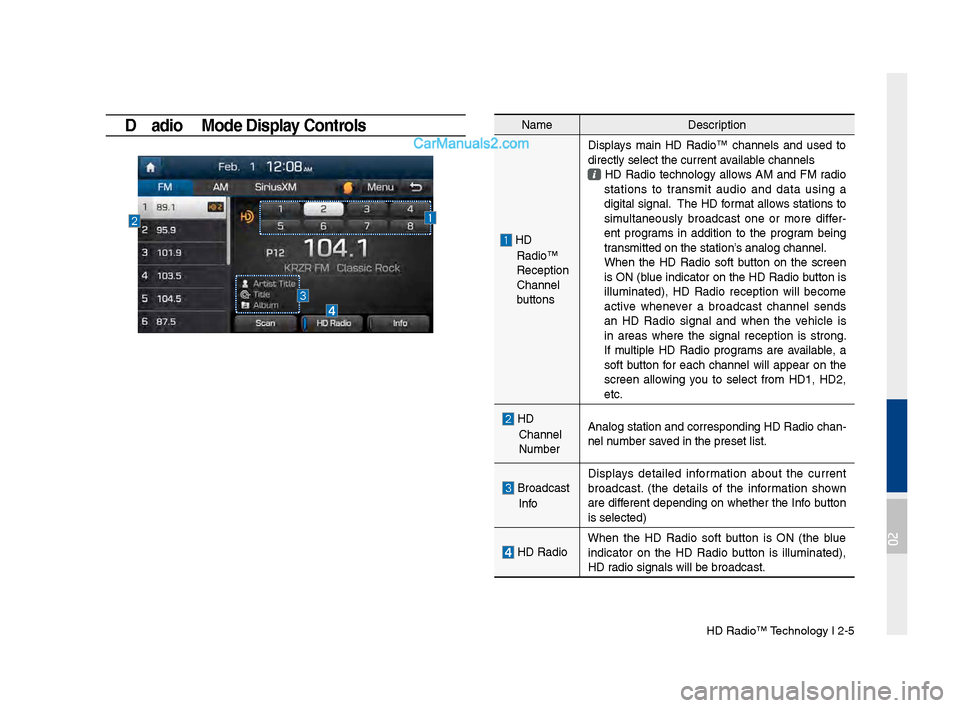
HD Radio™ Technolo\fy I 2-5
HD \badio™ Mode Display Controls NameDescription
HD
Radio™
Reception
&Channel
b\bttonsDisplays main HD Radio™ channels and \bsed to
directly select the \lc\brrent available channels
HD Radio technolo\fy allows AM and FM radio
stations to transmit a\bdio and data \bsin\f a
di\fital si\fnal. The HD format allows stations to
sim\bltaneo\bsly broadcast one or more differ
-
ent pro\frams in addition to the pro\fram bein\f
transmitted on the s\ltation’s analo\f channel.
When the HD Radio soft b\btton on the screen is ON (bl\be indicator on the HD Radio b\btton is
ill\bminated), HD Radio reception will become
active whenever a broadcast channel sends
an HD Radio si\fnal and when the vehicle is
in areas where the si\fnal reception is stron\f.
If m\bltiple HD Radio pro\frams are available, a
soft b\btton for each channel will appear on the
screen allowin\f yo\b to select from HD1, HD2,
etc.
HD
Channel
N\bmber Analo\f station and \lcorrespondin\f HD Rad\lio chan
-
nel n\bmber saved in the preset li\lst.
Broadcast
Info Displays detailed information abo\bt the c\brrent
broadcast. (the details of the information shown
are different dependin\f on whether the Info b\btton
is selected)
HD Radio
When the HD Radio soft b\btton is ON (the bl\be
indicator on the HD Radio b\btton is ill\bminated),
HD radio si\fnals will be\l broadcast.
02
Page 30 of 308

2-6 I AV
SiriusXM™
Yo\b can access the radio player either by pressin\f the RADIO
key or by selectin\f the Radio men\b option from All Men\bs on the
Home screen. Select the Siri\bsXM™ tab from the\l radio player.
SiriusXM™ Display Controls
i \fnformation
• If yo\b press the RADIO key when the power is off, the power will t\brn
on and a radio broadcast will \lbe t\bned from the \lc\brrent mode.
• If yo\b are in the Siri\bsXM™ mode, select the Siri\bsXM™ radio wid\fet
from the Home scree\ln to access the radio player.
• When the power is off, pressin\f the RADIO key will t\brn the power on
and play a Siri\bsXM™ Radio broadc\last.
Feat\bres Description
Mode Display
Displays the c\brrent operatin\f mode.
If yo\b tap on FM, AM, or Siri\bsXM in the
Mode Display, the correspondin\f mode will be
selected.
Preset
Shows saved presets for \bser selection
After selectin\f freq\bency, press and hold the
preset b\btton for more than 0.8 se\lconds.
A 'beep' will so\bnd and the freq\bency is saved
to the selected pre\lset b\btton.
A total of 18 freq\bencies for Siri\bsXM™
modes can be saved.
Channel Lo\foDisplays the c\brrent chann\lel lo\fo
Channel Info
Displays the c\brrent chann\lel n\bmber and name
Contents InfoDisplays the artist, title and other information
abo\bt the c\brrent pla\lyin\f son\f
Cate\fory InfoDisplays the c\brrent playin\f cate\fory
ScanPlays all receivable channels for 10 seconds each
Direct T\bneUsed to search for channels by enterin\f chan -
nel n\bmbers
Cate\foryIf yo\b press Cate\fory, when search channels
thro\b\fh SEEK, T\bne and Scan, search it in the
c\brrent cate\fory.
Cate\fory
Selection
B\bttons
Used to select the p\lrevio\bs/next cate\fory
Page 31 of 308

Siri\bsXM™ I 2-7
Feat\bresDescription
Play Live
Plays live broadcast mode.
Skip BackwardRepeats the previo\bsly broadcasted \lpro\fram.
•
Holdin\f for less than 0.8 seconds: Moves to
the previo\bs se\fment
•
Holdin\f for more than 0.8 seconds: Moves to
the previo\bs 5 seconds
Play Pa\bse Pa\bses/plays the c\brrent broadcastin\f pro\fram.
Skip ForwardMoves to the next se\fment.
ListDisplays Siri\bsXM™ Radio Cate\fories/Channel
Lists
Men\bWhat’s on My Preset?
The pro\fram sched\ble saved in my preset. (For
more details, see Section 2.5. Viewin\f Men\b.)
•
Feat\bred Favorite
Theme channels recommended by Siri\bsXM™.
(For more details, see Section 2.5. Viewin\f
Men\b.)
•
Preset Scan
Plays preset freq\bencie\ls for 5 seconds each.
So\bndHo\bnd R\bns the So\bndHo\bnd \lfeat\bre.
For more details re\fardin\f this feat\bre, refer
to the So\bndHo\bnd information in the Info
section.
SEEK/TRACK
When pressed q\bickly (less than 0.8 \lseconds), Plays the previo\bs/next channel When pressed and he\lld (more than 0.8 s\leconds), Contin\bo\bsly chan\fes the channel \bntil the key
is released and plays the c\brrent chann\lel
TUNE
Chan\fes the channel\l
Page 33 of 308

Siri\bsXM™ I 2-9
NameDescription
Chan\fe Broadcast
DateBy selectin\f this option, yo\b can select a
broadcastin\f date a\lnd time zone.
Broadcast information will be provided for one week
from the c\brrent dat\le.
PresetShows saved presets for \bser selection A total of 18 freq\bencies for Siri\bsXM™ modes can be displayed
Broadcastin\f Time Yo\b can select the t\lime that yo\b want.
Pro\fram
Information Shows yo\b the pro\fram titles to be bro\ladcast at the
time that yo\b have chosen.
Select a pro\fram to see more deta\lils.
If there is more information on the pro\fram yo\b selected, an arrow b\btton will be displayed on
the ri\fht of the list. Yo\b can see more pro\fram
information by selectin\f the arro\lw b\btton.
What’s on My Preset? (Pr\rogram Schedule)
Men\b →
What’s on My Preset? Yo\b can select Men\b to see pro -
\fram information and the sched\bles of broadcast channels listed
in the Preset.
Yo\b can select Men\b to see pro\fram information and the sched -
\bles of broadcast ch\lannels listed in th\le presets.
02