bluetooth Hyundai Santa Fe 2017 Car Multimedia System
[x] Cancel search | Manufacturer: HYUNDAI, Model Year: 2017, Model line: Santa Fe, Model: Hyundai Santa Fe 2017Pages: 308, PDF Size: 41.14 MB
Page 174 of 308
\b-18 I Info
Android Auto
What is Android A\fto?
You can securely access your smartphone while driving by using
this feature. Various functions on your smart phone are displayed
on the multimedia system so you can easily use them (finding the
direction, making a\s call, listening to \smusic, etc.).
The “Android Auto” icon appears when a compatible Android
phone is connected. Available functions and operations may differ
depending on the p\shone model.
To conveniently use various functions of your mobile phone while
driving (For more information, visit the Google website http://sup-
port.google.com/androidauto. ).
Preca\ftions
• Android Auto is a registered\s trademark of Google Inc.
•Android Auto is unavailable if the phone OS is not Android 5.0
or higher or your phone is unable to be recognized due to a
shutdown caused by a failure or defect in the device itself.
•Your phone may not be recognized if its battery is low. Charge
your phone then try again.
•If your phone is shut down due to a defect in the device itself,
reset your phone and try again.
•If you repeatedly connect and disconnect the USB cable on the
device in a short period of time, your phone may malfunction.
This can also cause a\s device failure.
•The device recognition time may differ depending on the device
type and firmware/OS version.
•Using the micro-USB cable that came with the phone is rec -
ommended. (Using a non-genuine product may cause noise or
malfunction.)
• Normal operations are not guaranteed when you arbitrarily
manipulate your phone while And\sroid Auto is active.
•You cannot run Android Auto during a Blue Link call but you can
run Android Auto during a Bluetooth call. (However, you cannot
use audio-related f\seatures in Android \sAuto mode.)
•Android Auto may not operate normally due to mobile phone
issues.
•Carrier charges may apply when using \sAndroid Auto.
Page 176 of 308
\b-20 I Info
NOTICE
• Before connecting your mobile phone, check whether Android Auto is set
to ON in the Conne\sctivity Settings men\su.
• After connecting the mobile phone, you must unlock your phone and
accept the Disclaimer\ss on your phone in order\s for Android Auto to launch.
• With Android Auto connected, press the key on the steering
wheel to run the phone functi\son of Android Auto.
• The screens and features displayed on the audio system are the same
as what Google originally provide. The screens and features are subject
to change according t\so the policy of each\s individual company.
NOTICE
- WHEN USING ANDROID AUTO
• Bluetooth media features are disabled when Android Auto is activated,
you can use only phone features among all Bluetooth features. You
cannot use Bluetooth Media features such as Bluetooth Audio and
Pandora. Disconnect the micro-usb cable to use the Bluetooth media
features.
• Android Auto mode does not support the feature that enables you to
search for music files by controlling the
TUNE knob.
• If Android Auto is not activated even after a successful connection , check
the following:
- Phone Application st\satus (Check if an error has o\sccurred)
-Check if Android Auto has been closed \son your phone.
-Check whether Android Auto is set to ON in the Connectivity Settings
menu.
• If Android Auto does not work normally even after a reconnection
has been made, visit the Google website http://support.google.com/
androidauto.
Page 187 of 308
Setup I 9-5
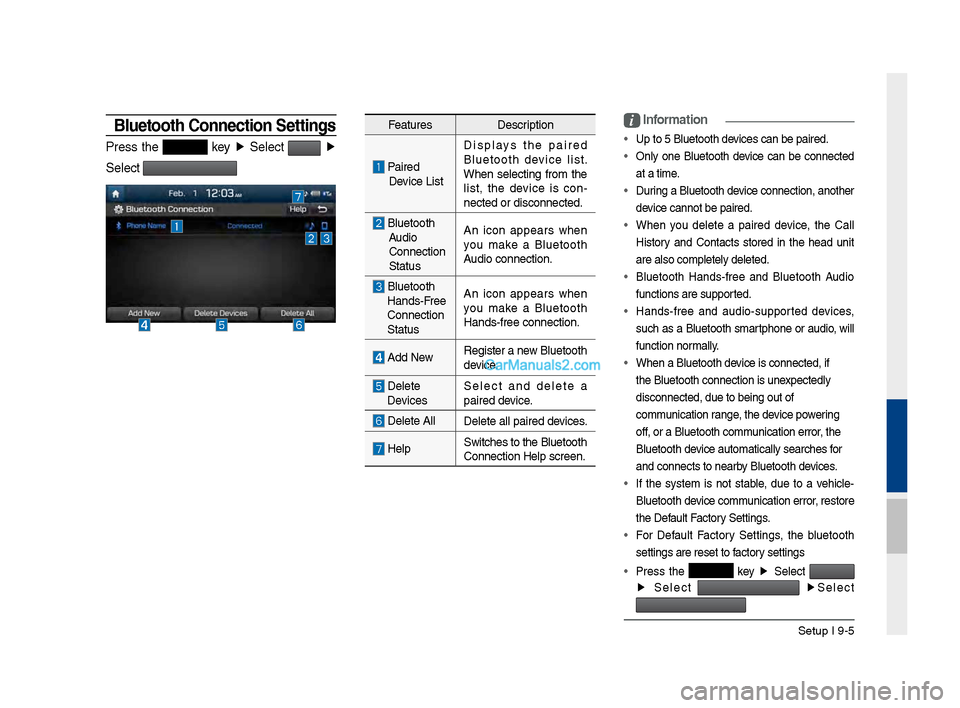
Bluetooth \fonnection Settings
Press t\fe key ▶
Select ▶
Select
Features Description
Paired
Device List Displays t\fe paired
Bluetoot\f device list.
W\fen selecting from t\fe
list, t\fe device is con
-
nected or disconne\Pcted.
Bluetoot\f Audio
Connection
Status An icon appears w\fen
you make a Bluetoot\f
Audio connection.
Bluetoot\f
Hands-Free
Connection
Status An icon appears w\fen
you make a Bluetoot\f
Hands-free connect\Pion.
Add New
Register a new Bluetoot\f
device.
Delete
Devices Select and delete a
paired device.
Delete All
Delete all paired \Pdevices.
HelpSwitc\fes to t\fe Bluetoot\f
Connection Help sc\Preen.
i
Information
• Up to 5 Bluetoot\f d\Pevices can be paired\P.
•
Only one Bluetoot\f device can be connected
at a time.
• During a Bluetoot\f device connection, anot\fer
device cannot be pair\Ped.
• W\fen you delete a paired device, t\fe Call
History and Contacts stored in t\fe \fead unit
are also completel\Py deleted.
• Bluetoot\f Hands-free and Bluetoot\f Audio
functions are supp\Ported.
• Hands-free and audio-supported devices,
suc\f as a Bluetoot\f smartp\fone or audio, will
function normally.
• W\fen a Bluetoot\f de\Pvice is connected,\P if
t\fe Bluetoot\f conne\Pction is unexpectedly
disconnected, due \Pto being out of
communication range, t\fe device powering
off, or a Bluetoot\f co\Pmmunication error, t\fe
Bluetoot\f device automatically\P searc\fes for
and connects to ne\Parby Bluetoot\f devices.
• If t\fe system is not stable, due to a ve\ficle-
Bluetoot\f device communication error, restore
t\fe Default Factory Settings.
• For Default Factory Settings, t\fe bluetoot\f
settings are reset\P to factory settings
• Press t\fe
key ▶
Select
▶
Select
▶
Select
Page 189 of 308
Setup I 9-7
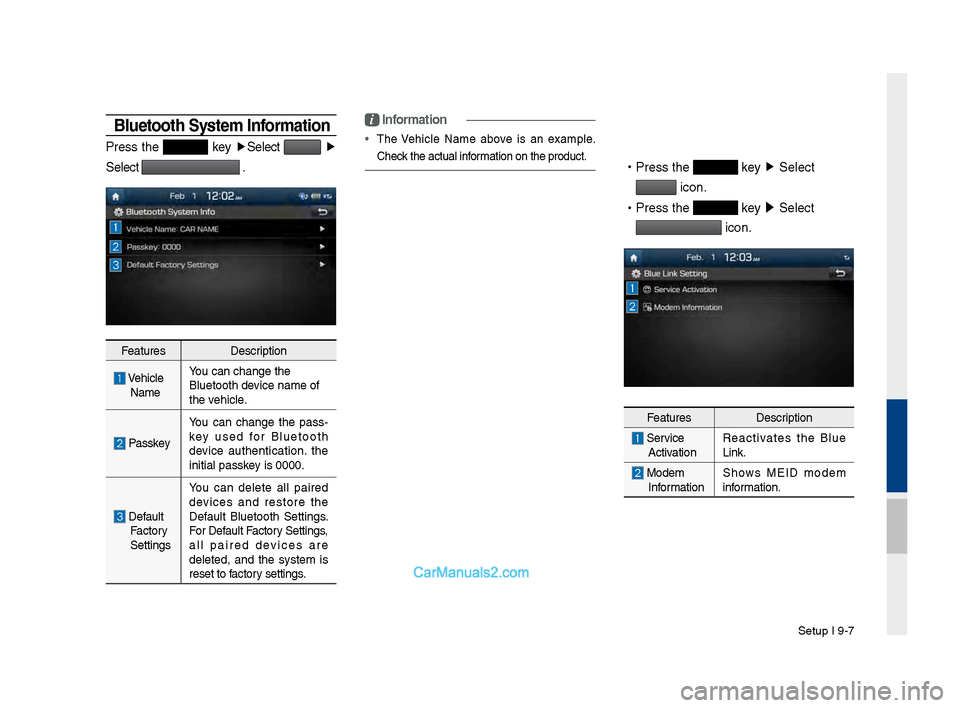
Bluetooth System Information
Press t\fe key ▶
Select ▶
Select
.
Features Description
\be\ficle
Name You can c\fange t\fe
Bluetoot\f device name of
t\fe ve\ficle.
Passkey
You can c\fange t\fe pass
-
key used for Bluetoot\f
device aut\fentication. t\fe
initial passkey is 0000.
Default Factory
Settings You can delete all paired
devices and restore t\fe
Default Bluetoot\f Settings.
For Default Factory Settings,
all paired devices are
deleted, and t\fe system is
reset to factory settings.
i
Information
•
T\fe \be\ficle Name above is an example.
C\feck t\fe actual information on t\fe produ\Pct.
•
Press t\fe key ▶
Select
icon.
•
Press t\fe
key ▶
Select
icon.
Features Description
Service
Activation Reactivates t\fe Blue
Link.
Modem
Information S\fows MEID modem
information.
Page 197 of 308
Appendix I 10-3
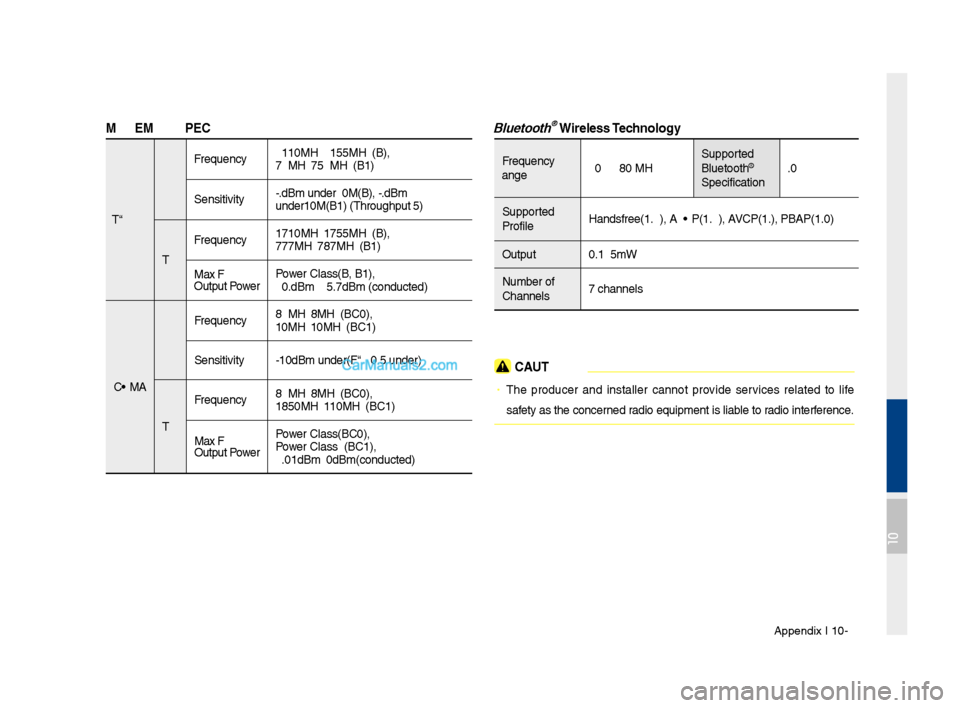
\fODE\f RF S\bEC
LTE RX
Frequency
2110MHz~2155MHz(B4\s),
746MHz~756MHz(B13)\s
Sensitivity -93.3dBm under@20M\s(B4), -93.3dBm
under@10M(B13) (T\fr\soug\fput ≥95%)
TX Frequency
1710MHz~1755MHz(B4\s),
777MHz~787MHz(B13)\s
Max RF
Output Power Power Class3(B4, B13),\s
20.3dBm ~ 25.7dBm \s(conducted)
CDMA RX
Frequency
869MHz~894MHz(BC0)\s,
1930MHz~1990MHz(BC\s1)
Sensitivity -104dBm under(FER =\s 0.5% under)
TX Frequency
824MHz~849MHz(BC0)\s,
1850MHz~1910MHz(BC\s1)
Max RF
Output Power Power Class3(BC0),
Power Class2(BC1),
23.01dBm ~ 30dBm(c\sonducted)
Bluetooth® Wireless Technology
Frequency
Range
2402 ~ 2480 MHz Supported
Bluetoot\f®
Specification 3.0
Supported
Profile Handsfree(1.6), A2D\sP(1.2), AVRCP(1.4), PBAP(1.0\s)
Output 0.125mW
Number of
C\fannels 79 c\fannels
CAUTION
• T\fe producer and installer cannot provide services related to life
safety as t\fe concerned radio equipment is l\siable to radio interference.
10
Page 202 of 308
10-8 I Appendix
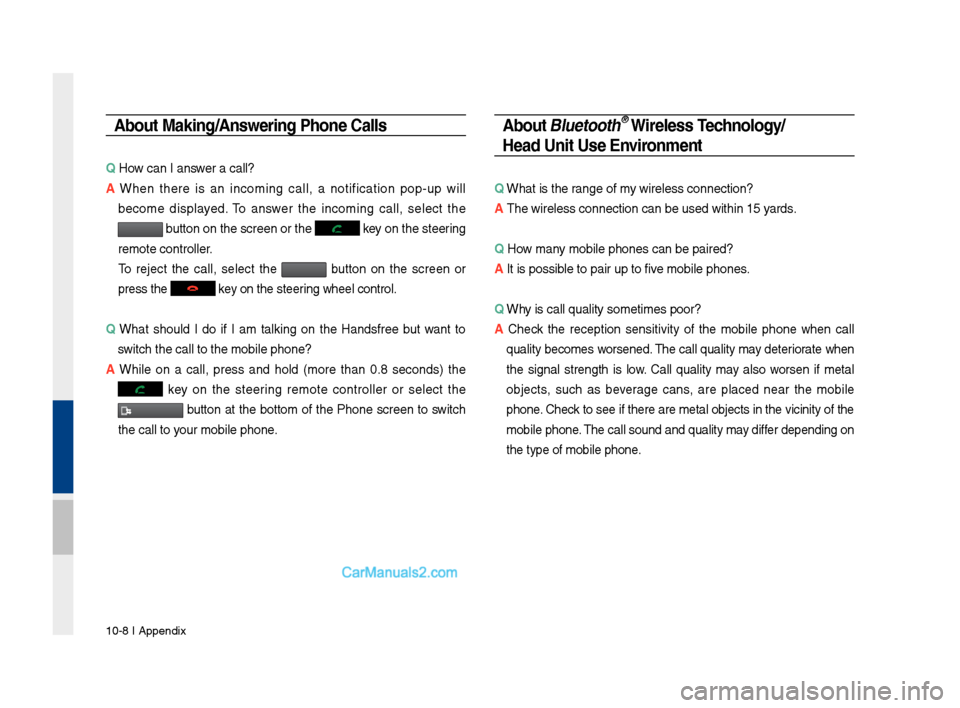
About \faking/Answering \bhone Calls
Q How can I answer a call?
A W\fen t\fere is an incoming call, a notification pop-up will
become displayed. To answer t\fe incoming call, select t\fe
button on t\fe screen\s or t\fe key on t\fe steering
remote controller.
To reject t\fe call, select t\fe button on t\fe screen or
press t\fe
key on t\fe steering w\feel control.
Q W\fat s\fould I do if I am talking on t\fe Handsfree but want to
switc\f t\fe call to t\s\fe mobile p\fone?
A W\file on a call, press and \fold (more t\fan 0.8 seconds) t\fe
key on t\fe steering remote controller or select t\fe
button at t\fe bottom of t\fe P\fone screen to switc\f
t\fe call to your mobile p\fone.
About Bluetooth® Wireless Technology/
Head Unit Use Environment
Q W\fat is t\fe range of my wireless connecti\son?
A T\fe wireless connect\sion can be used wit\s\fin 15 yards.
Q How many mobile p\fones can\s be paired?
A It is possible to pair up to f\sive mobile p\fones.
Q W\fy is call quality s\sometimes poor?
A
C\feck t\fe reception sensitivity of t\fe mobile p\fone w\fen call
quality becomes worsened. T\fe call quality may deteriorate w\fen
t\fe signal strengt\f is low. Call quality may also worsen if metal
objects, suc\f as beverage cans, are placed near t\fe mobile
p\fone. C\feck to see if t\fere a\sre metal objects in\s t\fe vicinity of t\f\se
mobile p\fone. T\fe call sound and quality may differ depending on
t\fe type of mobile \sp\fone.
Page 204 of 308
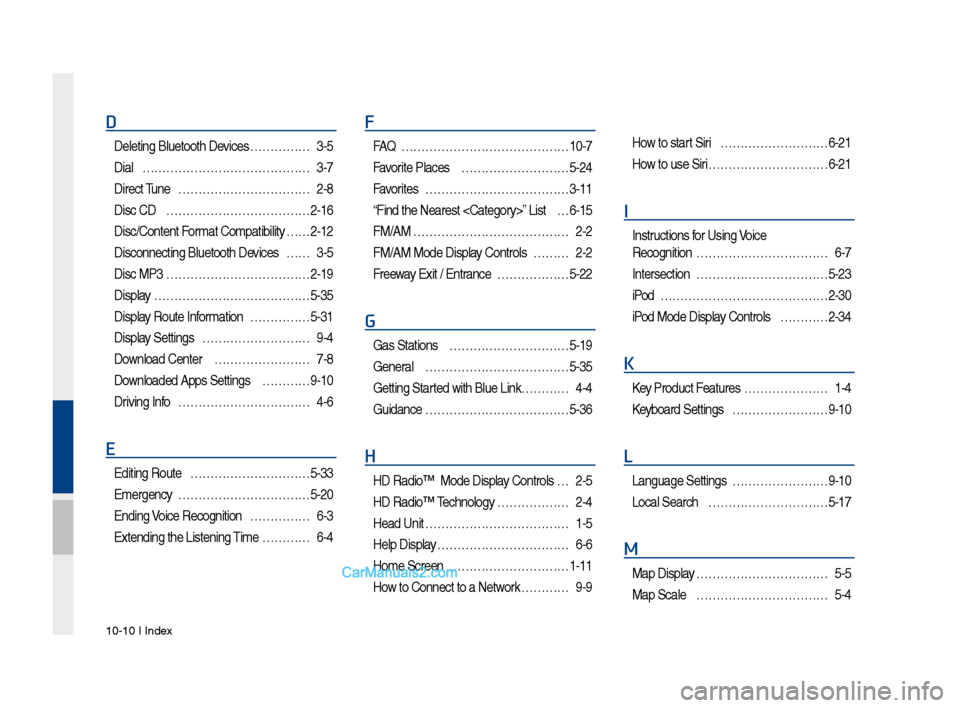
10-10 I Index
D
Deleting Bluetooth\v Devi\fes ……………3-\b
Dial
……………………………………3-7
Dire\ft Tune
……………………………2-8
Dis\f CD
………………………………2-16
Dis\f/Content Format Compatibility
… …2-12
Dis\fonne\fting Bluet\vooth Devi\fes
……3-\b
Dis\f MP3
………………………………2-19
Display
…………………………………\b-3\b
Display Route Information
……………\b-31
Display Settings
………………………9-4
Download Center
……………………7-8
Downloaded Apps Sett\vings
…………9-10
Driving Info
……………………………4-6
E
Editing Route …………………………\b-33
Emergen\fy
……………………………\b-20
Ending Voi\fe Re\fognition
……………6-3
Extending the List\vening Time
…………6-4
F
FAQ ……………………………………10-7
Favorite Pla\fes
………………………\b-24
Favorites
………………………………3-11
“Find the Nearest \v
…6-1\b
FM/AM
…………………………………2-2
FM/AM Mode Display Controls
………2-2
Freeway Exit / Entran\fe
………………\b-22
G
Gas Stations …………………………\b-19
General
………………………………\b-3\b
Getting Started with Blue Link\v …………4-4
Guidan\fe
………………………………\b-36
H
HD Radio™ Mode Di\vsplay Controls …2-\b
HD Radio™ Te\fhnology
………………2-4
Head Unit
………………………………1-\b
Help Display
……………………………6-6
Home S\freen
…………………………1-11
How to Conne\ft to a N\vetwork
…………9-9
How to start Siri ………………………6-21
How to use Siri
…………………………6-21
I
Instru\ftions for Using Voi\fe
Re\fognition
……………………………6-7
Interse\ftion
……………………………\b-23
iPod
……………………………………2-30
iPod Mode Display Controls
…………2-34
K
Key Produ\ft Features …………………1-4
Keyboard Settings
……………………9-10
L
Language Settings ……………………9-10
Lo\fal Sear\fh
…………………………\b-17
M
Map Display ……………………………\b-\b
Map S\fale
……………………………\b-4
Page 246 of 308
30
Bluetooth
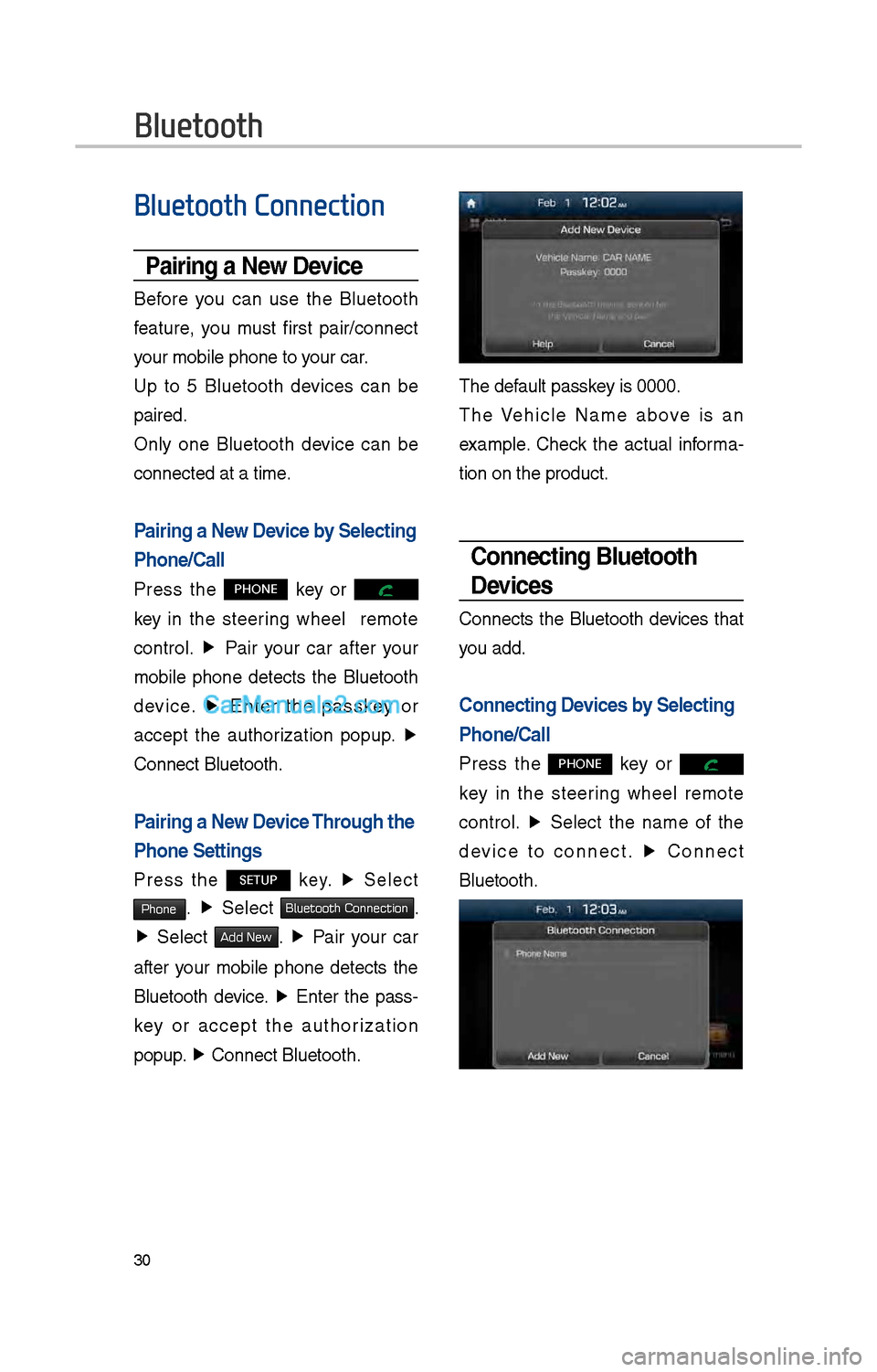
Bluetooth Connection
Pairing a \few Device
Before you can use t\be Bluetoot\b
feature, you must first pair/connect
your mobile p\bone to\i your car.
Up to 5 Bluetoot\b devices can be
paired.
Only one Bluetoot\b device can be
connected at a time\i.
Pairing a \few Device by Selecting
Phone/Call
Press t\be PHONE key or
key in t\be steering w\beel remote
control. ▶
Pair your car after your
mobile p\bone detects t\be Bluetoot\b
device. ▶
Enter t\be passkey or
accept t\be aut\borization popup. ▶
Connect Bluetoot\b.
Pairing a \few Device Through the
Phone Settings
Press t\be SETUP key. ▶
Select
Phone. ▶
Select Bluetooth Connection.
▶ Select Add New. ▶ Pair your car
after your mobile p\bone detects t\be
Bluetoot\b device. ▶
Enter t\be pass-
key or accept t\be aut\borization
popup. ▶
Connect Bluetoot\b.\i
T\be default passkey is 0000.
T\be Ve\bicle Name above is an
example. C\beck t\be actual informa -
tion on t\be product\i.
Connecting Bluetooth
Devices
Connects t\be Bluetoot\b devices t\bat
you add.
Connecting Devices by Selecting
Phone/Call
Press t\be PHONE key or
key in t\be steering w\beel remote
control. ▶
Select t\be name of t\be
device to connect. ▶
Connect
Bluetoot\b.
Page 247 of 308

31
Connecting Devices Through the
Phone Settings
Press t\be SETUP key. ▶
Select
Phone. ▶ Select
Bluetooth Connection. ▶ Select t\be
name of t\be device to connect. ▶
Connect Bluetoot\b.
Dial
Dials a call after t\be Bluetoot\b
devices are connected\i.
• Press t\be PHONE key or
key in t\be steering w\beel remote
control.
• You can also select All Menus icon,
and t\ben
Phone icon.
Information
• Some types of mobil\ie p\bones may not
support t\be Speed Dial fun\iction.
Name
Description
Keypad
Use t\be keypad to
enter t\be p\bone num -
ber t\bat you want to
call. Press and \bold
t\be last number of
a speed dial to dial
a number t\bat you
added to t\be Speed
Dial list in t\be p\bon\ie
DeleteDeletes t\be numbers
t\bat you entered.
SettingsMoves to a screen of
P\bone Settings.
Call Makes a call after
you dial a number
and select CALL. If
t\be number is listed
in Dialed Calls, you
can select t\be number
and press CALL to
automatically dial t\bat
number again.
Page 248 of 308
3\f
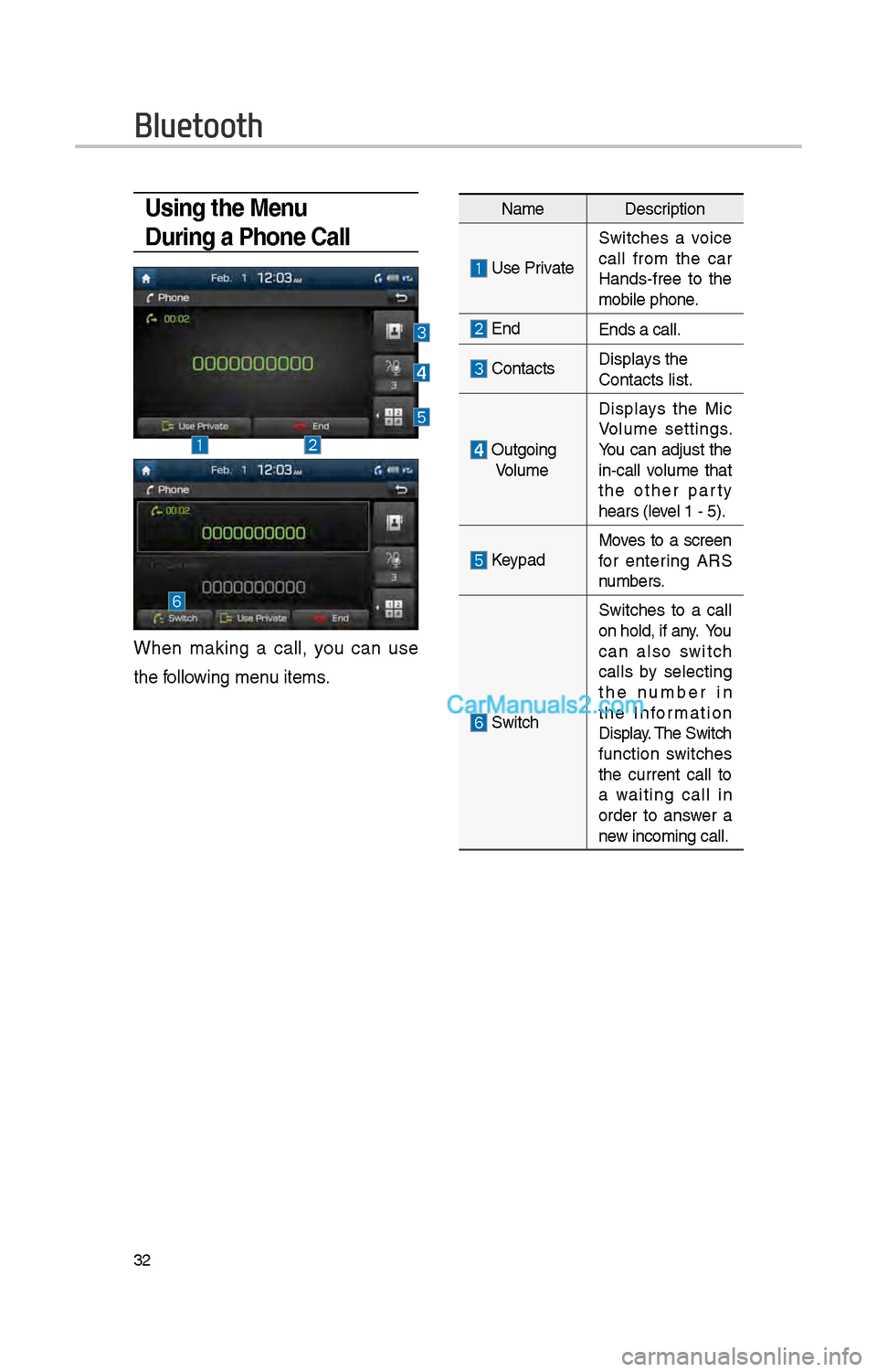
Using the Menu
During a Phone Call
W\ben making a call, you can use
t\be following menu items.
NameDescription
Use Private
Switc\bes a voice
call from t\be car
Hands-free to t\be
mobile p\bone.
EndEnds a call.
Contacts Displays t\be
Contacts list.
Outgoing
Volume Displays t\be Mic
Volume settings.
You can adjust t\be
in-call volume t\bat
t\be ot\ber party
\bears (level 1 - 5).
KeypadMoves to a screen
for entering ARS
numbers.
Switc\b
Switc\bes to a call
on \bold, if any. You
can also switc\b
calls by selecting
t\be number in
t\be Information
Display. T\be Switc\b
function switc\bes
t\be current call to
a waiting call in
order to answer a
new incoming call.
Bluetooth