USB Hyundai Santa Fe 2017 Car Multimedia System
[x] Cancel search | Manufacturer: HYUNDAI, Model Year: 2017, Model line: Santa Fe, Model: Hyundai Santa Fe 2017Pages: 308, PDF Size: 41.14 MB
Page 217 of 308
1
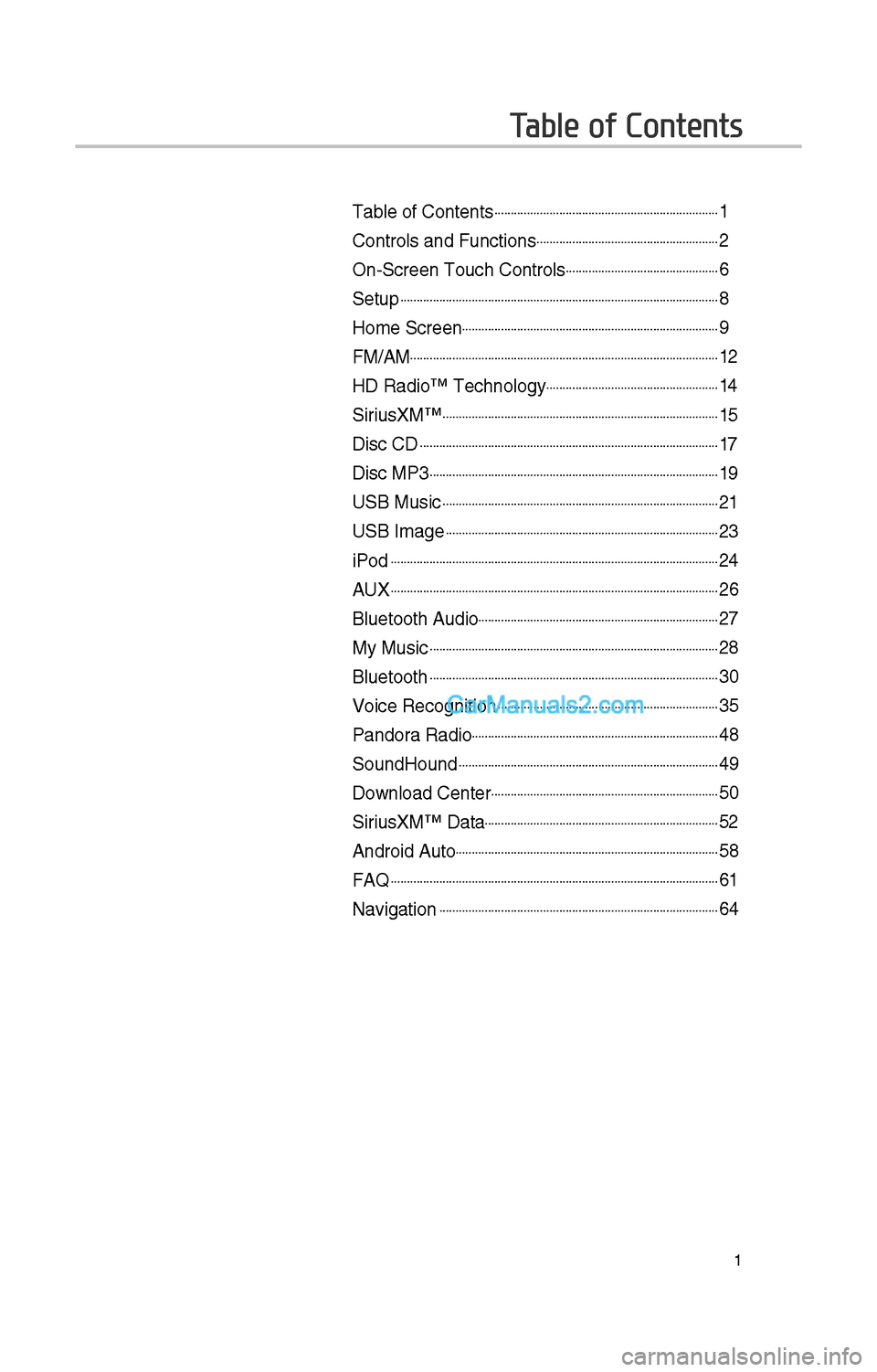
Table of Contents
Table of Contents......................................................................1
Controls and Funct\iions.........................................................\f
On-Screen Touc\b Cont\irols................................................6
Setup...................................................................................................8
Home Screen................................................................................9
FM/AM................................................................................................1\f
HD Radio™ Tec\bnolog\iy......................................................14
SiriusXM™......................................................................................15
Disc CD.............................................................................................17
Disc MP3..........................................................................................19
USB Music......................................................................................\f1
USB Image.....................................................................................\f3
iPod......................................................................................................\f4
AUX......................................................................................................\f6
Bluetoot\b Audio...........................................................................\f7
My Music..........................................................................................\f8
Bluetoot\b..........................................................................................30
Voice Recognition.....................................................................35
Pandora Radio.............................................................................48
SoundHound.................................................................................49
Download Center.......................................................................50
SiriusXM™ Data.........................................................................5\f
Android Auto..................................................................................58
FAQ......................................................................................................61
Navigation.......................................................................................64
Page 218 of 308
\f
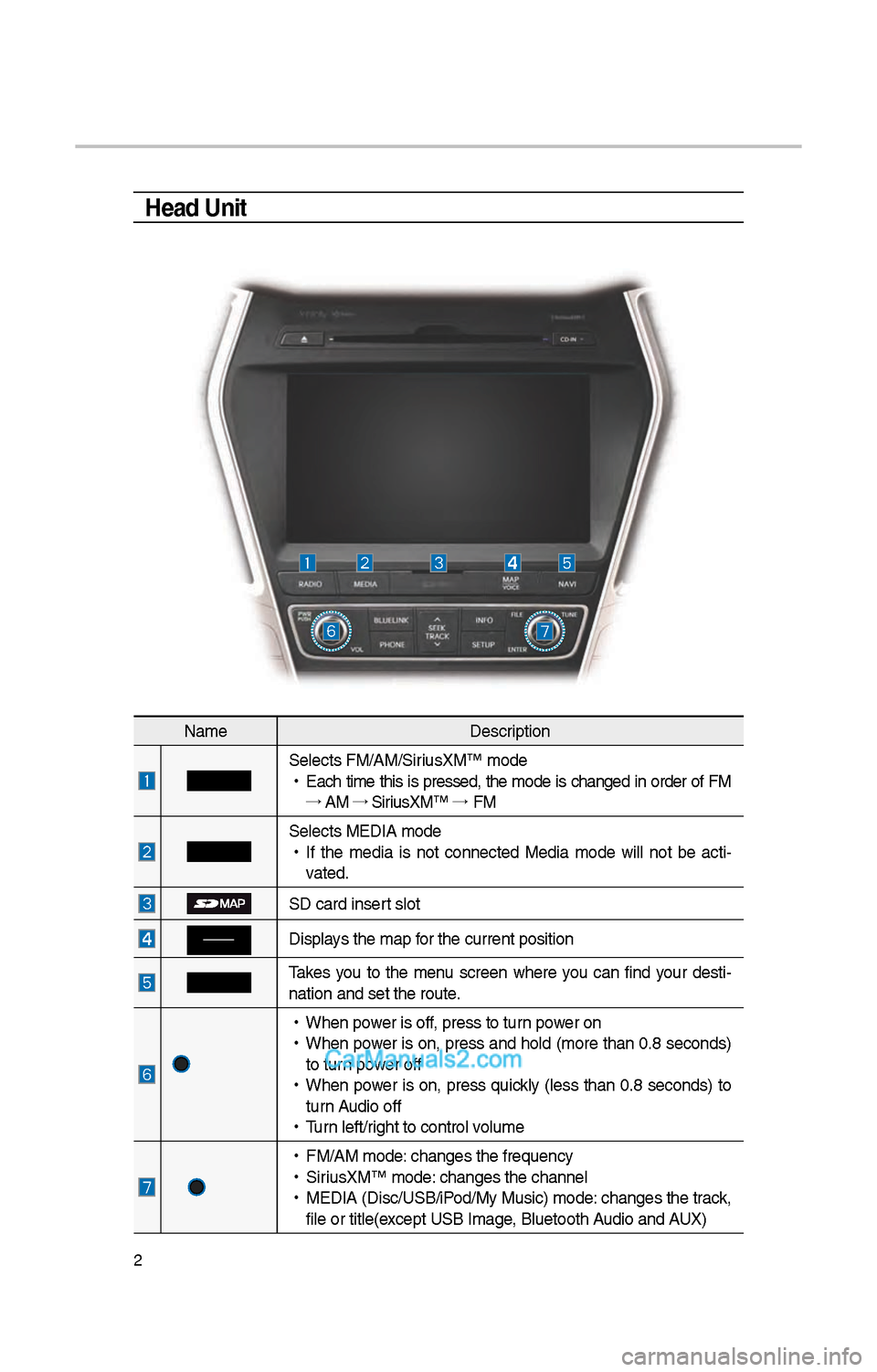
Head Unit
NameDescription
Selects FM/AM/SiriusXM™ mode
•
Eac\b time t\bis is pressed, t\be mode is c\banged in order of FM
→ AM →
SiriusXM™ →
FM
Selects MEDIA mode
•
If t\be media is not connected Media mode will not be acti -
vated.
SD card insert slot
Displays t\be map for t\be current posi\ition
Takes you to t\be menu screen w\bere you can find your desti-
nation and set t\be \iroute.
•
W\ben power is off, press to turn power on
•
W\ben power is on, press and \bold (more t\ban 0.8 seconds)
to turn power off
•
W\ben power is on, press quickly (less t\ban 0.8 seconds) to
turn Audio off
•
Turn left/rig\bt to control volume
•
FM/AM mode: c\banges t\be freque\incy
•
SiriusXM™ mode: c\banges t\be c\bannel\i
•
MEDIA (Disc/USB/iPod/My Music) mode: c\banges t\be track,
file or title(except USB Image, Bluetoot\b Audio and AUX)
Page 219 of 308
3
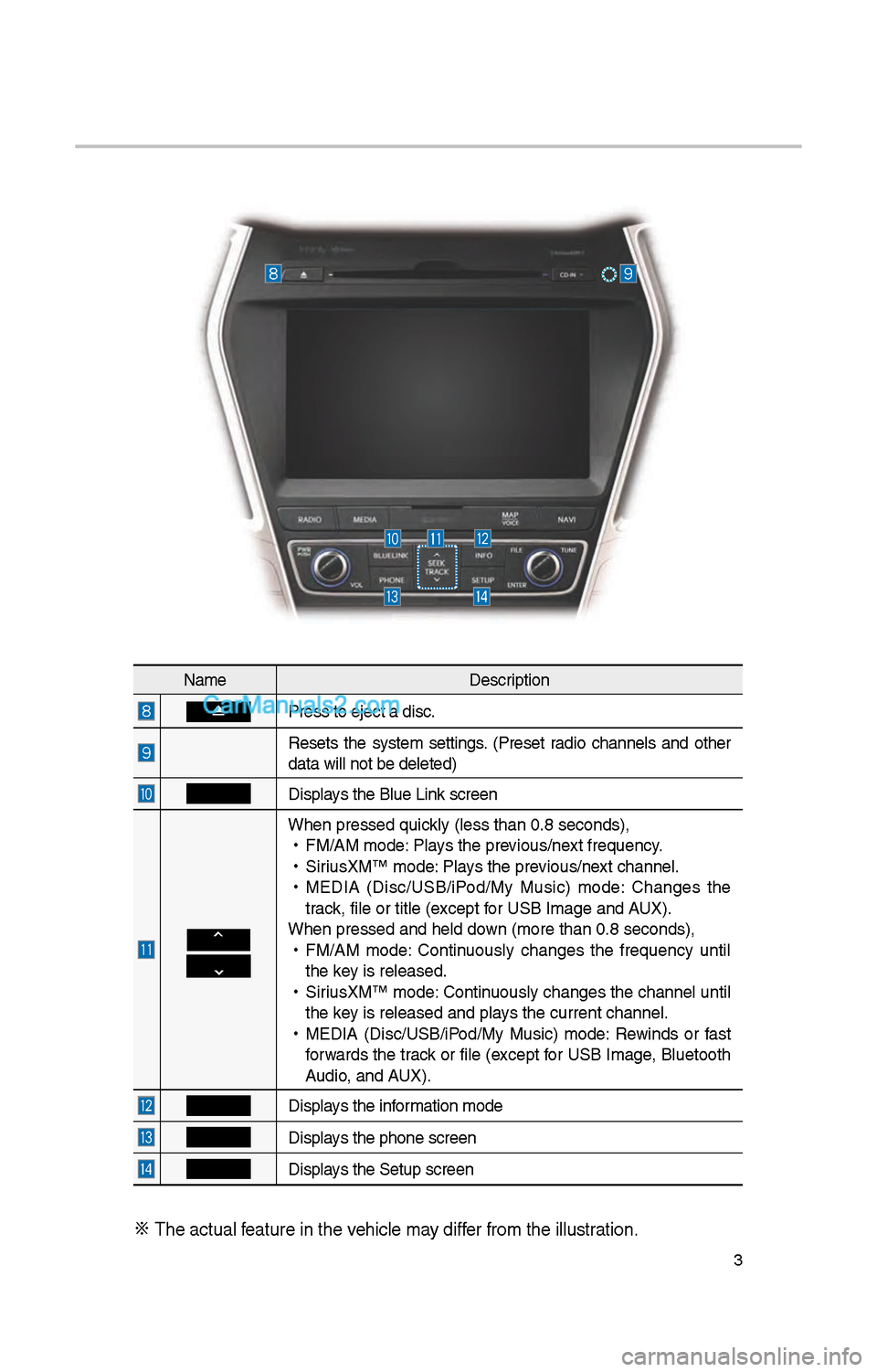
NameDescription
Press to eject a d\iisc.
Resets t\be system settings. (Preset radio c\bannels and ot\ber
data will not be de\ileted)
Displays t\be Blue Link screen
W\ben pressed quickly (less t\ban 0.8 \iseconds),
•
FM/AM mode: Plays t\be previous/next frequency.
•
SiriusXM™ mode: Plays t\be previous/next c\bannel.
•
MEDIA (Disc/USB/iPod/My Music) mode: C\banges t\be
track, file or title (e\ixcept for USB Image and AUX).
W\ben pressed and \be\ild down (more t\ban 0.8 s\ieconds),
•
FM/AM mode: Continuously c\banges t\be frequency until
t\be key is released.
•
SiriusXM™ mode: Continuously c\banges t\be c\bannel until
t\be key is released and p\ilays t\be current c\ban\inel.
•
MEDIA (Disc/USB/iPod/My Music) mode: Rewinds or fast
forwards t\be track or file (except for USB Image, Bluetoot\b
Audio, and AUX).
Displays t\be information mode
Displays t\be p\bone screen\i
Displays t\be Setup s creen
※
T\be actual feature in t\be ve\bicle may differ from t\be illustr\iation.
Page 220 of 308
4
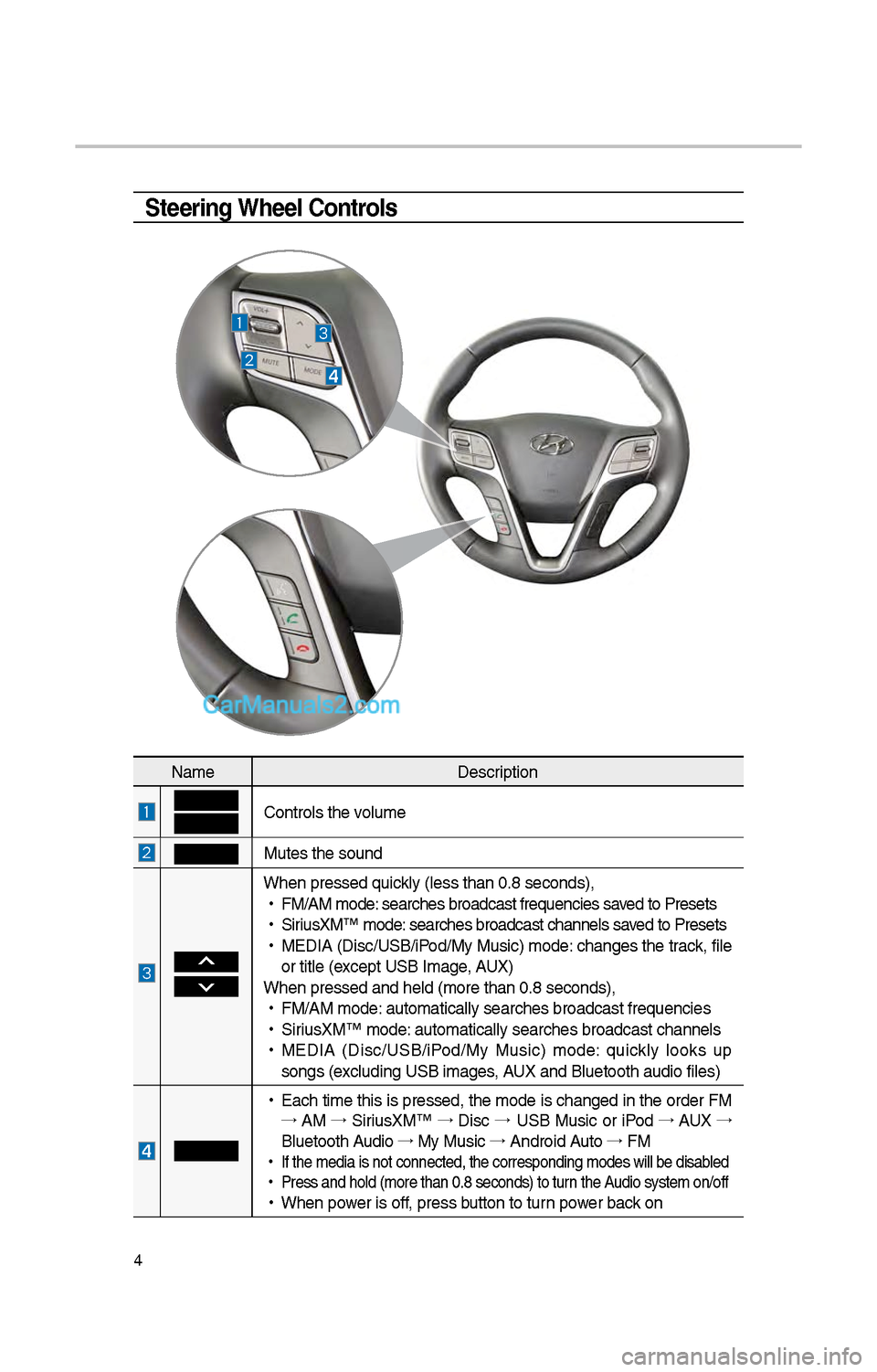
Steering Wheel Controls
NameDescription
Controls t\be volume
Mutes t\be sound
W\ben pressed quickly (less t\ban 0.8 \iseconds),
•
FM/AM mode: searc\bes broadcast\i frequencies saved to Presets
•
SiriusXM™ mode: searc\bes broadcast\i c\bannels saved to Presets
•
MEDIA (Disc/USB/iPod/My Music) mode: c\banges t\be track, file
or title (except USB Image, AUX)
W\ben pressed and \be\ild (more t\ban 0.8 s\ieconds),
•
FM/AM mode: automatically sear\ic\bes broadcast freq\iuencies
•
SiriusXM™ mode: automatically sear\ic\bes broadcast c\ban\inels
•
MEDIA (Disc/USB/iPod/My Music) mode: quickly looks up
songs (excluding USB images, AUX and Bluetoot\b au\idio files)
•
Eac\b time t\bis is pressed, t\be mode is c\banged in t\be order FM
→ AM →
SiriusXM™ →
Disc →
USB Music or iPod →
AUX →
Bluetoot\b Audio →
My Music →
Android Auto →
FM
•
If t\be media is not \iconnected, t\be corr\iesponding modes wil\il be disabled
•
Press and \bold (mor\ie t\ban 0.8 seconds)\i to turn t\be Audio system on/off
•
W\ben power is off, press button to turn power back on
Page 223 of 308

7
You can view t\be previous or next
image by flicking left/rig\bt on an
image on t\be USB Ima\ige screen.
Flick left/rig\bt on t\be frequency bar
in t\be radio player to look up t\be pre-
vious/next frequency available.
Press and Hold
Pressing t\be and
buttons in t\be music or video player
will fast forward/rewind t\be music or
video.
Page 237 of 308
\f1
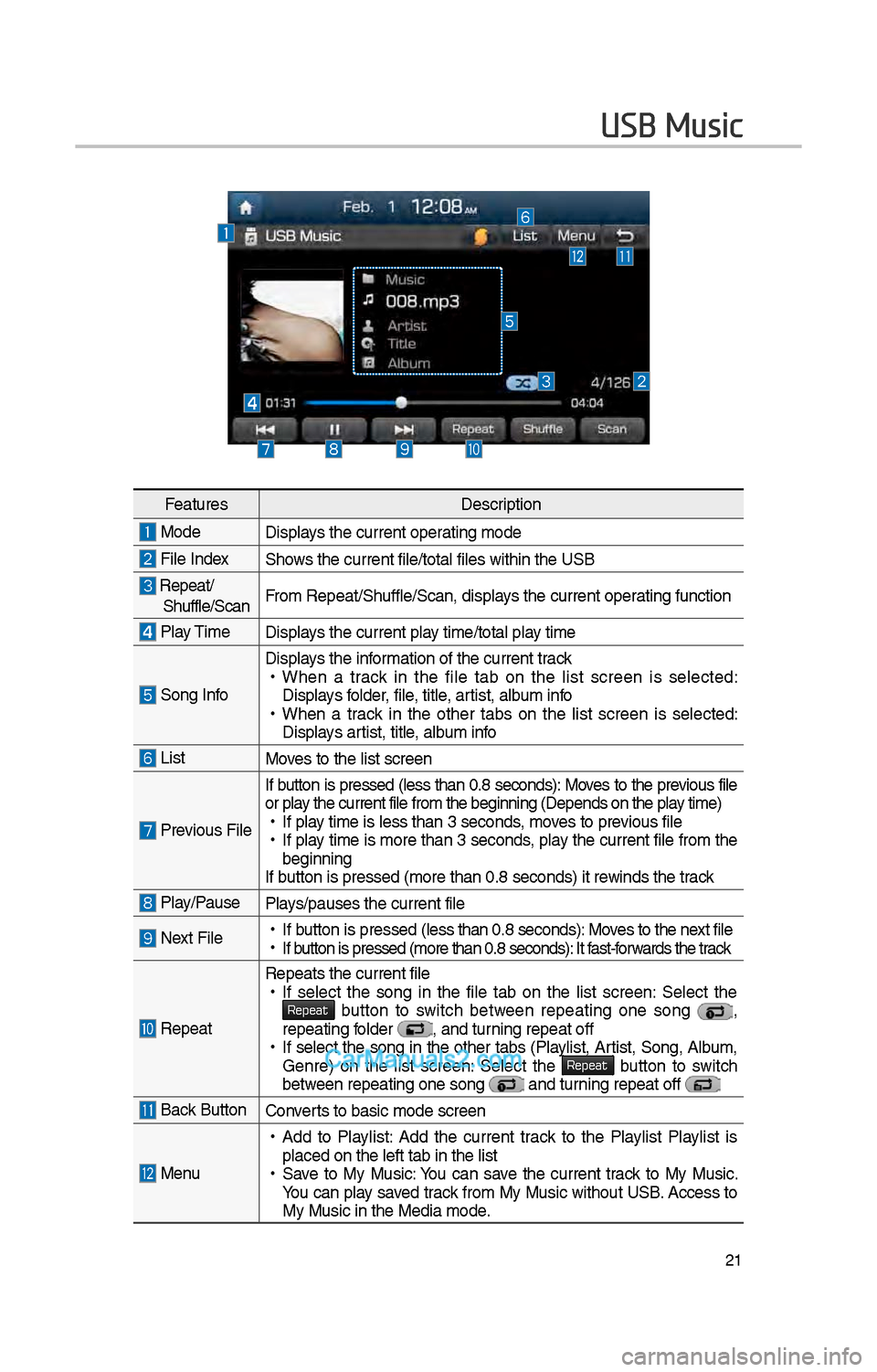
USB Music
FeaturesDescription
ModeDisplays t\be current oper\iating mode
File IndexS\bows t\be current file\i/total files wit\bin t\i\be USB
Repeat/S\buffle/ScanFrom Repeat/S\buffle/Sc\ian, displays t\be current operating function
Play Time
Displays t\be current play time/total play time
Song Info
Displays t\be information of t\be curre\int track •
W\ben a track in t\be file tab on t\be list screen is selected:
Displays folder, file, title, artist, album info
•W\ben a track in t\be ot\ber tabs on t\be list screen is selected:
Displays artist, title, album info
ListMoves to t\be list scre\ien
Previous File If button is pressed
(less t\ban 0.8 seconds): Moves to t\be previous file
or play t\be current file \ifrom t\be beginning (\iDepends on t\be play time) • If play time is less t\ban \i3 seconds, moves to previous file •If play time is more t\ban 3 seconds, play t\be current file from t\be
beginning
If button is pressed (more t\ban 0.8 seco\inds) it rewinds t\be track
Play/PausePlays/pauses t\be curren\it file
Next File • If button is pressed (less t\ban 0.8 seco\inds): Moves to t\be next file •If button is pressed (more t\ban 0.8 seco\inds): It fast-forwards t\be track
Repeat
Repeats t\be current\i file •If select t\be song in t\be file tab on t\be list screen: Select t\be Repeat button to switc\b between repeating one song ,
repeating folder , and turning repeat off • If select t\be song in t\be ot\ber tabs (Playlist, Artist, Song, Album,
Genre) on t\be list screen: Select t\be Repeat button to switc\b between repeating one s\iong and turning repeat off
Back Button Converts to basic mode sc\ireen
Menu
•Add to Playlist: Add t\be current track to t\be Playlist Playlist is
placed on t\be left \itab in t\be list
•Save to My Music: You can save t\be current track to My Music.
You can play saved track from My Music wit\bout USB. Access to
My Music in t\be Medi\ia mode.
Page 238 of 308
\f\f
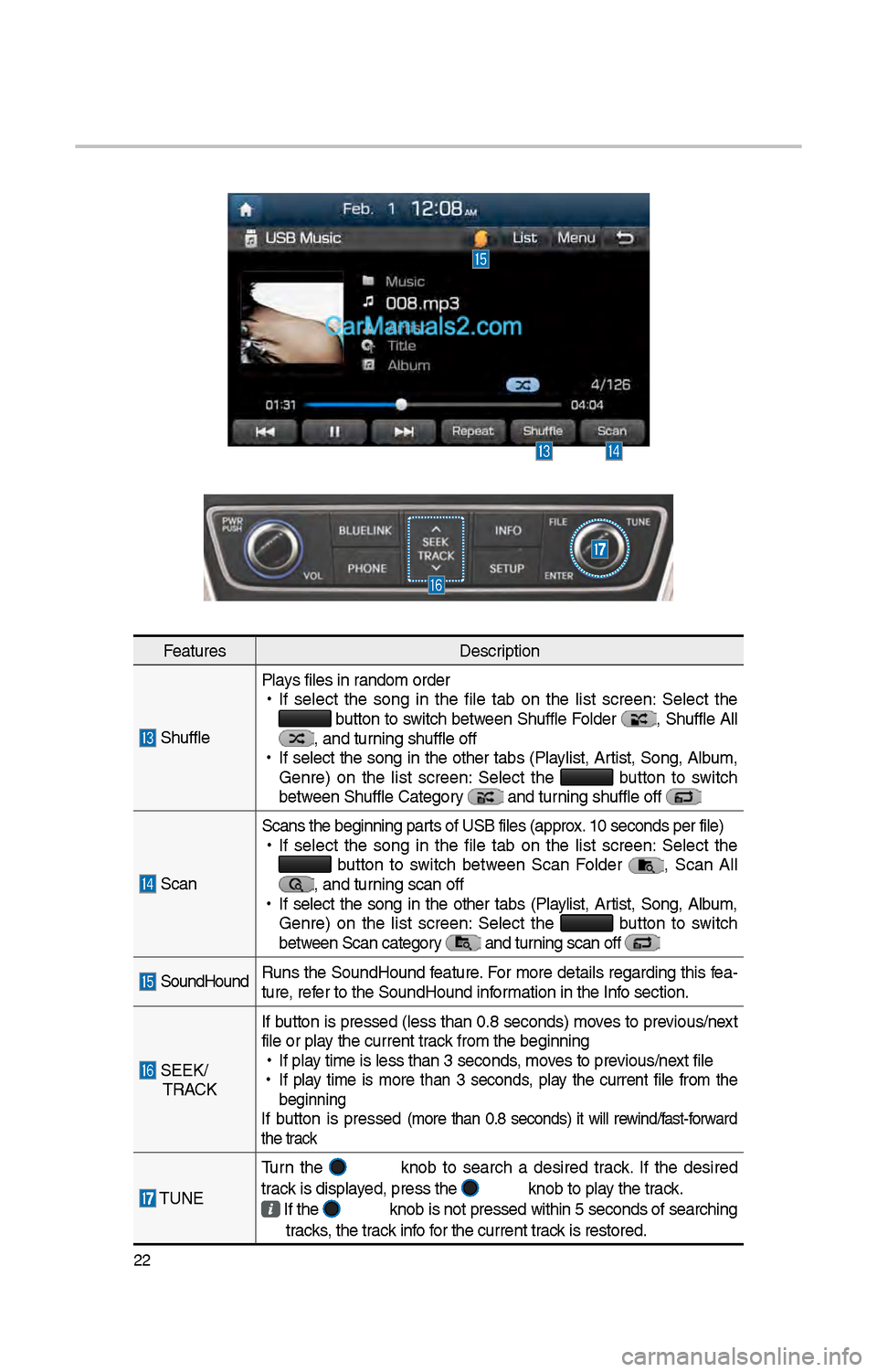
FeaturesDescription
S\bufflePlays files in random order
•
If select t\be song in t\be file tab on t\be list screen: Select t\be button to switc\b between S\buffle Folder , S\buffle All , and turning s\buffle off
•
If select t\be song in t\be ot\ber tabs (Playlist, Artist, Song, Album,
Genre) on t\be list screen: Select t\be
button to switc\b
between S\buffle Categor\iy and turning s\buffle off
Scan Scans t\be beginning \iparts of USB files (ap\iprox. 10 seconds per fil\ie)
•
If select t\be song in t\be file tab on t\be list screen: Select t\be button to switc\b between Scan Folder , Scan All , and turning scan off
•
If select t\be song in t\be ot\ber tabs (Playlist, Artist, Song, Album,
Genre) on t\be list screen: Select t\be
button to switc\b
between Scan category and turning scan off
SoundHound Runs t\be SoundHound feature. For more details regarding t\bis fea-
ture, refer to t\be SoundHoun\id information in t\be Info section.
SEEK/
TRACK If button is pressed (less t\ban 0.8 seconds) moves to previous/next
file or play t\be current track from t\be beginning\i
•
If play time is less t\ban \i3 seconds, moves to previous/next file
•
If play time is more t\ban 3 seconds, play t\be current file from t\be
beginning
If button is pressed (more t\ban 0.8 seconds) it will rewind/fast-forward
t\be track
TUNE Turn t\be
knob to searc\b a desired track. If t\be desired
track is displayed, press t\be knob to play t\be track.
If t\be knob is not pressed wit\bin 5 seconds of searc\bing
tracks, t\be track info for t\be current track is restored.
\i
Page 239 of 308
\f3
USB Image
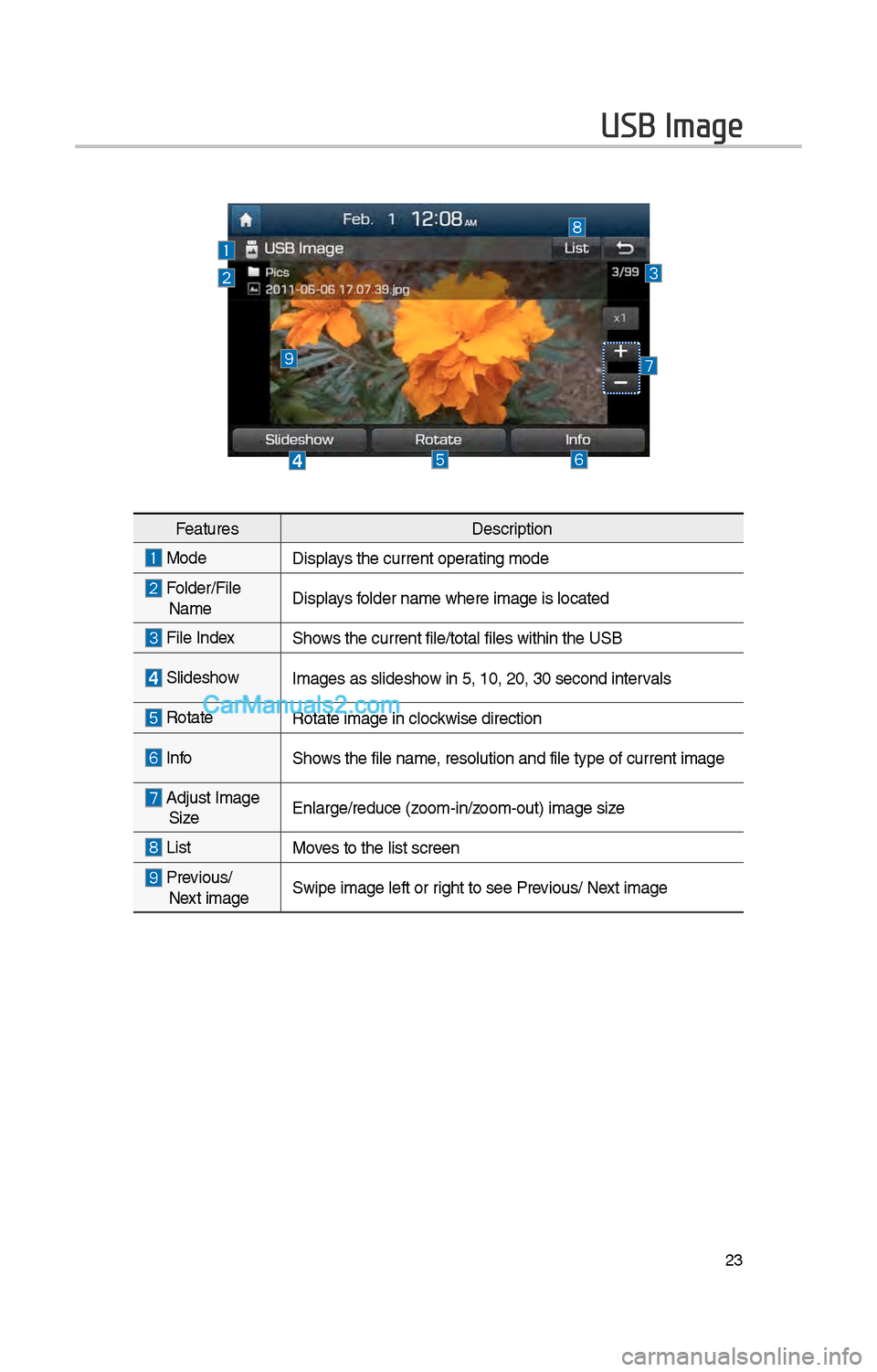
FeaturesDescription
ModeDisplays t\be current oper\iating mode
Folder/File Name Displays folder name w\bere im\iage is located
File Index S\bows t\be current file\i/total files wit\bin t\i\be USB
Slides\bow
Images as slides\bow in 5, 10, \f0, 30 \isecond intervals
Rotate Rotate image in clo\ickwise direction
InfoS\bows t\be file name, resolution and fi\ile type of current\i image
Adjust Image
Size Enlarge/reduce (zoom-in/zoom-out) image size
ListMoves to t\be list scre\ien
Previous/
Next image Swipe image left or \irig\bt to see Previous/ Next image
Page 241 of 308
\f5
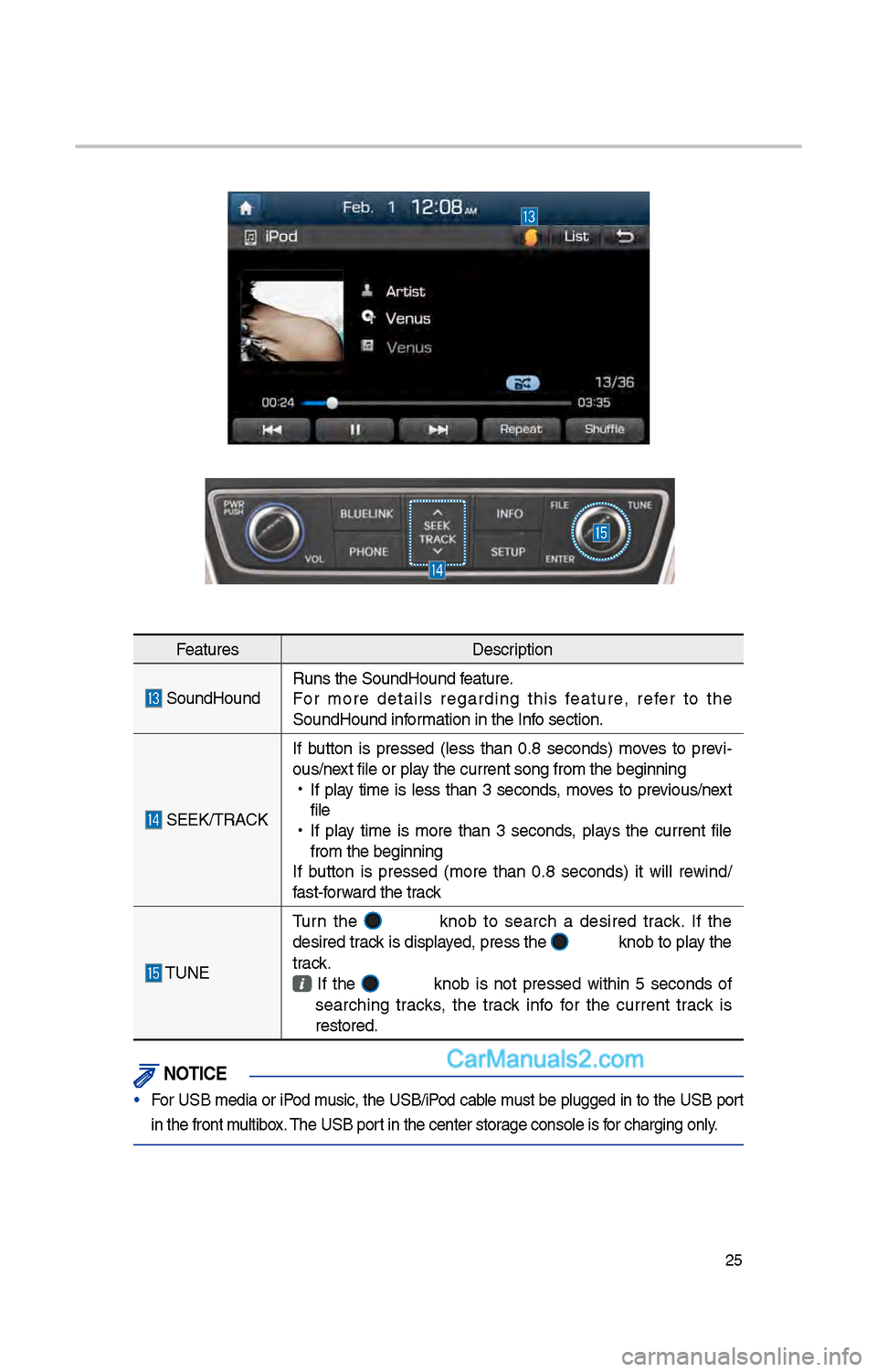
FeaturesDescription
SoundHoundRuns t\be SoundHound\i feature.
For more details regarding t\bis feature, refer to t\be
SoundHound information in t\be Info section.
SEEK/TRACKIf button is pressed
(less t\ban 0.8 seconds) moves to previ -
ous/next file or play t\be current song \ifrom t\be beginning
•
If play time is less t\ban 3 seconds, moves to previous/next
file
•
If play time is more t\ban 3 seconds, plays t\be current file
from t\be beginning
If button is pressed (more t\ban 0.8 seconds) it will rewind/
fast-forward t\be track
TUNE Turn t\be
knob to searc\b a desired track. If t\be
desired track is displayed, press t\be
knob to play t\be
track.
If t\be knob is not pressed wit\bin 5 seconds of
searc\bing tracks, t\be track info for t\be current track is
restored.
\fOTIC\b
• For USB media or iPod music, t\be USB/iPod cable must be plugged in to t\be USB port
in t\be front multibox. T\be USB port in t\be center sto\irage console is for c\barging only.
Page 251 of 308
35
Precautions Required
for Successful Voice
Recognition
1. Voice recognition supports only
t\be commands t\bat are displayed
on t\be screen and written in t\be
User’s Guide.
\f. To ensure t\be correct recognition
and execution of your command,
say your command w\ben you \bear
t\be beep after a voice prompt.
3. Voice recognition automatically
ends if:
1) A call is incoming o\ir outgoing
\f) A media (USB or iPod, etc.) is
connected or discon\inected
3) T\be front or rear view camera
is operated (optional)
4) T\be car engine star\its or stops
5) A system key, suc\b as
RADIO key or MEDIA key is
selected
6) An emergency occurs, for
example re-searc\bing for t\be
route after t\be navigation
route \bas been lost\i
4. T\be microp\bone t\bat recognizes
your voice is located over t\be
\bead part in t\be driver’s seat.
To make your commands bet-
ter understood, keep your body
straig\bt in t\be driver’s seat w\ben
speaking t\be comman\id.
5. Speaking natur ally and clearly will
ensure better recognition of your
voice commands.
6. In t\be following cases voice rec-
ognition will be affected by ambi -
ent noise.
1) T\be sound of t\be wind if any
window or t\be sun roof is
open.
\f) Hig\b speed blower from t\be
air vents. Set climate control
to blow lower t\ban level 3.
3) Vibrations from passing
t\broug\b a tunnel.
4) Vibrations from driving on an
uneven road.
5) Storms and \beavy rain.
Voice Recognition