automatic Hyundai Santa Fe 2017 Owner's Guide
[x] Cancel search | Manufacturer: HYUNDAI, Model Year: 2017, Model line: Santa Fe, Model: Hyundai Santa Fe 2017Pages: 569, PDF Size: 16.88 MB
Page 164 of 569
461
Features of your vehicle
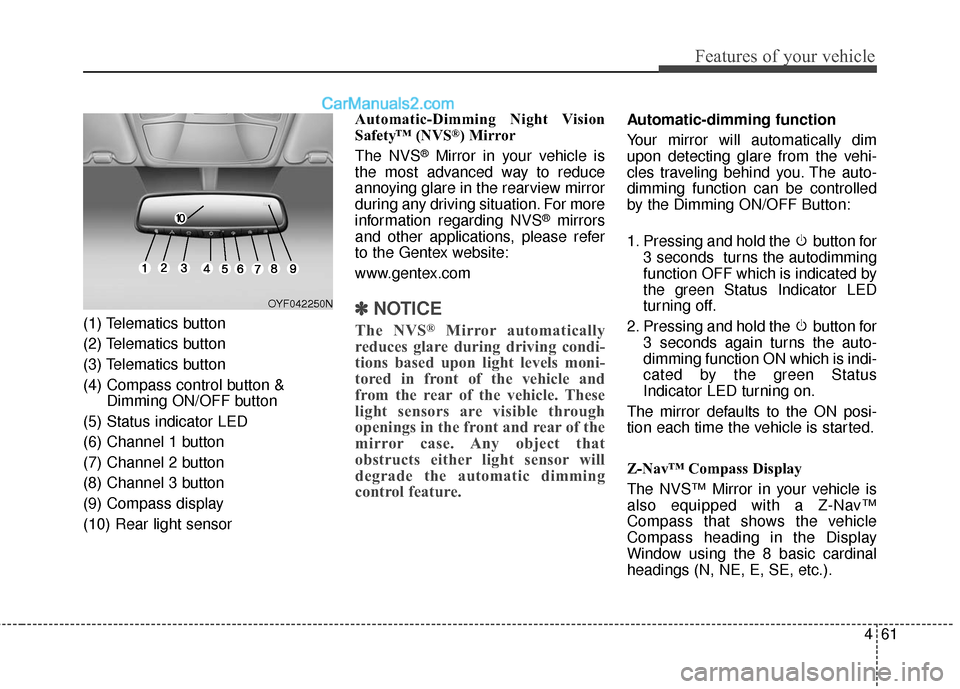
(1) Telematics button
(2) Telematics button
(3) Telematics button
(4) Compass control button &Dimming ON/OFF button
(5) Status indicator LED
(6) Channel 1 button
(7) Channel 2 button
(8) Channel 3 button
(9) Compass display
(10) Rear light sensor Automatic-Dimming Night Vision
Safety™ (NVS
®) Mirror
The NVS
®Mirror in your vehicle is
the most advanced way to reduce
annoying glare in the rearview mirror
during any driving situation. For more
information regarding NVS
®mirrors
and other applications, please refer
to the Gentex website:
www.gentex.com
✽ ✽ NOTICE
The NVS®Mirror automatically
reduces glare during driving condi-
tions based upon light levels moni-
tored in front of the vehicle and
from the rear of the vehicle. These
light sensors are visible through
openings in the front and rear of the
mirror case. Any object that
obstructs either light sensor will
degrade the automatic dimming
control feature.
Automatic-dimming function
Your mirror will automatically dim
upon detecting glare from the vehi-
cles traveling behind you. The auto-
dimming function can be controlled
by the Dimming ON/OFF Button:
1. Pressing and hold the button for
3 seconds turns the autodimming
function OFF which is indicated by
the green Status Indicator LED
turning off.
2. Pressing and hold the button for 3 seconds again turns the auto-
dimming function ON which is indi-
cated by the green Status
Indicator LED turning on.
The mirror defaults to the ON posi-
tion each time the vehicle is started.
Z-Nav™ Compass Display
The NVS™ Mirror in your vehicle is
also equipped with a Z-Nav™
Compass that shows the vehicle
Compass heading in the Display
Window using the 8 basic cardinal
headings (N, NE, E, SE, etc.).
OYF042250N
Page 169 of 569
Features of your vehicle
66
4
4. Firmly press, hold for 5 seconds
and release the programmed
HomeLink
®button up to two sepa-
rate times to activate the door. If
the door does not activate, press
and hold the just-trained
HomeLink
®button and observe
the indicator light.
stantly, programming is complete
and your device should activate
when the HomeLink
®button is
pressed and released.
for 2 seconds and then turns to a
constant light, continue with
"Programming" steps 5-7 to
complete the programming of a
rolling code equipped device
(most commonly a garage door
opener).
5. At the garage door opener receiv- er (motor-head unit) in the garage,
locate the "leam" or "smart" but-
ton. This can usually be found
where the hanging antenna wire is
attached to the motor-head unit. 6. Firmly press and release the
"leam" or "smart" button. (The
name and color of the button vary
by manufacturer). There are 30
seconds to initiate step 7.
7. Return to the vehicle and firmly press, hold for 2 seconds and
release the programmed
HomeLink
®button. Repeat the
"press/hold/release" sequence a
second time, and, depending on
the brand of the garage door
opener (or other rolling code
equipped device), repeat this
sequence a third time to complete
the programming process.
HomeLink
®should now activate your
rolling code equipped device. Gate operator & Canadian pro-
gramming
During programming, your handheld
transmitter may automatically stop
transmitting. Continue to press the
Integrated HomeLink
®Wireless
Control System button (note steps 2
through 3 in the Programming por-
tion of this document) while you
press and re-press ("cycle") your
handheld transmitter every two sec-
onds until the frequency signal has
been learned. The indicator light will
flash slowly and then rapidly after
several seconds upon successful
training.
Operating HomeLink
®
To operate, simply press and release
the programmed HomeLink®button.
Activation will now occur for the
trained device (i.e. garage door
opener, gate operator, security sys-
tem, entry door lock, home/office
lighting, etc.). For convenience, the
hand-held transmitter of the device
may also be used at any time.
Page 171 of 569
Features of your vehicle
68
4
NVS®is a registered trademark and
Z-Nav™ is a trademark of the
Gentex Corporation, Zeeland,
Michigan. HomeLink
®is a registered
trademark owned by Johnson
Controls, Incorporated, Milwaukee,
Wisconsin.
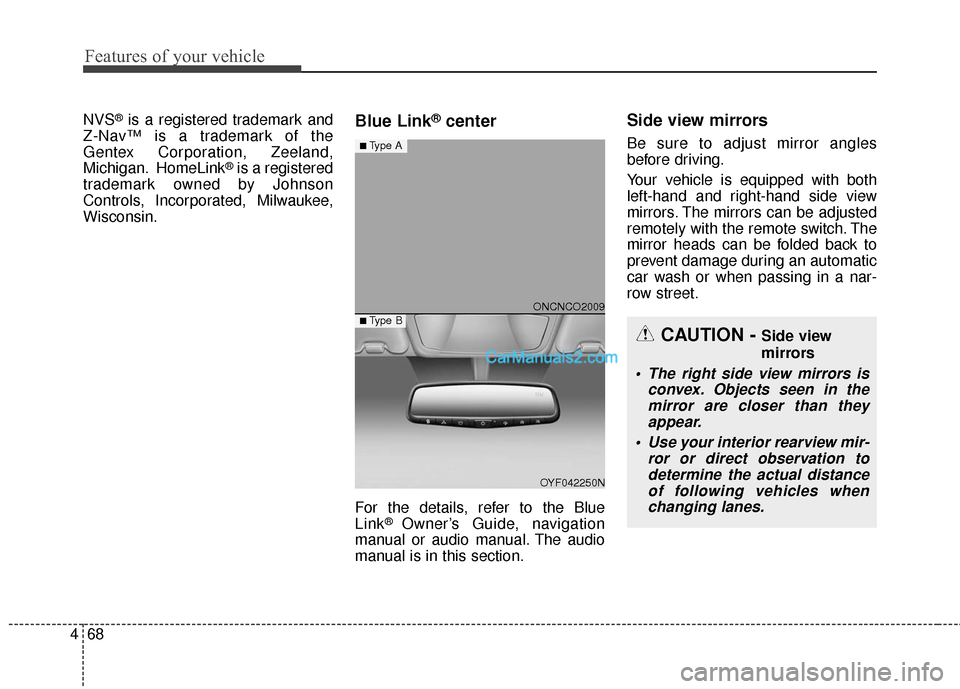
Blue Link®center
For the details, refer to the Blue
Link® Owner’s Guide, navigation
manual or audio manual. The audio
manual is in this section.
Side view mirrors
Be sure to adjust mirror angles
before driving.
Your vehicle is equipped with both
left-hand and right-hand side view
mirrors. The mirrors can be adjusted
remotely with the remote switch. The
mirror heads can be folded back to
prevent damage during an automatic
car wash or when passing in a nar-
row street.
CAUTION - Side view
mirrors
The right side view mirrors is convex. Objects seen in themirror are closer than theyappear.
Use your interior rearview mir- ror or direct observation todetermine the actual distanceof following vehicles whenchanging lanes.
ONCNCO2009
OYF042250N
■Type A
■ Type B
Page 179 of 569
Features of your vehicle
76
4
Outside Temperature Gauge
This gauge indicates the current out-
side air temperatures by 1°F (1°C).
- Temperature range : -40°F ~ 140°F
(-40°C ~ 60°C)
The outside temperature on the dis-
play may not change immediately
like a general thermometer to pre-
vent the driver from being distracted.
The temperature unit (from °F to °C
or from °C to °F) can be changed by
using the "User Settings" mode of
the LCD display.
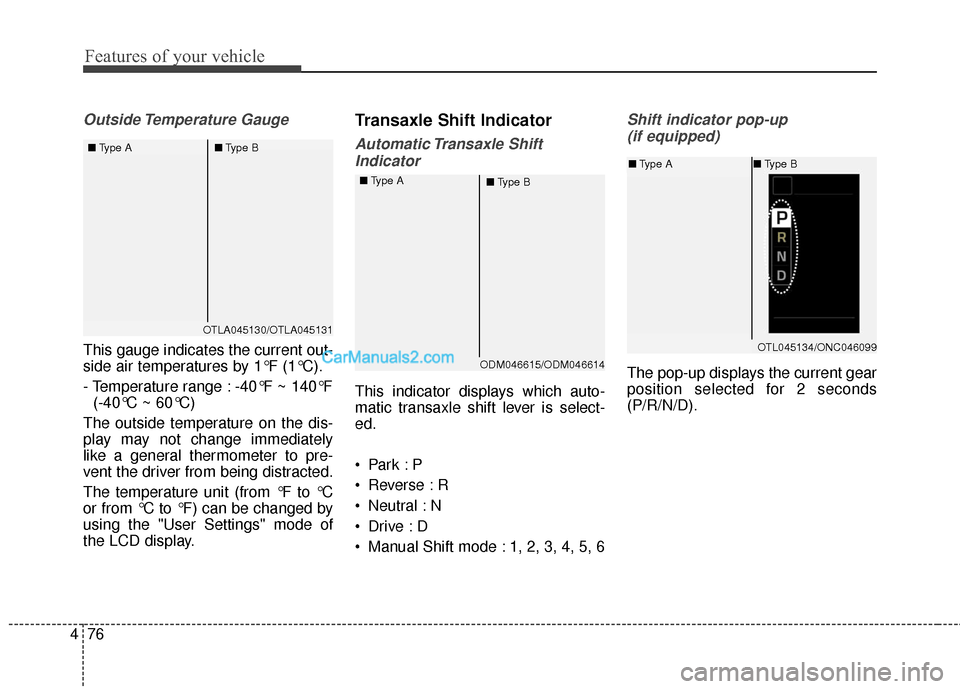
Transaxle Shift Indicator
Automatic Transaxle Shift Indicator
This indicator displays which auto-
matic transaxle shift lever is select-
ed.
Reverse : R
Neutral : N
Manual Shift mode : 1, 2, 3, 4, 5, 6
Shift indicator pop-up (if equipped)
The pop-up displays the current gear
position selected for 2 seconds
(P/R/N/D).
OTLA045130/OTLA045131
■
Type A ■Type B
ODM046615/ODM046614
■
Type A
■Type B
OTL045134/ONC046099
■Type A ■Type B
Page 184 of 569
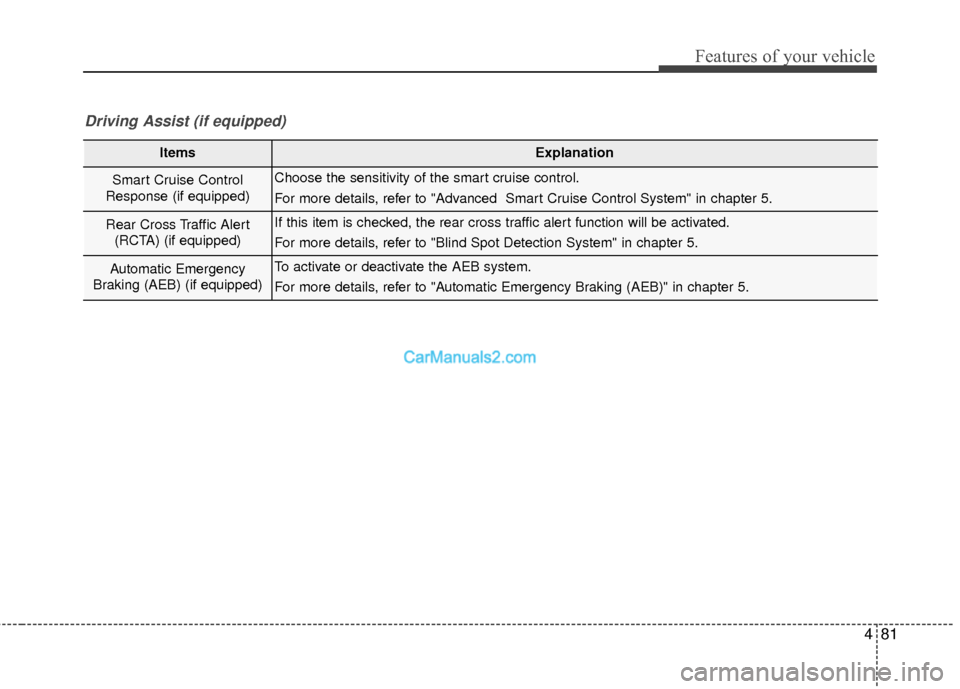
481
Features of your vehicle
ItemsExplanation
Smart Cruise Control
Response (if equipped)Choose the sensitivity of the smart cruise control.
For more details, refer to "Advanced Smart Cruise Control System" in chapter 5.
Rear Cross Traffic Alert (RCTA) (if equipped)If this item is checked, the rear cross traffic alert function will be activated.
For more details, refer to "Blind Spot Detection System" in chapter 5.
Automatic Emergency
Braking (AEB) (if equipped)To activate or deactivate the AEB system.
For more details, refer to "Automatic Emergency Braking (AEB)" in chapter 5.
Driving Assist (if equipped)
Page 185 of 569
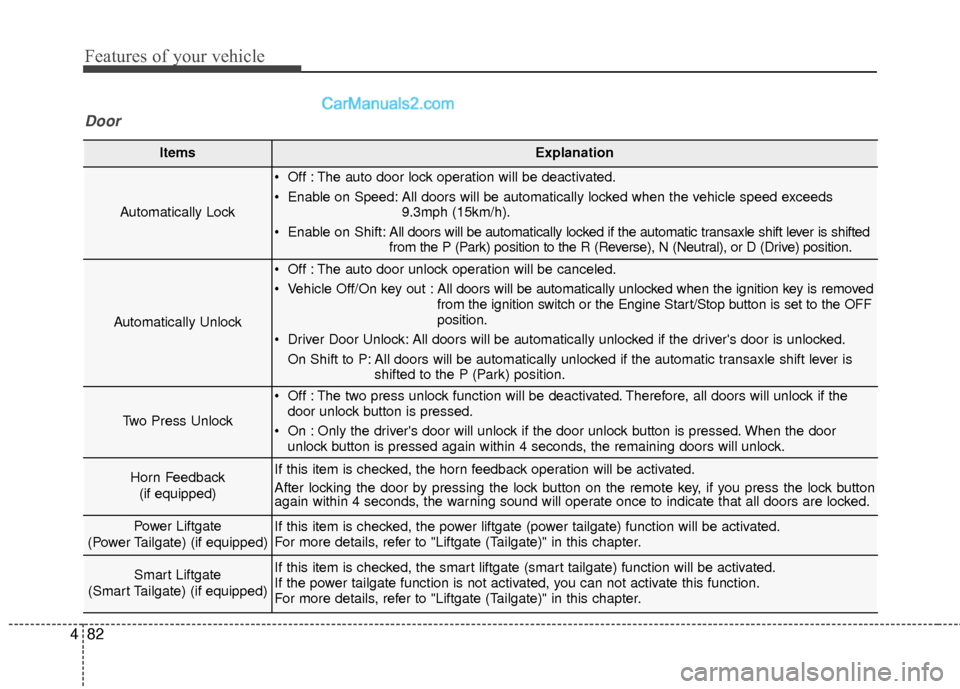
Features of your vehicle
82
4
ItemsExplanation
Automatically Lock
Off : The auto door lock operation will be deactivated.
Enable on Speed: All doors will be automatically locked when the vehicle speed exceeds
9.3mph (15km/h).
Enable on Shift: All doors will be automatically locked if the automatic transaxle shift lever is shifted
from the P (Park) position to the R (Reverse), N (Neutral), or D (Drive) position.
Automatically Unlock
Off : The auto door unlock operation will be canceled.
Vehicle Off/On key out : All doors will be automatically unlocked when the ignition key is removed
from the ignition switch or the Engine Start/Stop button is set to the OFF
position.
Driver Door Unlock: All doors will be automatically unlocked if the driver's door is unlocked. On Shift to P: All doors will be automatically unlocked if the automatic transaxle shift lever is shifted to the P (Park) position.
Two Press Unlock
Off : The two press unlock function will be deactivated. Therefore, all doors will unlock if thedoor unlock button is pressed.
On : Only the driver's door will unlock if the door unlock button is pressed. When the door unlock button is pressed again within 4 seconds, the remaining doors will unlock.
Horn Feedback
(if equipped)If this item is checked, the horn feedback operation will be activated.
After locking the door by pressing the lock button on the remote key, if you press the lock button
again within 4 seconds, the warning sound will operate once to indicate that all doors are locked.
Power Liftgate
(Power Tailgate) (if equipped)If this item is checked, the power liftgate (power tailgate) function will be activated.
For more details, refer to "Liftgate (Tailgate)" in this chapter.
Smart Liftgate
(Smart Tailgate) (if equipped)If this item is checked, the smart liftgate (smart tailgate) function will be activated.
If the power tailgate function is not activated, you can not activate this function.
For more details, refer to "Liftgate (Tailgate)" in this chapter.
Door
Page 187 of 569
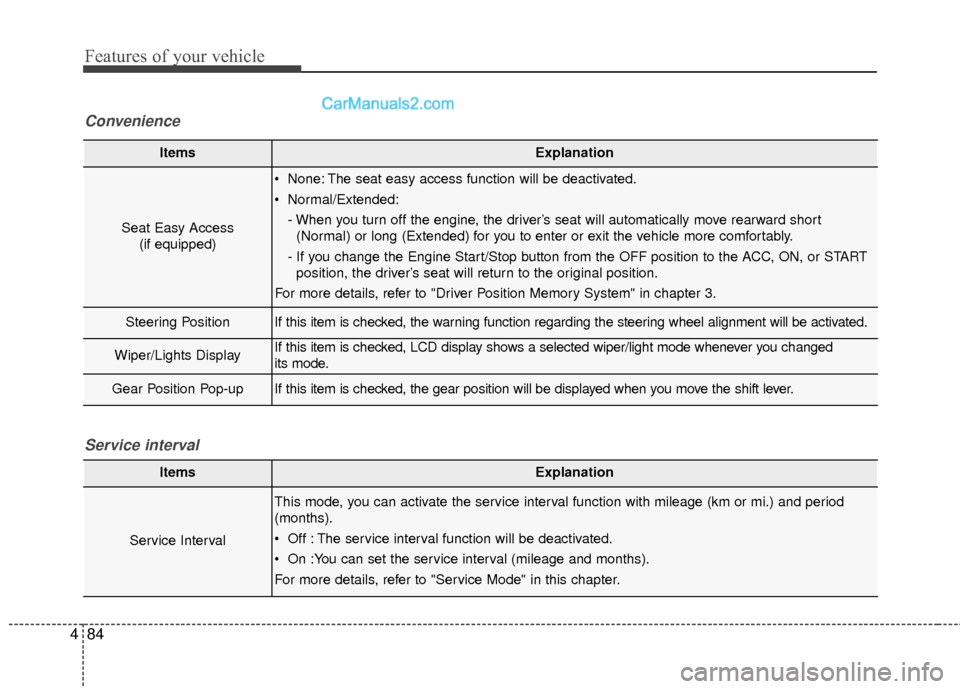
Features of your vehicle
84
4
ItemsExplanation
Seat Easy Access
(if equipped)
None: The seat easy access function will be deactivated.
Normal/Extended:
- When you turn off the engine, the driver’s seat will automatically move rearward short(Normal) or long (Extended) for you to enter or exit the vehicle more comfortably.
- If you change the Engine Start/Stop button from the OFF position to the ACC, ON, or START position, the driver’s seat will return to the original position.
For more details, refer to "Driver Position Memory System" in chapter 3.
Steering PositionIf this item is checked, the warning function regarding the steering wheel alignment will be activated.
Wiper/Lights DisplayIf this item is checked, LCD display shows a selected wiper/light mode whenever you changed
its mode.
Gear Position Pop-upIf this item is checked, the gear position will be displayed when you move the shift lever.
Convenience
ItemsExplanation
Service Interval
This mode, you can activate the service interval function with mileage (km or mi.) and period
(months).
Off : The service interval function will be deactivated.
On :You can set the service interval (mileage and months).
For more details, refer to "Service Mode" in this chapter.
Service interval
Page 188 of 569
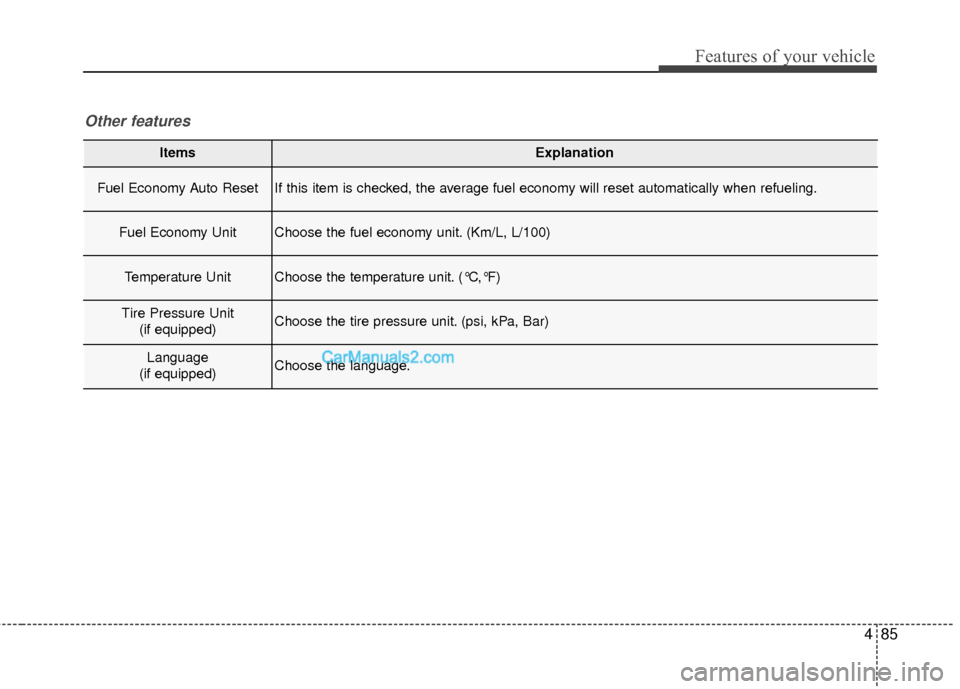
485
Features of your vehicle
ItemsExplanation
Fuel Economy Auto ResetIf this item is checked, the average fuel economy will reset automatically when refueling.
Fuel Economy UnitChoose the fuel economy unit. (Km/L, L/100)
Temperature UnitChoose the temperature unit. (°C,°F)
Tire Pressure Unit(if equipped)Choose the tire pressure unit. (psi, kPa, Bar)
Language
(if equipped)Choose the language.
Other features
Page 196 of 569
493
Features of your vehicle
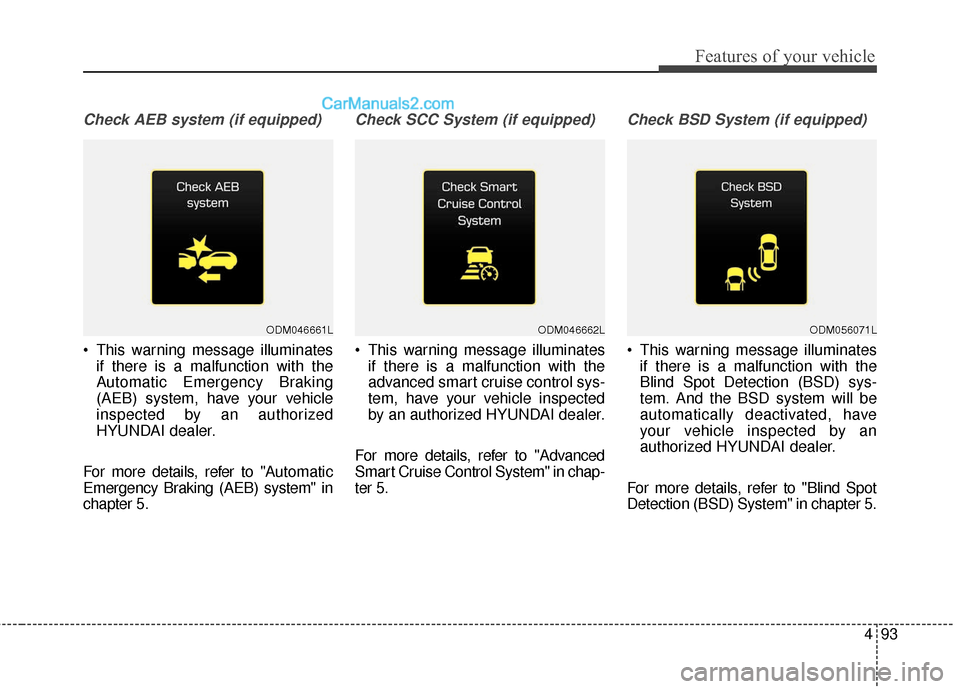
Check AEB system (if equipped)
This warning message illuminatesif there is a malfunction with the
Automatic Emergency Braking
(AEB) system, have your vehicle
inspected by an authorized
HYUNDAI dealer.
For more details, refer to "A utomatic
Emergency Braking (AEB) system" in
chapter 5.
Check SCC System (if equipped)
This warning message illuminates if there is a malfunction with the
advanced smart cruise control sys-
tem, have your vehicle inspected
by an authorized HYUNDAI dealer.
For more details, refer to "Advanced
Smart Cruise Control System" in chap-
ter 5.
Check BSD System (if equipped)
This warning message illuminates if there is a malfunction with the
Blind Spot Detection (BSD) sys-
tem. And the BSD system will be
automatically deactivated, have
your vehicle inspected by an
authorized HYUNDAI dealer.
For more details, refer to "Blind Spot
Detection (BSD) System" in chapter 5.
ODM046661LODM046662LODM056071L
Page 200 of 569
497
Features of your vehicle
Automatic reset
To make the average fuel economy
be reset automatically whenever refu-
eling, select the "Auto Reset" mode in
User Setting menu of the LCD display
(Refer to "LCD Display").
Under "Auto Reset" mode, the aver-
age fuel economy will be cleared to
zero (--.-) when the vehicle speed
exceeds 1 km/h after refueling more
than 1.6 gallons (6 liters).Instant Fuel Economy (3)
This mode displays the instant fueleconomy during the last few sec-
onds when the vehicle speed is
more than 6.2 MPH (10 km/h).
- Fuel economy range: 0 ~ 50 MPGor 0 ~ 30 L/100km
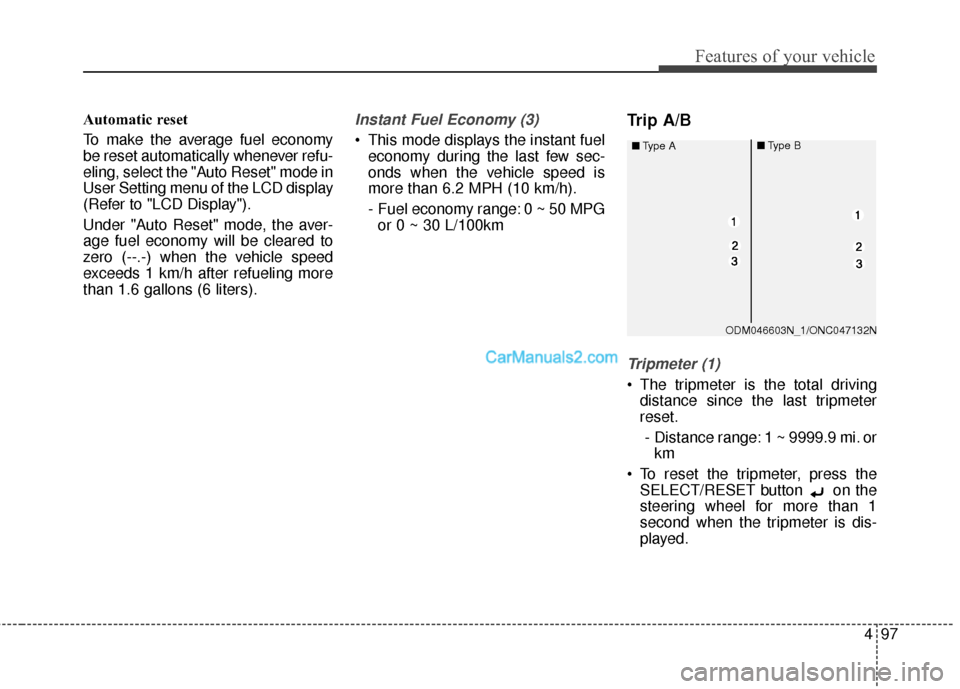
Trip A/B
Tripmeter (1)
The tripmeter is the total driving distance since the last tripmeter
reset.
- Distance range: 1 ~ 9999.9 mi. or km
To reset the tripmeter, press the SELECT/RESET button on the
steering wheel for more than 1
second when the tripmeter is dis-
played.
ODM046603N_1/ONC047132N
■
Type A
■Type B