automatic Hyundai Santa Fe 2017 Service Manual
[x] Cancel search | Manufacturer: HYUNDAI, Model Year: 2017, Model line: Santa Fe, Model: Hyundai Santa Fe 2017Pages: 569, PDF Size: 16.88 MB
Page 210 of 569
4107
Features of your vehicle
Automatic EmergencyBraking (AEB) Warninglight (if equipped)
This indicator light illuminates:
When there is a malfunction with the AEB.
In this case, have your vehicle
inspected by an authorized
HYUNDAI dealer.
For more information, refer to
"Automatic Emergency Braking
(AEB)" in chapter 5.
All Wheel Drive (AWD) Warning Light (if equipped)
This warning light illuminates:
Once you set the ignition switch or Engine Start/Stop Button to the ON
position.
- It illuminates for approximately 3seconds and then goes off.
When there is a malfunction with the AWD system.
In this case, have your vehicle
inspected by an authorized
HYUNDAI dealer.
WARNING - Safe Stopping
The TPMS cannot alert you to severe and sudden tire dam-
age caused by external fac-
tors.
If you notice any vehicle insta- bility, immediately take your
foot off the accelerator pedal,
apply the brakes gradually
with light force, and slowly
move to a safe position off the
road.
Page 213 of 569
Features of your vehicle
110
4
This indicator light illuminates for 2
seconds and goes off:
When the vehicle can not detect
the smart key which is in the vehi-
cle while the Engine Start/Stop
Button is ON.
In this case, have your vehicle
inspected by an authorized
HYUNDAI dealer.
This indicator light blinks:
When the battery of the smart key is weak.
- At this time, you can not start theengine. However, you can start
the engine if you press the Engine
Start/Stop Button with the smart
key. (For more details, refer to
"Starting the Engine" in section
5).
When there is a malfunction with the immobilizer system.
In this case, have your vehicle
inspected by an authorized
HYUNDAI dealer.Turn Signal Indicator
Light
This indicator light blinks:
When using the turn signals.
If any of the following occurs, there
may be a malfunction with the turn
signal system. In this case, have your
vehicle inspected by an authorized
HYUNDAI dealer.
- The indicator light does not blink but illuminates.
- The indicator light blinks more rap- idly.
- The indicator light does not illumi- nate at all.
High Beam Indicator
Light
This indicator light illuminates:
When the headlights are on and in the high beam position
When the turn signal lever is pulled into the Flash-to-Pass position.
Smart High Beam indi-
cator (if equipped)
This warning light illuminates :
When the high-Beam is on with the light switch in the AUTO light posi-
tion.
If your vehicle detects oncoming or preceding vehicles, the Smart High
Beam system will switch the high
beam to low beam automatically.
For more details, refer to "Smart
High Beam" in this chapter.
Page 221 of 569
Features of your vehicle
118
4
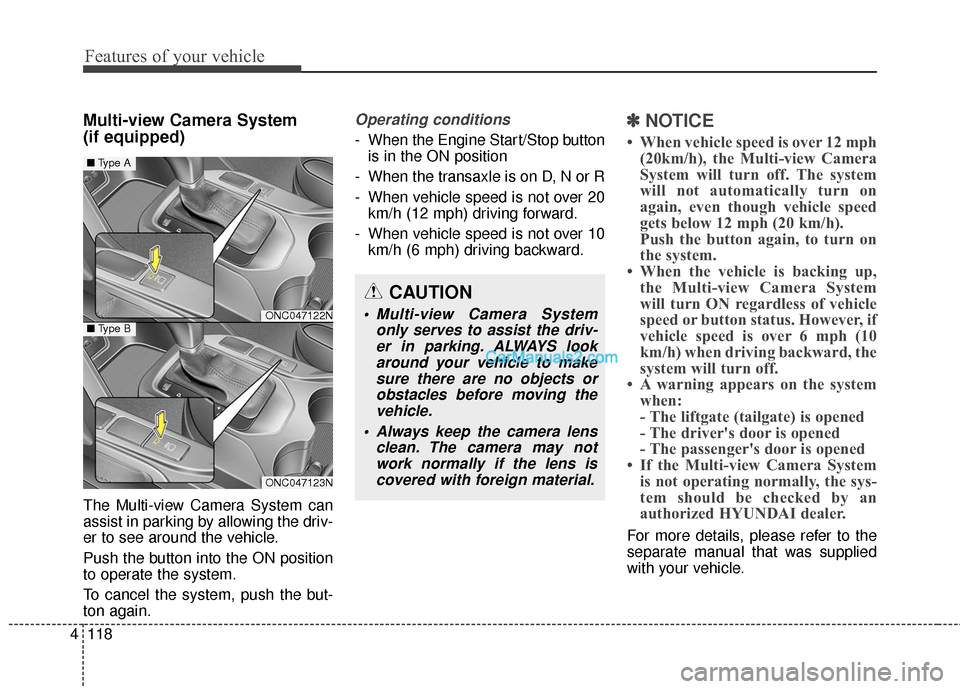
Multi-view Camera System
(if equipped)
The Multi-view Camera System can
assist in parking by allowing the driv-
er to see around the vehicle.
Push the button into the ON position
to operate the system.
To cancel the system, push the but-
ton again.
Operating conditions
- When the Engine Start/Stop button
is in the ON position
- When the transaxle is on D, N or R
- When vehicle speed is not over 20 km/h (12 mph) driving forward.
- When vehicle speed is not over 10 km/h (6 mph) driving backward.
✽ ✽ NOTICE
• When vehicle speed is over 12 mph
(20km/h), the Multi-view Camera
System will turn off. The system
will not automatically turn on
again, even though vehicle speed
gets below 12 mph (20 km/h).
Push the button again, to turn on
the system.
• When the vehicle is backing up, the Multi-view Camera System
will turn ON regardless of vehicle
speed or button status. However, if
vehicle speed is over 6 mph (10
km/h) when driving backward, the
system will turn off.
• A warning appears on the system when:
- The liftgate (tailgate) is opened
- The driver's door is opened
- The passenger's door is opened
• If the Multi-view Camera System is not operating normally, the sys-
tem should be checked by an
authorized HYUNDAI dealer.
For more details, please refer to the
separate manual that was supplied
with your vehicle.
CAUTION
Multi-view Camera System
only serves to assist the driv-er in parking. ALWAYS lookaround your vehicle to makesure there are no objects orobstacles before moving thevehicle.
Always keep the camera lens clean. The camera may notwork normally if the lens iscovered with foreign material.ONC047122N
ONC047123N
■ Type A
■Type B
Page 223 of 569
Features of your vehicle
120
4
Battery saver function
• The purpose of this feature is to
prevent the battery from being dis-
charged. The system automatically
turns off the parking lights when
the driver removes the ignition key
(smart key : turns off the engine)
and opens the driver-side door.
With this feature, the parking lights will be turned off automatically if
the driver parks on the side of the
road at night.
If necessary, to keep the lights on
when the ignition key is removed
(smart key : turns off the engine),
perform the following:
1) Open the driver-side door.
2) Turn the parking lights OFF and ON again using the light switch
on the steering column.
Headlamp delay (if equipped)
If you turn the ignition switch to the
ACC or OFF position with the head-
lights ON, the headlights remain on
for about 5 minutes. However, if the
driver’s door is opened and closed,
the headlights are turned off after 15
seconds.
The headlights can be turned off by
pressing the lock button on the trans-
mitter (or smart key) twice or turning
the light switch to the OFF or Auto
position.
However, if you turn the light switch
to the Auto position when it is dark
outside, the headlights will not be
turned off.
You can activate or deactivate this
feature. Refer to "User Settings" in
this section.
LIGHTING
CAUTION
If the driver gets out of the vehi-cle through other doors (otherthan the driver's door), the bat-tery saver function does notoperate and the headlamp delaydoes not turn off automatically.This will cause the battery to bedischarged. In this case, makesure to turn off the lamp beforegetting out of the vehicle.
Page 229 of 569
Features of your vehicle
126
4
Smart High Beam (if equipped)
The Smart High Beam is a system
that automatically adjusts the head-
lamp range (switches between high
beam and low beam) according to
the brightness of other vehicles and
road conditions.
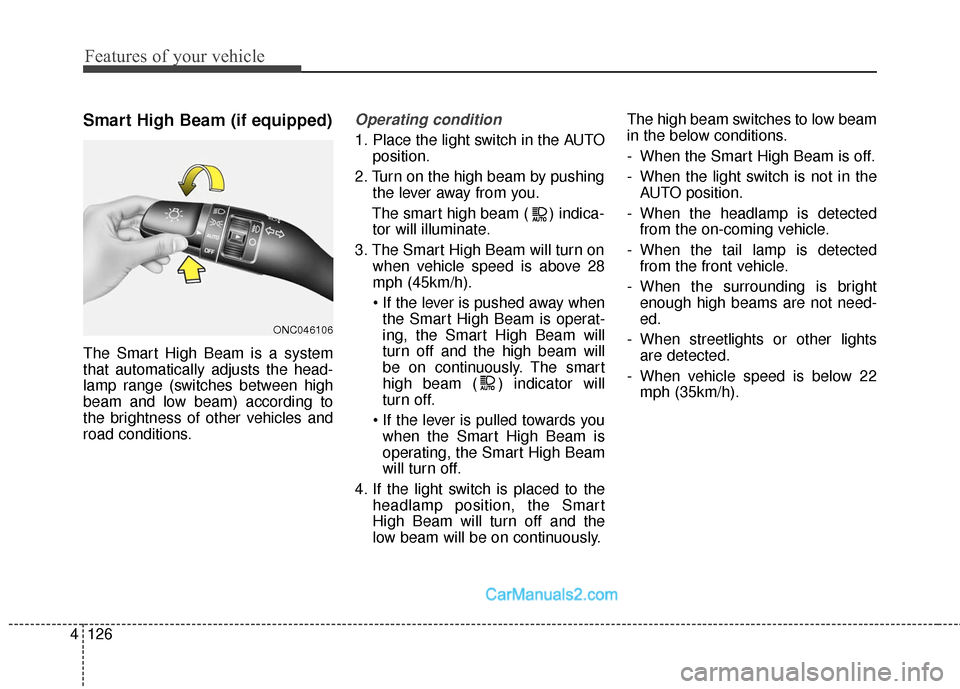
Operating condition
1. Place the light switch in the AUTO
position.
2. Turn on the high beam by pushing the lever away from you.
The smart high beam ( ) indica- tor will illuminate.
3. The Smart High Beam will turn on when vehicle speed is above 28
mph (45km/h).
the Smart High Beam is operat-
ing, the Smart High Beam will
turn off and the high beam will
be on continuously. The smart
high beam ( ) indicator will
turn off.
when the Smart High Beam is
operating, the Smart High Beam
will turn off.
4. If the light switch is placed to the headlamp position, the Smart
High Beam will turn off and the
low beam will be on continuously. The high beam switches to low beam
in the below conditions.
- When the Smart High Beam is off.
- When the light switch is not in the
AUTO position.
- When the headlamp is detected from the on-coming vehicle.
- When the tail lamp is detected from the front vehicle.
- When the surrounding is bright enough high beams are not need-
ed.
- When streetlights or other lights are detected.
- When vehicle speed is below 22 mph (35km/h).
ONC046106
Page 236 of 569
4133
Features of your vehicle
Automatic turn off function
(if equipped)
The interior lights automatically turn
off approximately 20 minutes after
the ignition switch is turned off.
If your vehicle is equipped with the
theft alarm system, the interior lights
automatically turn off approximately
5 seconds after the system is in the
armed stage.
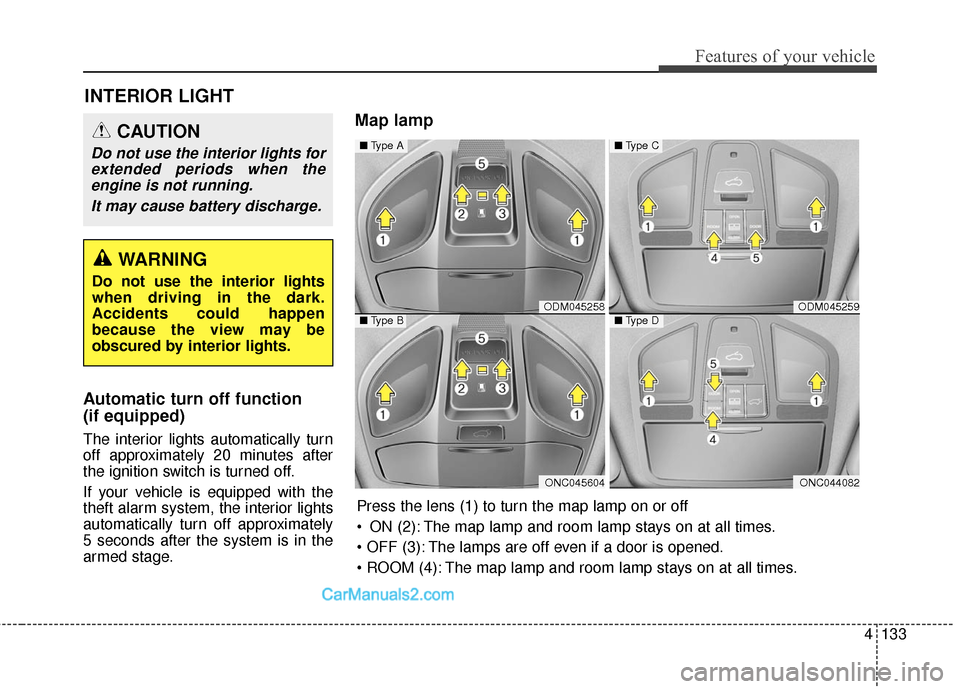
Map lamp
INTERIOR LIGHT
CAUTION
Do not use the interior lights forextended periods when theengine is not running.
It may cause battery discharge.
WARNING
Do not use the interior lights
when driving in the dark.
Accidents could happen
because the view may be
obscured by interior lights.
ODM045258
ONC045604
■ Type A
■Type BODM045259
ONC044082
■Type C
■Type D
Press the lens (1) to turn the map lamp on or off
ON (2): The map lamp and room lamp stays on at all times.
The lamps are off even if a door is opened.
The map lamp and room lamp stays on at all times.
Page 238 of 569
4135
Features of your vehicle
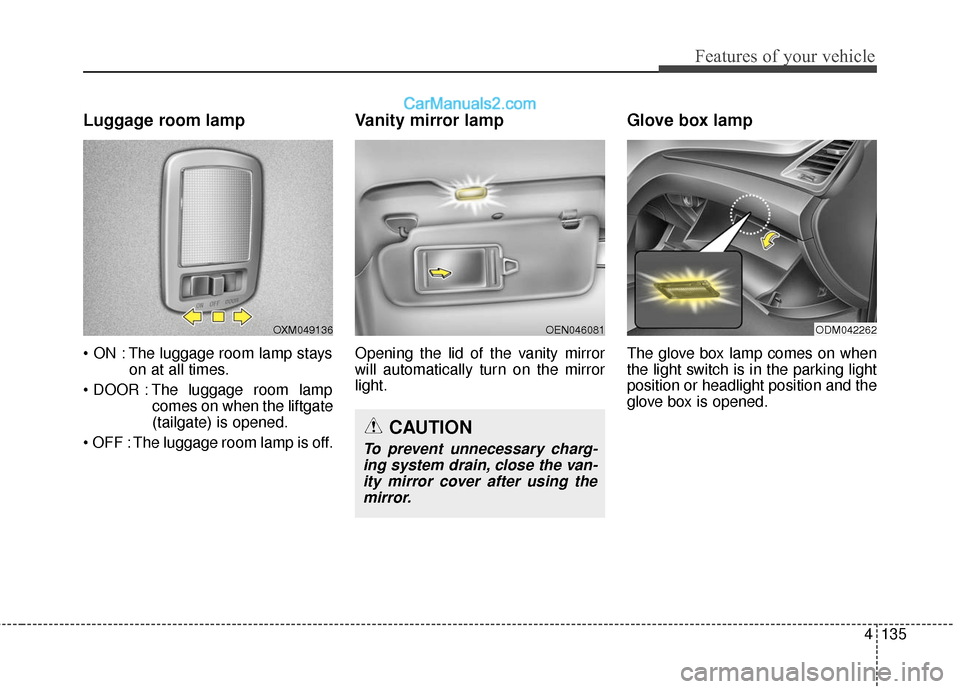
Luggage room lamp
The luggage room lamp stayson at all times.
The luggage room lamp comes on when the liftgate
(tailgate) is opened.
The luggage room lamp is off.
Vanity mirror lamp
Opening the lid of the vanity mirror
will automatically turn on the mirror
light.
Glove box lamp
The glove box lamp comes on when
the light switch is in the parking light
position or headlight position and the
glove box is opened.
OXM049136
CAUTION
To prevent unnecessary charg- ing system drain, close the van-ity mirror cover after using themirror.
OEN046081ODM042262
Page 240 of 569
4137
Features of your vehicle
✽
✽NOTICE
If you want to defrost and defog the
front windshield, refer to
“Windshield defrosting and defog-
ging” in this section.
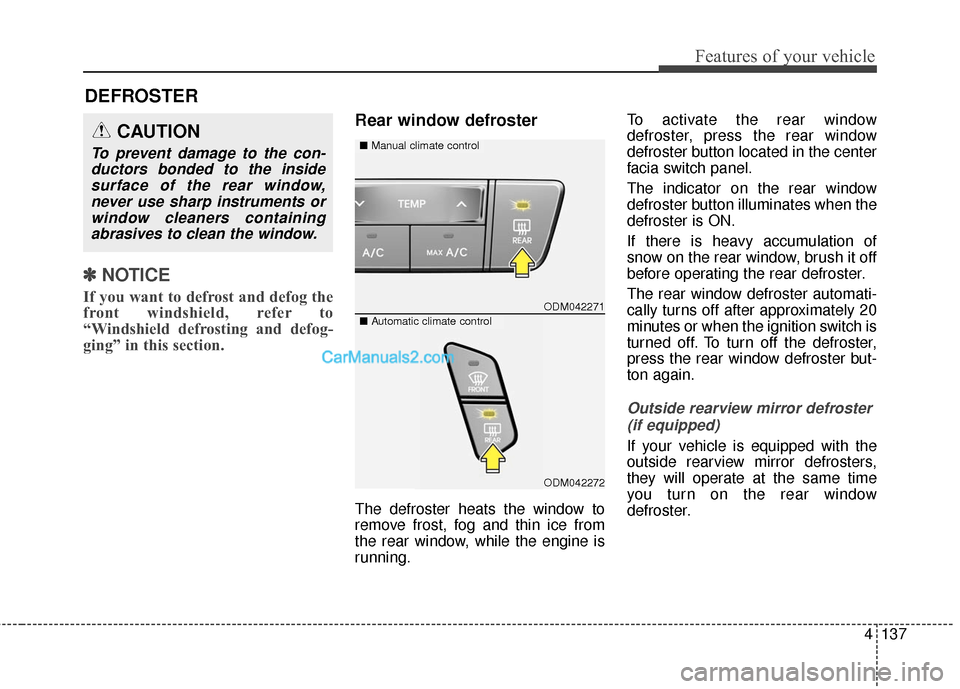
Rear window defroster
The defroster heats the window to
remove frost, fog and thin ice from
the rear window, while the engine is
running. To activate the rear window
defroster, press the rear window
defroster button located in the center
facia switch panel.
The indicator on the rear window
defroster button illuminates when the
defroster is ON.
If there is heavy accumulation of
snow on the rear window, brush it off
before operating the rear defroster.
The rear window defroster automati-
cally turns off after approximately 20
minutes or when the ignition switch is
turned off. To turn off the defroster,
press the rear window defroster but-
ton again.
Outside rearview mirror defroster
(if equipped)
If your vehicle is equipped with the
outside rearview mirror defrosters,
they will operate at the same time
you turn on the rear window
defroster.
DEFROSTER
ODM042271
■ Manual climate controlCAUTION
To prevent damage to the con-
ductors bonded to the insidesurface of the rear window,never use sharp instruments orwindow cleaners containingabrasives to clean the window.
■ Automatic climate control
ODM042272
Page 244 of 569
4141
Features of your vehicle
Mode selection
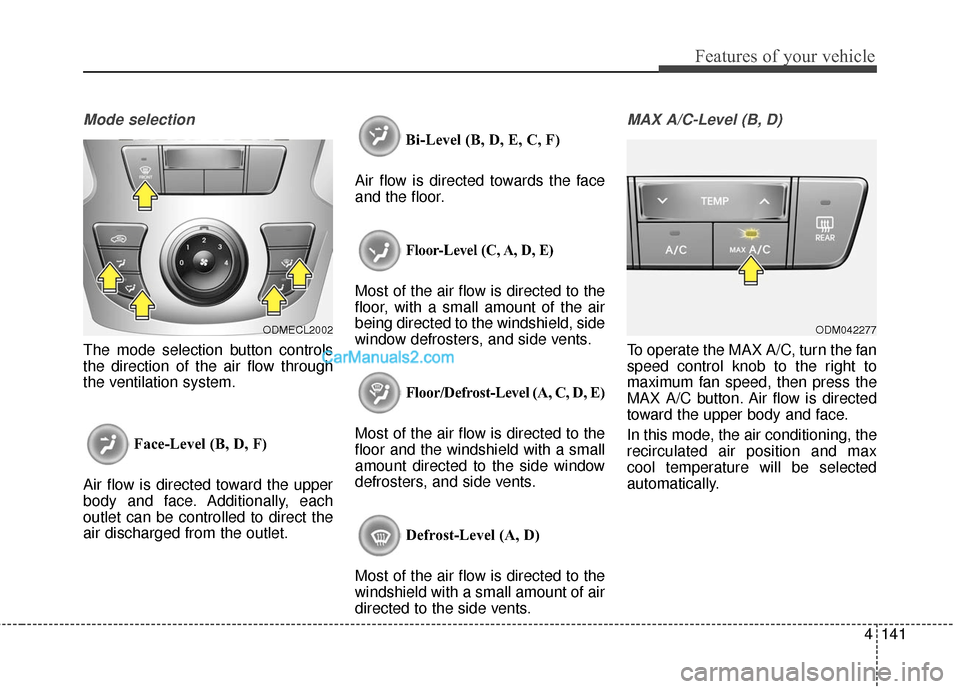
The mode selection button controls
the direction of the air flow through
the ventilation system.Face-Level (B, D, F)
Air flow is directed toward the upper
body and face. Additionally, each
outlet can be controlled to direct the
air discharged from the outlet. Bi-Level (B, D, E, C, F)
Air flow is directed towards the face
and the floor.
Floor-Level (C, A, D, E)
Most of the air flow is directed to the
floor, with a small amount of the air
being directed to the windshield, side
window defrosters, and side vents.
Floor/Defrost-Level (A, C, D, E)
Most of the air flow is directed to the
floor and the windshield with a small
amount directed to the side window
defrosters, and side vents.
Defrost-Level (A, D)
Most of the air flow is directed to the
windshield with a small amount of air
directed to the side vents.
MAX A/C-Level (B, D)
To operate the MAX A/C, turn the fan
speed control knob to the right to
maximum fan speed, then press the
MAX A/C button. Air flow is directed
toward the upper body and face.
In this mode, the air conditioning, the
recirculated air position and max
cool temperature will be selected
automatically.
ODMECL2002ODM042277
Page 252 of 569
4149
Features of your vehicle
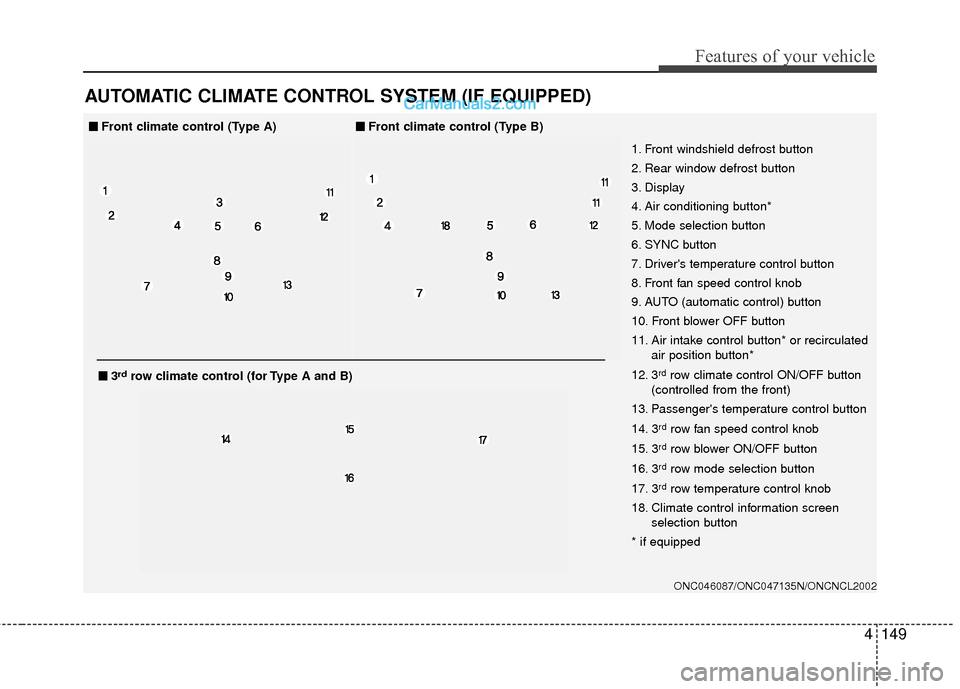
AUTOMATIC CLIMATE CONTROL SYSTEM (IF EQUIPPED)
ONC046087/ONC047135N/ONCNCL2002
1. Front windshield defrost button
2. Rear window defrost button
3. Display
4. Air conditioning button*
5. Mode selection button
6. SYNC button
7. Driver's temperature control button
8. Front fan speed control knob
9. AUTO (automatic control) button
10. Front blower OFF button
11. Air intake control button* or recirculatedair position button*
12. 3
rdrow climate control ON/OFF button
(controlled from the front)
13. Passenger's temperature control button
14. 3
rdrow fan speed control knob
15. 3
rdrow blower ON/OFF button
16. 3
rdrow mode selection button
17. 3
rdrow temperature control knob
18. Climate control information screen selection button
* if equipped
■
■ Front climate control (Type A)■
■Front climate control (Type B)
■
■3rdrow climate control (for Type A and B)