traffic Hyundai Santa Fe 2017 Owner's Manual
[x] Cancel search | Manufacturer: HYUNDAI, Model Year: 2017, Model line: Santa Fe, Model: Hyundai Santa Fe 2017Pages: 569, PDF Size: 16.88 MB
Page 103 of 569
Safety features of your vehicle
82
3
Adding equipment to or modi-
fying your air bag-equipped
vehicle
If you modify your vehicle by chang-
ing your vehicle's frame, bumper sys-
tem, front end or side sheet metal or
ride height, this may affect the oper-
ation of your vehicle's air bag sys-
tem.
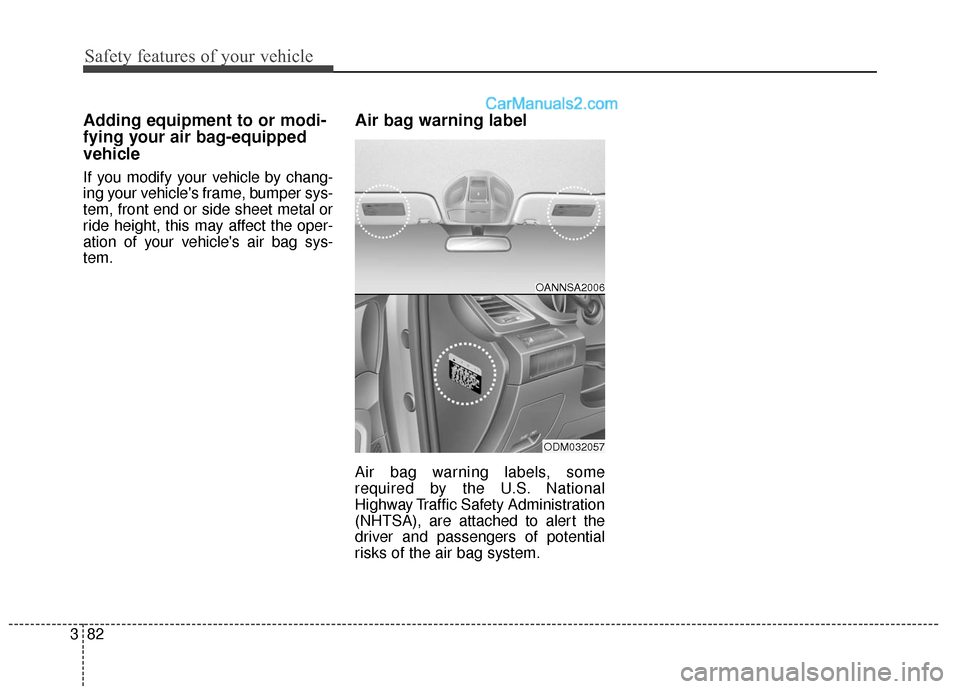
Air bag warning label
Air bag warning labels, some
required by the U.S. National
Highway Traffic Safety Administration
(NHTSA), are attached to alert the
driver and passengers of potential
risks of the air bag system.
OANNSA2006
ODM032057
Page 174 of 569
471
Features of your vehicle
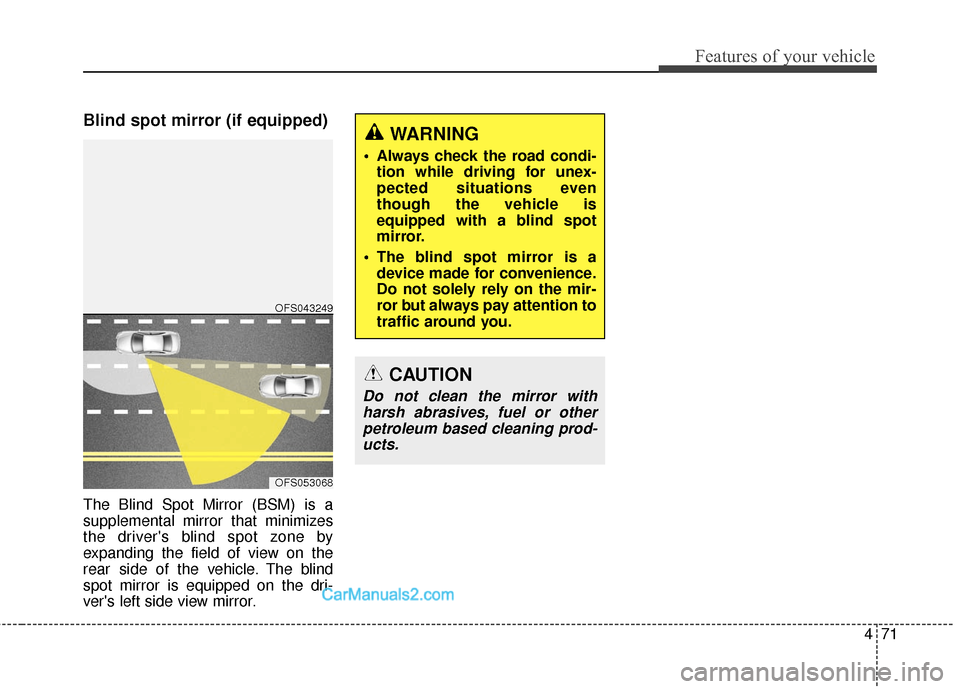
Blind spot mirror (if equipped)
The Blind Spot Mirror (BSM) is a
supplemental mirror that minimizes
the driver's blind spot zone by
expanding the field of view on the
rear side of the vehicle. The blind
spot mirror is equipped on the dri-
ver's left side view mirror.
WARNING
Always check the road condi-tion while driving for unex-
pected situations even
though the vehicle is
equipped with a blind spot
mirror.
The blind spot mirror is a device made for convenience.
Do not solely rely on the mir-
ror but always pay attention to
traffic around you.
OFS053068
OFS043249
CAUTION
Do not clean the mirror withharsh abrasives, fuel or otherpetroleum based cleaning prod-ucts.
Page 184 of 569
481
Features of your vehicle
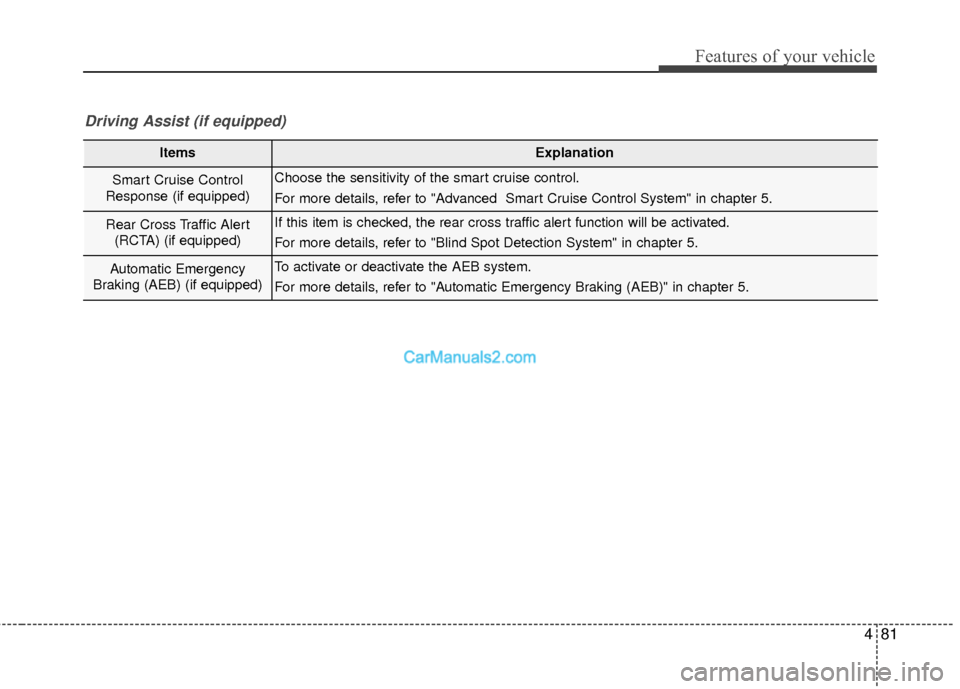
ItemsExplanation
Smart Cruise Control
Response (if equipped)Choose the sensitivity of the smart cruise control.
For more details, refer to "Advanced Smart Cruise Control System" in chapter 5.
Rear Cross Traffic Alert (RCTA) (if equipped)If this item is checked, the rear cross traffic alert function will be activated.
For more details, refer to "Blind Spot Detection System" in chapter 5.
Automatic Emergency
Braking (AEB) (if equipped)To activate or deactivate the AEB system.
For more details, refer to "Automatic Emergency Braking (AEB)" in chapter 5.
Driving Assist (if equipped)
Page 231 of 569
Features of your vehicle
128
4
(Continued)
When driving downhill or uphill.
When only part of the on com- ing vehicle is visible on acrossroad or curved road.
When there is a traffic light, reflecting sign, flashing signor mirror.
When the road conditions are poor such as being wet orcovered with snow.
When the on coming vehicle’s headlamps are off but the foglamps on.
When a vehicle suddenly appears from a curve.
(Continued)(Continued) When the on coming vehicle is tilted from a flat tire is beingtowed.
When the LDWS (Lane Departure Warning System)warning light illuminates. (ifequipped)WARNING
Do not place any accessories, stickers or tint the windshield.
Have the windshield glass replaced from an authorized
dealer.
Do not remove or impact relat- ed parts of the Smart High
Beam system.
Be careful that water doesn’t get into the Smart High Beam
unit.
Do not place objects on the dashboard that reflect light
such as mirrors, white paper,
etc. The system may malfunc-
tion if sunlight is reflected.
At times, the Smart High Beam system may not work
properly, always check the
road conditions for your safe-
ty. When the system does not
operate normally, manually
change between the high
beam and low beam.
Page 249 of 569
Features of your vehicle
146
4
Operation Tips
To prevent dust or unpleasant
fumes from entering the vehicle
through the ventilation system,
temporarily set the air intake con-
trol to the recirculated air position.
Be sure to return the control to the
fresh air position when the irritation
has passed to keep fresh air in the
vehicle. This will help keep the driv-
er alert and comfortable.
Air for the heating/cooling system is drawn in through the grilles just
ahead of the windshield. Care
should be taken that these are not
blocked by leaves, snow, ice or
other obstructions.
To prevent interior fog on the wind- shield, set the air intake control to
the fresh air position and fan speed
to the desired position, turn on the
air conditioning system, and adjust
the temperature control to desired
temperature.Air conditioning
HYUNDAI Air Conditioning Systems
are filled with environmentally friend-
ly R-134a refrigerant.
1. Start the engine. Push the air con- ditioning button.
2. Set the mode to the position.
3. Set the air intake control to the recirculated air position. However,
prolonged operation of the recircu-
lated air position will excessively
dry the air. In this case, change the
air position.
4. Adjust the fan speed control and temperature control to maintain
maximum comfort.
When maximum cooling is desired, set the temperature control to the
extreme left position then set the
fan speed control to the highest
speed.
✽ ✽ NOTICE
• While using the air conditioning
system, monitor the engine tem-
perature gauge closely while driv-
ing up hills or in heavy traffic
when outside temperatures are
high. Air conditioning system
operation may cause engine over-
heating. Continue to use the blow-
er fan but turn the air condition-
ing system off if the engine tem-
perature gauge indicates engine
overheating.
• Opening the windows in humid weather while operating the air
conditioning system may create
water droplets inside the vehicle.
Since excessive water droplets
may cause damage to electrical
equipment, air conditioning
should only be used with the win-
dows closed.
Page 285 of 569
Features of your vehicle
182
4
✽
✽
NOTICE
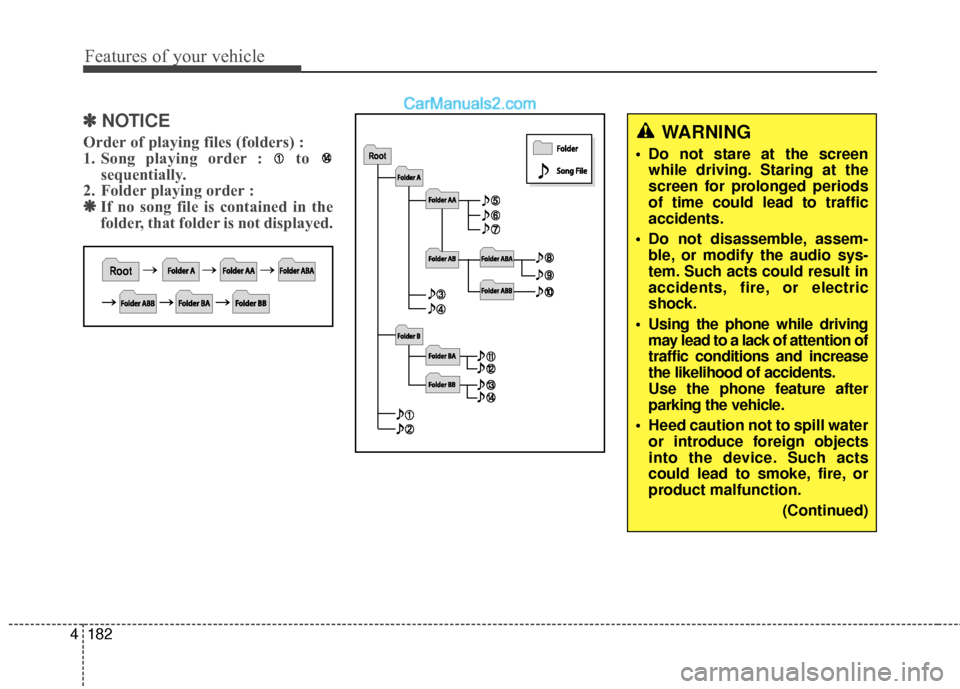
Order of playing files (folders) :
1. Song playing order : to
sequentially.
2. Folder playing order : ❋ ❋ If no song file is contained in the
folder, that folder is not displayed.WARNING
• Do not stare at the screen
while driving. Staring at the
screen for prolonged periods
of time could lead to traffic
accidents.
Do not disassemble, assem- ble, or modify the audio sys-
tem. Such acts could result in
accidents, fire, or electric
shock.
Using the phone while driving may lead to a lack of attention of
traffic conditions and increase
the likelihood of accidents.
Use the phone feature after
parking the vehicle.
Heed caution not to spill water or introduce foreign objects
into the device. Such acts
could lead to smoke, fire, or
product malfunction.
(Continued)
Page 286 of 569
4183
Features of your vehicle
(Continued) Turn on the car ignition before using this device. Do not oper-ate the audio system for longperiods of time with the ignitionturned off as such operationsmay lead to battery discharge.
Do not subject the device to severe shock or impact. Directpressure onto the front side ofthe monitor may cause dam-age to the LCD or touchscreen.
When cleaning the device, make sure to turn off thedevice and use a dry andsmooth cloth. Never usetough materials, chemicalcloths, or solvents (alcohol,benzene, thinners, etc.) assuch materials may damagethe device panel or causecolor/quality deterioration.
(Continued)CAUTION
Operating the device whiledriving could lead to accidentsdue to a lack of attention toexternal surroundings. Firstpark the vehicle before operat-ing the device.
Adjust the volume to levels that allow the driver to hear soundsfrom outside of the vehicle.Driving in a state where exter-nal sounds cannot be heardmay lead to accidents.
Pay attention to the volume set- ting when turning the deviceon. A sudden output of extremevolume upon turning thedevice on could lead to hearingimpairment. (Adjust the volumeto a suitable levels before turn-ing off the device.)
(Continued)
(Continued)
Please refrain from use if thescreen is blank or no sound
can be heard as these signs
may indicate product malfunc-
tion. Continued use in such
conditions could lead to acci-
dents(fires, electric shock) or
product malfunctions.
Do not touch the antenna dur- ing thunder or lightening as
such acts may lead to light-
ning induced electric shock.
Do not stop or park in park- ing-restricted areas to operate
the product. Such acts could
lead to traffic accidents.
Use the system with the vehi- cle ignition turned on.
Prolonged use with the igni-
tion turned off could result in
battery discharge.
Page 301 of 569
59
Driving your vehicle
Starting the engine
1. Make sure the parking brake isapplied.
2. Place the transaxle shift lever in P (Park). Depress the brake pedal
fully.
You can also start the enginewhen the shift lever is in the N(Neutral) position.
3. Turn the ignition switch to START and hold it there until the engine
starts (a maximum of 10 sec-
onds), then release the key.
It should be started withoutdepressing the accelerator pedal.
4. Do not wait for the engine to warm up while the vehicle remains sta-
tionary.
Start driving at moderate engine
speeds. (Steep accelerating and
decelerating should be avoided.)
WARNING
Always wear appropriate shoes
when operating your vehicle.
Unsuitable shoes (high heels,
ski boots,etc.) may interfere
with your ability to use the
brake or the accelerator pedal.
CAUTION
If the engine stalls while you arein motion, do not attempt tomove the shift lever to the P(Park) position. If traffic androad conditions permit, you mayput the shift lever in the N(Neutral) position while thevehicle is still moving and turnthe ignition switch to the STARTposition in an attempt to restartthe engine.
CAUTION
Do not engage the starter formore than 10 seconds. If theengine stalls or fails to start,wait 5 to 10 seconds before re-engaging the starter. Improperuse of the starter may damageit.
Page 306 of 569
Driving your vehicle
14
5
✽
✽
NOTICE
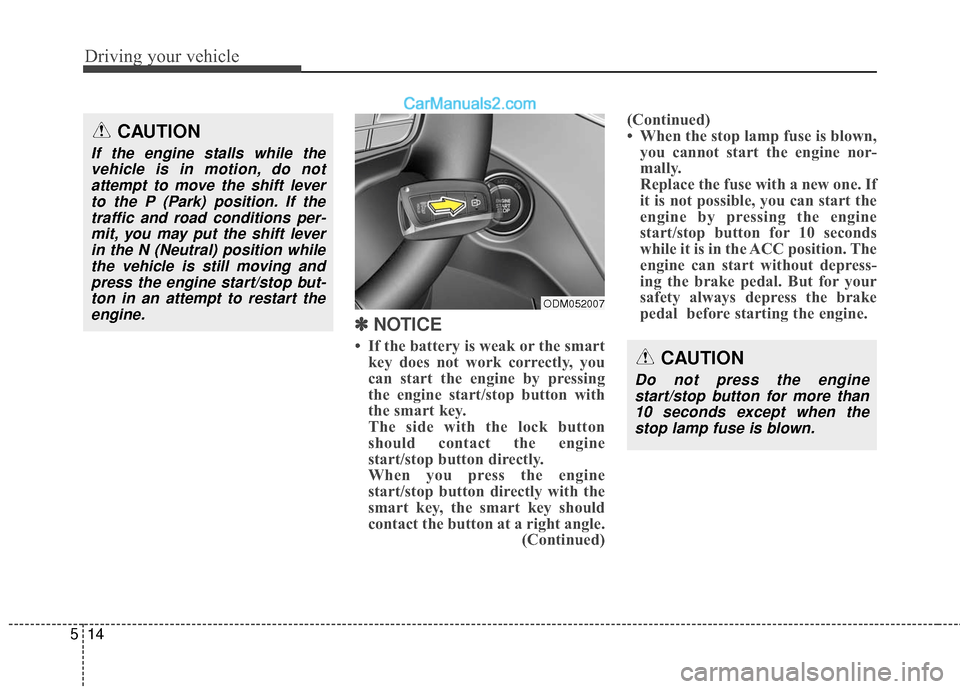
• If the battery is weak or the smart
key does not work correctly, you
can start the engine by pressing
the engine start/stop button with
the smart key.
The side with the lock button
should contact the engine
start/stop button directly.
When you press the engine
start/stop button directly with the
smart key, the smart key should
contact the button at a right angle. (Continued)(Continued)
• When the stop lamp fuse is blown,
you cannot start the engine nor-
mally.
Replace the fuse with a new one. If
it is not possible, you can start the
engine by pressing the engine
start/stop button for 10 seconds
while it is in the ACC position. The
engine can start without depress-
ing the brake pedal. But for your
safety always depress the brake
pedal before starting the engine.
CAUTION
If the engine stalls while the
vehicle is in motion, do notattempt to move the shift leverto the P (Park) position. If thetraffic and road conditions per-mit, you may put the shift leverin the N (Neutral) position whilethe vehicle is still moving andpress the engine start/stop but-ton in an attempt to restart theengine.
CAUTION
Do not press the enginestart/stop button for more than10 seconds except when thestop lamp fuse is blown.
ODM052007
Page 349 of 569
557
Driving your vehicle
The warning light illumi-
nates on the LCD display,
when you cancel the AEB
system. The driver can
monitor the AEB ON/OFF status on
the LCD display. When the warning
light remains ON with the AEB acti-
vated, have the system checked by
an authorized HYUNDAI dealer.
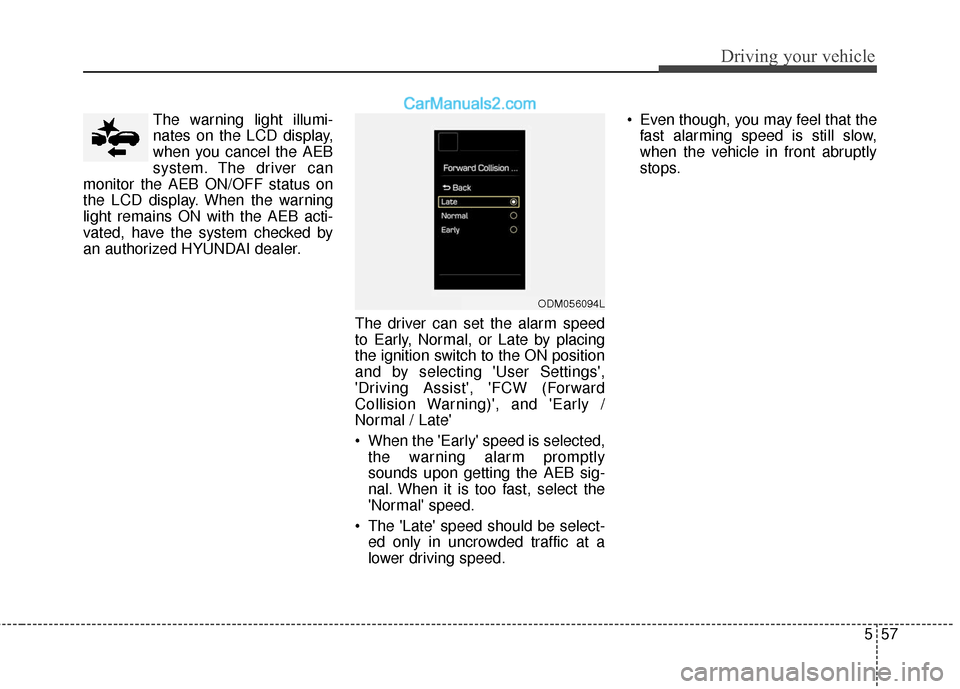
The driver can set the alarm speed
to Early, Normal, or Late by placing
the ignition switch to the ON position
and by selecting 'User Settings',
'Driving Assist', 'FCW (Forward
Collision Warning)', and 'Early /
Normal / Late'
When the 'Early' speed is selected,the warning alarm promptly
sounds upon getting the AEB sig-
nal. When it is too fast, select the
'Normal' speed.
The 'Late' speed should be select- ed only in uncrowded traffic at a
lower driving speed. Even though, you may feel that the
fast alarming speed is still slow,
when the vehicle in front abruptly
stops.
ODM056094L