radio Hyundai Santa Fe Sport 2015 Owner's Guide
[x] Cancel search | Manufacturer: HYUNDAI, Model Year: 2015, Model line: Santa Fe Sport, Model: Hyundai Santa Fe Sport 2015Pages: 785, PDF Size: 13.38 MB
Page 318 of 785
4225
Features of your vehicle
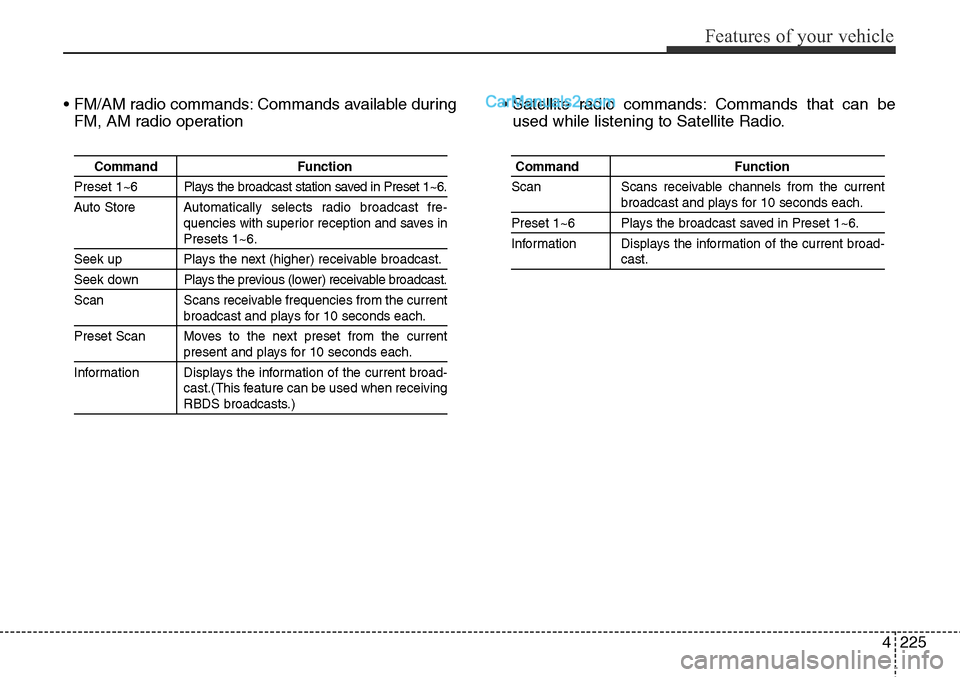
• FM/AM radio commands: Commands available during
FM, AM radio operation• Satellite radio commands: Commands that can be
used while listening to Satellite Radio.
Command Function
Preset 1~6 Plays the broadcast station saved in Preset 1~6.
Auto StoreAutomatically selects radio broadcast fre-
quencies with superior reception and saves in
Presets 1~6.
Seek up Plays the next (higher) receivable broadcast.
Seek down Plays the previous (lower) receivable broadcast.
Scan Scans receivable frequencies from the current
broadcast and plays for 10 seconds each.
Preset Scan Moves to the next preset from the current
present and plays for 10 seconds each.
Information Displays the information of the current broad-
cast.(This feature can be used when receiving
RBDS broadcasts.)
Command Function
Scan Scans receivable channels from the current
broadcast and plays for 10 seconds each.
Preset 1~6 Plays the broadcast saved in Preset 1~6.
Information Displays the information of the current broad-
cast.
Page 336 of 785
4243
Features of your vehicle
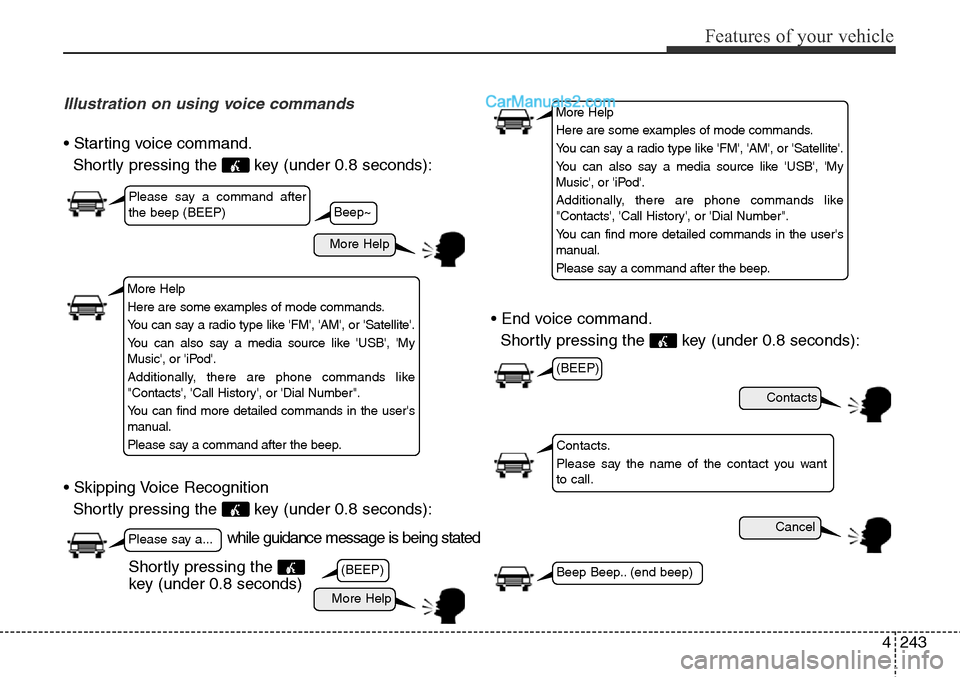
Illustration on using voice commands
• Starting voice command.
Shortly pressing the key (under 0.8 seconds):
• Skipping Voice Recognition
Shortly pressing the key (under 0.8 seconds):• End voice command.
Shortly pressing the key (under 0.8 seconds):
while guidance message is being stated
More Help
Contacts
Cancel
More Help
Please say a command after
the beep (BEEP)
Please say a...
Contacts.
Please say the name of the contact you want
to call.
(BEEP)
(BEEP)
Beep Beep.. (end beep)Shortly pressing the
key (under 0.8 seconds)
Beep~
More Help
Here are some examples of mode commands.
You can say a radio type like 'FM', 'AM', or 'Satellite'.
You can also say a media source like 'USB', 'My
Music', or 'iPod'.
Additionally, there are phone commands like
"Contacts', 'Call History', or 'Dial Number".
You can find more detailed commands in the user's
manual.
Please say a command after the beep.
More Help
Here are some examples of mode commands.
You can say a radio type like 'FM', 'AM', or 'Satellite'.
You can also say a media source like 'USB', 'My
Music', or 'iPod'.
Additionally, there are phone commands like
"Contacts', 'Call History', or 'Dial Number".
You can find more detailed commands in the user's
manual.
Please say a command after the beep.
Page 337 of 785
Features of your vehicle
244 4
Voice Command List
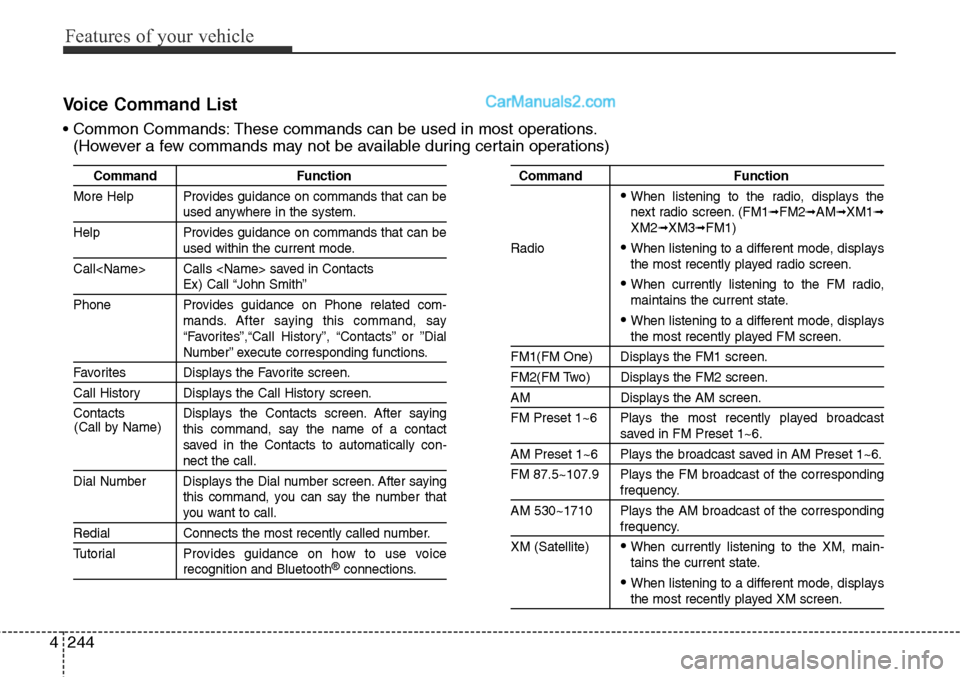
• Common Commands: These commands can be used in most operations.
(However a few commands may not be available during certain operations)
Command Function
More Help Provides guidance on commands that can be
used anywhere in the system.
Help Provides guidance on commands that can be
used within the current mode.
Call
Ex) Call “John Smith”
Phone Provides guidance on Phone related com-
mands. After saying this command, say
“Favorites”,“Call History”, “Contacts” or ”Dial
Number” execute corresponding functions.
Favorites Displays the Favorite screen.
Call History Displays the Call History screen.
Contacts Displays the Contacts screen. After saying
this command, say the name of a contact
saved in the Contacts to automatically con-
nect the call.
Dial Number Displays the Dial number screen. After saying
this command, you can say the number that
you want to call.
Redial Connects the most recently called number.
Tutorial Provides guidance on how to use voice
recognition and Bluetooth®connections.
Command Function
• When listening to the radio, displays the
next radio screen. (FM1➟FM2➟AM➟XM1➟XM2➟XM3➟FM1)
Radio
• When listening to a different mode, displays
the most recently played radio screen.
• When currently listening to the FM radio,
maintains the current state.
• When listening to a different mode, displaysthe most recently played FM screen.
FM1(FM One) Displays the FM1 screen.
FM2(FM Two) Displays the FM2 screen.
AM Displays the AM screen.
FM Preset 1~6 Plays the most recently played broadcast
saved in FM Preset 1~6.
AM Preset 1~6 Plays the broadcast saved in AM Preset 1~6.
FM 87.5~107.9 Plays the FM broadcast of the corresponding
frequency.
AM 530~1710 Plays the AM broadcast of the corresponding
frequency.
XM (Satellite)
• When currently listening to the XM, main-
tains the current state.
• When listening to a different mode, displaysthe most recently played XM screen. (Call by Name)
Page 339 of 785
Features of your vehicle
246 4
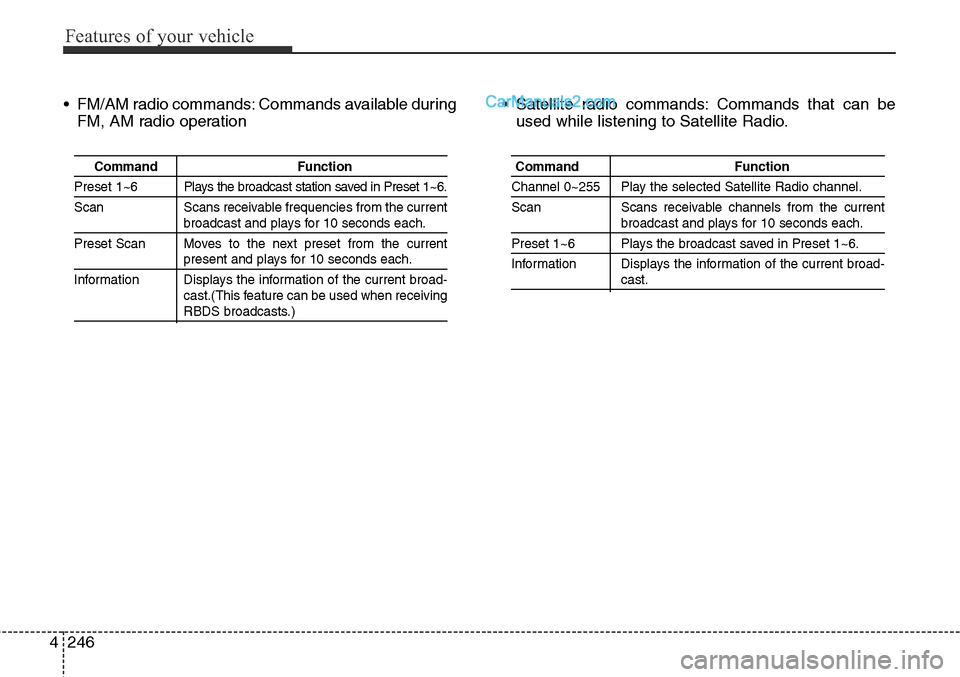
• FM/AM radio commands: Commands available during
FM, AM radio operation• Satellite radio commands: Commands that can be
used while listening to Satellite Radio.
Command Function
Preset 1~6 Plays the broadcast station saved in Preset 1~6.
Scan Scans receivable frequencies from the current
broadcast and plays for 10 seconds each.
Preset Scan Moves to the next preset from the current
present and plays for 10 seconds each.
Information Displays the information of the current broad-
cast.(This feature can be used when receiving
RBDS broadcasts.)
Command Function
Channel 0~255 Play the selected Satellite Radio channel.
Scan Scans receivable channels from the current
broadcast and plays for 10 seconds each.
Preset 1~6 Plays the broadcast saved in Preset 1~6.
Information Displays the information of the current broad-
cast.
Page 347 of 785
Features of your vehicle
254 4
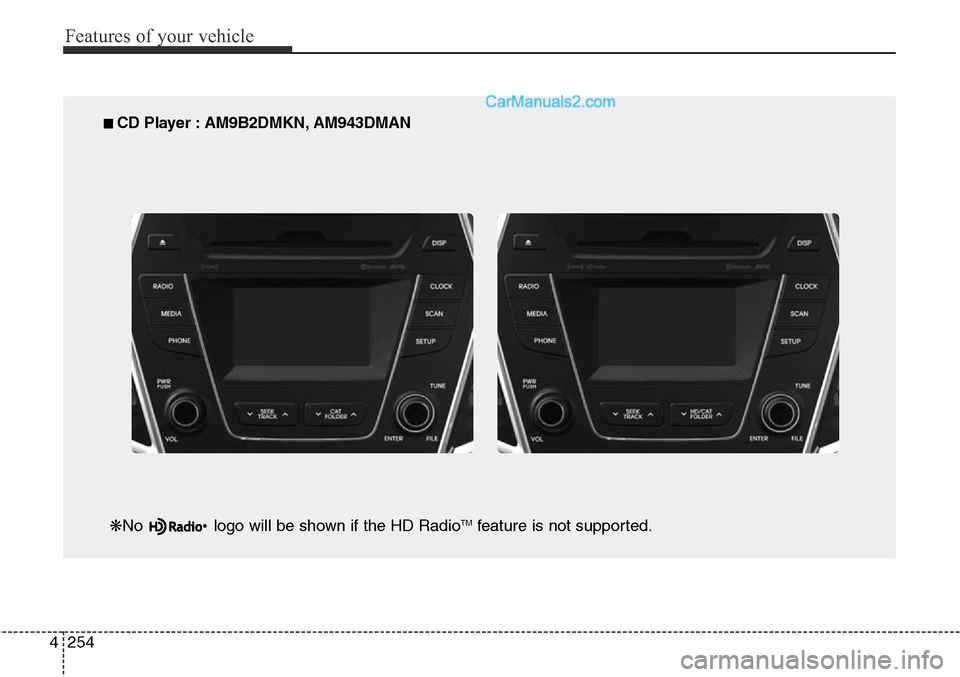
■ CD Player : AM9B2DMKN, AM943DMAN
❋No logo will be shown if the HD Radio
TMfeature is not supported.
Page 348 of 785
4255
Features of your vehicle
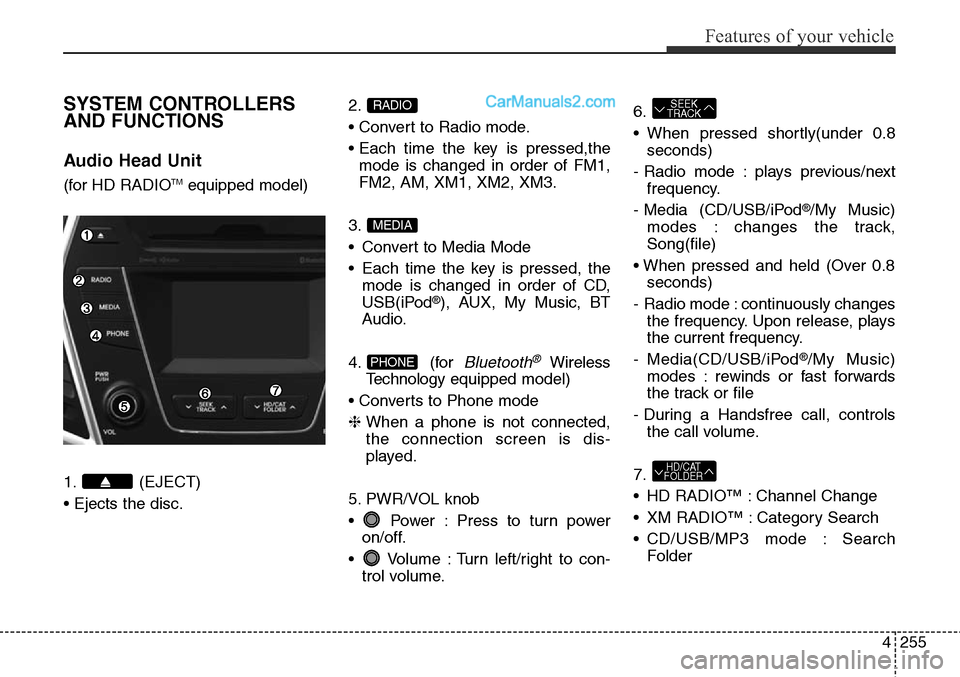
SYSTEM CONTROLLERS
AND FUNCTIONS
Audio Head Unit
(for HD RADIOTMequipped model)
1. (EJECT)
• Ejects the disc.2.
• Convert to Radio mode.
• Each time the key is pressed,the
mode is changed in order of FM1,
FM2, AM, XM1, XM2, XM3.
3.
• Convert to Media Mode
• Each time the key is pressed, the
mode is changed in order of CD,
USB(iPod
®), AUX, My Music, BT
Audio.
4. (for
Bluetooth®Wireless
Technologyequipped model)
• Converts to Phone mode
❈ When a phone is not connected,
the connection screen is dis-
played.
5. PWR/VOL knob
• Power : Press to turn power
on/off.
• Volume : Turn left/right to con-
trol volume.6.
• When pressed shortly(under 0.8
seconds)
- Radio mode : plays previous/next
frequency.
- Media (CD/USB/iPod
®/My Music)
modes : changes the track,
Song(file)
• When pressed and held (Over 0.8
seconds)
- Radio mode : continuously changes
the frequency. Upon release, plays
the current frequency.
- Media(CD/USB/iPod
®/My Music)
modes : rewinds or fast forwards
the track or file
- During a Handsfree call, controls
the call volume.
7.
• HD RADIO™ : Channel Change
• XM RADIO™ : Category Search
• CD/USB/MP3 mode : Search
Folder
HD/CAT
FOLDER
SEEK
TRACK
PHONE
MEDIA
RADIO
Page 349 of 785
Features of your vehicle
256 4
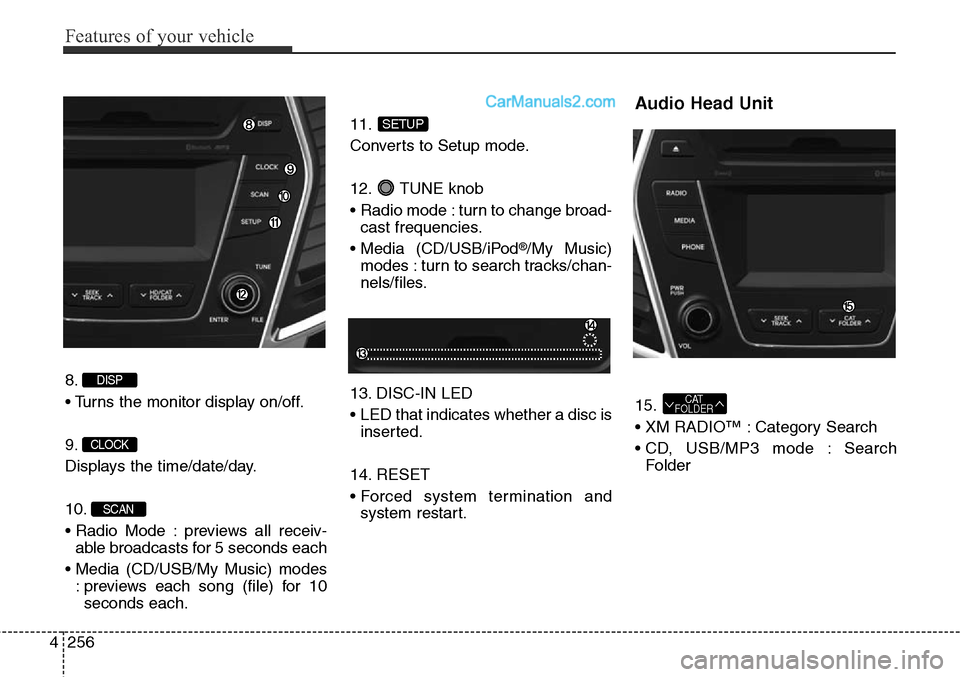
8.
• Turns the monitor display on/off.
9.
Displays the time/date/day.
10.
• Radio Mode : previews all receiv-
able broadcasts for 5 seconds each
• Media (CD/USB/My Music) modes
: previews each song (file) for 10
seconds each.11.
Converts to Setup mode.
12. TUNE knob
• Radio mode : turn to change broad-
cast frequencies.
• Media (CD/USB/iPod
®/My Music)
modes : turn to search tracks/chan-
nels/files.
13. DISC-IN LED
• LED that indicates whether a disc is
inserted.
14. RESET
• Forced system termination and
system restart.
Audio Head Unit
15.
• XM RADIO™ : Category Search
• CD, USB/MP3 mode : Search
FolderCAT
FOLDER
SETUP
SCAN
CLOCK
DISP
Page 350 of 785
4257
Features of your vehicle
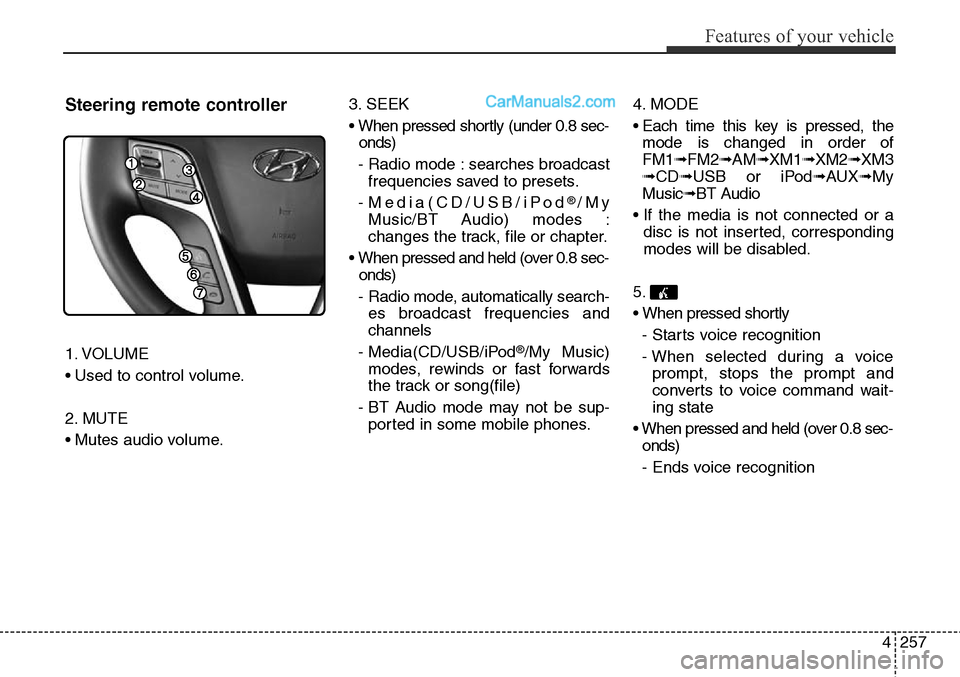
Steering remote controller
1. VOLUME
• Used to control volume.
2. MUTE
• Mutes audio volume.3. SEEK
• When pressed shortly (under 0.8 sec-
onds)
- Radio mode : searches broadcast
frequencies saved to presets.
- Media(CD/USB/iPod
®/My
Music/BT Audio) modes :
changes the track, file or chapter.
• When pressed and held (over 0.8 sec-
onds)
- Radio mode, automatically search-
es broadcast frequencies and
channels
- Media(CD/USB/iPod
®/My Music)
modes, rewinds or fast forwards
the track or song(file)
- BT Audio mode may not be sup-
ported in some mobile phones.4. MODE
• Each time this key is pressed, the
mode is changed in order of
FM1➟FM2➟AM➟XM1➟XM2➟XM3
➟CD➟USB or iPod➟AUX➟My
Music➟BT Audio
• If the media is not connected or a
disc is not inserted, corresponding
modes will be disabled.
5.
• When pressed shortly
- Starts voice recognition
- When selected during a voice
prompt, stops the prompt and
converts to voice command wait-
ing state
• When pressed and held (over 0.8 sec-
onds)
- Ends voice recognition
Page 352 of 785
4259
Features of your vehicle
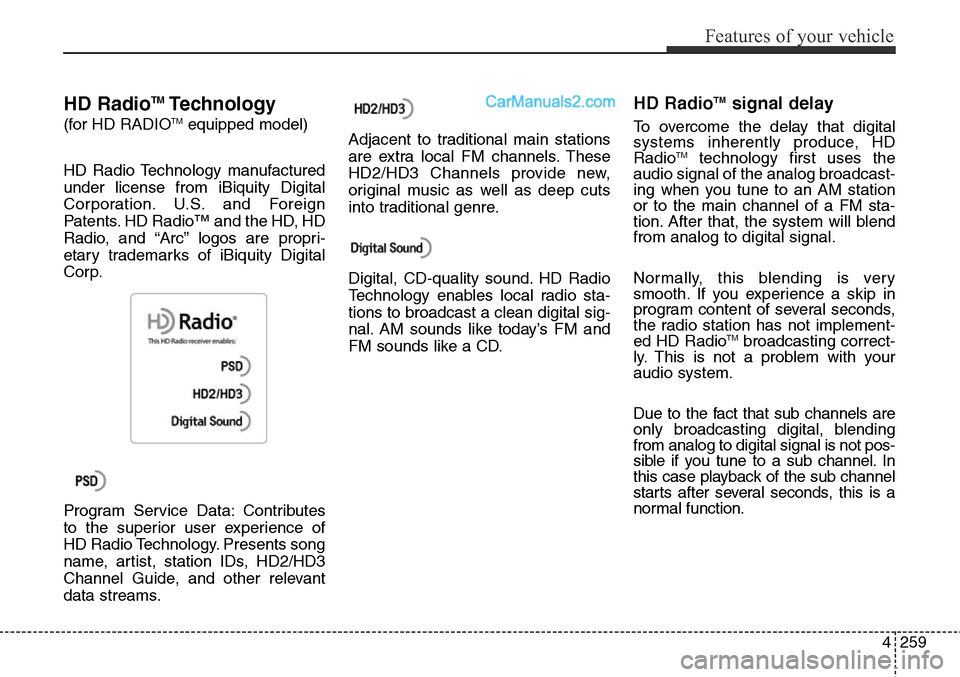
HD RadioTMTechnology
(for HD RADIOTMequipped model)
HD Radio Technology manufactured
under license from iBiquity Digital
Corporation. U.S. and Foreign
Patents. HD Radio™ and the HD, HD
Radio, and “Arc” logos are propri-
etary trademarks of iBiquity Digital
Corp.
Program Service Data: Contributes
to the superior user experience of
HD Radio Technology. Presents song
name, artist, station IDs, HD2/HD3
Channel Guide, and other relevant
data streams.Adjacent to traditional main stations
are extra local FM channels. These
HD2/HD3 Channels provide new,
original music as well as deep cuts
into traditional genre.
Digital, CD-quality sound. HD Radio
Technology enables local radio sta-
tions to broadcast a clean digital sig-
nal. AM sounds like today’s FM and
FM sounds like a CD.
HD RadioTMsignal delay
To overcome the delay that digital
systems inherently produce, HD
Radio
TMtechnology first uses the
audio signal of the analog broadcast-
ing when you tune to an AM station
or to the main channel of a FM sta-
tion. After that, the system will blend
from analog to digital signal.
Normally, this blending is very
smooth. If you experience a skip in
program content of several seconds,
the radio station has not implement-
ed HD Radio
TMbroadcasting correct-
ly. This is not a problem with your
audio system.
Due to the fact that sub channels are
only broadcasting digital, blending
from analog to digital signal is not pos-
sible if you tune to a sub channel. In
this case playback of the sub channel
starts after several seconds, this is a
normal function.
Page 353 of 785
![Hyundai Santa Fe Sport 2015 Owners Guide Features of your vehicle
260 4
RADIO MODE
Basic Mode Screen
1. Mode Display
Displays currently operating mode.
2. Frequency
Displays the current frequency.
3. Preset
Displays current preset number [1]](/img/35/16759/w960_16759-352.png "Hyundai Santa Fe Sport 2015 Owners Guide Features of your vehicle
260 4
RADIO MODE
Basic Mode Screen
1. Mode Display
Displays currently operating mode.
2. Frequency
Displays the current frequency.
3. Preset
Displays current preset number [1]")
Features of your vehicle
260 4
RADIO MODE
Basic Mode Screen
1. Mode Display
Displays currently operating mode.
2. Frequency
Displays the current frequency.
3. Preset
Displays current preset number [1] ~
[6].
4. Preset Display
Displays preset buttons.
5. Info
Displays broadcast information.
6. HD
Changes HD Radio channels.
7. A.store
Automatically saves frequencies with
superior reception to Preset buttons.