brake sensor Hyundai Santa Fe Sport 2017 Owner's Manual
[x] Cancel search | Manufacturer: HYUNDAI, Model Year: 2017, Model line: Santa Fe Sport, Model: Hyundai Santa Fe Sport 2017Pages: 614, PDF Size: 18.99 MB
Page 94 of 614
Safety features of your vehicle
72
3
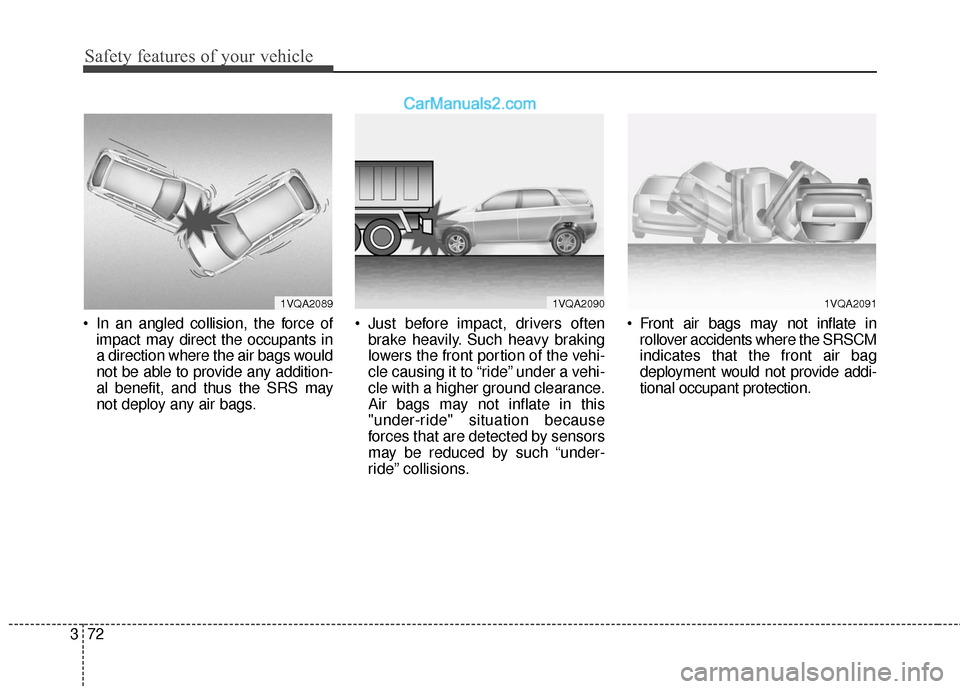
In an angled collision, the force of
impact may direct the occupants in
a direction where the air bags would
not be able to provide any addition-
al benefit, and thus the SRS may
not deploy any air bags. Just before impact, drivers often
brake heavily. Such heavy braking
lowers the front portion of the vehi-
cle causing it to “ride” under a vehi-
cle with a higher ground clearance.
Air bags may not inflate in this
"under-ride" situation because
forces that are detected by sensors
may be reduced by such “under-
ride” collisions. Front air bags may not inflate in
rollover accidents where the SRSCM
indicates that the front air bag
deployment would not provide addi-
tional occupant protection.
1VQA20901VQA20891VQA2091
Page 218 of 614
4121
Features of your vehicle
If you desire to deactivate the rear
parking assist system, press the
rear parking assist OFF button
again. (The indicator on the button
will illuminate.) To turn the system
on, press the button again. (The
indicator on the button will go off.)
This system will activate when backing up with the ignition switch
ON.
If the vehicle is moving at a speed
over 6mph (10km/h), the system
may not be activated correctly.
The sensing distance while the rear parking assist system is in
operation is approximately 47 in.
(120 cm).
When more than two objects are sensed at the same time, the clos-
est objects will be recognized first. Types of warning sound
When an object is 47 in. to 24 in.
(120 cm to 61 cm) from the rear
bumper: Buzzer beeps intermit-
tently.
When an object is 23 in. to 12 in. (60 cm to 31 cm) from the rear
bumper: Buzzer beeps more fre-
quently.
When an object is within 11.8 in. (30 cm) of the rear bumper:
Buzzer sounds continuously.Non-operational conditions of
rear parking assist system
The rear parking assist system may
not operate properly when:
1. Moisture is frozen to the sensor. (It will operate normally when the
moisture has been cleared.)
2. The sensor is covered with foreign matter, such as snow or water, or
the sensor cover is blocked. (It will
operate normally when the materi-
al is removed or the sensor is no
longer blocked.)
3. Driving on uneven road surfaces (unpaved roads, gravel, bumps,
gradient).
4. Objects generating excessive noise (vehicle horns, loud motor-
cycle engines, or truck air brakes)
are within range of the sensor.
5. Heavy rain or water spray exists.
6. Wireless transmitters or mobile phones are within range of the
sensor.
7. Trailer towing.
Page 403 of 614
Driving your vehicle
62
5
System malfunction
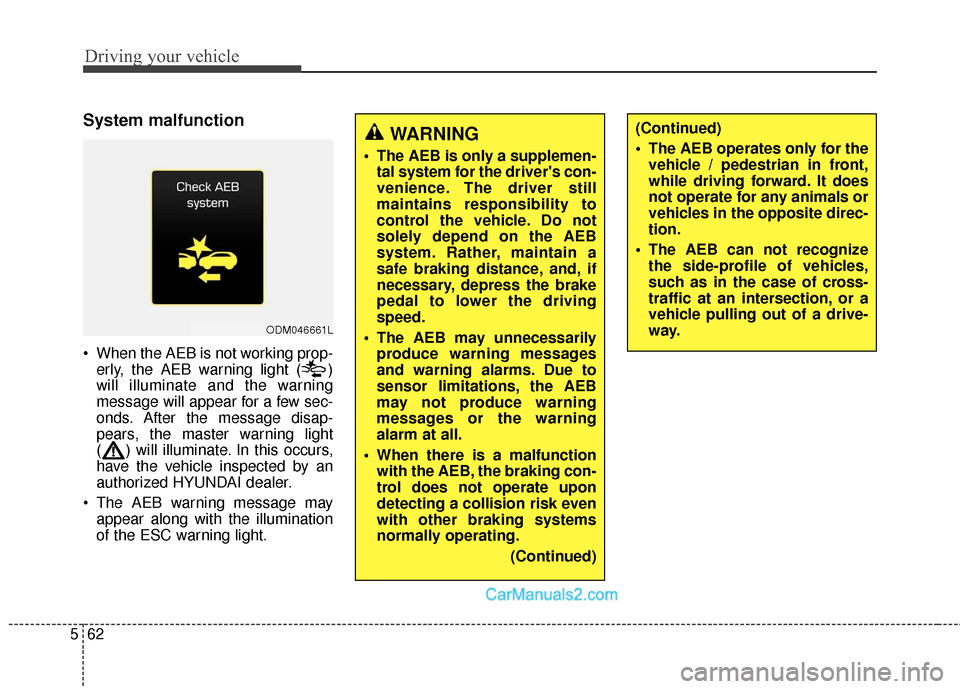
When the AEB is not working prop-
erly, the AEB warning light ( )
will illuminate and the warning
message will appear for a few sec-
onds. After the message disap-
pears, the master warning light
( ) will illuminate. In this occurs,
have the vehicle inspected by an
authorized HYUNDAI dealer.
The AEB warning message may appear along with the illumination
of the ESC warning light.
ODM046661L
WARNING
The AEB is only a supplemen-tal system for the driver's con-
venience. The driver still
maintains responsibility to
control the vehicle. Do not
solely depend on the AEB
system. Rather, maintain a
safe braking distance, and, if
necessary, depress the brake
pedal to lower the driving
speed.
The AEB may unnecessarily produce warning messages
and warning alarms. Due to
sensor limitations, the AEB
may not produce warning
messages or the warning
alarm at all.
When there is a malfunction with the AEB, the braking con-
trol does not operate upon
detecting a collision risk even
with other braking systems
normally operating.
(Continued)
(Continued)
The AEB operates only for thevehicle / pedestrian in front,
while driving forward. It does
not operate for any animals or
vehicles in the opposite direc-
tion.
The AEB can not recognize the side-profile of vehicles,
such as in the case of cross-
traffic at an intersection, or a
vehicle pulling out of a drive-
way.
Page 404 of 614
563
Driving your vehicle
Limitations of the system
The AEB monitors driving conditions
through the radar and the camera
sensor. For any vehicle activity
occurring outside the sensor's range
and field of view, the AEB may not be
able to react. The driver should exer-
cise caution in the following situa-
tions, as the AEB operation may be
limited:
Recognizing vehicles
- The radar or the camera isobscured by foreign substances.
- In heavy rain or snow
- There is electromagnetic interfer- ence.
- The object in front deflects the radar beam due to extreme angles
or an extremely irregular surface.
- The vehicle in front has a narrow body. (i.e. motor cycle and bicycle)
- The system cannot identify objects in front due to driving into the at
dusk/dawn, bright reflections, or
darkness. - The camera cannot fit the full out-
line of a vehicle in front.
- The vehicle in front has cargo extending beyond the back of the
vehicle or has a high ground clear-
ance.
- The vehicle in front does not turn ON the rear lights, does not have
rear lights, has asymmetric rear
lights, or has rear lights out of
angle.
- The outside brightness changes suddenly, such as entering/exiting
a tunnel.
- Vehicle driving is erratic.
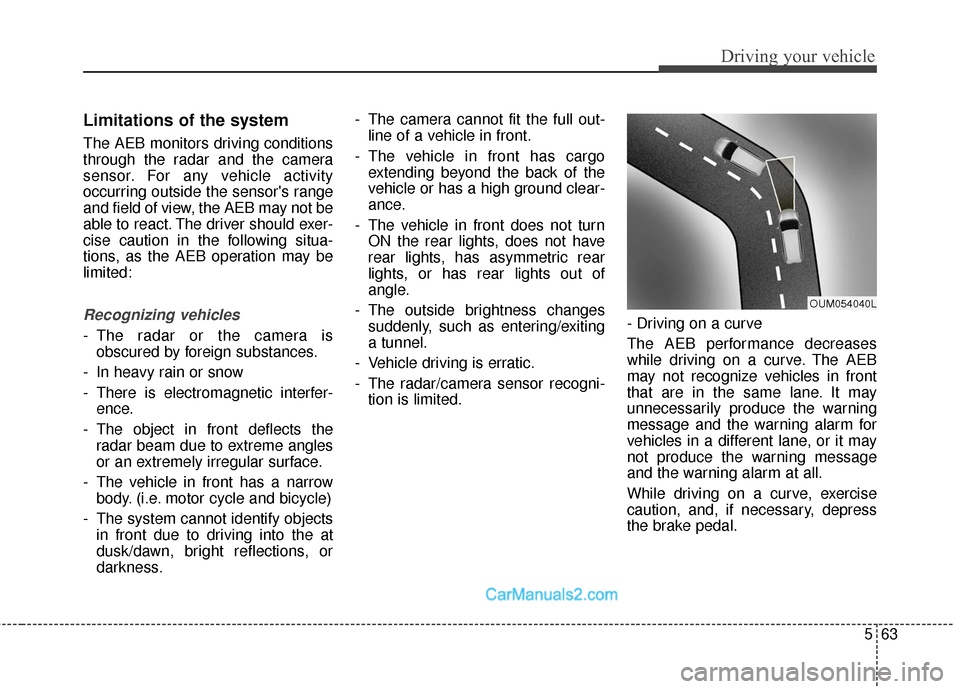
- The radar/camera sensor recogni- tion is limited. - Driving on a curve
The AEB performance decreases
while driving on a curve. The AEB
may not recognize vehicles in front
that are in the same lane. It may
unnecessarily produce the warning
message and the warning alarm for
vehicles in a different lane, or it may
not produce the warning message
and the warning alarm at all.
While driving on a curve, exercise
caution, and, if necessary, depress
the brake pedal.
OUM054040L
Page 407 of 614
Driving your vehicle
66
5
✽
✽
NOTICE
In some instances, the AEB system
may be cancelled when subjected to
electromagnetic interference.
This device complies with Part
15 of the FCC rules.
Operation is subject to the following
two conditions:
1. This device may not cause harm-
ful interference, and
2. This device must accept any inter- ference received, including inter-
ference that may cause undesired
operation.
WARNING
Cancel the AEB in the UserSettings on the LCD before
towing another vehicle. While
towing, the brake application
may adversely affect your
vehicle safety.
Exercise caution when there is a vehicle in front that has
cargo extending beyond the
back of the vehicle or has a
high ground clearance.
The sensor only detects standing or walking pedestri-
ans, not carts, bicycles,
motorcycles, luggage bags, or
strollers.
The AEB is not guaranteed to work in every possible situa-
tion. Never test the AEB
against a person or an object.
It may cause severe injuries
or death.
Page 417 of 614
Driving your vehicle
76
5
To temporarily accelerate with the
Smart Cruise Control on
If you want to speed up temporarily
when the Smart Cruise Control is on,
depress the accelerator pedal.
Increased speed will not interfere
with Smart Cruise Control operation
or change the set speed.
To return to the set speed, take your
foot off the accelerator.
If you push the toggle switch down
(SET-) at increased speed, the cruis-
ing speed will be set again.
✽ ✽ NOTICE
Be careful when accelerating tem-
porarily, because the speed is not
controlled automatically at this
time even if there is a vehicle in front
of you.
Smart Cruise Control will be tem-
porarily canceled when:
The brake pedal is depressed.
CANCEL button located on the steering wheel is depressed.
The CANCEL button is depressed when the vehicle is at a standstill.
The Advanced Smart Cruise Control
turns off temporarily when the indica-
tor on the LCD display turns off.
The CRUISE indicator is illuminated
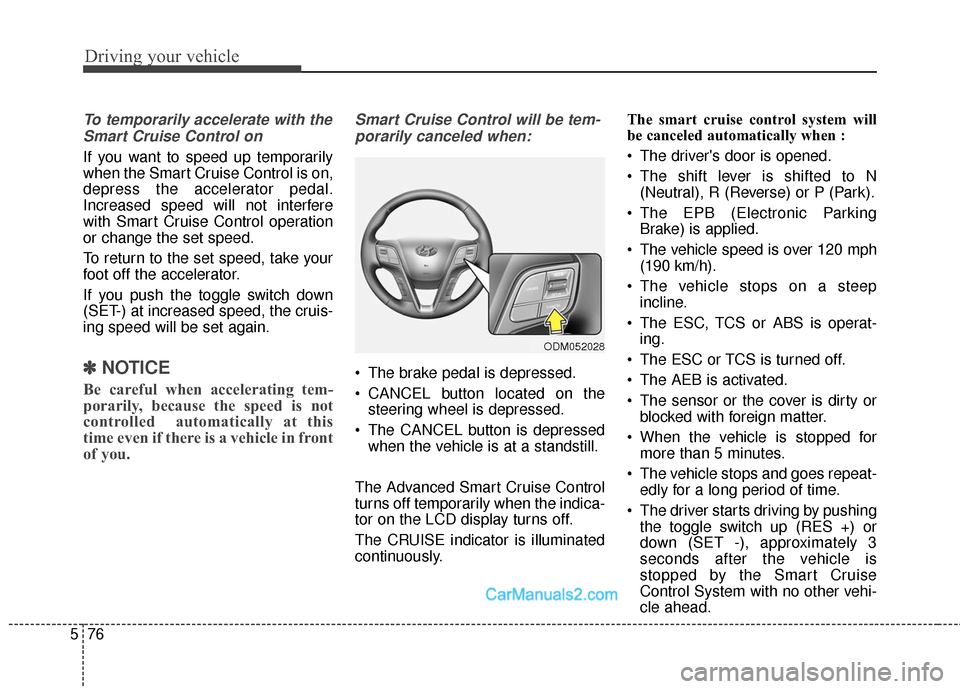
continuously. The smart cruise control system will
be canceled automatically when :
The driver's door is opened.
The shift lever is shifted to N
(Neutral), R (Reverse) or P (Park).
The EPB (Electronic Parking Brake) is applied.
The vehicle speed is over 120 mph (190 km/h).
The vehicle stops on a steep incline.
The ESC, TCS or ABS is operat- ing.
The ESC or TCS is turned off.
The AEB is activated.
The sensor or the cover is dirty or blocked with foreign matter.
When the vehicle is stopped for more than 5 minutes.
The vehicle stops and goes repeat- edly for a long period of time.
The driver starts driving by pushing the toggle switch up (RES +) or
down (SET -), approximately 3
seconds after the vehicle is
stopped by the Smart Cruise
Control System with no other vehi-
cle ahead.
ODM052028
Page 425 of 614
Driving your vehicle
84
5
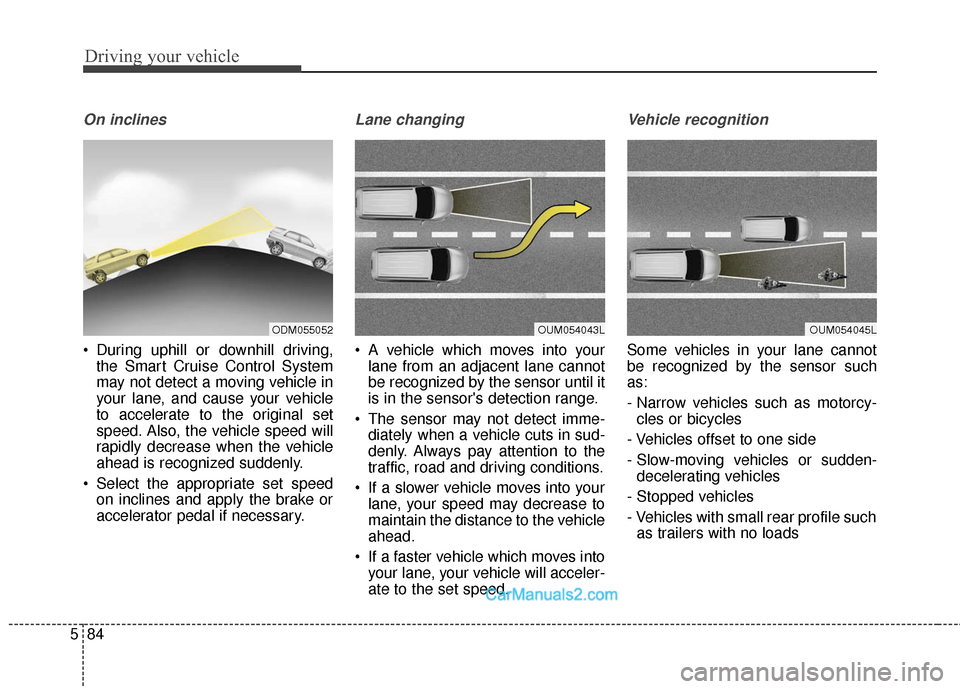
On inclines
During uphill or downhill driving,
the Smart Cruise Control System
may not detect a moving vehicle in
your lane, and cause your vehicle
to accelerate to the original set
speed. Also, the vehicle speed will
rapidly decrease when the vehicle
ahead is recognized suddenly.
Select the appropriate set speed on inclines and apply the brake or
accelerator pedal if necessary.
Lane changing
A vehicle which moves into yourlane from an adjacent lane cannot
be recognized by the sensor until it
is in the sensor's detection range.
The sensor may not detect imme- diately when a vehicle cuts in sud-
denly. Always pay attention to the
traffic, road and driving conditions.
If a slower vehicle moves into your lane, your speed may decrease to
maintain the distance to the vehicle
ahead.
If a faster vehicle which moves into your lane, your vehicle will acceler-
ate to the set speed.
Vehicle recognition
Some vehicles in your lane cannot
be recognized by the sensor such
as:
- Narrow vehicles such as motorcy-cles or bicycles
- Vehicles offset to one side
- Slow-moving vehicles or sudden- decelerating vehicles
- Stopped vehicles
- Vehicles with small rear profile such as trailers with no loads
OUM054043LOUM054045LODM055052
Page 426 of 614
585
Driving your vehicle
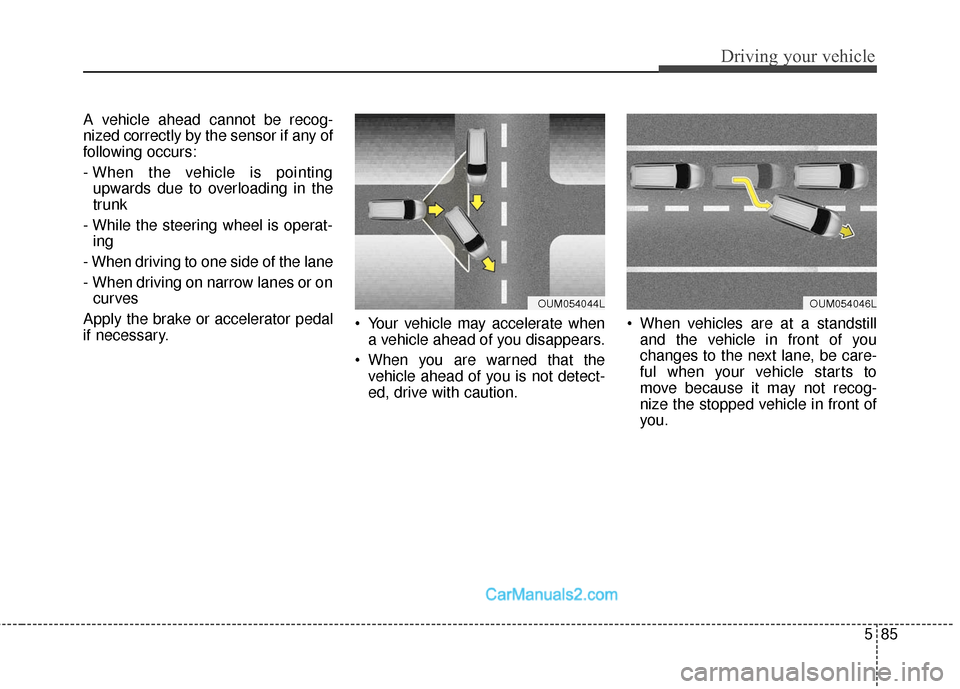
A vehicle ahead cannot be recog-
nized correctly by the sensor if any of
following occurs:
- When the vehicle is pointingupwards due to overloading in the
trunk
- While the steering wheel is operat- ing
- When driving to one side of the lane
- When driving on narrow lanes or on curves
Apply the brake or accelerator pedal
if necessary. Your vehicle may accelerate when
a vehicle ahead of you disappears.
When you are warned that the vehicle ahead of you is not detect-
ed, drive with caution. When vehicles are at a standstill
and the vehicle in front of you
changes to the next lane, be care-
ful when your vehicle starts to
move because it may not recog-
nize the stopped vehicle in front of
you.
OUM054044LOUM054046L
Page 563 of 614
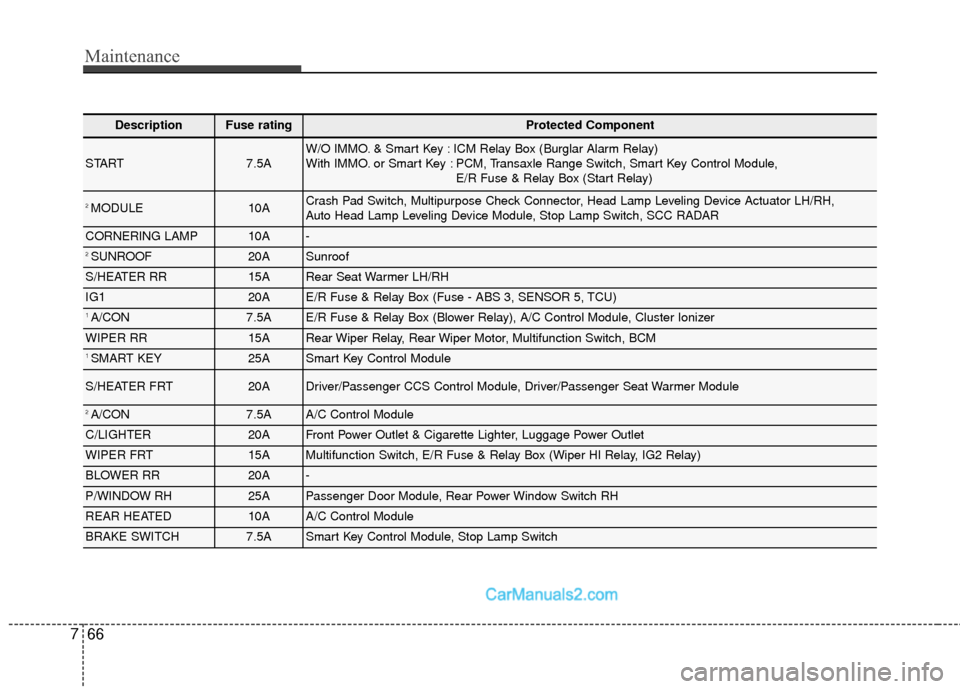
Maintenance
66
7
DescriptionFuse ratingProtected Component
START7.5AW/O IMMO. & Smart Key : ICM Relay Box (Burglar Alarm Relay)
With IMMO. or Smart Key : PCM, Transaxle Range Switch, Smart Key Control Module,
E/R Fuse & Relay Box (Start Relay)
2 MODULE10ACrash Pad Switch, Multipurpose Check Connector, Head Lamp Leveling Device Actuator LH/RH,
Auto Head Lamp Leveling Device Module, Stop Lamp Switch, SCC RADAR
CORNERING LAMP10A-
2 SUNROOF20ASunroof
S/HEATER RR15ARear Seat Warmer LH/RH
IG120AE/R Fuse & Relay Box (Fuse - ABS 3, SENSOR 5, TCU)
1 A/CON7.5AE/R Fuse & Relay Box (Blower Relay), A/C Control Module, Cluster Ionizer
WIPER RR15ARear Wiper Relay, Rear Wiper Motor, Multifunction Switch, BCM
1 SMART KEY25ASmart Key Control Module
S/HEATER FRT20ADriver/Passenger CCS Control Module, Driver/Passenger Seat Warmer Module
2 A/CON7.5AA/C Control Module
C/LIGHTER20AFront Power Outlet & Cigarette Lighter, Luggage Power Outlet
WIPER FRT15AMultifunction Switch, E/R Fuse & Relay Box (Wiper HI Relay, IG2 Relay)
BLOWER RR20A-
P/WINDOW RH 25APassenger Door Module, Rear Power Window Switch RH
REAR HEATED10AA/C Control Module
BRAKE SWITCH7.5ASmart Key Control Module, Stop Lamp Switch
Page 567 of 614
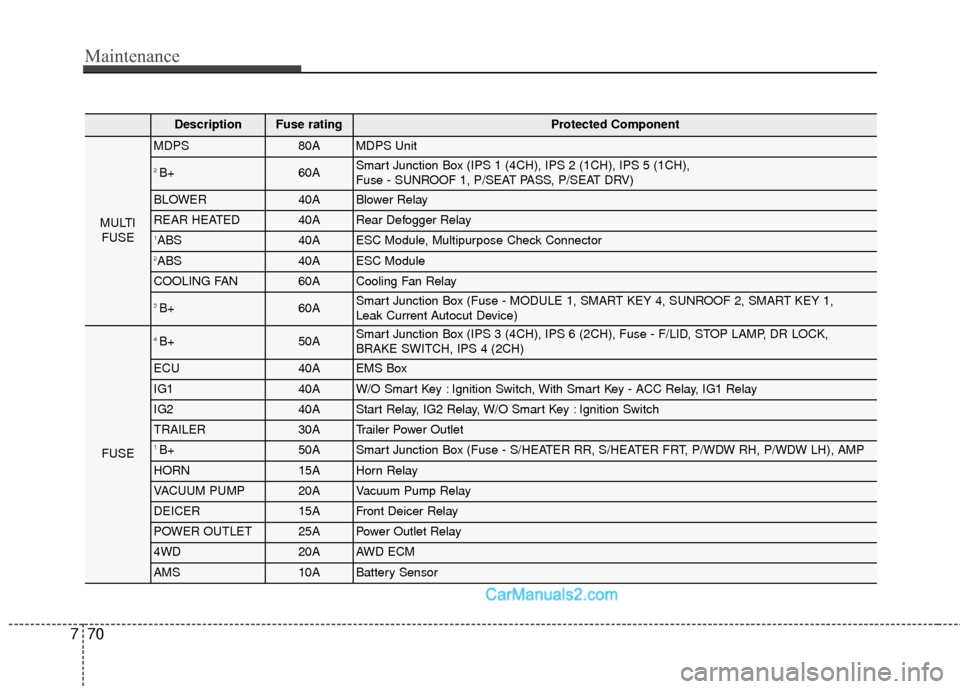
Maintenance
70
7
DescriptionFuse ratingProtected Component
MULTI
FUSE
MDPS80AMDPS Unit
2 B+60ASmart Junction Box (IPS 1 (4CH), IPS 2 (1CH), IPS 5 (1CH),
Fuse - SUNROOF 1, P/SEAT PASS, P/SEAT DRV)
BLOWER40ABlower Relay
REAR HEATED40ARear Defogger Relay
1ABS 40AESC Module, Multipurpose Check Connector
2ABS 40AESC Module
COOLING FAN60ACooling Fan Relay
3 B+60ASmart Junction Box (Fuse - MODULE 1, SMART KEY 4, SUNROOF 2, SMART KEY 1,
Leak Current Autocut Device)
FUSE
4 B+50ASmart Junction Box (IPS 3 (4CH), IPS 6 (2CH), Fuse - F/LID, STOP LAMP, DR LOCK,
BRAKE SWITCH, IPS 4 (2CH)
ECU40AEMS Box
IG140AW/O Smart Key : Ignition Switch, With Smart Key - ACC Relay, IG1 Relay
IG240AStart Relay, IG2 Relay, W/O Smart Key : Ignition Switch
TRAILER30ATrailer Power Outlet
1 B+50ASmart Junction Box (Fuse - S/HEATER RR, S/HEATER FRT, P/WDW RH, P/WDW LH), AMP
HORN15AHorn Relay
VACUUM PUMP20AVacuum Pump Relay
DEICER15AFront Deicer Relay
POWER OUTLET25APower Outlet Relay
4WD20AAWD ECM
AMS10ABattery Sensor