lock Hyundai Sonata 2005 Owner's Guide
[x] Cancel search | Manufacturer: HYUNDAI, Model Year: 2005, Model line: Sonata, Model: Hyundai Sonata 2005Pages: 271, PDF Size: 12.44 MB
Page 85 of 271
1FEATURES OF YOUR HYUNDAI72
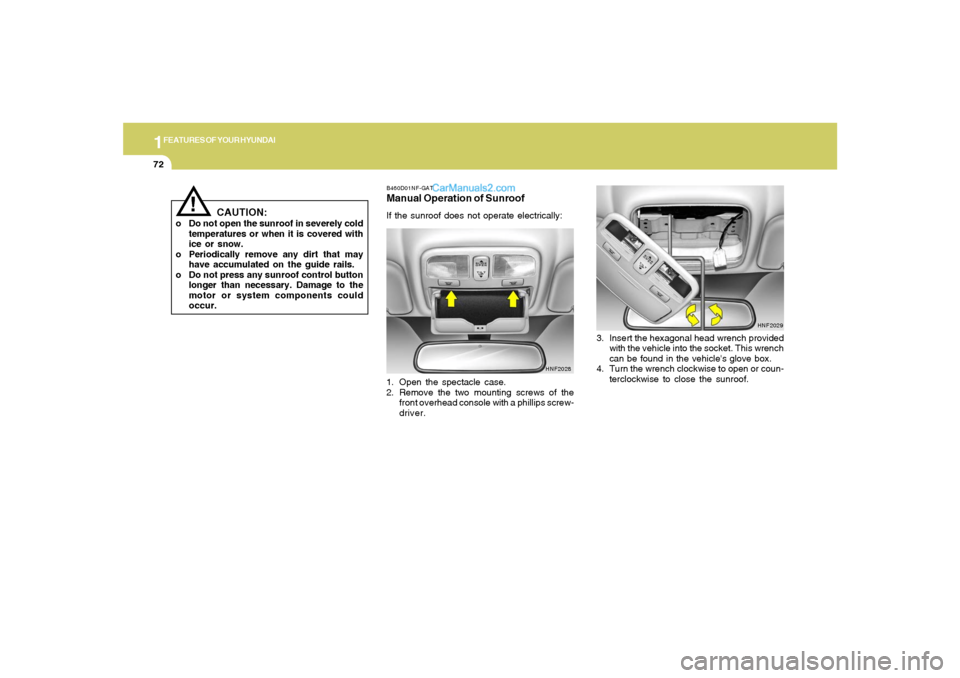
B460D01NF-GATManual Operation of SunroofIf the sunroof does not operate electrically:
1. Open the spectacle case.
2. Remove the two mounting screws of the
front overhead console with a phillips screw-
driver.
HNF2028
3. Insert the hexagonal head wrench provided
with the vehicle into the socket. This wrench
can be found in the vehicle's glove box.
4. Turn the wrench clockwise to open or coun-
terclockwise to close the sunroof.
HNF2029
!
CAUTION:
o Do not open the sunroof in severely cold
temperatures or when it is covered with
ice or snow.
o Periodically remove any dirt that may
have accumulated on the guide rails.
o Do not press any sunroof control button
longer than necessary. Damage to the
motor or system components could
occur.
Page 87 of 271
1FEATURES OF YOUR HYUNDAI74
CAUTION:
Do not leave this button pressed for an
extended period of time when the vehicle is
not running.
!
SPECTACLE CASE!
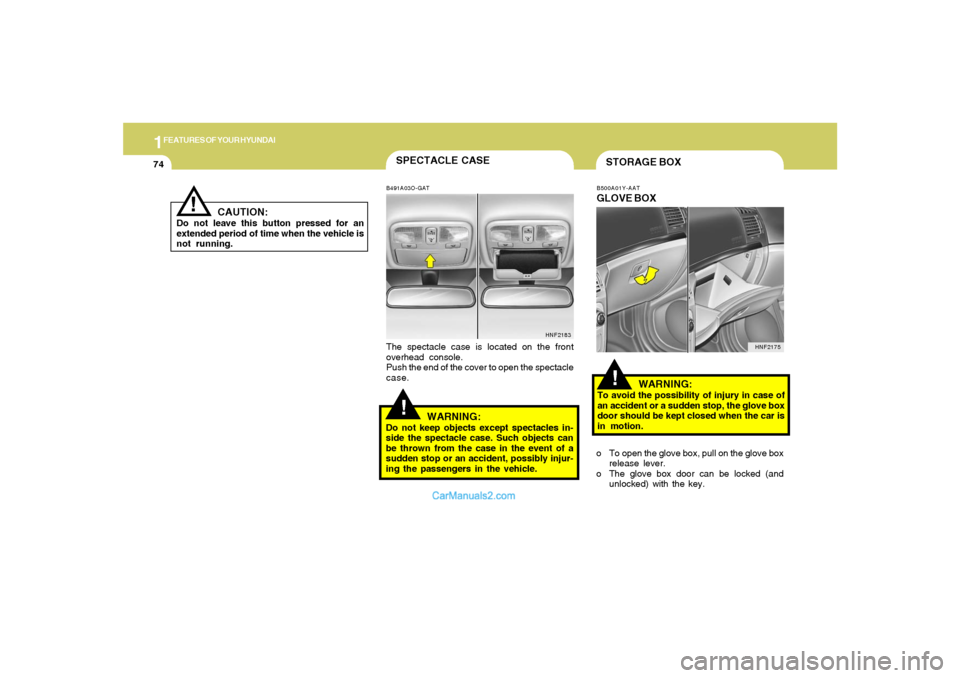
B491A03O-GATThe spectacle case is located on the front
overhead console.
Push the end of the cover to open the spectacle
case.
WARNING:
Do not keep objects except spectacles in-
side the spectacle case. Such objects can
be thrown from the case in the event of a
sudden stop or an accident, possibly injur-
ing the passengers in the vehicle.
HNF2183
!STORAGE BOXB500A01Y-AATGLOVE BOX
WARNING:To avoid the possibility of injury in case of
an accident or a sudden stop, the glove box
door should be kept closed when the car is
in motion.
o To open the glove box, pull on the glove box
release lever.
o The glove box door can be locked (and
unlocked) with the key.
HNF2175
Page 89 of 271
1FEATURES OF YOUR HYUNDAI76
!
WARNING:
To avoid the possibility of injury in case of
an accident or a sudden stop, the center
console box lid should be kept closed when
the car is in motion.
HNF2178
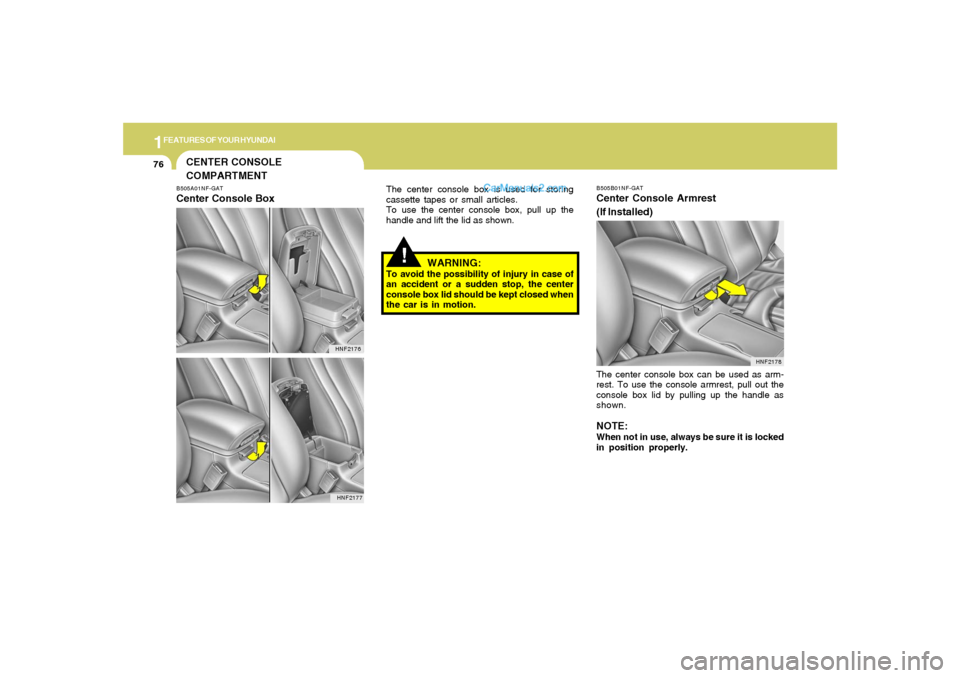
The center console box can be used as arm-
rest. To use the console armrest, pull out the
console box lid by pulling up the handle as
shown.NOTE:When not in use, always be sure it is locked
in position properly.B505B01NF-GATCenter Console Armrest
(If Installed)
The center console box is used for storing
cassette tapes or small articles.
To use the center console box, pull up the
handle and lift the lid as shown.
CENTER CONSOLE
COMPARTMENTB505A01NF-GATCenter Console Box
HNF2176
HNF2177
Page 95 of 271
1FEATURES OF YOUR HYUNDAI82
!
Integrated HomeLink
® Wireless Control
System
The HomeLink
® Wireless Control System pro-
vides a convenient way to replace up to three
hand-held radio-frequency (RF) transmitters
with a single built-in device. This innovative
feature will learn the radio frequency codes of
most current transmitters to operate devices
such as gate operators, garage door openers,
entry door locks, security systems, even home
lighting. Both standard and rolling code-equipped
transmitters can be programmed by following
the outlined procedures. Additional HomeLink
®
information can be found at: www.homelink.com
or by calling 1-800-355-3515.
CAUTION:
Before programming HomeLink
® to a ga-
rage door opener or gate operator, make
sure that people and objects are out of the
way of the device to prevent potential harm
or damage. Do not use HomeLink® with any
garage door opener that lacks the safety
stop and reverse features as required by
U.S. federal safety standards (this includes
any garage door opener model manufac-
tured before April 1, 1982). A garage door
that cannot detect an object - signaling the
door to stop and reverse - does not meet
current U.S. federal safety standards. Using
a garage door opener without these fea-
tures increases the risk of serious injury or
death.Programming HomeLink
®
NOTE:o When programming a garage door
opener, it is advised to park the vehicle
outside of the garage.
o It is recommended that a new battery be
placed in the hand-held transmitter of
the device being programmed to
HomeLink
® for quicker training and ac-
curate transmission of the radio-fre-
quency signal.
o Some vehicles may require the ignition
switch to be turned to the second (or
"accessories") position for program-
ming and/or operation of HomeLink.
o In the event that there are still program-
ming difficulties or questions after fol-
lowing the programming steps listed
below, contact HomeLink
® at:
www.homelink.com or 1-800-355-3515.
Retain the original transmitter of the RF device
you are programming for use in other vehicles
as well as for future HomeLink
® programming.
It is also suggested that upon the sale of the
vehicle, the programmed HomeLink
® buttons
be erased for security purposes.
Page 97 of 271
1FEATURES OF YOUR HYUNDAI84
!
then rapidly after several seconds upon suc-
cessful training.
Operating HomeLink
®
To operate, simply press and release the pro-
grammed HomeLink
® button. Activation will now
occur for the trained device (i.e. garage door
opener, gate operator, security system, entry
door lock, home/office lighting, etc.). For con-
venience, the hand-held transmitter of the de-
vice may also be used at any time.
Reprogramming a Single HomeLink
® But-
ton
To program a new device to a previously trained
HomeLink
® button, follow these steps:
1. Press and hold the desired HomeLink
® but-
ton. Do NOT release until step 4 has been
completed.
2. When the indicator light begins to flash slowly
(after 20 seconds), position the handheld
transmitter 1 to 3 inches away from the
HomeLink
® surface.
3. Press and hold the handheld transmitter
button. The HomeLink
® indicator light will
flash, first slowly and then rapidly.
4. When the indicator light begins to flash rap-
idly, release both buttons.
5. Press and hold the just-trained HomeLink
®
button and observe the red Status Indicator
LED. If the indicator light stays on constantly,
programming is complete and your new
device should activate.
Erasing HomeLink
® Buttons
Individual buttons cannot be erased. However,
to erase all three programmed buttons:
1. Press and hold the two outer HomeLink
®
buttons until the indicator light begins to
flash-after 20 seconds.
2. Release both buttons. Do not hold for longer
than 30 seconds.
The Integrated HomeLink
® Wireless Control
System is now in the training (learn) mode and
can be programmed at any time following the
appropriate steps in the Programming sections
above.
FCC ID: NZLZTVHL3
IC: 4112A-ZTVHL3This device complies with Part 15 FCC Rules.
Operation is subject to the following two condi-
tions: (1) this device may not cause harmful
interference, and (2) this device must accept
any interference received, including interfer-
ence that may cause undesired operation.
WARNING:
The transceiver has been tested and com-
plies with FCC and Industry Canada rules.
Changes or modifications not expressly
approved by the party responsible for com-
pliance could void the user's authority to
operate the device.
NVS
® is a registered trademark and Z-Nav™ is
a trademark of the Gentex Corporation, Zeeland,
Michigan. HomeLink
® is a registered trademark
owned by Johnson Controls, Incorporated,
Milwaukee, Wisconsin.
Page 98 of 271
1
FEATURES OF YOUR HYUNDAI
85
!
WARNING:
The trunk lid should always be kept com-
pletely closed while the vehicle is in motion.
If it is left open or ajar, poisonous exhaust
gases may enter the car and serious illness
or death may result. See additional warn-
ings concerning exhaust gases on page 2-
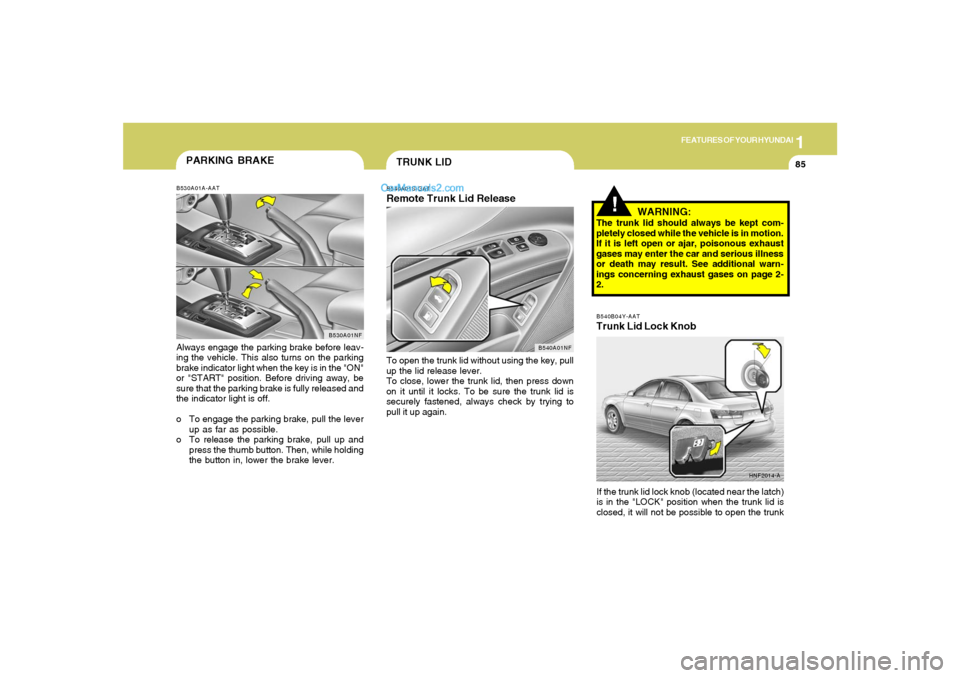
2.B540B04Y-AATTrunk Lid Lock Knob
HNF2014-A
If the trunk lid lock knob (located near the latch)
is in the "LOCK" position when the trunk lid is
closed, it will not be possible to open the trunk
PARKING BRAKEB530A01A-AATAlways engage the parking brake before leav-
ing the vehicle. This also turns on the parking
brake indicator light when the key is in the "ON"
or "START" position. Before driving away, be
sure that the parking brake is fully released and
the indicator light is off.
o To engage the parking brake, pull the lever
up as far as possible.
o To release the parking brake, pull up and
press the thumb button. Then, while holding
the button in, lower the brake lever.
B530A01NF
TRUNK LIDB540A01S-GATRemote Trunk Lid ReleaseTo open the trunk lid without using the key, pull
up the lid release lever.
To close, lower the trunk lid, then press down
on it until it locks. To be sure the trunk lid is
securely fastened, always check by trying to
pull it up again.
B540A01NF
Page 99 of 271
1FEATURES OF YOUR HYUNDAI86
!
HNF2016 B540B02E-AAT
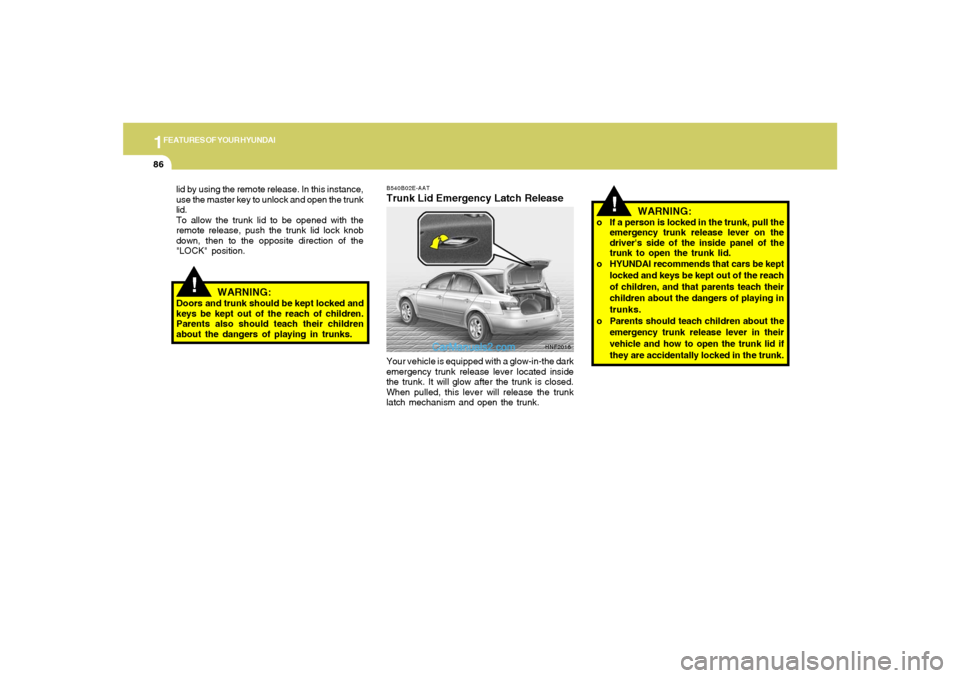
Trunk Lid Emergency Latch ReleaseYour vehicle is equipped with a glow-in-the dark
emergency trunk release lever located inside
the trunk. It will glow after the trunk is closed.
When pulled, this lever will release the trunk
latch mechanism and open the trunk. lid by using the remote release. In this instance,
use the master key to unlock and open the trunk
lid.
To allow the trunk lid to be opened with the
remote release, push the trunk lid lock knob
down, then to the opposite direction of the
"LOCK" position.
WARNING:
Doors and trunk should be kept locked and
keys be kept out of the reach of children.
Parents also should teach their children
about the dangers of playing in trunks.
!
WARNING:
o If a person is locked in the trunk, pull the
emergency trunk release lever on the
driver's side of the inside panel of the
trunk to open the trunk lid.
o HYUNDAI recommends that cars be kept
locked and keys be kept out of the reach
of children, and that parents teach their
children about the dangers of playing in
trunks.
o Parents should teach children about the
emergency trunk release lever in their
vehicle and how to open the trunk lid if
they are accidentally locked in the trunk.
Page 100 of 271
1
FEATURES OF YOUR HYUNDAI
87
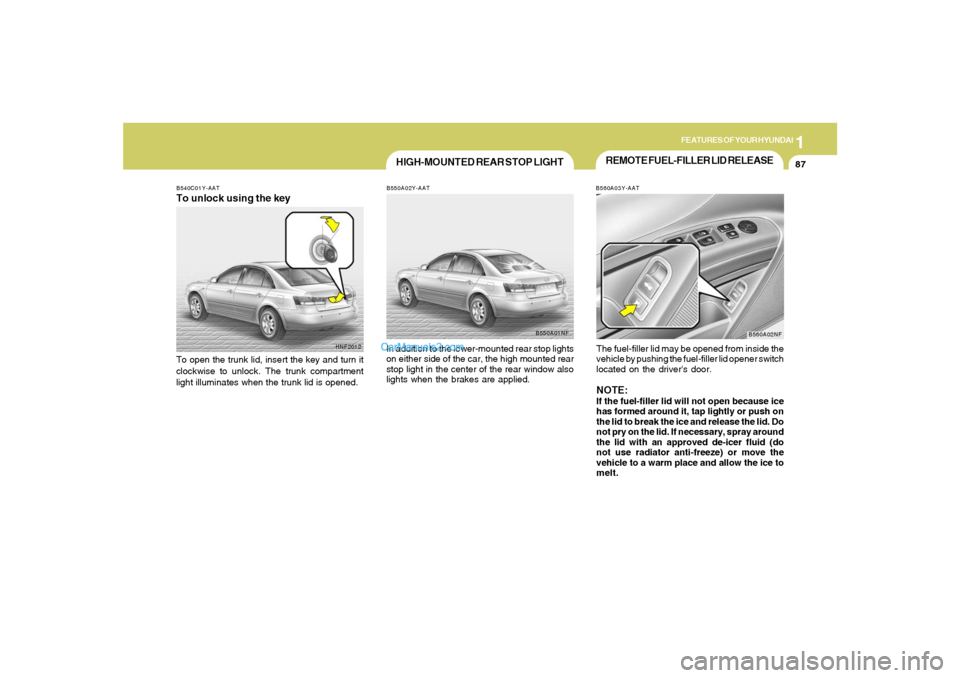
REMOTE FUEL-FILLER LID RELEASEB560A03Y-AATThe fuel-filler lid may be opened from inside the
vehicle by pushing the fuel-filler lid opener switch
located on the driver's door.NOTE:If the fuel-filler lid will not open because ice
has formed around it, tap lightly or push on
the lid to break the ice and release the lid. Do
not pry on the lid. If necessary, spray around
the lid with an approved de-icer fluid (do
not use radiator anti-freeze) or move the
vehicle to a warm place and allow the ice to
melt.
B560A02NF
HNF2012 B540C01Y-AAT
To unlock using the keyTo open the trunk lid, insert the key and turn it
clockwise to unlock. The trunk compartment
light illuminates when the trunk lid is opened.
HIGH-MOUNTED REAR STOP LIGHTB550A02Y-AATIn addition to the lower-mounted rear stop lights
on either side of the car, the high mounted rear
stop light in the center of the rear window also
lights when the brakes are applied.
B550A01NF
Page 102 of 271
1
FEATURES OF YOUR HYUNDAI
89
!
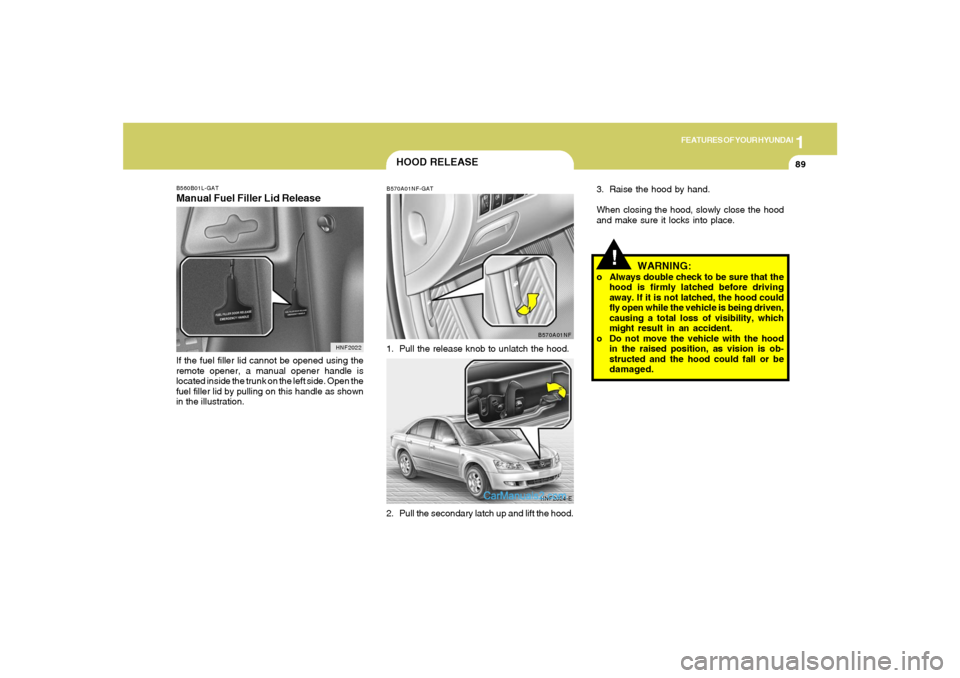
3. Raise the hood by hand.
When closing the hood, slowly close the hood
and make sure it locks into place.
WARNING:
o Always double check to be sure that the
hood is firmly latched before driving
away. If it is not latched, the hood could
fly open while the vehicle is being driven,
causing a total loss of visibility, which
might result in an accident.
o Do not move the vehicle with the hood
in the raised position, as vision is ob-
structed and the hood could fall or be
damaged.
B560B01L-GATManual Fuel Filler Lid ReleaseIf the fuel filler lid cannot be opened using the
remote opener, a manual opener handle is
located inside the trunk on the left side. Open the
fuel filler lid by pulling on this handle as shown
in the illustration.
HNF2022
HOOD RELEASEB570A01NF-GAT1. Pull the release knob to unlatch the hood.
2. Pull the secondary latch up and lift the hood.
B570A01NF
HNF2024-E
Page 104 of 271
1
FEATURES OF YOUR HYUNDAI
91
!
CAUTION:
After adjusting the steering wheel, try mov-
ing it up and down to make sure it is locked
in position.
!
WARNING:
Do not attempt to adjust the steering wheel
while driving as this may result in loss of
control of the vehicle and serious injury or
death.
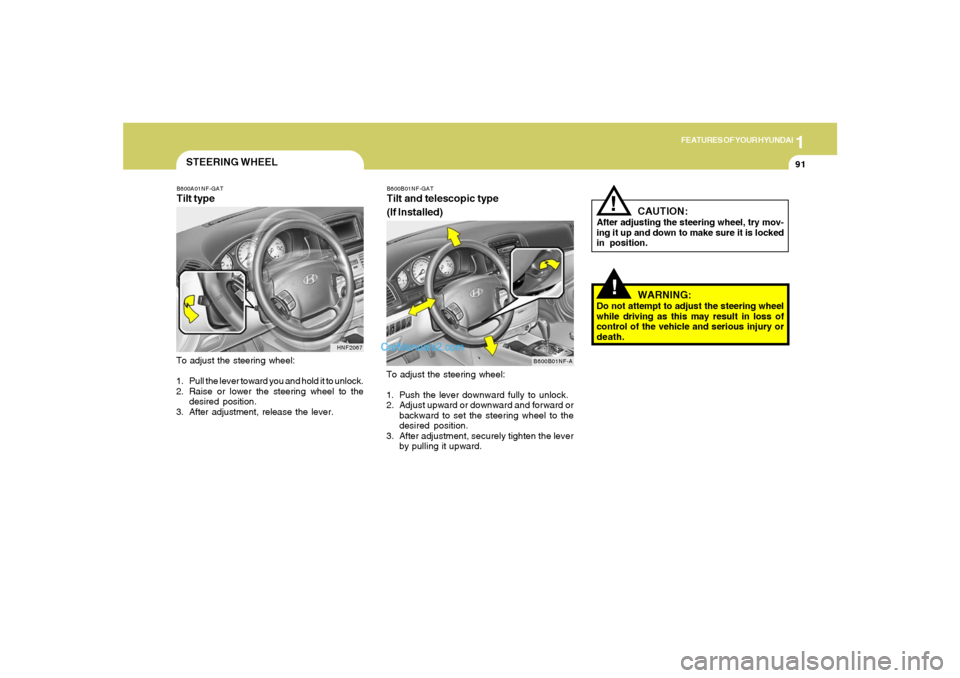
B600B01NF-GATTilt and telescopic type
(If Installed)To adjust the steering wheel:
1. Push the lever downward fully to unlock.
2. Adjust upward or downward and forward or
backward to set the steering wheel to the
desired position.
3. After adjustment, securely tighten the lever
by pulling it upward.
B600B01NF-A
STEERING WHEELB600A01NF-GATTilt typeTo adjust the steering wheel:
1. Pull the lever toward you and hold it to unlock.
2. Raise or lower the steering wheel to the
desired position.
3. After adjustment, release the lever.
HNF2067