all Hyundai Sonata 2013 Owner's Manual
[x] Cancel search | Manufacturer: HYUNDAI, Model Year: 2013, Model line: Sonata, Model: Hyundai Sonata 2013Pages: 410, PDF Size: 35.93 MB
Page 187 of 410
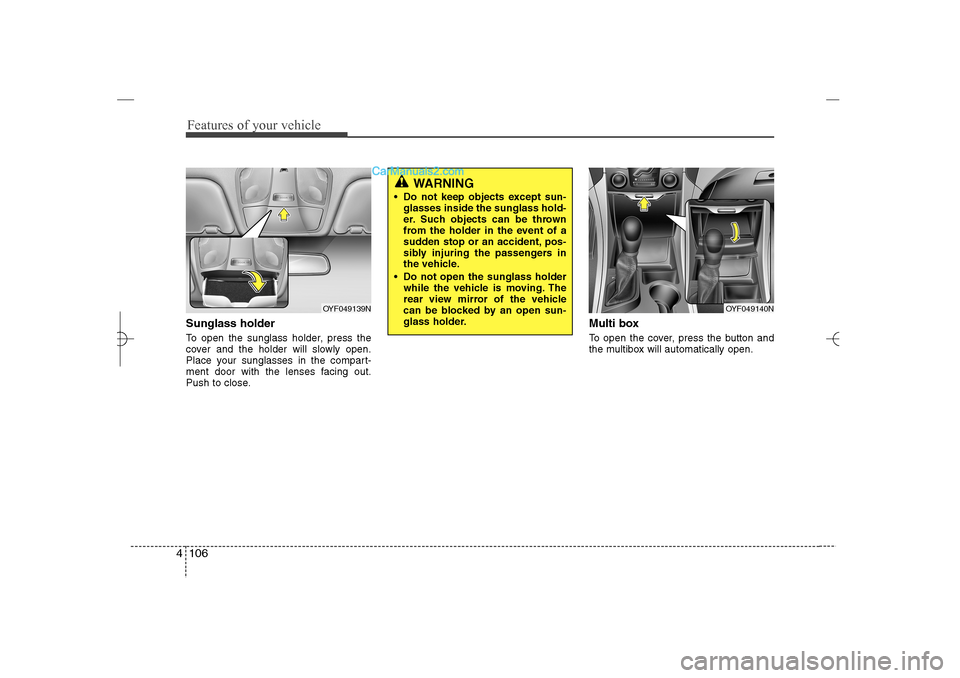
Features of your vehicle106 4Sunglass holder To open the sunglass holder, press the
cover and the holder will slowly open.
Place your sunglasses in the compart-
ment door with the lenses facing out.
Push to close.
Multi boxTo open the cover, press the button and
the multibox will automatically open.
OYF049139N
OYF049140N
WARNING
Do not keep objects except sun-
glasses inside the sunglass hold-
er. Such objects can be thrown
from the holder in the event of a
sudden stop or an accident, pos-
sibly injuring the passengers in
the vehicle.
Do not open the sunglass holder
while the vehicle is moving. The
rear view mirror of the vehicle
can be blocked by an open sun-
glass holder.
YF HMA 4a-111.qxp 1/16/2012 6:35 PM Page 106
Page 188 of 410
4 107
Features of your vehicle
INTERIOR FEATURES Cup holder
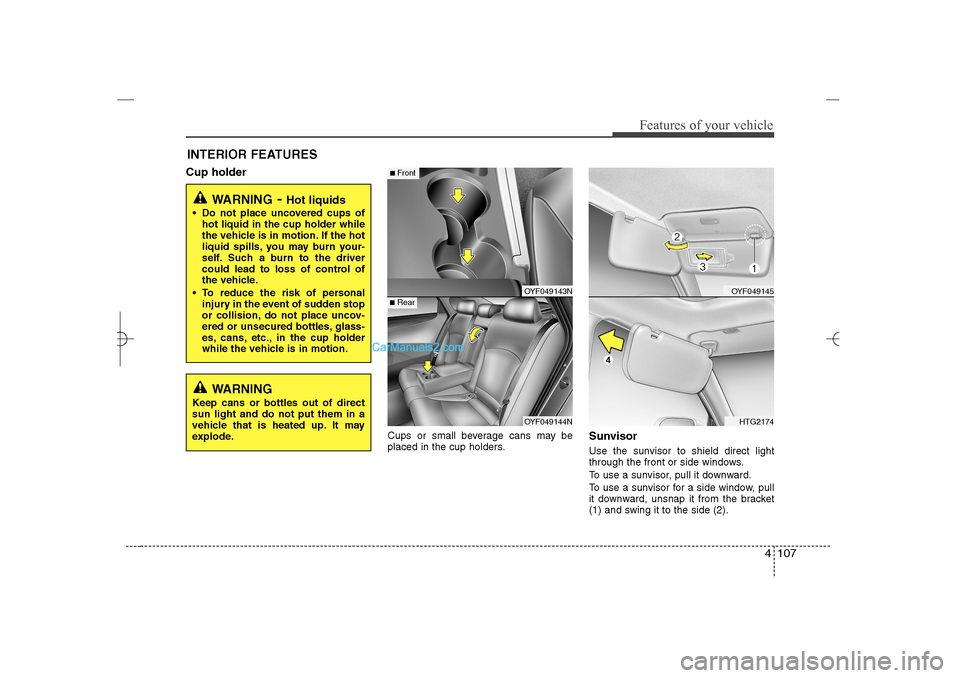
Cups or small beverage cans may be
placed in the cup holders.
SunvisorUse the sunvisor to shield direct light
through the front or side windows.
To use a sunvisor, pull it downward.
To use a sunvisor for a side window, pull
it downward, unsnap it from the bracket
(1) and swing it to the side (2).
WARNING
- Hot liquids
Do not place uncovered cups of
hot liquid in the cup holder while
the vehicle is in motion. If the hot
liquid spills, you may burn your-
self. Such a burn to the driver
could lead to loss of control of
the vehicle.
To reduce the risk of personal
injury in the event of sudden stop
or collision, do not place uncov-
ered or unsecured bottles, glass-
es, cans, etc., in the cup holder
while the vehicle is in motion.
OYF049143NOYF049144N
■Rear■Front
OYF049145HTG2174
WARNING
Keep cans or bottles out of direct
sun light and do not put them in a
vehicle that is heated up. It may
explode.
YF HMA 4a-111.qxp 1/16/2012 6:35 PM Page 107
Page 191 of 410
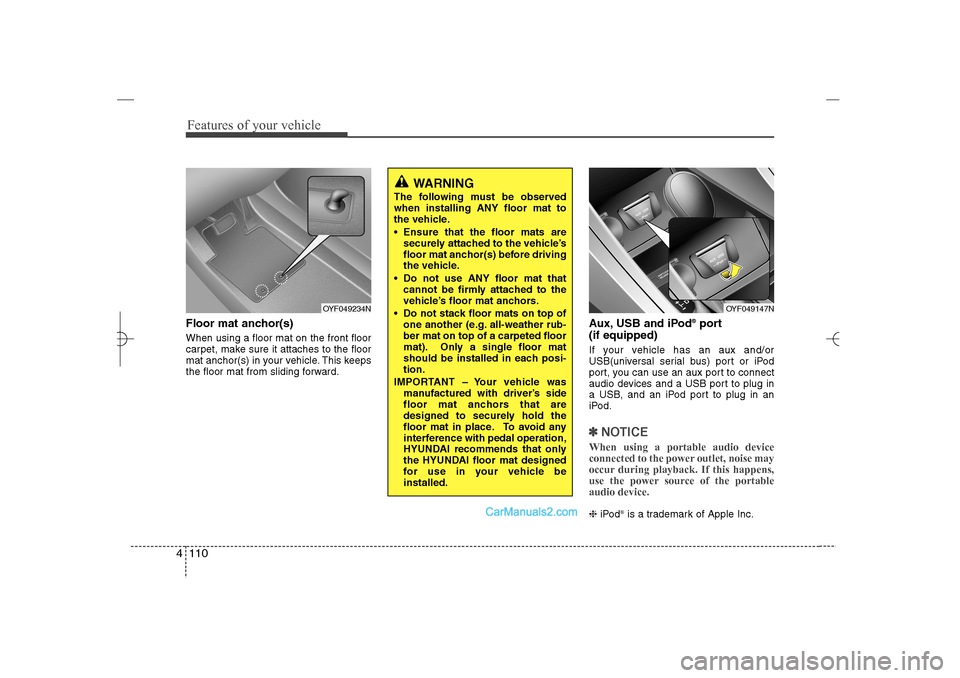
Features of your vehicle110 4Floor mat anchor(s)When using a floor mat on the front floor
carpet, make sure it attaches to the floor
mat anchor(s) in your vehicle. This keeps
the floor mat from sliding forward.
Aux, USB and iPod
®port
(if equipped)
If your vehicle has an aux and/or
USB(universal serial bus) port or iPod
port, you can use an aux port to connect
audio devices and a USB port to plug in
a USB, and an iPod port to plug in an
iPod.✽ ✽
NOTICEWhen using a portable audio device
connected to the power outlet, noise may
occur during playback. If this happens,
use the power source of the portable
audio device. ❈iPod
is a trademark of Apple Inc.
OYF049234N
OYF049147N
WARNING
The following must be observed
when installing ANY floor mat to
the vehicle.
Ensure that the floor mats are
securely attached to the vehicle’s
floor mat anchor(s) before driving
the vehicle.
Do not use ANY floor mat that
cannot be firmly attached to the
vehicle’s floor mat anchors.
Do not stack floor mats on top of
one another (e.g. all-weather rub-
ber mat on top of a carpeted floor
mat). Only a single floor mat
should be installed in each posi-
tion.
IMPORTANT – Your vehicle was
manufactured with driver’s side
floor mat anchors that are
designed to securely hold the
floor mat in place. To avoid any
interference with pedal operation,
HYUNDAI recommends that only
the HYUNDAI floor mat designed
for use in your vehicle be
installed.
YF HMA 4a-111.qxp 1/16/2012 6:36 PM Page 110
Page 193 of 410
Features of your vehicle112 4✽
✽
NOTICEIf you install an after market HID head
lamp, your vehicle's audio and electron-
ic device may malfunction.
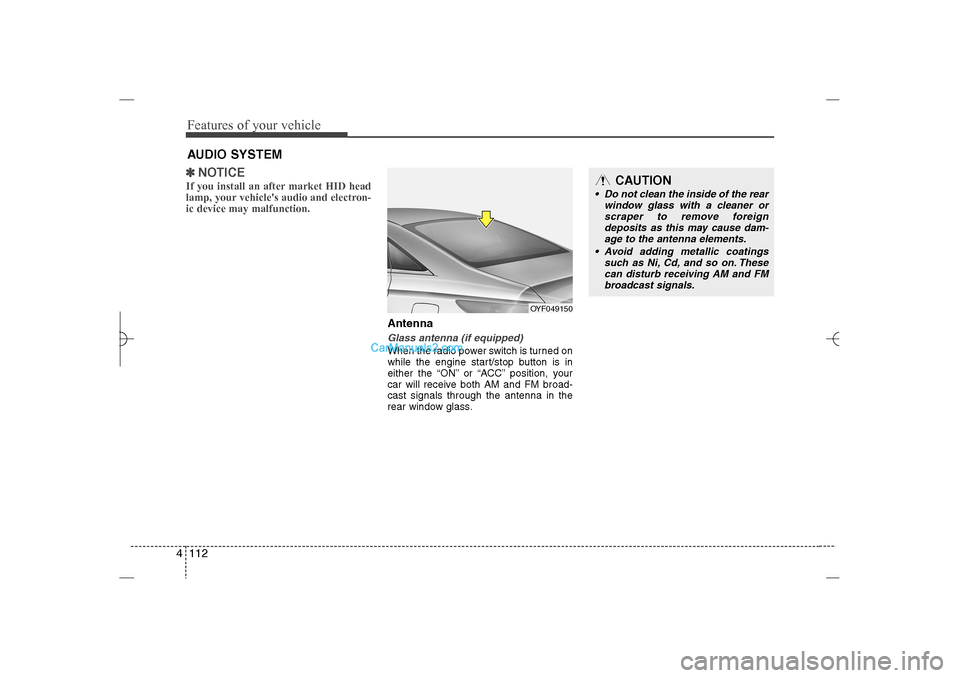
AntennaGlass antenna (if equipped)When the radio power switch is turned on
while the engine start/stop button is in
either the “ON” or “ACC” position, your
car will receive both AM and FM broad-
cast signals through the antenna in the
rear window glass.
AUDIO SYSTEM
OYF049150
CAUTION
• Do not clean the inside of the rear
window glass with a cleaner or
scraper to remove foreign
deposits as this may cause dam-
age to the antenna elements.
Avoid adding metallic coatings
such as Ni, Cd, and so on. These
can disturb receiving AM and FM
broadcast signals.
YF HMA 4b-112~(Audio).qxp 3/5/2012 4:24 PM Page 112
Page 196 of 410
4 115
Features of your vehicle
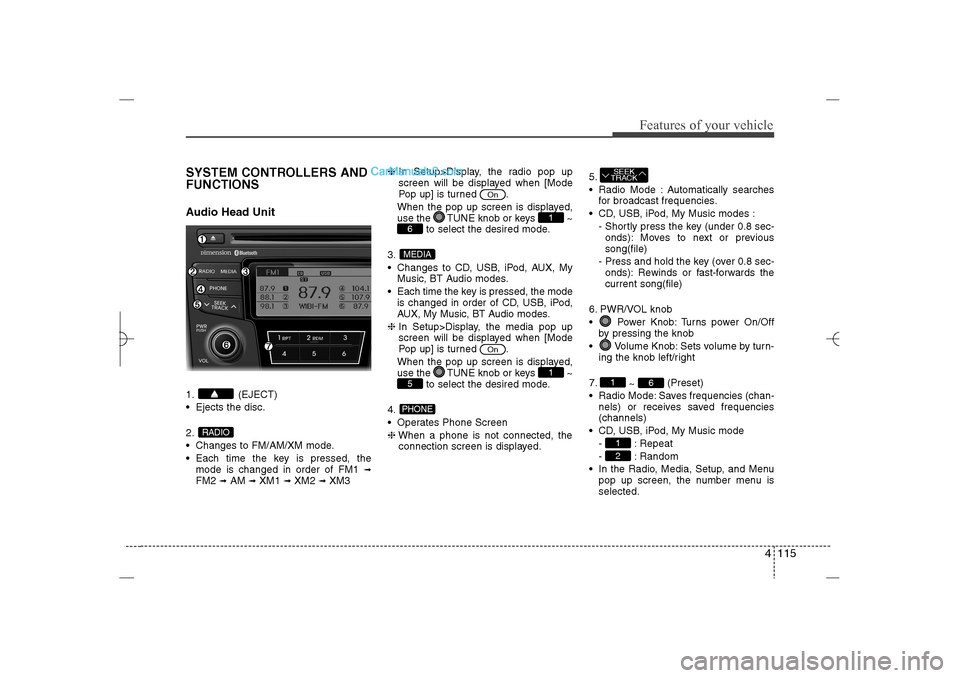
SYSTEM CONTROLLERS AND
FUNCTIONSAudio Head Unit1. (EJECT)
Ejects the disc.
2.
Changes to FM/AM/XM mode.
Each time the key is pressed, the
mode is changed in order of FM1
➟
FM2
➟AM
➟XM1
➟XM2
➟XM3❈In Setup>Display, the radio pop up
screen will be displayed when [Mode
Pop up] is turned .
When the pop up screen is displayed,
use the TUNE knob or keys ~
to select the desired mode.
3.
Changes to CD, USB, iPod, AUX, My
Music, BT Audio modes.
Each time the key is pressed, the mode
is changed in order of CD, USB, iPod,
AUX, My Music, BT Audio modes.
❈In Setup>Display, the media pop up
screen will be displayed when [Mode
Pop up] is turned .
When the pop up screen is displayed,
use the TUNE knob or keys ~
to select the desired mode.
4.
Operates Phone Screen
❈When a phone is not connected, the
connection screen is displayed.5.
Radio Mode : Automatically searches
for broadcast frequencies.
CD, USB, iPod, My Music modes :
- Shortly press the key (under 0.8 sec-
onds): Moves to next or previous
song(file)
- Press and hold the key (over 0.8 sec-
onds): Rewinds or fast-forwards the
current song(file)
6. PWR/VOL knob
Power Knob: Turns power On/Off
by pressing the knob
Volume Knob: Sets volume by turn-
ing the knob left/right
7.
~ (Preset)
Radio Mode: Saves frequencies (chan-
nels) or receives saved frequencies
(channels)
CD, USB, iPod, My Music mode
- : Repeat
- : Random
In the Radio, Media, Setup, and Menu
pop up screen, the number menu is
selected.
21
6
1SEEK
TRACK
PHONE5
1
On
MEDIA6
1
On
RADIO
YF HMA 4b-112~(Audio).qxp 3/5/2012 4:24 PM Page 115
Page 197 of 410
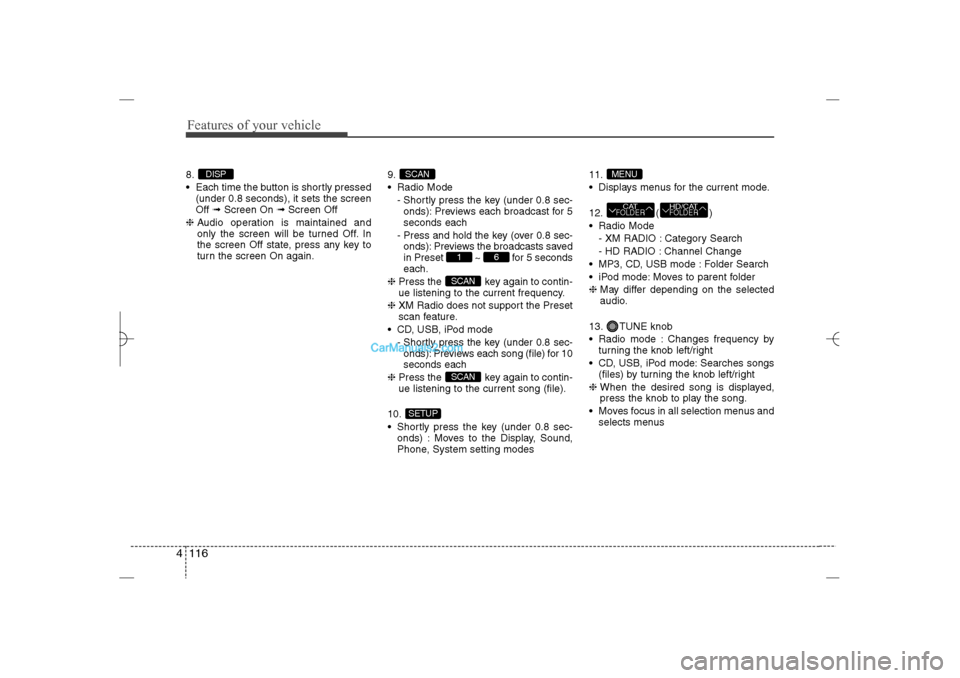
Features of your vehicle116 48.
Each time the button is shortly pressed
(under 0.8 seconds), it sets the screen
Off ➟Screen On ➟Screen Off
❈Audio operation is maintained and
only the screen will be turned Off. In
the screen Off state, press any key to
turn the screen On again.9.
Radio Mode
- Shortly press the key (under 0.8 sec-
onds): Previews each broadcast for 5
seconds each
- Press and hold the key (over 0.8 sec-
onds): Previews the broadcasts saved
in Preset ~ for 5 seconds
each.
❈Press the key again to contin-
ue listening to the current frequency.
❈XM Radio does not support the Preset
scan feature.
CD, USB, iPod mode
- Shortly press the key (under 0.8 sec-
onds): Previews each song (file) for 10
seconds each
❈Press the key again to contin-
ue listening to the current song (file).
10.
Shortly press the key (under 0.8 sec-
onds) : Moves to the Display, Sound,
Phone, System setting modes11.
Displays menus for the current mode.
12. ( )
Radio Mode
- XM RADIO : Category Search
- HD RADIO : Channel Change
MP3, CD, USB mode : Folder Search
iPod mode: Moves to parent folder
❈May differ depending on the selected
audio.
13. TUNE knob
Radio mode : Changes frequency by
turning the knob left/right
CD, USB, iPod mode: Searches songs
(files) by turning the knob left/right
❈ When the desired song is displayed,
press the knob to play the song.
Moves focus in all selection menus and
selects menus
HD/CATFOLDER
CATFOLDERMENU
SETUP
SCANSCAN
6
1
SCAN
DISP
YF HMA 4b-112~(Audio).qxp 3/5/2012 4:24 PM Page 116
Page 199 of 410
![Hyundai Sonata 2013 Owners Manual Features of your vehicle118 4SOUND SETTINGSPress the key Select [Sound]
through TUNE knob or key
Select menu through TUNE knobSound SettingsThis menu allows you to set the ‘Bass,
Middle, Trebleâ](/img/35/16808/w960_16808-198.png "Hyundai Sonata 2013 Owners Manual Features of your vehicle118 4SOUND SETTINGSPress the key Select [Sound]
through TUNE knob or key
Select menu through TUNE knobSound SettingsThis menu allows you to set the ‘Bass,
Middle, Trebleâ")
Features of your vehicle118 4SOUND SETTINGSPress the key Select [Sound]
through TUNE knob or key
Select menu through TUNE knobSound SettingsThis menu allows you to set the ‘Bass,
Middle, Treble’ and the Sound Fader and
Balance.
Select [Sound Settings] Select menu
through
TUNE knob
Tu r n
TUNE
knob
left/right to set
Bass, Middle, Treble : Selects the
sound tone.
Fader, Balance : Moves the sound
fader and balance.
Default : Restores default settings.
❈ Back : While adjusting values, re-
pressing the TUNE knob will
restore the parent menu.
Variable EQ (Audio with external
amplifier only)This is a premium sound system feature in
which the acoustical mode can be select-
ed according to musical preferences.
Select [Variable EQ] Set menu through
TUNE
knob
Innocente(Normal) : Natural sound,
sound optimized for driver.
Forza(Dynamic) : Powerful sound
emphasizing bass, stereo sound.
Concerto(Concert) : Sound similar to a
concert or live hall
❈May differ depending on the selected
audio.
2
SETUP
YF HMA 4b-112~(Audio).qxp 3/5/2012 4:24 PM Page 118
Page 200 of 410
![Hyundai Sonata 2013 Owners Manual 4 119
Features of your vehicle
Speed Dependent Volume ControlThis feature is used to automatically con-
trol the volume level according to the
speed of the vehicle.
Select [SDVC] Set in 4 levels [Off/](/img/35/16808/w960_16808-199.png "Hyundai Sonata 2013 Owners Manual 4 119
Features of your vehicle
Speed Dependent Volume ControlThis feature is used to automatically con-
trol the volume level according to the
speed of the vehicle.
Select [SDVC] Set in 4 levels [Off/")
4 119
Features of your vehicle
Speed Dependent Volume ControlThis feature is used to automatically con-
trol the volume level according to the
speed of the vehicle.
Select [SDVC] Set in 4 levels [Off/
Low/Mid/High] of
TUNE
knob
Voice Recognition VolumeAdjusts voice recognition volume.
Select [Voice Recognition Vol.] Set vol-
ume of
TUNE
knob
Blue Link Voice VolumeSets the Blue Link voice recognition vol-
ume.
❈While using Blue Link voice recogni-
tion, turning the tune knob will display
the volume control popup screen.
❈May differ depending on the selected
audio.
YF HMA 4b-112~(Audio).qxp 3/5/2012 4:24 PM Page 119
Page 201 of 410
![Hyundai Sonata 2013 Owners Manual Features of your vehicle120 4PHONE SETUPPress the key Select [Phone]
through TUNE knob or key
Select menu through TUNE knob
Pair PhoneSelect [Pair Phone] Set through TUNE
knob
➀Search for devic](/img/35/16808/w960_16808-200.png "Hyundai Sonata 2013 Owners Manual Features of your vehicle120 4PHONE SETUPPress the key Select [Phone]
through TUNE knob or key
Select menu through TUNE knob
Pair PhoneSelect [Pair Phone] Set through TUNE
knob
➀Search for devic")
Features of your vehicle120 4PHONE SETUPPress the key Select [Phone]
through TUNE knob or key
Select menu through TUNE knob
Pair PhoneSelect [Pair Phone] Set through TUNE
knob
➀Search for device names as displayed
on your mobile phone and connect.
➁Input the passkey displayed on the
screen. (Passkey : 0000)
❈The device name and passkey will be
displayed on the screen for up to 3
minutes. If pairing is not completed
within the 3 minutes, the mobile phone
pairing process will automatically be
canceled.
➂Pairing completion is displayed.
❈In some mobile phones, pairing will
automatically be followed by connec-
tion.
❈It is possible to pair up to fiveBluetooth
®
Wireless Technology
enabled mobile phones.
3
SETUP
CAUTION
To pair a Bluetooth
®
Wireless
Technology enabled mobile phone,
authentication and connection
processes are first required. As a
result, you cannot pair your mobile
phone while driving the vehicle.
First park your vehicle before use.
YF HMA 4b-112~(Audio).qxp 3/5/2012 4:24 PM Page 120
Page 202 of 410
![Hyundai Sonata 2013 Owners Manual 4 121
Features of your vehicle
Phone ListThe names of up to 5 paired phones will
be displayed.
A [ ] is displayed in front of the currently
connected phone.
Select the desired name to setup the
select](/img/35/16808/w960_16808-201.png "Hyundai Sonata 2013 Owners Manual 4 121
Features of your vehicle
Phone ListThe names of up to 5 paired phones will
be displayed.
A [ ] is displayed in front of the currently
connected phone.
Select the desired name to setup the
select")
4 121
Features of your vehicle
Phone ListThe names of up to 5 paired phones will
be displayed.
A [ ] is displayed in front of the currently
connected phone.
Select the desired name to setup the
selected phone.
Connecting a phoneSelect [Phone List] Select mobile phone
through TUNE knob Select [Connect
Phone]
➀Select a mobile phone that is not cur-
rently connected.
➁Connect the selected mobile phone.
➂Connection completion is displayed.
❈If a phone is already connected, dis-
connect the currently connected phone
and select a new phone to connect.
Disconnecting a connected phoneSelect [Phone List] Select mobile phone
through TUNE knob Select
[Disconnect Phone]➀
Select the currently connected mobile
phone.
➁
Disconnect the selected mobile
phone.
➂
Disconnection completion is dis-
played. Changing connection sequence
(Priority)
This is used to change the order (priority)
of automatic connection for the paired
mobile phones.
Select [Phone List] Select [Priority]
through TUNE knob Select No. 1
Priority mobile phone➀
Select [Priority].
➁
From the paired phones, select the
phone desired for No.1 priority.
➂
The changed priority sequence is dis-
played.
❈Once the connection sequence (priority)
is changed, the new no. 1 priority mobile
phone will be connected.
- When the no. 1 priority cannot be
connected: Automatically attempts to
connect the most recently connected
phone.
- Cases when the most recently con-
nected phone cannot be connected:
Attempts to connect in the order in
which paired phones are listed.
- The connected phone will automati-
cally be changed to No. 1 priority.
YF HMA 4b-112~(Audio).qxp 3/5/2012 4:24 PM Page 121