change time Hyundai Sonata 2014 Manual PDF
[x] Cancel search | Manufacturer: HYUNDAI, Model Year: 2014, Model line: Sonata, Model: Hyundai Sonata 2014Pages: 665, PDF Size: 17.43 MB
Page 424 of 665
![Hyundai Sonata 2014 Manual PDF Connecting a Device
Press the key Select
[Phone] Select [Paired Phone List]
1) Connected Phone : Device that is
currently connected
2) Paired Phone : Device that is
paired but not connected](/img/35/16805/w960_16805-423.png "Hyundai Sonata 2014 Manual PDF Connecting a Device
Press the key Select
[Phone] Select [Paired Phone List]
1) Connected Phone : Device that is
currently connected
2) Paired Phone : Device that is
paired but not connected")
Connecting a Device
Press the key Select
[Phone] Select [Paired Phone List]
1) Connected Phone : Device that is
currently connected
2) Paired Phone : Device that is
paired but not connected
From the paired phone list, select the
device you want to connect and
press the button.
Changing Priority
What is Priority?
It is possible to pair up to five
Bluetooth®Wireless Technology
devices with the car audio system.
As a result, the “Change Priority’ fea-
ture is used to set the connection pri-
ority of paired phones. However, the
most recently connected phone will
always be set as the highest priority.
Press the key Select
[Phone] Select [Paired Phone List]
4-166
Multimedia System
Page 425 of 665
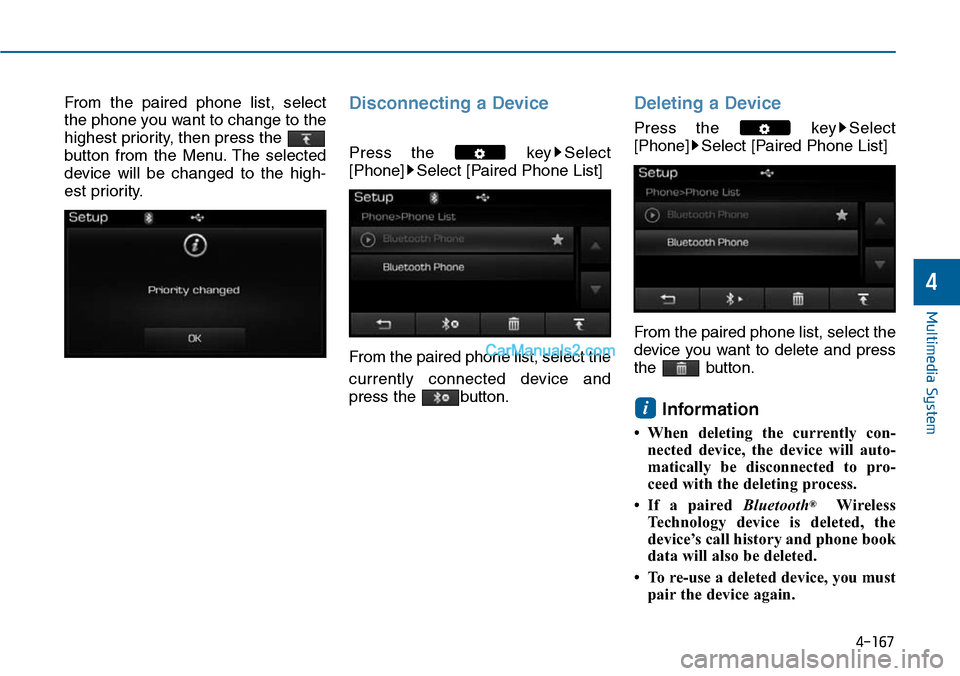
From the paired phone list, select
the phone you want to change to the
highest priority, then press the
button from the Menu. The selected
device will be changed to the high-
est priority.
Disconnecting a Device
Press the key Select
[Phone] Select [Paired Phone List]
From the paired phone list, select the
currently connected device and
press the button.
Deleting a Device
Press the key Select
[Phone] Select [Paired Phone List]
From the paired phone list, select the
device you want to delete and press
the button.
Information
• When deleting the currently con-
nected device, the device will auto-
matically be disconnected to pro-
ceed with the deleting process.
•If a paired Bluetooth®Wireless
Te c h n o l o g y d e v i c e i s d e l e t e d , t h e
device’s call history and phone book
data will also be deleted.
• To re-use a deleted device, you must
pair the device again.
i
4-167
Multimedia System
4
Page 430 of 665
VOICE RECOGNITION
(if equipped)
Using Voice Recognition
Starting Voice Recognition
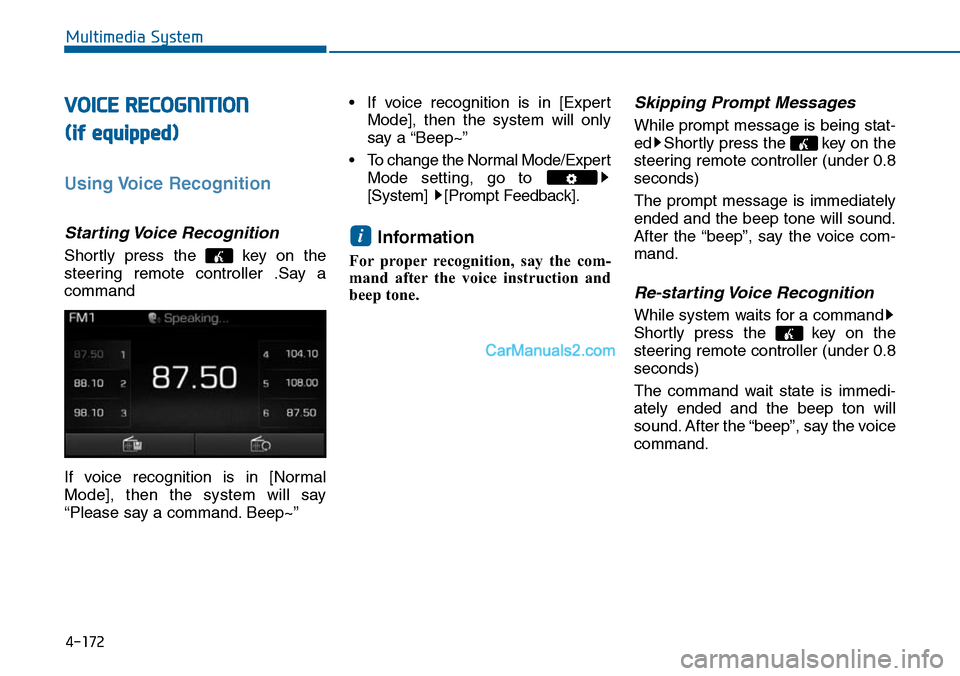
Shortly press the key on the
steering remote controller .Say a
command
If voice recognition is in [Normal
Mode], then the system will say
“Please say a command. Beep~”
• If voice recognition is in [Expert
Mode], then the system will only
say a “Beep~”
•To change the Normal Mode/Expert
Mode setting, go to
[System] [Prompt Feedback].
Information
For proper recognition, say the com-
mand after the voice instruction and
beep tone.
Skipping Prompt Messages
While prompt message is being stat-
ed Shortly press the key on the
steering remote controller (under 0.8
seconds)
The prompt message is immediately
ended and the beep tone will sound.
After the “beep”, say the voice com-
mand.
Re-starting Voice Recognition
While system waits for a command
Shortly press the key on the
steering remote controller (under 0.8
seconds)
The command wait state is immedi-
ately ended and the beep ton will
sound. After the “beep”, say the voice
command.
i
4-172
Multimedia System
Page 439 of 665
![Hyundai Sonata 2014 Manual PDF Scroll text
Press the key Select
[Display] Select [Scroll text]
This feature is used to scroll text dis-
played on the screen when it is too
long to be displayed at once.
When turned on, t](/img/35/16805/w960_16805-438.png "Hyundai Sonata 2014 Manual PDF Scroll text
Press the key Select
[Display] Select [Scroll text]
This feature is used to scroll text dis-
played on the screen when it is too
long to be displayed at once.
When turned on, t")
Scroll text
Press the key Select
[Display] Select [Scroll text]
This feature is used to scroll text dis-
played on the screen when it is too
long to be displayed at once.
When turned on, the text is repeat-
edly scrolled. When turned off, the
text is scrolled just once.
MP3 Information Display
Press the key Select
[Display] Select [Song Info]
This feature is used to change the
information displayed within USB
and MP3 CD modes.
1) Folder File : Displays file name
and folder name
2) Album Ar tist Song : Displays
album name/artist name/song
Sound Settings
Audio Settings
Press the key Select
[Sound] Select [Audio Setting]
Use the , , , buttons to
adjust the Fader/Balance settings.
Use the , buttons to adjust the
Bass/Middle/Treble settings.
Press the button to reset.Default
4-181
Multimedia System
4
Page 441 of 665
![Hyundai Sonata 2014 Manual PDF Bluetooth®Wireless
Technology Setting
Pairing a New Device
Press the key Select
[Phone] Select [Pair Phone]
Bluetooth®Wireless Technology
devices can be paired with the audio
system.
For more](/img/35/16805/w960_16805-440.png "Hyundai Sonata 2014 Manual PDF Bluetooth®Wireless
Technology Setting
Pairing a New Device
Press the key Select
[Phone] Select [Pair Phone]
Bluetooth®Wireless Technology
devices can be paired with the audio
system.
For more")
Bluetooth®Wireless
Technology Setting
Pairing a New Device
Press the key Select
[Phone] Select [Pair Phone]
Bluetooth®Wireless Technology
devices can be paired with the audio
system.
For more infor mation, refer to the
“Pairing through Phone Setup” sec-
tion within Bluetooth®Wireless
Technology.
Viewing Paired Phone List
Press the key Select
[Phone] Select [Paired Phone List]
This feature is used to view mobile
phones that have been paired with
the audio system. Upon selecting a
paired phone, the setup menu is dis-
played.
For more infor mation, refer to the
“Setting Bluetooth®Wireless
Te c h n o l o g y C o n n e c t i o n ” s e c t i o n w i t h -
in Bluetooth®Wireless Technology.
1) : Moves to the previous
screen
2) Connect/Disconnect Phone :
Connect/disconnects currently
selected phone
3) Delete : Deletes the currently
selected phone
4) Change Priority : Sets currently
selected phone to highest connec-
tion priority
Information
- BEFORE DOWNLOADING
Phone books
• Only Phone books within connected
phones can be downloaded. Also
check to see that your mobile phone
supports the download feature.
• To learn more about whether your
mobile phone supports Phone books
downloads, refer to your mobile
phone user’s manual.
• The Phone books for only the con-
nected phone can be downloaded.
Before downloading, check to see
whether your phone supports the
download feature.
i
4-183
Multimedia System
4
Page 444 of 665
![Hyundai Sonata 2014 Manual PDF 4-186
Multimedia System
Vo i c e R e c o g n i t i o n M o d e S e t t i n g
(if equipped)
Press the key Select
[System] Select [Voice Recognition
System]
This feature is used to select](/img/35/16805/w960_16805-443.png "Hyundai Sonata 2014 Manual PDF 4-186
Multimedia System
Vo i c e R e c o g n i t i o n M o d e S e t t i n g
(if equipped)
Press the key Select
[System] Select [Voice Recognition
System]
This feature is used to select")
4-186
Multimedia System
Vo i c e R e c o g n i t i o n M o d e S e t t i n g
(if equipped)
Press the key Select
[System] Select [Voice Recognition
System]
This feature is used to select the
desired prompt feedback option from
Normal and Expert.
1) Normal : When using voice recog-
nition, provides detailed guidance
prompts
2) Expert : When using voice recog-
nition, omits some guidance
prompts
Information
Voice Recognition is depend on the
Audio System.
Language
Press the key Select
[System] Select [Language]
This feature is used to change the
system and voice recognition lan-
guage.
If the language is changed, the sys-
tem will restart and apply the select-
ed language.
REAR VIEW CAMERA
(if equipped)
• The system has been equipped
with a rear view camera for user
safety by allowing a wider rear
range of vision.
•The rear view camera will automat-
ically operate when the ignition key
is turned ON and the transmission
lever is set to R.
•The rear view camera will automat-
ically stop operating when set to a
different lever.
The rear view camera has been
equipped with an optical lens to
provide a wider range of vision and
may appear different from the actu-
al distance. For safety, directly
check the rear and left/right sides.
NOTICE
i
Page 447 of 665
4-189
Multimedia System
4
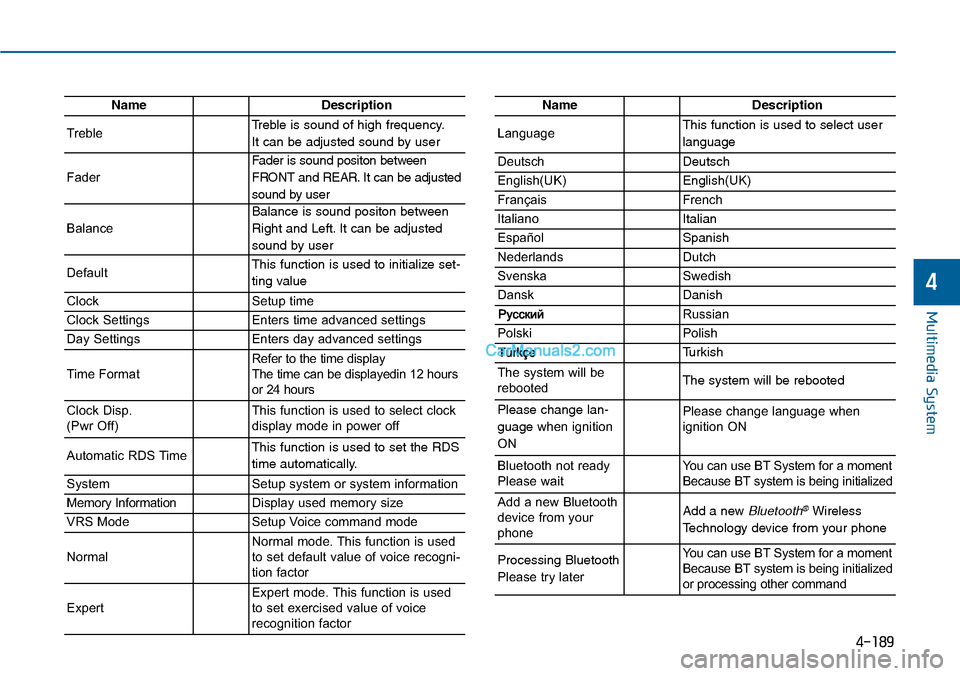
NameDescription
TrebleTreble is sound of high frequency.
It can be adjusted sound by user
Fader
Fader is sound positon between
FRONT and REAR. It can be adjusted
sound by user
Balance
Balance is sound positon between
Right and Left. It can be adjusted
sound by user
DefaultThis function is used to initialize set-
ting value
ClockSetup time
Clock SettingsEnters time advanced settings
Day SettingsEnters day advanced settings
Time FormatRefer to the time display The time can be displayedin 12 hoursor 24 hours
Clock Disp.(Pwr Off)This function is used to select clockdisplay mode in power off
Automatic RDS TimeThis function is used to set the RDS
time automatically.
SystemSetup system or system information
Memory InformationDisplay used memory size
VRS ModeSetup Voice command mode
NormalNormal mode. This function is usedto set default value of voice recogni-tion factor
ExpertExpert mode. This function is usedto set exercised value of voicerecognition factor
NameDescription
LanguageThis function is used to select user
language
DeutschDeutsch
English(UK)English(UK)
FrançaisFrench
Italiano Italian
EspañolSpanish
NederlandsDutch
SvenskaSwedish
DanskDanish
Russian
PolskiPolish
Turkish
The system will berebootedThe system will be rebooted
Please change lan-
guage when ignition
ON
Please change language when ignition ON
Bluetooth not readyPlease waitYo u c a n u s e B T S y s t e m f o r a m o m e n tBecause BT system is being initialized
Add a new Bluetoothdevice from yourphone
Add a new Bluetooth®Wireless
Technology device from your phone
Processing Bluetooth
Please try later
Yo u c a n u s e B T S y s t e m f o r a m o m e n tBecause BT system is being initializedor processing other command
Page 449 of 665
4-191
Multimedia System
4
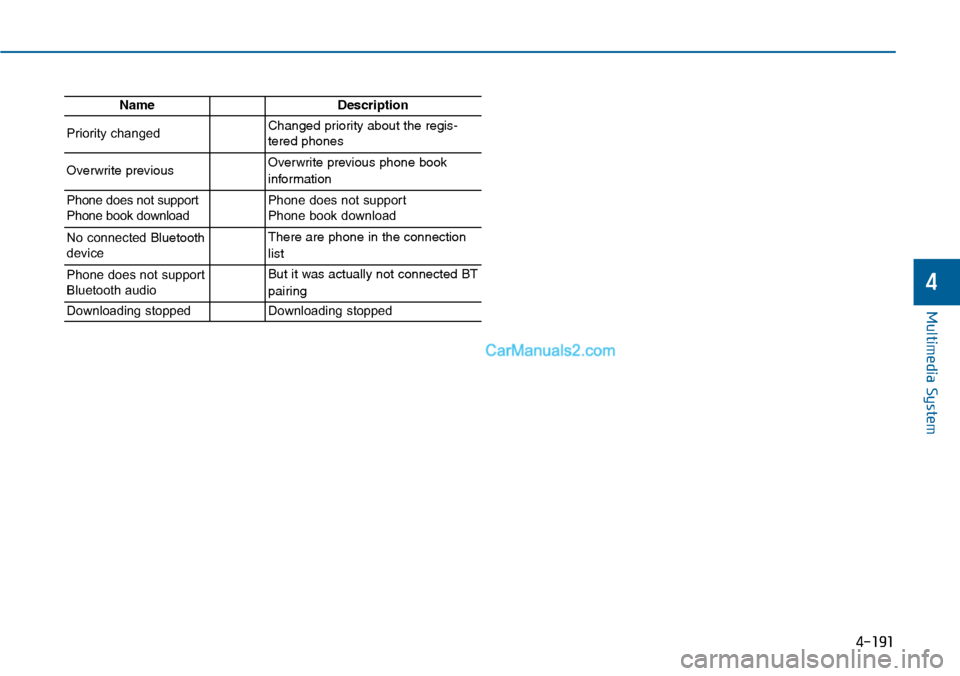
NameDescription
Priority changedChanged priority about the regis-tered phones
Overwrite previous Overwrite previous phone book
information
Phone does not supportPhone book downloadPhone does not support Phone book download
No connected Bluetoothdevice
There are phone in the connection
list
Phone does not supportBluetooth audio
But it was actually not connected BT
pairing
Downloading stoppedDownloading stopped
Page 451 of 665
5-2
Driving your vehicle
Carbon monoxide (CO) gas is toxic. Breathing CO can cause unconsciousness and death.
Engine exhaust contains carbon monoxide which cannot be seen or smelled.
Do not inhale engine exhaust.
If at any time you smell engine exhaust inside the vehicle, open the windows immediately. Exposure to CO can causeunconsciousness and death by asphyxiation.
Be sure the exhaust system does not leak.
The exhaust system should be checked whenever the vehicle is raised to change the oil or for any other purpose. Ifyou hear a change in the sound of the exhaust or if you drive over something that strikes the underneath side of thevehicle, we recommend that the exhaust system be checked as soon as possible by an authorized HYUNDAI dealer.
Do not run the engine in an enclosed area.
Letting the engine idle in your garage, even with the garage door open, is a hazardous practice. Run the engine onlylong enough to start the engine and to move the vehicle out of the garage.
Avoid idling the engine for prolonged periods with people inside the vehicle .
If it is necessary to idle the engine for a prolonged period with people inside the vehicle , be sure to do so only in anopen area with the air intake set at "Fresh" and fan control set to high so fresh air is drawn into the interior.
Keep the air intakes clear.
To a s s u r e p r o p e r o p e r a t i o n o f t h e v e n t i l a t i o n s y s t e m , k e e p t h e v e n t i l a t i o n a i r i n t a k e s l o c a t e d i n f r o n t o f t h e w i n d s h i e l dclear of snow, ice, leaves, or other obstructions.
If you must drive with the trunk open:
Close all windows.
Open instrument panel air vents.
Set the air intake control at "Fresh", the air flow control at "Floor" or "Face", and the fan control set to high.
WARNING
Page 468 of 665
5-19
Driving your vehicle
5
To prevent damage to the engine,
clutch and transaxle:
•When downshifting from 5th
gear to 4th gear, be careful not
to inadvertently push the shift
lever sideways engaging the 2nd
gear. A drastic downshift may
cause the engine speed to
increase to the point the
tachometer will enter the red-
zone.
•Do not downshift more than two
gear at a time or downshift the
gear when the engine is running
at high speed (5,000 RPM or
higher). Such a downshifting
may damage the engine, clutch
and the transaxle.
Good driving practices
•Never take the vehicle out of gear
and coast down a hill. This is
extremely dangerous.
•Don't "ride" the brakes.This can
cause the brakes and related parts
to overheat and malfunction.
When you are driving down a long
hill, slow down and shift to a lower
gear. Engine braking will help slow
down the vehicle.
•Slow down before shifting to a
lower gear. This will help avoid
over-revving the engine, which can
cause damage.
•Slow down when you encounter
cross winds. This gives you much
better control of your vehicle.
•Be sure the vehicle is completely
stopped before you shift into R
(Reverse) to prevent damage to
the transaxle.
•Exercise extreme caution when
driving on a slippery surface. Be
especially careful when braking,
accelerating or shifting gears. On a
slippery surface, an abrupt change
in vehicle speed can cause the
drive wheels to lose traction and
may cause loss of vehicle control
resulting in an accident
NOTICE
Do not use the engine brake
(shifting from a higher gear to
lower gear) rapidly on slippery
roads. The vehicle may slip
causing an accident.
WARNING