display Hyundai Sonata 2014 Workshop Manual
[x] Cancel search | Manufacturer: HYUNDAI, Model Year: 2014, Model line: Sonata, Model: Hyundai Sonata 2014Pages: 665, PDF Size: 17.43 MB
Page 291 of 665
![Hyundai Sonata 2014 Workshop Manual SETUP
Display Settings
Press the key Select
[Display] through TUNE knob or
key
Mode Pop up
[Mode Pop up] Changes /selection mode
• During On state, press the
or key to display the mo](/img/35/16805/w960_16805-290.png "Hyundai Sonata 2014 Workshop Manual SETUP
Display Settings
Press the key Select
[Display] through TUNE knob or
key
Mode Pop up
[Mode Pop up] Changes /selection mode
• During On state, press the
or key to display the mo")
SETUP
Display Settings
Press the key Select
[Display] through TUNE knob or
key
Mode Pop up
[Mode Pop up] Changes /selection mode
• During On state, press the
or key to display the mode
change pop up screen.
Text Scroll
[Text Scroll] Set /
•:Maintains scroll
•:Scrolls only one (1) time.
Media Display
When playing an MP3 file, select the
desired display info from ‘Folder/File’
or ‘Album/Artist/Song’.
Off
On
OffOn
MEDIA
RADIO
OffOn
1
SETUP
4-33
Multimedia System
4
Page 293 of 665
![Hyundai Sonata 2014 Workshop Manual Phone Setup
(for Bluetooth®Wireless
Technology equipped model)
Press the key Select
[Phone] through TUNE knob or
key Select menu through
TUNE knob
Pair Phone
To p a i r a Bluetooth®W](/img/35/16805/w960_16805-292.png "Hyundai Sonata 2014 Workshop Manual Phone Setup
(for Bluetooth®Wireless
Technology equipped model)
Press the key Select
[Phone] through TUNE knob or
key Select menu through
TUNE knob
Pair Phone
To p a i r a Bluetooth®W")
Phone Setup
(for Bluetooth®Wireless
Technology equipped model)
Press the key Select
[Phone] through TUNE knob or
key Select menu through
TUNE knob
Pair Phone
To p a i r a Bluetooth®Wireless
Te ch n o l o g y e n a bl e d m o b i l e p h o n e ,
authentication and connection
processes are first required. As a
result, you cannot pair your mobile
phone while driving the vehicle.
First park your vehicle before use.
Select [Pair Phone] Set through
TUNE knob
➀Search for device names as dis-
played on your mobile phone and
connect.
➁ Input the passkey displayed on the
screen. (Passkey : 0000)
❈ The device name and passkey will
be displayed on the screen for up
to 3 minutes. If pairing is not com-
pleted within the 3 minutes, the
mobile phone pairing process will
automatically be canceled.
➂ Pair ing completion is displayed.
❈ In some mobile phones, pairing
will automatically be followed by
connection.
❈ It is possible to pair up to five
Bluetooth®Wireless Technology
enabled mobile phones.
NOTICE
4
SETUP
4-35
Multimedia System
4
Page 294 of 665
![Hyundai Sonata 2014 Workshop Manual Phone List
The names of up to 5 paired phones
will be displayed.
A [ ] is displayed in front of the cur-
rently connected phone.
Select the desired name to setup the
selected phone.
• Connec](/img/35/16805/w960_16805-293.png "Hyundai Sonata 2014 Workshop Manual Phone List
The names of up to 5 paired phones
will be displayed.
A [ ] is displayed in front of the cur-
rently connected phone.
Select the desired name to setup the
selected phone.
• Connec")
Phone List
The names of up to 5 paired phones
will be displayed.
A [ ] is displayed in front of the cur-
rently connected phone.
Select the desired name to setup the
selected phone.
• Connecting a phone
Select [Phone List] Select mobile
phone through TUNE knob Select
[Connect Phone]
➀ Select a mobile phone that is not
currently connected.
➁ Connect the selected mobile
phone.
➂ Connection completion is dis-
played.
❈If a phone is already connected,disconnect the currently connect-ed phone and select a new phoneto connect.
• Disconnecting a connected phone
Select [Phone List] Select mobile
phone through TUNE knob Select
[Disconnect Phone]
➀ Select the currently connected
mobile phone.
➁Disconnect the selected mobile
phone.
➂ Disconnection completion is dis-
played.
• Changing connection sequence
(Priority)
This is used to change the order (pri-
ority) of automatic connection for the
paired mobile phones.
Select [Phone List] Select [Priority]
through TUNE knob Select No. 1
Priority mobile phone
➀ Select [Priority].
➁ From the paired phones, select
the phone desired for No.1 priority.
➂ The changed priority sequence is
displayed.
❈ Once the connection sequence
(priority) is changed, the new no. 1
priority mobile phone will be con-
nected.
- when the no. 1 priority cannot be
connected: Automatically attempts
to connect the most recently con-
nected phone.
- Cases when the most recently
connected phone cannot be con-
nected: Attempts to connect in the
order in which paired phones are
listed.
4-36
Multimedia System
Page 295 of 665
![Hyundai Sonata 2014 Workshop Manual - The connected phone will auto-
matically be changed to No. 1 pri-
ority.
• Delete
Select [Phone List] Select mobile
phone through TUNE knob Select
[Delete]
➀ Select the desired mobile](/img/35/16805/w960_16805-294.png "Hyundai Sonata 2014 Workshop Manual - The connected phone will auto-
matically be changed to No. 1 pri-
ority.
• Delete
Select [Phone List] Select mobile
phone through TUNE knob Select
[Delete]
➀ Select the desired mobile")
- The connected phone will auto-
matically be changed to No. 1 pri-
ority.
• Delete
Select [Phone List] Select mobile
phone through TUNE knob Select
[Delete]
➀ Select the desired mobile phone.
➁ Delete the selected mobile phone.
➂ Deletion completion is displayed.
❈ When attempting to delete a currentlyconnected phone, the phone is firstdisconnected.
•When you delete a mobile
phone, the mobile phone con-
tacts will also be erased.
•For stable Bluetooth®Wireless
Te ch n o l o g y c o m mu n i c a t i o n ,
delete the mobile phone from
the audio and also delete the
audio from your mobile phone.
Contacts Download
This feature is used to download
contacts and call histories into the
audio system.
Select [Contacts Download] Select
through TUNEknob
•The download feature may not
be supported in some mobile
phones.
•If a different operation is per-
formed while Contacts are being
downloaded, downloading will be
discontinued. Contacts already
downloaded will be saved.
•When downloading new
Contacts, delete all previously
saved Contacts before starting
download.
Auto Download
When connecting a mobile phone, it
is possible to automatically download
new Contacts and Call Histories.
Select [Auto Download] Set /
through TUNE knob
Audio Streaming
Songs (files) saved in your
Bluetooth®Wireless Technology
enabledmobile phone can be played
through the audio system.
Select [Audio Streaming] Set /
through TUNE knob
The Bluetooth®Wireless Technology
audio streaming feature may not be
supported in some mobile phones.
Outgoing Volume
This is used to set the volume of your
voice as heard by the other par ty
while on a Bluetooth®Wireless
Technology enabled handsfree call.
Select [Outgoing Volume] Set vol-
ume through TUNEknob
❈ Even while on a call, the volume
can be changed by using the
key.SEEKTRACK
NOTICE
Off
On
Off
On
NOTICE
NOTICE
4-37
Multimedia System
4
Page 296 of 665
![Hyundai Sonata 2014 Workshop Manual Bluetooth®Wireless
Technology System Off
This feature is used when you do not
wish to use the Bluetooth®Wireless
Technologysystem.
Select [Bluetooth System Off] Set
through TUNE knob
❈ If](/img/35/16805/w960_16805-295.png "Hyundai Sonata 2014 Workshop Manual Bluetooth®Wireless
Technology System Off
This feature is used when you do not
wish to use the Bluetooth®Wireless
Technologysystem.
Select [Bluetooth System Off] Set
through TUNE knob
❈ If")
Bluetooth®Wireless
Technology System Off
This feature is used when you do not
wish to use the Bluetooth®Wireless
Technologysystem.
Select [Bluetooth System Off] Set
through TUNE knob
❈ If a phone is already connected,
disconnect the currently connect-
ed phone and turn the Bluetooth®
Wireless Technology system off.
Using the Bluetooth®Wireless
Technology System
To u s e Bluetooth®Wireless Technology
when the system is currently off, fol-
low these next steps.
• Turning On Bluetooth®Wireless
Te c h n o l o g y t h r o u g h t h e
Key
Press the key Screen
Guidance
❈ Moves to the screen where
Bluetooth®Wireless Technology
functions can be used and dis-
plays guidance.
•Turning On Bluetooth®Wireless
Te c h n o l o g y t h r o u g h t h e
key
Press the key Select [Phone]
through TUNE knob or key
➀ A screen asking whether to turn
on Bluetooth®Wireless Technology
will be displayed.
➁ On the screen, select to turn
on Bluetooth®Wireless Technology
and display guidance.
❈ If the Bluetooth®Wireless
Technology system is turned on,
the system will automatically try to
connect the most recently con-
nected Bluetooth®Wireless
Technology mobile phone.
•Bluetooth®Wireless Technology
connection may become inter-
mittently disconnected in some
mobile phones. Follow these
next steps to try again.
1) Turn the Bluetooth®Wireless
Technology function within the
mobile phone ON/OFF and try
to connect again.
2) Turn the mobile phone power
ON/OFF and try to connect
again.
3) Completely remove the mobile
phone battery, reboot, and then
try to connect again.
4) Reboot the audio system and
try to connect again
5) Delete all paired devices in your
mobile phone and the audio
system and pair again for use.
NOTICE
YES
3
SETUP
SETUP
PHONE
PHONE
4-38
Multimedia System
Page 297 of 665
![Hyundai Sonata 2014 Workshop Manual System Settings
Press the key Select [System]
through tune knob or key
Memory Information
Displays currently used memory and
total system memory.
Select [Memory Information] OK
The currently used](/img/35/16805/w960_16805-296.png "Hyundai Sonata 2014 Workshop Manual System Settings
Press the key Select [System]
through tune knob or key
Memory Information
Displays currently used memory and
total system memory.
Select [Memory Information] OK
The currently used")
System Settings
Press the key Select [System]
through tune knob or key
Memory Information
Displays currently used memory and
total system memory.
Select [Memory Information] OK
The currently used memory is dis-
played on the left side while the total
system memory is displayed on the
right side.
4
SETUP
4-39
Multimedia System
4
Page 301 of 665
![Hyundai Sonata 2014 Workshop Manual 4-43
Multimedia System
4
MENU : Audio CD
In CD mode, press key.
Repeat
Set [ RPT] through the TUNE
knob or key to repeat the cur-
rent song.
❈Press RPT again to turn off.
Random
Set [ RDM](/img/35/16805/w960_16805-300.png "Hyundai Sonata 2014 Workshop Manual 4-43
Multimedia System
4
MENU : Audio CD
In CD mode, press key.
Repeat
Set [ RPT] through the TUNE
knob or key to repeat the cur-
rent song.
❈Press RPT again to turn off.
Random
Set [ RDM")
4-43
Multimedia System
4
MENU : Audio CD
In CD mode, press key.
Repeat
Set [ RPT] through the TUNE
knob or key to repeat the cur-
rent song.
❈Press RPT again to turn off.
Random
Set [ RDM] through the TUNE
knob or key to randomly play
songs within the current folder.
❈Press RDM again to turn off.
Information
Set [ Info] through the TUNE
knob or key to display informa-
tion of the current song.
❈Press the key to turn off
info display.
MENU : MP3 CD / USB
In MP3 CD / USB mode, press
key.
Repeat
Set [ RPT] through the TUNE
knob or key to repeat the cur-
rent song.
❈Press RPT again to turn off.
Folder Random
Set [ F.RDM] through the TUNE
knob or key to randomly play
songs within the current folder.
❈Press F.RDM again to turn off.
2 RDM
1 RPT
MENU
MENU
3
2 RDM
1 RPT
MENU
Page 302 of 665
![Hyundai Sonata 2014 Workshop Manual 4-44
Multimedia System
Folder Repeat
Set [ F.RPT] through the TUNE
knob or key to repeat songs
within the current folder.
❈Press F.RPT again to turn off.
All Random
Set [ A.RDM] through t](/img/35/16805/w960_16805-301.png "Hyundai Sonata 2014 Workshop Manual 4-44
Multimedia System
Folder Repeat
Set [ F.RPT] through the TUNE
knob or key to repeat songs
within the current folder.
❈Press F.RPT again to turn off.
All Random
Set [ A.RDM] through t")
4-44
Multimedia System
Folder Repeat
Set [ F.RPT] through the TUNE
knob or key to repeat songs
within the current folder.
❈Press F.RPT again to turn off.
All Random
Set [ A.RDM] through the TUNE
knob or key to randomly play all
songs within the CD.
❈Press A.RDM again to turn off.
Information
Set [ Info] through the TUNE
knob or key to display informa-
tion of the current song.
❈Press the key to turn off
info display.
Copy
Set [ Copy] through the TUNE
knob or key.
❈This is used to copy the current
song into My Music. You can play
the copied Music in My Music
mode.
❈If another key is pressed while
copying is in progress, a pop up
asking you whether to cancel
copying is displayed.
❈If another media is connected or
inserted (USB, CD, iPod®, AUX)
while copying is in progress, copy-
ing is canceled.
❈Music will not be played while
copying is in progress.
MENU : iPod®
In iPod mode, press key.
Repeat
Set [ RPT] through the TUNE
knob or key to repeat the cur-
rent song.
❈ Press RPT again to turn repeat off.
Random
Set [ RDM] through the TUNE
knob or key.
Plays all songs within the currently
playing category in random order.
❈Press RDM again to turn off.
2 RDM
1 RPT
MENU
6
MENU
5
4
3
Page 303 of 665
![Hyundai Sonata 2014 Workshop Manual 4-45
Multimedia System
4
Information
Set [ Info] through the TUNE
knob or key.
Displays information of the current
song.
❈Press the key to turn off
info display.
Search
Set [ Search]th](/img/35/16805/w960_16805-302.png "Hyundai Sonata 2014 Workshop Manual 4-45
Multimedia System
4
Information
Set [ Info] through the TUNE
knob or key.
Displays information of the current
song.
❈Press the key to turn off
info display.
Search
Set [ Search]th")
4-45
Multimedia System
4
Information
Set [ Info] through the TUNE
knob or key.
Displays information of the current
song.
❈Press the key to turn off
info display.
Search
Set [ Search]through the TUNE
knob or key.
Displays iPod®category list.
❈Searching iPod®category is
key pressed, move to par-
ent category.
MENU : My Music Mode
In My Music mode, press key.
Repeat
Set [ RPT] through the TUNE knob
or key.
Repeats the currently playing song.
❈Press RPT again to turn repeat off.
Random
Set [ RDM] through the TUNEknob
or key.
Plays all songs within the currently
playing folder in random order.
❈Press RDM again to turn random
off.
Information
Set [ Info] through the TUNEknob
or key.
Displays information of the current
song.
❈Press the key to turn off
info display.
Delete
Set [ Delete] through the TUNE
knob or key.
•Deletes currently playing file
In the play screen, pressing delete
will delete the currently playing song.
•Deletes file from list
➀ Select the file you wish to delete
by using the TUNE knob.
➁Press the key and select
the delete menu to delete the
selected file.
MENU
4
MENU
3
2 RDM
1 RPT
MENU
MENU
4
MENU
3
Page 305 of 665
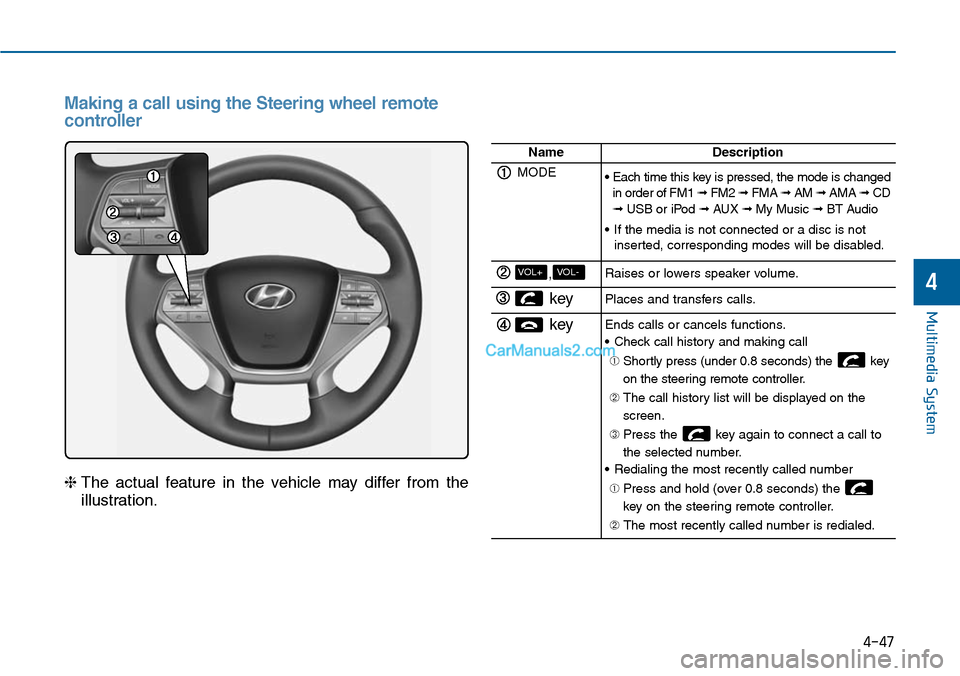
4-47
Multimedia System
4
Making a call using the Steering wheel remote
controller
❈The actual feature in the vehicle may differ from the
illustration.
NameDescription
MODE• Each time this key is pressed, the mode is changedin order of FM1 ➟ FM2 ➟ FMA ➟ AM ➟ AMA➟ CD➟ USB or iPod ➟ AUX ➟ My Music ➟ BT Audio
•If the media is not connected or a disc is notinserted, corresponding modes will be disabled.
,VOL-VOL+Raises or lowers speaker volume.
key Places and transfers calls.
keyEnds calls or cancels functions.
•Check call history and making call
➀ Shortly press (under 0.8 seconds) the key
on the steering remote controller.
➁ The call history list will be displayed on the
screen.
➂ Press the key again to connect a call to
the selected number.
•Redialing the most recently called number
➀ Press and hold (over 0.8 seconds) the
key on the steering remote controller.
➁ The most recently called number is redialed.