START Hyundai Sonata 2015 Owner's Manual
[x] Cancel search | Manufacturer: HYUNDAI, Model Year: 2015, Model line: Sonata, Model: Hyundai Sonata 2015Pages: 603, PDF Size: 14.7 MB
Page 428 of 603
5-70
Driving your vehicle
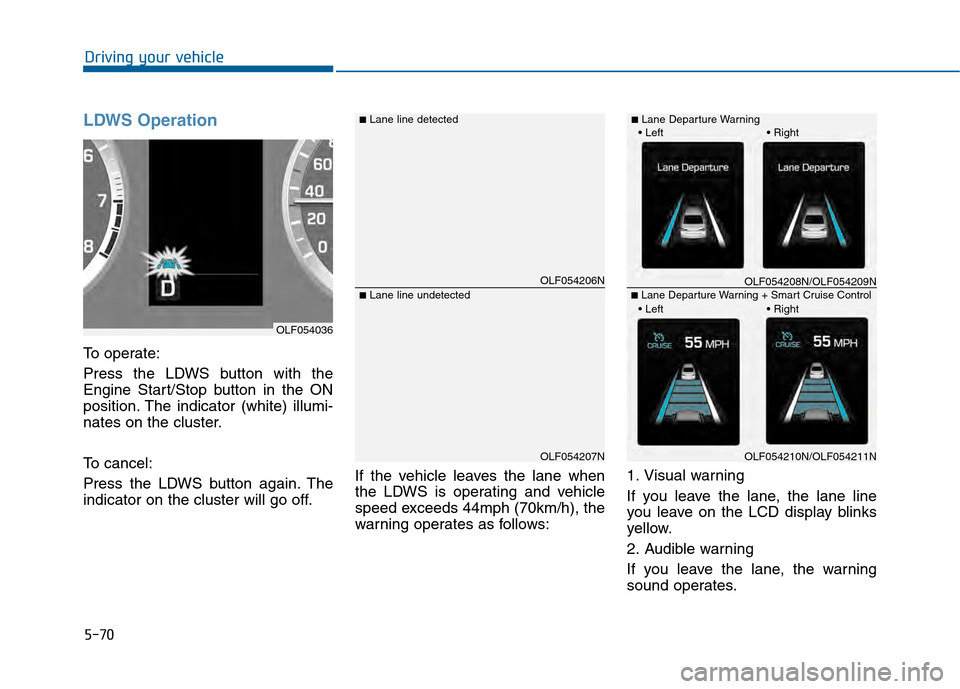
LDWS Operation
To operate:
Press the LDWS button with the
Engine Start/Stop button in the ON
position. The indicator (white) illumi-
nates on the cluster.
To cancel:
Press the LDWS button again. The
indicator on the cluster will go off.If the vehicle leaves the lane when
the LDWS is operating and vehicle
speed exceeds 44mph (70km/h), the
warning operates as follows:1. Visual warning
If you leave the lane, the lane line
you leave on the LCD display blinks
yellow.
2. Audible warning
If you leave the lane, the warning
sound operates.
OLF054206N
OLF054207N
■Lane line detected
■Lane line undetected
OLF054036
OLF054208N/OLF054209N
OLF054210N/OLF054211N
■Lane Departure Warning
■Lane Departure Warning + Smart Cruise Control
Page 431 of 603
5-73
Driving your vehicle
5
The Foward Collision Warning
System helps avoid accidents by
identifying critical situations early and
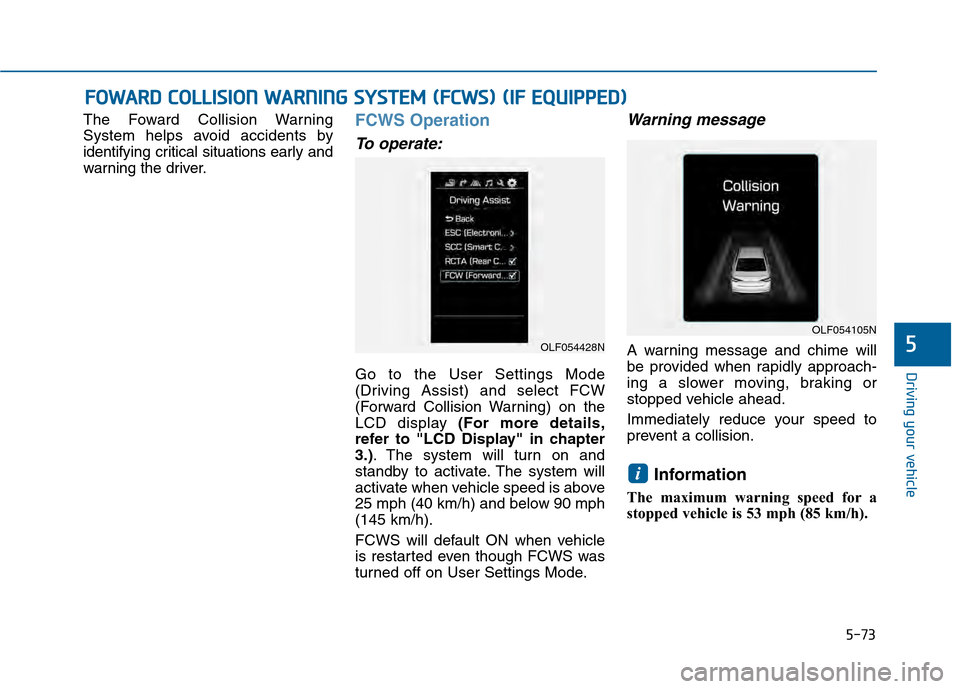
warning the driver.FCWS Operation
To operate:
Go to the User Settings Mode
(Driving Assist) and select FCW
(Forward Collision Warning) on the
LCD display (For more details,
refer to "LCD Display" in chapter
3.). The system will turn on and
standby to activate. The system will
activate when vehicle speed is above
25 mph (40 km/h) and below 90 mph
(145 km/h).
FCWS will default ON when vehicle
is restarted even though FCWS was
turned off on User Settings Mode.
Warning message
A warning message and chime will
be provided when rapidly approach-
ing a slower moving, braking or
stopped vehicle ahead.
Immediately reduce your speed to
prevent a collision.
Information
The maximum warning speed for a
stopped vehicle is 53 mph (85 km/h).
i
F FO
O W
W A
AR
RD
D
C
C O
O L
LL
LI
IS
S I
IO
O N
N
W
W A
AR
RN
N I
IN
N G
G
S
S Y
Y S
ST
T E
EM
M
(
( F
F C
C W
W S
S)
)
(
( I
IF
F
E
E Q
Q U
UI
IP
P P
PE
ED
D )
)
OLF054428N
OLF054105N
Page 435 of 603
5-77
Driving your vehicle
5
BSD (Blind Spot Detection) /
LCA (Lane Change Assist)
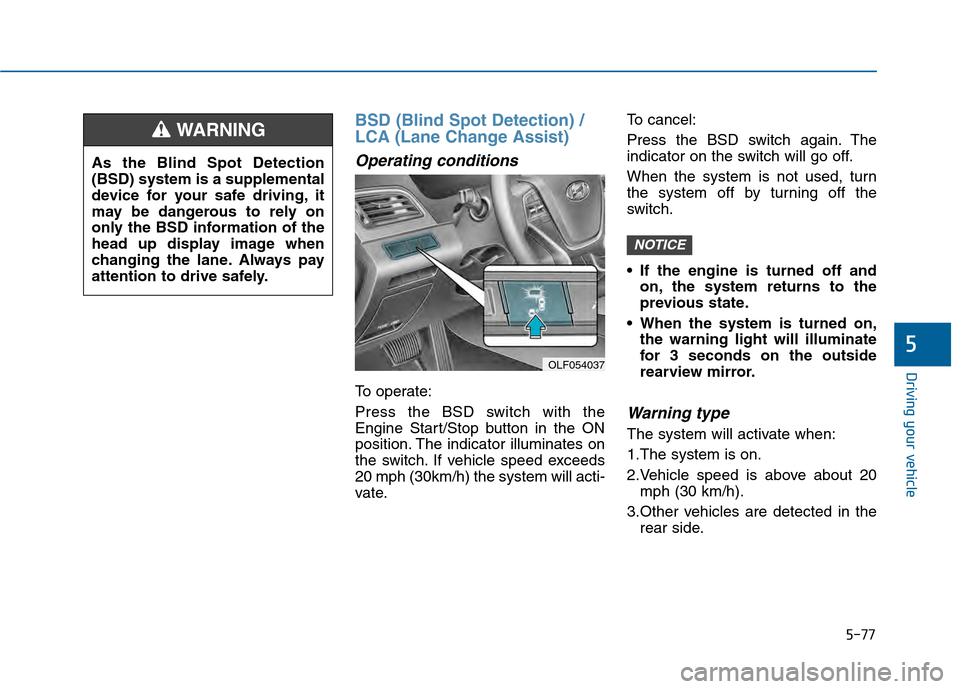
Operating conditions
To operate:
Press the BSD switch with the
Engine Start/Stop button in the ON
position. The indicator illuminates on
the switch. If vehicle speed exceeds
20 mph (30km/h) the system will acti-
vate.To cancel:
Press the BSD switch again. The
indicator on the switch will go off.
When the system is not used, turn
the system off by turning off the
switch.
If the engine is turned off and
on, the system returns to the
previous state.
When the system is turned on, the warning light will illuminate
for 3 seconds on the outside
rearview mirror.
Warning type
The system will activate when:
1.The system is on.
2.Vehicle speed is above about 20mph (30 km/h).
3.Other vehicles are detected in the rear side.
NOTICE
OLF054037
As the Blind Spot Detection
(BSD) system is a supplemental
device for your safe driving, it
may be dangerous to rely on
only the BSD information of the
head up display image when
changing the lane. Always pay
attention to drive safely.
WARNING
Page 441 of 603
5-83
Driving your vehicle
5
(Continued)
- Metal substances are near thevehicles such as in a construc-
tion area.
- A big vehicle is near such as a bus or truck.
- A motorcycle or bicycle is near.
- A flat trailer is near.
- If the vehicle has started at the same time as the vehicle next to
you and has accelerated.
- When the other vehicle passes by at a higher rate of speed.
- When changing lanes.
- When going down or up a steep road where the height of the lane
is different.
- When the other vehicle drives very close.
- When a trailer or carrier is installed.
- When the temperature of the rear bumper is high.
- When the radars are covered by a wall or a pillar of a parking lot.
(Continued)(Continued)
- When your vehicle is backing up,
if the detected vehicle also backs
up.
- Small objects like shopping carts and strollers.
- If there is a vehicle with decreased ride height (lowered).
- When the vehicle is close to another vehicle.
- When the vehicle in the next lane moves two lanes away from you
OR when the vehicle two lanes
away moves to the next lane
from you.Information
This device complies with Part 15 of
the FCC rules.
Operation is subject to the following
two conditions:
1. This device may not cause harmful interference, and
2. This device must accept any inter- ference received, including interfer-
ence that may cause undesired
operation.
i
Page 455 of 603
What to do in an emergency
6
Hazard Warning Flasher .......................................6-2
In Case of an Emergency While Driving.............6-2
If the Engine Stalls While Driving .................................6-2
If the Engine Stalls at a Crossroad or Crossing ........6-2
If you Have a Flat Tire While Driving ..........................6-3
If the Engine Will Not Start..................................6-3
If the Engine Doesn't Turn Over or
Turns Over Slowly .............................................................6-3
If the Engine Turns Over Normally but
Doesn't Start ......................................................................6-\
3
Jump Starting ..........................................................6-4
If the Engine Overheats........................................6-7
Tire Pressure Monitoring System (TPMS).........6-9
Check Tire Pressure .........................................................6-9
Tire Pressure Monitoring System ...............................6-10
Low Tire Pressure Telltale ............................................6-11
Low Tire Pressure Position and
Tire Pressure Telltale .....................................................6-11
TPMS (Tire Pressure Monitoring System)
Malfunction Indicator.....................................................6-12
Changing a Tire with TPMS..........................................6-13
If you Have a Flat Tire........................................6-15
With Spare Tire................................................................6-15
With Tire Mobility Kit (TMK) ........................................6-23
Towing ...................................................................6-30
Towing Service .................................................................6-30
Emergency Towing..........................................................6-31
Page 456 of 603
6-2
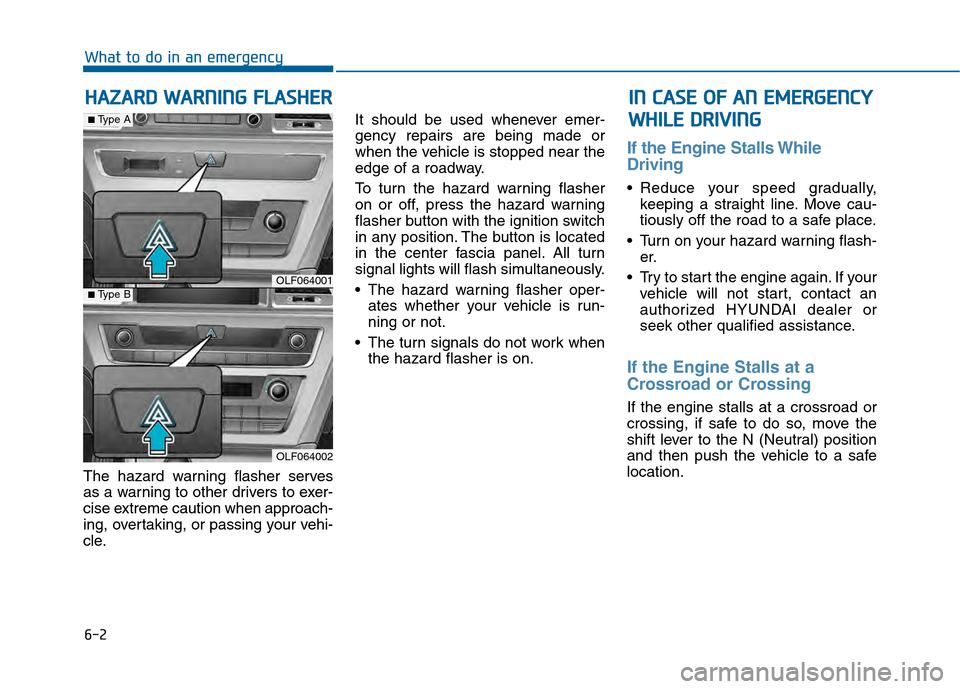
The hazard warning flasher serves
as a warning to other drivers to exer-
cise extreme caution when approach-
ing, overtaking, or passing your vehi-
cle.It should be used whenever emer-
gency repairs are being made or
when the vehicle is stopped near the
edge of a roadway.
To turn the hazard warning flasher
on or off, press the hazard warning
flasher button with the ignition switch
in any position. The button is located
in the center fascia panel. All turn
signal lights will flash simultaneously.
• The hazard warning flasher oper-
ates whether your vehicle is run-
ning or not.
The turn signals do not work when the hazard flasher is on.
If the Engine Stalls While
Driving
Reduce your speed gradually,keeping a straight line. Move cau-
tiously off the road to a safe place.
Turn on your hazard warning flash- er.
Try to start the engine again. If your vehicle will not start, contact an
authorized HYUNDAI dealer or
seek other qualified assistance.
If the Engine Stalls at a
Crossroad or Crossing
If the engine stalls at a crossroad or
crossing, if safe to do so, move the
shift lever to the N (Neutral) position
and then push the vehicle to a safe
location.
H HA
AZ
ZA
A R
RD
D
W
W A
AR
RN
N I
IN
N G
G
F
F L
LA
A S
SH
H E
ER
R
What to do in an emergency
I
IN
N
C
C A
A S
SE
E
O
O F
F
A
A N
N
E
E M
M E
ER
R G
G E
EN
N C
CY
Y
W
W H
HI
IL
L E
E
D
D R
RI
IV
V I
IN
N G
G
OLF064001
OLF064002
■Type A
■Type B
Page 457 of 603
6-3
What to do in an emergency
If you Have a Flat Tire While
Driving
If a tire goes flat while you are driving:
Take your foot off the acceleratorpedal and let the vehicle slow down
while driving straight ahead. Do not
apply the brakes immediately or
attempt to pull off the road as this
may cause loss of vehicle control
resulting in an accident. When the
vehicle has slowed to such a speed
that it is safe to do so, brake care-
fully and pull off the road. Drive off
the road as far as possible and park
on firm, level ground. If you are on
a divided highway, do not park in
the median area between the two
traffic lanes.
When the vehicle is stopped, press the hazard warning flasher button,
move the shift lever into P(Park),
and apply the parking brake, and
place the ignition switch in the
LOCK/OFF position.
Have all passengers get out of the vehicle. Be sure they all get out on
the side of the vehicle that is away
from traffic.
When changing a flat tire, follow the instructions provided later in
this chapter.
If the Engine Doesn't Turn
Over or Turns Over Slowly
Be sure the shift lever is in N
(Neutral) or P (Park). The engine
starts only when the shift lever is in
N (Neutral) or P (Park).
Check the battery connections to be sure they are clean and tight.
Turn on the interior light. If the light dims or goes out when you operate
the starter, the battery is drained.
Do not push or pull the vehicle to
start it. This could cause damage to
your vehicle. See instructions for
"Jump Starting" provided in this
chapter.
If the Engine Turns Over
Normally but Doesn't Start
Check the fuel level and add fuel if
necessary.
If the engine still does not start, have
your vehicle checked by an author-
ized HYUNDAI dealer.
6
I I F
F
T
T H
H E
E
E
E N
N G
GI
IN
N E
E
W
W I
IL
L L
L
N
N O
O T
T
S
S T
T A
A R
RT
T
Push or pull starting the vehicle
may cause the catalytic con-
verter to overload which can
lead to damage to the emission
control system.
CAUTION
Page 458 of 603
6-4
What to do in an emergency
Jump starting can be dangerous if
done incorrectly. Follow the jump
starting procedure in this section to
avoid serious injury or damage to
your vehicle. If in doubt about how to
properly jump start your vehicle, we
strongly recommend that you have a
service technician or towing service
do it for you.
J J U
U M
M P
P
S
S T
T A
A R
RT
TI
IN
N G
G
To prevent SERIOUS INJURY or
DEATH to you or bystanders,
always follow these precautions
when working near or handling
the battery:
Always read and follow
instructions carefully
when handling a battery.Wear eye protection
designed to protect the
eyes from acid splashes.
Keep all flames, sparks,
or smoking materials
away from the battery.
Hydrogen is always present in battery cells,
is highly combustible,
and may explode if ignit-
ed.
Keep batteries out of
reach of children.
(Continued)
WARNING (Continued)Batteries contain sulfu-
ric acid which is highly
corrosive. Do not allow
acid to contact your
eyes, skin or clothing.
If acid gets into your eyes, flush
your eyes with clean water for at
least 15 minutes and get imme-
diate medical attention. If acid
gets on your skin, thoroughly
wash the area. If you feel pain or
a burning sensation, get med-
ical attention immediately.
•When lifting a plastic-cased
battery, excessive pressure
on the case may cause battery
acid to leak. Lift with a battery
carrier or with your hands on
opposite corners.
Do not attempt to jump start
your vehicle if your battery is
frozen. (Continued)
Page 459 of 603
6-5
What to do in an emergency
6
Information
An inappropriately disposedbattery can be harmful to the
environment and human
health. Dispose the battery
according to your local law(s)
or regulations.
To prevent damage to your vehi-
cle:
Only use a 12-volt power supply (battery or jumper system) to
jump start your vehicle.
Do not attempt to jump start your vehicle by push-starting.
Jump starting procedure
1. Position the vehicles close enough that the jumper cables will reach,
but do not allow the vehicles to
touch.
2. Avoid fans or any moving parts in the engine compartment at all
times, even when the vehicles are
turned off.
3. Turn off all electrical devices such as radios, lights, air conditioning,
etc. Put the vehicles in P (Park)
and set the parking brakes. Turn
both vehicles OFF.
NOTICE
i
Pb
(Continued)
NEVER attempt to recharge
the battery when the vehicle’s
battery cables are connected
to the battery.
The electrical ignition system
works with high voltage.
NEVER touch these compo-
nents with the engine running
or when the ignition switch is
in the ON position.
Page 460 of 603
6-6
What to do in an emergency
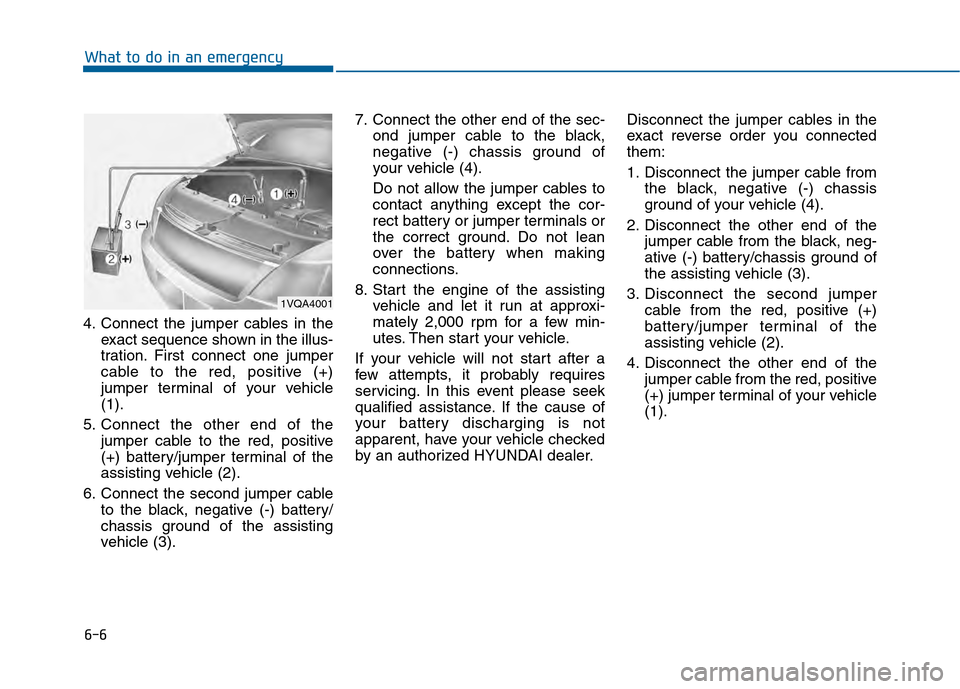
4. Connect the jumper cables in the exact sequence shown in the illus-
tration. First connect one jumper
cable to the red, positive (+)
jumper terminal of your vehicle
(1).
5. Connect the other end of the jumper cable to the red, positive
(+) battery/jumper terminal of the
assisting vehicle (2).
6. Connect the second jumper cable to the black, negative (-) battery/
chassis ground of the assisting
vehicle (3). 7. Connect the other end of the sec-
ond jumper cable to the black,
negative (-) chassis ground of
your vehicle (4).
Do not allow the jumper cables to
contact anything except the cor-
rect battery or jumper terminals or
the correct ground. Do not lean
over the battery when making
connections.
8. Start the engine of the assisting vehicle and let it run at approxi-
mately 2,000 rpm for a few min-
utes. Then start your vehicle.
If your vehicle will not start after a
few attempts, it probably requires
servicing. In this event please seek
qualified assistance. If the cause of
your battery discharging is not
apparent, have your vehicle checked
by an authorized HYUNDAI dealer. Disconnect the jumper cables in the
exact reverse order you connected
them:
1. Disconnect the jumper cable from
the black, negative (-) chassis
ground of your vehicle (4).
2. Disconnect the other end of the jumper cable from the black, neg-
ative (-) battery/chassis ground of
the assisting vehicle (3).
3. Disconnect the second jumper cable from the red, positive (+)
battery/jumper terminal of the
assisting vehicle (2).
4. Disconnect the other end of the jumper cable from the red, positive
(+) jumper terminal of your vehicle
(1).
1VQA4001