Screen display Hyundai Sonata 2015 User Guide
[x] Cancel search | Manufacturer: HYUNDAI, Model Year: 2015, Model line: Sonata, Model: Hyundai Sonata 2015Pages: 603, PDF Size: 14.7 MB
Page 287 of 603
4-34
Multimedia System
Pairing Key / Key
on the Steering Remote
Controller
When No Devices have beenPaired
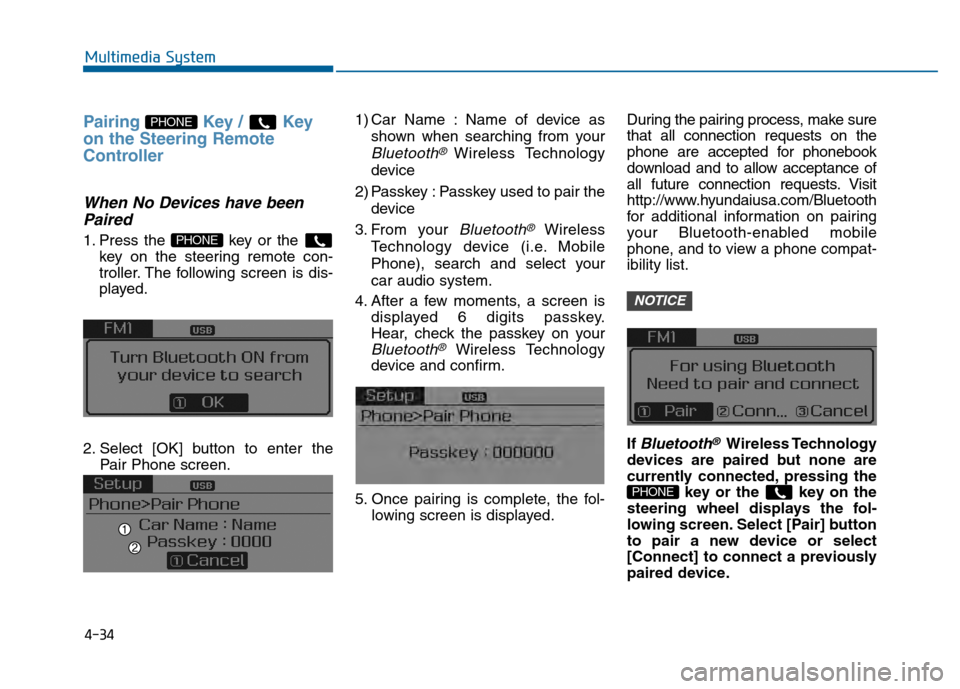
1. Press the key or the
key on the steering remote con-
troller. The following screen is dis-
played.
2. Select [OK] button to enter the Pair Phone screen. 1) Car Name : Name of device as
shown when searching from your
Bluetooth® Wireless Technology
device
2) Passkey : Passkey used to pair the device
3. From your
Bluetooth®Wireless
Technology device (i.e. Mobile
Phone), search and select your
car audio system.
4. After a few moments, a screen is displayed 6 digits passkey.
Hear, check the passkey on your
Bluetooth®Wireless Technology
device and confirm.
5. Once pairing is complete, the fol- lowing screen is displayed. During the pairing process, make sure
that all connection requests on the
phone are accepted for phonebook
download and to allow acceptance of
all future connection requests. Visit
http://www.hyundaiusa.com/Bluetooth
for additional information on pairing
your Bluetooth-enabled mobile
phone, and to view a phone compat-
ibility list.
If
Bluetooth®Wireless Technology
devices are paired but none are
currently connected, pressing the key or the key on the
steering wheel displays the fol-
lowing screen. Select [Pair] button
to pair a new device or select
[Connect] to connect a previously
paired device.
PHONE
NOTICE
PHONE
PHONE
Page 295 of 603
4-42
Multimedia System
Phone Menu Screen
Phone Menus
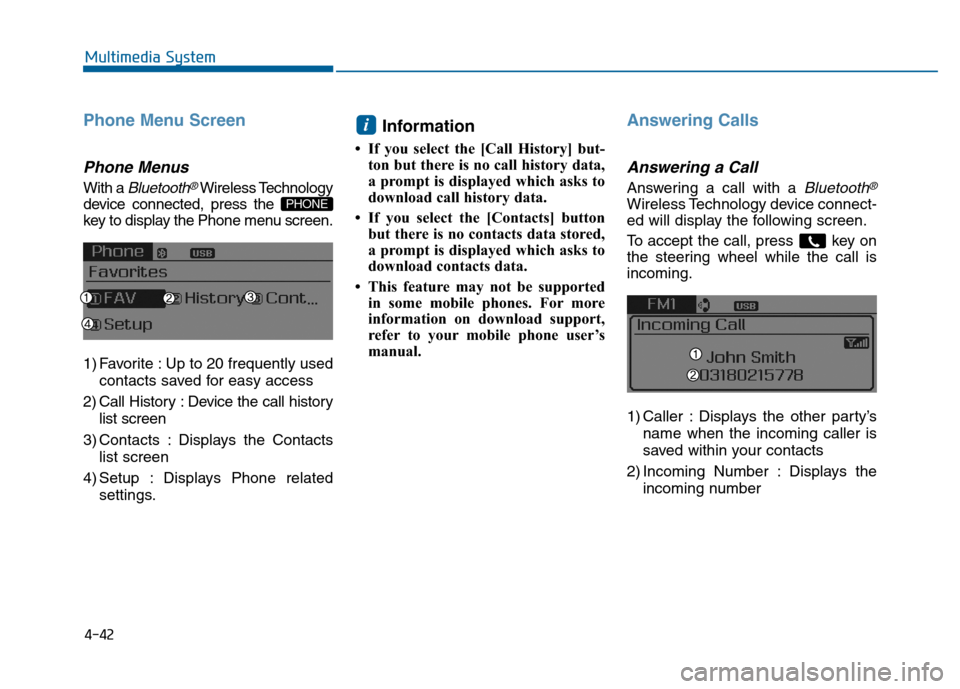
With a Bluetooth®Wireless Technology
device connected, press the
key to display the Phone menu screen.
1) Favorite : Up to 20 frequently used
contacts saved for easy access
2) Call History : Device the call history list screen
3) Contacts : Displays the Contacts list screen
4) Setup : Displays Phone related settings.
Information
• If you select the [Call History] but-ton but there is no call history data,
a prompt is displayed which asks to
download call history data.
• If you select the [Contacts] button but there is no contacts data stored,
a prompt is displayed which asks to
download contacts data.
• This feature may not be supported in some mobile phones. For more
information on download support,
refer to your mobile phone user’s
manual.
Answering Calls
Answering a Call
Answering a call with a Bluetooth®
Wireless Technology device connect-
ed will display the following screen.
To accept the call, press key on
the steering wheel while the call is
incoming.
1) Caller : Displays the other party’s
name when the incoming caller is
saved within your contacts
2) Incoming Number : Displays the incoming number
i
PHONE
Page 297 of 603
![Hyundai Sonata 2015 User Guide 4-44
Multimedia System
Contacts
Press the key Select
[Contacts]
The list of saved phone book entries
is displayed.
NOTE:
Find a contact in an alphabetical
order, press the key.
Information
• Up t](/img/35/16796/w960_16796-296.png "Hyundai Sonata 2015 User Guide 4-44
Multimedia System
Contacts
Press the key Select
[Contacts]
The list of saved phone book entries
is displayed.
NOTE:
Find a contact in an alphabetical
order, press the key.
Information
• Up t")
4-44
Multimedia System
Contacts
Press the key Select
[Contacts]
The list of saved phone book entries
is displayed.
NOTE:
Find a contact in an alphabetical
order, press the key.
Information
• Up to 1,000 contacts saved in yourBluetooth®Wireless Technology
phone can be downloaded into the
car contacts. Contacts that have been
downloaded to the car cannot be edit-
ed or deleted on the phone.
• Mobile phone contacts are managed separately for each paired Bluetooth
®
Wireless Technology device (max 5
devices x 1,000 contacts each).
Previously downloaded data is main-
tained even if the Bluetooth
®Wireless
Technology device has been discon-
nected.
(However, the contacts and call histo-
ry saved to the phone will be deleted
if a paired phone is deleted.)
• It is possible to download contacts during Bluetooth streaming audio.
• When downloading contacts, the icon will be displayed within the status
bar. • It is not possible to begin download-
ing a contact list when the contact
download feature has been turned off
within the Bluetooth
®Wireless
Technology device. In addition, some
devices may require device authori-
zation upon attempting to download
contacts. If downloading does not
normally occur, check the Bluetooth
®
Wireless Technology device settings
or the screen state.
• The contacts download feature may not be supported in some mobile
phones. For more information of sup-
ported Bluetooth
®devices and func-
tion support, refer to your phone’s
user manual.
i
MENU
PHONE
Page 301 of 603
4-48
Multimedia System
Voice Command List
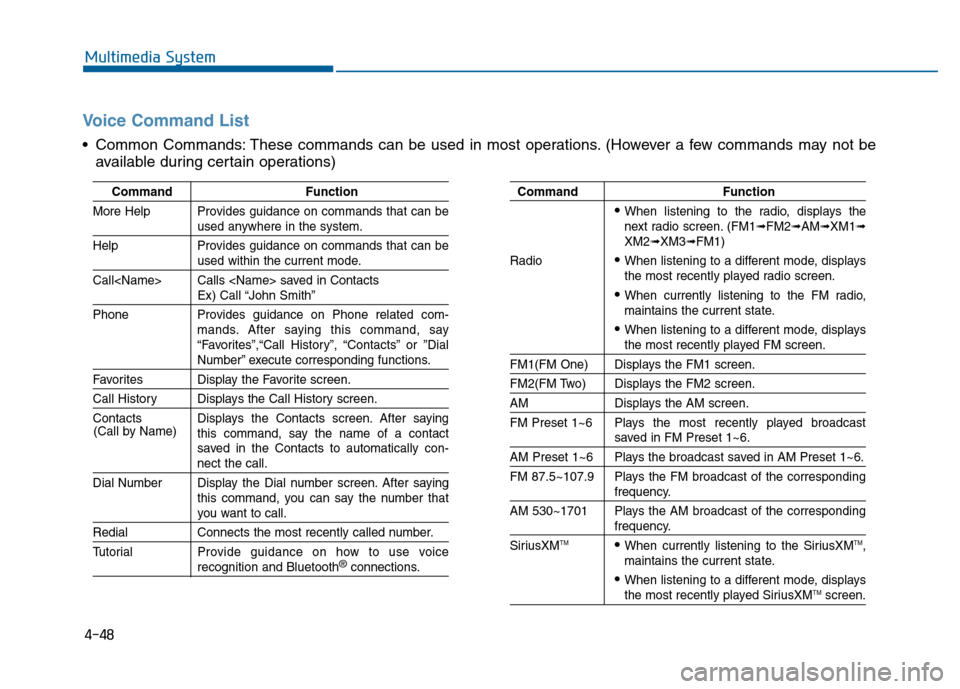
Common Commands: These commands can be used in most operations. (However a few commands may not beavailable during certain operations)
Command Function
More Help Provides guidance on commands that can be
used anywhere in the system.
Help Provides guidance on commands that can be
used within the current mode.
Call
Ex) Call “John Smith”
Phone Provides guidance on Phone related com- mands. After saying this command, say
“Favorites”,“Call History”, “Contacts” or ”Dial
Number” execute corresponding functions.
Favorites Display the Favorite screen.
Call History Displays the Call History screen.
Contacts Displays the Contacts screen. After sayingthis command, say the name of a contact
saved in the Contacts to automatically con-
nect the call.
Dial Number Display the Dial number screen. After saying this command, you can say the number that
you want to call.
RedialConnects the most recently called number.
Tutorial Pro vide guidance on how to use voice
recognition and Bluetooth®connections.
Command Function
When listening to the radio, displays the
next radio screen. (FM1➟FM2➟AM➟XM1➟XM2➟XM3➟FM1)
Radio
When listening to a different mode, displays
the most recently played radio screen.
When currently listening to the FM radio,
maintains the current state.
When listening to a different mode, displaysthe most recently played FM screen.
FM1(FM One) Displays the FM1 screen.
FM2(FM Two) Displays the FM2 screen.
AM Displays the AM screen.
FM Preset 1~6 Plays the most recently played broadcast
saved in FM Preset 1~6.
AM Preset 1~6 Plays the broadcast saved in AM Preset 1~6.
FM 87.5~107.9 Plays the FM broadcast of the corresponding
frequency.
AM 530~1701 Plays the AM broadcast of the corresponding
frequency.
SiriusXMTMWhen currently listening to the SiriusXMTM,
maintains the current state.
When listening to a different mode, displaysthe most recently played SiriusXMTMscreen.
(Call by Name)
Page 302 of 603
4-49
Multimedia System
4
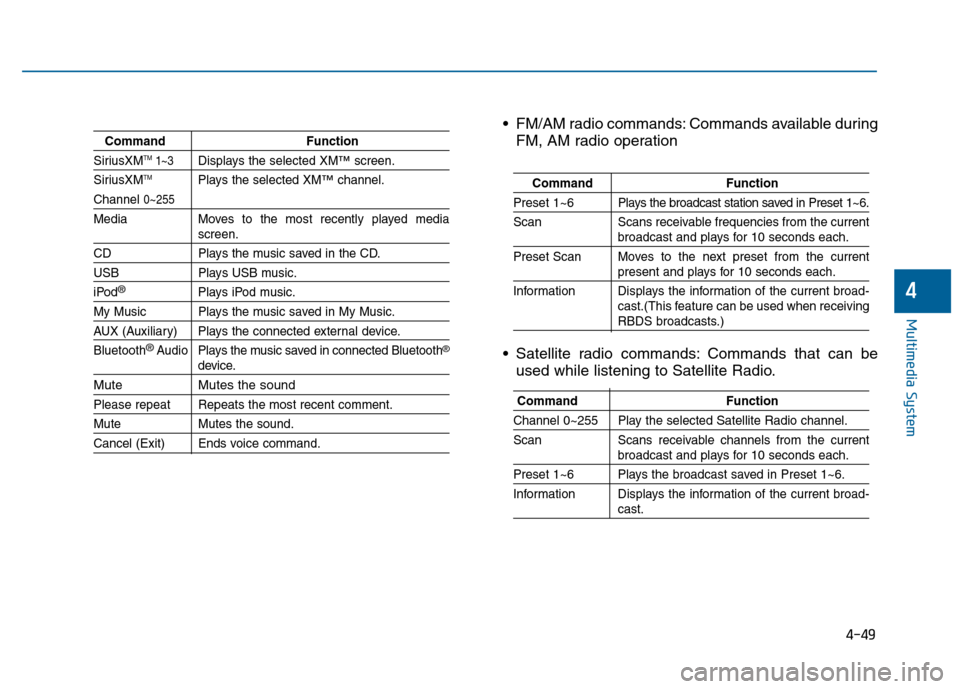
CommandFunction
SiriusXMTM1~3Displays the selected XM™screen.
SiriusXMTMPlays the selected XM™channel.
Channel 0~255
Media Moves to the most recently played mediascreen.
CD Plays the music saved in the CD.
USBPlays USB music.
iPod®Plays iPod music.
My Music Plays the music saved in My Music.
AUX (Auxiliary) Plays the connected external device.
Bluetooth
®Audio Plays the music saved in connected Bluetooth®
device.
Mute Mutes the sound
Please repeat Repeats the most recent comment.
Mute Mutes the sound.
Cancel (Exit) Ends voice command.
FM/AM radio commands: Commands available during
FM, AM radio operation
Satellite radio commands: Commands that can be used while listening to Satellite Radio.
Command Function
Preset 1~6 Plays the broadcast station saved in Preset 1~6.
Scan Scans receivable frequencies from the current
broadcast and plays for 10 seconds each.
Preset Scan Moves to the next preset from the current
present and plays for 10 seconds each.
Information Displays the information of the current broad- cast.(This feature can be used when receiving
RBDS broadcasts.)
Command Function
Channel 0~255 Play the selected Satellite Radio channel.
Scan Scans receivable channels from the current
broadcast and plays for 10 seconds each.
Preset 1~6 Plays the broadcast saved in Preset 1~6.
Information Displays the information of the current broad-
cast.
Page 303 of 603
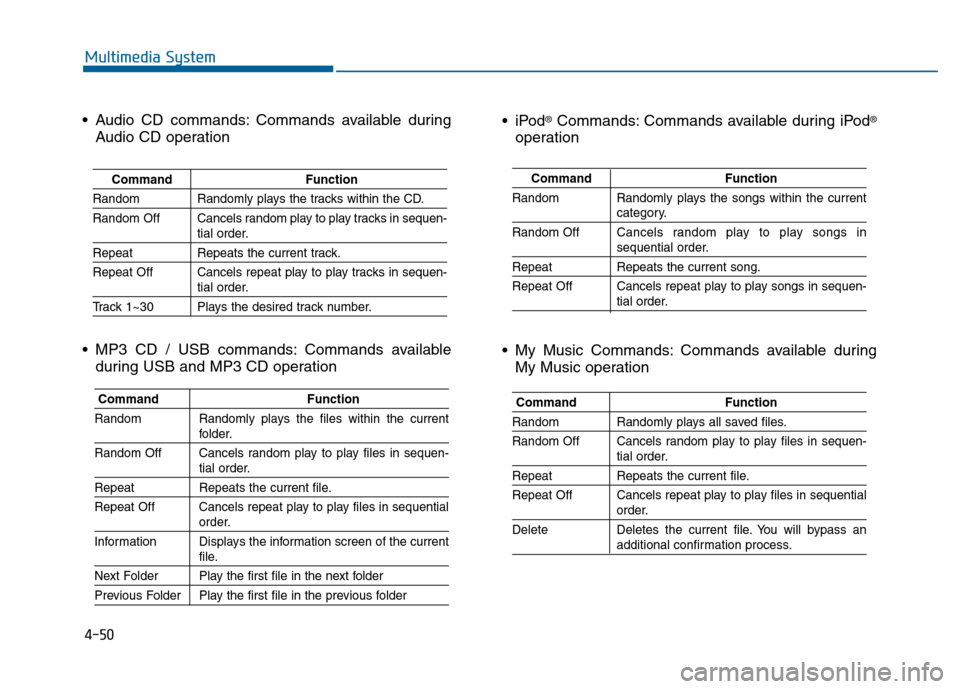
4-50
Multimedia System
CommandFunction
Random Randomly plays the songs within the current
category.
Random Off Cancels random play to play songs in
sequential order.
Repeat Repeats the current song.
Repeat Off Cancels repeat play to play songs in sequen-
tial order.
®Commands: Commands available during iPod®
operation
My Music Commands: Commands available during My Music operation
Command Function
Random Randomly plays all saved files.
Random Off Cancels random play to play files in sequen-
tial order.
RepeatRepeats the current file.
Repeat Off Cancels repeat play to play files in sequential
order.
Delete Deletes the current file. You will bypass an
additional confirmation process.
Audio CD commands: Commands available during Audio CD operation
MP3 CD / USB commands: Commands available during USB and MP3 CD operation
Command Function
Random Randomly plays the tracks within the CD.
Random Off Cancels random play to play tracks in sequen-
tial order.
RepeatRepeats the current track.
Repeat Off Cancels repeat play to play tracks in sequen-
tial order.
Track 1~30 Plays the desired track number.
Command Function
Random Randomly plays the files within the current
folder.
Random Off Cancels random play to play files in sequen-
tial order.
Repeat Repeats the current file.
Repeat Off Cancels repeat play to play files in sequential
order.
Information Displays the information screen of the current
file.
Next Folder Play the first file in the next folder
Previous Folder Play the first file in the previous folder
Page 305 of 603
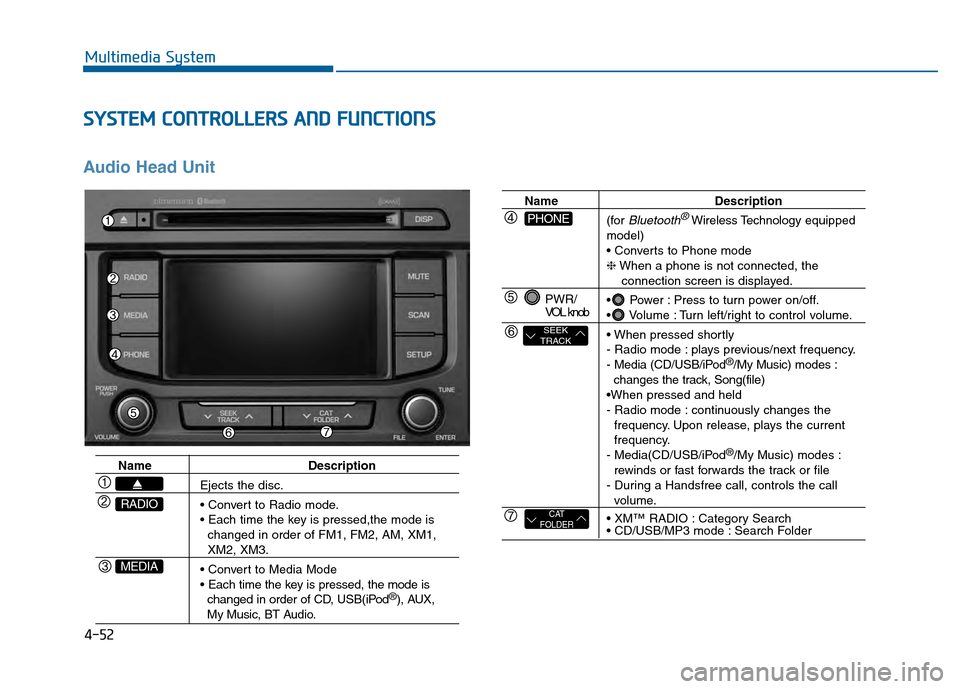
4-52
Multimedia System
S
SY
Y S
ST
T E
EM
M
C
C O
O N
NT
TR
R O
O L
LL
LE
E R
R S
S
A
A N
N D
D
F
F U
U N
NC
CT
T I
IO
O N
NS
S
Audio Head Unit
Name Description
Ejects the disc.
changed in order of FM1, FM2, AM, XM1,
XM2, XM3.
changed in order of CD, USB(iPod
®), AUX, My Music, BT Audio.
MEDIA
RADIO
Name Description
(for
Bluetooth®Wireless Technology equipped
model)
❈ When a phone is not connected, the
connection screen is displayed.
Power : Press to turn power on/off.
Volume : Turn left/right to control volume.
- Radio mode : plays previous/next frequency.
- Media (CD/USB/iPod
®/My Music) modes :
changes the track, Song(file)
- Radio mode : continuously changes the frequency. Upon release, plays the current
frequency.
- Media(CD/USB/iPod
®/My Music) modes :
rewinds or fast forwards the track or file
- During a Handsfree call, controls the call
volume.
Category Search
Search Folder
PWR/
VOL knob
CAT
FOLDER
SEEK
TRACK
PHONE
Page 308 of 603
4-55
Multimedia System
4
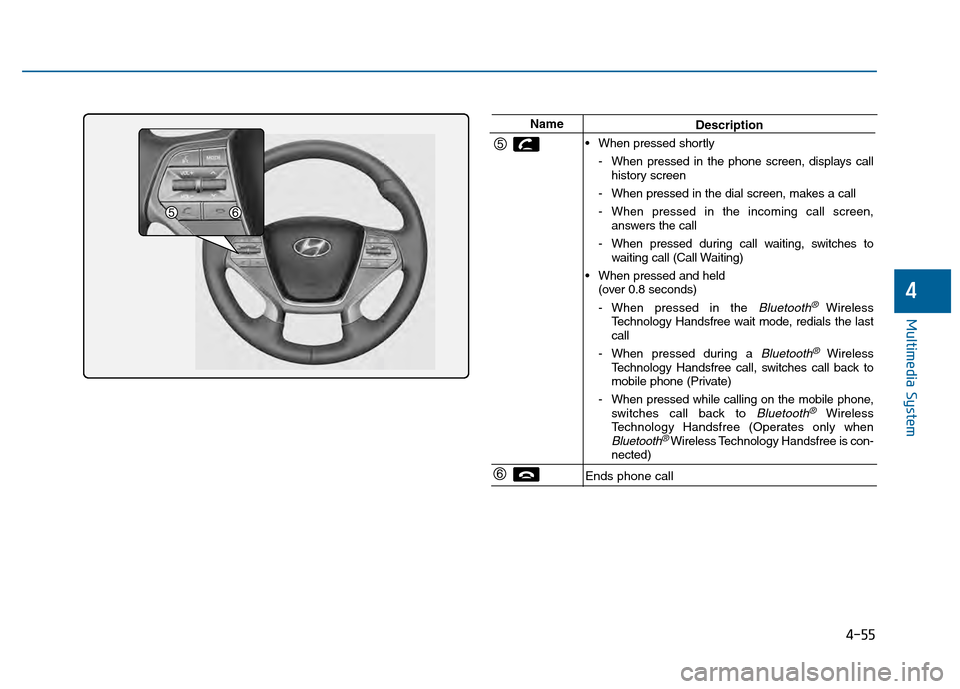
NameDescription
When pressed shortly - When pressed in the phone screen, displays callhistory screen
- When pressed in the dial screen, makes a call
- When pressed in the incoming call screen, answers the call
- When pressed during call waiting, switches to waiting call (Call Waiting)
When pressed and held (over 0.8 seconds)
- When pressed in the
Bluetooth® Wireless
Technology Handsfree wait mode, redials the last
call
- When pressed during a
Bluetooth®Wireless
Technology Handsfree call, switches call back to
mobile phone (Private)
- When pressed while calling on the mobile phone, switches call back to
Bluetooth®Wireless
Technology Handsfree (Operates only when
Bluetooth®Wireless Technology Handsfree is con-
nected)
Ends phone call
Page 309 of 603
4-56
Multimedia System
R
RA
A D
DI
IO
O
M
M O
OD
DE
E
B
Ba
as
si
ic
c
M
M o
od
de
e
S
S c
cr
re
e e
en
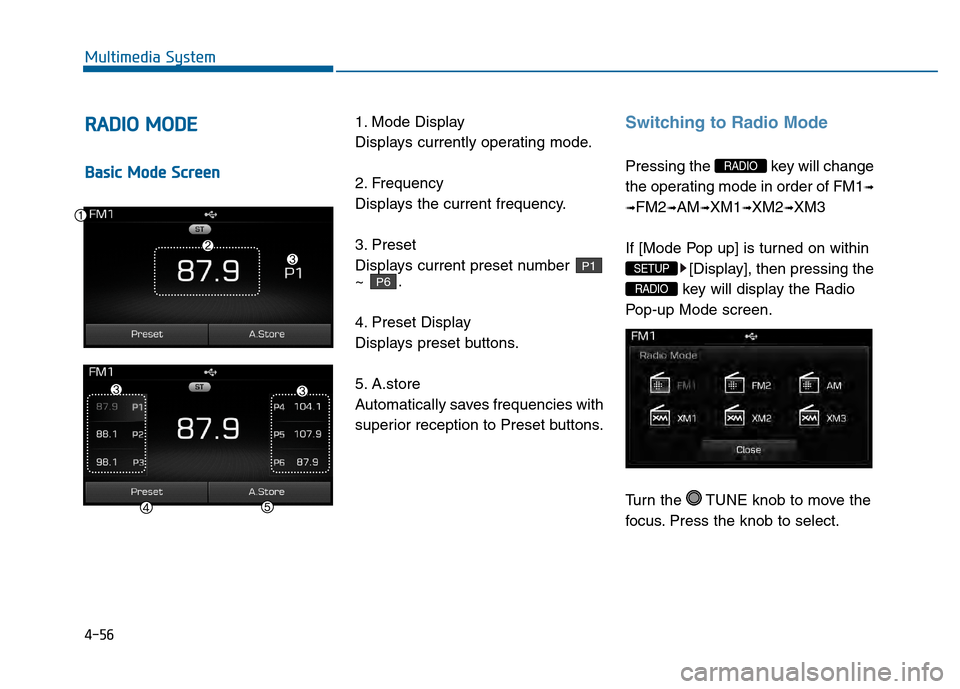
n 1. Mode Display
Displays currently operating mode.
2. Frequency
Displays the current frequency.
3. Preset
Displays current preset number
~ .
4. Preset Display
Displays preset buttons.
5. A.store
Automatically saves frequencies with
superior reception to Preset buttons.
Switching to Radio Mode
Pressing the key will change
the operating mode in order of FM1
➟
➟
FM2➟AM➟XM1➟XM2➟XM3
If [Mode Pop up] is turned on within [Display], then pressing the
key will display the Radio
Pop-up Mode screen.
Turn the TUNE knob to move the
focus. Press the knob to select.
RADIO
SETUP
RADIO
P6
P1
Page 313 of 603
![Hyundai Sonata 2015 User Guide 4-60
Multimedia System
M
ME
ED
D I
IA
A
M
M O
OD
DE
E
Pressing the key will change
the operating mode in order of CD
➟
USB(iPod®) ➟ AUX ➟ My Music ➟BT
Audio.
If [Mode Pop up] is turned o](/img/35/16796/w960_16796-312.png "Hyundai Sonata 2015 User Guide 4-60
Multimedia System
M
ME
ED
D I
IA
A
M
M O
OD
DE
E
Pressing the key will change
the operating mode in order of CD
➟
USB(iPod®) ➟ AUX ➟ My Music ➟BT
Audio.
If [Mode Pop up] is turned o")
4-60
Multimedia System
M
ME
ED
D I
IA
A
M
M O
OD
DE
E
Pressing the key will change
the operating mode in order of CD
➟
USB(iPod®) ➟ AUX ➟ My Music ➟BT
Audio.
If [Mode Pop up] is turned on within
[Display], then pressing the
key will display the Media
Pop-up Mode screen.
Turn the TUNE knob to move the
focus. Press the knob to select.
Information
The media mode pop up screen can be
displayed only when there are two or
more media modes turned on.
Title Icon
When a Bluetooth®Wireless
Technology, iPod®, USB, or AUX
device is connected or a CD is
inserted, the corresponding mode
icon will be displayed.
Icon Title
Bluetooth®Wireless Technology
CD
iPod®
USB
AUX
i
MEDIA
SETUP
MEDIA