ECO mode Hyundai Sonata 2017 Owner's Guide
[x] Cancel search | Manufacturer: HYUNDAI, Model Year: 2017, Model line: Sonata, Model: Hyundai Sonata 2017Pages: 563, PDF Size: 17.7 MB
Page 274 of 563

4-26
Multimedia System
Category
Press the key Set through
the
TUNEknob
The display will indicate the cate- gory menus, highlight the category
that the current channel belongs
to.
In the Category List Mode, press the key to navigate cate-
gory list.
Press the tune knob to select the lowest channel in the highlighted
category.
❈ If channel is selected by selecting
category, then the “CATEGORY”
icon is displayed at the top of the
screen.
Preset
Press the ~ key
Shortly pressing the key (under 0.8
seconds): Plays the frequency
saved in the corresponding key.
Pressing and holding the key (over 0.8 seconds): Pressing and holding
the desired key from ~
will save the current broadcast to
the selected key and sound a
BEEP.
Information - Trobleshooting
1. Antenna Error
If this message is displayed, the anten-
na or antenna cable is broken or
unplugged. Please consult with your
Hyundai dealership.
2. No Signal
If this message is displayed, it means
that the antenna is covered and that
the SiriusXM Satellite Radio signal is
not available. Ensure the antenna is
uncovered and has a clear view of the
sky.
Menu
Select category menu through the TUNE knob Press the key
Select [ Info] through the TUNE
knob or key
Info (Information)
Displays the Artist/Song info of the
current song.
1
MENU
i
61
61
CATFOLDER
CATFOLDER
Page 275 of 563
4-27
Multimedia System
4
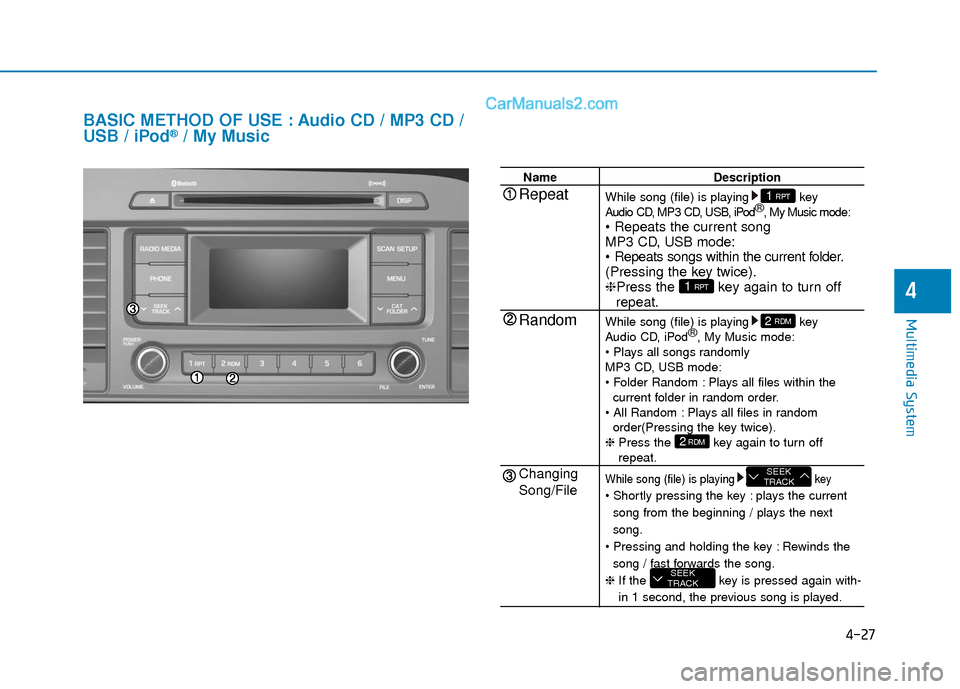
BASIC METHOD OF USE : Audio CD / MP3 CD /
USB / iPod®/ My Music
NameDescription
While song (file) is playing key
Audio CD, MP3 CD, USB, iPod ®
, My Music mode:
MP3 CD, USB mode:
(Pressing the key twice).
❈ Press the key again to turn off
repeat.
While song (file) is playing key
Audio CD, iPod ®
, My Music mode:
MP3 CD, USB mode:
Plays all files within the current folder in random order.
Plays all files in random order(Pressing the key twice).
❈ Press the key again to turn off
repeat.
While song (file) is playing key
plays the current
song from the beginning / plays the next
song.
Rewinds the song / fast forwards the song.
❈ If the key is pressed again with-
in 1 second, the previous song is played.
SEEK
TRACK
SEEK
TRACK
2RDM
2 RDM
1 RPT
1 RPTRepeat
Random
Changing
Song/File
Page 276 of 563
4-28
Multimedia System
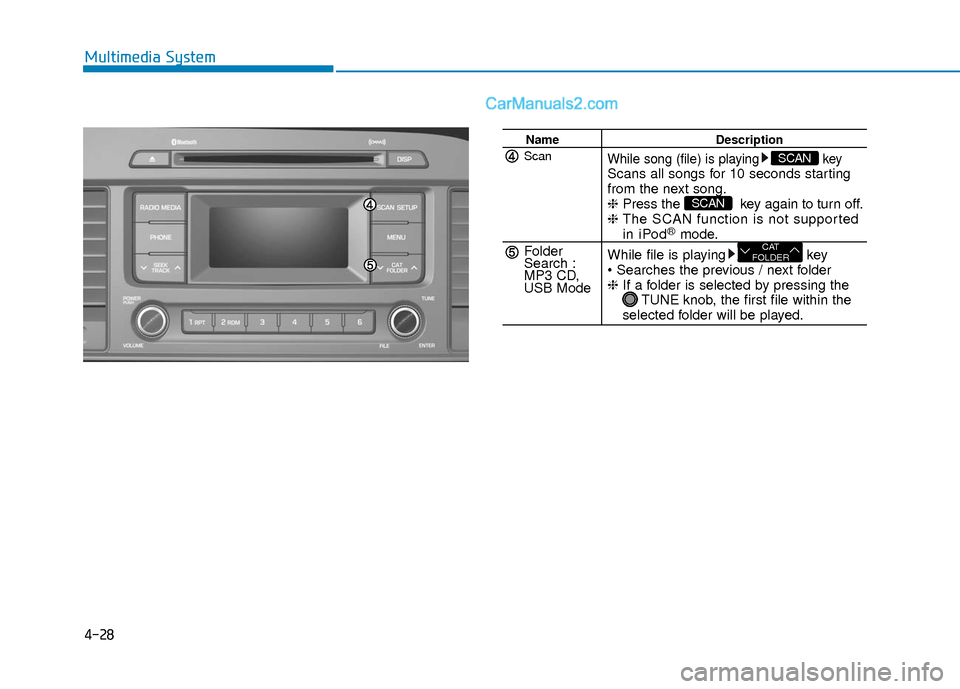
NameDescription
While song (file) is playing keyScans all songs for 10 seconds starting
from the next song.
❈Press the key again to turn off.
❈ The SCAN function is not supported
in iPod®mode.
While file is playing key
❈ If a folder is selected by pressing the
TUNE knob, the first file within the
selected folder will be played.
CAT
FOLDER
SCAN
SCANScan
Folder
Search :
MP3 CD,
USB Mode
Page 282 of 563
4-34
Multimedia System
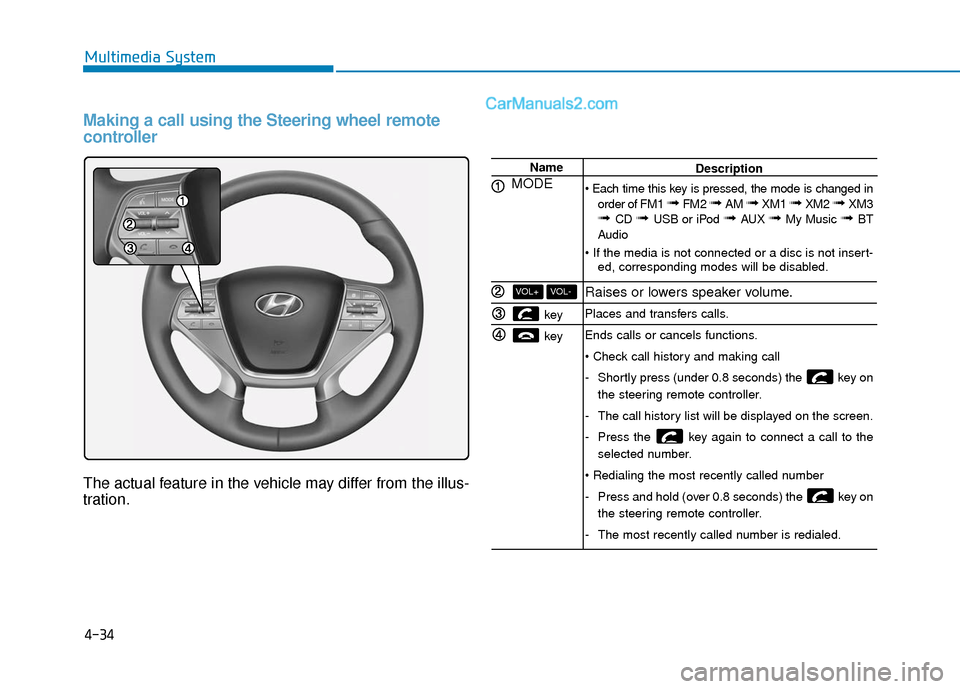
Making a call using the Steering wheel remote
controller
The actual feature in the vehicle may differ from the illus-
tration.
Name
MODE
key
key
VOL-VOL+
Description
order of FM1
➟ FM2 ➟ AM ➟ XM1 ➟ XM2 ➟ XM3➟ CD ➟ USB or iPod ➟ AUX ➟ My Music ➟ BT
Audio
ed, corresponding modes will be disabled.
Raises or lowers speaker volume.
Places and transfers calls.
Ends calls or cancels functions.
-Shortly press (under 0.8 seconds) the key on
the steering remote controller.
- The call history list will be displayed on the screen.
- Press the key again to connect a call to the
selected number.
- Press and hold (over 0.8 seconds) the key on
the steering remote controller.
- The most recently called number is redialed.
Page 294 of 563
4-46
Multimedia System
V
VO
O I
IC
C E
E
R
R E
EC
CO
O G
GN
N I
IT
T I
IO
O N
N
Using Voice Recognition
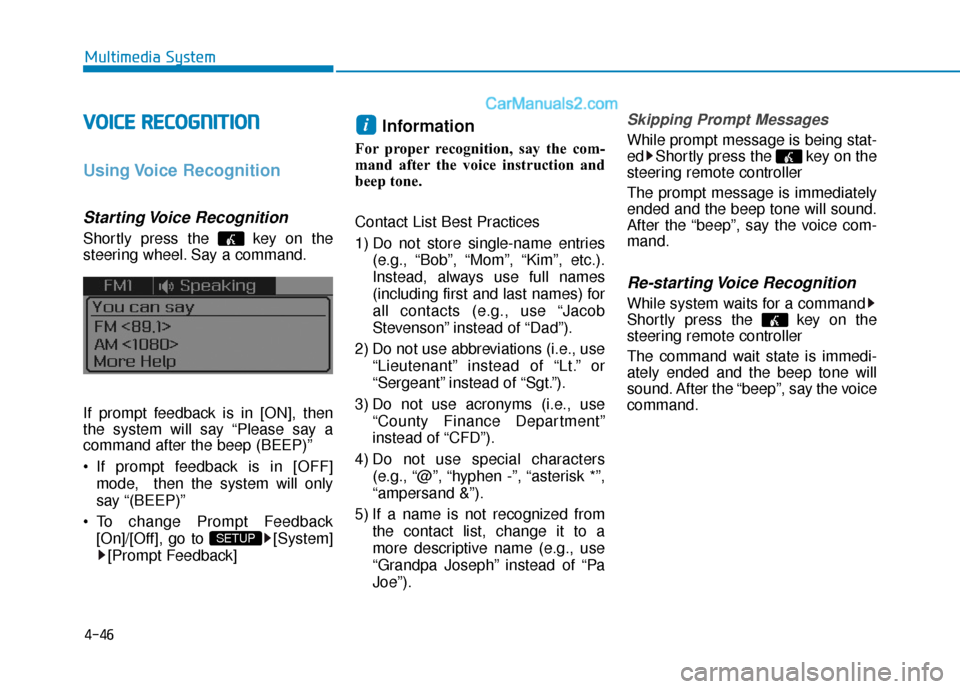
Starting Voice Recognition
Shortly press the key on the
steering wheel. Say a command.
If prompt feedback is in [ON], then
the system will say “Please say a
command after the beep (BEEP)”
If prompt feedback is in [OFF]
mode, then the system will only
say “(BEEP)”
To change Prompt Feedback [On]/[Off], go to [System][Prompt Feedback]
Information
For proper recognition, say the com-
mand after the voice instruction and
beep tone.
Contact List Best Practices
1) Do not store single-name entries (e.g., “Bob”, “Mom”, “Kim”, etc.).
Instead, always use full names
(including first and last names) for
all contacts (e.g., use “Jacob
Stevenson” instead of “Dad”).
2) Do not use abbreviations (i.e., use “Lieutenant” instead of “Lt.” or
“Sergeant” instead of “Sgt.”).
3) Do not use acronyms (i.e., use “County Finance Department”
instead of “CFD”).
4) Do not use special characters (e.g., “@”, “hyphen -”, “asterisk *”,
“ampersand &”).
5) If a name is not recognized from the contact list, change it to a
more descriptive name (e.g., use
“Grandpa Joseph” instead of “Pa
Joe”).
Skipping Prompt Messages
While prompt message is being stat-
ed Shortly press the key on the
steering remote controller
The prompt message is immediately
ended and the beep tone will sound.
After the “beep”, say the voice com-
mand.
Re-starting Voice Recognition
While system waits for a command
Shortly press the key on the
steering remote controller
The command wait state is immedi-
ately ended and the beep tone will
sound. After the “beep”, say the voice
command.
i
SETUP
Page 295 of 563
4-47
Multimedia System
4
E
EN
N D
DI
IN
N G
G
V
V O
O I
IC
C E
E
R
R E
EC
CO
O G
GN
N I
IT
T I
IO
O N
N
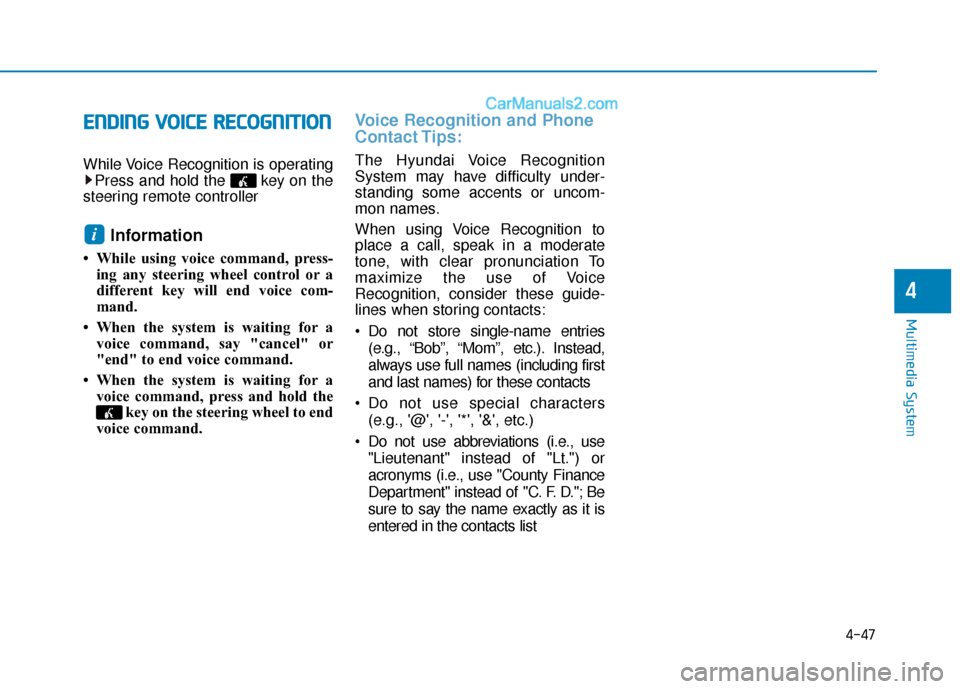
While Voice Recognition is operating
Press and hold the key on the
steering remote controller
Information
• While using voice command, press- ing any steering wheel control or a
different key will end voice com-
mand.
• When the system is waiting for a voice command, say "cancel" or
"end" to end voice command.
• When the system is waiting for a voice command, press and hold the key on the steering wheel to end
voice command.
Voice Recognition and Phone
Contact Tips:
The Hyundai Voice Recognition
System may have difficulty under-
standing some accents or uncom-
mon names.
When using Voice Recognition to
place a call, speak in a moderate
tone, with clear pronunciation To
maximize the use of Voice
Recognition, consider these guide-
lines when storing contacts:
Do not store single-name entries
(e.g., “Bob”, “Mom”, etc.). Instead,
always use full names (including first
and last names) for these contacts
Do not use special characters (e.g., '@', '-', '*', '&', etc.)
Do not use abbreviations (i.e., use "Lieutenant" instead of "Lt.") or
acronyms (i.e., use "County Finance
Department" instead of "C. F. D."; Be
sure to say the name exactly as it is
entered in the contacts list
i
Page 296 of 563
4-48
Multimedia System
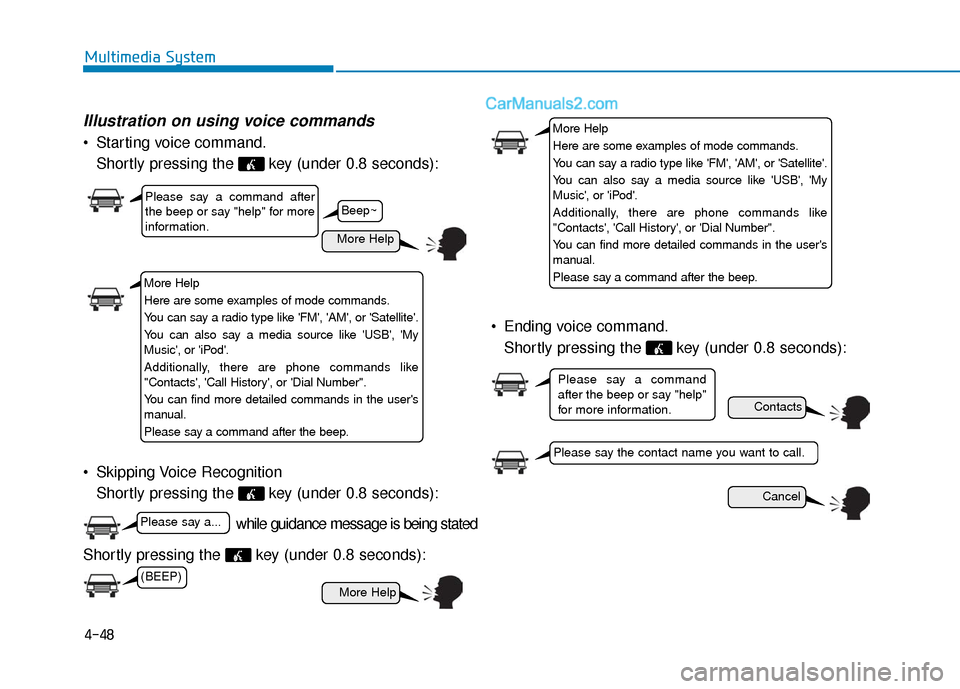
Illustration on using voice commands
Starting voice command.Shortly pressing the key (under 0.8 seconds):
Skipping Voice Recognition Shortly pressing the key (under 0.8 seconds):
Shortly pressing the key (under 0.8 seconds): Ending voice command.
Shortly pressing the key (under 0.8 seconds):
while guidance message is being stated
More Help
Contacts
Cancel
More Help
Please say a command after
the beep or say "help" for more
information.
Please say the contact name you want to call.
Please say a command
after the beep or say "help"
for more information.
Beep~
More Help
Here are some examples of mode commands.
You can say a radio type like 'FM', 'AM', or 'Satellite'.
You can also say a media source like 'USB', 'My
Music', or 'iPod'.
Additionally, there are phone commands like
"Contacts', 'Call History', or 'Dial Number".
You can find more detailed commands in the user's
manual.
Please say a command after the beep.
More Help
Here are some examples of mode commands.
You can say a radio type like 'FM', 'AM', or 'Satellite'.
You can also say a media source like 'USB', 'My
Music', or 'iPod'.
Additionally, there are phone commands like
"Contacts', 'Call History', or 'Dial Number".
You can find more detailed commands in the user's
manual.
Please say a command after the beep.
(BEEP)
Please say a...
Page 297 of 563
4-49
Multimedia System
4
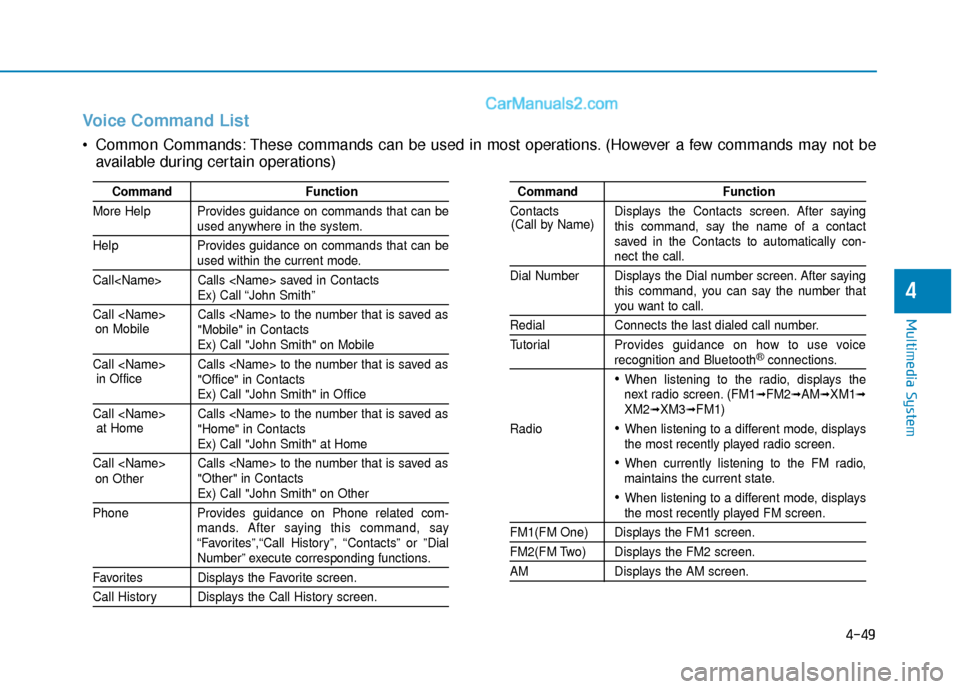
Voice Command List
Common Commands: These commands can be used in most operations. (However a few commands may not beavailable during certain operations)
Command Function
More Help Provides guidance on commands that can be
used anywhere in the system.
Help Provides guidance on commands that can be
used within the current mode.
Call
Ex) Call “John Smith”
Call
Ex) Call "John Smith" on Mobile
Call
Ex) Call "John Smith" in Office
Call
Ex) Call "John Smith" at Home
Call
Ex) Call "John Smith" on Other
Phone Provides guidance on Phone related com- mands. After saying this command, say
“Favorites”,“Call History”, “Contacts” or ”Dial
Number” execute corresponding functions.
Favorites Displays the Favorite screen.
Call History Displays the Call History screen.
Command Function
Contacts Displays the Contacts screen. After saying this command, say the name of a contact
saved in the Contacts to automatically con-
nect the call.
Dial Number Displays the Dial number screen. After saying this command, you can say the number that
you want to call.
Redial Connects the last dialed call number.
Tutorial Provides guidance on how to use voice
recognition and Bluetooth®connections.
When listening to the radio, displays the
next radio screen. (FM1➟FM2➟AM➟XM1➟XM2➟XM3➟FM1)
Radio
When listening to a different mode, displays
the most recently played radio screen.
When currently listening to the FM radio,
maintains the current state.
When listening to a different mode, displaysthe most recently played FM screen.
FM1(FM One) Displays the FM1 screen.
FM2(FM Two) Displays the FM2 screen.
AM Displays the AM screen.
(Call by Name)
on Mobile
in Officeat Home
on Other
Page 309 of 563
Driving your vehicle
5
Before Driving ........................................................5-4
Before Entering the Vehicle ...........................................5-4
Before Starting ..................................................................5-4
Ignition Switch ........................................................5-6
Key Ignition Switch ...........................................................5-6
Engine Start/Stop Button................................................5-9
Transmission .........................................................5-14
Automatic Transmission .................................................5-14
Ecoshift Dual Clutch Transmission..............................5-18
Paddle Shifter ..................................................................5-24
Shift-Lock System ..........................................................5-25
Shift-Lock Release .........................................................5-25
Parking ........................................................................\
.......5-26
Good Driving Practices ..................................................5-26
Braking System ....................................................5-28
Power Brakes ...................................................................5-28
Disc Brakes Wear Indicator ..........................................5-29
Foot Parking Brake.........................................................5-29
Electronic Parking Brake (EPB)...................................5-31
AUTO HOLD ......................................................................5-\
37
Anti-lock Brake System (ABS) ....................................5-40
Electronic Stability Control (ESC)................................5-43
Hill-Start Assist Control (HAC) ...................................5-46
Good Braking Practices .................................................5-47
Drive Mode Integrated Control System ............5-48
Cruise Control .......................................................5-50
Cruise Control Operation...............................................5-50
Smart Cruise Control system..............................5-54
To Adjust the Sensitivity of Smart Cruise Control ....5-55
To Convert to Cruise Control Mode............................5-55
Smart Cruise Control Speed .........................................5-56
Smart Cruise Control Vehicle-to-Vehicle Distance...5-60
Radar to Detect Distance to the Vehicle Ahead .....5-63
Limitations of the System .............................................5-64
Lane Departure Warning System (LDWS) ........5-69
LDWS Operation ..............................................................5-70
Warning Light and Message.........................................5-71
Blind Spot Detection System (BSD) ..................5-73
BSD (Blind Spot Detection) /
LCA (Lane Change Assist) .............................................5-74
RCTA (Rear Cross Traffic Alert) ..................................5-77
Automatic emergency braking (AEB) ...............5-81
System setting and activation......................................5-81
AEB warning message and system control ..............5-83
Sensor to detect the distance from the vehicle
in front (front radar) .....................................................5-86
System malfunction ........................................................5-87
Limitation of the system ...............................................5-89
Page 316 of 563
5-8
Starting the engine
1. Make sure the parking brake isapplied.
2. Make sure the shift lever is in P (Park).
3. Depress the brake pedal.
4. Turn the ignition switch to the START position. Hold the key
(maximum of 10 seconds) until the
engine starts and release it.
Information
• Do not wait for the engine to warmup while the vehicle remains station-
ary. Start driving at moderate
engine speeds. (Steep accelerating
and decelerating should be avoided.)
• Whether the engine is cold or warm, always start the vehicle with your
foot on the brake pedal. Do not
depress the accelerator while start-
ing the vehicle. Do not race the
engine while warming it up. To prevent damage to the vehicle:
Do not hold the ignition key in
the START position for more
than 10 seconds. Wait 5 to 10
seconds before trying again.
If traffic and road conditions permit, you may put the shift
lever in the N (Neutral) position
while the vehicle is still moving
and turn the ignition switch to
the START position in an
attempt to restart the engine.
Do not push or tow your vehicle to start the engine.
NOTICEi
Driving your vehicle
Always wear appropriate shoes
when operating your vehicle.
Unsuitable shoes, such as high
heels, ski boots, sandals, flip-
flops, etc., may interfere with
your ability to use the brake and
accelerator pedals.
WARNING