vent Hyundai Sonata 2020 Owner's Manual
[x] Cancel search | Manufacturer: HYUNDAI, Model Year: 2020, Model line: Sonata, Model: Hyundai Sonata 2020Pages: 537, PDF Size: 14.54 MB
Page 373 of 537
06
6-89
• Do not use Smart Cruise Control
when it may not be safe to keep the
vehicle at a constant speed:
- When driving in heavy traffic or
when traffic conditions make it
difficult to drive at a constant
speed
- When driving on rainy, icy, or
snow-covered roads
- When driving on a steep downhill
or uphill
- When driving in windy areas
- When driving in parking lots
- When driving near crash barriers
- When driving on a sharp curve
- When driving with limited view
(possibly due to bad weather, such
as fog, snow, rain or sandstorm)
- When the vehicle sensing
ability decreases due to vehicle
modification resulting level
difference of the vehicle's front
and rear
• Unexpected situations may lead to
possible accidents. Pay attention
continuously to road conditions
and driving even when smart cruise
control system is being operated.Smart Cruise Control Switch
CRUISE/:Turns cruise control system
on or off.
RES+: Resumes or increases cruise control speed.
SET-: Sets or decreases cruise control speed.
:
Sets vehicle-to-vehicle distance.
CANCEL (CNCL): Cancels cruise control operation.
To Convert to Cruise Control
Mode
The driver may choose to only use the
conventional Cruise Control mode
(speed control function) by doing as
follows:
1. Turn Smart Cruise Control system on (the cruise indicator light will be on
but the system will not be activated).
2. Push and hold the Vehicle-to-Vehicle Distance button for more than 2
seconds.
3. Choose between “Smart Cruise Control” and “Cruise Control”.
When the system is canceled using the
CRUISE/
button or the CRUISE button
is used after the engine is turned on, the
Smart Cruise Control mode will turn on.
WARNING
When using the Cruise Control mode,
you must manually adjust the distance
to other vehicles by depressing the
brake pedal. The system does not
automatically adjust the distance to
vehicles in front of you.
Page 381 of 537
06
6-97
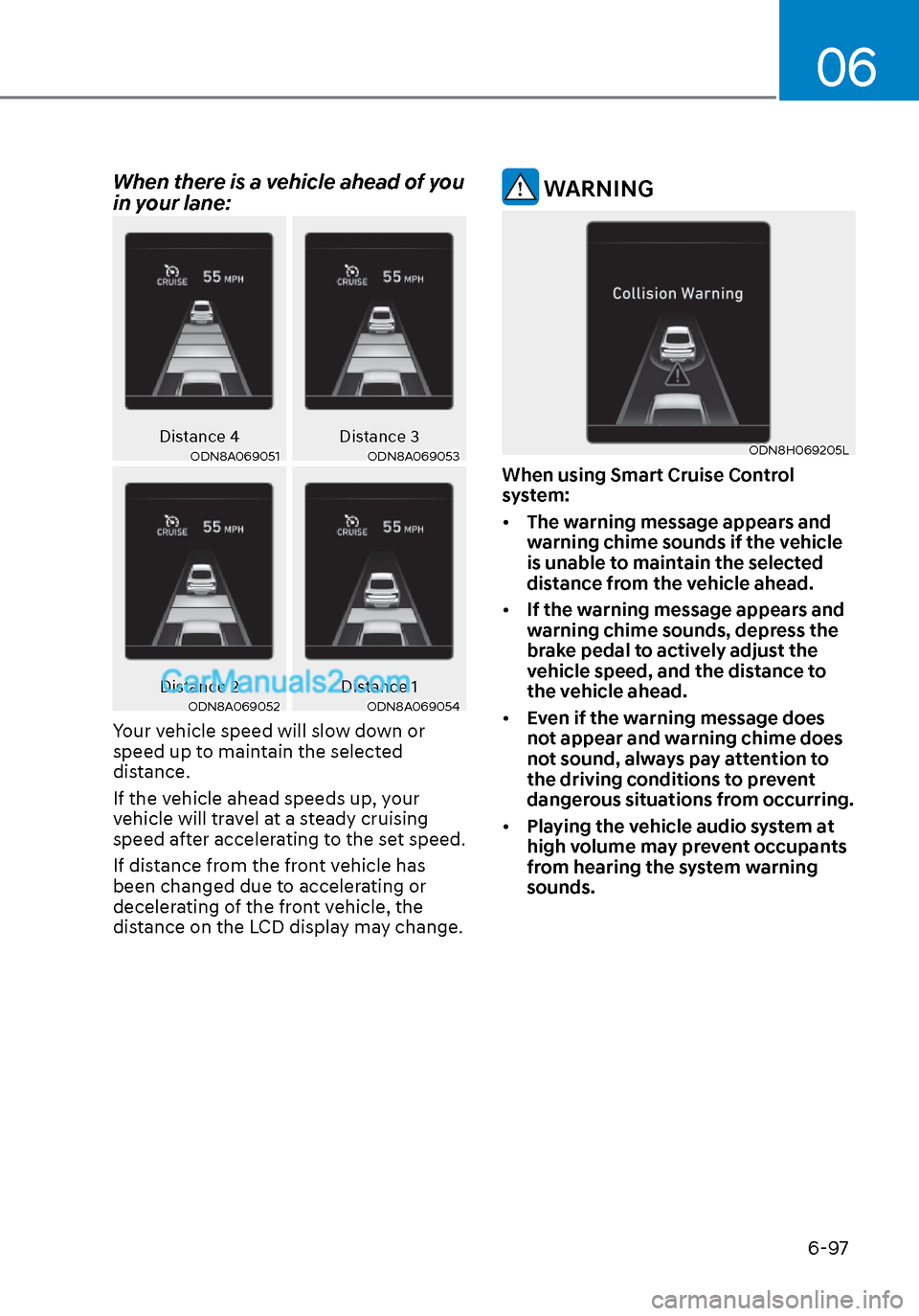
When there is a vehicle ahead of you
in your lane:
Distance 4Distance 3ODN8A069051ODN8A069051ODN8A069053ODN8A069053
Distance 2 Distance 1ODN8A069052ODN8A069052ODN8A069054ODN8A069054
Your vehicle speed will slow down or
speed up to maintain the selected
distance.
If the vehicle ahead speeds up, your
vehicle will travel at a steady cruising
speed after accelerating to the set speed.
If distance from the front vehicle has
been changed due to accelerating or
decelerating of the front vehicle, the
distance on the LCD display may change.
WARNING
ODN8H069205LODN8H069205L
When using Smart Cruise Control
system:
• The warning message appears and
warning chime sounds if the vehicle
is unable to maintain the selected
distance from the vehicle ahead.
• If the warning message appears and
warning chime sounds, depress the
brake pedal to actively adjust the
vehicle speed, and the distance to
the vehicle ahead.
• Even if the warning message does
not appear and warning chime does
not sound, always pay attention to
the driving conditions to prevent
dangerous situations from occurring.
• Playing the vehicle audio system at
high volume may prevent occupants
from hearing the system warning
sounds.
Page 388 of 537
While Driving6-104
WARNING
When using Smart Cruise Control take
the following precautions:
• If an emergency stop is necessary,
you must apply the brakes. The
vehicle cannot be stopped at every
emergency situation by using Smart
Cruise Control system.
• Keep a safe distance according to
road conditions and vehicle speed. If
the vehicle to vehicle distance is too
close during a high-speed driving, a
serious collision may result.
• Always maintain sufficient braking
distance and decelerate your vehicle
by applying the brakes if necessary.
• Smart Cruise Control system cannot
recognize a stopped vehicle,
pedestrians or an oncoming vehicle.
Always look ahead cautiously to
prevent unexpected and sudden
situations from occurring.
• Vehicles moving in front of you with
a frequent lane change may cause
a delay in the system's reaction or
may cause the system to react to a
vehicle actually in an adjacent lane.
Always drive cautiously to prevent
unexpected and sudden situations
from occurring.
• Always be aware of the selected
speed and vehicle to vehicle
distance. The driver should not solely
rely on the system but always pay
attention to driving conditions and
control your vehicle speed.
• Smart Cruise Control system may not
recognize complex driving situations
so always pay attention to driving
conditions and control your vehicle
speed.
• Smart Cruise Control system may
recognize a pedestrian, bicycle,
motorcycle, etc. as a vehicle. Always,
look ahead cautiously to prevent
unexpected and sudden situations
from occurring.
• Turn off Smart Cruise Control system
when the vehicle is being towed.
NOTICE
Smart Cruise Control system may not
operate temporarily due to:
• Electrical interference
• Modifying the suspension
• Differences of tire abrasion or tire
pressure
• Installing different type of tires
The brake control using Smart Cruise
Control system may make a sound.
Information
This device complies with Part 15 of the
FCC rules.
Operation is subject to the following two
conditions:
1. This device may not cause harmful
interference.
2. This device must accept any
interference received, including
interference that may cause undesired
operation.
Page 391 of 537
06
6-107
Information
• Navigation-based Smart Cruise Control
is limited in other countries.
• The system may not operate due to the
existence of leading vehicles and the
driving situations of the vehicle.
• The system operates regardless of
whether the sharp curve warning
appears on the navigation, but the time
gap could occur between the warning
and system operation.
• The navigation only provides curve
information within permitted speed
ranges so that the system may not
decrease its speed during extreme over-
speed driving.
• The system is not designed to work on
highways other than mentioned as a
controlled access road.
• The system automatically cancels when
you leave the highway. •
Highway Driving Assist and
Navigation-based Smart Cruise
Control uses the same symbol
that indicates the status of the system.
Therefore, even if Navigation-based
Cruise Control is off, the
symbol
may be displayed.
• If there is a problem with Navigation-
based Smart Cruise Control, the system
cannot be activated in the AVN system
screen, and the
symbol will turn
off. However, if Highway Driving Assist
is activated, the
symbol will be
displayed.
• After you pass through a tollgate on a
highway, the system operates based
on the first lane. If you enter one of
the other lanes, the system might not
properly decelerate.
• If you over speed, the system may not
decelerate the vehicle in a curve.
• Deceleration by the system may not be
sufficient if the driver accelerates while
the system is operating,
• Deceleration by the system may not be
sufficient due to road conditions such
as uneven road surfaces, narrow lanes,
etc.
• If the road is controlled, due to
construction or holiday events, the
system might not work properly.
Page 394 of 537
While Driving6-110
• When you replace the windshield
glass, LFA system camera or related
parts of the steering wheel, have the
vehicle inspected by an authorized
HYUNDAI dealer.
• The system helps detect lane
markers and controls the steering
wheel by a camera, therefore, if the
lane markers are hard to detect, the
system may not work properly.
• Please refer to “Limitations of the
System”.
• Do not remove or damage the related
parts of LFA system.
• You may not hear a warning sound
of LFA system if the audio volume is
high.
• Do not place objects on the
dashboard that reflects light such as
mirrors, white paper, etc. This may
prevent LFA system from functioning
properly. •
Always have your hands on the
steering wheel while LFA system is
activated. If you continue to drive
with your hands off the steering
wheel after the “Keep hands on
steering wheel” warning message
appears, the system will turn off
automatically.
However, if the driver has their
hands on the steering wheel again,
the system will start controlling the
steering wheel.
• The steering wheel is not
continuously controlled so if the
vehicle speed is at a higher rate
when leaving a lane the vehicle may
not be controlled by the system. The
driver must always follow the speed
limit when using the system.
• If you attach objects to the steering
wheel, the system may not assist
steering or the hands off alarm may
not work properly.
Page 410 of 537
While Driving6-126
CAUTION
• When the operation condition of
Rear Cross-Traffic Collision Warning
system is satisfied, the warning
will occur every time a vehicle
approaches the side or rear of your
stopped (0 mph (0 km/h) vehicle
speed) vehicle.
• The system’s warning or brake may
not operate properly if the left or
right of your vehicle’s rear bumper is
blocked by a vehicle or obstacle.
• The driver should always use
extreme caution while operating
the vehicle, whether or not the
warning light on the side view mirror
illuminates or there is a warning
alarm.
• Playing the vehicle audio system at
high volume may offset the system’s
warning sounds.
• The warning of Rear Cross-Traffic
Collision Warning System may not
sound while other system’s warning
sounds.
• If any other warning sound such as
seat belt warning chime is already
generated, Rear Cross-Traffic
Collision Warning system warning
may not sound.
WARNING
• Drive safely even though the vehicle
is equipped with Rear Cross-Traffic
Collision Warning system and Rear
Cross-Traffic Collision-Avoidance
Assist system. Do not solely rely
on the system but check your
surrounding when backing the
vehicle up.
• The driver is responsible for accurate
brake control.
• Always pay extreme caution while
driving. Rear Cross-Traffic Collision
Warning system and Rear Cross-
Traffic Collision-Avoidance Assist
system may not operate properly or
unnecessarily operate in accordance
with your driving situations.
• Rear Cross-Traffic Collision-
Avoidance Assist system is not a
substitute for safe driving practices,
but a convenience function only. It
is the responsibility of the driver to
always drive cautiously to prevent
unexpected and sudden situations
from occurring. Pay attention to the
road conditions at all times.
Page 417 of 537
06
6-133
Hazardous Driving Conditions
When hazardous driving elements
are encountered such as water, snow,
ice, mud and sand, take the below
suggestions:
• Drive cautiously and keep a longer braking distance.
• Avoid abrupt braking or steering.
• When your vehicle is stuck in snow, mud, or sand, use second
gear. Accelerate slowly to avoid
unnecessary wheel spin.
• Put sand, rock salt, tire chains or other non-slip materials under the wheels to
provide additional traction while the
vehicle becomes stuck in ice, snow,
or mud.
WARNING
Downshifting with an automatic
transmission while driving on slippery
surfaces can cause an accident. The
sudden change in tire speed could
cause the tires to skid. Be careful when
downshifting on slippery surfaces.
Rocking the Vehicle
If it is necessary to rock the vehicle to
free it from snow, sand, or mud, first turn
the steering wheel right and left to clear
the area around your front wheels. Then,
shift back and forth between R (Reverse)
and a forward gear.
Try to avoid spinning the wheels, and do
not race the engine.
To prevent transmission wear, wait until
the wheels stop spinning before shifting
gears. Release the accelerator pedal
while shifting, and press lightly on the
accelerator pedal while the transmission
is in gear. Slowly spinning the wheels in
forward and reverse directions causes a
rocking motion that may free the vehicle.
WARNING
If the vehicle is stuck and excessive
wheel spin occurs, the temperature
of the tires can increase very quickly.
If the tires become damaged, a tire
blow out or tire explosion can occur.
This condition is dangerous - you and
others may be injured. Do not attempt
this procedure if people or objects are
anywhere near the vehicle.
If you attempt to free the vehicle, the
vehicle can overheat quickly, possibly
causing an engine compartment fire
or other damage. Try to avoid spinning
the wheels as much as possible to
prevent overheating of either the tires
or the engine. DO NOT allow the vehicle
to spin the wheels above 35 mph (56
km/h).
Information
The ESC system must be turned OFF
before rocking the vehicle.
NOTICE
If you are still stuck after rocking the
vehicle a few times, have the vehicle
pulled out by a tow vehicle to avoid
engine overheating, possible damage to
the transmission, and tire damage. See
"Towing" in chapter 7.
SPECIAL DRIVING CONDITIONS
Page 421 of 537
06
6-137
WARNING
The use of tire chains may adversely
affect vehicle handling:
• Drive less than 20 mph (30 km/h)
or the chain manufacturer's
recommended speed limit,
whichever is lower.
• Drive carefully and avoid bumps,
holes, sharp turns, and other road
hazards, which may cause the
vehicle to bounce.
• Avoid sharp turns or locked wheel
braking.
Information
• Install tire chains on both left and right
front tires. It should be noted that
installing tire chains on the tires will
provide a greater driving force, but will
not prevent side skids.
• Do not install studded tires without
first checking local, state and municipal
regulations for possible restrictions
against their use.
Chain installation
When installing tire chains, follow the
manuf
acturer’s instructions and mount
them as tightly possible. Drive slowly
(less than 20 mph (30 km/h)) with
chains installed. If you hear the chains
contacting the body or chassis, stop and
tighten them. If they still make contact,
slow down until the noise stops. Remove
the tire chains as soon as you begin
driving on cleared roads.
When mounting snow chains, park the
vehicle on level ground away from traffic.
Turn on the vehicle Hazard Warning
Flasher and place a triangular emergency
warning device behind the vehicle (if
available). Always place the vehicle in P
(Park), apply the parking brake and turn
off the engine before installing snow
chains.
NOTICE
When using tire chains:
• Wrong size chains or improperly
installed chains can damage your
vehicle's brake lines, suspension,
body and wheels.
• Use SAE "S" class or wire chains.
• If you hear noise caused by chains
contacting the body, retighten the
chain to prevent contact with the
vehicle body.
• To prevent body damage, retighten
the chains after driving 0.3~0.6 miles
(0.5~1.0 km).
• Do not use tire chains on vehicles
equipped with aluminum wheels. If
unavoidable, use a wire type chain.
• Use wire chains less than 0.59 inch
(15mm) wide to prevent damage to
the chain’s connection.
Winter Precautions
Use high quality ethylene glycol
coolant
Your vehicle is delivered with high
quality ethylene glycol coolant in the
cooling system. It is the only type of
coolant that should be used because it
helps prevent corrosion in the cooling
system, lubricates the water pump and
prevents freezing. Be sure to replace or
replenish your coolant in accordance
with the maintenance schedule in
chapter 8. Before winter, have your
coolant tested to assure that its freezing
point is sufficient for the temperatures
anticipated during the winter.
Page 422 of 537
While Driving6-138
Change to "winter weight" oil if
necessary
In some climates it is recommended that
a lower viscosity "winter weight" oil be
used during cold weather. See chapter 8
for recommendations. If you aren't sure
what weight oil you should use, consult
an authorized HYUNDAI dealer.
Check battery and cables
Winter puts additional burdens on the
battery system. Visually inspect the
battery and cables as described in
chapter 8. The level of charge in your
battery can be checked by an authorized
HYUNDAI dealer or a service station.
Check spark plugs and ignition
system
Inspect your spark plugs as described in
chapter 8 and replace them if necessary.
Also check all ignition wiring and
components to be sure they are not
cracked, worn or damaged in any way.
Use approved window washer anti-
freeze in system
To keep the water in the window washer
system from freezing, add an approved
window washer anti-freeze solution in
accordance with instructions on the
container. Window washer anti-freeze is
available from an authorized HYUNDAI
dealer and most auto parts outlets. Do
not use engine coolant or other types
of antifreeze as these may damage the
paint finish.
Do not let your parking brake freeze
Under some conditions your parking
brake can freeze in the engaged position.
This is most likely to happen when
there is an accumulation of snow or
ice around or near the rear brakes or
if the brakes are wet. If there is a risk
the parking brake may freeze, apply
it only temporarily while you put the
gear selector lever in P and block the
rear wheels so the car cannot roll. Then
release the parking brake.
Do not let ice and snow accumulate
underneath
Under some conditions, snow and ice
can build up under the fenders and
interfere with the steering. When driving
in severe winter conditions where this
may happen, you should periodically
check underneath the car to be sure the
movement of the front wheels and the
steering components is not obstructed.
Don't place foreign objects
or materials in the engine
compartment
Placement of foreign object or materials
which prevent cooling of the engine, in
the engine compartment, may cause a
failure or combustion. The manufacturer
is not responsible for the damage caused
by such placement.
To keep locks from freezing
To keep the locks from freezing, squirt
an approved de-icer fluid or glycerine
into the key opening. If a lock is covered
with ice, squirt it with an approved de-
icing fluid to remove the ice. If the lock
is frozen internally, you may be able to
thaw it out by using a heated key. Handle
the heated key with care to avoid injury.
Page 432 of 537
Emergency Situations7-4
Jump starting can be dangerous if done
incorrectly. Follow the jump starting
procedure in this section to avoid serious
injury or damage to your vehicle. If in
doubt about how to properly jump start
your vehicle, we strongly recommend
that you have a service technician or
towing service do it for you.
WARNING
To prevent SERIOUS INJURY or DEATH
to you or bystanders, always follow
these precautions when working near
or handling the battery:
Always read and follow
instructions carefully when
handling a battery.
Wear eye protection designed
to protect the eyes from acid
splashes.
Keep all flames, sparks, or
smoking materials away from
the battery.
Hydrogen is always present
in battery cells, is highly
combustible, and may explode
if ignited.
Keep batteries out of reach of
children.
Batteries contain sulfuric acid
which is highly corrosive. Do
not allow acid to contact your
eyes, skin or clothing.
If acid gets into your eyes, flush your
eyes with clean water for at least 15
minutes and get immediate medical
attention. If acid gets on your skin,
thoroughly wash the area. If you feel
pain or a burning sensation, get medical
attention immediately.
• When lifting a plastic-cased battery,
excessive pressure on the case may
cause battery acid to leak. Lift with a
battery carrier or with your hands on
opposite corners.
• Do not attempt to jump start your
vehicle if your battery is frozen.
• NEVER attempt to recharge the
battery when the vehicle’s battery
cables are connected to the battery.
• The electrical ignition system works
with high voltage. NEVER touch
these components with the engine
running or when the ignition switch
is in the ON position.
Information
An inappropriately disposed
battery can be harmful to
the environment and human
health. Dispose of the battery
according to your local law(s) or
regulations.
NOTICE
To prevent damage to your vehicle:
• Only use a 12-volt power supply
(battery or jumper system) to jump
start your vehicle.
• Do not attempt to jump start your
vehicle by push-starting.
JUMP STARTING