vent Hyundai Sonata 2020 Repair Manual
[x] Cancel search | Manufacturer: HYUNDAI, Model Year: 2020, Model line: Sonata, Model: Hyundai Sonata 2020Pages: 537, PDF Size: 14.54 MB
Page 229 of 537
![Hyundai Sonata 2020 Repair Manual 05
5-99
FORWARD/REVERSE PARKING DISTANCE WARNING (PDW)
(IF EQUIPPED)
ODN8A059055ODN8A059055
ODN8059056LODN8059056L[A] : Front sensor, [B] : Rear sensor
Forward/Reverse Parking Distance
Warning syst](/img/35/16773/w960_16773-228.png "Hyundai Sonata 2020 Repair Manual 05
5-99
FORWARD/REVERSE PARKING DISTANCE WARNING (PDW)
(IF EQUIPPED)
ODN8A059055ODN8A059055
ODN8059056LODN8059056L[A] : Front sensor, [B] : Rear sensor
Forward/Reverse Parking Distance
Warning syst")
05
5-99
FORWARD/REVERSE PARKING DISTANCE WARNING (PDW)
(IF EQUIPPED)
ODN8A059055ODN8A059055
ODN8059056LODN8059056L[A] : Front sensor, [B] : Rear sensor
Forward/Reverse Parking Distance
Warning system assists the driver during
movement of the vehicle by chiming if
an object is sensed within the distance of
40 in (100 cm) in front and 48 in (120 cm)
behind the vehicle.
This system is a supplemental system
that senses objects within the range and
location of the sensors, it cannot detect
objects in other areas where sensors are
not installed.
WARNING
• ALWAYS look around your vehicle
to make sure there are no objects or
obstacles before moving the vehicle
in any direction to prevent a collision.
• Always pay close attention when the
vehicle is driven close to objects,
particularly pedestrians, and
especially children.
• Be aware that some objects may
not be visible on the screen or be
detected by the sensors, due to the
objects distance, size or material, all
of which can limit the effectiveness
of the sensor.
• Do not tamper with the location
or size of the license plate
discretionally.
Page 240 of 537
Convenient Features5-110
When the Remote Moving Forward
is ready by the above No. (1)
method, the vehicle recognizes the
condition as exit. After confirming
the surroundings within 13 ft. (4 m), it
allows to operate the steering wheel
up to the conditions ahead.
When Remote Moving Forward is
ready by the above No. (2) method,
the vehicle recognizes the condition
as entering to the parking space.
According to the front condition, it
immediately allows the vehicle to
enter to the parking space and line
up with the steering wheel control.
However, the function performance
can be degraded up to the shape or
position of the surrounding objects.
If you select the remote moving
backward, both of the No. (1) and (2)
methods make the vehicle go straight
after lining up.
While Remote Moving Forward/
Backward assist is operating, the
brake light turns on.
ODN8A059249ODN8A059249
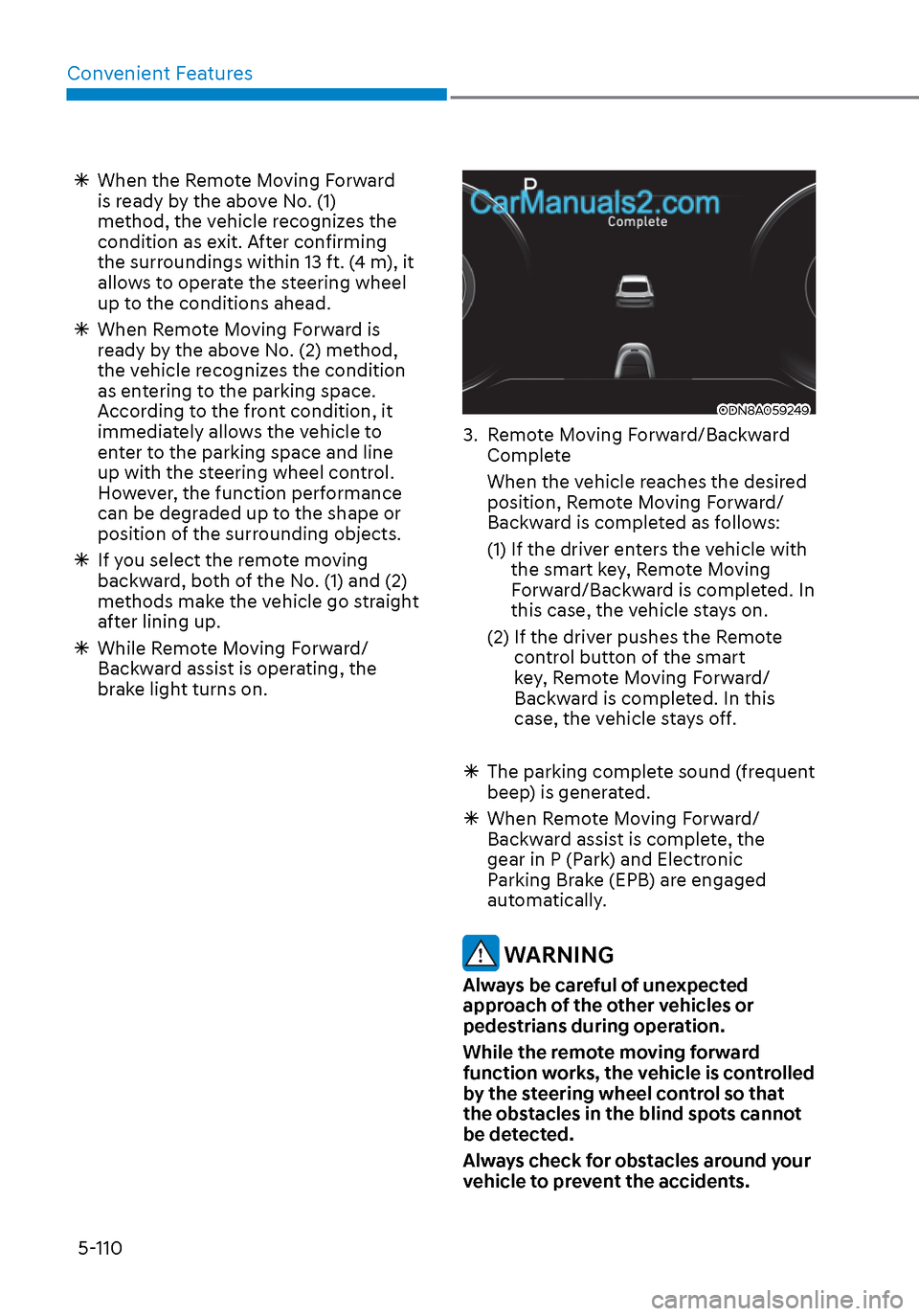
3. Remote Moving Forward/Backward
Complete
When the vehicle reaches the desired position, Remote Moving Forward/
Backward is completed as follows:
(1) If the driver enters the vehicle with the smart key, Remote Moving
Forward/Backward is completed. In
this case, the vehicle stays on.
(2) If the driver pushes the Remote control button of the smart
key, Remote Moving Forward/
Backward is completed. In this
case, the vehicle stays off.
The parking complete sound (frequent
beep) is generated.
When Remote Moving Forward/
Backward assist is complete, the
gear in P (Park) and Electronic
Parking Brake (EPB) are engaged
automatically.
WARNING
Always be careful of unexpected
approach of the other vehicles or
pedestrians during operation.
While the remote moving forward
function works, the vehicle is controlled
by the steering wheel control so that
the obstacles in the blind spots cannot
be detected.
Always check for obstacles around your
vehicle to prevent the accidents.
Page 251 of 537
05
5-121
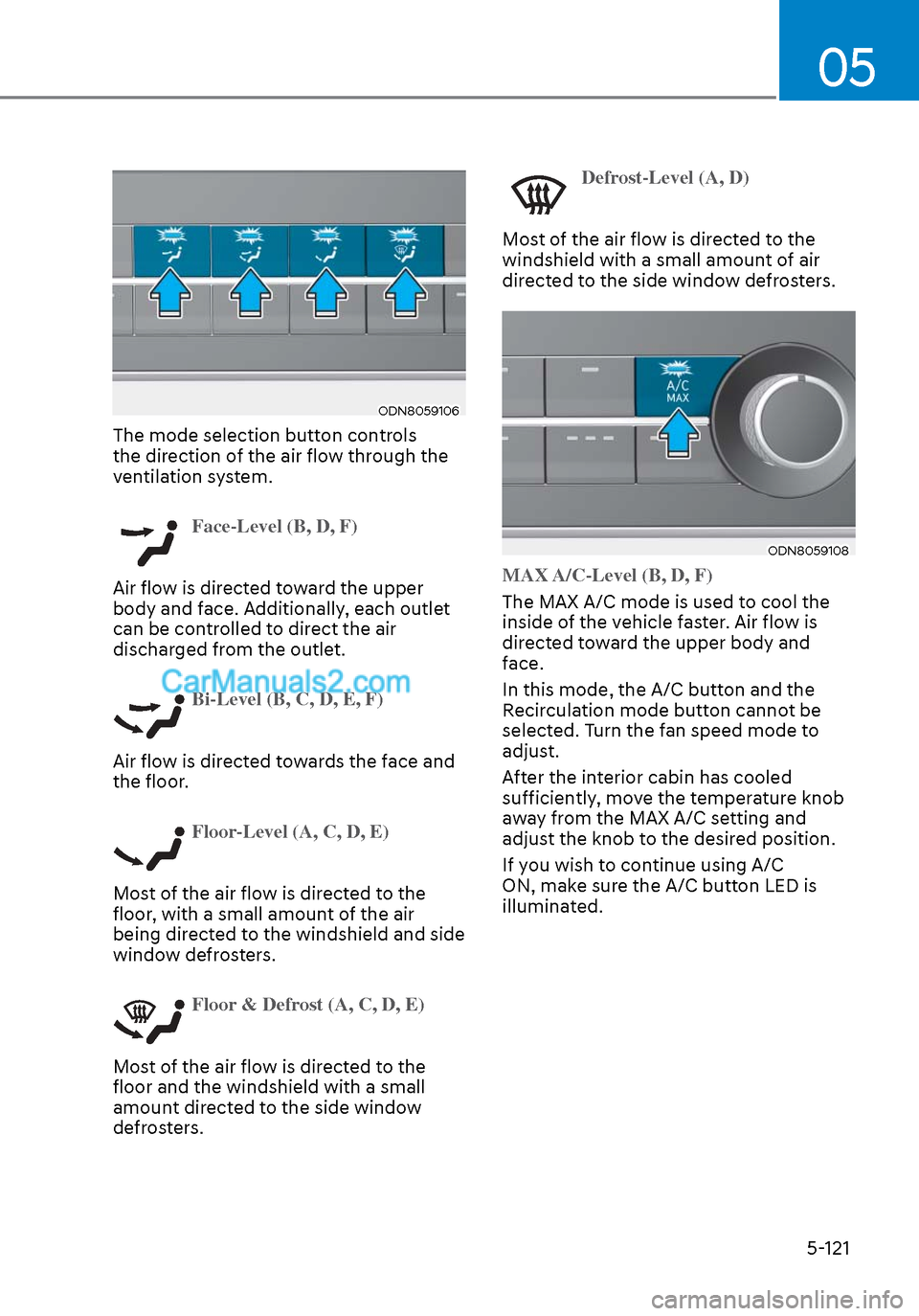
ODN8059106ODN8059106
The mode selection button controls
the direction of the air flow through the
ventilation system.
Face-Level (B, D, F)
Air flow is directed toward the upper
body and f
ace. Additionally, each outlet
can be controlled to direct the air
discharged from the outlet.
Bi-Level (B, C, D, E, F)
Air flow is directed towards the face and
the floor
.
Floor-Level (A, C, D, E)
Most of the air flow is directed to the
floor
, with a small amount of the air
being directed to the windshield and side
window defrosters.
Floor & Defrost (A, C, D, E)
Most of the air flow is directed to the
floor and the windshield with a small
amount dir
ected to the side window
defrosters.
Defrost-Level (A, D)
Most of the air flow is directed to the
windshield with a small amoun
t of air
directed to the side window defrosters.
ODN8059108ODN8059108
MAX A/C-Level (B, D, F)
The MAX A/C mode is used to cool the
inside o
f the vehicle faster. Air flow is
directed toward the upper body and
face.
In this mode, the A/C button and the
Recirculation mode button cannot be
selected. Turn the fan speed mode to
adjust.
After the interior cabin has cooled
sufficiently, move the temperature knob
away from the MAX A/C setting and
adjust the knob to the desired position.
If you wish to continue using A/C
ON, make sure the A/C button LED is
illuminated.
Page 252 of 537
Convenient Features5-122
Instrument panel vents
ODN8059109ODN8059109
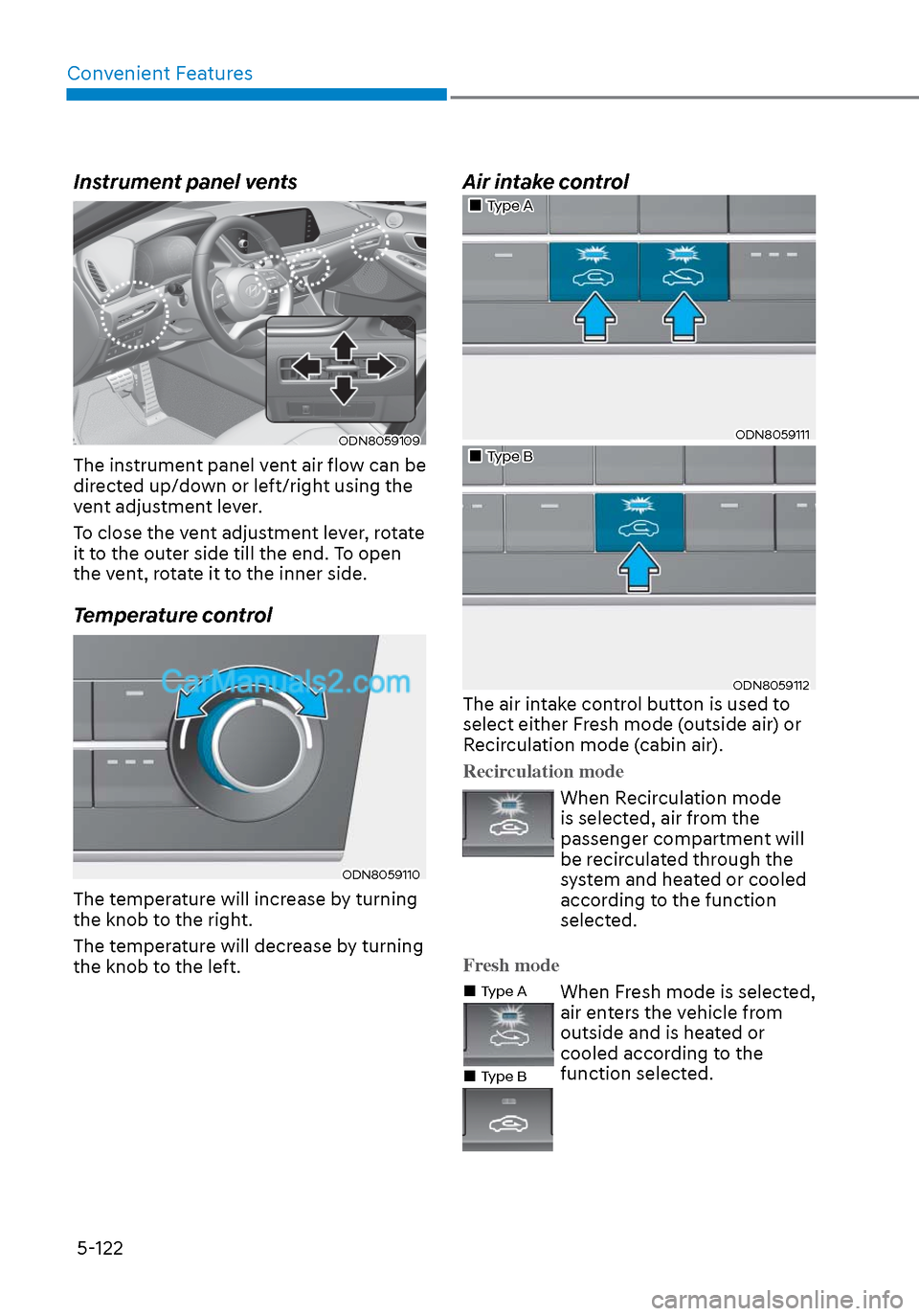
The instrument panel vent air flow can be
directed up/down or left/right using the
vent adjustment lever.
To close the vent adjustment lever, rotate
it to the outer side till the end. To open
the vent, rotate it to the inner side.
Temperature control
ODN8059110ODN8059110
The temperature will increase by turning
the knob to the right.
The temperature will decrease by turning
the knob to the left.
Air intake control
Type AType A
ODN8059111ODN8059111
Type BType B
ODN8059112ODN8059112The air intake control button is used to
select either Fresh mode (outside air) or
Recirculation mode (cabin air).
Recirculation mode
When Recirculation mode
is selected, air from the
passenger compartment will
be recirculated through the
system and heated or cooled
according to the function
selected.
Fresh mode
Type AType A
Type BType B
When Fresh mode is selected,
air enters the vehicle from
outside and is heated or
cooled according to the
function selected.
Page 254 of 537
Convenient Features5-124
System Operation
Cooling / Ventilation
1. Select the Face Level mode.
2. Set the air intake control to fresh mode.
3. Set the temperature control to the desired position.
4. Set the fan speed control to the desired speed.
Heating
1. Select the Floor Level mode.
2. Set the air intake control to fresh mode.
3. Set the temperature control to the desired position.
4. Set the fan speed control to the desired speed.
5. If desired, turn the air conditioning ON with the temperature control knob set
to heat in order to dehumidify the air
before it enters into the cabin.
If the windshield fogs up, select the Floor
& Defrost
mode or press the Front
Defrost mode.
Operation Tips
• To keep dust or unpleasant fumes fr
om entering the vehicle through the
ventilation system, temporarily set
the air intake control to recirculation
mode. Return the control to Fresh
mode when the unpleasant air outside
has diminished. This will help keep the
driver alert and comfortable.
• To help prevent the inside of the windshield from fogging, set the air
intake control to fresh mode and fan
speed to the desired position, turn
on the air conditioning system, and
adjust the temperature control to the
desired temperature.
Air conditioning
Your HYUNDAI vehicle air conditioning
system is filled with R-1234yf refrigerant.
1. Start the engine.
2. Press the air conditioning button.
3. Set the mode to the Face Level
mode.
4. Set the air intake control to Recirculation mode temporarily to
allow the cabin to cool quickly. When
the desired temperature in the cabin
is reached, change the air intake
control back to Fresh mode.
5. Adjust the fan speed control and temperature control to maintain
maximum comfort.
When maximum cooling is desired, set
the temperature control to the MAX A/C
position, then set the fan speed control
to the highest setting.
NOTICE
When using the air conditioning system,
monitor the engine temperature gauge
closely while driving up hills or in heavy
traffic when outside temperatures are
high. Air conditioning system operation
when climbing a steep grade or in high
outside ambient temperatures can
cause engine overheating.
Continue to use the fan, but turn the air
conditioning system off if the engine
temperature gauge indicates engine
overheating.
Page 256 of 537
Convenient Features5-126
NOTICE
It is important that the correct type and
amount of oil and refrigerant is used.
Otherwise, damage to the compressor
and abnormal system operation may
occur. To prevent damage, the air
conditioning system in your vehicle
should only be serviced by trained and
certified technicians.
WARNING
Vehicles equipped with R-1234yf
Since the refrigerant is
mildly flammable and
operated at high pressure,
the air conditioning system
should only be serviced
by trained and certified
technicians. It is important
that the correct type
and amount of oil and
refrigerant are used.
All refrigerants should be reclaimed
with proper equipment.
Venting refrigerants directly to the
atmosphere is harmful to individuals
and environment. Failure to heed these
warnings can lead to serious injuries.
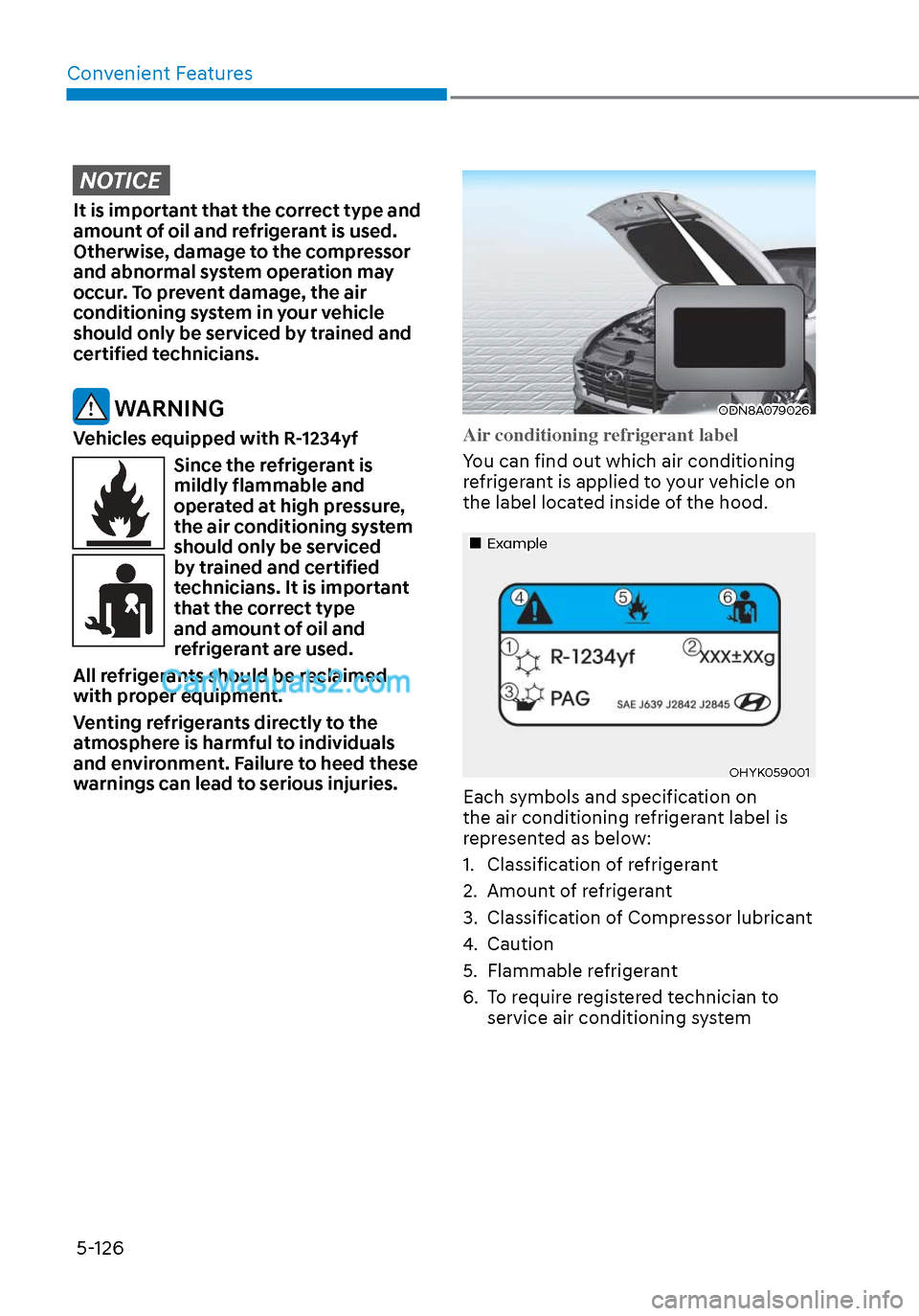
ODN8A079026ODN8A079026
Air conditioning refrigerant label
You can find out which air conditioning
r
efrigerant is applied to your vehicle on
the label located inside of the hood.
ExampleExample
OHYK059001OHYK059001
Each symbols and specification on
the air conditioning refrigerant label is
represented as below:
1. Classification of refrigerant
2. Amount of refrigerant
3. Classification of Compressor lubricant
4. Caution
5. Flammable refrigerant
6. To require registered technician to service air conditioning system
Page 261 of 537
05
5-131
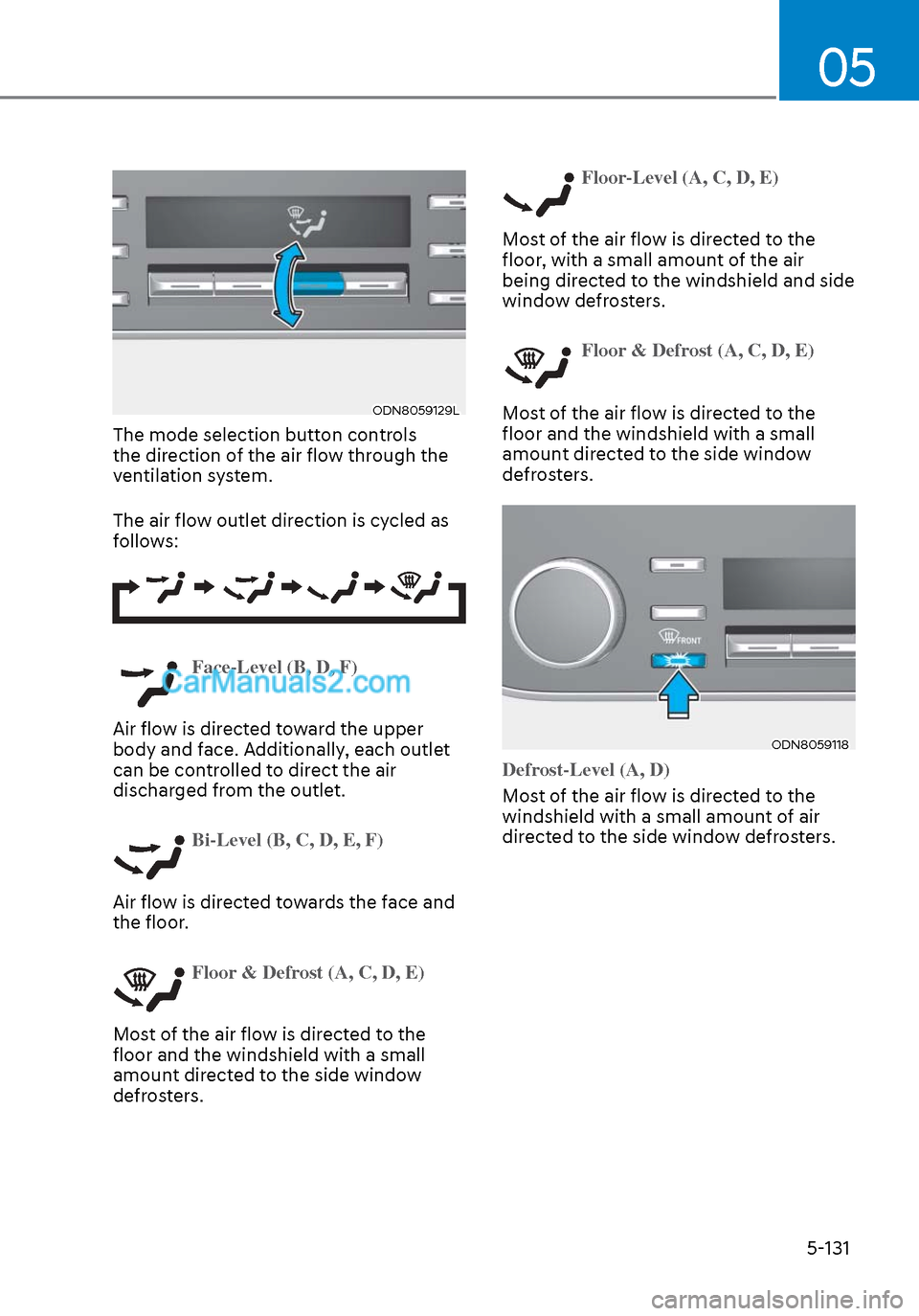
ODN8059129LODN8059129L
The mode selection button controls
the direction of the air flow through the
ventilation system.
The air flow outlet direction is cycled as
follows:
Face-Level (B, D, F)
Air flow is directed toward the upper
body and f
ace. Additionally, each outlet
can be controlled to direct the air
discharged from the outlet.
Bi-Level (B, C, D, E, F)
Air flow is directed towards the face and
the floor
.
Floor & Defrost (A, C, D, E)
Most of the air flow is directed to the
floor and the windshield with a small
amount dir
ected to the side window
defrosters.
Floor-Level (A, C, D, E)
Most of the air flow is directed to the
floor
, with a small amount of the air
being directed to the windshield and side
window defrosters.
Floor & Defrost (A, C, D, E)
Most of the air flow is directed to the
floor and the windshield with a small
amount dir
ected to the side window
defrosters.
ODN8059118ODN8059118
Defrost-Level (A, D)
Most of the air flow is directed to the
windshield with a small amoun
t of air
directed to the side window defrosters.
Page 262 of 537
Convenient Features5-132
Instrument panel vents
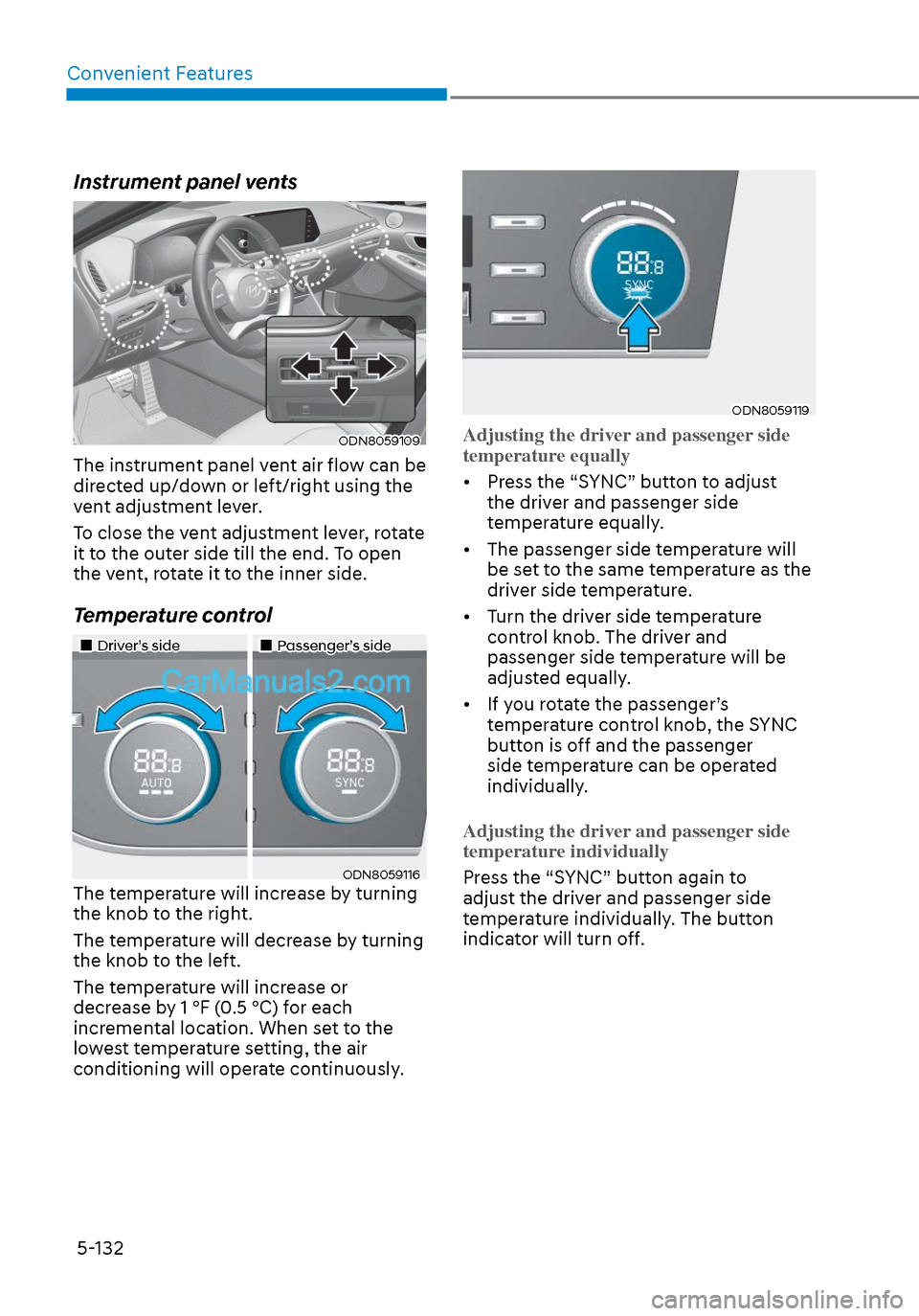
ODN8059109ODN8059109
The instrument panel vent air flow can be
directed up/down or left/right using the
vent adjustment lever.
To close the vent adjustment lever, rotate
it to the outer side till the end. To open
the vent, rotate it to the inner side.
Temperature control
Driver’s sideDriver’s sidePassenger’s sidePassenger’s side
ODN8059116ODN8059116The temperature will increase by turning
the knob to the right.
The temperature will decrease by turning
the knob to the left.
The temperature will increase or
decrease by 1 °F (0.5 °C) for each
incremental location. When set to the
lowest temperature setting, the air
conditioning will operate continuously.
ODN8059119ODN8059119
Adjusting the driver and passenger side
temperature equally
• Press the “SYNC” button to adjust the driv
er and passenger side
temperature equally.
• The passenger side temperature will be set to the same temperature as the
driver side temperature.
• Turn the driver side temperature control knob. The driver and
passenger side temperature will be
adjusted equally.
• If you rotate the passenger’s temperature control knob, the SYNC
button is off and the passenger
side temperature can be operated
individually.
Adjusting the driver and passenger side
temperatur
e individually
Press the “SYNC” button again to
adjus
t the driver and passenger side
temperature individually. The button
indicator will turn off.
Page 265 of 537
05
5-135
System Operation
Cooling / Ventilation
1. Select the Face Level mode.
2. Set the air intake control to fresh mode.
3. Set the temperature control to the desired position.
4. Set the fan speed control to the desired speed.
Heating
1. Select the Floor Level mode.
2. Set the air intake control to fresh mode.
3. Set the temperature control to the desired position.
4. Set the fan speed control to the desired speed.
5. If desired, turn the air conditioning ON with the temperature control knob set
to heat in order to dehumidify the air
before it enters into the cabin.
If the windshield fogs up, select the Floor
& Defrost
mode or press the Front
Defrost mode.
Operation Tips
• To keep dust or unpleasant fumes fr
om entering the car through the
ventilation system, temporarily set the
air intake control to the recirculation
mode. Return the control to the to
Fresh mode when the unpleasant air
outside has diminished. This will help
keep the driver alert and comfortable.
• To help prevent the inside of the windshield from fogging, set the air
intake control to fresh mode and the
fan speed to the desired position, turn
on the air conditioning system, and
adjust the temperature control to the
desired temperature.
Air conditioning
Your HYUNDAI vehicle air conditioning
system is filled with R-1234yf refrigerant.
1. Start the engine.
2. Press the air conditioning button.
3. Set the mode to the Face Level
mode.
4. Set the air intake control to Recirculation mode temporarily to
allow the cabin to cool quickly. When
the desired temperature in the cabin
is reached, change the air intake
control back to Fresh mode.
5. Adjust the fan speed control and temperature control to maintain
maximum comfort.
When maximum cooling is desired, set
the temperature control to the MAX A/C
position, then set the fan speed control
to the highest setting.
NOTICE
When using the air conditioning system,
monitor the engine temperature gauge
closely while driving up hills or in heavy
traffic when outside temperatures.
Air conditioning system operation
when climbing a steep grade or in
high outside ambient temperatures
can cause engine overheating.
Continue to use the fan, but turn the air
conditioning system off if the engine
temperature gauge indicates engine
overheating.
Page 267 of 537
05
5-137
Checking the amount of air
conditioner refrigerant and
compressor lubricant
When the amount of refrigerant is low,
the performance of the air conditioning
is reduced. Overfilling also reduces the
performance of the air conditioning
system.
Therefore, if abnormal operation is
found, have the system inspected by an
authorized HYUNDAI dealer.
NOTICE
It is important that the correct type and
amount of oil and refrigerant is used.
Otherwise, damage to the compressor
and abnormal system operation may
occur. To prevent damage, the air
conditioning system in your vehicle
should only be serviced by trained and
certified technicians.
WARNING
Vehicles equipped with R-1234yf
Since the refrigerant is
mildly flammable and
operated at high pressure,
the air conditioning system
should only be serviced
by trained and certified
technicians. It is important
that the correct type
and amount of oil and
refrigerant are used.
All refrigerants should be reclaimed
with proper equipment.
Venting refrigerants directly to the
atmosphere is harmful to individuals
and environment. Failure to heed these
warnings can lead to serious injuries.
ODN8A079026ODN8A079026
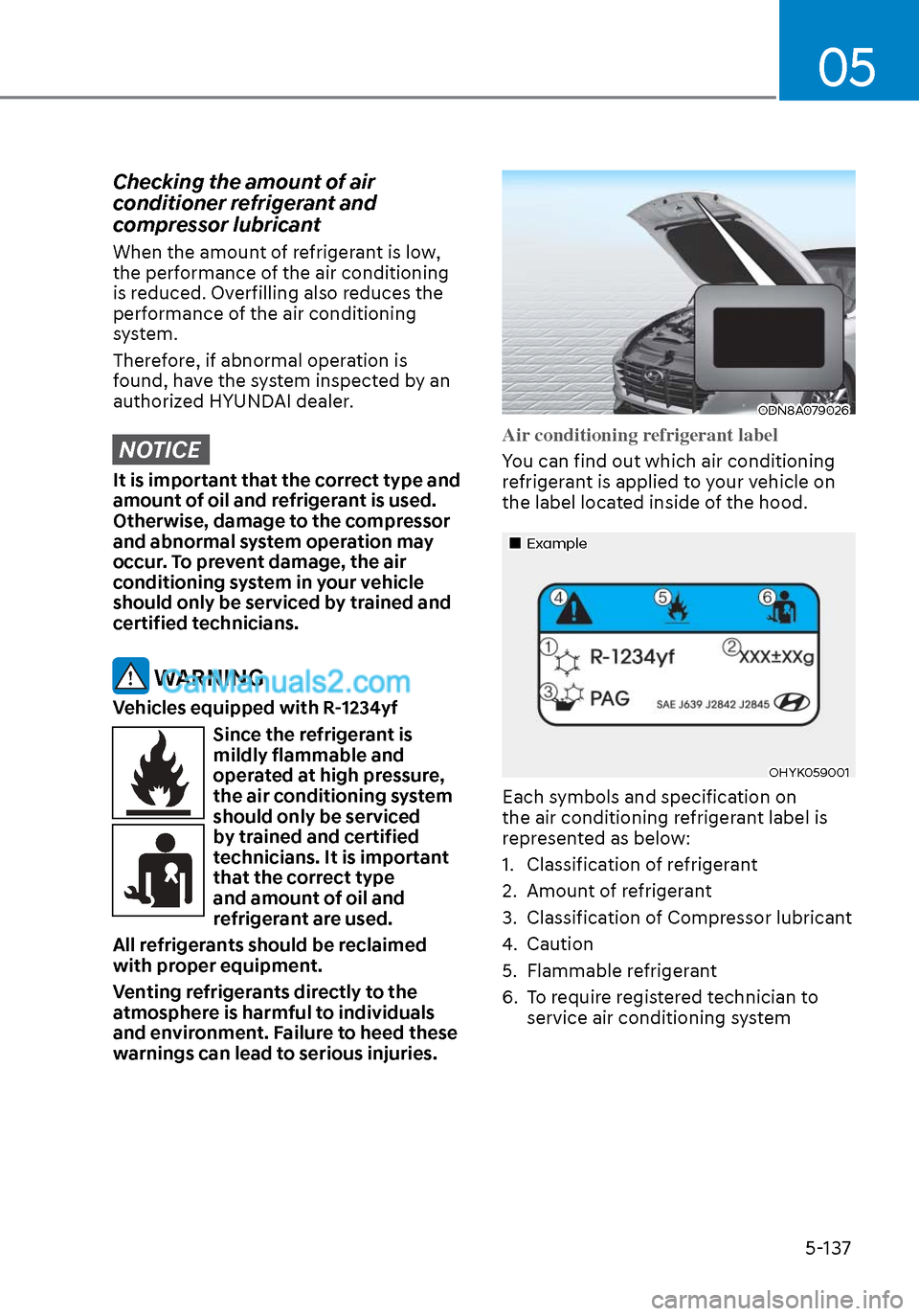
Air conditioning refrigerant label
You can find out which air conditioning
r
efrigerant is applied to your vehicle on
the label located inside of the hood.
ExampleExample
OHYK059001OHYK059001
Each symbols and specification on
the air conditioning refrigerant label is
represented as below:
1. Classification of refrigerant
2. Amount of refrigerant
3. Classification of Compressor lubricant
4. Caution
5. Flammable refrigerant
6. To require registered technician to service air conditioning system