maint HYUNDAI SONATA 2023 Owner's Guide
[x] Cancel search | Manufacturer: HYUNDAI, Model Year: 2023, Model line: SONATA, Model: HYUNDAI SONATA 2023Pages: 555, PDF Size: 42.72 MB
Page 326 of 555
06
6-39
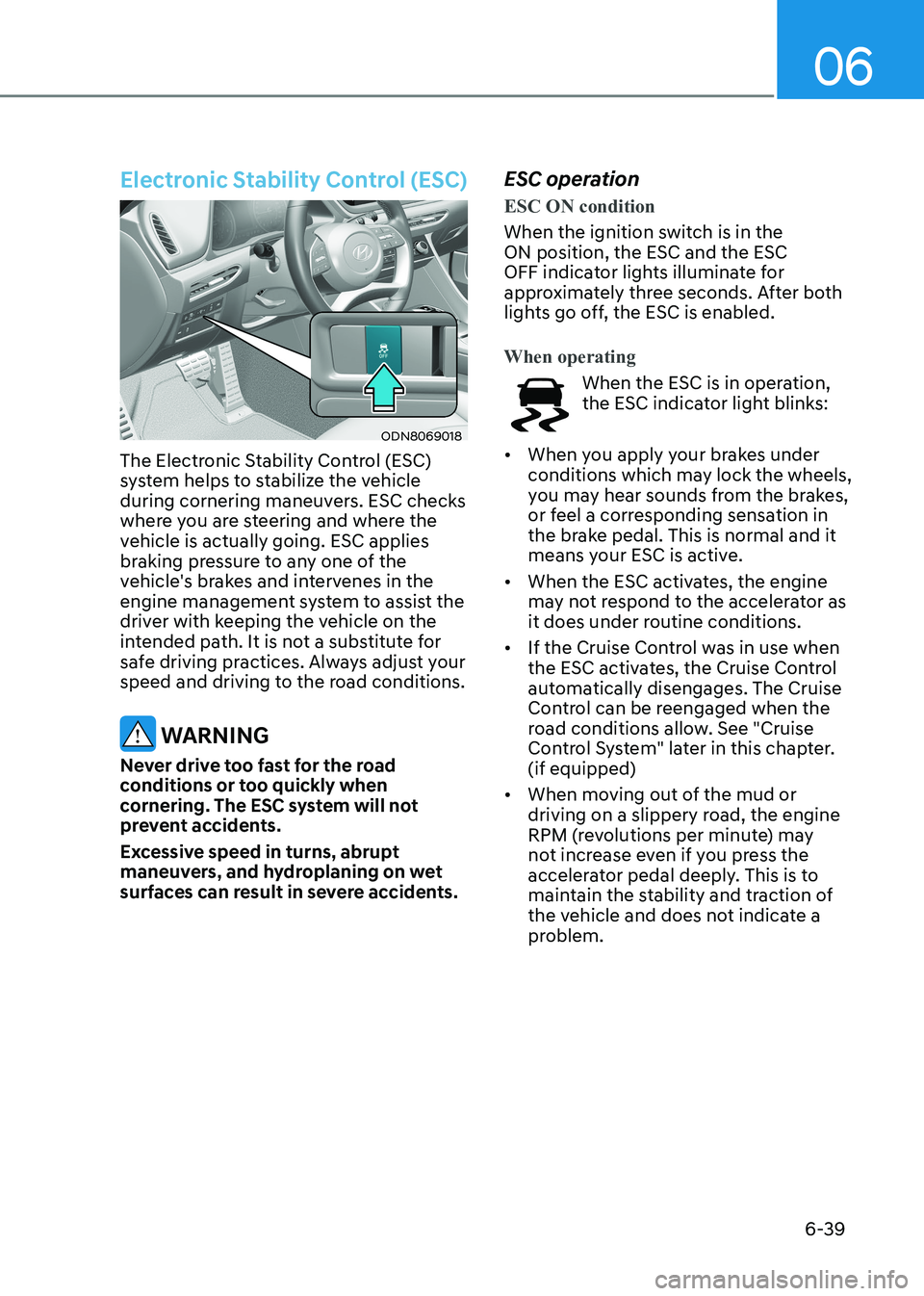
Electronic Stability Control (ESC)
ODN8069018
The Electronic Stability Control (ESC)
system helps to stabilize the vehicle
during cornering maneuvers. ESC checks
where you are steering and where the
vehicle is actually going. ESC applies
braking pressure to any one of the
vehicle's brakes and intervenes in the
engine management system to assist the
driver with keeping the vehicle on the
intended path. It is not a substitute for
safe driving practices. Always adjust your
speed and driving to the road conditions.
WARNING
Never drive too fast for the road
conditions or too quickly when
cornering. The ESC system will not
prevent accidents.
Excessive speed in turns, abrupt
maneuvers, and hydroplaning on wet
surfaces can result in severe accidents. ESC operation
ESC ON condition
When the ignition switch is in the ON position, the ESC and the ESC
OFF indicator lights illuminate for
approximately three seconds. After both
lights go off, the ESC is enabled.
When operating
When the ESC is in operation,
the ESC indicator light blinks:
• When you apply your brakes under
conditions which may lock the wheels,
you may hear sounds from the brakes,
or feel a corresponding sensation in
the brake pedal. This is normal and it
means your ESC is active.
• When the ESC activates, the engine
may not respond to the accelerator as
it does under routine conditions.
• If the Cruise Control was in use when
the ESC activates, the Cruise Control
automatically disengages. The Cruise
Control can be reengaged when the
road conditions allow. See "Cruise
Control System" later in this chapter. (if equipped)
• When moving out of the mud or
driving on a slippery road, the engine
RPM (revolutions per minute) may
not increase even if you press the
accelerator pedal deeply. This is to
maintain the stability and traction of
the vehicle and does not indicate a
problem.
Page 328 of 555
06
6-41
ESC OFF usage
When Driving
The ESC OFF mode should only be used
briefly to help free the vehicle if stuck in
snow by temporarily stopping operation
of the ESC to maintain wheel torque.
To turn ESC off while driving, press the
ESC OFF button while driving on a flat
road surface.
NOTICE
To prevent damage to the transmission: • Do not allow wheel(s) of one axle to
spin excessively while the ESC, ABS,
and parking brake warning lights
are displayed. The repairs would not
be covered by the vehicle warranty.
Reduce engine power and do not
spin the wheel(s) excessively while
these lights are displayed.
• When operating the vehicle on
a dynamometer, make sure the
ESC is turned off (ESC OFF light
illuminated).
Information
Turning the ESC off does not affect ABS
or standard brake system operation.
Vehicle Stability Management
(VSM)
The Vehicle Stability Management (VSM)
is a function of the Electronic Stability
Control (ESC) system. It helps ensure the
vehicle stays stable when accelerating
or braking suddenly on wet, slippery and
rough roads where traction over the four
tires can suddenly become uneven.
WARNING
Take the following precautions when
using the Vehicle Stability Management
(VSM): • ALWAYS check the speed and the
distance to the vehicle ahead. The
VSM is not a substitute for safe
driving practices.
• Never drive too fast for the road
conditions. The VSM system will not
prevent accidents. Excessive speed
in bad weather, slippery and uneven
roads can result in severe accidents.
VSM operation
VSM ON condition
The VSM operates when:
The Electronic Stability Control (ESC) is on.
When operating
When you apply your brakes under
conditions which may activate the ESC,
you may hear sounds from the brakes,
or feel a corresponding sensation in the
brake pedal. This is normal and it means
your VSM is active.
NOTICE
The VSM does not operate when: • Driving on a banked road such as
gradient or incline.
• Driving rearward.
• ESC OFF indicator light is on.
• EPS (Electric Power Steering)
warning light (
) is on or blinks.
Page 344 of 555
06
6-57
System Malfunction
„„Type A„„Type B
OAD058171LOIK057091L
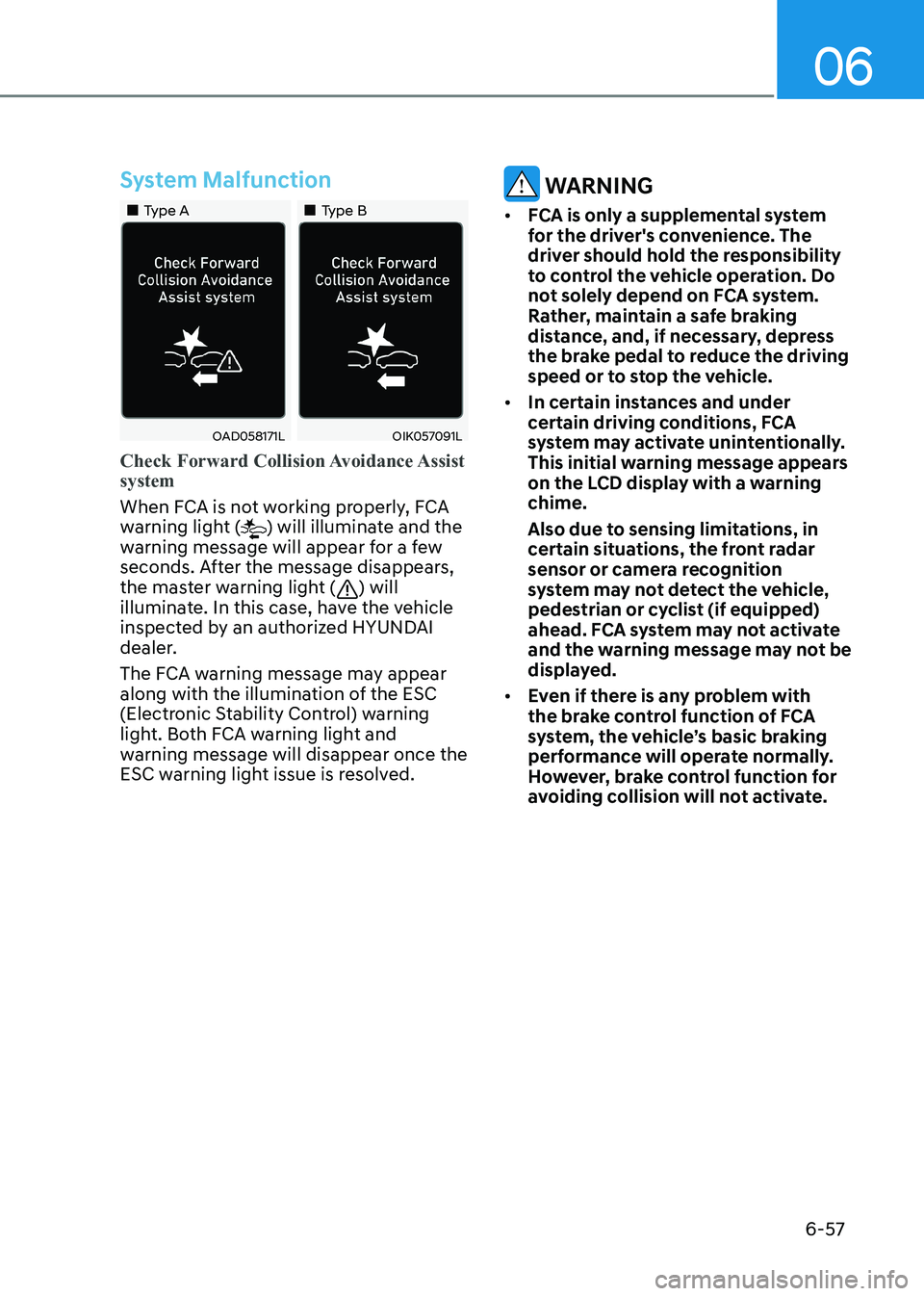
Check Forward Collision Avoidance Assist system
When FCA is not working properly, FCA
warning light () will illuminate and the
warning message will appear for a few
seconds. After the message disappears,
the master warning light (
) will
illuminate. In this case, have the vehicle
inspected by an authorized HYUNDAI
dealer.
The FCA warning message may appear
along with the illumination of the ESC
(Electronic Stability Control) warning
light. Both FCA warning light and
warning message will disappear once the
ESC warning light issue is resolved.
WARNING
• FCA is only a supplemental system
for the driver's convenience. The
driver should hold the responsibility
to control the vehicle operation. Do
not solely depend on FCA system.
Rather, maintain a safe braking
distance, and, if necessary, depress
the brake pedal to reduce the driving
speed or to stop the vehicle.
• In certain instances and under
certain driving conditions, FCA
system may activate unintentionally.
This initial warning message appears
on the LCD display with a warning chime.
Also due to sensing limitations, in
certain situations, the front radar
sensor or camera recognition
system may not detect the vehicle,
pedestrian or cyclist (if equipped)
ahead. FCA system may not activate
and the warning message may not be
displayed.
• Even if there is any problem with
the brake control function of FCA
system, the vehicle’s basic braking
performance will operate normally.
However, brake control function for
avoiding collision will not activate.
Page 345 of 555
While Driving
6-58
•
If the vehicle in front stops suddenly,
you may have less control of the
brake system. Therefore, always keep
a safe distance between your vehicle
and the vehicle in front of you.
• FCA system may activate during
braking and the vehicle may stop suddenly shifting loose objects
toward the passengers. Always keep
loose objects secured and fasten the
seat belt.
• FCA system may not activate if the
driver applies the brake pedal to
avoid collision.
• The brake control may be
insufficient, possibly causing a
collision, if a vehicle in front abruptly
stops. Always pay extreme caution.
• Occupants may get injured, if
the vehicle abruptly stops by the
activated FCA system. Pay extreme caution.
• FCA system operates only when the
system detect vehicles, pedestrian or
cyclist in front of the vehicle.
• FCA system may not activate
according to road conditions,
inclement weather, driving
conditions or traffic conditions.
• FCA system may not work for all
vehicles, passengers or cyclists.
WARNING
• FCA system does not operate when
the vehicle is in reverse.
• FCA system is not designed to detect
other objects on the road such as animals.
• FCA system does not detect vehicles
in the opposite lane.
• FCA system does not detect cross
traffic vehicles that are approaching.
• FCA system cannot detect vehicles
that are stopped vertically to your
vehicle at a intersection or dead end
street.
• FCA system cannot detect the cross
traffic cyclist that are approaching.
In these cases, you must maintain a
safe braking distance, and if necessary,
depress the brake pedal to reduce the
driving speed in order to maintain a
safe distance or to stop the vehicle.
Limitations of the System
Forward Collision avoidance assist
system is designed to monitor the
vehicle ahead or a pedestrian or cyclist
in the roadway through radar signals
and camera recognition to warn the
driver that a collision is imminent, and if
necessary, apply emergency braking.
In certain situations, the radar sensor
or the camera may not be able to
detect the vehicle, pedestrian or cyclist
ahead. In these cases, FCA system may
not operate normally. The driver must
pay careful attention in the following
situations where FCA operation may be
limited.
Page 347 of 555
While Driving
6-60
OADAS014SD
OADAS016SD
OADAS018SD
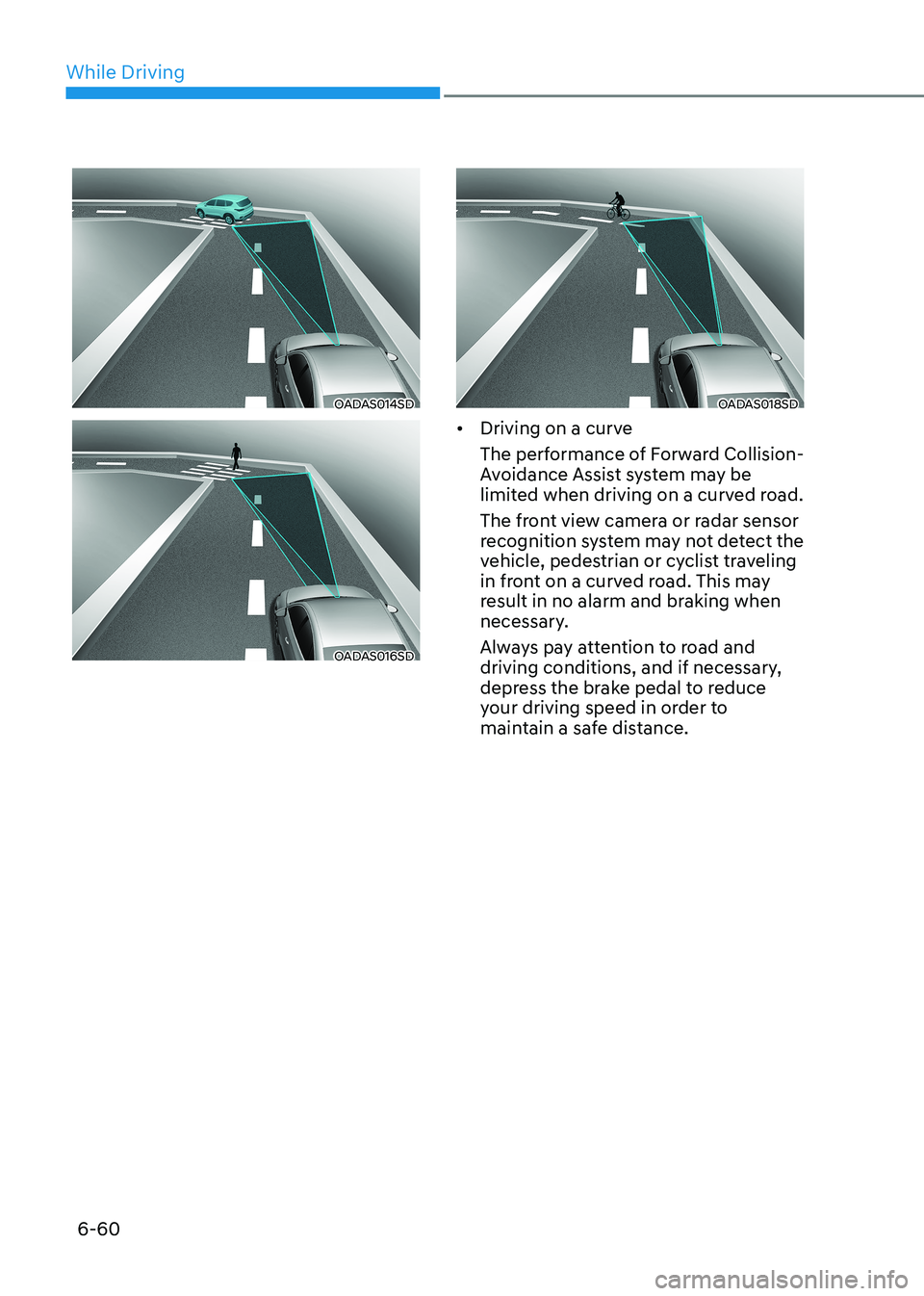
• Driving on a curve
The performance of Forward Collision-
Avoidance Assist system may be
limited when driving on a curved road.
The front view camera or radar sensor
recognition system may not detect the
vehicle, pedestrian or cyclist traveling
in front on a curved road. This may
result in no alarm and braking when
necessary.
Always pay attention to road and
driving conditions, and if necessary,
depress the brake pedal to reduce
your driving speed in order to
maintain a safe distance.
Page 349 of 555
While Driving
6-62
OADAS012SD
OADAS011SD
OADAS010SD
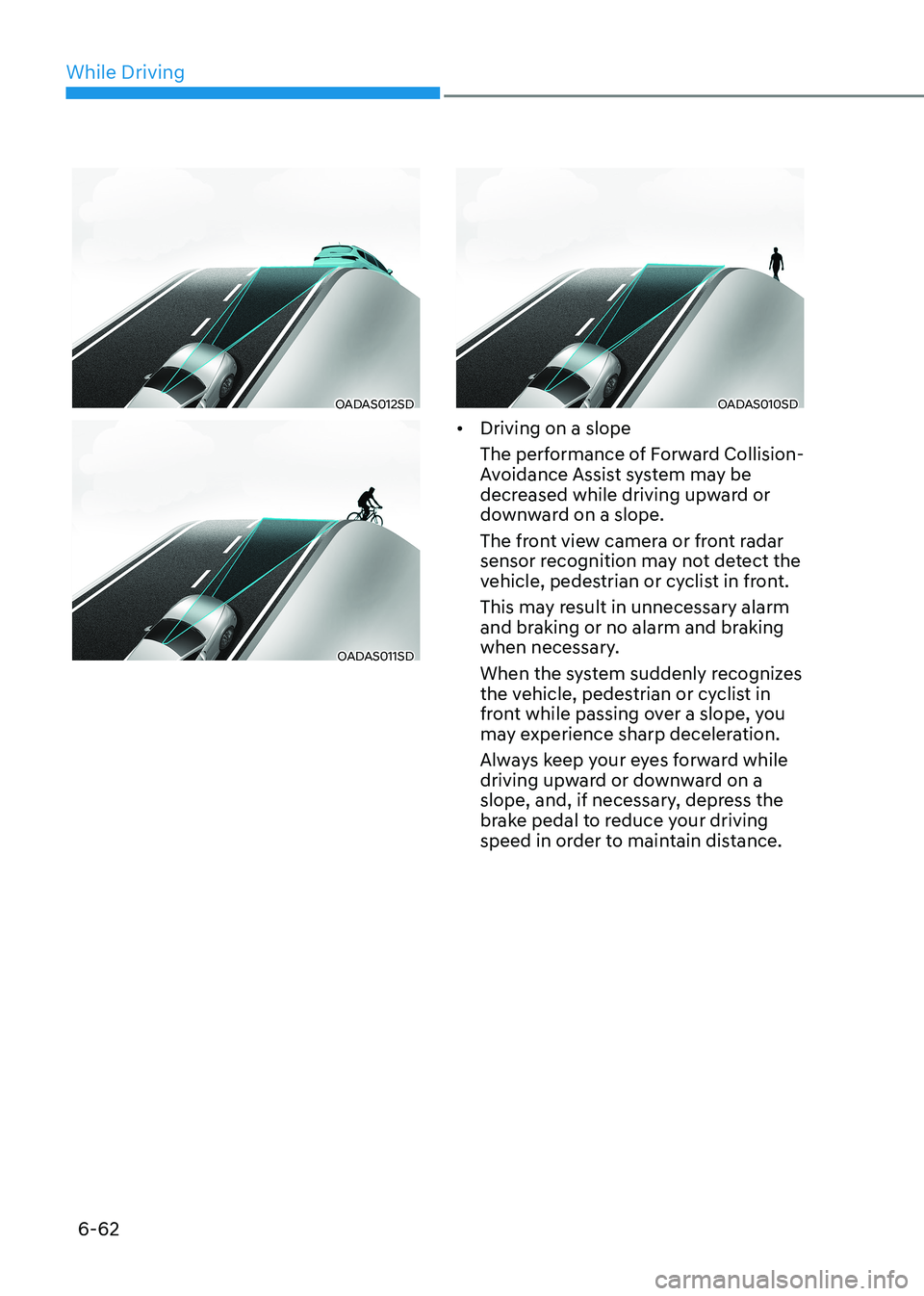
• Driving on a slope
The performance of Forward Collision-
Avoidance Assist system may be
decreased while driving upward or
downward on a slope.
The front view camera or front radar
sensor recognition may not detect the
vehicle, pedestrian or cyclist in front.
This may result in unnecessary alarm
and braking or no alarm and braking
when necessary.
When the system suddenly recognizes
the vehicle, pedestrian or cyclist in
front while passing over a slope, you
may experience sharp deceleration.
Always keep your eyes forward while
driving upward or downward on a
slope, and, if necessary, depress the
brake pedal to reduce your driving
speed in order to maintain distance.
Page 350 of 555
06
6-63
ODN8H069196
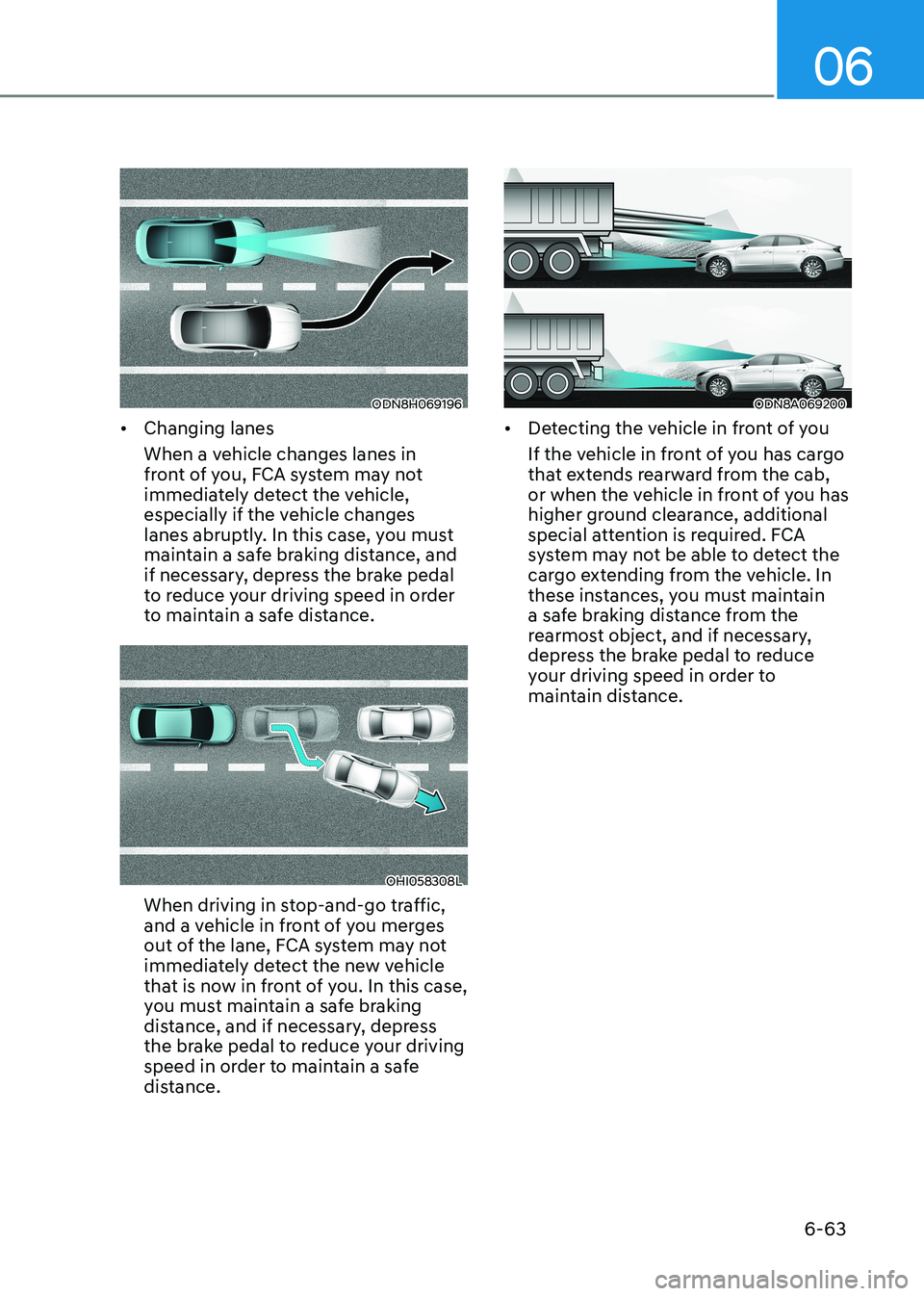
• Changing lanes
When a vehicle changes lanes in
front of you, FCA system may not
immediately detect the vehicle,
especially if the vehicle changes
lanes abruptly. In this case, you must
maintain a safe braking distance, and
if necessary, depress the brake pedal
to reduce your driving speed in order
to maintain a safe distance.
OHI058308L
When driving in stop-and-go traffic,
and a vehicle in front of you merges
out of the lane, FCA system may not
immediately detect the new vehicle
that is now in front of you. In this case,
you must maintain a safe braking
distance, and if necessary, depress
the brake pedal to reduce your driving
speed in order to maintain a safe
distance.
ODN8A069200
• Detecting the vehicle in front of you
If the vehicle in front of you has cargo
that extends rearward from the cab,
or when the vehicle in front of you has
higher ground clearance, additional
special attention is required. FCA
system may not be able to detect the
cargo extending from the vehicle. In
these instances, you must maintain
a safe braking distance from the
rearmost object, and if necessary,
depress the brake pedal to reduce
your driving speed in order to
maintain distance.
Page 361 of 555
While Driving
6 -74
OOSH069085L
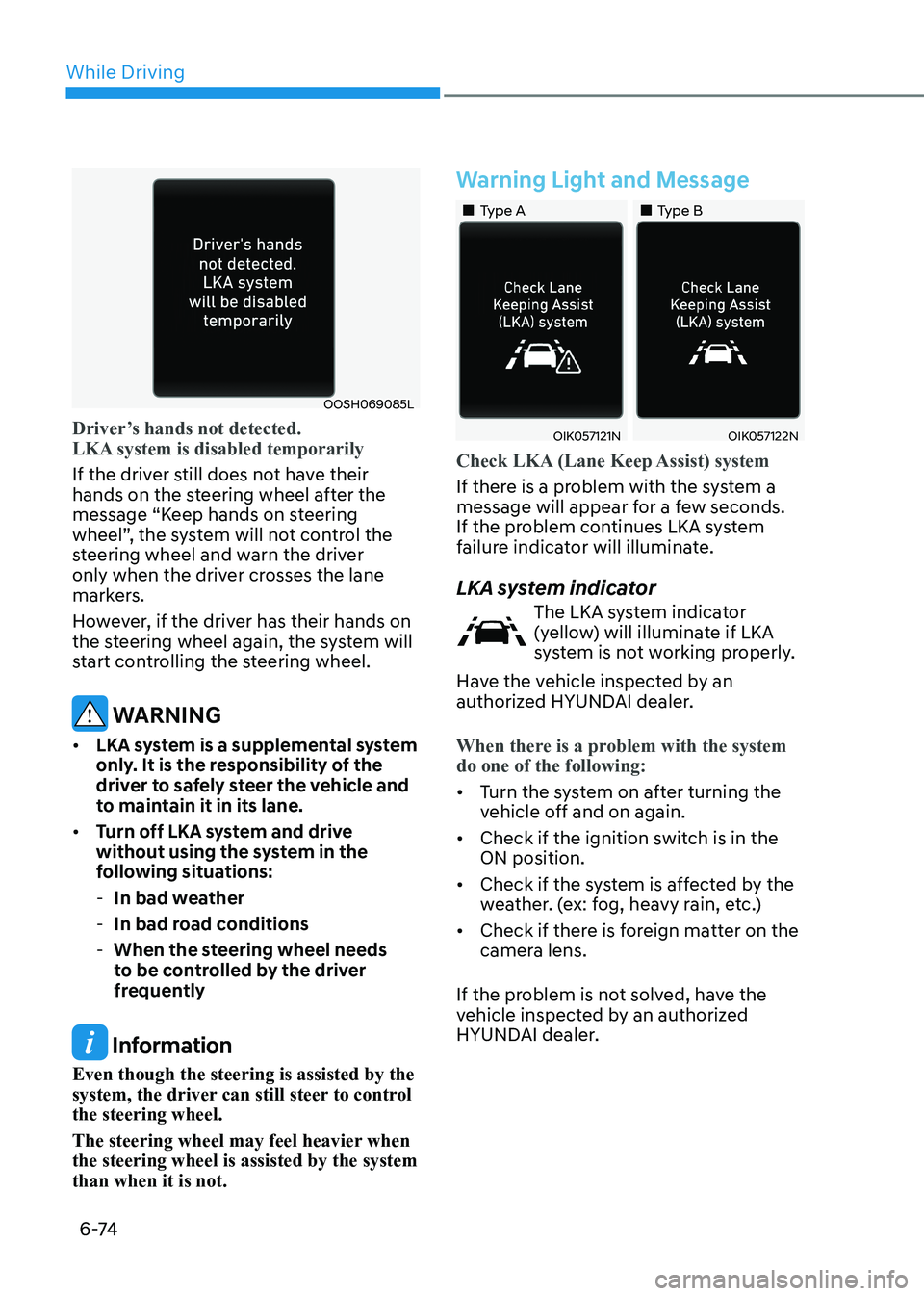
Driver’s hands not detected.
LKA system is disabled temporarily
If the driver still does not have their
hands on the steering wheel after the
message “Keep hands on steering
wheel”, the system will not control the
steering wheel and warn the driver
only when the driver crosses the lane
markers.
However, if the driver has their hands on
the steering wheel again, the system will
start controlling the steering wheel.
WARNING
• LKA system is a supplemental system
only. It is the responsibility of the
driver to safely steer the vehicle and
to maintain it in its lane.
• Turn off LKA system and drive
without using the system in the
following situations:
- In bad weather
- In bad road conditions
- When the steering wheel needs
to be controlled by the driver
frequently
Information
Even though the steering is assisted by the
system, the driver can still steer to control the steering wheel.
The steering wheel may feel heavier when the steering wheel is assisted by the system than when it is not.
Warning Light and Message
„„Type A „„Type B
OIK057121NOIK057122N
Check LKA (Lane Keep Assist) system
If there is a problem with the system a
message will appear for a few seconds.
If the problem continues LKA system
failure indicator will illuminate.
LKA system indicator
The LKA system indicator
(yellow) will illuminate if LKA
system is not working properly.
Have the vehicle inspected by an
authorized HYUNDAI dealer.
When there is a problem with the system do one of the following:
• Turn the system on after turning the
vehicle off and on again.
• Check if the ignition switch is in the ON position.
• Check if the system is affected by the
weather. (ex: fog, heavy rain, etc.)
• Check if there is foreign matter on the
camera lens.
If the problem is not solved, have the
vehicle inspected by an authorized
HYUNDAI dealer.
Page 365 of 555
While Driving
6-78
Blind-Spot Collision-Avoidance Assist
system may activate the Electronic
Stability Control (ESC) in accordance with a colliding possibility with an
approaching vehicle while changing
lanes. It is to lower the colliding risk or
help mitigate the colliding damage.
WARNING
• Always be aware of road conditions
while driving and be alert for
unexpected situations even though
the Blind-Spot Collision Warning
system and Blind-Spot Collision-
Avoidance Assist system are
operating.
• Blind-Spot Collision Warning system
and Blind-Spot Collision-Avoidance
Assist system are supplemental
systems to assist you. Always pay
attention, while driving, for your
safety. Do not entirely rely on the
systems or an accident may occur.
• Blind-Spot Collision Warning system
and Blind-Spot Collision-Avoidance
Assist system are not substitutes
for proper and safe driving. Always
drive safely and use caution when changing lanes or backing up the
vehicle.
Blind-Spot Collision Warning system
and Blind-Spot Collision-Avoidance
Assist system may not detect every
object alongside the vehicle.
System Setting and Activation
System setting • The driver can activate the system
by placing the ignition switch to the
ON position and by selecting ‘User
Settings → Driver Assistance → Blind-
Spot Safety’
- BCA and BCW turn on and get ready to be activated when ‘Active
assist’ is selected. Then, if a vehicle
approaches the driver’s blind spot
area a warning sounds or braking
power is applied.
- BCW turns on and gets ready to be activated when ‘Warning only’
is selected. Then, if a vehicle
approaches the driver’s blind spot
area a warning sounds. Braking
assist will not be applied in this
setting.
- If you select “Off”, BCW system deactivates.
• If the engine is turned off then on
again, the system maintains the
previous state.
• The driver can select the initial
warning activation time in the
User Settings in the LCD display
or infotainment system display by
selecting ‘User Settings → Driver
Assistance → Warning Timing’.
Page 378 of 555
06
6-91
Function settings
Setting functions
OCN7070042L
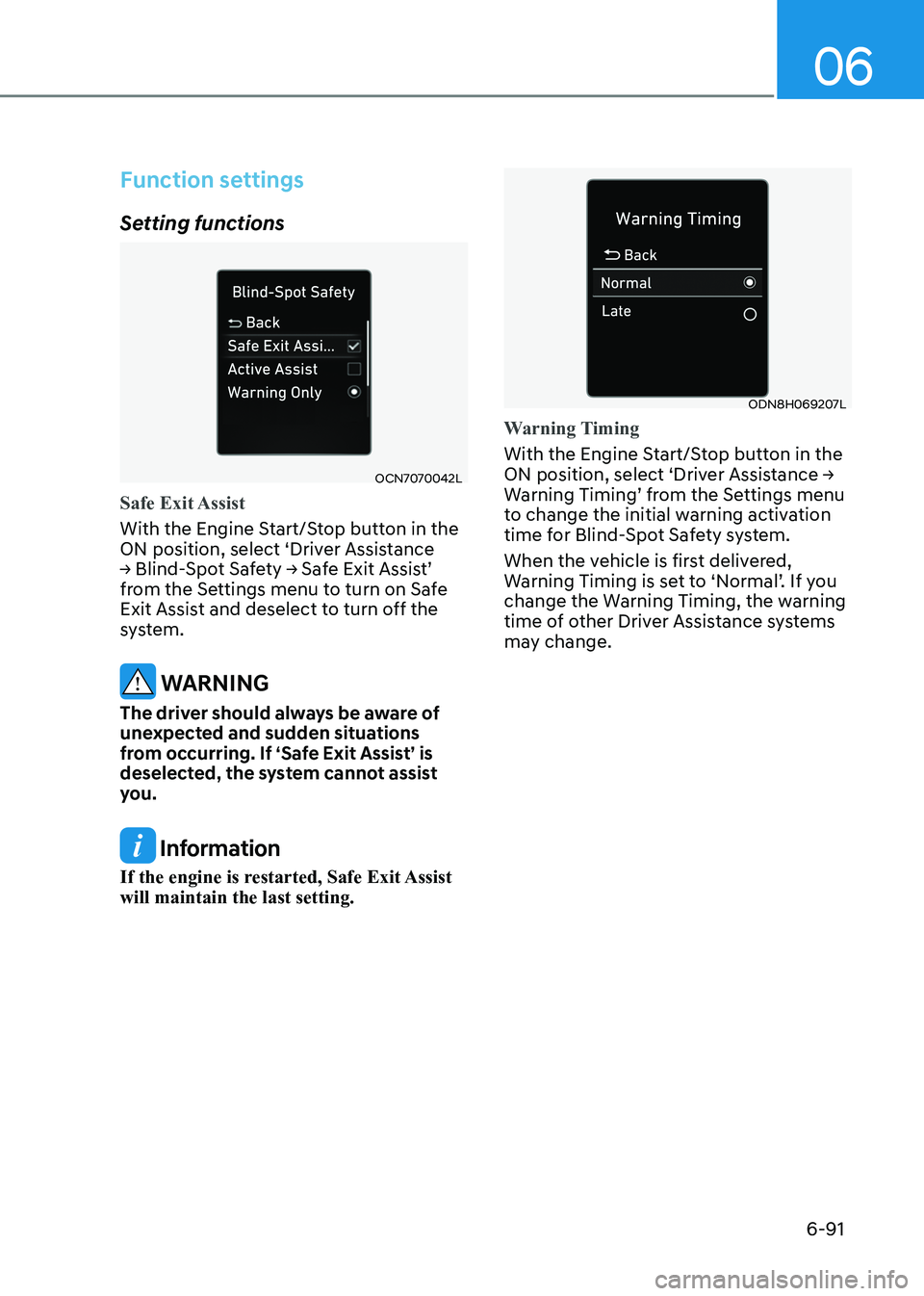
Safe Exit Assist
With the Engine Start/Stop button in the
ON position, select ‘Driver Assistance
→ Blind-Spot Safety → Safe Exit Assist’
from the Settings menu to turn on Safe
Exit Assist and deselect to turn off the
system.
WARNING
The driver should always be aware of
unexpected and sudden situations
from occurring. If ‘Safe Exit Assist’ is
deselected, the system cannot assist
you.
Information
If the engine is restarted, Safe Exit Assist will maintain the last setting.
ODN8H069207L
Warning Timing
With the Engine Start/Stop button in the
ON position, select ‘Driver Assistance →
Warning Timing’ from the Settings menu
to change the initial warning activation
time for Blind-Spot Safety system.
When the vehicle is first delivered,
Warning Timing is set to ‘Normal’. If you
change the Warning Timing, the warning
time of other Driver Assistance systems
may change.