maint HYUNDAI SONATA 2023 User Guide
[x] Cancel search | Manufacturer: HYUNDAI, Model Year: 2023, Model line: SONATA, Model: HYUNDAI SONATA 2023Pages: 555, PDF Size: 42.72 MB
Page 81 of 555
3-52
Seats & Safety System
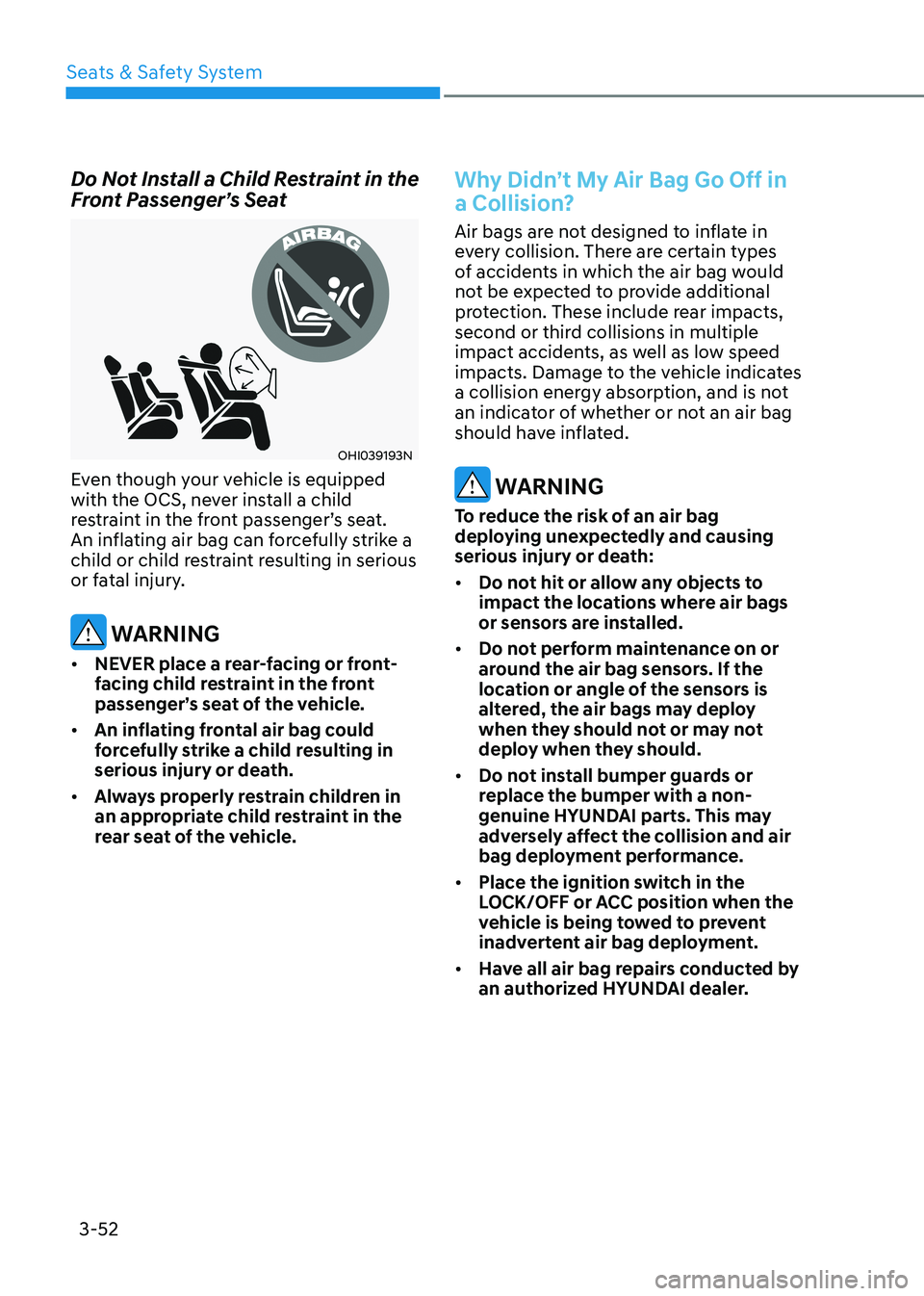
Do Not Install a Child Restraint in the
Front Passenger’s Seat
OHI039193N
Even though your vehicle is equipped
with the OCS, never install a child
restraint in the front passenger’s seat.
An inflating air bag can forcefully strike a
child or child restraint resulting in serious
or fatal injury.
WARNING
• NEVER place a rear-facing or front-
facing child restraint in the front
passenger’s seat of the vehicle.
• An inflating frontal air bag could
forcefully strike a child resulting in
serious injury or death.
• Always properly restrain children in
an appropriate child restraint in the
rear seat of the vehicle.
Why Didn’t My Air Bag Go Off in
a Collision?
Air bags are not designed to inflate in
every collision. There are certain types
of accidents in which the air bag would
not be expected to provide additional
protection. These include rear impacts,
second or third collisions in multiple
impact accidents, as well as low speed
impacts. Damage to the vehicle indicates
a collision energy absorption, and is not
an indicator of whether or not an air bag
should have inflated.
WARNING
To reduce the risk of an air bag
deploying unexpectedly and causing
serious injury or death: • Do not hit or allow any objects to
impact the locations where air bags
or sensors are installed.
• Do not perform maintenance on or
around the air bag sensors. If the
location or angle of the sensors is
altered, the air bags may deploy
when they should not or may not
deploy when they should.
• Do not install bumper guards or
replace the bumper with a non-
genuine HYUNDAI parts. This may
adversely affect the collision and air
bag deployment performance.
• Place the ignition switch in the
LOCK/OFF or ACC position when the
vehicle is being towed to prevent
inadvertent air bag deployment.
• Have all air bag repairs conducted by
an authorized HYUNDAI dealer.
Page 85 of 555
Seats & Safety System
3-56
ODN8A039088
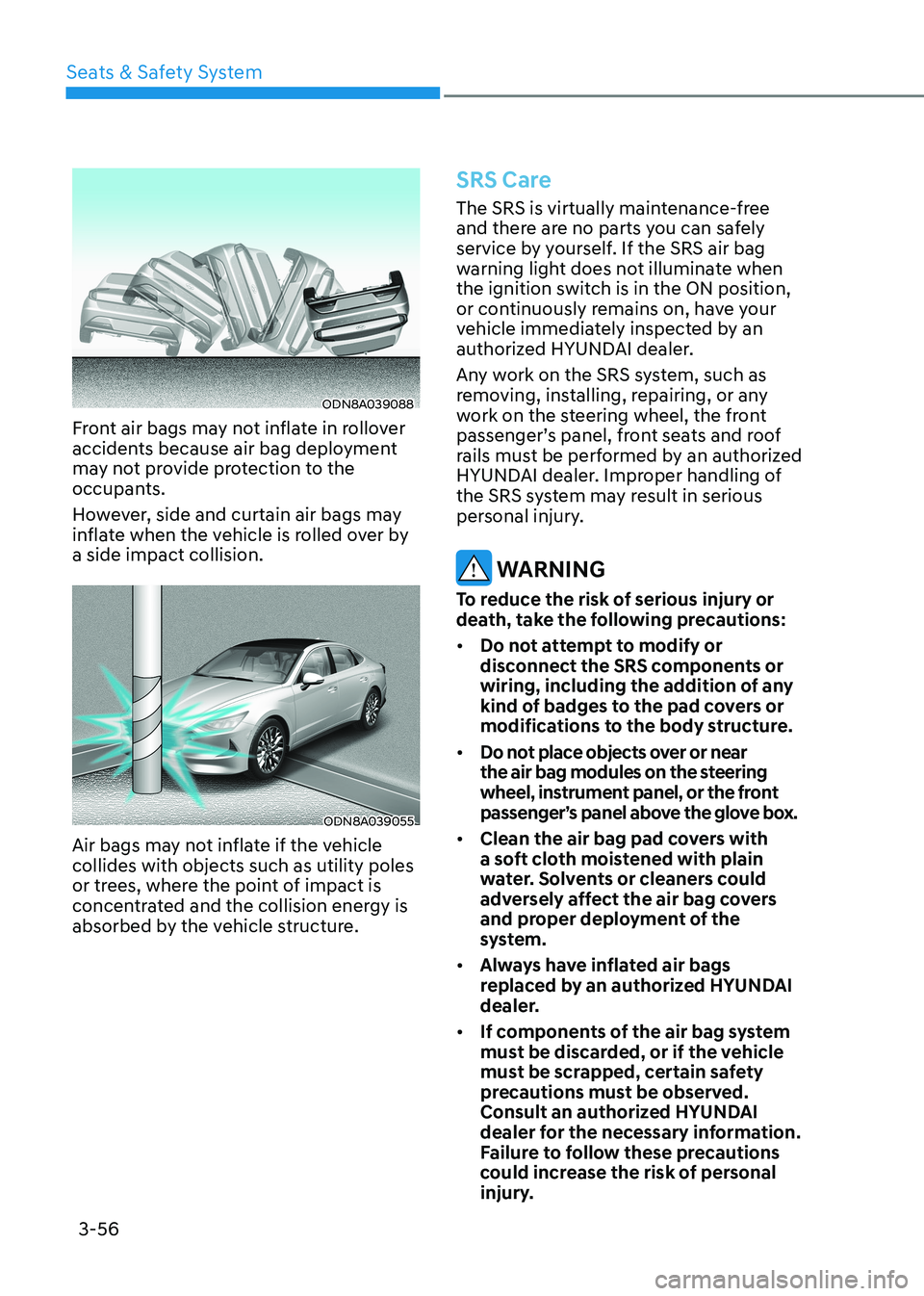
Front air bags may not inflate in rollover
accidents because air bag deployment
may not provide protection to the
occupants.
However, side and curtain air bags may
inflate when the vehicle is rolled over by a side impact collision.
ODN8A039055
Air bags may not inflate if the vehicle collides with objects such as utility poles
or trees, where the point of impact is
concentrated and the collision energy is
absorbed by the vehicle structure.
SRS Care
The SRS is virtually maintenance-free
and there are no parts you can safely
service by yourself. If the SRS air bag
warning light does not illuminate when
the ignition switch is in the ON position,
or continuously remains on, have your
vehicle immediately inspected by an
authorized HYUNDAI dealer.
Any work on the SRS system, such as
removing, installing, repairing, or any
work on the steering wheel, the front
passenger’s panel, front seats and roof
rails must be performed by an authorized
HYUNDAI dealer. Improper handling of
the SRS system may result in serious
personal injury.
WARNING
To reduce the risk of serious injury or
death, take the following precautions: • Do not attempt to modify or
disconnect the SRS components or
wiring, including the addition of any
kind of badges to the pad covers or
modifications to the body structure.
• Do not place objects over or near
the air bag modules on the steering
wheel, instrument panel, or the front
passenger’s panel above the glove box.
• Clean the air bag pad covers with
a soft cloth moistened with plain
water. Solvents or cleaners could
adversely affect the air bag covers
and proper deployment of the
system.
• Always have inflated air bags
replaced by an authorized HYUNDAI
dealer.
• If components of the air bag system
must be discarded, or if the vehicle
must be scrapped, certain safety
precautions must be observed.
Consult an authorized HYUNDAI
dealer for the necessary information.
Failure to follow these precautions
could increase the risk of personal
injury.
Page 94 of 555
Instrument Cluster
4-8
Odometer
„„Type A, B
OIG046114
„„Type C
ODN8A049037C
„„Type D
OCN7040015
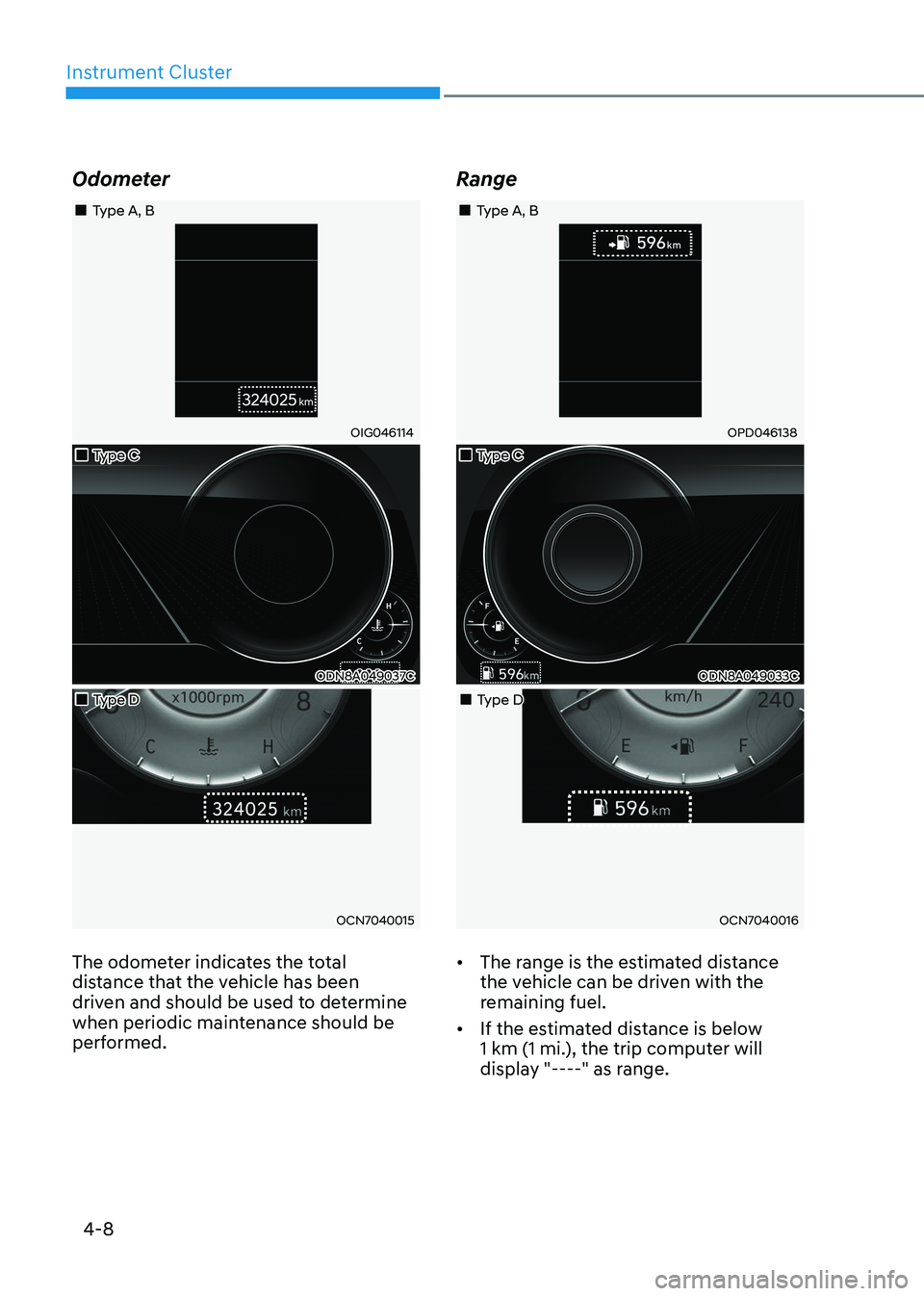
The odometer indicates the total
distance that the vehicle has been
driven and should be used to determine
when periodic maintenance should be
performed. Range
„„Type A, B
OPD046138
„„Type C
ODN8A049033C
„„Type D
OCN7040016
• The range is the estimated distance
the vehicle can be driven with the
remaining fuel.
• If the estimated distance is below
1 km (1 mi.), the trip computer will
display "----" as range.
Page 149 of 555
5
Manual Climate Control System .......................................................................... 5-105
Heating and Air Conditioning .............................................................................. 5-106
System Operation ................................................................................................... 5-111
System Maintenance ............................................................................................. 5-112
Automatic Climate Control System ........................................................... 5-114
Automatic Heating and Air Conditioning .............................................................5-115
Manual Temperature Control Mode ..................................................................... 5-116
System Operation .................................................................................................. 5-122
System Maintenance ............................................................................................ 5-123
Windshield Defrosting and Defogging ......................................................5-125
Manual Climate Control System........................................................................... 5-125
Automatic Climate Control System...................................................................... 5-126
Defogging Logic .................................................................................................... 5-127
Auto Defogging System (Only for Automatic Climate Control System) ............5-128
Defroster ................................................................................................................ 5-129
Climate Control Additional Features ........................................................5-130
Sunroof Inside Air Recirculation .......................................................................... 5-130
Automatic Ventilation .......................................................................................... 5-130
Storage Compartment ................................................................................ 5-131
Center Console Storage ......................................................................................... 5-131
Glove Box ................................................................................................................ 5-131
Interior Features .......................................................................................... 5-132
Cup Holder ............................................................................................................. 5-132
Sunvisor ................................................................................................................. 5-133
Power Outlet .......................................................................................................... 5-133
USB Charger .......................................................................................................... 5-134
Wireless Cellular Phone Charging System ..........................................................5-135
Clock ...................................................................................................................... 5-137
Clothes Hanger ...................................................................................................... 5-137
Floor Mat Anchor(s) ............................................................................................... 5-138
Infotainment System .................................................................................. 5-139
USB and iPod® Port ............................................................................................... 5-139
Antenna .................................................................................................................. 5-139
Steering Wheel Audio Control ............................................................................. 5-140
Bluetooth ® Wireless Technology Hands-Free .....................................................5-141
Audio (Display Audio) / Video / Navigation System (AVN) ................................5-141
5. Convenience Features
Page 157 of 555
05
5-11
Start-up
You can start the vehicle without
inserting the key.
For information, refer to the “Engine
Start/Stop Button” section in chapter 6.
NOTICE
To prevent damaging the smart key: • Keep the smart key in a cool,
dry place to avoid damage or
malfunction. Exposure to moisture
or high temperature may cause
the internal circuit of the smart key
to malfunction which may not be
covered under warranty.
• Avoid dropping or throwing the
smart key.
• Protect the smart key from extreme
temperatures. Remote start
You can start the vehicle using the
Remote Start button (7) of the smart key.
To start the vehicle remotely:•
Lock the doors by pressing the door
lock button within 10 m (32 feet)
distance from the vehicle.
• Press the remote start button for over
2 seconds within 4 seconds after
locking the doors and the hazard
warning will blink.
To turn off the remote start function,
press the remote start button once.
In case of the manual operation,
the climate control system will be
maintained even when the engine is
turned OFF. However, the automatic
operation is set to 22°C (72°F).
Remote smart parking assist (RSPA) (if equipped)
The Remote smart parking assist (RSPA)
system helps the drivers park their
vehicle by using sensors to measure
parking spaces and control the steering
wheel, gear shift and vehicle speed to
semi-automatically park the vehicle.
With the smart key, the driver can move
the vehicle forward or backward using
the rearward /forward buttons (5, 6) on
the smart key.
For information, refer to “Remote smart
parking assist (RSPA)” in this chapter.
Page 203 of 555
05
5-57
Information
If the fuel filler door does not open
because ice has formed around it, tap
lightly or push on the door to break the
ice and release the door. Do not pry on the
door. If necessary, spray around the door
with an approved deicer fluid (do not use
radiator antifreeze) or move the vehicle to a warm place and allow the ice to melt. Closing the fuel filler door
1. To install the fuel tank cap, turn it clockwise until it “clicks” one time.
2. Close the fuel filler door until it is latched securely.
WARNING
Gasoline is highly flammable and
explosive. Failure to follow these
guidelines may result in SERIOUS
INJURY or DEATH: • Read and follow all warnings posted
at the gas station.
• Before refueling, note the location of
the Emergency Gasoline Shut-Off, if
available, at the gas station.
• Before touching the fuel nozzle, you
should eliminate the potential build-
up of static electricity by touching
a metal part of the vehicle, a safe
distance away from the fuel filler
neck, nozzle, or other gas source,
with your bare hand.
• Do not use cellular phones while
refueling. Electric current and/or
electronic interference from cellular
phones can potentially ignite fuel
vapors and cause a fire. •
Do not get back into a vehicle
once you have begun refueling.
You can generate a buildup of
static electricity by touching,
rubbing or sliding against any item
or fabric capable of producing
static electricity. Static electricity
discharge can ignite fuel vapors
causing a fire. If you must re-enter
the vehicle, you should once again
eliminate potentially dangerous
static electricity discharge by
touching a metal part of the vehicle,
away from the fuel filler neck, nozzle
or other gasoline source, with your
bare hand.
• When using an approved portable
fuel container, be sure to place the
container on the ground prior to
refueling. Static electricity discharge
from the container can ignite fuel
vapors causing a fire.
Once refueling has begun, contact
between your bare hand and the
vehicle should be maintained until
the filling is complete.
• Use only approved portable plastic
fuel containers designed to carry and
store gasoline.
• When refueling, always move the
shift button to the P (Park) position
set the parking brake, and place
the ignition switch to the LOCK/
OFF position. Sparks produced by
electrical components related to the
engine can ignite fuel vapors causing
a fire.
• Do not use matches or a lighter and
do not smoke or leave a lit cigarette
in your vehicle while at a gas station,
especially during refueling.
• Do not over-fill or top-off your
vehicle tank, which can cause gasoline spillage.
Page 209 of 555
05
5-63
ODN8A059204
To flash the high beam headlamp, pull
the lever towards you, then release the
lever. The high beams will remain ON as
long as you hold the lever towards you.
High Beam Assist (HBA)
OOS047409N
High Beam Assist is a system that
automatically adjusts the headlamp
range (switches between high beam and
low beam) according to the brightness of
other vehicles and road conditions.
System setting
The driver can activate HBA by placing
the ignition switch to the ON position
and by selecting:
‘User Settings → Lights → High Beam
Assist’. If you disable this setting, HBA
will not work.
The setting of the HBA will be
maintained, as selected, when the
engine is re-started.
Operating condition
1. Place the headlamp switch in the AUTO position.
2. Turn on the high beam by pushing the lever away from you.
High Beam Assist (
) indicator will
illuminate.
3. High Beam Assist will turn on when vehicle speed is above 40 km/h (25
mph).
• If the headlamp switch is pushed
away when High Beam Assist
system is operating, High Beam
Assist system will turn off and the
high beam will be on continuously.
• If the headlamp switch is pulled
towards you when the high beam
is OFF, the high beam will turn ON
without High Beam Assist system
canceled. When you let go of the
light switch, the lever will move to the middle and the high beam will
turn OFF.
• If the headlamp switch is pulled
towards you when the high beam is
on by High Beam Assist system, the
low beam will be on and High Beam
Assist system will turn OFF.
• If the headlamp switch is placed
to the headlamp ON position,
High Beam Assist system will turn
off and the low beam will be on
continuously.
Page 248 of 555
Convenience Features
5-102
Link with other systems
Activation of other systems may
be restricted according to the
circumstances while Remote Smart
Parking Assist system is in activation.
The systems linked to the Remote Smart
Parking Assist system are as follows:
1. Idle Stop & Go
(1) While Remote Smart Parking
Assist system is operating, ISG is
deactivated.
(2) If Remote Smart Parking Assist system is completed or cancelled,
ISG can be activated.
2. Auto Hold
(1) The activated Auto Hold is switched to deactivation status
when Remote Smart Parking Assist
system starts.
(2) The Auto Hold button will not respond while Remote Smart
Parking Assist system is in
activation.
(3) After Remote Smart Parking Assist system is completed or
deactivated, the Auto Hold will
return to the status before Remote
Smart Parking Assist system was
activated.
3. Electronic Stability Control (ESC)
(1) Electronic Stability Control (ESC) system switches from OFF to
activation status (ESC OFF button
turns off) when Remote Smart
Parking Assist system is activated.
(2) The ESC OFF button will not respond while Remote Smart
Parking Assist system is in
activation.
(3) The ABS/TCS/ESC system activates while Remote Smart Parking Assist
system is in activation.
(4) After Remote Smart Parking Assist system is completed or
deactivated, the ESC maintains the
ON status.
How the Remote Moving
Forward/Backward System
Works
Backward Parking
ODN8059255
ODN8059335
ODN8059257
(1) Search for parking space and line up the vehicle.
(2) Move until the spot where the passengers can get off the vehicle with ease.
(3) Press the Remote Moving Forward/ Backward button with the shift
button placed in P (Park).
Page 257 of 555
05
5-111
System Operation
Cooling / Ventilation
1. Select the Face Level
mode.
2. Set the air intake control to fresh mode.
3. Set the temperature control to the desired position.
4. Set the fan speed control to the
desired speed.
Heating
1. Select the Floor Level
mode.
2. Set the air intake control to fresh mode.
3. Set the temperature control to the desired position.
4. Set the fan speed control to the
desired speed.
5. If desired, turn the air conditioning ON
with the temperature control knob set
to heat in order to dehumidify the air
before it enters into the cabin.
If the windshield fogs up, select the Floor
& Defrost
mode or press the Front
Defrost mode.
Operation Tips
• To keep dust or unpleasant fumes
from entering the vehicle through the
ventilation system, temporarily set
the air intake control to recirculation
mode. Return the control to Fresh
mode when the unpleasant air outside
has diminished. This will help keep the
driver alert and comfortable.
• To help prevent the inside of the
windshield from fogging, set the air
intake control to fresh mode and fan
speed to the desired position, turn
on the air conditioning system, and
adjust the temperature control to the
desired temperature.
Air conditioning
Your HYUNDAI vehicle air conditioning
system is filled with R-1234yf refrigerant.
1. Start the engine.
2. Press the air conditioning button.
3. Set the mode to the Face Level
mode.
4. Set the air intake control to
Recirculation mode temporarily to
allow the cabin to cool quickly. When
the desired temperature in the cabin
is reached, change the air intake
control back to Fresh mode.
5. Adjust the fan speed control and temperature control to maintain
maximum comfort.
When maximum cooling is desired, set
the temperature control to the MAX A/C
position, then set the fan speed control
to the highest setting.
NOTICE
When using the air conditioning system,
monitor the engine temperature gauge
closely while driving up hills or in heavy
traffic when outside temperatures are
high. Air conditioning system operation
when climbing a steep grade or in high
outside ambient temperatures can
cause engine overheating.
Continue to use the fan, but turn the air
conditioning system off if the engine
temperature gauge indicates engine
overheating.
Page 258 of 555
Convenience Features
5-112
Air conditioning system operation tips
• If the vehicle has been parked in
direct sunlight during hot weather,
open the windows for a short time
to let the hot air inside the vehicle escape.
• After sufficient cooling has been
achieved, switch back from the
recirculated air to the fresh outside air position.
• To help reduce moisture inside of
the windows on rainy or humid
days, decrease the humidity inside
the vehicle by operating the air
conditioning system with the windows
and sunroof closed.
• Use the air conditioning system
every month only for a few minutes
to ensure maximum system
performance.
• If you operate air conditioner
excessively, the difference between
the temperature of the outside air and
that of the windshield could cause
the outer surface of the windshield
to fog up, causing loss of visibility. In
this case, set the mode selection knob
or button to the
position and fan
speed control to the lower speed.
System Maintenance
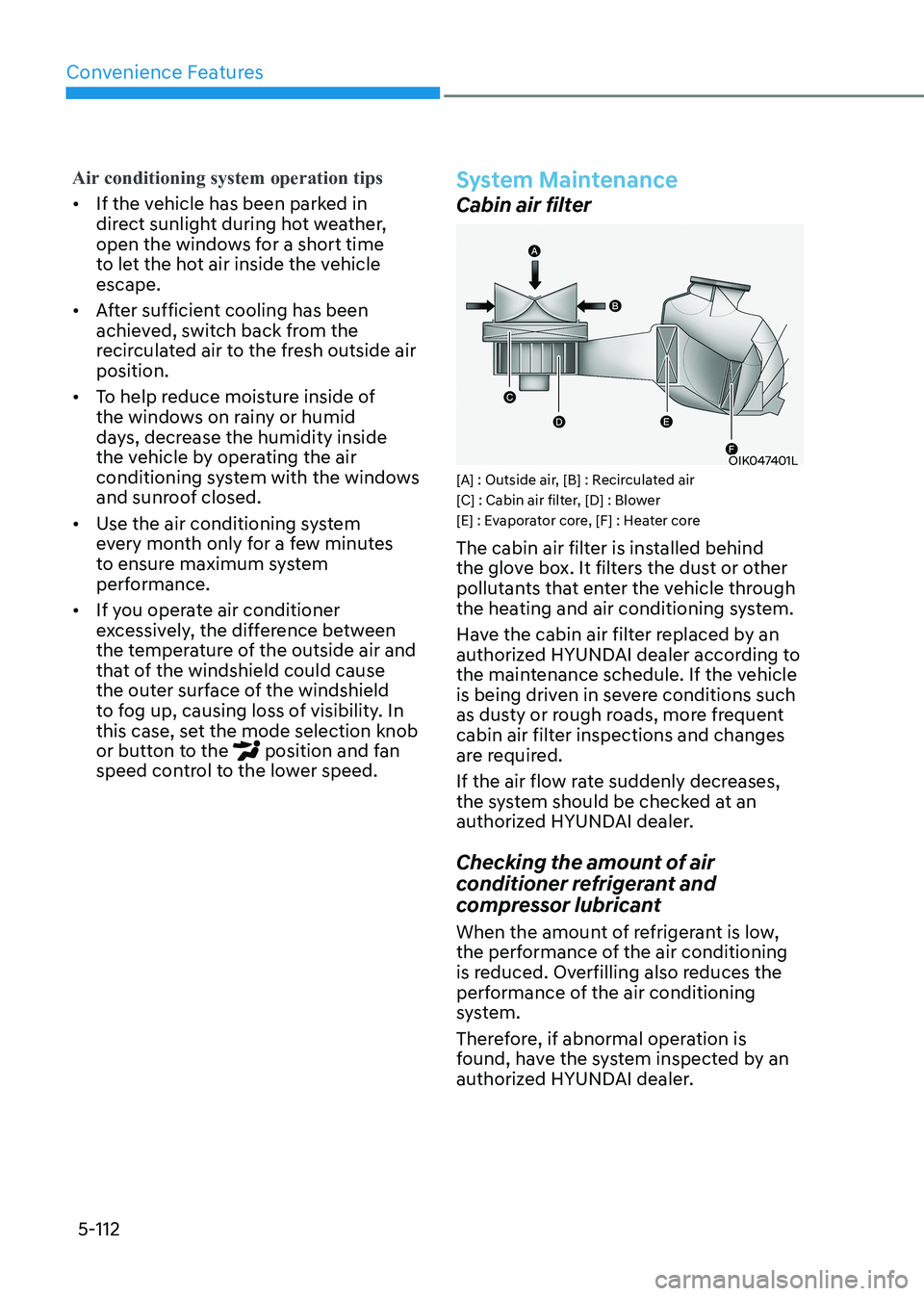
Cabin air filter
OIK047401L
[A] : Outside air, [B] : Recirculated air
[C] : Cabin air filter, [D] : Blower
[E] : Evaporator core, [F] : Heater core
The cabin air filter is installed behind
the glove box. It filters the dust or other
pollutants that enter the vehicle through
the heating and air conditioning system.
Have the cabin air filter replaced by an
authorized HYUNDAI dealer according to
the maintenance schedule. If the vehicle
is being driven in severe conditions such
as dusty or rough roads, more frequent
cabin air filter inspections and changes
are required.
If the air flow rate suddenly decreases,
the system should be checked at an
authorized HYUNDAI dealer.
Checking the amount of air
conditioner refrigerant and
compressor lubricant
When the amount of refrigerant is low,
the performance of the air conditioning
is reduced. Overfilling also reduces the
performance of the air conditioning
system.
Therefore, if abnormal operation is
found, have the system inspected by an
authorized HYUNDAI dealer.