maint HYUNDAI SONATA 2023 Workshop Manual
[x] Cancel search | Manufacturer: HYUNDAI, Model Year: 2023, Model line: SONATA, Model: HYUNDAI SONATA 2023Pages: 555, PDF Size: 42.72 MB
Page 408 of 555
06
6-121
WARNING
When using Smart Cruise Control take
the following precautions: • If an emergency stop is necessary,
you must apply the brakes. The
vehicle cannot be stopped at every
emergency situation by using Smart
Cruise Control system.
• Keep a safe distance according to
road conditions and vehicle speed. If
the vehicle to vehicle distance is too close during a high-speed driving, a
serious collision may result.
• Always maintain sufficient braking
distance and decelerate your vehicle
by applying the brakes if necessary.
• Smart Cruise Control system cannot
recognize a stopped vehicle,
pedestrians or an oncoming vehicle.
Always look ahead cautiously to
prevent unexpected and sudden
situations from occurring.
• Vehicles moving in front of you with
a frequent lane change may cause
a delay in the system's reaction or
may cause the system to react to a
vehicle actually in an adjacent lane.
Always drive cautiously to prevent
unexpected and sudden situations
from occurring.
• Always be aware of the selected
speed and vehicle to vehicle
distance. The driver should not solely
rely on the system but always pay
attention to driving conditions and
control your vehicle speed.
• Smart Cruise Control system may not
recognize complex driving situations
so always pay attention to driving
conditions and control your vehicle speed.• Smart Cruise Control system may
recognize a pedestrian, bicycle,
motorcycle, etc. as a vehicle. Always,
look ahead cautiously to prevent
unexpected and sudden situations
from occurring.
• Turn off Smart Cruise Control system
when the vehicle is being towed.
NOTICE
Smart Cruise Control system may not
operate temporarily due to: • Electrical interference
• Modifying the suspension
• Differences of tire abrasion or tire
pressure
• Installing different type of tires
The brake control using Smart Cruise
Control system may make a sound.
Information
This device complies with Industry Canada RSS-210 standard. Operation is subject to the following two conditions: 1. This device may not cause harmful
interference.
2. This device must accept any
interference received, including
interference that may cause undesired operation.
Page 410 of 555
06
6-123
System Setting and Operation
System setting • With the Engine Start/Stop button in
the ON or START position, Navigation-
based Smart Cruise Control can
be activated by selecting 'Driver
Assistance →
Highway Auto Curve
Slowdown' from the User Settings
mode on the infotainment system.
For detailed information, please refer
to the infotainment system manual
separately supplied.
• If the engine is turned off then on
again, the system maintains the last
setting.
Operating conditions
Select 'Highway Auto Curve Slowdown'
from the Settings menu in the
infotainment system screen and satisfy
the following conditions for the system
to operate. • Driving on the highway main line
• Smart Cruise Control is operating
If all the mentioned conditions are
satisfied, the system is ENABLED and
the 'AUTO' symbol on the cluster will
illuminate white.
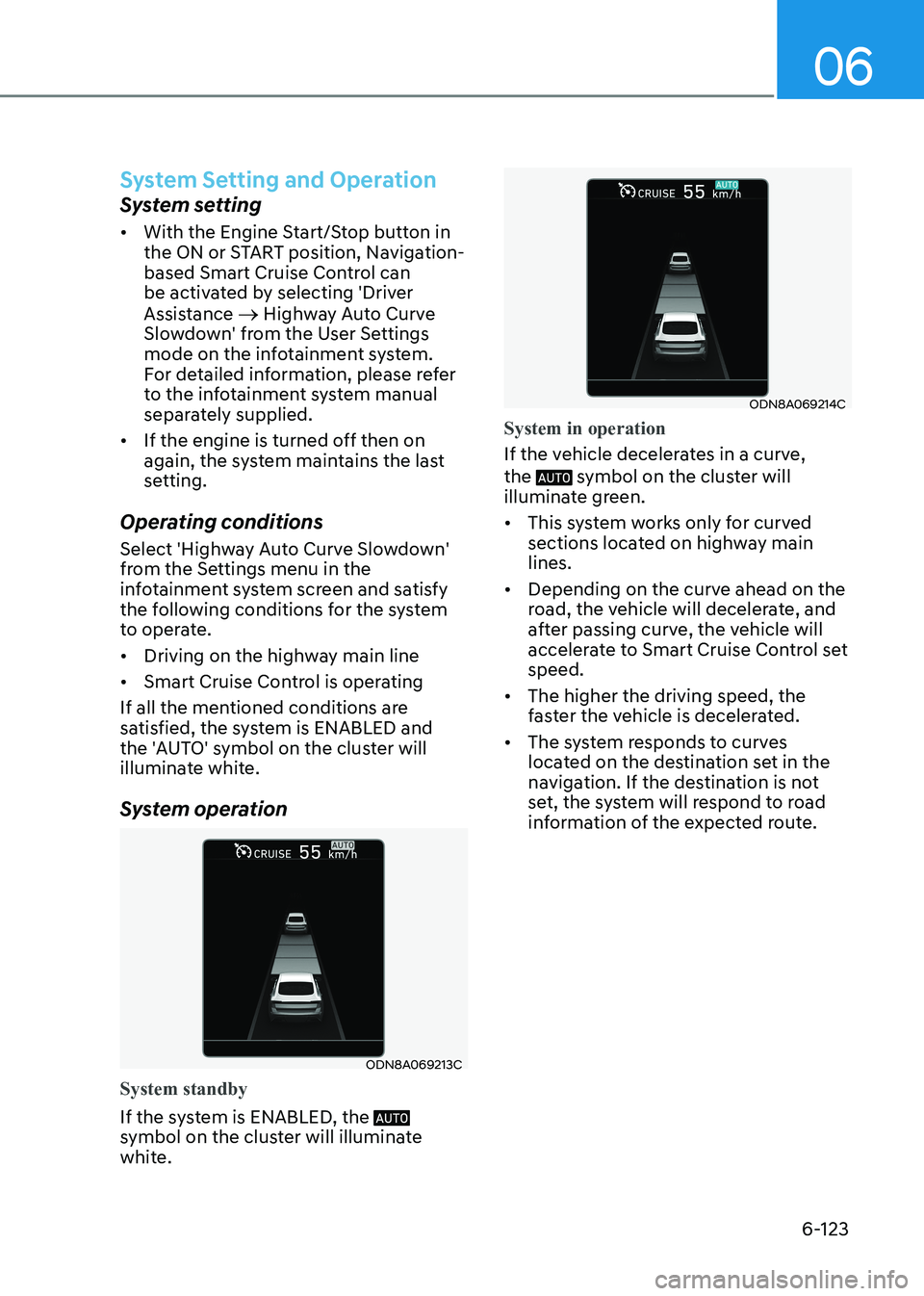
System operation
ODN8A069213C
System standby
If the system is ENABLED, the
symbol on the cluster will illuminate
white.
ODN8A069214C
System in operation
If the vehicle decelerates in a curve, the
symbol on the cluster will
illuminate green. • This system works only for curved
sections located on highway main lines.
• Depending on the curve ahead on the
road, the vehicle will decelerate, and
after passing curve, the vehicle will
accelerate to Smart Cruise Control set speed.
• The higher the driving speed, the
faster the vehicle is decelerated.
• The system responds to curves
located on the destination set in the
navigation. If the destination is not
set, the system will respond to road
information of the expected route.
Page 415 of 555
While Driving
6-128
Warning Message
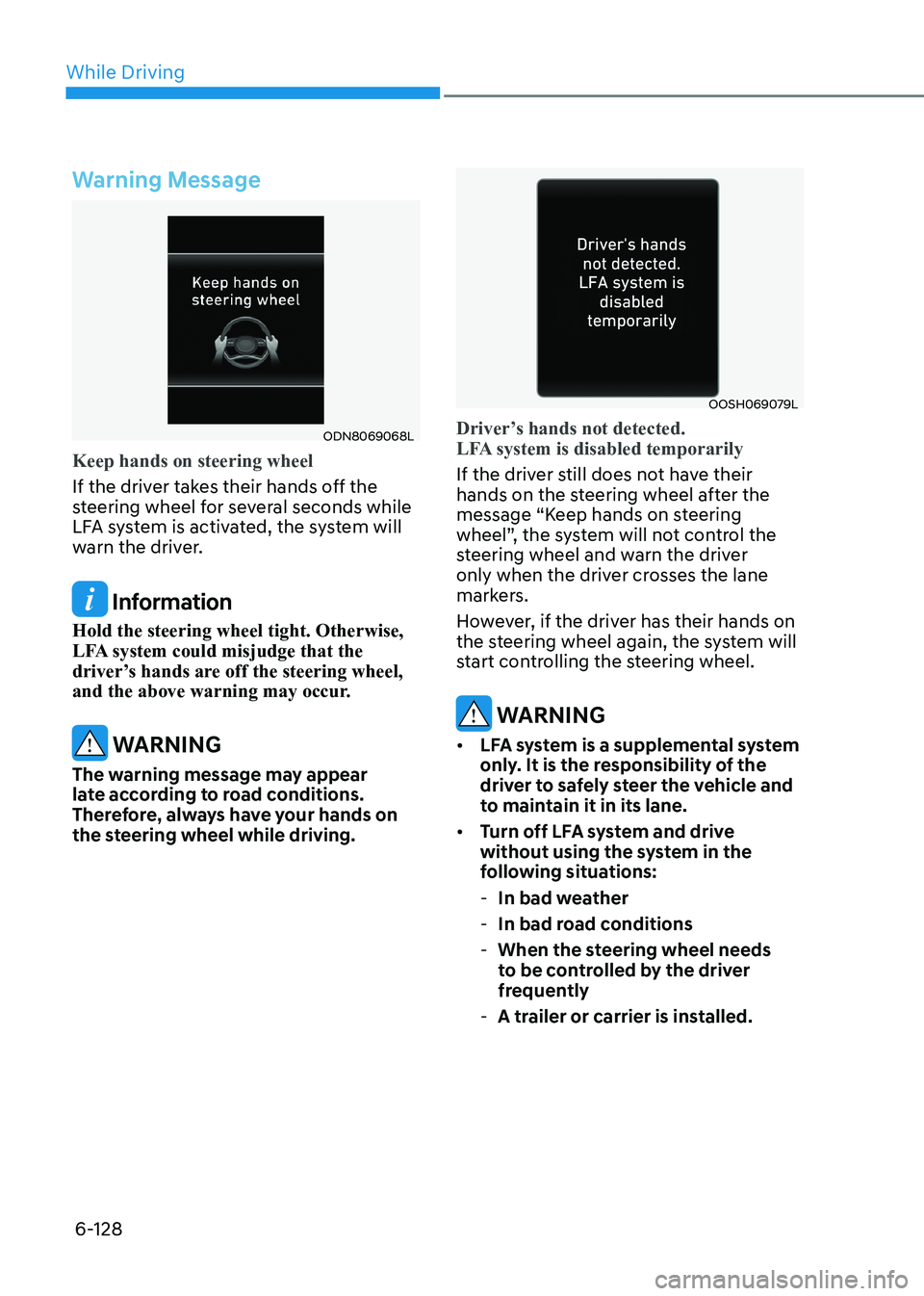
ODN8069068L
Keep hands on steering wheel
If the driver takes their hands off the
steering wheel for several seconds while
LFA system is activated, the system will
warn the driver.
Information
Hold the steering wheel tight. Otherwise,
LFA system could misjudge that the
driver’s hands are off the steering wheel,
and the above warning may occur.
WARNING
The warning message may appear
late according to road conditions.
Therefore, always have your hands on
the steering wheel while driving.
OOSH069079L
Driver’s hands not detected.
LFA system is disabled temporarily
If the driver still does not have their
hands on the steering wheel after the
message “Keep hands on steering
wheel”, the system will not control the
steering wheel and warn the driver
only when the driver crosses the lane
markers.
However, if the driver has their hands on
the steering wheel again, the system will
start controlling the steering wheel.
WARNING
• LFA system is a supplemental system
only. It is the responsibility of the
driver to safely steer the vehicle and
to maintain it in its lane.
• Turn off LFA system and drive
without using the system in the
following situations:
- In bad weather
- In bad road conditions
- When the steering wheel needs
to be controlled by the driver
frequently
- A trailer or carrier is installed.
Page 419 of 555
While Driving
6-132
Highway Driving Assist system helps
keep the vehicle between lanes, maintain
a distance with the vehicle ahead, and
automatically adjusts the vehicle speed
to the speed limit while driving on the
highway.
WARNING
• Highway Driving Assist system is
not a substitute for safe driving
practices, but a convenience
function. It is the responsibility of
the driver to always be aware of the
surroundings and drive safely.
• Highway Driving Assist system relies
entirely on the road information
provided by the navigation system.
It is the responsibility of the driver
to follow traffic laws and avoid
accidents.
• For your safety, please read the
owner's manual before using the
system.
Information
• Highway Driving Assist system is
available only on controlled access road of certain highways. Controlled access road indicates
roads with limited entrances and exits that allow uninterrupted high
speed traffic flow. Only passenger
cars and motorcycles are allowed on
controlled access roads.
Available highway
(Controlled access road)
USA Select Interstate
Highway and U.S.
(Federal) and State
Highways
Canada Select Provincial and
Territorial Highways
• Additional highways may be expanded by navigation updates.
highway Driving assist (hDa) (if equippeD)
Page 420 of 555
06
6-133
System Setting and Operation
System setting • With the Engine Start/Stop button in
the ON or START position, Highway
Driving Assist can be activated
by selecting 'Driver Assistance →
Highway Driving Assist’ from the User
Settings mode on the infotainment
system. For detailed information,
please refer to the infotainment
system manual separately supplied.
• If the engine is turned off then on
again, the system maintains the last
setting.
Operating conditions
Select 'Highway Driving Assist' from
the Settings menu in the infotainment
system screen and satisfy the following
conditions for the system to operate. • Driving on the highway main line
• Smart Cruise Control is operating
- If Smart Cruise Control is in the READY state the Highway Driving
Assist will be in the READY state. The
indicator on the cluster
will illuminate white.
• Vehicle speed is under 153 km/h (95
mph)
If all the mentioned conditions are
satisfied, the system is ENABLED and the
indicator on the cluster will
illuminate green. Steering wheel control
ODN8A069215C
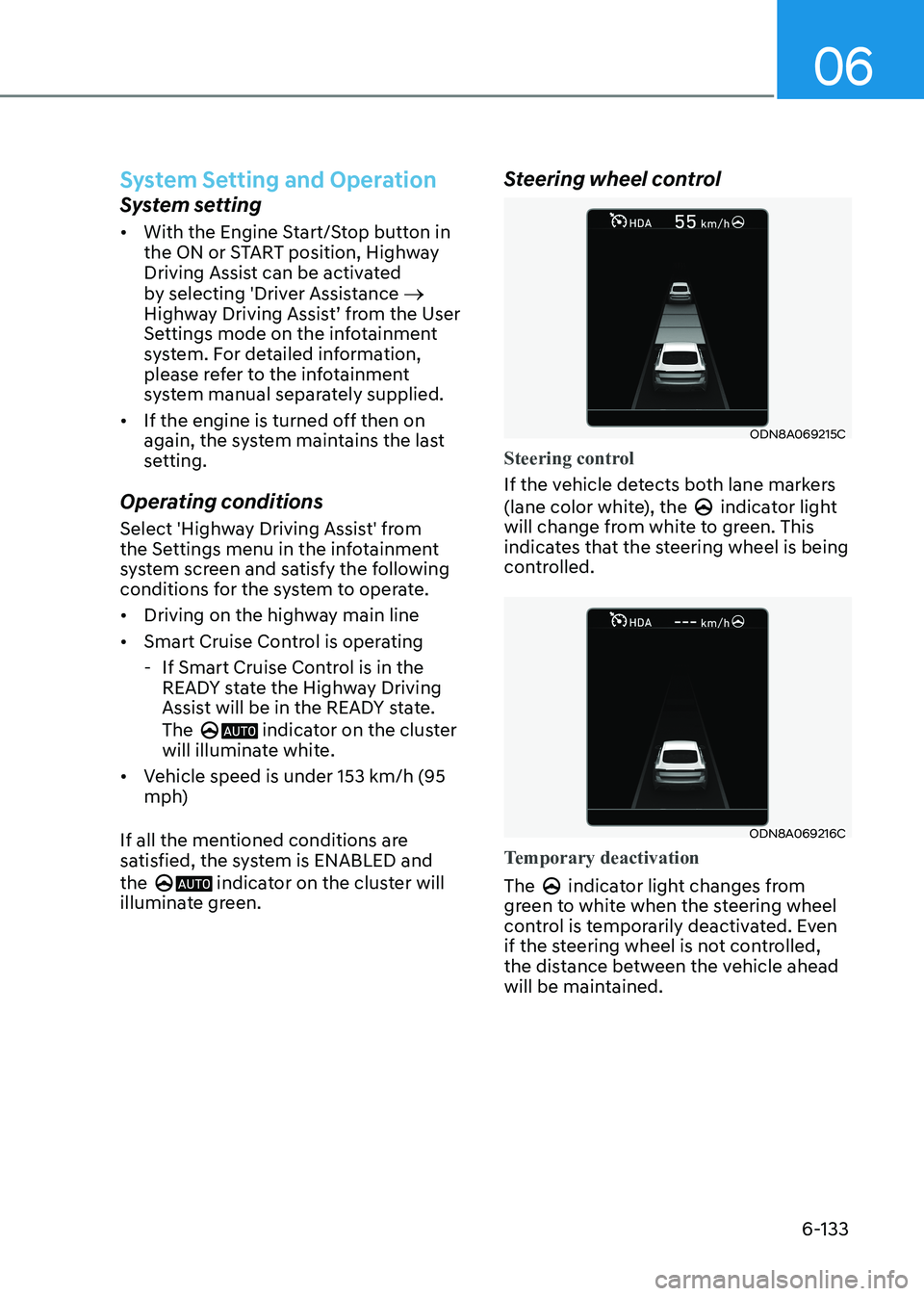
Steering control
If the vehicle detects both lane markers
(lane color white), the
indicator light
will change from white to green. This
indicates that the steering wheel is being
controlled.
ODN8A069216C
Temporary deactivation
The indicator light changes from
green to white when the steering wheel
control is temporarily deactivated. Even
if the steering wheel is not controlled,
the distance between the vehicle ahead
will be maintained.
Page 438 of 555
06
6-151
Smooth Cornering
Avoid braking or gear changing in
corners, especially when roads are wet.
Ideally, corners should always be taken
under gentle acceleration.
Driving at Night
Night driving presents more hazards than
driving in the daylight. Here are some
important tips to remember: • Slow down and keep more distance
between you and other vehicles, as it
may be more difficult to see at night,
especially in areas where there may
not be any street lights.
• Adjust your mirrors to reduce the glare
from other driver's headlamps.
• Keep your headlamps clean and
properly aimed. Dirty or improperly
aimed headlamps will make it much
more difficult to see at night.
• Avoid staring directly at the
headlamps of oncoming vehicles. You
could be temporarily blinded, and it
will take several seconds for your eyes
to readjust to the darkness.
Driving in the Rain
Rain and wet roads can make driving
dangerous. Here are a few things to
consider when driving in the rain or on
slick pavement: • Slow down and allow extra following
distance. A heavy rainfall makes
it harder to see and increases the
distance needed to stop your vehicle.
• Turn OFF your Cruise Control.
• Replace your windshield wiper blades
when they show signs of streaking or
missing areas on the windshield.
• Tires should be properly maintained
with at least 1.6mm (2/32nds of an
inch) of tread depth. If your tires
do not have enough tread, making
a quick stop on wet pavement can
cause a skid and possibly lead to an
accident. See "Tire replacement" in
chapter 8.
• Turn on your headlamps to make it
easier for others to see you.
• Driving too fast through large puddles
can affect your brakes. If you must go
through puddles, try to drive through
them slowly.
• If you believe your brakes may be wet,
apply them lightly while driving until
normal braking operation returns.
Hydroplaning
If the road is wet enough and you are
going fast enough, your vehicle may
have little or no contact with the road
surface and actually ride on the water.
The best advice is SLOW DOWN when
the road is wet.
The risk of hydroplaning increases as
the depth of tire tread decreases, refer
to “Tire replacement” in chapter 8.
Page 439 of 555
While Driving
6-152
Driving in Flooded Areas
Avoid driving through flooded areas
unless you are sure the water is no
higher than the bottom of the wheel hub.
Drive through any water slowly. Allow
adequate stopping distance because
brake performance may be reduced.
After driving through water, dry the
brakes by gently applying them several
times while the vehicle is moving slowly.
Highway Driving
Tires
Adjust the tire inflation, as specified.
Under-inflation may overheat or damage
the tires.
Do not install worn-out or damaged tires,
which may reduce traction or adversely
affect vehicle handling. This could lead
to sudden tire failure that may cause
loss of vehicle control resulting in an
accident.
Information
Never over-inflate your tires above the
maximum inflation pressure, as specified
on your tires.
Fuel, engine coolant and engine oil
Driving at higher speeds on the highway
consumes more fuel and is less efficient
than driving at a slower, more moderate
speed. Maintain a moderate speed in
order to conserve fuel when driving on
the highway.
Be sure to check both the engine coolant
level and the engine oil before driving.
Drive belt
A loose or damaged drive belt may
overheat the engine.
Page 441 of 555
While Driving
6-154
Winter Precautions
Use high quality ethylene glycol
coolant
Your vehicle is delivered with high
quality ethylene glycol coolant in the
cooling system. It is the only type of
coolant that should be used because it
helps prevent corrosion in the cooling
system, lubricates the water pump and
prevents freezing. Be sure to replace or
replenish your coolant in accordance
with the maintenance schedule in
chapter 8. Before winter, have your
coolant tested to assure that its freezing
point is sufficient for the temperatures
anticipated during the winter.
Change to "winter weight" oil if necessary
In some climates it is recommended that
a lower viscosity "winter weight" oil be
used during cold weather. See chapter 8
for recommendations. If you aren't sure
what weight oil you should use, consult
an authorized HYUNDAI dealer.
Check battery and cables
Winter puts additional burdens on the
battery system. Visually inspect the
battery and cables as described in
chapter 8. The level of charge in your
battery can be checked by an authorized
HYUNDAI dealer or a service station.Check spark plugs and ignition
system
Inspect your spark plugs as described in
chapter 8 and replace them if necessary. Also check all ignition wiring and
components to be sure they are not
cracked, worn or damaged in any way.
Use approved window washer anti-
freeze in system
To keep the water in the window washer
system from freezing, add an approved
window washer anti-freeze solution in
accordance with instructions on the
container. Window washer anti-freeze is
available from an authorized HYUNDAI
dealer and most auto parts outlets. Do
not use engine coolant or other types
of antifreeze as these may damage the
paint finish.
Do not let your parking brake freeze
Under some conditions your parking
brake can freeze in the engaged position.
This is most likely to happen when
there is an accumulation of snow or
ice around or near the rear brakes or
if the brakes are wet. If there is a risk
the parking brake may freeze, apply
it only temporarily while you put the
gear selector lever in P and block the
rear wheels so the car cannot roll. Then
release the parking brake.
Page 457 of 555
07
7-9
Tire Pressure Monitoring System
WARNING
Over-inflation or under-inflation can
reduce tire life, adversely affect vehicle
handling, and lead to sudden tire failure
that may cause loss of vehicle control
resulting in an accident.
Each tire, including the spare (if
provided), should be checked monthly
when cold and inflated to the inflation
pressure recommended by the vehicle
manufacturer on the vehicle placard
or tire inflation pressure label. If your
vehicle has tires of a different size than
the size indicated on the vehicle placard
or tire inflation pressure label, you should
determine the proper tire inflation
pressure for those tires.
As an added safety feature, your
vehicle has been equipped with a tire
pressure monitoring system (TPMS)
that illuminates a low tire pressure
telltale when one or more of your tires is
significantly under-inflated. Accordingly,
when the low tire pressure telltale
illuminates, you should stop and check
your tires as soon as possible, and inflate
them to the proper pressure. Driving on
a significantly under-inflated tire causes
the tire to overheat and can lead to tire
failure.
Under-inflation also reduces fuel
efficiency and tire tread life, and may
affect the vehicle’s handling and
stopping ability.
Please note that the TPMS is not a
substitute for proper tire maintenance,
and it is the driver’s responsibility to
maintain correct tire pressure, even if
under-inflation has not reached the level
to trigger illumination of the TPMS low
tire pressure telltale.
Your vehicle has also been equipped with
a TPMS malfunction indicator to indicate
when the system is not operating
properly. The TPMS malfunction
indicator is combined with the low
tire pressure telltale. When the system
detects a malfunction, the telltale will
flash for approximately one minute and
then remain continuously illuminated.
This sequence will continue upon
subsequent vehicle start-ups as long as
the malfunction exists.
When the malfunction indicator is
illuminated, the system may not be able
to detect or signal low tire pressure as
intended. TPMS malfunctions may occur
for a variety of reasons, including the
installation of replacement or alternate
tires or wheels on the vehicle that
prevent the TPMS from functioning
properly.
Always check the TPMS malfunction
telltale after replacing one or more tires
or wheels on your vehicle to ensure that
the replacement or alternate tires and
wheels allow the TPMS to continue to
function properly.
NOTICE
If any of the below happens, have
the system checked by an authorized
HYUNDAI dealer.
1. The Low Tire Pressure TPMS Malfunction Indicator does not
illuminate for 3 seconds when the
ignition switch is placed to the ON position or engine is running.
2. The TPMS Malfunction Indicator remains illuminated after blinking for
approximately 1 minute.
3. The Low Tire Pressure LCD display remains illuminated
Page 471 of 555
Engine Compartment .................................................................................... 8-3
Maintenance Services ................................................................................... 8-5
Owner’s Responsibility ............................................................................................ 8-5
Owner Maintenance Precautions ............................................................................ 8-5
Owner Maintenance ...................................................................................... 8-6
Owner Maintenance Schedule ................................................................................ 8-6
Scheduled Maintenance Services ................................................................ 8-8
Maintenance Schedule (Smartstream G1.6 T-GDI) ................................................8-8
Maintenance Schedule (Smartstream G2.5 GDI) ..................................................8-12
Maintenance Schedule (Smartstream G2.5 T-GDI) ...............................................8-16
Explanation of Scheduled Maintenance Items ..........................................8-20
Engine Oil ..................................................................................................... 8-23
Checking the Engine Oil Level ............................................................................... 8-23
Checking the Engine Oil and Filter ....................................................................... 8-25
Engine Coolant ............................................................................................. 8-26
Checking the Engine Coolant Level ...................................................................... 8-26
Changing Engine Coolant ...................................................................................... 8-28
Brake Fluid .................................................................................................... 8-29
Checking the Brake Fluid Level ............................................................................. 8-29
Washer Fluid ................................................................................................. 8-30
Checking the Washer Fluid Level .......................................................................... 8-30
Air Cleaner ..................................................................................................... 8-31
Filter Replacement .................................................................................................. 8-31
Climate Control Air Filter ............................................................................. 8-33
Filter Inspection...................................................................................................... 8-33
Filter Replacement ................................................................................................. 8-33
Wiper Blades ................................................................................................ 8-34
Blade Inspection .................................................................................................... 8-34
Blade Replacement ................................................................................................ 8-34
Battery .......................................................................................................... 8-36
For Best Battery Service ........................................................................................ 8-36
Battery Recharging ................................................................................................ 8-37
Reset Features ........................................................................................................ 8-37
8. Maintenance
8