light HYUNDAI SONATA HYBRID 2019 Manual PDF
[x] Cancel search | Manufacturer: HYUNDAI, Model Year: 2019, Model line: SONATA HYBRID, Model: HYUNDAI SONATA HYBRID 2019Pages: 546, PDF Size: 78.75 MB
Page 214 of 546
3-78
Convenient features of your vehicle
Engine overheated
This warning message is displayed
when the engine coolant tempera-
ture is above 120°C (248°F). This
means that the engine is overheated
and may be damaged.
If your vehicle is overheated, refer
to "Overheating" in chapter 6.
Check headlight (if equipped)
This warning message is displayed,
if the headlamps are not operating
properly. The headlamp bulb may
need to be replaced. If the vehicle is
equipped with LED headlamps, have
the vehicle inspected by an author-
ized HYUNDAI dealer.Information
Make sure to replace the burned out
bulb with a new one of the same
wattage rating.
Check headlamp LED (if equipped)
This warning message is displayed if
there is a problem with the LED
headlamp. Have the vehicle inspect-
ed by an authorized HYUNDAI deal-
er.
Check headlamp cooling fan(if equipped)
This warning message is displayed if
there is a problem with headlamp
fan. Have the vehicle inspected by an
authorized HYUNDAI dealer.
Check smart high beam system
(if equipped)
This warning message is displayed if
there is a problem with the Smart
High Beam System. Have the vehicle
inspected by an authorized
HYUNDAI dealer.
For more information, refer to
"Smart High Beam System" in
chapter 3.
i
Page 219 of 546
3-83
Convenient features of your vehicle
3
Information
Coasting guide is only a supplemental
system to assist with fuel-efficient
driving. Thus, the operating condi-
tions may be different in accordance
with traffic/road conditions (i.e. driv-
ing in a traffic jam, driving on a slope,
driving on a curve). Thus, take the
actual driving conditions into consid-
eration, such as distances from the
vehicles ahead/behind, while referring
to the coasting guide system as guid-
ance.
Unplugging vehicle to start (Plug-in hybrid)
The message is displayed when you
start the engine without unplugging
the charging cable. Unplug the
charging cable, and then start the
vehicle.
Remaining time to fully chargethe battery (Plug-in hybrid)
The message is displayed to notifythe remaining time to fully charge the
battery.
2WD Certification Mode (Plug-in hybrid)
The message is displayed when the
2WD vehicle enters the fuel econo-
my certification test mode.
Wait until fuel door opens (Plug-in hybrid)
The message is displayed when youattempt to open the fuel filler door
with the fuel tank pressurized. Wait
until the fuel tank is depressurized.
Information
It may take up to 20 seconds to open fuel filler door.
When the fuel filler door is frozen and does not open after 20 seconds
at freezing temperature, slightly tap
the fuel filler door and then attempt
to open it.
Fuel door open
(Plug-in hybrid)
The message is displayed when thefuel filler door opens after the fuel
tank is depressurized. If this mes-
sage is displayed, you can refuel thefuel tank.
Check fuel door(Plug-in hybrid)
The message is displayed when the
vehicle is driven with the fuel filler
door opened. Close the fuel filler
door and then start driving.
Park with engine
On to charge battery (Plug-in hybrid)
The message is displayed when thecharging connector is plugged with
the shift lever in R (Reverse), N
(Neutral) or D (Drive). Move the shift
lever to P (Park) and re-start the
charging process.
i
i
Page 224 of 546
3-88
Convenient features of your vehicle
Warning Message Mode
If one of followings occurs, warning
messages will be displayed on the
information mode for several sec-
onds.
- Malfunction of below systems
- Low washer fluid (if equipped)
(TPMS)
system (AEB)
User settings mode
In this mode, you can change the
setting of the instrument cluster,
doors, lamps, etc.
1. Driving Assist
2. Door
3. Lights
4. Sound
5. Convenience
6. Service interval
7. Other features
8. Reset
The information provided differs
according to the items applied to
your vehicle. 1. Driving Assist
LKAS (Lane Keeping Assist
System)
- Lane Departure Warning/Standard LKA/Active LKA
To adjust the sensitivity of the Lane
Keeping Assist System.
For more information, refer to the
"Lane Keeping Assist System" in
chapter 5.
DAA (Driver Attention Alert)
To adjust the sensitivity of the Driver
Attention Alert (DAA).
- Off/Normal/Early
For more information, refer to the
"Driver Attention Alert (DAA)" in
chapter 5.
Page 226 of 546
3-90
Convenient features of your vehicle
Automatic Unlock
- Disable: The auto door unlockoperation will be canceled.
- Vehicle Off: All doors will be auto- matically unlocked when the
Engine Star/Stop button is set to
the OFF position. (if equipped with
smart key)
- On Key Out: All doors will be auto- matically unlocked when the igni-
tion key is removed from the igni-
tion switch. (if equipped with
remote key)
- Driver Door Unlock: All doors will be automatically unlocked when
the driver’s door is opened.
- On Shift to P: All doors will be auto- matically unlocked if the automatic
transmission shift lever is shifted to
the P (Park) position.
Smart Trunk
To activate or deactivate the Smart
Trunk system.
For more details, refer to "Smart
Trunk" in this chapter. 3. Lights
One Touch Turn Signal
- Off: The one touch turn signal func-
tion will be deactivated.
- 3, 5, 7 Flashes: The turn signal indicator will blink 3, 5, or 7 times
when the turn signal lever is moved
slightly.
For more information, refer to
"Light" in this chapter.
Head Lamp Delay
To activate or deactivate the head-
lamp delay function.
For more information, refer to
"Light" in this chapter
Welcome Light
To activate or deactivate the wel- come light function.
For more information, refer to
"Light" in this chapter. 4. Sound
Park Assist Volume
- Softer/Louder
To adjust the Park Assist System
volume.
Welcome Sound
To activate or deactivate the wel- come sound.
Page 227 of 546
3-91
Convenient features of your vehicle
3
5. Convenience
Seat Easy Access
- Off: The seat easy access functionis deactivated.
- Normal/Extended: When you turn off the engine, the driver's seat will
automatically move rearward short
(Normal) or long (Extended) for
you to enter or exit the vehicle
more comfortably.
For more information, refer to
"Driver Position Memory System"
in this chapter. Wireless Charging System
To activate or deactivate the wireless charging system in the front seat.
For more information, refer to
"Wireless Charging System" in
this chapter.
Wiper/Lights Display
To activate or deactivate the Wiper/
Light mode.
When activated, the LCD display
shows the selected Wiper/Light
mode whenever you changed the
mode.
Gear Position Pop-up
To activate or deactivate the gear
position pop-up.
When activated, the gear position
will be displayed on the LCD display.6. Service Interval
Enabled service Interval
To activate or deactivate the service
interval function.
Adjust Interval
If the service interval menu is acti-
vated, you may adjust the time and
distance.
Information
To use the service interval menu, con-
sult an authorized HYUNDAI dealer.
i
Page 231 of 546
3-95
Convenient features of your vehicle
3
Instant Fuel Economy (3)
This mode displays the instant fueleconomy during the last few sec-
onds when the vehicle speed ismore than 6.2 MPH (10 km/h).
Accumulated Info display
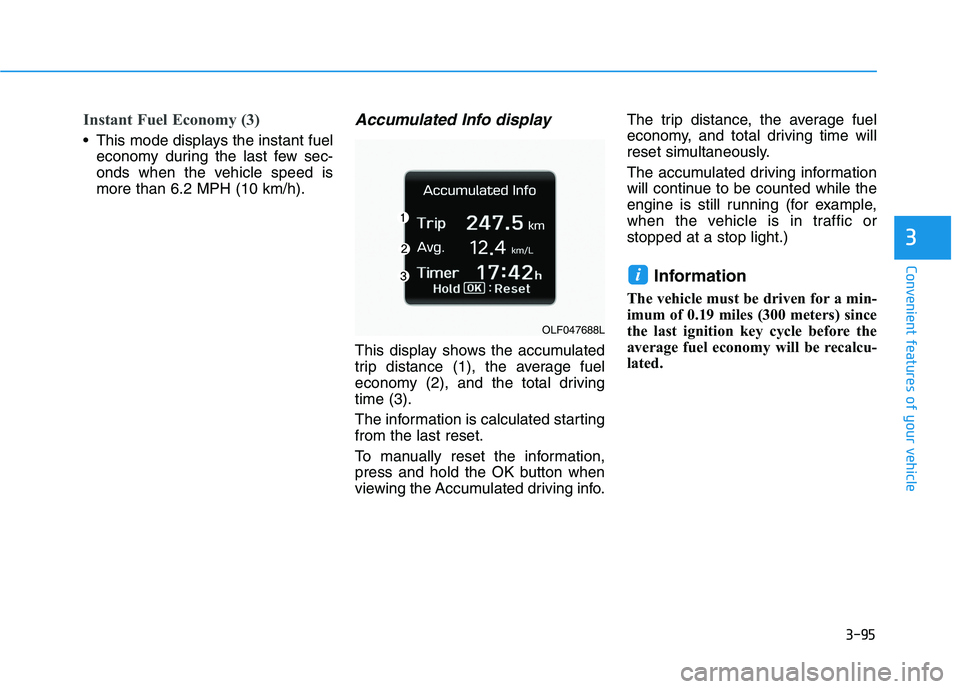
This display shows the accumulated
trip distance (1), the average fuel
economy (2), and the total drivingtime (3).
The information is calculated starting from the last reset.
To manually reset the information,
press and hold the OK button when
viewing the Accumulated driving info. The trip distance, the average fuel
economy, and total driving time will
reset simultaneously.
The accumulated driving information
will continue to be counted while the
engine is still running (for example,
when the vehicle is in traffic orstopped at a stop light.)
Information
The vehicle must be driven for a min-
imum of 0.19 miles (300 meters) since
the last ignition key cycle before the
average fuel economy will be recalcu-
lated.
i
OLF047688L
Page 232 of 546
3-96
Convenient features of your vehicle
Driving Info display
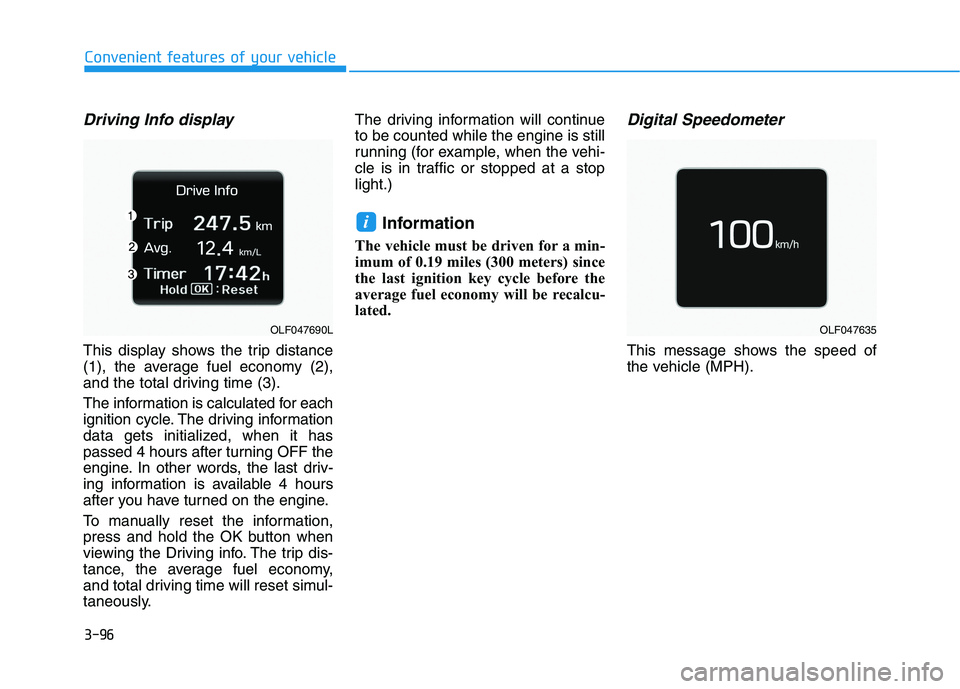
This display shows the trip distance
(1), the average fuel economy (2),
and the total driving time (3).
The information is calculated for each
ignition cycle. The driving information
data gets initialized, when it has
passed 4 hours after turning OFF the
engine. In other words, the last driv-
ing information is available 4 hours
after you have turned on the engine.
To manually reset the information,
press and hold the OK button when
viewing the Driving info. The trip dis-
tance, the average fuel economy,
and total driving time will reset simul-
taneously.The driving information will continueto be counted while the engine is still
running (for example, when the vehi-
cle is in traffic or stopped at a stoplight.)
Information
The vehicle must be driven for a min-
imum of 0.19 miles (300 meters) since
the last ignition key cycle before the
average fuel economy will be recalcu-
lated.
Digital Speedometer
This message shows the speed of
the vehicle (MPH).
i
OLF047690LOLF047635
Page 234 of 546
3-98
Convenient features of your vehicleL
L IIGG HH TT
Exterior Lights
Lighting control
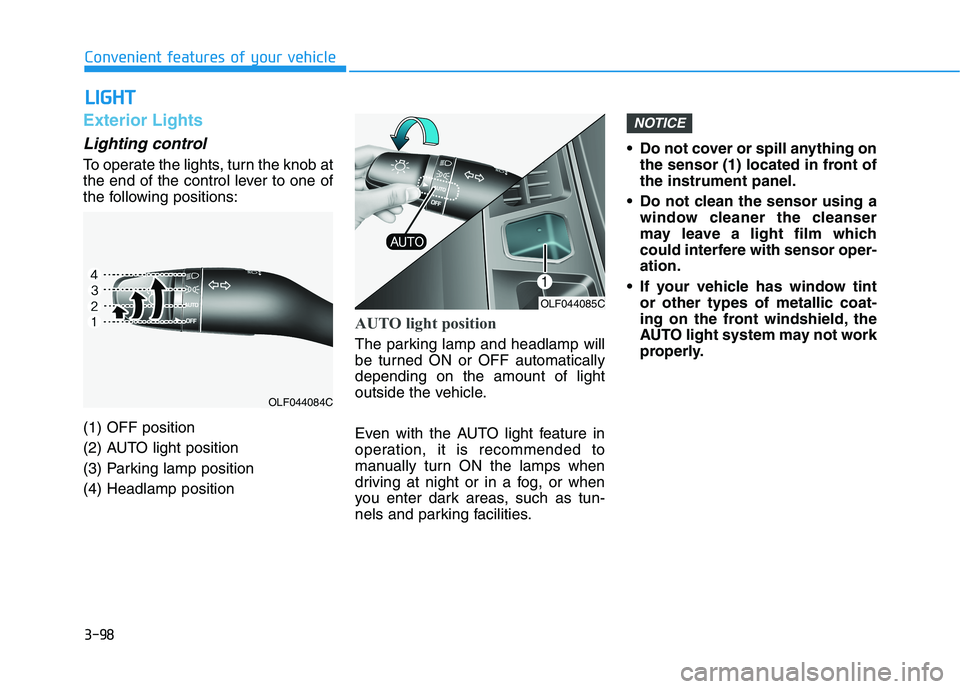
To operate the lights, turn the knob at
the end of the control lever to one of
the following positions: (1) OFF position
(2) AUTO light position
(3) Parking lamp position(4) Headlamp position
AUTO light position
The parking lamp and headlamp will
be turned ON or OFF automaticallydepending on the amount of light
outside the vehicle.
Even with the AUTO light feature in
operation, it is recommended to
manually turn ON the lamps when
driving at night or in a fog, or when
you enter dark areas, such as tun-
nels and parking facilities. Do not cover or spill anything on
the sensor (1) located in front ofthe instrument panel.
Do not clean the sensor using a window cleaner the cleanser
may leave a light film which
could interfere with sensor oper-ation.
If your vehicle has window tint or other types of metallic coat-
ing on the front windshield, the
AUTO light system may not work
properly.
NOTICE
OLF044085C
OLF044084C
Page 235 of 546
3-99
Convenient features of your vehicle
3
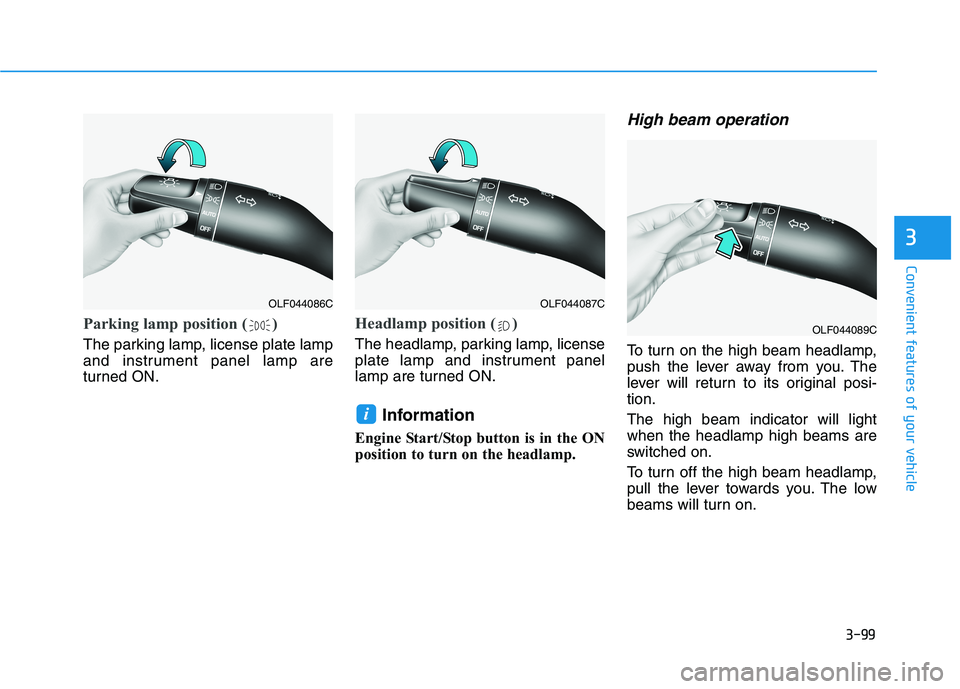
Parking lamp position ( )
The parking lamp, license plate lamp
and instrument panel lamp are
turned ON.
Headlamp position ( )
The headlamp, parking lamp, license
plate lamp and instrument panel
lamp are turned ON.Information
Engine Start/Stop button is in the ON
position to turn on the headlamp.
High beam operation
To turn on the high beam headlamp,
push the lever away from you. The
lever will return to its original posi-tion. The high beam indicator will light when the headlamp high beams are
switched on.
To turn off the high beam headlamp,
pull the lever towards you. The low
beams will turn on.
i
OLF044086COLF044087C
OLF044089C
Page 237 of 546
3-101
Convenient features of your vehicle
3
Operating condition
1. Place the light switch in the AUTOposition.
2. Turn on the high beam by pushing the lever away from you.
The smart high beam ( ) indica- tor will illuminate.
3. The Smart High Beam will turn on when vehicle speed is above 45km/h (28 mph).
the Smart High Beam is operat-
ing, the Smart High Beam will
turn off and the high beam will
be on continuously. The smart
high beam ( ) indicator will
turn off.
when the Smart High Beam is
operating, the Smart High Beam
will turn off.
4. If the light switch is placed to the headlamp position, the Smart
High Beam will turn off and the
low beam will be on continuously. The high beam switches to low beam
in the below conditions.
- When the Smart High Beam is off.
- When the light switch is not in the
AUTO position.
- When the headlamp is detected from the on-coming vehicle.
- When the tail lamp is detected from the front vehicle.
- When the surrounding is bright enough high beams are not need- ed.
- When streetlights or other lights are detected.
- When vehicle speed is below 35 km/h (18 mph).
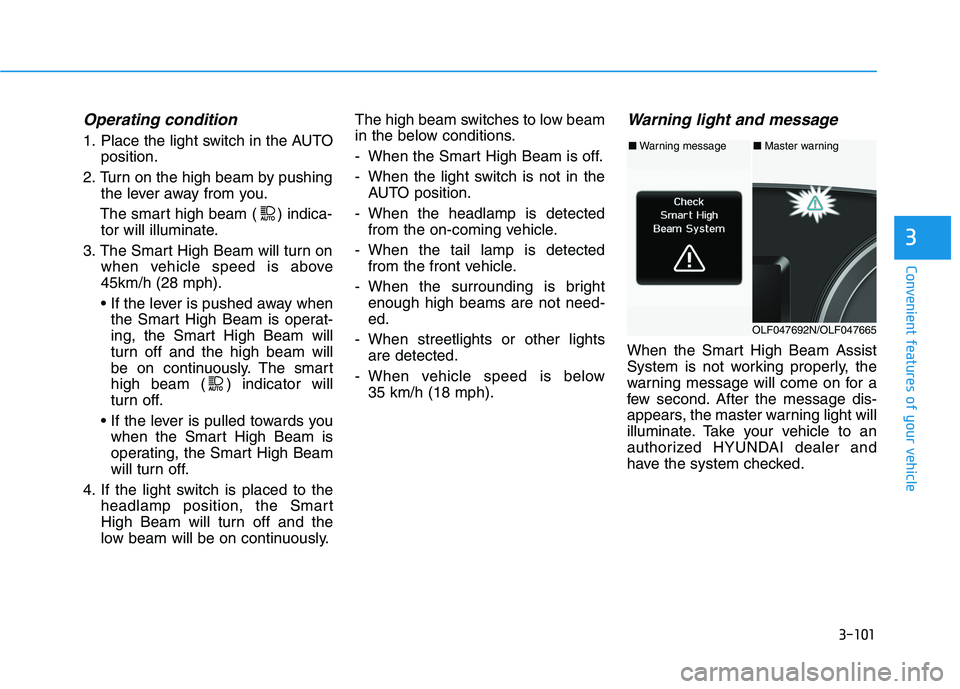
Warning light and message
When the Smart High Beam Assist
System is not working properly, the
warning message will come on for a
few second. After the message dis-
appears, the master warning light will
illuminate. Take your vehicle to an
authorized HYUNDAI dealer and
have the system checked.
■Warning message■ Master warning
OLF047692N/OLF047665