HYUNDAI SONATA HYBRID 2023 Owners Manual
Manufacturer: HYUNDAI, Model Year: 2023, Model line: SONATA HYBRID, Model: HYUNDAI SONATA HYBRID 2023Pages: 549
Page 221 of 549
Convenience Features
5 -74
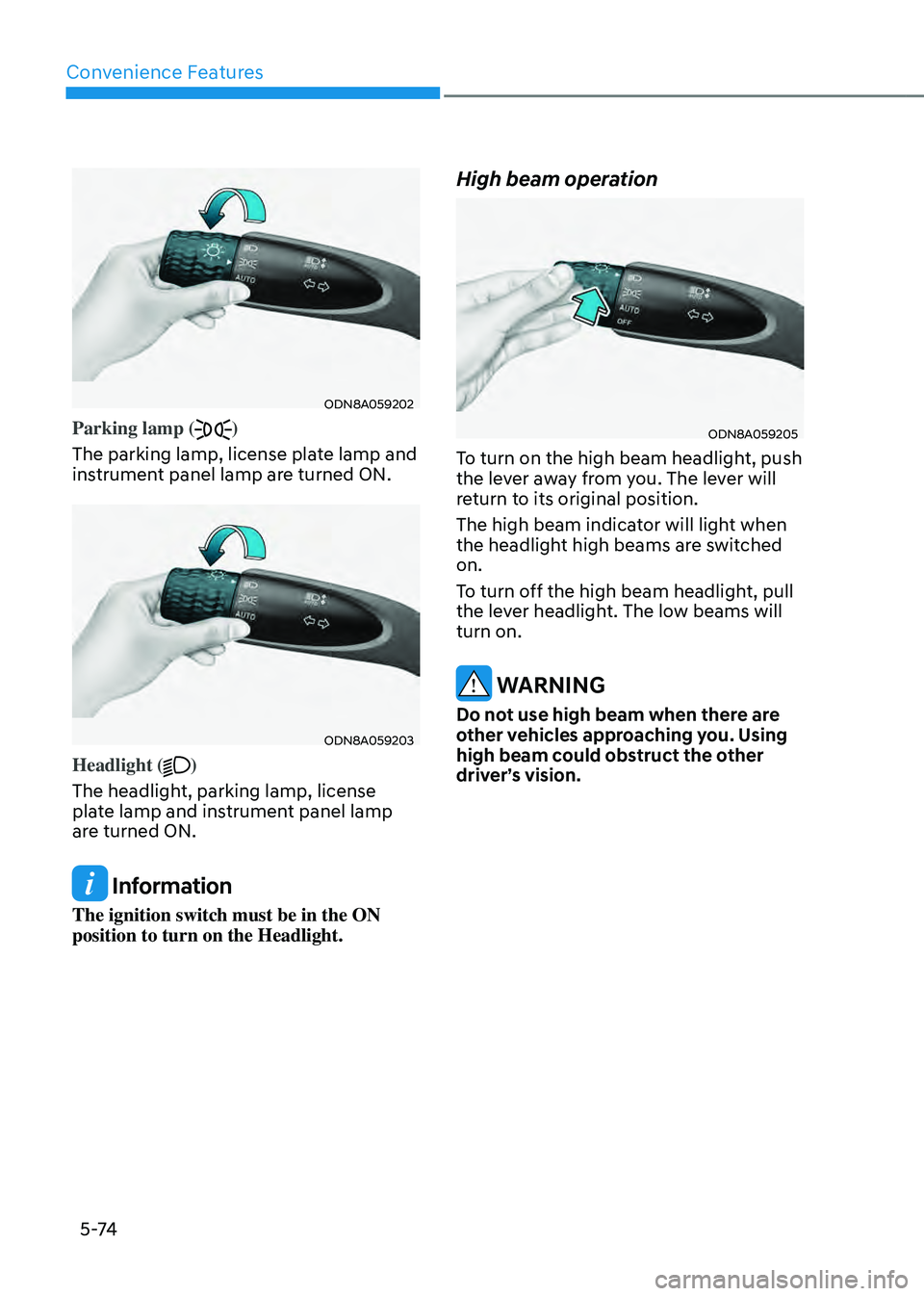
ODN8A059202ODN8A059202
Parking lamp ()
The parking lamp, license plate lamp and
instrument panel lamp are turned ON.
ODN8A059203ODN8A059203
Headlight ()
The headlight, parking lamp, license
plate lamp and instrument panel lamp
are turned ON.
Information
The ignition switch must be in the ON
position to turn on the Headlight.
High beam operation
ODN8A059205ODN8A059205
To turn on the high beam headlight, push
the lever away from you. The lever will
return to its original position.
The high beam indicator will light when
the headlight high beams are switched
on.
To turn off the high beam headlight, pull
the lever headlight. The low beams will
turn on.
WARNING
Do not use high beam when there are
other vehicles approaching you. Using
high beam could obstruct the other
driver’s vision.
Page 222 of 549
05
5-75
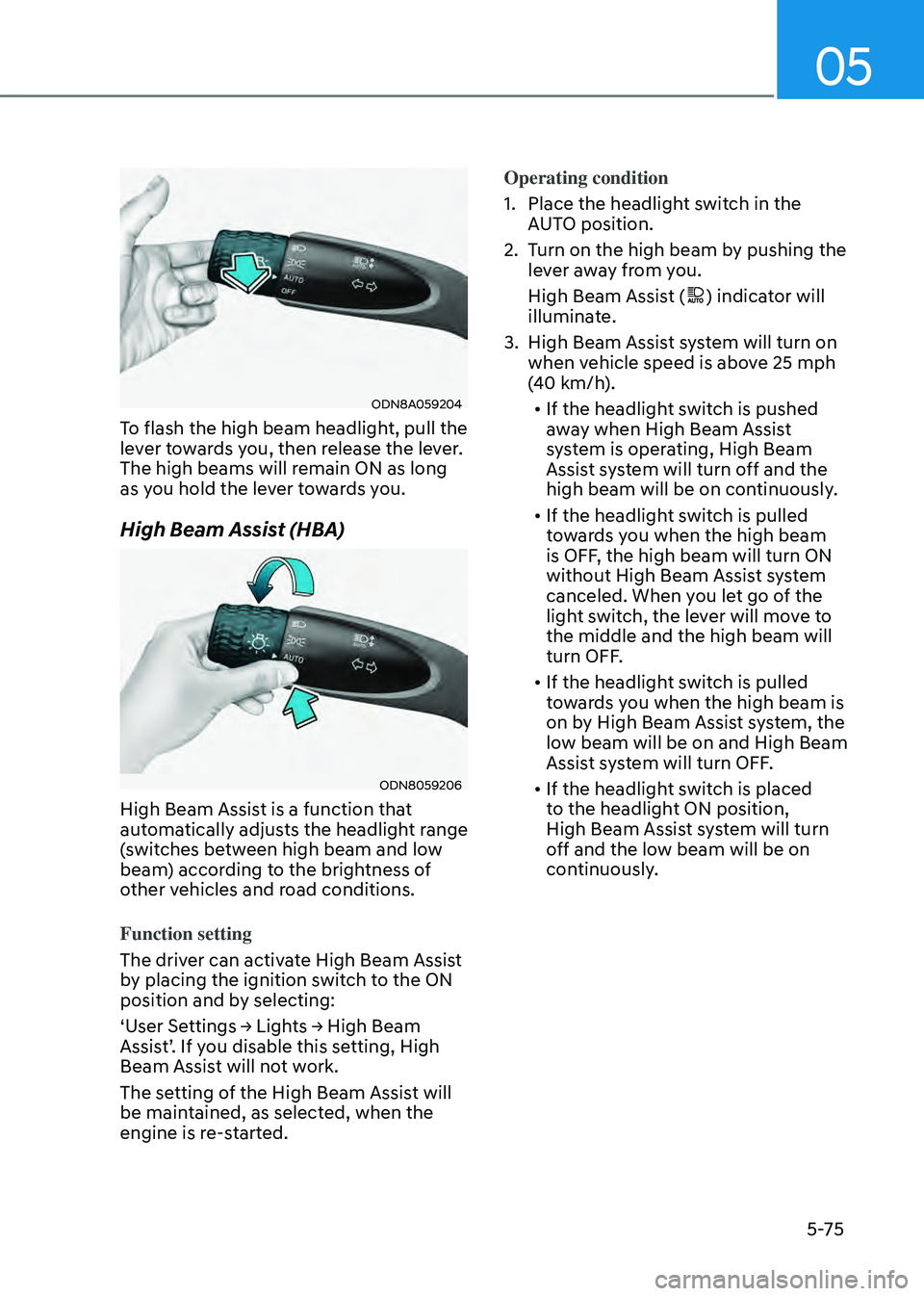
ODN8A059204ODN8A059204
To flash the high beam headlight, pull the
lever towards you, then release the lever.
The high beams will remain ON as long
as you hold the lever towards you.
High Beam Assist (HBA)
ODN8059206 ODN8059206
High Beam Assist is a function that
automatically adjusts the headlight range
(switches between high beam and low
beam) according to the brightness of
other vehicles and road conditions.
Function setting
The driver can activate High Beam Assist
by placing the ignition switch to the ON
position and by selecting:
‘User Settings → Lights → High Beam
Assist’. If you disable this setting, High
Beam Assist will not work.
The setting of the High Beam Assist will
be maintained, as selected, when the
engine is re-started.Operating condition
1. Place the headlight switch in the
AUTO position.
2. Turn on the high beam by pushing the
lever away from you.
High Beam Assist (
) indicator will
illuminate.
3. High Beam Assist system will turn on
when vehicle speed is above 25 mph
(40 km/h).
• If the headlight switch is pushed
away when High Beam Assist
system is operating, High Beam
Assist system will turn off and the
high beam will be on continuously.
• If the headlight switch is pulled
towards you when the high beam
is OFF, the high beam will turn ON
without High Beam Assist system
canceled. When you let go of the
light switch, the lever will move to
the middle and the high beam will
turn OFF.
• If the headlight switch is pulled
towards you when the high beam is
on by High Beam Assist system, the
low beam will be on and High Beam
Assist system will turn OFF.
• If the headlight switch is placed
to the headlight ON position,
High Beam Assist system will turn
off and the low beam will be on
continuously.
Page 223 of 549
Convenience Features
5 -76
When High Beam Assist system is
operating, the high beam switches to low
beam if any of the following conditions
occur:
-When the headlight of an on-coming
vehicle is detected.
-When the tail lamp of a vehicle in front
is detected.
-When the headlight or tail lamp of a
motorcycle or a bicycle is detected.
-When the surrounding ambient light is
bright enough that high beams are not
required.
-When streetlights or other lights are
detected.
-When the headlight switch is not in
the AUTO position.
-When High Beam Assist system is off.
-When vehicle speed is below 15 mph
(24 km/h).
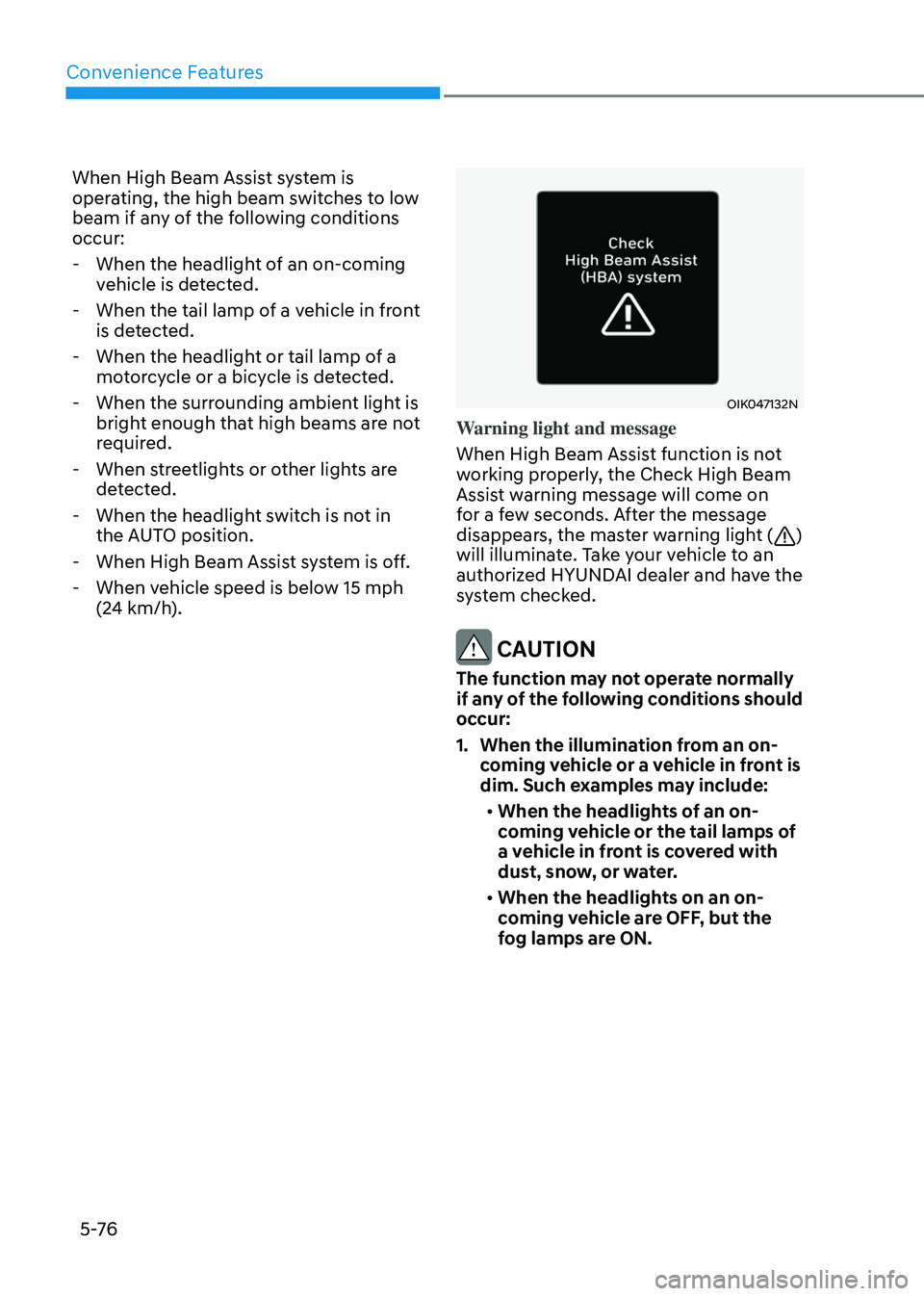
OIK047132NOIK047132N
Warning light and message
When High Beam Assist function is not
working properly, the Check High Beam
Assist warning message will come on
for a few seconds. After the message
disappears, the master warning light (
)
will illuminate. Take your vehicle to an
authorized HYUNDAI dealer and have the
system checked.
CAUTION
The function may not operate normally
if any of the following conditions should
occur:
1. When the illumination from an on-
coming vehicle or a vehicle in front is
dim. Such examples may include:
• When the headlights of an on-
coming vehicle or the tail lamps of
a vehicle in front is covered with
dust, snow, or water.
• When the headlights on an on-
coming vehicle are OFF, but the
fog lamps are ON.
Page 224 of 549
05
5-77
2. When the High Beam Assist camera
is adversely affected by an external
condition. Such examples may
include:
• When the vehicle’s headlights have
been damaged or not repaired
properly.
• When the vehicle headlights are
not aimed properly.
• When the vehicle is driven on a
narrow curved road or rough road
• When the vehicle is driven on an
uphill road or downhill road
• When only part of the vehicle in
front is visible on a crossroad or
curved road.
• When there is a traffic light,
reflecting sign, flashing sign or
mirror.
• When the road conditions are bad
such as being wet or covered with
snow.
• When a vehicle suddenly appears
from a curve.
• When the vehicle is tilted from a
flat tire or being towed.
• When Lane Keeping Assist system
warning light illuminates.
• When the light from the on-coming
or front vehicle is not detected
because of exhaust fume, smoke,
fog, snow, etc.
• When the front window is covered
with foreign matters such as ice,
dust, fog, or is damaged.
3. When the forward visibility is poor.
Such examples may include:
• When the headlights of an on-
coming vehicle or a vehicle in front
is not detected due to poor outside
visibility (smog, smoke, dust, fog,
heavy rain, snow, etc.).
• When the windshield visibility is
poor.
WARNING
• Do not attempt to disassemble
the front view camera without
the assistance of an authorized
HYUNDAI dealer technician. If the
front camera is removed for any
reason, the function may need to
be re-calibrated. Have the system
inspected by an authorized HYUNDAI
dealer.
• If the windshield of your vehicle is
replaced, most likely the front view
camera will need to be re-calibrated.
If this occurs, have your vehicle
inspected and have the function re-
calibrated by an authorized HYUNDAI
dealer.
• Be careful that water doesn’t get into
High Beam Assist unit and do not
remove or damage related parts of
High Beam Assist.
• Do not place objects on the crash
pad that reflect light such as mirrors,
white paper, etc. The function may
malfunction if sunlight is reflected.
• At times, High Beam Assist system
may not work properly. The function
is for your convenience only. It is the
responsibility of the driver for safe
driving practices and always check
the road conditions for your safety.
• When the function does not operate
normally, change the headlight
position manually between the high
beam and low beam.
Page 225 of 549
Convenience Features
5-78
Turn signals and lane change signals
ODN8A059207ODN8A059207
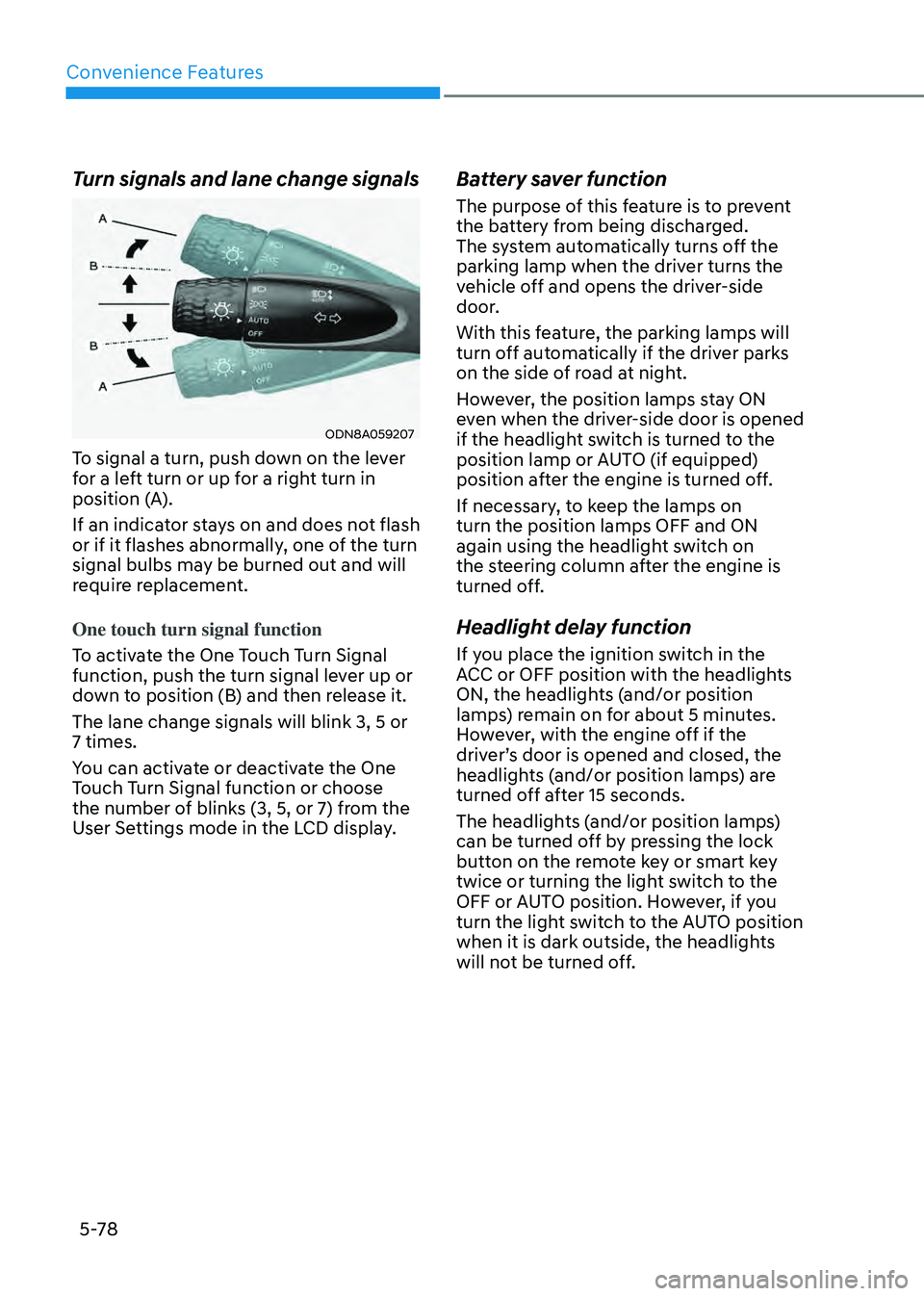
To signal a turn, push down on the lever
for a left turn or up for a right turn in
position (A).
If an indicator stays on and does not flash
or if it flashes abnormally, one of the turn
signal bulbs may be burned out and will
require replacement.
One touch turn signal function
To activate the One Touch Turn Signal
function, push the turn signal lever up or
down to position (B) and then release it.
The lane change signals will blink 3, 5 or
7 times.
You can activate or deactivate the One
Touch Turn Signal function or choose
the number of blinks (3, 5, or 7) from the
User Settings mode in the LCD display.
Battery saver function
The purpose of this feature is to prevent
the battery from being discharged.
The system automatically turns off the
parking lamp when the driver turns the
vehicle off and opens the driver-side
door.
With this feature, the parking lamps will
turn off automatically if the driver parks
on the side of road at night.
However, the position lamps stay ON
even when the driver-side door is opened
if the headlight switch is turned to the
position lamp or AUTO (if equipped)
position after the engine is turned off.
If necessary, to keep the lamps on
turn the position lamps OFF and ON
again using the headlight switch on
the steering column after the engine is
turned off.
Headlight delay function
If you place the ignition switch in the
ACC or OFF position with the headlights
ON, the headlights (and/or position
lamps) remain on for about 5 minutes.
However, with the engine off if the
driver’s door is opened and closed, the
headlights (and/or position lamps) are
turned off after 15 seconds.
The headlights (and/or position lamps)
can be turned off by pressing the lock
button on the remote key or smart key
twice or turning the light switch to the
OFF or AUTO position. However, if you
turn the light switch to the AUTO position
when it is dark outside, the headlights
will not be turned off.
Page 226 of 549
05
5-79
NOTICE
If the driver exits the vehicle through
another door besides the driver
door, the battery saver function
does not operate and the headlight
delay function does not turn OFF
automatically.
This may cause the battery to
discharge. To avoid battery discharge,
turn OFF the headlights manually from
the headlight switch before exiting the
vehicle.
Headlight leveling device
It automatically adjusts the headlight
beam level according to the number of
passengers and loading weight in the
luggage area.
And it offers proper headlamp beam
under various conditions.
WARNING
If the function does not work properly,
have the vehicle inspected by an
authorized HYUNDAI dealer. Do not
attempt to inspect or replace the wiring
yourself.
Interior Lights
WARNING
Do not use the interior lights when
driving in the dark. The interior lights
may obscure your view and cause an
accident.
NOTICE
Do not use the interior lights for
extended periods when the vehicle is
turned off or the battery will discharge.
Interior lamp AUTO cut
The interior lamps will automatically go
off approximately 20 minutes after the
engine is turned off and the doors are
closed. If a door is opened, the lamp
will go off 40 minutes after the engine is
turned off. If the doors are locked by the
remote key or smart key and the vehicle
enters the armed stage of the theft
alarm system, the lamps will go off five
seconds later.
Page 227 of 549
Convenience Features
5-80
Front lamps
ODN8A059210ODN8A059210
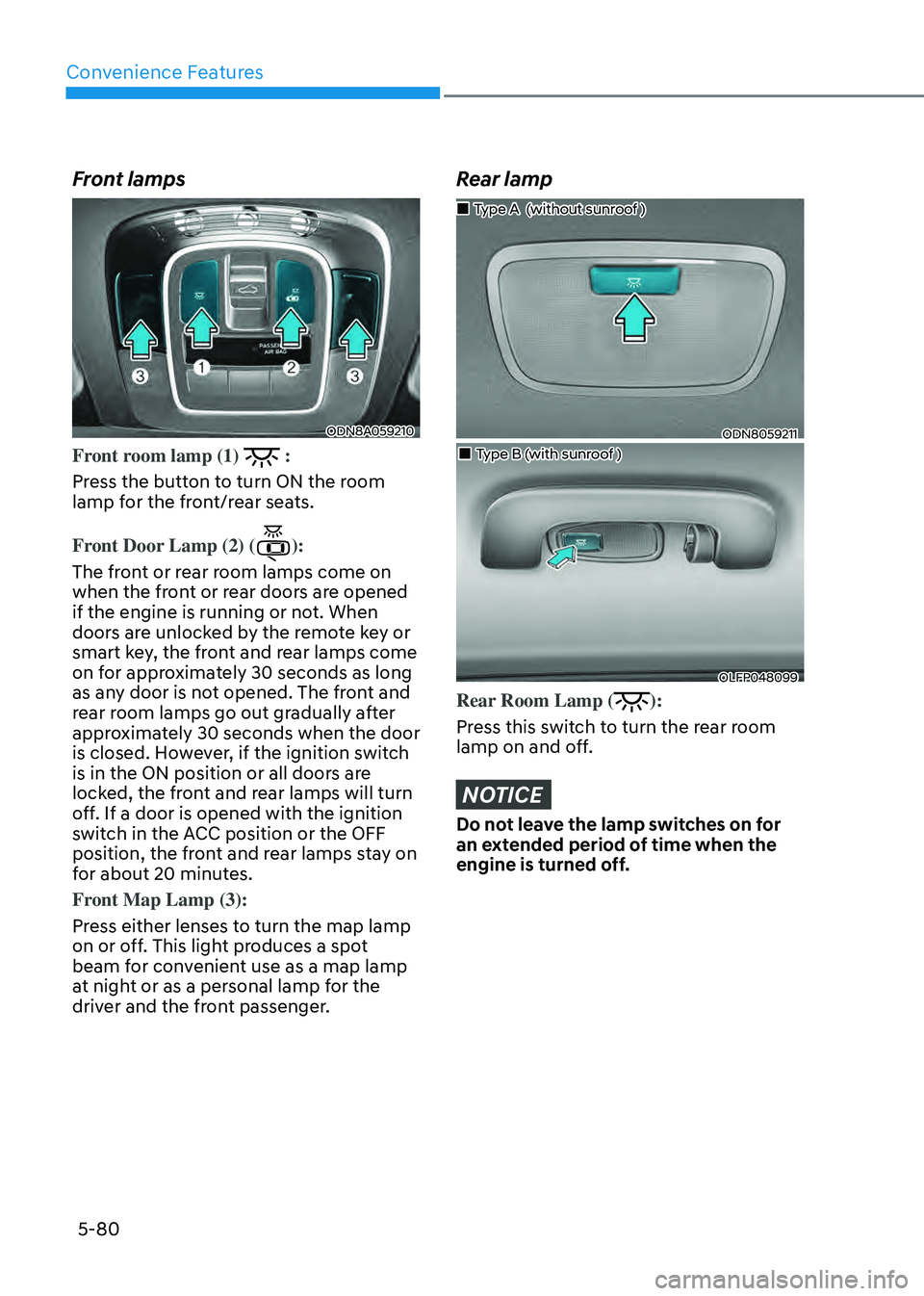
Front room lamp (1) :
Press the button to turn ON the room
lamp for the front/rear seats.
Front Door Lamp (2) (
):
The front or rear room lamps come on
when the front or rear doors are opened
if the engine is running or not. When
doors are unlocked by the remote key or
smart key, the front and rear lamps come
on for approximately 30 seconds as long
as any door is not opened. The front and
rear room lamps go out gradually after
approximately 30 seconds when the door
is closed. However, if the ignition switch
is in the ON position or all doors are
locked, the front and rear lamps will turn
off. If a door is opened with the ignition
switch in the ACC position or the OFF
position, the front and rear lamps stay on
for about 20 minutes.
Front Map Lamp (3):
Press either lenses to turn the map lamp
on or off. This light produces a spot
beam for convenient use as a map lamp
at night or as a personal lamp for the
driver and the front passenger.
Rear lamp
ODN8059211ODN8059211
Page 228 of 549
05
5-81
Luggage compartment lamp
ODN8059213LODN8059213L
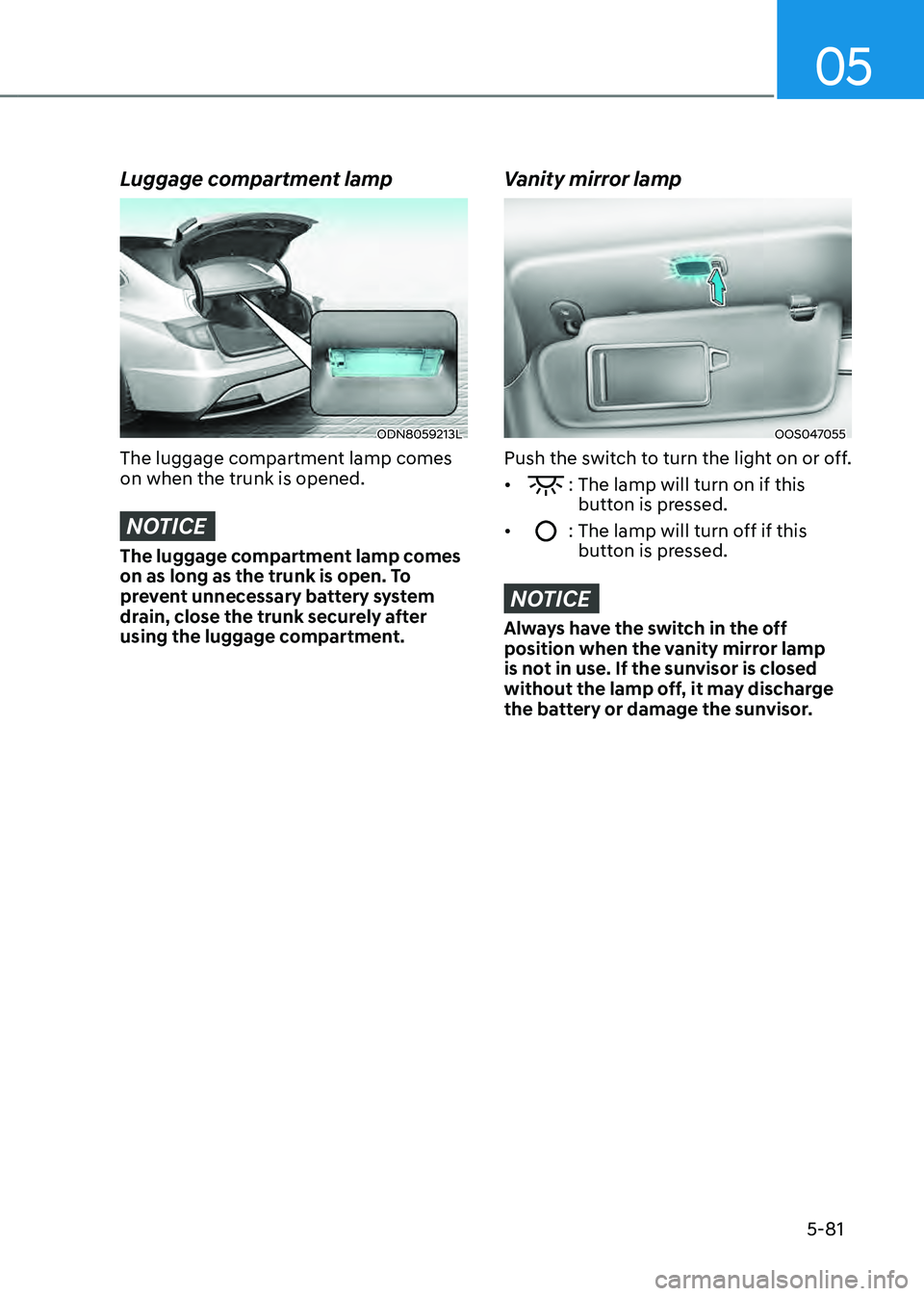
The luggage compartment lamp comes
on when the trunk is opened.
NOTICE
The luggage compartment lamp comes
on as long as the trunk is open. To
prevent unnecessary battery system
drain, close the trunk securely after
using the luggage compartment.
Vanity mirror lamp
OOS047055OOS047055
Push the switch to turn the light on or off.
• : The lamp will turn on if this button is pressed.
• : The lamp will turn off if this button is pressed.
NOTICE
Always have the switch in the off
position when the vanity mirror lamp
is not in use. If the sunvisor is closed
without the lamp off, it may discharge
the battery or damage the sunvisor.
Page 229 of 549
Convenience Features
5-82
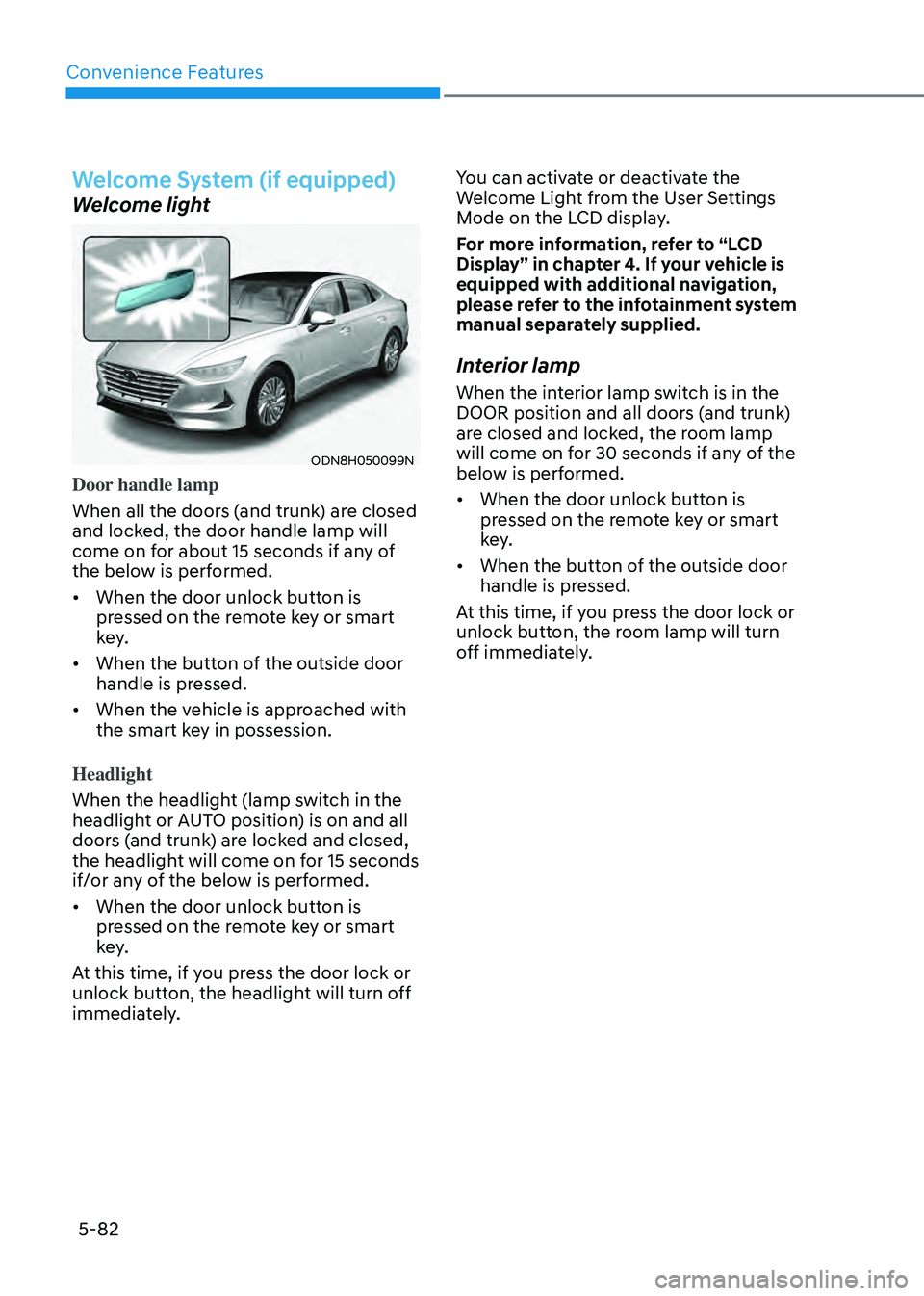
Welcome System (if equipped)
Welcome light
ODN8H050099NODN8H050099N
Door handle lamp
When all the doors (and trunk) are closed
and locked, the door handle lamp will
come on for about 15 seconds if any of
the below is performed.
• When the door unlock button is
pressed on the remote key or smart
key.
• When the button of the outside door
handle is pressed.
• When the vehicle is approached with
the smart key in possession.
Headlight
When the headlight (lamp switch in the
headlight or AUTO position) is on and all
doors (and trunk) are locked and closed,
the headlight will come on for 15 seconds
if/or any of the below is performed.
• When the door unlock button is
pressed on the remote key or smart
key.
At this time, if you press the door lock or
unlock button, the headlight will turn off
immediately. You can activate or deactivate the
Welcome Light from the User Settings
Mode on the LCD display.
For more information, refer to “LCD
Display” in chapter 4. If your vehicle is
equipped with additional navigation,
please refer to the infotainment system
manual separately supplied.
Interior lamp
When the interior lamp switch is in the
DOOR position and all doors (and trunk)
are closed and locked, the room lamp
will come on for 30 seconds if any of the
below is performed.
• When the door unlock button is
pressed on the remote key or smart
key.
• When the button of the outside door
handle is pressed.
At this time, if you press the door lock or
unlock button, the room lamp will turn
off immediately.
Page 230 of 549
05
5-83
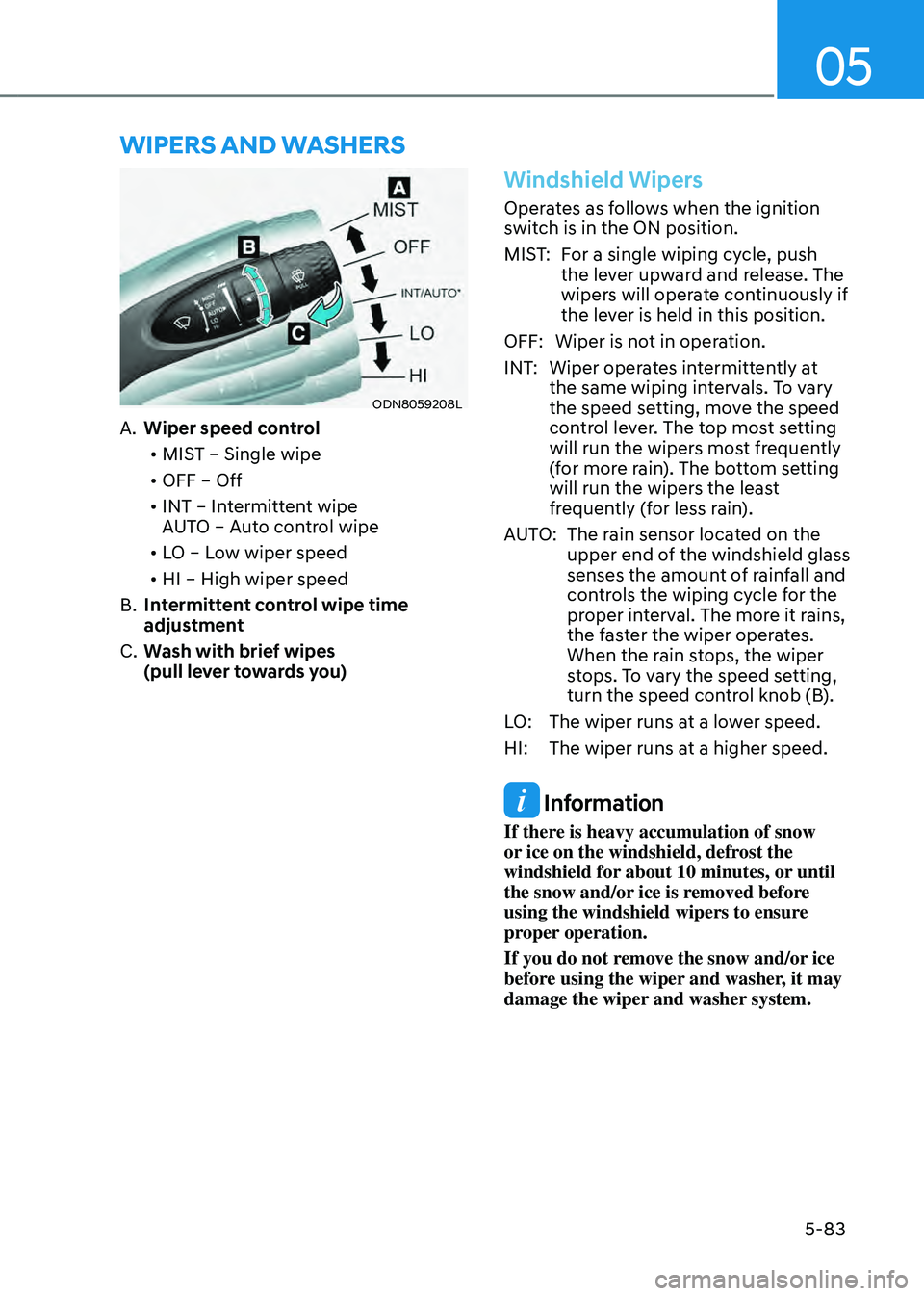
WIPERS AND WASHERS
ODN8059208LODN8059208L
A. Wiper speed control
• MIST – Single wipe
• OFF – Off
• INT – Intermittent wipe
AUTO – Auto control wipe
• LO – Low wiper speed
• HI – High wiper speed
B. Intermittent control wipe time
adjustment
C. Wash with brief wipes
(pull lever towards you)
Windshield Wipers
Operates as follows when the ignition
switch is in the ON position.
MIST:For a single wiping cycle, push
the lever upward and release. The
wipers will operate continuously if
the lever is held in this position.
OFF: Wiper is not in operation.
INT: Wiper operates intermittently at
the same wiping intervals. To vary
the speed setting, move the speed
control lever. The top most setting
will run the wipers most frequently
(for more rain). The bottom setting
will run the wipers the least
frequently (for less rain).
AUTO: The rain sensor located on the
upper end of the windshield glass
senses the amount of rainfall and
controls the wiping cycle for the
proper interval. The more it rains,
the faster the wiper operates.
When the rain stops, the wiper
stops. To vary the speed setting,
turn the speed control knob (B).
LO: The wiper runs at a lower speed.
HI: The wiper runs at a higher speed.
Information
If there is heavy accumulation of snow
or ice on the windshield, defrost the
windshield for about 10 minutes, or until
the snow and/or ice is removed before
using the windshield wipers to ensure
proper operation.
If you do not remove the snow and/or ice
before using the wiper and washer, it may
damage the wiper and washer system.