HYUNDAI SONATA HYBRID 2023 Owners Manual
Manufacturer: HYUNDAI, Model Year: 2023, Model line: SONATA HYBRID, Model: HYUNDAI SONATA HYBRID 2023Pages: 549
Page 231 of 549
Convenience Features
5-84
Information
If the wiper switch is set in AUTO mode
when Engine Start/Stop button is in the
ON position, the wiper will operate once to
perform a self-check of the system. Set the
wiper to the OFF position when the wiper
is not in use.
WARNING
To avoid personal injury from the
windshield wipers, when the engine
is running and the windshield wiper
switch is placed in the AUTO mode:
• Do not touch the upper end of the
windshield glass facing the rain
sensor.
• Do not wipe the upper end of the
windshield glass with a damp or wet
cloth.
• Do not put pressure on the
windshield glass.
Windshield Washers
ODN8059209KODN8059209K
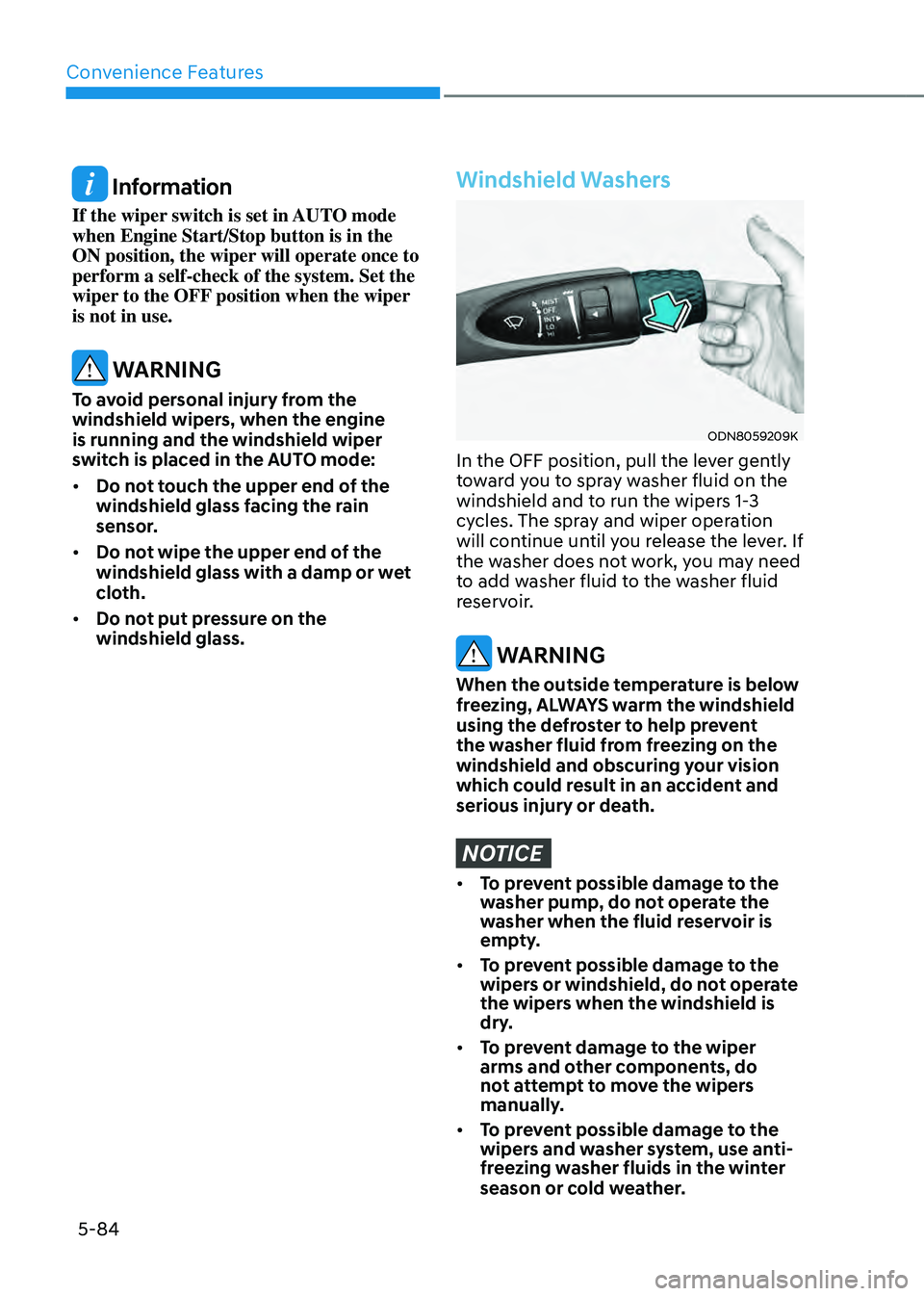
In the OFF position, pull the lever gently
toward you to spray washer fluid on the
windshield and to run the wipers 1-3
cycles. The spray and wiper operation
will continue until you release the lever. If
the washer does not work, you may need
to add washer fluid to the washer fluid
reservoir.
WARNING
When the outside temperature is below
freezing, ALWAYS warm the windshield
using the defroster to help prevent
the washer fluid from freezing on the
windshield and obscuring your vision
which could result in an accident and
serious injury or death.
NOTICE
• To prevent possible damage to the
washer pump, do not operate the
washer when the fluid reservoir is
empty.
• To prevent possible damage to the
wipers or windshield, do not operate
the wipers when the windshield is
dry.
• To prevent damage to the wiper
arms and other components, do
not attempt to move the wipers
manually.
• To prevent possible damage to the
wipers and washer system, use anti-
freezing washer fluids in the winter
season or cold weather.
Page 232 of 549
05
5-85
Rear View Monitor system is a
supplemental system that shows the area
behind the vehicle on the infotainment
system screen to assist you when parking
or driving.
Rear View Monitor with Parking
Guidance
ODN8052058ODN8052058
ODN8059059ODN8059059
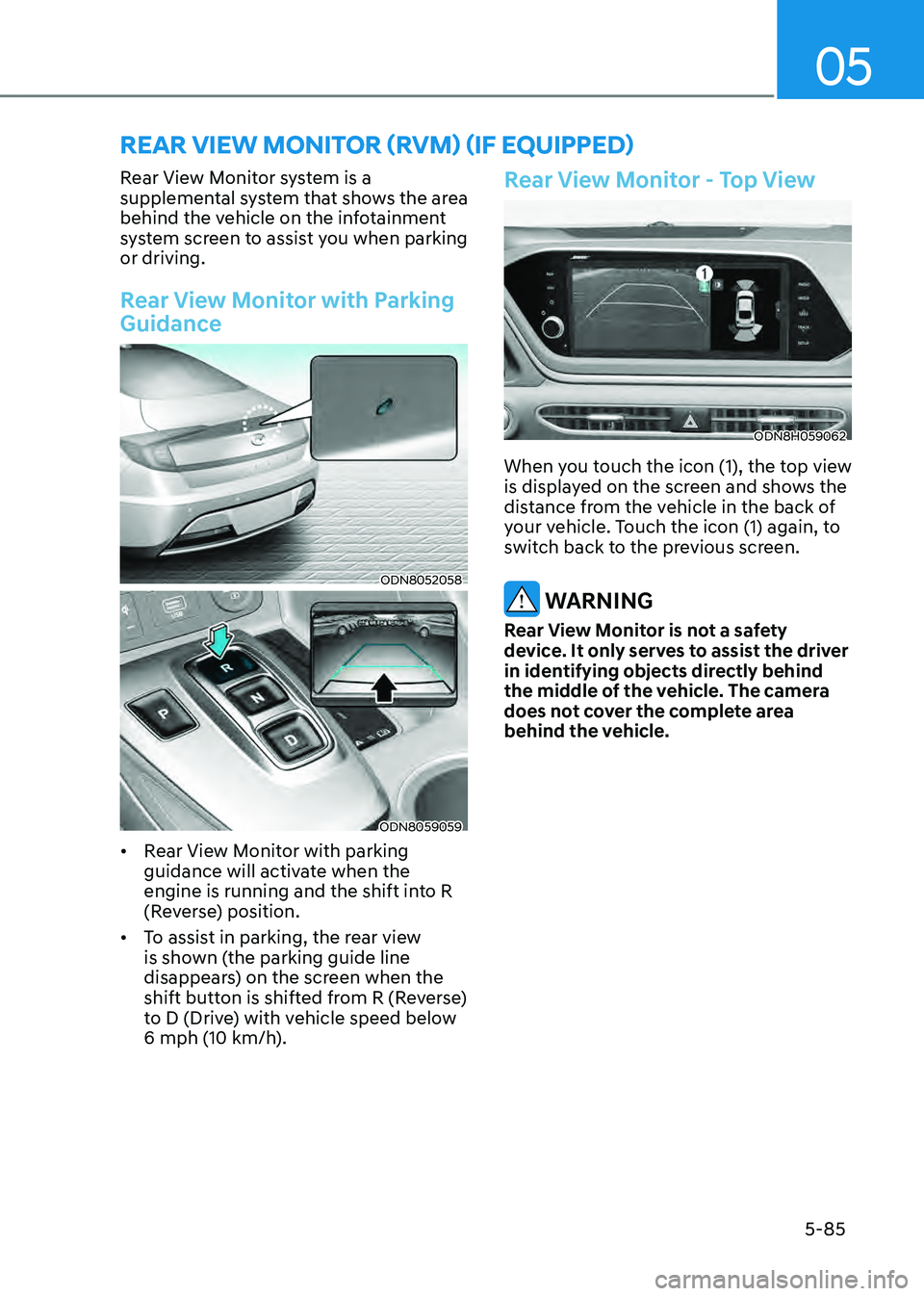
• Rear View Monitor with parking
guidance will activate when the
engine is running and the shift into R
(Reverse) position.
• To assist in parking, the rear view
is shown (the parking guide line
disappears) on the screen when the
shift button is shifted from R (Reverse)
to D (Drive) with vehicle speed below
6 mph (10 km/h).
Rear View Monitor - Top View
ODN8H059062ODN8H059062
When you touch the icon (1), the top view
is displayed on the screen and shows the
distance from the vehicle in the back of
your vehicle. Touch the icon (1) again, to
switch back to the previous screen.
WARNING
Rear View Monitor is not a safety
device. It only serves to assist the driver
in identifying objects directly behind
the middle of the vehicle. The camera
does not cover the complete area
behind the vehicle.
REAR VIEW MONITOR (RVM) (IF EQUIPPED)
Page 233 of 549
Convenience Features
5-86
WARNING
• Never rely solely on the rear camera
display when backing-up.
• Always look around your vehicle to
make sure there are no objects or
obstacles before moving the vehicle
in any direction to prevent a collision.
• Always pay close attention when the
vehicle is driven close to objects,
particularly pedestrians, and
especially children.
NOTICE
• Do not spray the camera or its
surrounding area directly with a high
pressure washer. Shock applied from
high pressure water may cause the
device to not operate normally.
• Do not use any cleanser containing
acid or alkaline detergents when
cleaning the lens. Use only a mild
soap or neutral detergent, and rinse
thoroughly with water.
• Always keep the rear view camera
lens clean. If the lens is covered with
foreign material, it may adversely
affect camera performance and
Rear View Monitor may not operate
normally. However, do not use
chemical solvents such as strong
detergents containing high alkaline
or volatile organic solvents (gasoline,
acetone etc.). This may damage the
camera lens.
Page 234 of 549
05
5-87
SURROUND VIEW MONITOR (SVM) (IF EQUIPPED)
ODN8059265ODN8059265
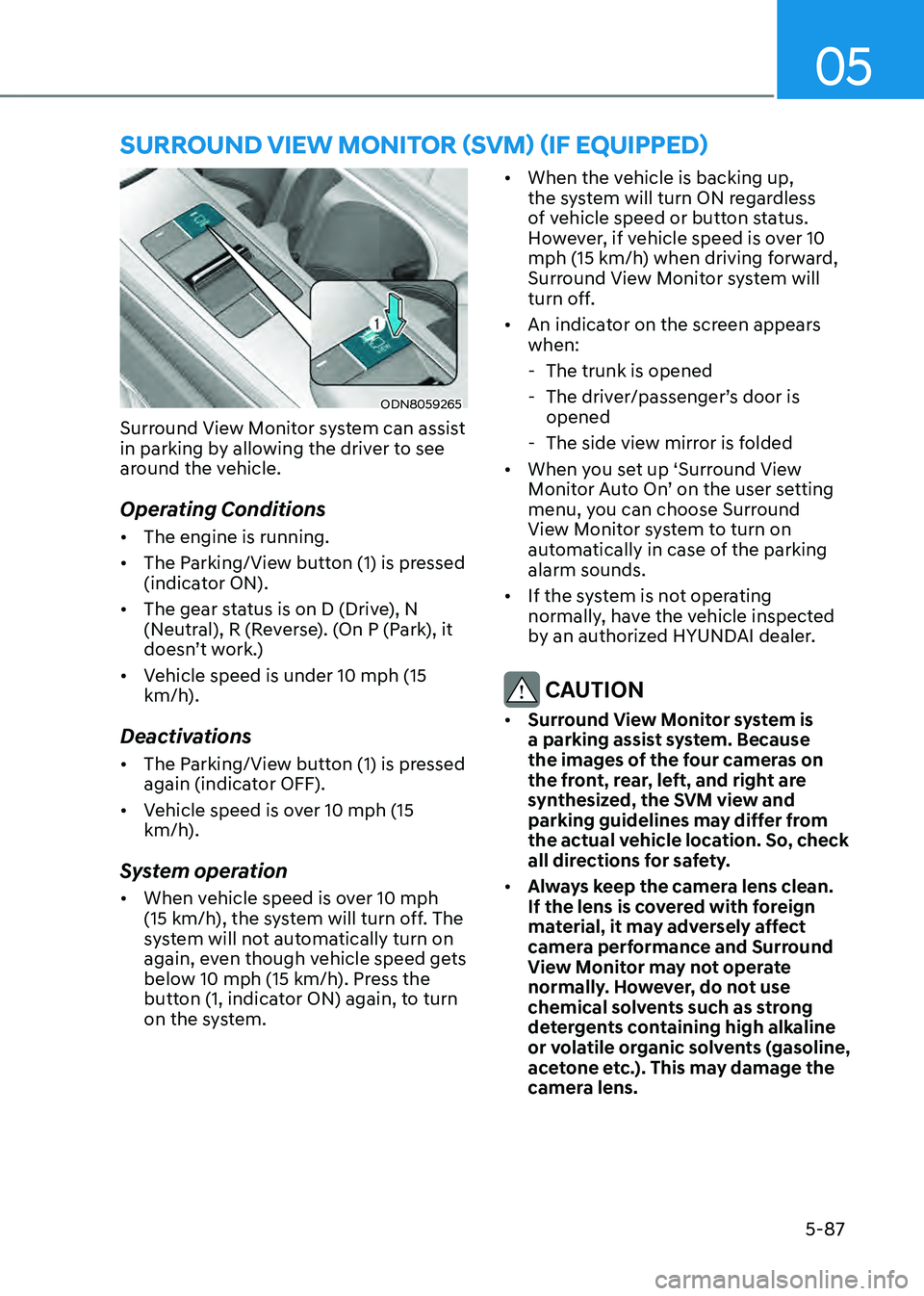
Surround View Monitor system can assist
in parking by allowing the driver to see
around the vehicle.
Operating Conditions
• The engine is running.
• The Parking/View button (1) is pressed
(indicator ON).
• The gear status is on D (Drive), N
(Neutral), R (Reverse). (On P (Park), it
doesn’t work.)
• Vehicle speed is under 10 mph (15
km/h).
Deactivations
• The Parking/View button (1) is pressed
again (indicator OFF).
• Vehicle speed is over 10 mph (15
km/h).
System operation
• When vehicle speed is over 10 mph
(15 km/h), the system will turn off. The
system will not automatically turn on
again, even though vehicle speed gets
below 10 mph (15 km/h). Press the
button (1, indicator ON) again, to turn
on the system.
• When the vehicle is backing up,
the system will turn ON regardless
of vehicle speed or button status.
However, if vehicle speed is over 10
mph (15 km/h) when driving forward,
Surround View Monitor system will
turn off.
• An indicator on the screen appears
when:
-The trunk is opened
-The driver/passenger’s door is
opened
-The side view mirror is folded
• When you set up ‘Surround View
Monitor Auto On’ on the user setting
menu, you can choose Surround
View Monitor system to turn on
automatically in case of the parking
alarm sounds.
• If the system is not operating
normally, have the vehicle inspected
by an authorized HYUNDAI dealer.
CAUTION
• Surround View Monitor system is
a parking assist system. Because
the images of the four cameras on
the front, rear, left, and right are
synthesized, the SVM view and
parking guidelines may differ from
the actual vehicle location. So, check
all directions for safety.
• Always keep the camera lens clean.
If the lens is covered with foreign
material, it may adversely affect
camera performance and Surround
View Monitor may not operate
normally. However, do not use
chemical solvents such as strong
detergents containing high alkaline
or volatile organic solvents (gasoline,
acetone etc.). This may damage the
camera lens.
Page 235 of 549
Convenience Features
5-88
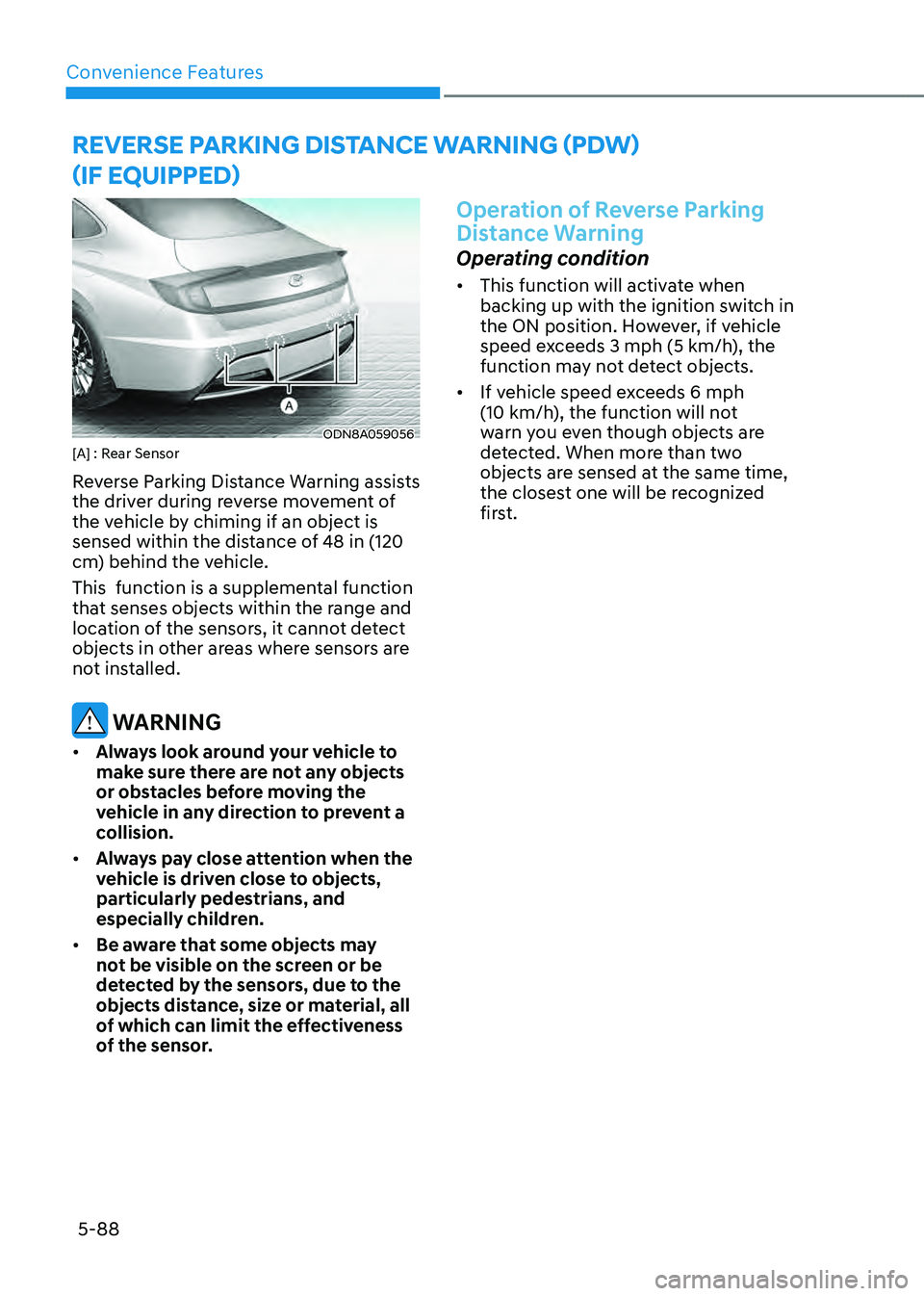
ODN8A059056ODN8A059056[A] : Rear Sensor
Reverse Parking Distance Warning assists
the driver during reverse movement of
the vehicle by chiming if an object is
sensed within the distance of 48 in (120
cm) behind the vehicle.
This function is a supplemental function
that senses objects within the range and
location of the sensors, it cannot detect
objects in other areas where sensors are
not installed.
WARNING
• Always look around your vehicle to
make sure there are not any objects
or obstacles before moving the
vehicle in any direction to prevent a
collision.
• Always pay close attention when the
vehicle is driven close to objects,
particularly pedestrians, and
especially children.
• Be aware that some objects may
not be visible on the screen or be
detected by the sensors, due to the
objects distance, size or material, all
of which can limit the effectiveness
of the sensor.
Operation of Reverse Parking
Distance Warning
Operating condition
• This function will activate when
backing up with the ignition switch in
the ON position. However, if vehicle
speed exceeds 3 mph (5 km/h), the
function may not detect objects.
• If vehicle speed exceeds 6 mph
(10 km/h), the function will not
warn you even though objects are
detected. When more than two objects are sensed at the same time,
the closest one will be recognized
first.
REVERSE PARKING DISTANCE WARNING (PDW)
(IF EQUIPPED)
Page 236 of 549
05
5-89
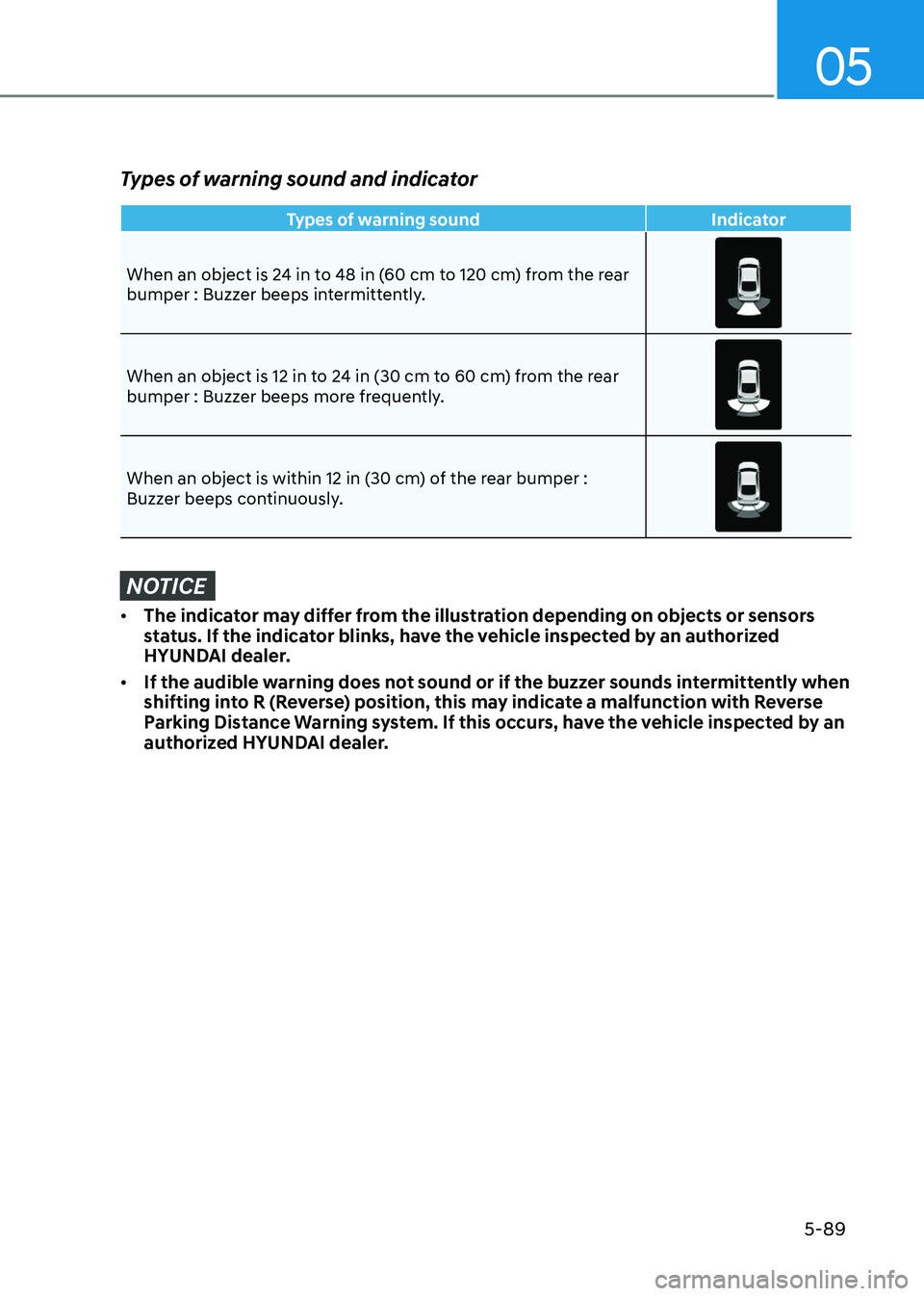
Types of warning sound and indicator
Types of warning soundIndicator
When an object is 24 in to 48 in (60 cm to 120 cm) from the rear
bumper : Buzzer beeps intermittently.
When an object is 12 in to 24 in (30 cm to 60 cm) from the rear bumper : Buzzer beeps more frequently.
When an object is within 12 in (30 cm) of the rear bumper : Buzzer beeps continuously.
NOTICE
• The indicator may differ from the illustration depending on objects or sensors
status. If the indicator blinks, have the vehicle inspected by an authorized
HYUNDAI dealer.
• If the audible warning does not sound or if the buzzer sounds intermittently when
shifting into R (Reverse) position, this may indicate a malfunction with Reverse
Parking Distance Warning system. If this occurs, have the vehicle inspected by an
authorized HYUNDAI dealer.
Page 237 of 549
Convenience Features
5-90
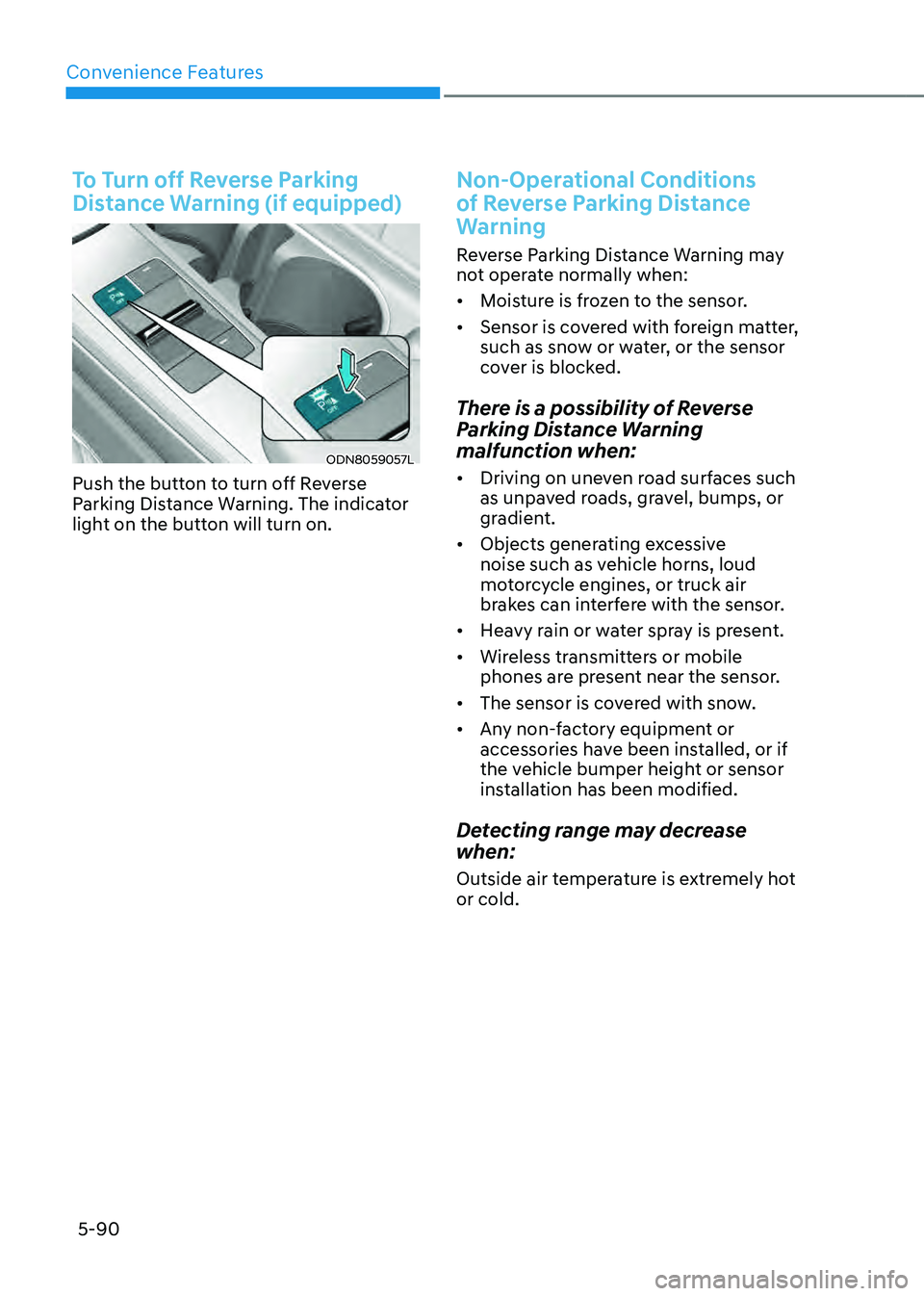
To Turn off Reverse Parking
Distance Warning (if equipped)
ODN8059057LODN8059057L
Push the button to turn off Reverse
Parking Distance Warning. The indicator
light on the button will turn on.
Non-Operational Conditions
of Reverse Parking Distance
Warning
Reverse Parking Distance Warning may
not operate normally when:
• Moisture is frozen to the sensor.
• Sensor is covered with foreign matter,
such as snow or water, or the sensor
cover is blocked.
There is a possibility of Reverse
Parking Distance Warning
malfunction when:
• Driving on uneven road surfaces such
as unpaved roads, gravel, bumps, or
gradient.
• Objects generating excessive
noise such as vehicle horns, loud
motorcycle engines, or truck air
brakes can interfere with the sensor.
• Heavy rain or water spray is present.
• Wireless transmitters or mobile
phones are present near the sensor.
• The sensor is covered with snow.
• Any non-factory equipment or
accessories have been installed, or if
the vehicle bumper height or sensor
installation has been modified.
Detecting range may decrease
when:
Outside air temperature is extremely hot
or cold.
Page 238 of 549
05
5-91
The following objects may not be
recognized by the sensor:
• Sharp or slim objects such as ropes,
chains or small poles.
• Objects, which tend to absorb sensor
frequency such as clothes, spongy
material or snow.
• Undetectable objects smaller than 40
in (100 cm) and narrower than 6 in (14
cm) in diameter.
WARNING
Your new vehicle warranty does not
cover any accidents or damage to the
vehicle or injuries to its occupants
related to Reverse Parking Distance
Warning system. Always drive safely
and cautiously.
Reverse Parking Distance
Warning Precautions
• Reverse Parking Distance Warning
may not sound consistently
depending on the speed and shapes
of the objects detected.
• Reverse Parking Distance Warning
may malfunction if the vehicle
bumper height or sensor installation
has been modified or damaged. Any
non-factory installed equipment or
accessories may also interfere with
the sensor performance.
• The sensor may not recognize objects
less than 12 in (30 cm) from the
sensor, or it may sense an incorrect
distance. Use caution.
• When the sensor is frozen or stained
with snow, dirt, or water, the sensor
may be inoperative until the stains are
removed using a soft cloth.
• Do not push, scratch or strike the
sensor with any hard objects that
could damage the surface of the
sensor. Sensor damage could occur.
• Do not spray the sensors or its
surrounding area directly with a high
pressure washer. Shock applied from
high pressure water may cause the
device to not operate normally.
Page 239 of 549
Convenience Features
5-92
FORWARD/REVERSE PARKING DISTANCE WARNING (PDW)
(IF EQUIPPED)
ODN8H050055NODN8H050055N
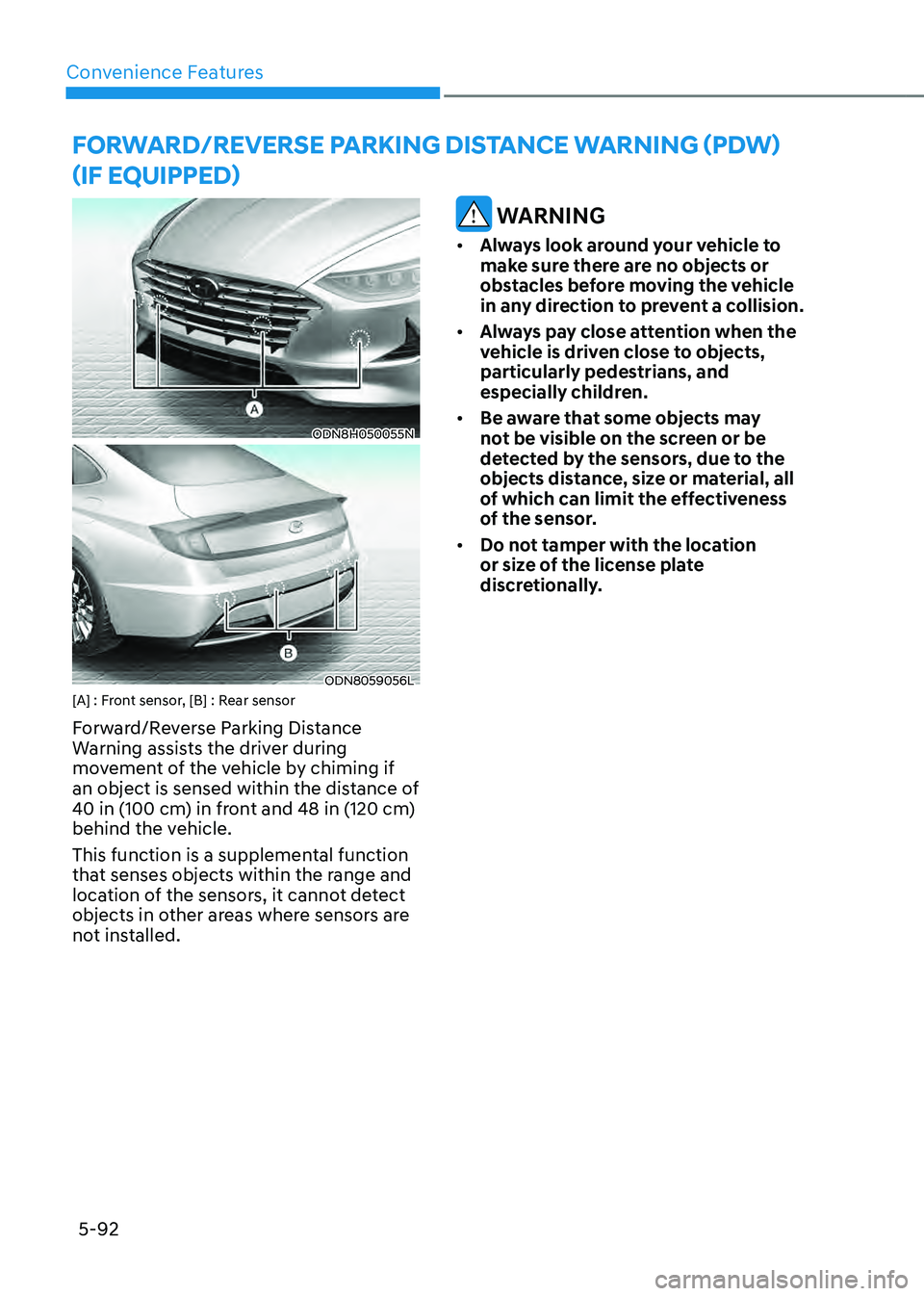
ODN8059056LODN8059056L[A] : Front sensor, [B] : Rear sensor
Forward/Reverse Parking Distance
Warning assists the driver during
movement of the vehicle by chiming if
an object is sensed within the distance of
40 in (100 cm) in front and 48 in (120 cm)
behind the vehicle.
This function is a supplemental function
that senses objects within the range and
location of the sensors, it cannot detect
objects in other areas where sensors are
not installed.
WARNING
• Always look around your vehicle to
make sure there are no objects or
obstacles before moving the vehicle
in any direction to prevent a collision.
• Always pay close attention when the
vehicle is driven close to objects,
particularly pedestrians, and
especially children.
• Be aware that some objects may
not be visible on the screen or be
detected by the sensors, due to the
objects distance, size or material, all
of which can limit the effectiveness
of the sensor.
• Do not tamper with the location
or size of the license plate
discretionally.
Page 240 of 549
05
5-93
Operation of Forward/Reverse
Parking Distance Warning
System
Operating condition
ODN8059057ODN8059057
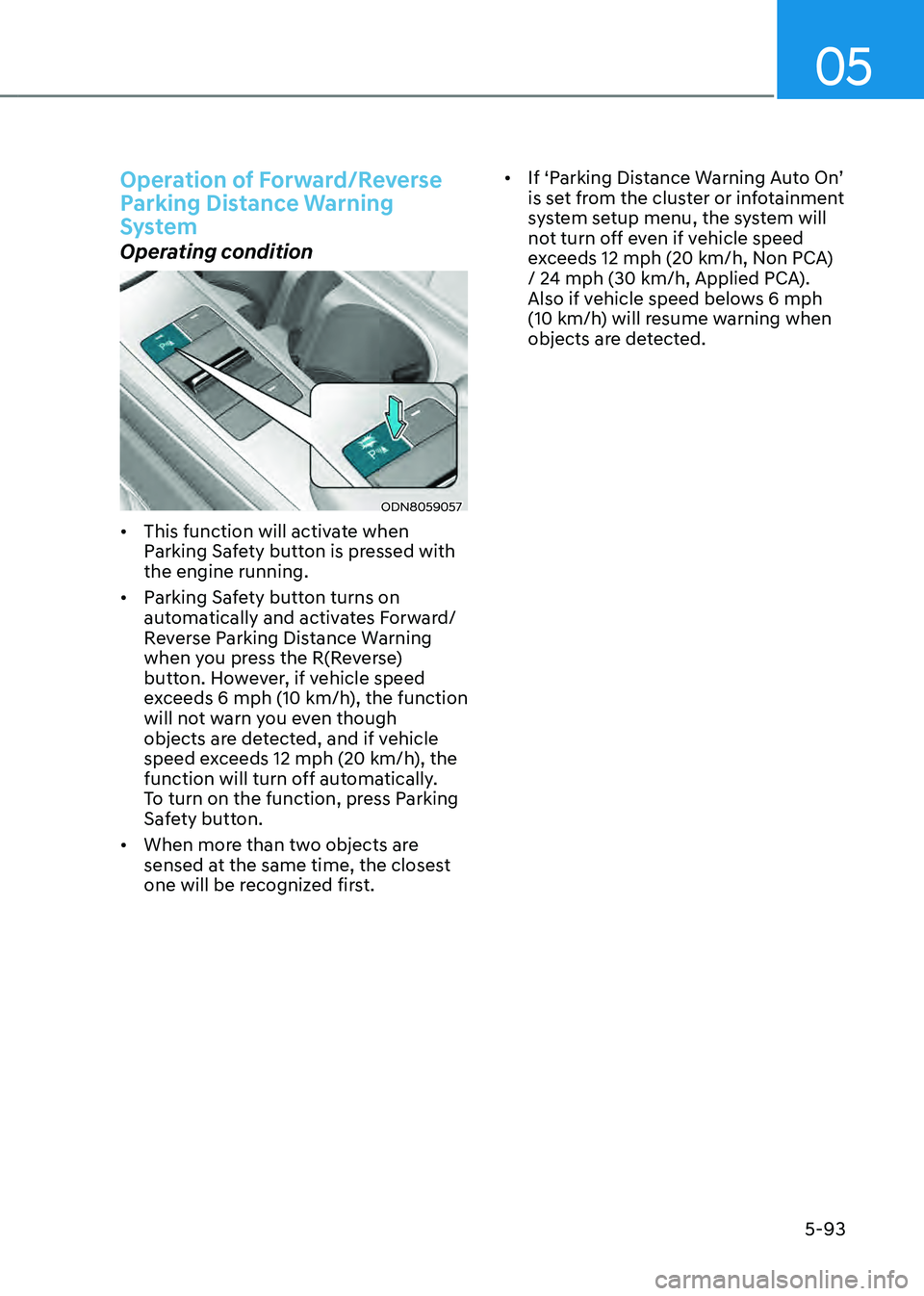
• This function will activate when
Parking Safety button is pressed with
the engine running.
• Parking Safety button turns on
automatically and activates Forward/
Reverse Parking Distance Warning
when you press the R(Reverse)
button. However, if vehicle speed
exceeds 6 mph (10 km/h), the function
will not warn you even though
objects are detected, and if vehicle
speed exceeds 12 mph (20 km/h), the
function will turn off automatically.
To turn on the function, press Parking
Safety button.
• When more than two objects are
sensed at the same time, the closest
one will be recognized first.
• If ‘Parking Distance Warning Auto On’
is set from the cluster or infotainment
system setup menu, the system will
not turn off even if vehicle speed
exceeds 12 mph (20 km/h, Non PCA)
/ 24 mph (30 km/h, Applied PCA).
Also if vehicle speed belows 6 mph
(10 km/h) will resume warning when
objects are detected.