display Hyundai Terracan 2006 User Guide
[x] Cancel search | Manufacturer: HYUNDAI, Model Year: 2006, Model line: Terracan, Model: Hyundai Terracan 2006Pages: 539, PDF Size: 18.11 MB
Page 137 of 539
1
FEATURES OF YOUR HYUNDAI
123
!
HOW TO PRESET STATIONS Six AM and twelve FM stations may be programmed into the memory of theradio. Then, by simply pressing the band select button and/or one of the six station select buttons, you mayrecall any of these stations instantly. To program the stations, follow these steps:
o Press band selector to set the band
for AM, FM1, or FM2.
o Select the desired station to be stored by seek or manual tuning.
o Determine the preset station select button you wish to use to access that station.
o Press the station select button for more than two seconds. A selectbutton indicator will show in the dis- play indicating which select buttonyou have depressed. The frequency display will flash after it has been stored into the memory with a beepsound. You should then release the button, and proceed to program the next desired station. A total of 18stations can be programmed by selecting one AM and two FM sta- tions per button. o When completed, any preset sta-
tion may be recalled by selectingAM, FM1 or FM2 band and the appropriate station button.
7. SCAN Button When the scan button is pressed, the frequency will increase and the receiv- able stations will be tuned in one after another, receiving each station for 5seconds. To stop scanning, press the scan button again.
CAUTION:
o Do not place beverages close to the audio system. The audio sys- tem mechanism may be damaged if you spill them.
o Do not impact on the audio sys- tem, or the audio system mecha-nism could be damaged.
Page 139 of 539
1
FEATURES OF YOUR HYUNDAI
125
!
H240D03O-AAT 1. FF/REW Button
o The FF (fast forward tape winding)
starts when the button is press- ed during PLAY or REW.
o PLAY starts when the button is
pressed again during the FF.
o REW (rewinding) starts when the button is pressed during PLAY
or FF.
o PLAY starts when the button is pressed again during REW.
2. AUTO MUSIC SELECT Button Press the button to find the starting point of each song in a prerecordedmusic tape. The quiet space between songs (must have at least a 4 sec. gap) can beidentified by the AUTO MUSIC SE- LECT button.
o Pressing the button will play the beginning of the next music seg- ment.
o Pressing the button will start replay at the beginning of the musicjust listened to. 3. TAPE PROGRAM Button This allows you to play the reverse side of the tape by merely pressing theprogram button. An arrow will appear in the display to show tape direction. NOTE: When tape operation is abnormal or ER8 fault code is displayed, Presseject button more than 5 seconds to initialize the deck. 4. EJECT Button
o When the EJECT button is pressed
with a cassette loaded, the cassette will eject.
o When the EJECT button is pressed during FF/REW, the cassette willeject.
5. DOLBY SELECT Button If you get background noise during PLAY, you can reduce this consider- ably by merely pressing DOLBY SE- LECT button.If you want to release, press the button again. CAUTION:
o Do not insert anything like coins into the player slot as damage to the unit may occur.
o Do not place beverages close to
the audio system. The playbackmechanism may be damaged if you spill them.
o Do not impact on the audio sys- tem, or the playback mechanismcould be damaged.
Page 141 of 539
1
FEATURES OF YOUR HYUNDAI
127
H290B03E-AAT
1. POWER ON-OFF Control Knob The radio unit may be operated when the ignition key is in the "ACC" or "ON"position. Press the button to switch the power on. The display shows the radio frequency in the radio mode or thetape direction indicator in the tape mode, or CD track either the CD mode or CD AUTO CHANGER mode. Toswitch the power off, press the button again. VOLUME Control Rotate the knob clockwise to increase the volume and turn the knob counter-clockwise to reduce the volume.
2. BASS/BALANCE Control Knob
BASS Control Knob Press to pop the knob out. To increase the bass, rotate the knob clockwise, while to decrease the bass, rotate the knob counterclockwise. BALANCE Control knob Pull the Bass control knob out further. Rotate the knob clockwise to empha-size right speaker sound (left speaker sound will be attenuated). When the control knob is turned coun-terclockwise, left speaker sound will be emphasized (right speaker sound will be attenuated).
3. TREBLE/FAD Knob TREBLE Control Knob Press to pop the knob out and turn to the left or right for the desired treble tone. FAD (Fader) Control Knob Further pull the popped-up knob. Turn the control knob counterclockwise to emphasize front speaker sound (rearspeaker sound will be attenuated). When the control knob is turned clock- wise, rear speaker sound will be em-phasized (front speaker sound will be attenuated).
4. TUNE (Manual) Select Button Press the ( ) side or ( ) side to increase or to decrease the frequency.With the button held down for 0.5 sec. or more, the stop signal (broadcasting radio wave) is ignored and channelselection continues. SEEK Operation (Automatic Channel Selection) Press the TUNE select button for 0.5 sec or more. Releasing it will automati- cally tune to the next available station with a beep sound.When the ( ) side is pressed longer than 0.5 second, releasing it will auto- matically tune to the next higher fre-quency and when the ( ) side is pressed longer than 0.5 second, re- leasing it will automatically tune to thenext lower frequency.
5. PRESET STATION Select
Buttons
Six (6) stations for AM, FM1 and FM2 respectively can be preset in the elec- tronic memory circuit.
Page 142 of 539
1FEATURES OF YOUR HYUNDAI
128
HOW TO PRESET STATIONS Six AM and twelve FM stations may be programmed into the memory of theradio. Then, by simply pressing the band select button and/or one of the six station select buttons, you mayrecall any of these stations instantly. To program the stations, follow these steps:
o Press band selector to set the bandfor AM, FM1 and FM2.
o Select the desired station to be stored by seek or manual tuning.
o Determine the preset station select button you wish to use to access that station.
o Press the station select button for more than two seconds. A selectbutton indicator will show in the dis- play indicating which select buttonyou have depressed. The frequency display will flash after it has been stored into the memory with a beepsound. You should then release the button, and proceed to program the next desired station. A total of 18stations can be programmed by selecting one AM and two FM sta- tions per button. o When completed, any preset sta-
tion may be recalled by selectingAM, FM1 or FM2 band and the appropriate station button.
6. BAND Selector Pressing the button changes the AM, FM1 and FM2 bands. The mode selected is shown on the dis-play.
7. EQUALIZER Button Press the EQ button to select the CLASSIC, JAZZ, ROCK and DEFEAT MODE for the desired tone quality.Each press of the button changes the display as follows; 8. Best Station Memory Button
(BSM) (If Installed)
When the BSM button is pressed for two seconds or longer, the six chan-nels from the highest field intensity are selected next and stored in memory. The stations selected are stored in thesequence frequency from the first pre- set key. SCAN Button (If Installed) When the scan button is pressed, the frequency will increase and the receiv- able stations will be tuned in one afteranother, receiving each station for 5 seconds. To stop scanning, press the scan button again.
! CAUTION:
o Do not place beverages close to the audio system. The audio sys- tem mechanism may be damagedif you spill them.
o Do not impact on the audio sys-
tem, or the audio system mecha-nism could be damaged.
FM/AM
CLASSIC JAZZ ROCK DEFEAT
Page 144 of 539
1FEATURES OF YOUR HYUNDAI
130
H290D02O-GAT
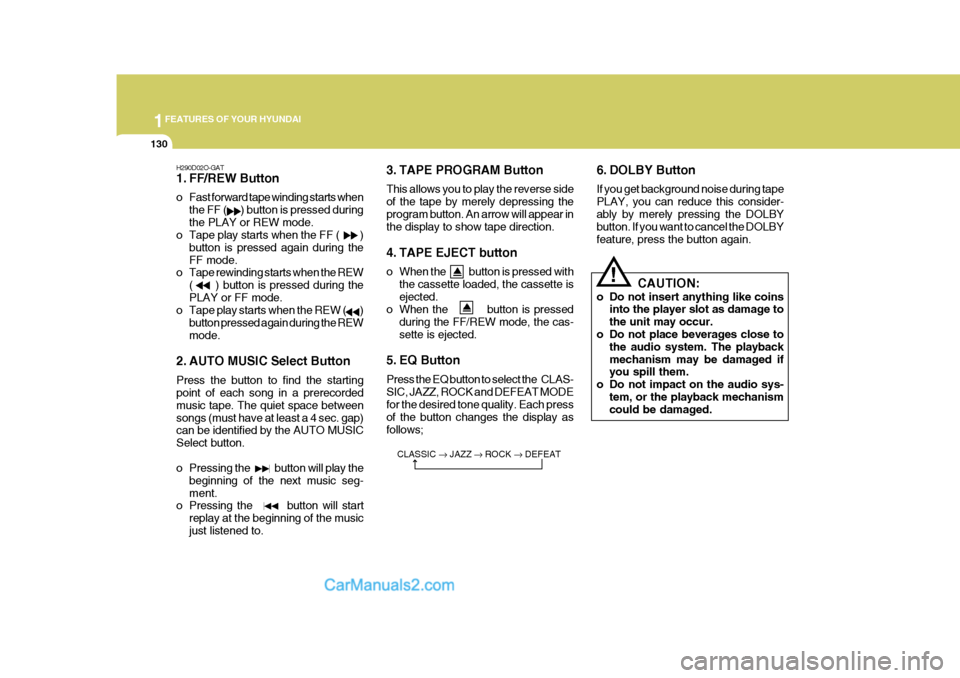
1. FF/REW Button
o Fast forward tape winding starts whenthe FF ( ) button is pressed during the PLAY or REW mode.
o Tape play starts when the FF ( )
button is pressed again during theFF mode.
o Tape rewinding starts when the REW
( ) button is pressed during thePLAY or FF mode.
o Tape play starts when the REW ( )
button pressed again during the REWmode.
2. AUTO MUSIC Select Button Press the button to find the starting point of each song in a prerecorded music tape. The quiet space betweensongs (must have at least a 4 sec. gap) can be identified by the AUTO MUSIC Select button.
o Pressing the button will play the beginning of the next music seg- ment.
o Pressing the button will start
replay at the beginning of the musicjust listened to. 3. TAPE PROGRAM Button This allows you to play the reverse side of the tape by merely depressing theprogram button. An arrow will appear in the display to show tape direction.
4. TAPE EJECT button
o When the button is pressed with
the cassette loaded, the cassette is ejected.
o When the button is pressed
during the FF/REW mode, the cas-sette is ejected.
5. EQ Button Press the EQ button to select the CLAS- SIC, JAZZ, ROCK and DEFEAT MODE for the desired tone quality. Each press of the button changes the display asfollows; 6. DOLBY Button If you get background noise during tape PLAY, you can reduce this consider-ably by merely pressing the DOLBY button. If you want to cancel the DOLBY feature, press the button again.
CLASSIC JAZZ ROCK DEFEAT
!
CAUTION:
o Do not insert anything like coins into the player slot as damage to the unit may occur.
o Do not place beverages close to the audio system. The playbackmechanism may be damaged if you spill them.
o Do not impact on the audio sys- tem, or the playback mechanismcould be damaged.
Page 146 of 539
1FEATURES OF YOUR HYUNDAI
132
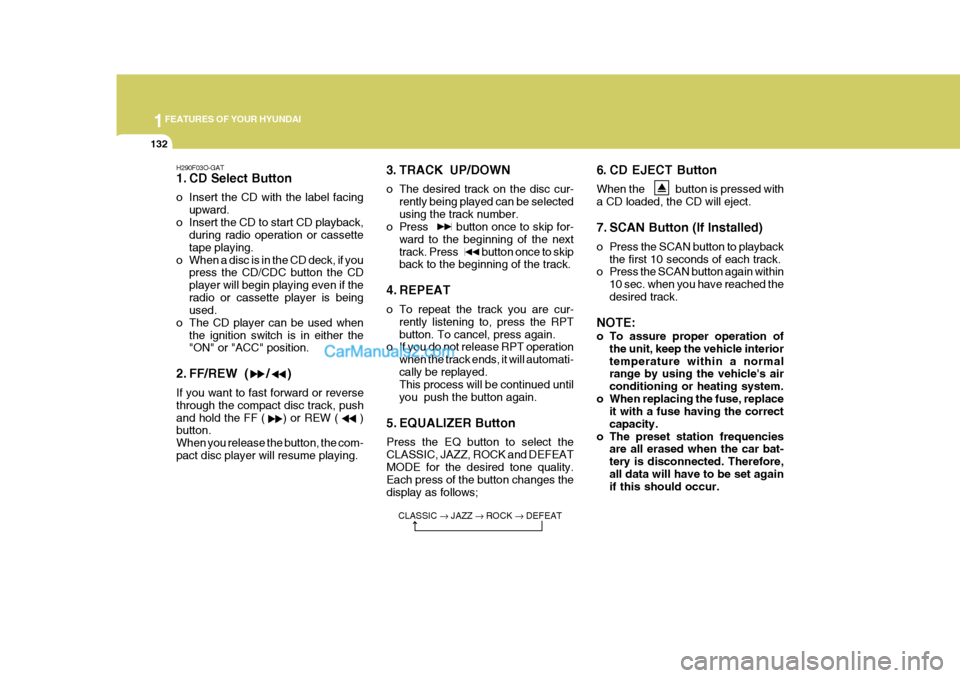
6. CD EJECT Button When the button is pressed with a CD loaded, the CD will eject.
7. SCAN Button (If Installed)
o Press the SCAN button to playbackthe first 10 seconds of each track.
o Press the SCAN button again within
10 sec. when you have reached the desired track.
NOTE:
o To assure proper operation of the unit, keep the vehicle interior temperature within a normal range by using the vehicle's air conditioning or heating system.
o When replacing the fuse, replace it with a fuse having the correctcapacity.
o The preset station frequencies are all erased when the car bat-tery is disconnected. Therefore,all data will have to be set again if this should occur.
H290F03O-GAT
1. CD Select Button
o Insert the CD with the label facing
upward.
o Insert the CD to start CD playback, during radio operation or cassette tape playing.
o When a disc is in the CD deck, if you press the CD/CDC button the CDplayer will begin playing even if theradio or cassette player is being used.
o The CD player can be used when the ignition switch is in either the"ON" or "ACC" position.
2. FF/REW ( / ) If you want to fast forward or reverse through the compact disc track, pushand hold the FF ( ) or REW ( ) button. When you release the button, the com-pact disc player will resume playing. 3. TRACK UP/DOWN
o The desired track on the disc cur-
rently being played can be selected using the track number.
o Press button once to skip for-
ward to the beginning of the nexttrack. Press button once to skip back to the beginning of the track.
4. REPEAT
o To repeat the track you are cur- rently listening to, press the RPT button. To cancel, press again.
o If you do not release RPT operation
when the track ends, it will automati-cally be replayed. This process will be continued until you push the button again.
5. EQUALIZER Button Press the EQ button to select the CLASSIC, JAZZ, ROCK and DEFEATMODE for the desired tone quality. Each press of the button changes the display as follows;
CLASSIC JAZZ ROCK DEFEAT
Page 149 of 539
1
FEATURES OF YOUR HYUNDAI
135
B290H03HP-GAT The CD auto changer is located in the right side of the luggage compartment.
o To use the CD auto changer.
1. Open the sliding lid of the CD auto changer.
2. To eject the compact disc maga-
zine, press the EJECT button lo- cated inside the CD auto changer.
3. Insert the discs into the magazine.
4. Push the magazine into the CD auto changer and close the sliding lid.
o The CD auto changer can be used when the ignition switch is in either"ON" or "ACC" position.
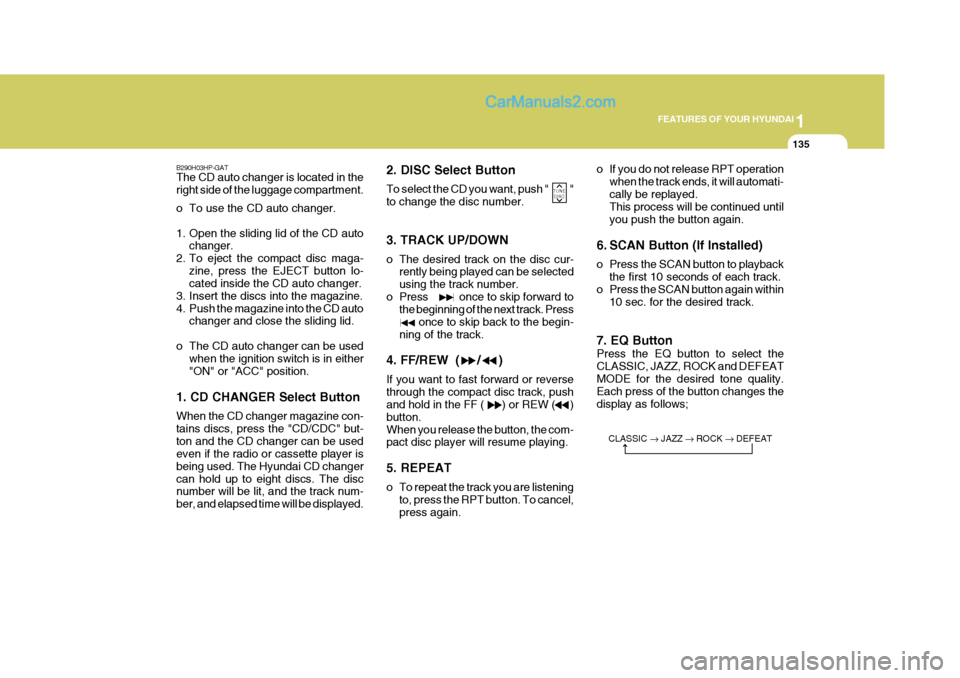
1. CD CHANGER Select Button When the CD changer magazine con- tains discs, press the "CD/CDC" but-ton and the CD changer can be used even if the radio or cassette player is being used. The Hyundai CD changercan hold up to eight discs. The disc number will be lit, and the track num- ber, and elapsed time will be displayed. 2. DISC Select Button To select the CD you want, push " " to change the disc number. 3. TRACK UP/DOWN
o The desired track on the disc cur-
rently being played can be selected using the track number.
o Press once to skip forward to the beginning of the next track. Press once to skip back to the begin-ning of the track.
4. FF/REW ( / ) If you want to fast forward or reverse through the compact disc track, push and hold in the FF ( ) or REW ( ) button.When you release the button, the com- pact disc player will resume playing. 5. REPEAT
o To repeat the track you are listening to, press the RPT button. To cancel, press again. o If you do not release RPT operation
when the track ends, it will automati-cally be replayed. This process will be continued until you push the button again.
6. SCAN Button (If Installed)
o Press the SCAN button to playback the first 10 seconds of each track.
o Press the SCAN button again within 10 sec. for the desired track.
7. EQ Button Press the EQ button to select the CLASSIC, JAZZ, ROCK and DEFEATMODE for the desired tone quality. Each press of the button changes the display as follows;
TUNE DISC
CLASSIC JAZZ ROCK DEFEAT
Page 151 of 539
1
FEATURES OF YOUR HYUNDAI
137
INDICATION Er2 Er3Er6 Er8
HHH
no CD
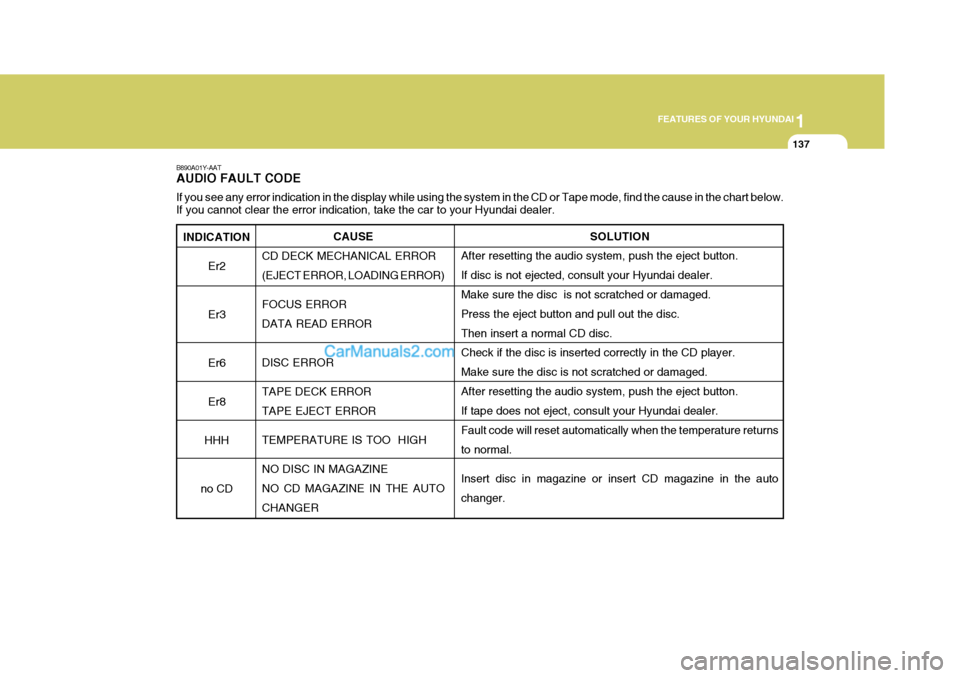
B890A01Y-AAT AUDIO FAULT CODE If you see any error indication in the display while using the system in the CD or Tape mode, find the cause in the chart below .
If you cannot clear the error indication, take the car to your Hyundai dealer.
SOLUTION
After resetting the audio system, push the eject button. If disc is not ejected, consult your Hyundai dealer.Make sure the disc is not scratched or damaged. Press the eject button and pull out the disc. Then insert a normal CD disc. Check if the disc is inserted correctly in the CD player. Make sure the disc is not scratched or damaged.After resetting the audio system, push the eject button. If tape does not eject, consult your Hyundai dealer. Fault code will reset automatically when the temperature returnsto normal. Insert disc in magazine or insert CD magazine in the auto changer.
CAUSE
CD DECK MECHANICAL ERROR(EJECT ERROR, LOADING ERROR) FOCUS ERROR DATA READ ERROR DISC ERROR TAPE DECK ERROR TAPE EJECT ERROR TEMPERATURE IS TOO HIGH NO DISC IN MAGAZINE NO CD MAGAZINE IN THE AUTO CHANGER
Page 352 of 539
1CONTROLS AND EQUIPMENT
44
!WARNING:
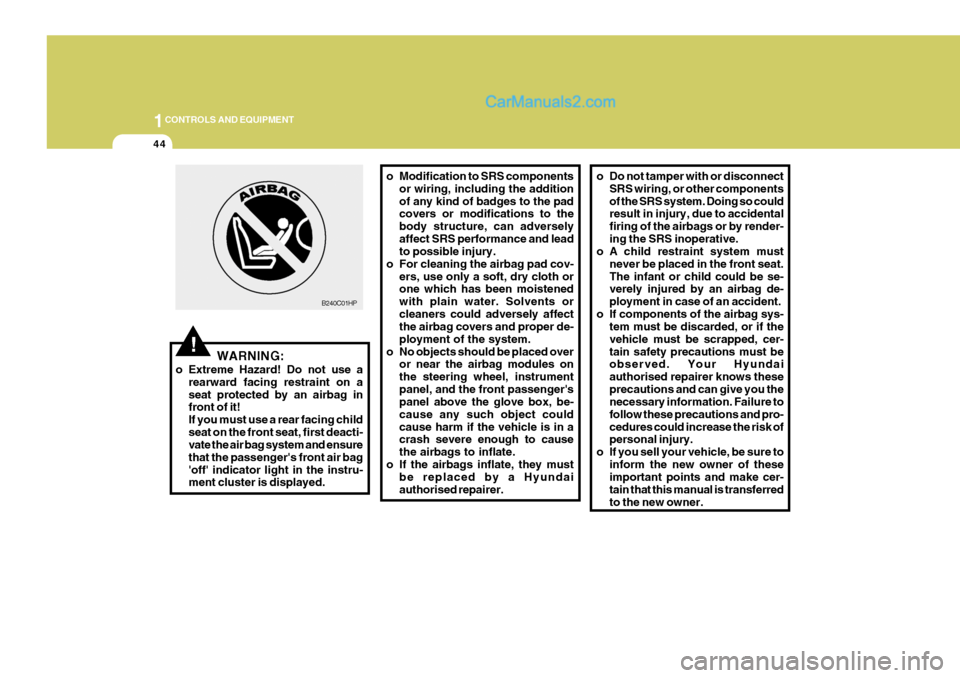
o Extreme Hazard! Do not use a rearward facing restraint on a seat protected by an airbag in front of it! If you must use a rear facing childseat on the front seat, first deacti- vate the air bag system and ensure that the passenger's front air bag'off' indicator light in the instru- ment cluster is displayed. o Modification to SRS components
or wiring, including the addition of any kind of badges to the pad covers or modifications to the body structure, can adverselyaffect SRS performance and lead to possible injury.
o For cleaning the airbag pad cov- ers, use only a soft, dry cloth orone which has been moistened with plain water. Solvents orcleaners could adversely affect the airbag covers and proper de- ployment of the system.
o No objects should be placed over or near the airbag modules onthe steering wheel, instrumentpanel, and the front passenger's panel above the glove box, be- cause any such object couldcause harm if the vehicle is in a crash severe enough to cause the airbags to inflate.
o If the airbags inflate, they must be replaced by a Hyundaiauthorised repairer.
B240C01HP
o Do not tamper with or disconnect
SRS wiring, or other components of the SRS system. Doing so could result in injury, due to accidental firing of the airbags or by render-ing the SRS inoperative.
o A child restraint system must
never be placed in the front seat.The infant or child could be se- verely injured by an airbag de- ployment in case of an accident.
o If components of the airbag sys- tem must be discarded, or if thevehicle must be scrapped, cer-tain safety precautions must be observed. Your Hyundai authorised repairer knows theseprecautions and can give you the necessary information. Failure to follow these precautions and pro-cedures could increase the risk of personal injury.
o If you sell your vehicle, be sure to inform the new owner of theseimportant points and make cer- tain that this manual is transferredto the new owner.
Page 367 of 539
1
CONTROLS AND EQUIPMENT
59
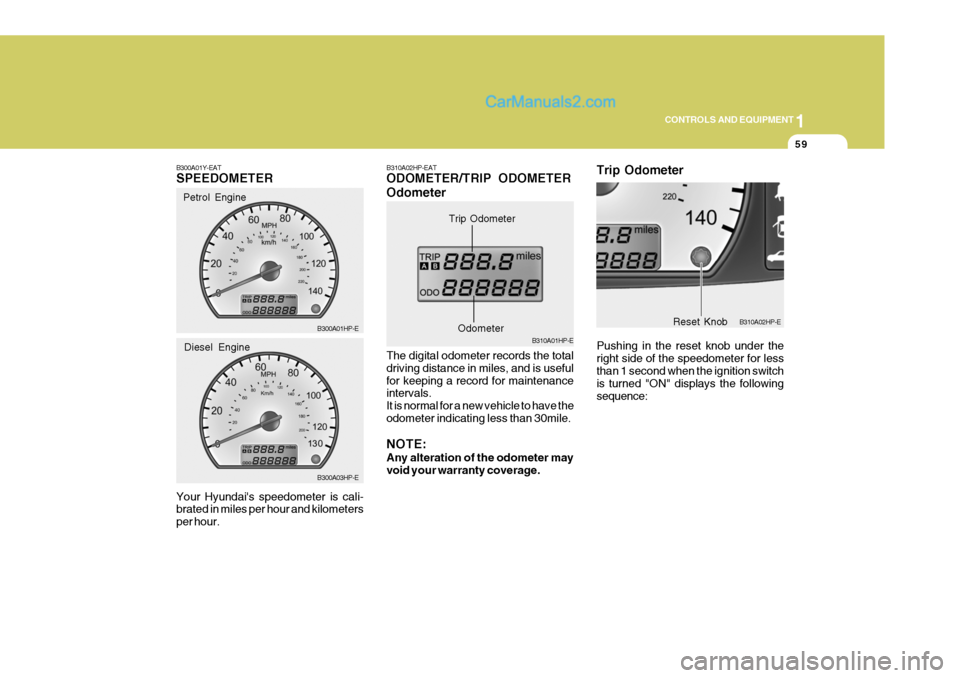
B300A01Y-EAT SPEEDOMETER Your Hyundai's speedometer is cali- brated in miles per hour and kilometers per hour. Petrol Engine
B300A01HP-E B300A03HP-E
Diesel EngineB310A02HP-EAT ODOMETER/TRIP ODOMETER Odometer The digital odometer records the total driving distance in miles, and is usefulfor keeping a record for maintenance intervals. It is normal for a new vehicle to have theodometer indicating less than 30mile. NOTE: Any alteration of the odometer may void your warranty coverage. B310A01HP-E
Trip Odometer
Odometer
B310A02HP-E
Reset Knob
Trip Odometer Pushing in the reset knob under the right side of the speedometer for less than 1 second when the ignition switch is turned "ON" displays the followingsequence: