ad blue HYUNDAI TUCSON 2014 Owners Manual
[x] Cancel search | Manufacturer: HYUNDAI, Model Year: 2014, Model line: TUCSON, Model: HYUNDAI TUCSON 2014Pages: 542, PDF Size: 7.59 MB
Page 16 of 542
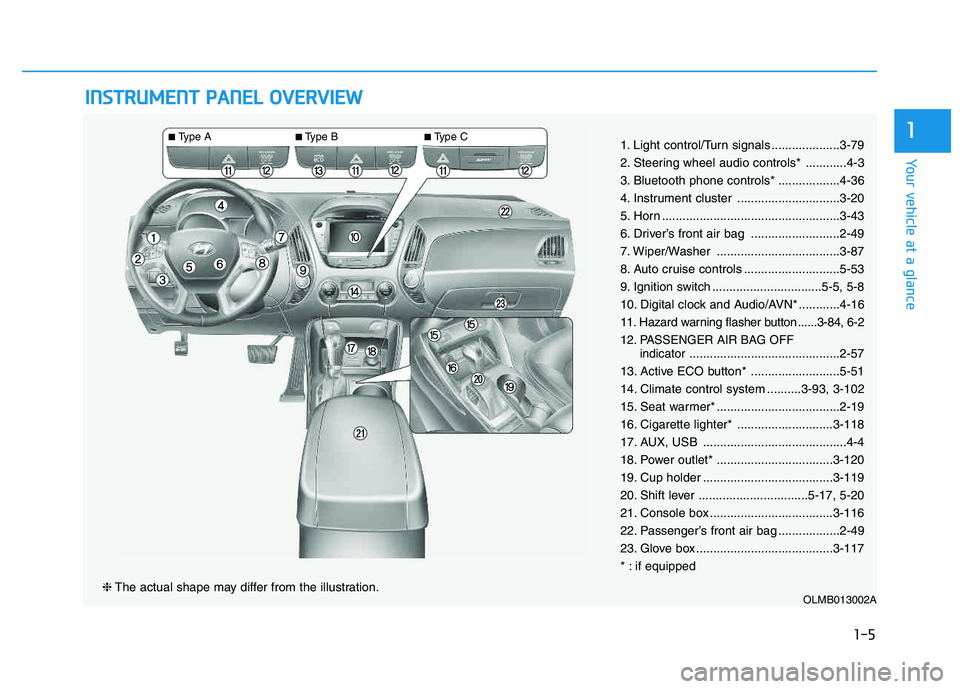
IINN SSTT RR UU MM EENN TT PP AA NN EELL OO VVEERR VV IIEE WW
OLMB013002A❈ The actual shape may differ from the illustration.
■Type A ■Type B ■
Type C
1-5
Your vehicle at a glance
11. Light control/Turn signals ....................3-79
2. Steering wheel audio controls* ............4-3
3. Bluetooth phone controls* ..................4-36
4. Instrument cluster ..............................3-20
5. Horn ....................................................3-43
6. Driver’s front air bag ..........................2-49
7. Wiper/Washer ....................................3-87
8. Auto cruise controls ............................5-53
9. Ignition switch ................................5-5, 5-8
10. Digital clock and Audio/AVN* ............4-16
11. Hazard warning flasher button ......3-84, 6-2
12. PASSENGER AIR BAG OFF
indicator............................................2-57
13. Active ECO button* ..........................5-51
14. Climate control system ..........3-93, 3-102
15. Seat warmer* ....................................2-19
16. Cigarette lighter* ............................3-118
17. AUX, USB ..........................................4-4
18. Power outlet* ..................................3-120
19. Cup holder ......................................3-119
20. Shift lever ................................5-17, 5-20
21. Console box ....................................3-116
22. Passenger’s front air bag ..................2-49
23. Glove box ........................................3-117
* : if equipped
Page 132 of 542
3-46
Convenient features of your vehicle
Blue Link®
center (if equipped)
For details, refer to the Blue Link ®
Owner’s Guide, Navigation Manual
or Audio Manual. The Audio Manualis in the chapter 4.
Electric chromic mirror (ECM) with compass and HomeLink ®
system (if equipped)
Your vehicle may be equipped with a
Gentex Automatic-Dimming Mirror
with a Z-Nav™ Electronic Compass
Display and an Integrated HomeLink ®
Wireless Control System.
During nighttime driving, this feature will automatically detect and reduce
rearview mirror glare while the com-
pass indicates the direction the vehi-
cle is pointed. The HomeLink ®
Universal Transceiver allows you to
activate your garage door(s), electric
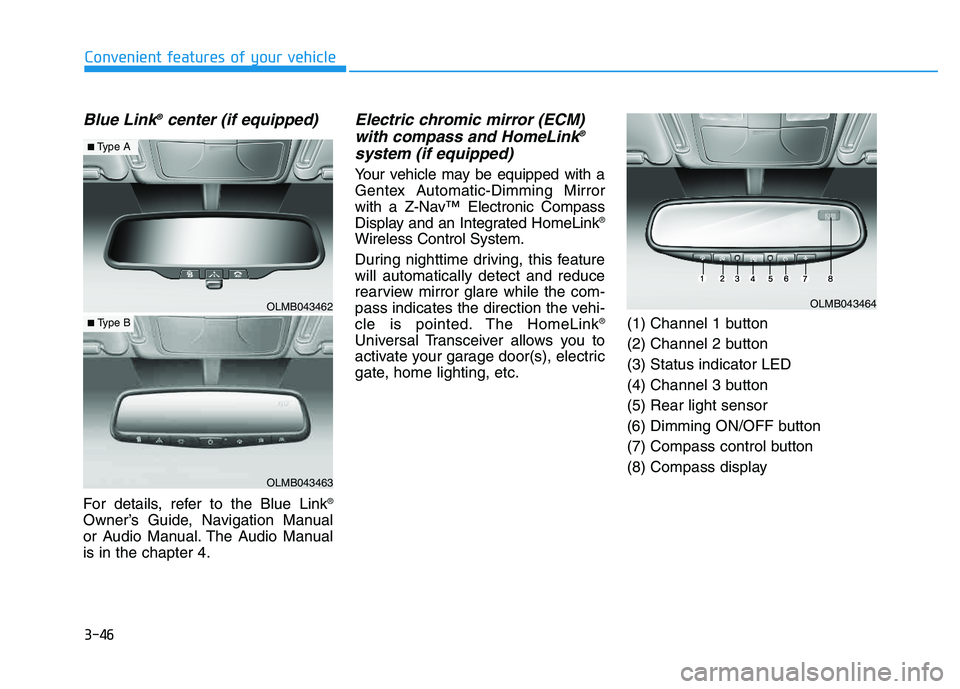
gate, home lighting, etc. (1) Channel 1 button
(2) Channel 2 button(3) Status indicator LED
(4) Channel 3 button(5) Rear light sensor
(6) Dimming ON/OFF button
(7) Compass control button
(8) Compass display
OLMB043462
OLMB043463
■
Type A
■ Type B
OLMB043464
Page 139 of 542
3-53
Convenient features of your vehicle
3
Erasing HomeLink®
buttons
Individual buttons cannot be erased.
However, to erase all three pro-
grammed buttons:
1. Press and hold the two outer
HomeLink ®
buttons until the indi-
cator light begins to flash-after 20
seconds.
2. Release both buttons. Do not hold for longer than 30 seconds.
The Integrated HomeLink ®
Wireless
Control System is now in the training
(learn) mode and can be pro-
grammed at any time following the
appropriate steps in the Programming
chapters above. NVS ®
is a registered trademark and
Z-Nav™ is a trademark of the Gentex
Corporation, Zeeland, Michigan.HomeLink ®
is a registered trademark
owned by Johnson Controls,
Incorporated, Milwaukee, Wisconsin.
FCC ID: NZLZTVHL3
IC: 4112A-ZTVHL3 This device complies with Part 15 of the FCC Rules.
Operation is subject to the following
two conditions:
1. This device may not cause harm-
ful interference, and
2. This device must accept any inter- ference received, including inter-
ference that may cause undesired
operation.
Electric chromic mirror (ECM)
with HomeLink ®
system,
compass and Blue Link ®
(if equipped)
Your vehicle may be equipped with a
Gentex Automatic-Dimming Mirror
with a Z-Nav™ Electronic Compass
Display and an Integrated HomeLink ®
Wireless Control System. During
nighttime driving, this feature willautomatically detect and reduce
rearview mirror glare while the com-
pass indicates the direction the vehi-
cle is pointed. The HomeLink ®
Universal Transceiver allows you to
activate your garage door(s), electric
gate, home lighting, etc.
The transceiver has been testedand complies with FCC and
Industry Canada rules. Changes
or modifications not expressly
approved by the party responsi-
ble for compliance could voidthe user's authority to operate
the device.
WARNING
Page 212 of 542
Multimedia System
AUDIO SYSTEM ......................................................4-2
HOW VEHICLE AUDIO WORKS .............................4-4
CD PLAYER : AC110TMKN, AC1B0TMKN, AC1B1TMAN ..................................4-16
System controllers and functions ...............................4-17
Setup ..................................................................................4-20
Radio : FM, AM OR XM .................................................4-24
Basic method of use ......................................................4-27
Bluetooth®Wireless Technology Audio .....................4-34
Phone .................................................................................4-36
Voice command list .........................................................4-53
CD PLAYER : AC111TMAN, AC110TMAN ..........4-59
System controllers and functions ...............................4-60
Steering remote controller ...........................................4-62
RADIO mode .....................................................................4-64 XM RADIO TM
mode...........................................................4-66
MEDIA mode .....................................................................4-70
AUDIO CD mode ...............................................................4-71
MP3 CD mode ..................................................................4-74
USB mode..........................................................................4-80
iPod ®
mode........................................................................4-85
AUX mode .........................................................................4-88
MY MUSIC mode .............................................................4-90
Bluetooth ®Wireless Technology Audio .....................4-94
Pairing a
Bluetooth ®Wireless Technology Device....4-95 Using
Bluetooth
® Wireless Technology....................4-100
Voice recognition ..........................................................4-108
Setup ................................................................................4-115
Rear view camera .........................................................4-121 Blue Link ®
........................................................................4-122
4
Page 223 of 542
4-12
Multimedia System
✽✽NOTICE - USING THE
iPod ®
DEVICE
Some iPod ®
models may not
support communication proto-
col and files may not properly
play.
Supported iPod ®
models:
- iPhone ®
3GS/4
- iPod ®
touch 1st~4th generation
- iPod ®
nano 1st~6th generation
- iPod ®
classic
The order of search or playback of songs in the iPod ®
can be dif-
ferent from the order searched
in the audio system.
If the iPod ®
is disabled due to its
own malfunction, reset the
iPod ®
. (Reset: Refer to iPod ®
manual)
An iPod ®
may not operate nor-
mally on low battery. (Continued)(Continued)
Some iPod
®
devices, such as the
iPhone ®
, can be connected
through the Bluetooth®
Wireless
Technology interface. The
device must have audio
Bluetooth ®
Wireless Technology
capability (such as for stereo
headphone Bluetooth®
Wireless
Technology).
The device can play, but it will
not be controlled by the audio
system.
To use iPod ®
features within the
audio, use the cable provided
upon purchasing an iPod ®
device.
Skipping or improper operation may occur depending on the
characteristics of your iPod ®
/
iPhone ®
device.
If your iPhone ®
is connected to
both the Bluetooth®
Wireless
Technology and USB, the sound
may not be properly played. In
your iPhone ®
, select the Dock
connector or Bluetooth®
Wireless Technology to change
the sound output (source). (Continued)(Continued)
When connecting iPod
®
with the
iPod ®
Power Cable, insert the
connector to the multimedia
socket completely. If not insert-
ed completely, communications
between iPod ®
and audio may
be interrupted.
When adjusting the sound effects of the iPod ®
and the
audio system, the sound effects
of both devices will overlap and
might reduce or distort the
quality of the sound.
Deactivate (turn off) the equal- izer function of an iPod ®
when
adjusting the audio system’s
volume, and turn off the equal-
izer of the audio system when
using the equalizer of an iPod ®
.
When not using iPod ®
with car
audio, detach the iPod ®
cable
from iPod ®
. Otherwise, iPod ®
may remain in accessory mode,
and may not work properly.
Page 224 of 542
4-13
Multimedia System
4
✽✽NOTICE - Bluetooth®
Wireless Technology
The Bluetooth ®
word mark and
logos are registered trademarks
owned by Bluetooth SIG, lnc. and
any use of such marks is under
license.
A Bluetooth ®
enabled call phone is
required to use Bluetooth®
wire-
less technology.
Bluetooth ®
Wirelss Technology
phone compatibility can be checked
by visiting www
. hyundaiusa.com
and under the SERVICE & PARTS
- BLUETOOTH COMPATIBILI- TY menu. ✽
✽
NOTICE - BEFORE USING THE
Bluetooth®
HANDSFREE
What is Bluetooth®?
Bluetooth ®
refers to a short-dis-
tance wireless networking technol-
ogy which uses a 2.4GHz ~
2.48GHz frequency to connect
various devices within a certain
distance.
Supported within PCs, external devices, Bluetooth ®
phones, PDAs,
various electronic devices, and
automotive environments,
Bluetooth ®
allows data to be trans-
mitted at high speeds without hav-
ing to use a connector cable.
Bluetooth ®
Handsfree refers to a
device which allows the user to
conveniently make phone calls
with Bluetooth ®
mobile phones
through the Audio System.
Bluetooth ®
Handsfree may not be sup-
ported in some mobile phones. To
learn more about mobile device com-
patibility, visit www
. hyundaiusa.com.
Driving while distracted can
result in a loss of vehicle con-
trol that may lead to an acci-
dent, severe personal injury,
and death. The driver’s primary
responsibility is in the safeand legal operation of a vehi-
cle, and use of any handheld
devices, other equipment, or
vehicle systems which take
the driver’s eyes, attention and
focus away from the safe oper-
ation of a vehicle or which are
not permissible by law should
never be used during opera-
tion of the vehicle.
WARNING
Page 225 of 542
4-14
Multimedia System
✽✽NOTICE - PRECAUTIONS FOR SAFE DRIVING
Bluetooth ®
Handsfree is a feature
that enables drivers to practice
safe driving. Connecting the head
unit with a Bluetooth®
phone
allows the user to conveniently
make and receive calls and use
contacts. Before using Bluetooth®
,
carefully read the contents of this
user’s manual.
Excessive use or operations while driving may lead to negligent driv-
ing practices and result in acci-
dents. Refrain from excessive
operations while driving.
Viewing the screen for prolonged periods of time is dangerous and
may lead to accidents. When driv-
ing, view the screen only for short
periods of time. ✽✽
NOTICE -WHEN CON- NECTING A
Bluetooth®
PHONE
Before connecting the head unit with the mobile phone, check to
see that the mobile phone supports
Bluetooth ®
features.
Even if the phone supports Bluetooth ®
, the phone will not be
found during device searches if the
phone has been set to hidden state
or the Bluetooth ®
power is turned
off. Disable the hidden state or
turn on the Bluetooth®
power
prior to searching/connecting with
the Head unit.
Bluetooth phone is automatically connected when the ignition on.
If you do not want automatic con- nection with your Bluetooth®
device, turn off the Bluetooth®
fea-
ture within your mobile phone.
The Handsfree call volume and quality may differ depending on
the mobile phone. Park the vehicle when connecting
the head unit with the mobile
phone.
Bluetooth ®
connection may
become intermittently disconnect-
ed in some mobile phones. Follow
these steps to try again.
1. Within the mobile phone, turn the Bluetooth ®
function off/on
and try again.
2. Turn the mobile phone power Off/On and try again.
3. Completely remove the mobile phone battery, reboot, and then
again.
4. Reboot the Audio System and try again.
5. Delete all paired devices, pair and try again.
Handsfree call quality and volume may differ depending on the
model of your mobile phone.
Page 226 of 542
4-15
Multimedia System
4
✽✽NOTICE - USING THE
Voice Recognition
When using the voice recognition feature, only commands listed
within the user's manual are sup-
ported.
Be aware that during the opera- tion of the voice recognition sys-
tem, pressing any key other than
the key terminate voice recog-
nition mode.
For superior voice recognition performance, position the micro-
phone used for voice recognition
above the head of the driver’s seat
and maintain a proper position
when saying commands.
Within the following situations, voice recognition may not function
properly due to external sound.
- When the windows and sunroofare open
- When the wind of the cooling / heating device is strong
- When entering and passing through tunnels (Continued)(Continued)
- When driving on rugged anduneven roads
- During severe rain (heavy rains, windstorms)
Phone related voice commands can be used only when a
Bluetooth ®
Wireless Technology
device is connected.
When making calls by stating a name, the corresponding contact
must be downloaded and stored
within the audio system.
After downloading the Bluetooth®
Wireless Technology phone book,
it may take some time to convert
the phone book data into voice
information. During this time,
voice recognition may not proper-
ly operate.
Pronounce the voice commands naturally and clearly as if in a nor-
mal conversation.
Page 245 of 542
4-34
Multimedia System
Bluetooth®Wireless Technology
AUDIO
What is Bluetooth®Wireless
Technology
?
Bluetooth®Wireless Technology allows
devices to be connected in a short dis-
tance, including hands-free devices,
stereo headsets, wireless remote con-
trollers, etc. For more information, visit
the Bluetooth®Wireless Technology
website at www.Bluetooth.com
Before using Bluetooth®Wireless
Technology audio features
Bluetooth®Wireless Technology
audio may not be supported depending on the compatibility of
your
Bluetooth®Wireless Technology
mobile phone.
Bluetooth®Wireless
Technology audio, you must first
pair and connect the
Bluetooth®
Wireless Technology mobile phone.
The
Bluetooth®word mark and
logos are registered trademarks
owned by
Bluetooth®SIG, Inc. and
any use of such marks is under
license. Other trademarks and trade
names are those of their respective
owners. A
Bluetooth®enabled cell
phone is required to use
Bluetooth®
Wireless Technology.
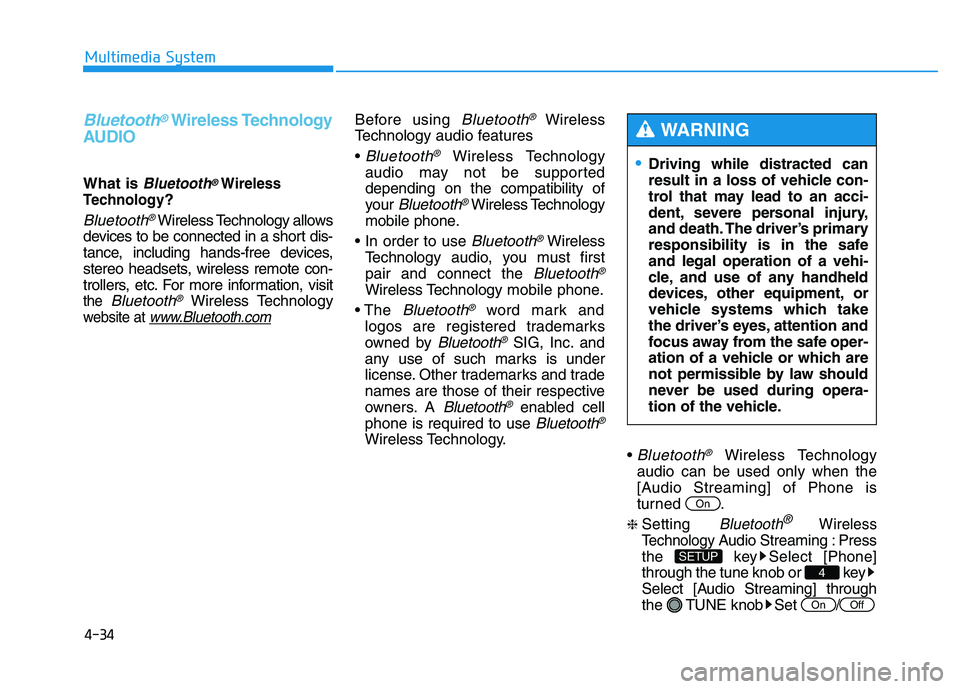
Bluetooth®Wireless Technology
audio can be used only when the
[Audio Streaming] of Phone is
turned .
❈ Setting Bluetooth®Wireless
Technology
Audio Streaming : Press
the key Select [Phone]
through the tune knob or key
Select [Audio Streaming] through
the TUNE knob Set
/OffOn
4
SETUP
On
Driving while distracted can result in a loss of vehicle con-
trol that may lead to an acci-
dent, severe personal injury,
and death. The driver’s primary
responsibility is in the safeand legal operation of a vehi-
cle, and use of any handheld
devices, other equipment, or
vehicle systems which take
the driver’s eyes, attention and
focus away from the safe oper-
ation of a vehicle or which are
not permissible by law should
never be used during opera-
tion of the vehicle.
WARNING
Page 246 of 542
4-35
Multimedia System
4
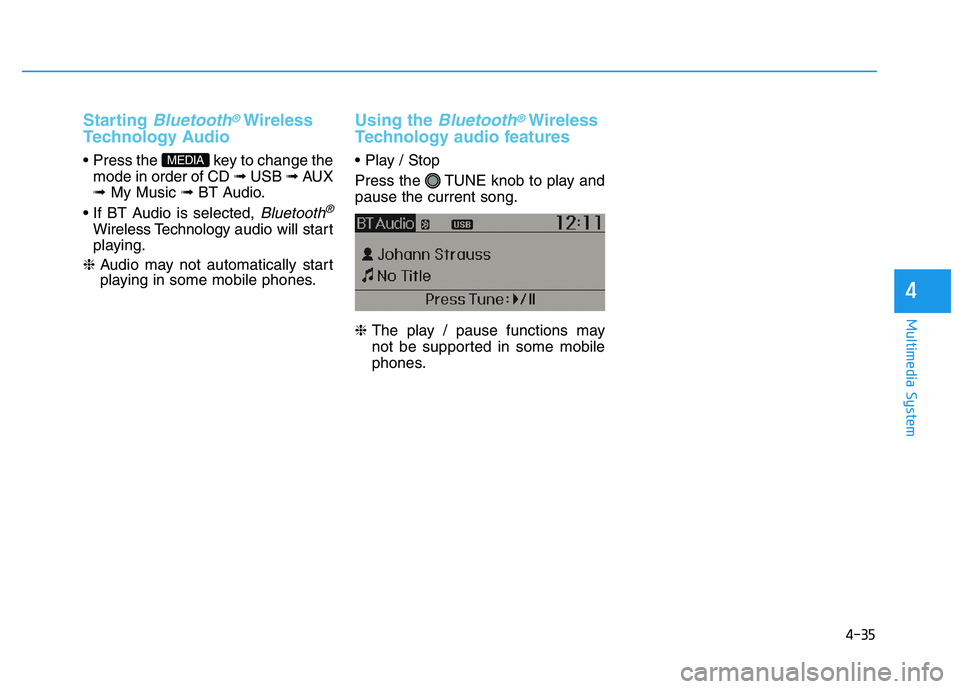
Starting Bluetooth®Wireless
Technology Audio
key to change the mode in order of CD ➟ USB ➟ AUX
➟ My Music ➟ BT Audio.
Bluetooth®
Wireless Technology audio will start
playing.
❈ Audio may not automatically start
playing in some mobile phones.
Using the Bluetooth®Wireless
Technology audio features
Press the TUNE knob to play and pause the current song. ❈ The play / pause functions may
not be supported in some mobile
phones.MEDIA