ECO mode INFINITI FX 2012 User Guide
[x] Cancel search | Manufacturer: INFINITI, Model Year: 2012, Model line: FX, Model: INFINITI FX 2012Pages: 522, PDF Size: 3.51 MB
Page 100 of 522
actual fuel consumption.
The display is updated every 30 seconds.
The dte mode includes a low range warning
feature. If the fuel level is low, the warning
is displayed on the screen.
When the fuel level drops even lower, the
dte display will change to“——”.
. If the amount of fuel added is small, the
display just before the ignition switch
is pushed to the OFF position may
continue to be displayed.
. When driving uphill or rounding curves,
the fuel in the tank shifts, which may
momentarily change the display.
5. Outside air temperature (ICY —8F
or 8C)
The outside air temperature is displayed in
8For 8C in the range of −22 to 1318F(−30
to 558C).
The outside air temperature mode includes
a low temperature warning feature. If the
outside air temperature is below 378 F
(38C), the warning is displayed on the
screen.
The outside temperature sensor is located
in front of the radiator. The sensor may be
affected by road or engine heat, wind directions and other driving conditions.
The display may differ from the actual
outside temperature or the temperature
displayed on various signs or billboards.
6. Setting
Setting cannot be made while driving. A
message
“Setting can only be operated
when stopped” is also displayed on the
dot matrix crystal display.
The
switch*Aandswitch*Bare
used in the setting mode to select and
decide a menu.
SKIP:
Push the
switch*Ato move to the
warning check mode.
Push the
switch*Bto select other
menus.
ALERT:
There are 3 submenus under the alert
menu.
. BACK
Select this submenu to return to the top
page of the setting mode.
. TIME TO REST
Select this submenu to specify when
the “TIME TO REST” indicator activates. .
ICY
Select this submenu to display the low
outside temperature warning.
MAINTENANCE:
There are 5 submenus under the main-
tenance menu.
. BACK
Select this submenu to return to the top
page of the setting mode.
. ENGINE OIL
Select this submenu to set or reset the
distance for changing the engine oil.
. OIL FILTER
Select this submenu to set or reset the
distance for replacing the oil filter.
. TIRE
Select this submenu to set or reset the
distance for replacing tires.
. OTHER
Select this submenu and set or reset
the distance for replacing items other
than the engine oil, oil filter and tires.
CUSTOMIZE:
There are 4 submenus under the display
menu.
Instruments and controls2-29
Page 112 of 522

SIC3270
SIC3830
Instrument brightness control
The instrument brightness control switch
can be operated when the ignition switch
is in the ON position. When the switch is
operated, the dot matrix liquid crystal
display switches to the brightness adjust-
ment mode.
Push the upper switch
*Ato brighten the
instrument panel lights. The bar
*1moves
to the + side. When reaching the maximum
brightness, “MAX”appears on the display
*2.
Push the lower switch
*Bto dim the
instrument panel lights. The bar
*1moves to the
−side. When reaching the minimum
brightness, “MIN”appears on the display
*3. However, “MIN” does not appear
during the nighttime.
The dot matrix liquid crystal display
returns to the normal display under the
following conditions:
. when the instrument brightness control
switch is not operated for more than 5
seconds.
. when the
orswitch on the right
side of the combination meter panel is
pushed.
Instruments and controls2-41
Page 117 of 522
2-46Instruments and controls
SSD1156
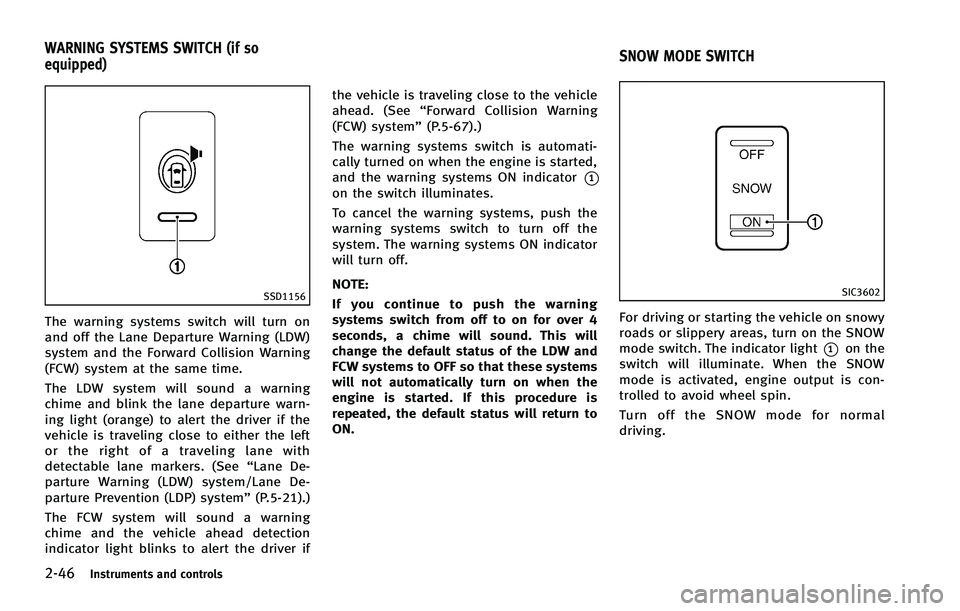
The warning systems switch will turn on
and off the Lane Departure Warning (LDW)
system and the Forward Collision Warning
(FCW) system at the same time.
The LDW system will sound a warning
chime and blink the lane departure warn-
ing light (orange) to alert the driver if the
vehicle is traveling close to either the left
or the right of a traveling lane with
detectable lane markers. (See“Lane De-
parture Warning (LDW) system/Lane De-
parture Prevention (LDP) system” (P.5-21).)
The FCW system will sound a warning
chime and the vehicle ahead detection
indicator light blinks to alert the driver if the vehicle is traveling close to the vehicle
ahead. (See
“Forward Collision Warning
(FCW) system” (P.5-67).)
The warning systems switch is automati-
cally turned on when the engine is started,
and the warning systems ON indicator
*1on the switch illuminates.
To cancel the warning systems, push the
warning systems switch to turn off the
system. The warning systems ON indicator
will turn off.
NOTE:
If you continue to push the warning
systems switch from off to on for over 4
seconds, a chime will sound. This will
change the default status of the LDW and
FCW systems to OFF so that these systems
will not automatically turn on when the
engine is started. If this procedure is
repeated, the default status will return to
ON.
SIC3602
For driving or starting the vehicle on snowy
roads or slippery areas, turn on the SNOW
mode switch. The indicator light
*1on the
switch will illuminate. When the SNOW
mode is activated, engine output is con-
trolled to avoid wheel spin.
Turn off the SNOW mode for normal
driving.
WARNING SYSTEMS SWITCH (if so
equipped) SNOW MODE SWITCH
Page 136 of 522
SIC2925
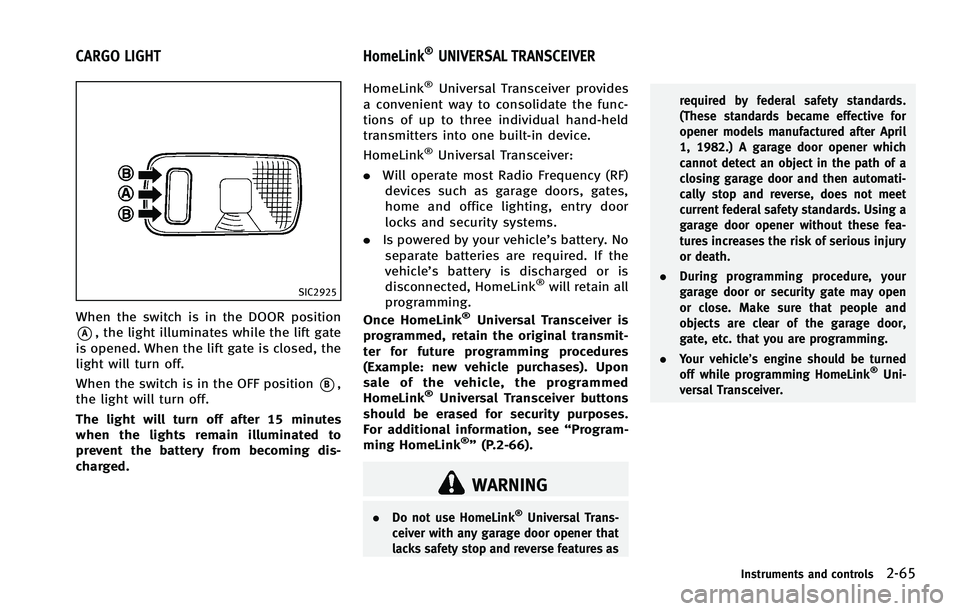
When the switch is in the DOOR position
*A, the light illuminates while the lift gate
is opened. When the lift gate is closed, the
light will turn off.
When the switch is in the OFF position
*B,
the light will turn off.
The light will turn off after 15 minutes
when the lights remain illuminated to
prevent the battery from becoming dis-
charged. HomeLink
®Universal Transceiver provides
a convenient way to consolidate the func-
tions of up to three individual hand-held
transmitters into one built-in device.
HomeLink
®Universal Transceiver:
. Will operate most Radio Frequency (RF)
devices such as garage doors, gates,
home and office lighting, entry door
locks and security systems.
. Is powered by your vehicle’s battery. No
separate batteries are required. If the
vehicle’s battery is discharged or is
disconnected, HomeLink
®will retain all
programming.
Once HomeLink
®Universal Transceiver is
programmed, retain the original transmit-
ter for future programming procedures
(Example: new vehicle purchases). Upon
sale of the vehicle, the programmed
HomeLink
®Universal Transceiver buttons
should be erased for security purposes.
For additional information, see “Program-
ming HomeLink
®” (P.2-66).
WARNING
. Do not use HomeLink®Universal Trans-
ceiver with any garage door opener that
lacks safety stop and reverse features as required by federal safety standards.
(These standards became effective for
opener models manufactured after April
1, 1982.) A garage door opener which
cannot detect an object in the path of a
closing garage door and then automati-
cally stop and reverse, does not meet
current federal safety standards. Using a
garage door opener without these fea-
tures increases the risk of serious injury
or death.
. During programming procedure, your
garage door or security gate may open
or close. Make sure that people and
objects are clear of the garage door,
gate, etc. that you are programming.
. Your vehicle’s engine should be turned
off while programming HomeLink
®Uni-
versal Transceiver.
Instruments and controls2-65
CARGO LIGHT HomeLink®UNIVERSAL TRANSCEIVER
Page 138 of 522
programmed device, push and hold the
programmed HomeLink®button - re-
leasing when the device begins to
activate.
5. If the indicator light on HomeLink
®
blinks rapidly for two seconds and then
turns solid, HomeLink®has picked up a
“ rolling code” garage door opener
signal. You will need to proceed with
the next steps to train HomeLink
®,
completing the programming may re-
quire a ladder and another person for
convenience.
6. Push and release the program button located on the garage door opener’s
motor to activate the “training mode”.
This button is usually located near the
antenna wire that hangs down from the
motor. If the wire originates from under
a light lens, you will need to remove the
lens to access the training button.
NOTE:
Once you have pushed and released
the training button on the garage door
opener’s motor and the “training light”
is lit, you have 30 seconds in which to
perform step 7. For convenience, use
the help of a second person to assist
when performing this step. 7. Quickly (within 30 seconds of pushing
and releasing the garage door opener
training button) and firmly push and
release the HomeLink
®button you’ve
just programmed. Push and release the
HomeLink
®button up to three times to
complete the training.
8. Your HomeLink
®button should now be
programmed. To program the remaining
HomeLink
®buttons for additional door
or gate openers, follow steps 2 through
8 only.
NOTE:
Do not repeat step 1 unless you want to
“ clear” all previously programmed
HomeLink
®buttons.
If you have any questions or are having
difficulty programming your HomeLink
®
buttons, please refer to the HomeLink®
web site at: www.homelink.com or call 1-
800-355-3515.
PROGRAMMING HomeLink®FOR
CANADIAN CUSTOMERS
Prior to 1992, D.O.C. regulations required
hand-held transmitters to stop transmitting
after 2 seconds. To program your hand-
held transmitter to HomeLink
®, continue to
push and hold the HomeLink®button (note
steps 2 through 4 under “Programming
HomeLink
®”) while you push and re-push
(“cycle”) your hand-held transmitter every
2 seconds until the indicator light flashes
rapidly (indicating successful program-
ming).
NOTE:
If programming a garage door opener, etc.,
it is advised to unplug the device during
the “cycling” process to prevent possible
damage to the garage door opener com-
ponents.
OPERATING THE HomeLink®UNI-
VERSAL TRANSCEIVER
HomeLink®Universal Transceiver (once
programmed) may now be used to activate
the garage door, etc. To operate, simply
push the appropriate programmed
HomeLink
®Universal Transceiver button.
The red indicator light will illuminate while
the signal is being transmitted.
Instruments and controls2-67
Page 146 of 522

.You can switch the lock system to the
mode that allows you to open all the
doors when the key is turned once.
(See “How to use SETTING button” (P.4-
15).)
OPENING AND CLOSING WINDOWS
WITH THE MECHANICAL KEY
The driver’s door key operation also allows
you to open and close the window that is
equipped with the automatic open/close
function. (See “Power windows” (P.2-58)).
To open the window, turn the driver’s door
key cylinder to the rear of the vehicle for
longer than 1 second. The door is unlocked
and the window keeps opening while
turning the key.
This function can also be performed by
pushing and holding the door UNLOCK
button of the Intelligent Key. (See “Remote
keyless entry system” (P.3-14).)
To close the window, turn the driver’s door
key cylinder to the front of the vehicle for
longer than 1 second. The door is locked
and the window keeps closing while turn-
ing the key.
SPA1814
LOCKING WITH INSIDE LOCK KNOB
To lock the door individually, move the
inside lock knob to the lock position
*1.
To unlock, move the inside lock knob to the
unlock position
*2.
Be sure not to leave the Intelligent Key
inside the vehicle.
SPA2300
LOCKING WITH POWER DOOR LOCK
SWITCH
Operating the power door lock switch will
lock or unlock all the doors. The switches
are located on the driver’ s and front
passenger’s door armrests.
To lock the doors, push the power door
lock switch to the lock position
*1.
Be sure not to leave the Intelligent Key
inside the vehicle.
To unlock the doors including the fuel-filler
door, push the power door lock switch to
the unlock position
*2.
Pre-driving checks and adjustments3-5
Page 156 of 522
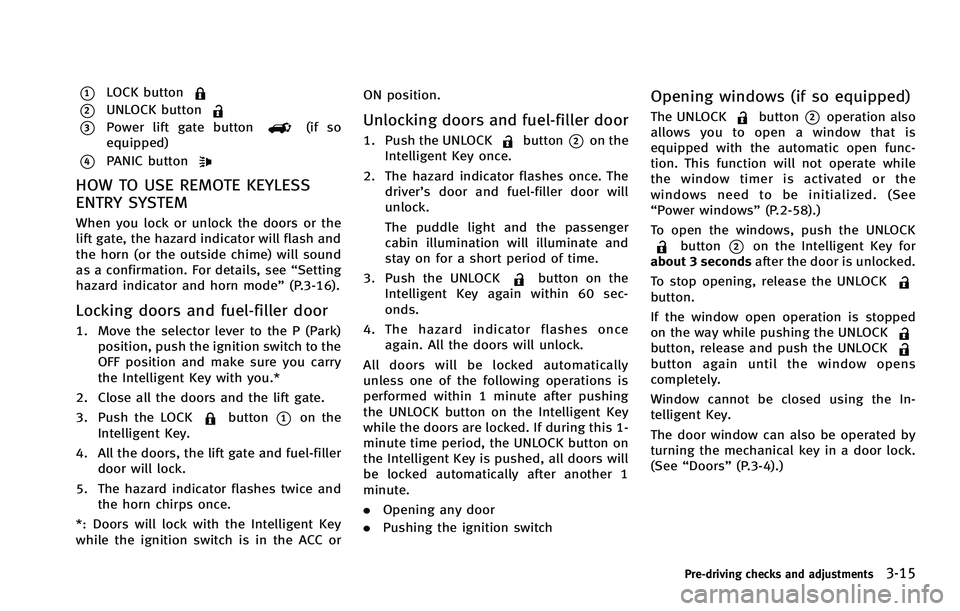
*1LOCK button
*2UNLOCK button
*3Power lift gate button(if so
equipped)
*4PANIC button
HOW TO USE REMOTE KEYLESS
ENTRY SYSTEM
When you lock or unlock the doors or the
lift gate, the hazard indicator will flash and
the horn (or the outside chime) will sound
as a confirmation. For details, see “Setting
hazard indicator and horn mode” (P.3-16).
Locking doors and fuel-filler door
1. Move the selector lever to the P (Park)
position, push the ignition switch to the
OFF position and make sure you carry
the Intelligent Key with you.*
2. Close all the doors and the lift gate.
3. Push the LOCK
button*1on the
Intelligent Key.
4. All the doors, the lift gate and fuel-filler door will lock.
5. The hazard indicator flashes twice and the horn chirps once.
*: Doors will lock with the Intelligent Key
while the ignition switch is in the ACC or ON position.
Unlocking doors and fuel-filler door
1. Push the UNLOCKbutton*2on the
Intelligent Key once.
2. The hazard indicator flashes once. The driver’s door and fuel-filler door will
unlock.
The puddle light and the passenger
cabin illumination will illuminate and
stay on for a short period of time.
3. Push the UNLOCK
button on the
Intelligent Key again within 60 sec-
onds.
4. The hazard indicator flashes once again. All the doors will unlock.
All doors will be locked automatically
unless one of the following operations is
performed within 1 minute after pushing
the UNLOCK button on the Intelligent Key
while the doors are locked. If during this 1-
minute time period, the UNLOCK button on
the Intelligent Key is pushed, all doors will
be locked automatically after another 1
minute.
. Opening any door
. Pushing the ignition switch
Opening windows (if so equipped)
The UNLOCKbutton*2operation also
allows you to open a window that is
equipped with the automatic open func-
tion. This function will not operate while
the window timer is activated or the
windows need to be initialized. (See
“Power windows” (P.2-58).)
To open the windows, push the UNLOCK
button*2on the Intelligent Key for
about 3 seconds after the door is unlocked.
To stop opening, release the UNLOCK
button.
If the window open operation is stopped
on the way while pushing the UNLOCK
button, release and push the UNLOCKbutton again until the window opens
completely.
Window cannot be closed using the In-
telligent Key.
The door window can also be operated by
turning the mechanical key in a door lock.
(See “Doors” (P.3-4).)
Pre-driving checks and adjustments3-15
Page 157 of 522
3-16Pre-driving checks and adjustments
Opening/closing lift gate (if so
equipped)
Opening:
1. Push the power lift gate button
*3for more than 1 second.
2. The lift gate will automatically open.
The hazard indicator flashes 4 times and
the outside chime sounds for approxi-
mately 3 seconds.
Closing:
1. Push the power lift gate button
*3.
2. The lift gate will automatically close.
If the button
*3is pushed while the
lift gate is being opened or closed, the lift
gate will reverse.
The power lift gate button
*3cannot
be operated when the ignition switch is in
the ON position.
Using panic alarm
If you are near your vehicle and feel
threatened, you may activate the alarm to
call attention as follows:
1. Push the PANIC
button*4on the
Intelligent Key for more than 1 second. 2. The theft warning alarm and headlights
will stay on for 25 seconds.
3. The panic alarm stops when:
.It has run for 25 seconds, or.Any of the buttons on the Intelligent Key is pushed. (Note: Panic button
should be pushed for more than 1
second.)
Setting hazard indicator and horn
mode
This vehicle is set in hazard indicator and
horn mode when you first receive the
vehicle.
In hazard indicator and horn mode, when
the LOCK
button*1is pushed, the
hazard indicator flashes twice and the horn
chirps once. When the UNLOCK
button
*2is pushed, the hazard indicator flashes
once.
If horns are not necessary, the system can
be switched to the hazard indicator mode.
In hazard indicator mode, when the LOCK
button is pushed, the hazard indicator
flashes twice. When the UNLOCK
button is pushed, neither the hazard
indicator nor the horn operates.
Page 158 of 522
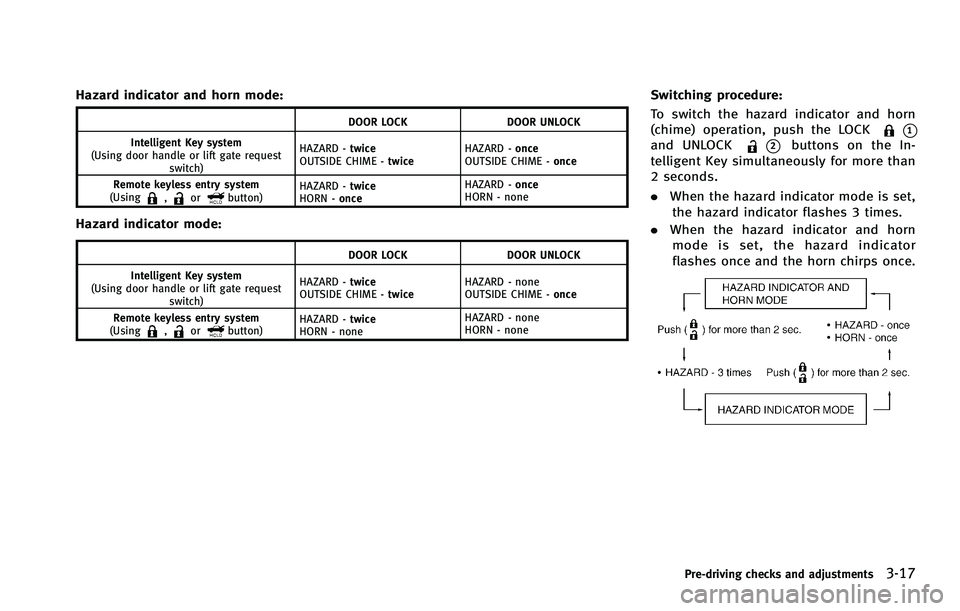
Hazard indicator and horn mode:
DOOR LOCKDOOR UNLOCK
Intelligent Key system
(Using door handle or lift gate request switch) HAZARD -
twice
OUTSIDE CHIME - twiceHAZARD -
once
OUTSIDE CHIME - once
Remote keyless entry system
(Using
,orbutton) HAZARD -
twice
HORN - once HAZARD -
once
HORN - none
Hazard indicator mode:
DOOR LOCK DOOR UNLOCK
Intelligent Key system
(Using door handle or lift gate request switch) HAZARD -
twice
OUTSIDE CHIME - twiceHAZARD - none
OUTSIDE CHIME -
once
Remote keyless entry system
(Using
,orbutton) HAZARD -
twice
HORN - none HAZARD - none
HORN - none
Switching procedure:
To switch the hazard indicator and horn
(chime) operation, push the LOCK
*1and UNLOCK*2buttons on the In-
telligent Key simultaneously for more than
2 seconds.
. When the hazard indicator mode is set,
the hazard indicator flashes 3 times.
. When the hazard indicator and horn
mode is set, the hazard indicator
flashes once and the horn chirps once.
Pre-driving checks and adjustments3-17
Page 162 of 522

.Pushing the power lift gate switch*Aon the instrument panel.
. Pushing the power lift gate button
*Con the Intelligent Key for more than 1
second.
. Pushing the power lift gate switch
*Don the lower part of the lift gate.
The hazard flashes 4 times and the outside
chime sounds when the lift gate starts
closing.
NOTE:
When the lift gate is closed, it remains
unlocked. Manually lock the lift gate.
Reverse function
The power lift gate will reverse immediately
if one of the following actions is performed
during power open or power close.
. pushing the power lift gate switch
*Aon the instrument panel
. pushing the power lift gate button
*Con the Intelligent Key
. pushing the power lift gate switch
*Don the lower part of the lift gate
The outside chime sounds when the lift
gate starts to reverse.
The power lift gate button
*Con the
Intelligent Key cannot be operated when the ignition switch is in the ON position.
Auto reverse function
The auto-reverse function enables the lift
gate to automatically reverse when some-
thing is caught in the lift gate as it is
opening or closing. When the control unit
detects an obstacle, the lift gate will
reverse and return to the full open or full
close position.
If a second obstacle is detected, the lift
gate motion will stop and the drive motor
will disengage. The lift gate will enter the
manual mode.
A pinch sensor is mounted on each side of
the lift gate. If an obstacle is detected by
the pinch sensor during power close, the
lift gate will reverse and return to the full
open position immediately.
NOTE:
If the pinch sensor is damaged or
removed, the power close function will
not operate.
WARNING
There is a small distance immediately before
the closed position that cannot be detected.
Make sure that all passengers keep their
hands, etc., clear from the lift gate opening
before closing the lift gate.
Pre-driving checks and adjustments3-21