wheel INFINITI FX 2012 User Guide
[x] Cancel search | Manufacturer: INFINITI, Model Year: 2012, Model line: FX, Model: INFINITI FX 2012Pages: 522, PDF Size: 3.51 MB
Page 74 of 522
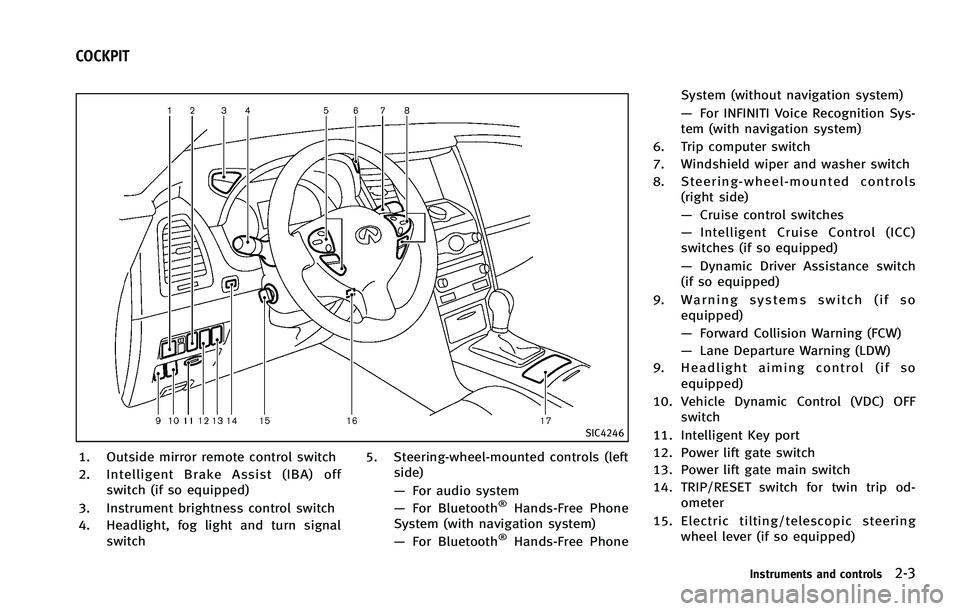
SIC4246
1. Outside mirror remote control switch
2. Intelligent Brake Assist (IBA) offswitch (if so equipped)
3. Instrument brightness control switch
4. Headlight, fog light and turn signal switch 5. Steering-wheel-mounted controls (left
side)
—For audio system
— For Bluetooth
®Hands-Free Phone
System (with navigation system)
— For Bluetooth
®Hands-Free Phone System (without navigation system)
—
For INFINITI Voice Recognition Sys-
tem (with navigation system)
6. Trip computer switch
7. Windshield wiper and washer switch
8. Steering-wheel-mounted controls (right side)
—Cruise control switches
— Intelligent Cruise Control (ICC)
switches (if so equipped)
— Dynamic Driver Assistance switch
(if so equipped)
9. Warning systems switch (if so equipped)
—Forward Collision Warning (FCW)
— Lane Departure Warning (LDW)
9. Headlight aiming control (if so equipped)
10. Vehicle Dynamic Control (VDC) OFF switch
11. Intelligent Key port
12. Power lift gate switch
13. Power lift gate main switch
14. TRIP/RESET switch for twin trip od- ometer
15. Electric tilting/telescopic steering wheel lever (if so equipped)
Instruments and controls2-3
COCKPIT
Page 75 of 522
2-4Instruments and controls
16. Manual tilting/telescopic steeringwheel lever (if so equipped)
17. Center-console-mounted controls —Climate controlled seat switches or
Seat heater switches
— SNOW mode switch
— Continuous Damping Control mode
select switch (if so equipped)
Page 76 of 522
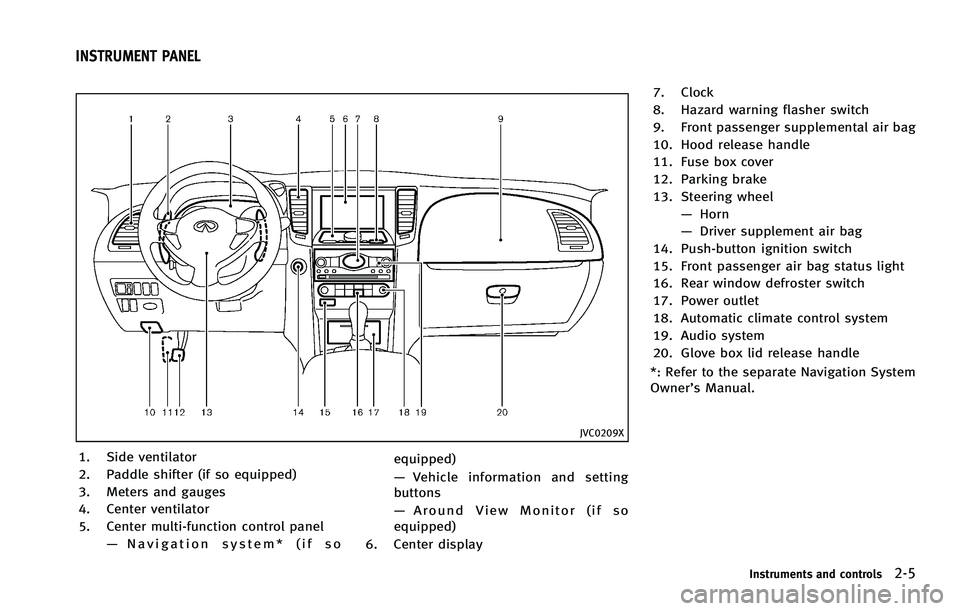
JVC0209X
1. Side ventilator
2. Paddle shifter (if so equipped)
3. Meters and gauges
4. Center ventilator
5. Center multi-function control panel—Navigation system* (if so equipped)
—
Vehicle information and setting
buttons
— Around View Monitor (if so
equipped)
6. Center display 7. Clock
8. Hazard warning flasher switch
9. Front passenger supplemental air bag
10. Hood release handle
11. Fuse box cover
12. Parking brake
13. Steering wheel
—Horn
— Driver supplement air bag
14. Push-button ignition switch
15. Front passenger air bag status light
16. Rear window defroster switch
17. Power outlet
18. Automatic climate control system
19. Audio system
20. Glove box lid release handle
*: Refer to the separate Navigation System
Owner’s Manual.
Instruments and controls2-5
INSTRUMENT PANEL
Page 83 of 522
2-12Instruments and controls
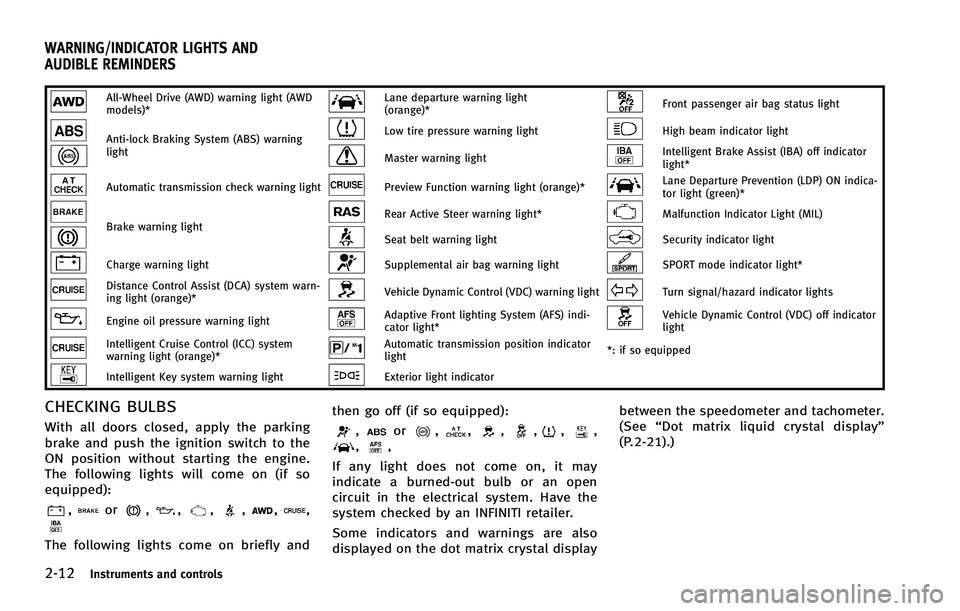
All-Wheel Drive (AWD) warning light (AWD
models)*Lane departure warning light
(orange)*Front passenger air bag status light
Anti-lock Braking System (ABS) warning
lightLow tire pressure warning lightHigh beam indicator light
Master warning lightIntelligent Brake Assist (IBA) off indicator
light*
Automatic transmission check warning lightPreview Function warning light (orange)*Lane Departure Prevention (LDP) ON indica-
tor light (green)*
Brake warning lightRear Active Steer warning light*Malfunction Indicator Light (MIL)
Seat belt warning lightSecurity indicator light
Charge warning lightSupplemental air bag warning lightSPORT mode indicator light*
Distance Control Assist (DCA) system warn-
ing light (orange)*Vehicle Dynamic Control (VDC) warning lightTurn signal/hazard indicator lights
Engine oil pressure warning lightAdaptive Front lighting System (AFS) indi-
cator light*Vehicle Dynamic Control (VDC) off indicator
light
Intelligent Cruise Control (ICC) system
warning light (orange)*Automatic transmission position indicator
light*: if so equipped
Intelligent Key system warning lightExterior light indicator
CHECKING BULBS
With all doors closed, apply the parking
brake and push the ignition switch to the
ON position without starting the engine.
The following lights will come on (if so
equipped):
,or,,,,,,
The following lights come on briefly and then go off (if so equipped):
,or,,,,,,,,
If any light does not come on, it may
indicate a burned-out bulb or an open
circuit in the electrical system. Have the
system checked by an INFINITI retailer.
Some indicators and warnings are also
displayed on the dot matrix crystal display between the speedometer and tachometer.
(See
“Dot matrix liquid crystal display”
(P.2-21).)
WARNING/INDICATOR LIGHTS AND
AUDIBLE REMINDERS
Page 84 of 522
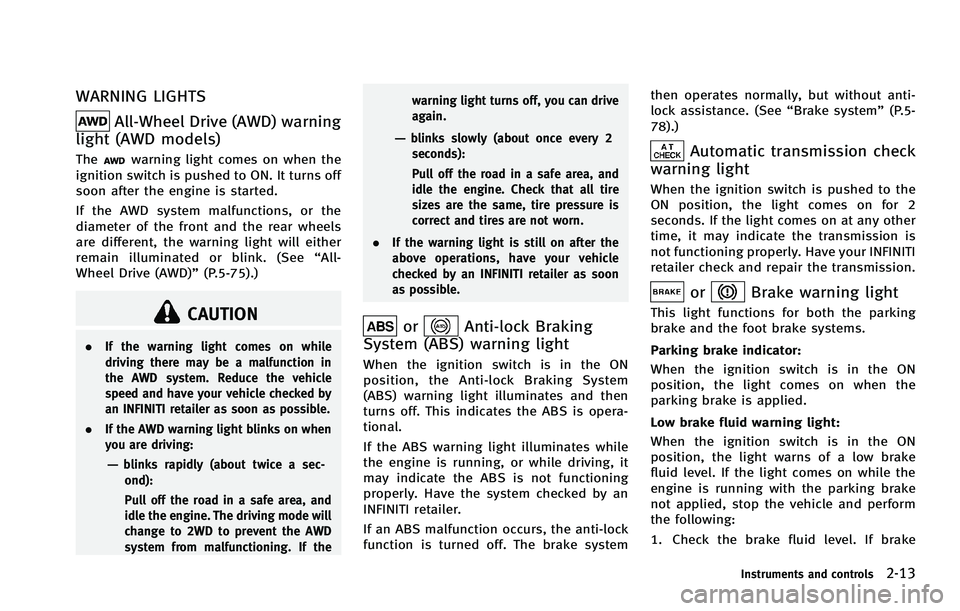
WARNING LIGHTS
All-Wheel Drive (AWD) warning
light (AWD models)
Thewarning light comes on when the
ignition switch is pushed to ON. It turns off
soon after the engine is started.
If the AWD system malfunctions, or the
diameter of the front and the rear wheels
are different, the warning light will either
remain illuminated or blink. (See “All-
Wheel Drive (AWD)” (P.5-75).)
CAUTION
.If the warning light comes on while
driving there may be a malfunction in
the AWD system. Reduce the vehicle
speed and have your vehicle checked by
an INFINITI retailer as soon as possible.
. If the AWD warning light blinks on when
you are driving:
—blinks rapidly (about twice a sec-
ond):
Pull off the road in a safe area, and
idle the engine. The driving mode will
change to 2WD to prevent the AWD
system from malfunctioning. If the warning light turns off, you can drive
again.
—blinks slowly (about once every 2
seconds):
Pull off the road in a safe area, and
idle the engine. Check that all tire
sizes are the same, tire pressure is
correct and tires are not worn.
. If the warning light is still on after the
above operations, have your vehicle
checked by an INFINITI retailer as soon
as possible.
orAnti-lock Braking
System (ABS) warning light
When the ignition switch is in the ON
position, the Anti-lock Braking System
(ABS) warning light illuminates and then
turns off. This indicates the ABS is opera-
tional.
If the ABS warning light illuminates while
the engine is running, or while driving, it
may indicate the ABS is not functioning
properly. Have the system checked by an
INFINITI retailer.
If an ABS malfunction occurs, the anti-lock
function is turned off. The brake system then operates normally, but without anti-
lock assistance. (See
“Brake system”(P.5-
78).)
Automatic transmission check
warning light
When the ignition switch is pushed to the
ON position, the light comes on for 2
seconds. If the light comes on at any other
time, it may indicate the transmission is
not functioning properly. Have your INFINITI
retailer check and repair the transmission.
orBrake warning light
This light functions for both the parking
brake and the foot brake systems.
Parking brake indicator:
When the ignition switch is in the ON
position, the light comes on when the
parking brake is applied.
Low brake fluid warning light:
When the ignition switch is in the ON
position, the light warns of a low brake
fluid level. If the light comes on while the
engine is running with the parking brake
not applied, stop the vehicle and perform
the following:
1. Check the brake fluid level. If brake
Instruments and controls2-13
Page 87 of 522
2-16Instruments and controls
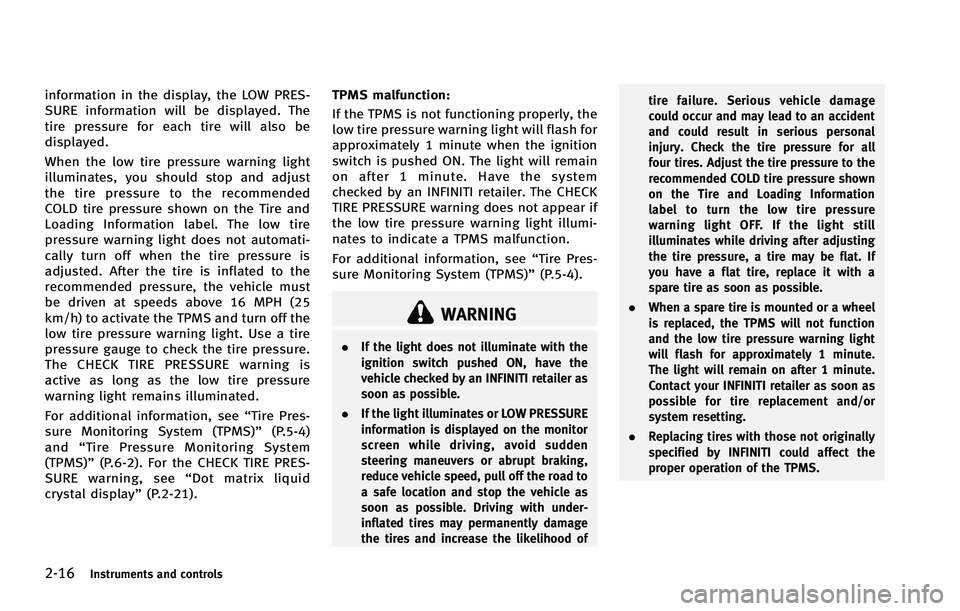
information in the display, the LOW PRES-
SURE information will be displayed. The
tire pressure for each tire will also be
displayed.
When the low tire pressure warning light
illuminates, you should stop and adjust
the tire pressure to the recommended
COLD tire pressure shown on the Tire and
Loading Information label. The low tire
pressure warning light does not automati-
cally turn off when the tire pressure is
adjusted. After the tire is inflated to the
recommended pressure, the vehicle must
be driven at speeds above 16 MPH (25
km/h) to activate the TPMS and turn off the
low tire pressure warning light. Use a tire
pressure gauge to check the tire pressure.
The CHECK TIRE PRESSURE warning is
active as long as the low tire pressure
warning light remains illuminated.
For additional information, see“Tire Pres-
sure Monitoring System (TPMS)” (P.5-4)
and “Tire Pressure Monitoring System
(TPMS)” (P.6-2). For the CHECK TIRE PRES-
SURE warning, see “Dot matrix liquid
crystal display” (P.2-21). TPMS malfunction:
If the TPMS is not functioning properly, the
low tire pressure warning light will flash for
approximately 1 minute when the ignition
switch is pushed ON. The light will remain
on after 1 minute. Have the system
checked by an INFINITI retailer. The CHECK
TIRE PRESSURE warning does not appear if
the low tire pressure warning light illumi-
nates to indicate a TPMS malfunction.
For additional information, see “Tire Pres-
sure Monitoring System (TPMS)” (P.5-4).
WARNING
.If the light does not illuminate with the
ignition switch pushed ON, have the
vehicle checked by an INFINITI retailer as
soon as possible.
. If the light illuminates or LOW PRESSURE
information is displayed on the monitor
screen while driving, avoid sudden
steering maneuvers or abrupt braking,
reduce vehicle speed, pull off the road to
a safe location and stop the vehicle as
soon as possible. Driving with under-
inflated tires may permanently damage
the tires and increase the likelihood of tire failure. Serious vehicle damage
could occur and may lead to an accident
and could result in serious personal
injury. Check the tire pressure for all
four tires. Adjust the tire pressure to the
recommended COLD tire pressure shown
on the Tire and Loading Information
label to turn the low tire pressure
warning light OFF. If the light still
illuminates while driving after adjusting
the tire pressure, a tire may be flat. If
you have a flat tire, replace it with a
spare tire as soon as possible.
. When a spare tire is mounted or a wheel
is replaced, the TPMS will not function
and the low tire pressure warning light
will flash for approximately 1 minute.
The light will remain on after 1 minute.
Contact your INFINITI retailer as soon as
possible for tire replacement and/or
system resetting.
. Replacing tires with those not originally
specified by INFINITI could affect the
proper operation of the TPMS.
Page 88 of 522
CAUTION
.The TPMS is not a substitute for the
regular tire pressure check. Be sure to
check the tire pressure regularly.
. If the vehicle is being driven at speeds of
less than 16 MPH (25 km/h), the TPMS
may not operate correctly.
. Be sure to install the specified size of
tires to the four wheels correctly.
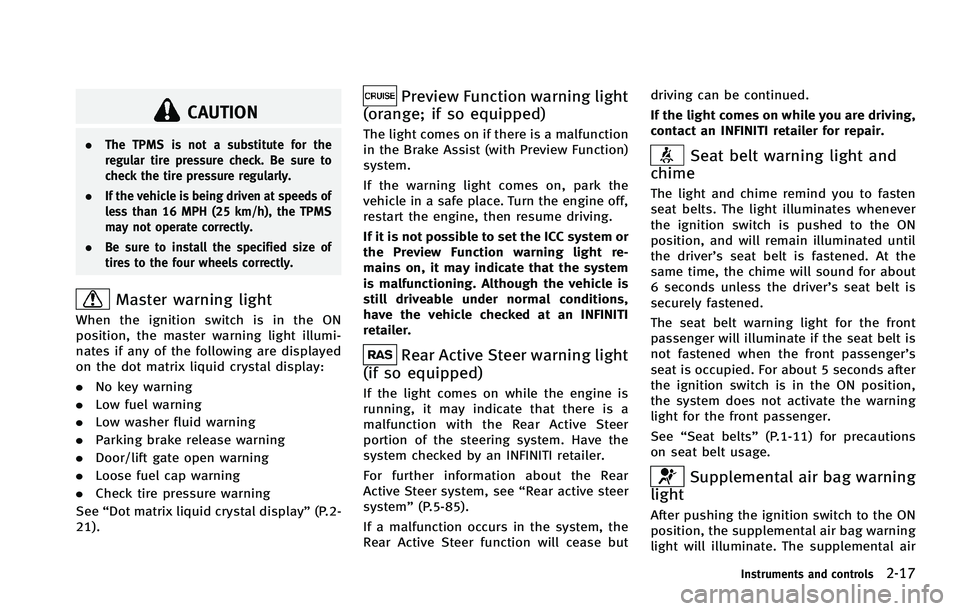
Master warning light
When the ignition switch is in the ON
position, the master warning light illumi-
nates if any of the following are displayed
on the dot matrix liquid crystal display:
.No key warning
. Low fuel warning
. Low washer fluid warning
. Parking brake release warning
. Door/lift gate open warning
. Loose fuel cap warning
. Check tire pressure warning
See “Dot matrix liquid crystal display” (P.2-
21).
Preview Function warning light
(orange; if so equipped)
The light comes on if there is a malfunction
in the Brake Assist (with Preview Function)
system.
If the warning light comes on, park the
vehicle in a safe place. Turn the engine off,
restart the engine, then resume driving.
If it is not possible to set the ICC system or
the Preview Function warning light re-
mains on, it may indicate that the system
is malfunctioning. Although the vehicle is
still driveable under normal conditions,
have the vehicle checked at an INFINITI
retailer.
Rear Active Steer warning light
(if so equipped)
If the light comes on while the engine is
running, it may indicate that there is a
malfunction with the Rear Active Steer
portion of the steering system. Have the
system checked by an INFINITI retailer.
For further information about the Rear
Active Steer system, see “Rear active steer
system” (P.5-85).
If a malfunction occurs in the system, the
Rear Active Steer function will cease but driving can be continued.
If the light comes on while you are driving,
contact an INFINITI retailer for repair.
Seat belt warning light and
chime
The light and chime remind you to fasten
seat belts. The light illuminates whenever
the ignition switch is pushed to the ON
position, and will remain illuminated until
the driver’s seat belt is fastened. At the
same time, the chime will sound for about
6 seconds unless the driver’s seat belt is
securely fastened.
The seat belt warning light for the front
passenger will illuminate if the seat belt is
not fastened when the front passenger’s
seat is occupied. For about 5 seconds after
the ignition switch is in the ON position,
the system does not activate the warning
light for the front passenger.
See “Seat belts” (P.1-11) for precautions
on seat belt usage.
Supplemental air bag warning
light
After pushing the ignition switch to the ON
position, the supplemental air bag warning
light will illuminate. The supplemental air
Instruments and controls2-17
Page 97 of 522
2-26Instruments and controls
18. Distance Control Assist (DCA)
system switch indicator (if so
equipped)
The indicator is displayed when the Dis-
tance Control Assist (DCA) system switch is
pushed on. When the switch is pushed
again, the indicator disappears. While the
indicator is displayed, the DCA system is
operational. (See“Distance Control Assist
(DCA) system” (P.5-54).)
SIC3281
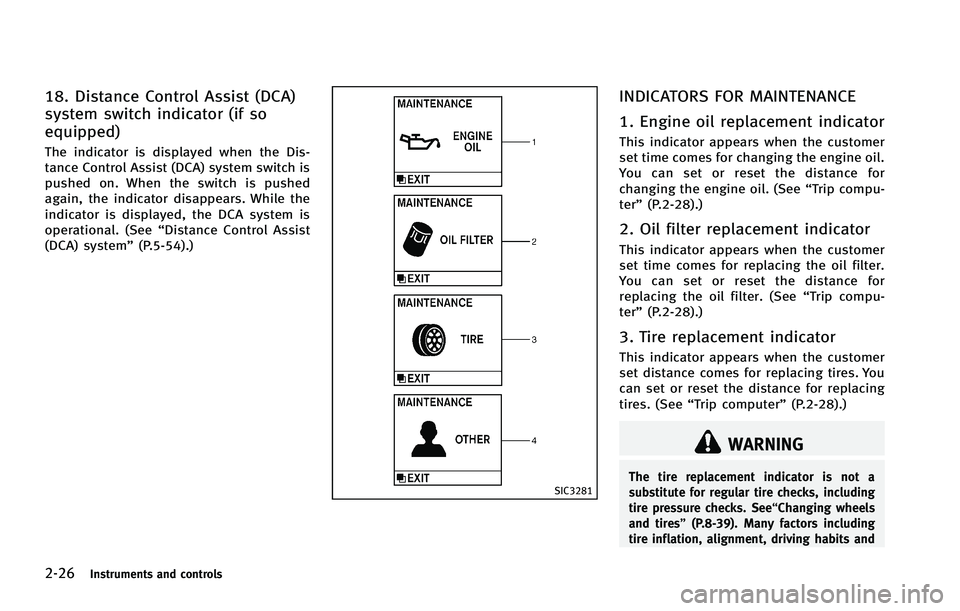
INDICATORS FOR MAINTENANCE
1. Engine oil replacement indicator
This indicator appears when the customer
set time comes for changing the engine oil.
You can set or reset the distance for
changing the engine oil. (See “Trip compu-
ter” (P.2-28).)
2. Oil filter replacement indicator
This indicator appears when the customer
set time comes for replacing the oil filter.
You can set or reset the distance for
replacing the oil filter. (See “Trip compu-
ter” (P.2-28).)
3. Tire replacement indicator
This indicator appears when the customer
set distance comes for replacing tires. You
can set or reset the distance for replacing
tires. (See “Trip computer” (P.2-28).)
WARNING
The tire replacement indicator is not a
substitute for regular tire checks, including
tire pressure checks. See“Changing wheels
and tires” (P.8-39). Many factors including
tire inflation, alignment, driving habits and
Page 111 of 522
2-40Instruments and controls
flat road, select position 0.
WARNING
Xenon headlights are extremely bright
compared to conventional headlights. If
the xenon headlights hit the rearview mirror
of the vehicle ahead or the windshield of
oncoming vehicle, the driver of these
vehicles may have difficulty driving because
of the brightness. Use the headlight aiming
control switch to lower the light axis. See
“Xenon headlights”(P.2-36) for additional
information.
Daytime running light system (Ca-
nada only)
The daytime running lights automatically
illuminate when the engine is started with
the parking brake released. The daytime
running lights operate with the headlight
switch in the OFF position or in the
position. Turn the headlight switch to theposition for full illumination when
driving at night.
If the parking brake is applied before the
engine is started, the daytime running
lights do not illuminate. The daytime running lights illuminate once the parking
brake is released. The daytime running
lights will remain on until the ignition
switch is pushed to the OFF position.
WARNING
When the daytime running light system is
active, tail lights on your vehicle are not on.
It is necessary at dusk to turn on your
headlights. Failure to do so could cause an
accident injuring yourself and others.
Adaptive Front lighting System
(AFS) (if so equipped)
The Adaptive Front lighting System (AFS)
will automatically adjust the headlights
(low beam) toward the turning direction to
improve the driver’s view. When the head-
light switch is ON and the driver operates
the steering wheel in a turn, the AFS
system will be activated.
The AFS will operate:
. when the headlight switch is ON.
. when the selector lever is in any
position other than P (Park) or R
(Reverse). .
when the vehicle is driven at above 16
MPH (25 km/h) for the left-side head-
light. Note that the right-side low beam
headlight will swivel but the left side
will not swivel when the vehicle is at a
stop and the steering wheel is turned.
The vehicle must attain a speed above
16 MPH (25 km/h) before AFS activates
the left-side headlight.
AFS will also adjust the headlight to a
proper axis automatically, depending on
the number of occupants in the vehicle, the
load the vehicle is carrying and the road
conditions.
If the AFS OFF indicator light blinks after
the ignition switch has been pushed to the
ON position, this may indicate that the AFS
is not functioning properly. Have the
system checked by an INFINITI retailer.
When the engine is started, the headlights
will vibrate to check the system condition.
This is not a malfunction.
Page 114 of 522

.Turn signals do not work when the
hazard warning flasher lights are on.
The flasher can be actuated with the
ignition switch in any position.
Some state laws may prohibit the use of
the hazard warning flasher switch while
driving.
SIC3831
To sound the horn, push the center pad
area of the steering wheel.
WARNING
Do not disassemble the horn. Doing so
could affect proper operation of the supple-
mental front air bag system. Tampering with
the supplemental front air bag system may
result in serious personal injury.
WARNING
Do not use or allow occupants to use the
seat heater if you or the occupants cannot
monitor elevated seat temperatures or have
an inability to feel pain in body parts that
contact the seat. Use of the seat heater by
such people could result in serious injury.
CAUTION
.The battery could run down if the seat
heater is operated while the engine is
not running.
. Do not use the seat heater for extended
periods or when no one is using the
seat.
. Do not put anything on the seat which
insulates heat, such as a blanket,
cushion, seat cover, etc. Otherwise, the
seat may become overheated.
. Do not place anything hard or heavy on
the seat or pierce it with a pin or similar
object. This may result in damage to the
heater.
Instruments and controls2-43
HORN HEATED SEATS (if so equipped)