wheel INFINITI FX 2012 Workshop Manual
[x] Cancel search | Manufacturer: INFINITI, Model Year: 2012, Model line: FX, Model: INFINITI FX 2012Pages: 522, PDF Size: 3.51 MB
Page 302 of 522

steering switch or use the audio system
volume knob while the system is
making an announcement.
How to speak numbers:
INFINITI Voice Recognition requires a cer-
tain way to speak numbers when giving
voice commands. Refer to the following
examples.
General rule
Only single digits 0 (zero) to 9 can be used.
(For example, if you would like to say 500,
“five zero zero” can be used, but “five
hundred” cannot.)
Examples
. 1-800-662-6200
—“ One eight zero zero six six two six
two zero zero”
Improving Recognition of Phone numbers
You can improve the recognition of phone
numbers by saying the phone number in
three groups of numbers. For example,
when you try to call 800-662-6200, say
“eight zero zero” first, and the system will
then ask you for the next three digits. Then,
say “six six two”. After recognition, the
system will then ask for the last four digits.
Say, “six two zero zero”. Using this method of phone digit entry can improve recogni-
tion performance.
When speaking a house number, speak the
number
“0”as“zero”. If the letter “o (oh)”
is included in the house number, it will not
be recognized as the number “0 (zero)”
even if you speak “oh”instead of “zero”.
Please speak “zero”for the number “0
(zero)”, “oh”for the letter “o (oh)”.
Send digits using dial ton:
. Press the TALK
switch during a
phone call.
. The menu will be launched and you will
be provided with the following gui-
dance: “Please say the digits to dial”.
. After guidance, say the digits of the
number you want to send. After this,
the digits that have been recognized
will be read out.
. If you press the ENTER button on the
steering wheel or on the INFINITI con-
troller, the selected digits will be sent.
Monitor, climate, audio, phone and voice recognition systems4-125
Page 305 of 522

4-128Monitor, climate, audio, phone and voice recognition systems
Voice command examples
To use the INFINITI Voice Recognition
function, speaking one command is some-
times sufficient, but at other times it is
necessary to speak two or more com-
mands. As examples, some additional
basic operations by voice commands are
described here.
For navigation system commands, see the
separate Navigation System Owner’s Man-
ual.
SAA2167
Example 1 - Placing a call to the phone
number 800-662-6200:
1. Push the TALK
switch located on
the steering wheel.
SAA2535
2. The system announces, “Would you like
to access Phone, Navigation, Informa-
tion, Audio or Help?”
3. Speak “Phone”.
Page 308 of 522

SAA2167
Example 2 - Placing an international call to
the phone number 011-81-111-222-3333:
1. Push the TALK
switch located on
the steering wheel.
SAA2535
2. The system announces, “Would you like
to access Phone, Navigation, Informa-
tion, Audio or Help?”
3. Speak “Phone”.
SAA2536
4. Speak“International Call ”.
Monitor, climate, audio, phone and voice recognition systems4-131
Page 319 of 522
4-142Monitor, climate, audio, phone and voice recognition systems
.When the air conditioner is in the AUTO
mode, the fan speed decreases auto-
matically for easy recognition.
. Wait until a tone sounds before speak-
ing a command.
. Speak in a natural voice without paus-
ing between words.
SAA2167
Giving voice command
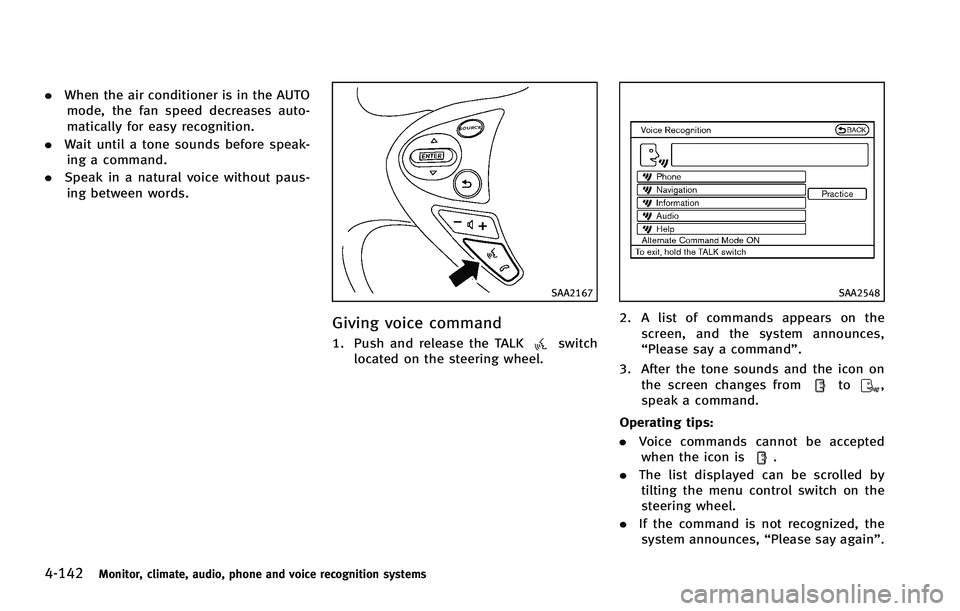
1. Push and release the TALKswitch
located on the steering wheel.
SAA2548
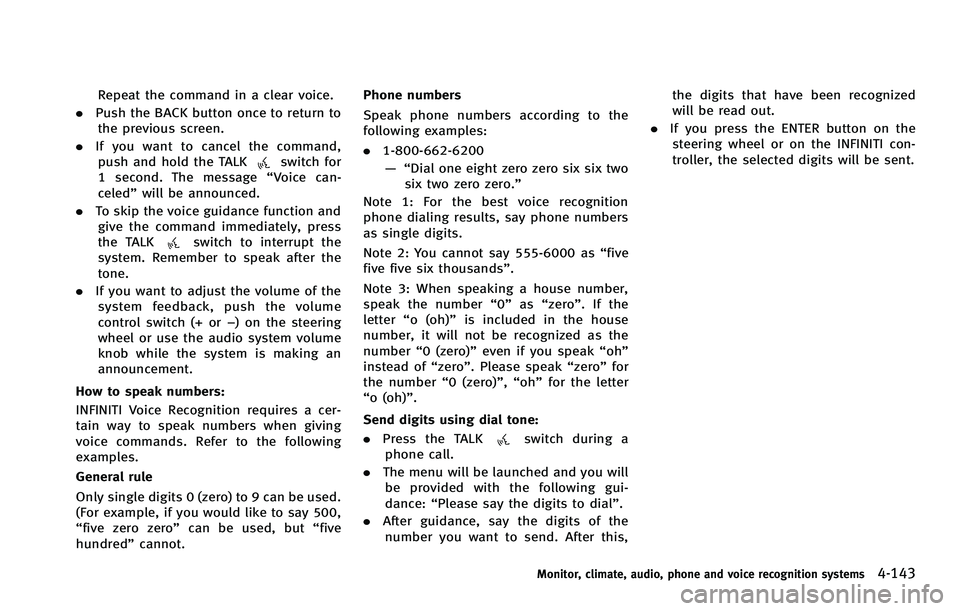
2. A list of commands appears on the
screen, and the system announces,
“Please say a command”.
3. After the tone sounds and the icon on the screen changes from
to,
speak a command.
Operating tips:
. Voice commands cannot be accepted
when the icon is
.
. The list displayed can be scrolled by
tilting the menu control switch on the
steering wheel.
. If the command is not recognized, the
system announces, “Please say again”.
Page 320 of 522
Repeat the command in a clear voice.
. Push the BACK button once to return to
the previous screen.
. If you want to cancel the command,
push and hold the TALK
switch for
1 second. The message “Voice can-
celed” will be announced.
. To skip the voice guidance function and
give the command immediately, press
the TALK
switch to interrupt the
system. Remember to speak after the
tone.
. If you want to adjust the volume of the
system feedback, push the volume
control switch (+ or −) on the steering
wheel or use the audio system volume
knob while the system is making an
announcement.
How to speak numbers:
INFINITI Voice Recognition requires a cer-
tain way to speak numbers when giving
voice commands. Refer to the following
examples.
General rule
Only single digits 0 (zero) to 9 can be used.
(For example, if you would like to say 500,
“five zero zero” can be used, but “five
hundred” cannot. Phone numbers
Speak phone numbers according to the
following examples:
.
1-800-662-6200
—“ Dial one eight zero zero six six two
six two zero zero.”
Note 1: For the best voice recognition
phone dialing results, say phone numbers
as single digits.
Note 2: You cannot say 555-6000 as “five
five five six thousands” .
Note 3: When speaking a house number,
speak the number “0”as“zero”. If the
letter “o (oh)” is included in the house
number, it will not be recognized as the
number “0 (zero)” even if you speak “oh”
instead of “zero”. Please speak “zero”for
the number “0 (zero)”,“oh”for the letter
“o (oh)”.
Send digits using dial tone:
. Press the TALK
switch during a
phone call.
. The menu will be launched and you will
be provided with the following gui-
dance: “Please say the digits to dial”.
. After guidance, say the digits of the
number you want to send. After this, the digits that have been recognized
will be read out.
. If you press the ENTER button on the
steering wheel or on the INFINITI con-
troller, the selected digits will be sent.
Monitor, climate, audio, phone and voice recognition systems4-143
Page 327 of 522
Forward Collision Warning (FCW) system
(if so equipped) ................................................. 5-67Precautions on FCW system ........................... 5-68
Intelligent Brake Assist (IBA) system (if
so equipped) ..................................................... 5-70 Precautions on IBA system ............................ 5-71
Break-in schedule .............................................. 5-74
Increasing fuel economy .................................... 5-74
All-Wheel Drive (AWD) (if so equipped) .............. 5-75
Parking/parking on hills .................................... 5-76
Power steering................................................... 5-77
Continuous damping control (if so equipped)..... 5-77
Brake system..................................................... 5-78 Braking precautions ...................................... 5-78
European design brake pads (if
so equipped) ................................................. 5-78
Parking brake break-in .................................. 5-79 Brake assist ...................................................... 5-79
Brake assist................................................. 5-79Preview function (Intelligent Cruise Control
system equipped models) ............................ 5-79
Anti-lock Braking System (ABS) .................... 5-82
Vehicle Dynamic Control (VDC) system .............. 5-83
Rear active steer system (if so equipped) .......... 5-85
Cold weather driving ......................................... 5-85
Freeing a frozen door lock ........................... 5-85
Antifreeze .................................................... 5-85
Battery......................................................... 5-85
Draining of coolant water............................. 5-85
Tire equipment ............................................ 5-86
Special winter equipment ............................ 5-86
Driving on snow or ice ................................. 5-86
Engine block heater (if so equipped)............ 5-87
Page 329 of 522
5-4Starting and driving
cause a fire.
CAUTION
.Do not use leaded gasoline. Deposits
from leaded gasoline seriously reduce
the three-way catalyst’s ability to help
reduce exhaust pollutants.
. Keep your engine tuned up. Malfunctions
in the ignition, fuel injection, or elec-
trical systems can cause overrich fuel
flow into the three-way catalyst, causing
it to overheat. Do not keep driving if the
engine misfires, or if noticeable loss of
performance or other unusual operating
conditions are detected. Have the vehicle
inspected promptly by an INFINITI retai-
ler.
. Avoid driving with an extremely low fuel
level. Running out of fuel could cause
the engine to misfire, damaging the
three-way catalyst.
. Do not race the engine while warming it
up.
. Do not push or tow your vehicle to start
the engine.
TIRE PRESSURE MONITORING SYS-
TEM (TPMS)
Each tire, including the spare (if provided),
should be checked monthly when cold and
inflated to the inflation pressure recom-
mended by the vehicle manufacturer on the
vehicle placard or tire inflation pressure
label. (If your vehicle has tires of a different
size than the size indicated on the vehicle
placard or tire inflation pressure label, you
should determine the proper tire inflation
pressure for those tires.)
As an added safety feature, your vehicle
has been equipped with a Tire Pressure
Monitoring System (TPMS) that illuminates
a low tire pressure telltale when one or
more of your tires is significantly under-
inflated. Accordingly, when the low tire
pressure telltale illuminates, you should
stop and check your tires as soon as
possible, and inflate them to the proper
pressure. Driving on a significantly under-
inflated tire causes the tire to overheat and
can lead to tire failure. Under-inflation also
reduces fuel efficiency and tire tread life,
and may affect the vehicle’s handling and
stopping ability.
Please note that the TPMS is not a
substitute for proper tire maintenance, and it is the driver’
s responsibility to
maintain correct tire pressure, even if
under-inflation has not reached the level
to trigger illumination of the TPMS low tire
pressure telltale.
Your vehicle has also been equipped with a
TPMS malfunction indicator to indicate
when the system is not operating properly.
The TPMS malfunction indicator is com-
bined with the low tire pressure telltale.
When the system detects a malfunction,
the telltale will flash for approximately one
minute and then remain continuously
illuminated. This sequence will continue
upon subsequent vehicle start-ups as long
as the malfunction exists. When the mal-
function indicator is illuminated, the sys-
tem may not be able to detect or signal low
tire pressure as intended. TPMS malfunc-
tions may occur for a variety of reasons,
including the installation of replacement or
alternate tires or wheels on the vehicle that
prevent the TPMS from functioning prop-
erly. Always check the TPMS malfunction
telltale after replacing one or more tires or
wheels on your vehicle to ensure that the
replacement or alternate tires and wheels
allow the TPMS to continue to function
properly.
Page 330 of 522
Additional information
.The TPMS does not monitor the tire
pressure of the spare tire.
. The TPMS will activate only when the
vehicle is driven at speeds above 16
MPH (25 km/h). Also, this system may
not detect a sudden drop in tire
pressure (for example a flat tire while
driving).
. The low tire pressure warning light does
not automatically turn off when the tire
pressure is adjusted. After the tire is
inflated to the recommended pressure,
the vehicle must be driven at speeds
above 16 MPH (25 km/h) to activate the
TPMS and turn off the low tire pressure
warning light. Use a tire pressure gauge
to check the tire pressure.
. The CHECK TIRE PRESSURE warning also
appears on the dot matrix liquid crystal
display when the low tire pressure
warning light is illuminated and low
tire pressure is detected. The CHECK
TIRE PRESSURE warning turns off when
the low tire pressure warning light
turns off.
The CHECK TIRE PRESSURE warning
does not appear if the low tire pressure
warning light illuminates to indicate a TPMS malfunction.
. Tire pressure rises and falls depending
on the heat caused by the vehicle’s
operation and the outside temperature.
Low outside temperature can lower the
temperature of the air inside the tire
which can cause a lower tire inflation
pressure. This may cause the low tire
pressure warning light to illuminate. If
the warning light illuminates in low
ambient temperature, check the tire
pressure for all four tires.
. You can also check the pressure of all
tires (except the spare tire) on the
display screen. The order of the tire
pressure figures displayed on the
screen does not correspond with the
actual order of the tire position. See
“TIRE PRESSURE information” (P.4-11).
For additional information, see “Low tire
pressure warning light” (P.2-15) and“Tire
Pressure Monitoring System (TPMS)” (P.6-
2).
WARNING
. If the low tire pressure warning light
illuminates or LOW PRESSURE informa-
tion is displayed on the monitor screen while driving, avoid sudden steering
maneuvers or abrupt braking, reduce
vehicle speed, pull off the road to a safe
location and stop the vehicle as soon as
possible. Driving with under-inflated
tires may permanently damage the tires
and increase the likelihood of tire fail-
ure. Serious vehicle damage could occur
and may lead to an accident and could
result in serious personal injury. Check
the tire pressure for all four tires. Adjust
the tire pressure to the recommended
COLD tire pressure shown on the Tire
and Loading Information label to turn
the low tire pressure warning light OFF. If
the light still illuminates while driving
after adjusting the tire pressure, a tire
may be flat. If you have a flat tire,
replace it with a spare tire as soon as
possible. (See
“Flat tire” (P.6-2) for
changing a flat tire.)
. When a spare tire is mounted or a wheel
is replaced, the TPMS will not function
and the low tire pressure warning light
will flash for approximately 1 minute.
The light will remain on after 1 minute.
Contact your INFINITI retailer as soon as
possible for tire replacement and/or
system resetting.
Starting and driving5-5
Page 331 of 522
5-6Starting and driving
.Replacing tires with those not originally
specified by INFINITI could affect the
proper operation of the TPMS.
. Do not inject any tire liquid or aerosol
tire sealant into the tires, as this may
cause a malfunction of the tire pressure
sensors.
CAUTION
.The TPMS may not function properly
when the wheels are equipped with tire
chains or the wheels are buried in snow.
. Do not place metalized film or any metal
parts (antenna, etc.) on the windows.
This may cause poor reception of the
signals from the tire pressure sensors,
and the TPMS will not function properly.
Some devices and transmitters may tem-
porarily interfere with the operation of the
TPMS and cause the low tire pressure
warning light to illuminate. Some exam-
ples are:
.Facilities or electric devices using simi-
lar radio frequencies are near the
vehicle. .
If a transmitter set to similar frequen-
cies is being used in or near the
vehicle.
. If a computer (or similar equipment) or
a DC/AC converter is being used in or
near the vehicle.
FCC Notice:
For USA:
This device complies with Part 15 of the
FCC Rules. Operation is subject to the
following two conditions: (1) This device
may not cause harmful interference, and
(2) this device must accept any interfer-
ence received, including interference that
may cause undesired operation.
Note: Changes or modifications not ex-
pressly approved by the party responsible
for compliance could void the user’ s
authority to operate the equipment.
For Canada:
This device complies with RSS-210 of
Industry Canada. Operation is subject to
the following two conditions: (1) this
device may not cause interference, and
(2) this device must accept any interfer-
ence, including interference that may
cause undesired operation of the device.
AVOIDING COLLISION AND ROLL-
OVER
WARNING
Failure to operate this vehicle in a safe and
prudent manner may result in loss of control
or an accident.
Be alert and drive defensively at all times.
Obey all traffic regulations. Avoid exces-
sive speed, high speed cornering, or
sudden steering maneuvers, because
these driving practices could cause you to
lose control of your vehicle. As with any
vehicle, a loss of control could result in a
collision with other vehicles or objects, or
cause the vehicle to rollover, particularly if
the loss of control causes the vehicle to
slide sideways. Be attentive at all times,
and avoid driving when tired. Never drive
when under the influence of alcohol or
drugs (including prescription or over-the-
counter drugs which may cause drowsi-
ness). Always wear your seat belt as
outlined in the “Seat belts”(P.1-11) of this
manual, and also instruct your passengers
to do so.
Page 332 of 522
Seat belts help reduce the risk of injury in
collisions and rollovers.In a rollover crash,
an unbelted or improperly belted person is
significantly more likely to be injured or
killed than a person properly wearing a
seat belt.
ON-PAVEMENT AND OFF-ROAD
DRIVING PRECAUTIONS
Utility vehicles have a significantly higher
rollover rate than other types of vehicles.
They have higher ground clearance than
passenger cars to make them capable of
performing in a variety of on-pavement and
off-road applications. This gives them a
higher center of gravity than ordinary cars.
An advantage of higher ground clearance is
a better view of the road, allowing you to
anticipate problems. However, they are not
designed for cornering at the same speeds
as conventional passenger cars any more
than low-slung sports cars are designed to
perform satisfactorily under off-road con-
ditions. If at all possible, avoid sharp turns
or abrupt maneuvers, particularly at high
speeds. As with other vehicles of this type,
failure to operate this vehicle correctly may
result in loss of control or vehicle rollover.
Seat belts help reduce the risk of injury in collisions and rollovers. In a rollover crash,
an unbelted or improperly belted person is
significantly more likely to be injured or
killed than a person properly wearing a
seat belt.
Be sure to read
“Driving safety precau-
tions” (P.5-8).
OFF-ROAD RECOVERY
If the right side or left side wheels
unintentionally leave the road surface,
maintain control of the vehicle by following
the procedure below. Please note that this
procedure is only a general guide. The
vehicle must be driven as appropriate
based on the conditions of the vehicle,
road and traffic.
1. Remain calm and do not overreact.
2. Do not apply the brakes.
3. Maintain a firm grip on the steering
wheel with both hands and try to hold a
straight course.
4. When appropriate, slowly release the accelerator pedal to gradually slow the
vehicle.
5. If there is nothing in the way, steer the vehicle to follow the road while the
vehicle speed is reduced. Do not attempt to drive the vehicle back onto
the road surface until vehicle speed is
reduced.
6. When it is safe to do so, gradually turn the steering wheel until both tires
return to the road surface. When all
tires are on the road surface, steer the
vehicle to stay in the appropriate
driving lane..If you decide that it is not safe toreturn the vehicle to the road surface
based on vehicle, road or traffic
conditions, gradually slow the vehi-
cle to a stop in a safe place off the
road.
RAPID AIR PRESSURE LOSS
Rapid air pressure loss or a “blow-out”can
occur if the tire is punctured or is damaged
due to hitting a curb or pothole. Rapid air
pressure loss can also be caused by
driving on under-inflated tires.
Rapid air pressure loss can affect the
handling and stability of the vehicle,
especially at highway speeds.
Help prevent rapid air pressure loss by
maintaining the correct air pressure and
visually inspect the tires for wear and
damage. See “Wheels and tires” (P.8-32) of
Starting and driving5-7