ignition switch INFINITI FX35 2008 Service Manual
[x] Cancel search | Manufacturer: INFINITI, Model Year: 2008, Model line: FX35, Model: INFINITI FX35 2008Pages: 3924, PDF Size: 81.37 MB
Page 2988 of 3924
REAR WINDOW DEFOGGERGW-75
< SERVICE INFORMATION >
C
DE
F
G H
J
K L
M A
B
GW
N
O P
Check Driver Side Door Mirror Defogger CircuitINFOID:0000000001328015
1.CHECK POWER SUPPLY CIRCUIT
1. Turn ignition switch OFF.
2. Disconnect door mirror (driver side) connector.
3. Turn ignition switch ON.
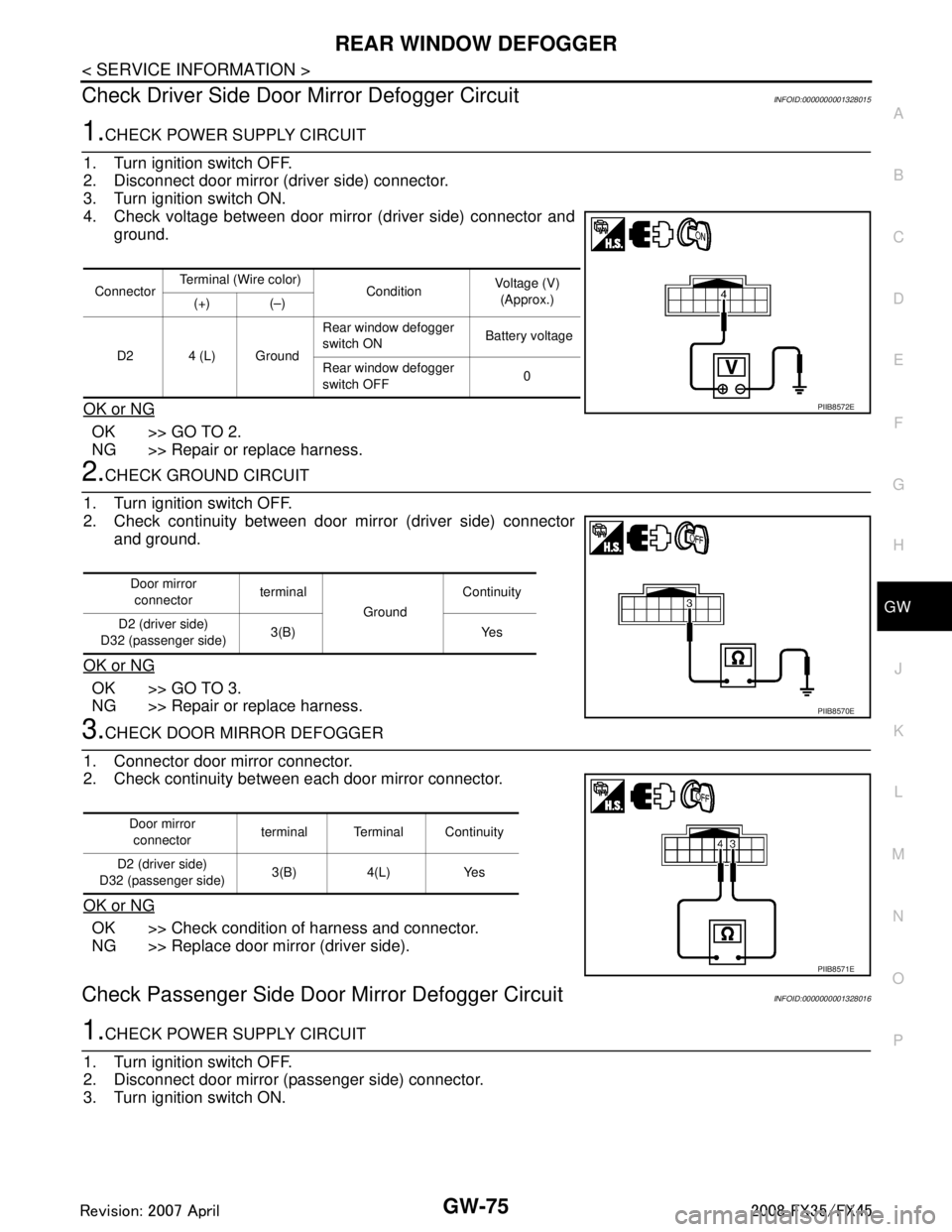
4. Check voltage between door mirror (driver side) connector and ground.
OK or NG
OK >> GO TO 2.
NG >> Repair or replace harness.
2.CHECK GROUND CIRCUIT
1. Turn ignition switch OFF.
2. Check continuity between door mirror (driver side) connector and ground.
OK or NG
OK >> GO TO 3.
NG >> Repair or replace harness.
3.CHECK DOOR MIRROR DEFOGGER
1. Connector door mirror connector.
2. Check continuity between each door mirror connector.
OK or NG
OK >> Check condition of harness and connector.
NG >> Replace door mirror (driver side).
Check Passenger Si de Door Mirror Defogger CircuitINFOID:0000000001328016
1.CHECK POWER SUPPLY CIRCUIT
1. Turn ignition switch OFF.
2. Disconnect door mirror (passenger side) connector.
3. Turn ignition switch ON.
Connector Terminal (Wire color)
ConditionVoltage (V)
(Approx.)
(+) (–)
D2 4 (L) Ground Rear window defogger
switch ON
Battery voltage
Rear window defogger
switch OFF 0
PIIB8572E
Door mirror
connector terminal
GroundContinuity
D2 (driver side)
D32 (passenger side) 3(B) Yes
PIIB8570E
Door mirror
connector terminal Terminal Continuity
D2 (driver side)
D32 (passenger side) 3(B) 4(L) Yes
PIIB8571E
3AA93ABC3ACD3AC03ACA3AC03AC63AC53A913A773A893A873A873A8E3A773A983AC73AC93AC03AC3
3A893A873A873A8F3A773A9D3AAF3A8A3A8C3A863A9D3AAF3A8B3A8C
Page 2989 of 3924
GW-76
< SERVICE INFORMATION >
REAR WINDOW DEFOGGER
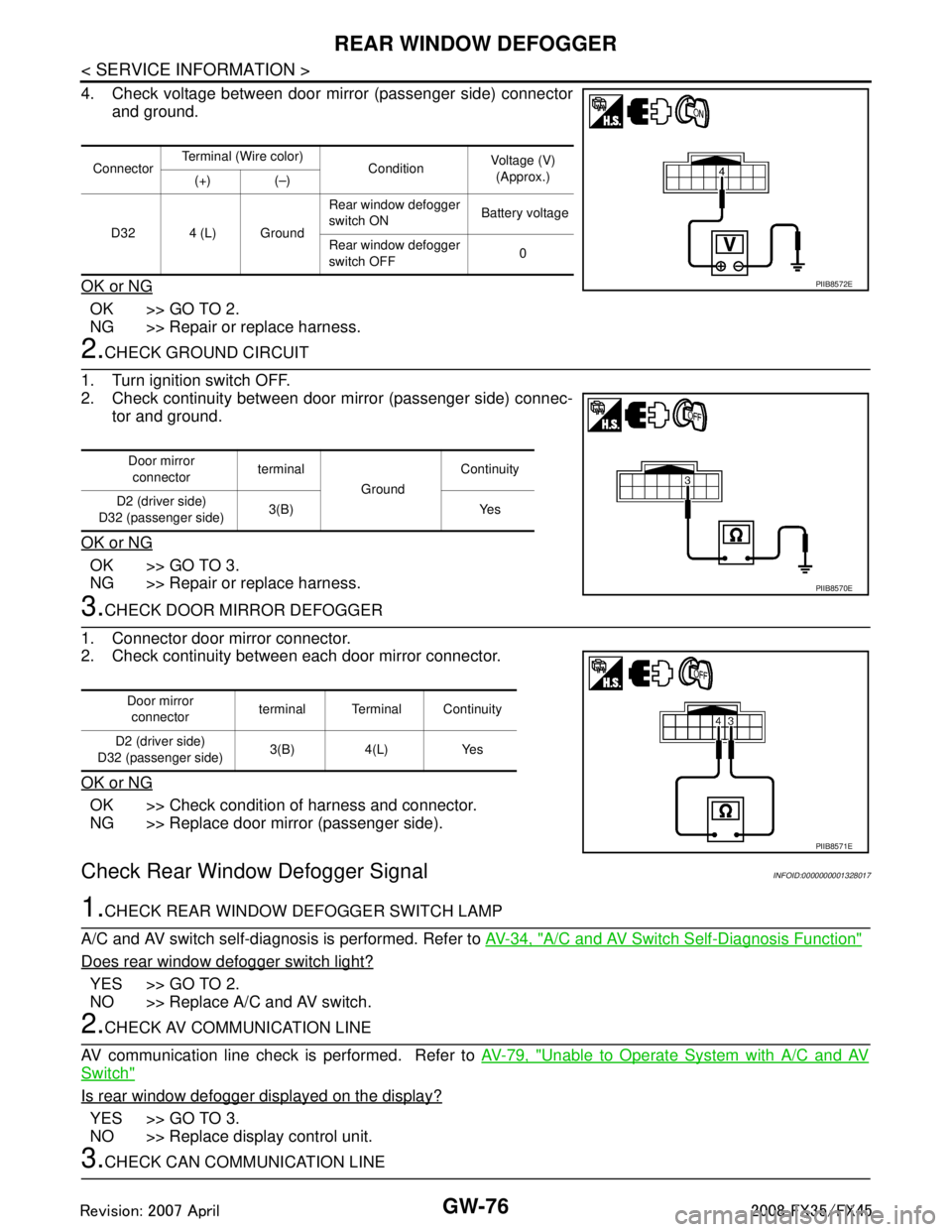
4. Check voltage between door mirror (passenger side) connectorand ground.
OK or NG
OK >> GO TO 2.
NG >> Repair or replace harness.
2.CHECK GROUND CIRCUIT
1. Turn ignition switch OFF.
2. Check continuity between door mirror (passenger side) connec- tor and ground.
OK or NG
OK >> GO TO 3.
NG >> Repair or replace harness.
3.CHECK DOOR MIRROR DEFOGGER
1. Connector door mirror connector.
2. Check continuity between each door mirror connector.
OK or NG
OK >> Check condition of harness and connector.
NG >> Replace door mirror (passenger side).
Check Rear Windo w Defogger SignalINFOID:0000000001328017
1.CHECK REAR WINDOW DEFOGGER SWITCH LAMP
A/C and AV switch self-diagnosis is performed. Refer to AV-34, "
A/C and AV Switch Self-Diagnosis Function"
Does rear window defogger switch light?
YES >> GO TO 2.
NO >> Replace A/C and AV switch.
2.CHECK AV COMMUNICATION LINE
AV communication line check is performed. Refer to AV-79, "
Unable to Operate System with A/C and AV
Switch"
Is rear window defogger displayed on the display?
YES >> GO TO 3.
NO >> Replace display control unit.
3.CHECK CAN COMMUNICATION LINE
ConnectorTerminal (Wire color)
ConditionVoltage (V)
(Approx.)
(+) (–)
D32 4 (L) Ground Rear window defogger
switch ON
Battery voltage
Rear window defogger
switch OFF 0
PIIB8572E
Door mirror
connector terminal
GroundContinuity
D2 (driver side)
D32 (passenger side) 3(B) Yes
PIIB8570E
Door mirror
connector terminal Terminal Continuity
D2 (driver side)
D32 (passenger side) 3(B) 4(L) Yes
PIIB8571E
3AA93ABC3ACD3AC03ACA3AC03AC63AC53A913A773A893A873A873A8E3A773A983AC73AC93AC03AC3
3A893A873A873A8F3A773A9D3AAF3A8A3A8C3A863A9D3AAF3A8B3A8C
Page 3023 of 3924
![INFINITI FX35 2008 Service Manual
PRECAUTIONSLAN-3
< SERVICE INFORMATION > [CAN FUNDAMENTAL]
C
D
E
F
G H
I
J
L
M A
B
LAN
N
O P
SERVICE INFORMATION
PRECAUTIONS
Precaution for Trouble DiagnosisINFOID:0000000001451944
CAUTION:
• Never](/img/42/57017/w960_57017-3022.png "INFINITI FX35 2008 Service Manual
PRECAUTIONSLAN-3
< SERVICE INFORMATION > [CAN FUNDAMENTAL]
C
D
E
F
G H
I
J
L
M A
B
LAN
N
O P
SERVICE INFORMATION
PRECAUTIONS
Precaution for Trouble DiagnosisINFOID:0000000001451944
CAUTION:
• Never")
PRECAUTIONSLAN-3
< SERVICE INFORMATION > [CAN FUNDAMENTAL]
C
D
E
F
G H
I
J
L
M A
B
LAN
N
O P
SERVICE INFORMATION
PRECAUTIONS
Precaution for Trouble DiagnosisINFOID:0000000001451944
CAUTION:
• Never apply 7.0 V or more to the measurement terminal.
Use a tester with open terminal voltage of 7.0 V or less.
Turn the ignition switch OFF and disconnect th e battery cable from the negative terminal when
checking the harness.
Precaution for Harness RepairINFOID:0000000001451945
• Solder the repaired area and wrap tape around the soldered area. NOTE:
A fray of twisted lines must be within 110 mm (4.33 in).
Bypass connection is never allowed at the repaired area. NOTE:
Bypass connection may cause CAN communication error. The
spliced wire becomes separated and t he characteristics of twisted
line are lost.
Replace the applicable harness as an assembly if error is detected on the shield lines of CAN communica-
tion line.
SKIB8766E
SKIB8767E
3AA93ABC3ACD3AC03ACA3AC03AC63AC53A913A773A893A873A873A8E3A773A983AC73AC93AC03AC3
3A893A873A873A8F3A773A9D3AAF3A8A3A8C3A863A9D3AAF3A8B3A8C
Page 3027 of 3924
![INFINITI FX35 2008 Service Manual
TROUBLE DIAGNOSISLAN-7
< SERVICE INFORMATION > [CAN FUNDAMENTAL]
C
D
E
F
G H
I
J
L
M A
B
LAN
N
O P
TROUBLE DIAGNOSIS
Condition of Error DetectionINFOID:0000000001451948
“U1000” or “U1001” is](/img/42/57017/w960_57017-3026.png "INFINITI FX35 2008 Service Manual
TROUBLE DIAGNOSISLAN-7
< SERVICE INFORMATION > [CAN FUNDAMENTAL]
C
D
E
F
G H
I
J
L
M A
B
LAN
N
O P
TROUBLE DIAGNOSIS
Condition of Error DetectionINFOID:0000000001451948
“U1000” or “U1001” is")
TROUBLE DIAGNOSISLAN-7
< SERVICE INFORMATION > [CAN FUNDAMENTAL]
C
D
E
F
G H
I
J
L
M A
B
LAN
N
O P
TROUBLE DIAGNOSIS
Condition of Error DetectionINFOID:0000000001451948
“U1000” or “U1001” is indicated on SELF-DIAG RESULTS on CONSULT-III if CAN communication signal is
not transmitted or received between units for 2 seconds or more.
CAN COMMUNICATION SYSTEM ERROR
CAN communication line open (CAN-H, CAN-L, or both)
CAN communication line short (ground, betw een CAN communication lines, other harnesses)
Error of CAN communication control circuit of the unit connected to CAN communication line
WHEN “U1000” OR “U1001” IS INDICATED EV EN THOUGH CAN COMMUNICATION SYSTEM IS
NORMAL
Removal/installation of parts: Error may be detec ted when removing and installing CAN communication unit
and related parts while turning the ignition switch ON. (A DTC except for CAN communication may be
detected.)
Fuse blown out (removed): CAN communication of the unit may cease.
Voltage drop: Error may be detected if voltage drops due to discharged battery when turning the ignition
switch ON (Depending on the control unit which carries out CAN communication).
Error may be detected if the power supply circuit of the control unit, which carries out CAN communication,
malfunctions (Depending on the control unit which carries out CAN communication).
Error may be detected if reprogramming is not completed normally.
NOTE:
CAN communication system is normal if “U1000” or “U 1001” is indicated on SELF-DIAG RESULTS of CON-
SULT-III under the above conditions. Erase the memory of the self-diagnosis of each unit.
Symptom When Error Occurs in CAN Communication SystemINFOID:0000000001451949
In CAN communication system, multiple units mutually transmit and receive signals. Each unit cannot transmit
and receive signals if any error occurs on CAN communicati on line. Under this condition, multiple control units
related to the root cause malfunction or go into fail-safe mode.
ERROR EXAMPLE
NOTE:
Each vehicle differs in symptom of each unit under fail-safe mode and CAN communication line wiring.
Refer to LAN-37, "
Abbreviation List" for the unit abbreviation.
Example: TCM branch line open circuit
SKIB8738E
Unit name Symptom
ECM Engine torque limiting is affected, and shift harshness increases.
BCM Reverse warning chime does not sound.
3AA93ABC3ACD3AC03ACA3AC03AC63AC53A913A773A893A873A873A8E3A773A983AC73AC93AC03AC3
3A893A873A873A8F3A773A9D3AAF3A8A3A8C3A863A9D3AAF3A8B3A8C
Page 3029 of 3924
![INFINITI FX35 2008 Service Manual
TROUBLE DIAGNOSISLAN-9
< SERVICE INFORMATION > [CAN FUNDAMENTAL]
C
D
E
F
G H
I
J
L
M A
B
LAN
N
O P
Example: Main Line Between Data Link
Connector and ABS Actuator and Electr ic Unit (Control Unit) O](/img/42/57017/w960_57017-3028.png "INFINITI FX35 2008 Service Manual
TROUBLE DIAGNOSISLAN-9
< SERVICE INFORMATION > [CAN FUNDAMENTAL]
C
D
E
F
G H
I
J
L
M A
B
LAN
N
O P
Example: Main Line Between Data Link
Connector and ABS Actuator and Electr ic Unit (Control Unit) O")
TROUBLE DIAGNOSISLAN-9
< SERVICE INFORMATION > [CAN FUNDAMENTAL]
C
D
E
F
G H
I
J
L
M A
B
LAN
N
O P
Example: Main Line Between Data Link
Connector and ABS Actuator and Electr ic Unit (Control Unit) Open Circuit
Example: CAN-H, CAN-L Harness Short Circuit
SKIB8740E
Unit name Symptom
ECM Engine torque limiting is affected, and shift harshness increases.
BCM Reverse warning chime does not sound.
The front wiper moves under continuous operation mode even though the front wip-
er switch being in the intermittent position.
EPS control unit The steering effort increases.
Combination meter The shift position indicator and OD OFF indicator turn OFF.
The speedometer is inoperative.
The odo/trip meter stops.
ABS actuator and electric unit (control unit) Normal operation.
TCM No impact on operation.
IPDM E/R When the ignition switch is ON,
The headlamps (Lo) turn ON.
The cooling fan continues to rotate.
SKIB8741E
3AA93ABC3ACD3AC03ACA3AC03AC63AC53A913A773A893A873A873A8E3A773A983AC73AC93AC03AC3
3A893A873A873A8F3A773A9D3AAF3A8A3A8C3A863A9D3AAF3A8B3A8C
Page 3030 of 3924
![INFINITI FX35 2008 Service Manual
LAN-10
< SERVICE INFORMATION >[CAN FUNDAMENTAL]
TROUBLE DIAGNOSIS
Self-Diagnosis
INFOID:0000000001451950
CAN Diagnostic Support MonitorINFOID:0000000001451951
CONSULT-III and CAN diagnostic support m](/img/42/57017/w960_57017-3029.png "INFINITI FX35 2008 Service Manual
LAN-10
< SERVICE INFORMATION >[CAN FUNDAMENTAL]
TROUBLE DIAGNOSIS
Self-Diagnosis
INFOID:0000000001451950
CAN Diagnostic Support MonitorINFOID:0000000001451951
CONSULT-III and CAN diagnostic support m")
LAN-10
< SERVICE INFORMATION >[CAN FUNDAMENTAL]
TROUBLE DIAGNOSIS
Self-Diagnosis
INFOID:0000000001451950
CAN Diagnostic Support MonitorINFOID:0000000001451951
CONSULT-III and CAN diagnostic support monitor (on-boar d diagnosis function) are used for detecting root
cause.
MONITOR ITEM (CONSULT-III)
Unit name Symptom
ECM Engine torque limiting is affected, and shift harshness increases.
Engine speed drops.
BCM Reverse warning chime does not sound.
The front wiper moves under continuous operation mode even though the front
wiper switch being in the intermittent position.
The room lamp does not turn ON.
The engine does not start (if an error or malfunction occurs while turning the igni- tion switch OFF.)
The steering lock does not release (if an error or malfunction occurs while turning the ignition switch OFF.)
EPS control unit The steeri ng effort increases.
Combination meter The tachometer and the speedometer do not move.
Warning lamps turn ON.
Indicator lamps do not turn ON.
ABS actuator and electric unit (control unit) Normal operation.
TCM No impact on operation.
IPDM E/R When the ignition switch is ON,
The headlamps (Lo) turn ON.
The cooling fan continues to rotate.
DTC
Self-diagnosis item
(CONSULT-III indication) DTC detection condition Inspection/Action
U1000 CAN COMM CIRCUIT When ECM is not transmitting or receiving CAN
communication signal of OBD (emission-related
diagnosis) for 2 seconds or more.
Refer to LAN-13
.
When a control unit (except for ECM) is not
transmitting or receiving CAN communication
signal for 2 seconds or more.
U1001 CAN COMM CIRCUIT When ECM is not transmitting or receiving CAN
communication signal other than OBD (emis-
sion-related diagnosis) for 2 seconds or more.
U1002 SYSTEM COMM When a control unit is not transmitting or receiv-
ing CAN communication signal for 2 seconds or
less. Start the inspection. Re-
fer to the applicable sec-
tion of the indicated
control unit.
U1010 CONTROL UNIT [CAN] When an error is detected during the initial diag-
nosis for CAN controller of each control unit. Replace the control unit
indicating “U1010”.
3AA93ABC3ACD3AC03ACA3AC03AC63AC53A913A773A893A873A873A8E3A773A983AC73AC93AC03AC3
3A893A873A873A8F3A773A9D3AAF3A8A3A8C3A863A9D3AAF3A8B3A8C
Page 3031 of 3924
![INFINITI FX35 2008 Service Manual
TROUBLE DIAGNOSISLAN-11
< SERVICE INFORMATION > [CAN FUNDAMENTAL]
C
D
E
F
G H
I
J
L
M A
B
LAN
N
O P
Example: CAN DIAG SUPPORT MNTR indication
Without PAST
With PAST
MONITOR ITEM (ON-BOARD DIAGNOSIS)](/img/42/57017/w960_57017-3030.png "INFINITI FX35 2008 Service Manual
TROUBLE DIAGNOSISLAN-11
< SERVICE INFORMATION > [CAN FUNDAMENTAL]
C
D
E
F
G H
I
J
L
M A
B
LAN
N
O P
Example: CAN DIAG SUPPORT MNTR indication
Without PAST
With PAST
MONITOR ITEM (ON-BOARD DIAGNOSIS)")
TROUBLE DIAGNOSISLAN-11
< SERVICE INFORMATION > [CAN FUNDAMENTAL]
C
D
E
F
G H
I
J
L
M A
B
LAN
N
O P
Example: CAN DIAG SUPPORT MNTR indication
Without PAST
With PAST
MONITOR ITEM (ON-BOARD DIAGNOSIS)
NOTE:
For some models, CAN communication diagnosis result is received from the vehicle monitor. (CONSULT-III
is not available.)
Refer to LAN-39, "
CAN Diagnostic Support Monitor" for the details.
PKID1075E
Item PRSNT Description
Initial diagnosis OK Normal at present
NG Control unit error (Except for some control units)
Transmission diagnosis OK Normal at present
UNKWN Unable to transmit signals for 2 seconds or more.
Diagnosis not performed
Control unit name
(Reception diagnosis) OK Normal at present
UNKWN Unable to receive signals for 2 seconds or more.
Diagnosis not performed
No control unit for receiving signals. (No applicable optional parts)
Item PRSNT PAST Description
Transmission diagnosis OKOK Normal at present and in the past
1 – 39 Normal at present, but unable to transmit signals for 2 seconds or more
in the past. (The number indicates the number of ignition switch cycles
from OFF to ON.)
UNKWN 0 Unable to transmit signals for 2 seconds or more at present.
Control unit name
(Reception diagnosis) OK
OK Normal at present and in the past
1 – 39 Normal at present, but unable to receive signals for 2 seconds or more
in the past. (The number indicates the number of ignition switch cycles
from OFF to ON.)
UNKWN 0 Unable to receive signals for 2 seconds or more at present.
–– Diagnosis not performed.
No control unit for receiving signals. (No applicable optional parts)
3AA93ABC3ACD3AC03ACA3AC03AC63AC53A913A773A893A873A873A8E3A773A983AC73AC93AC03AC3
3A893A873A873A8F3A773A9D3AAF3A8A3A8C3A863A9D3AAF3A8B3A8C
Page 3035 of 3924
![INFINITI FX35 2008 Service Manual
TROUBLE DIAGNOSES WORK FLOWLAN-15
< SERVICE INFORMATION > [CAN FUNDAMENTAL]
C
D
E
F
G H
I
J
L
M A
B
LAN
N
O P
Result: Symptom
NOTE:
Check normal units as well as error symptoms.
- Example: Circui](/img/42/57017/w960_57017-3034.png "INFINITI FX35 2008 Service Manual
TROUBLE DIAGNOSES WORK FLOWLAN-15
< SERVICE INFORMATION > [CAN FUNDAMENTAL]
C
D
E
F
G H
I
J
L
M A
B
LAN
N
O P
Result: Symptom
NOTE:
Check normal units as well as error symptoms.
- Example: Circui")
TROUBLE DIAGNOSES WORK FLOWLAN-15
< SERVICE INFORMATION > [CAN FUNDAMENTAL]
C
D
E
F
G H
I
J
L
M A
B
LAN
N
O P
Result: Symptom
NOTE:
Check normal units as well as error symptoms.
- Example: Circuit between ECM and the combination meter is judged normal if the customer indicates tachometer functions normally.
When a CAN communication system error is present, mult iple control units may malfunction or go into fail-
safe mode.
Indication of the combination meter is important to det ect the root cause because it is the most obvious to
the customer, and it performs CA N communication with many units.
INSPECTION OF VEHICLE CONDITION
Check whether or not “U1000” or “U1001” is indi cated on “SELF-DIAG RESULTS” by CONSULT-III.
NOTE:
Root cause cannot be detected using the procedure in this section if “U1000” or “U1001” is not indicated.
Check whether the symptom is reproduced or not.
NOTE:
Do not turn the ignition switch OFF or disconnect the battery cable while reproducing the error. The error may temporarily correct itself, making it difficult to determine the root cause.
The procedures for present errors differ from the procedures for past errors. Refer to "DETECT THE
ROOT CAUSE".
CHECK OF CAN SYSTEM TYPE (HOW TO US E CAN SYSTEM TYPE SPECIFICATION CHART)
Determine CAN system type based on vehicle equipm ent. Then choose the correct diagnosis sheet.
NOTE:
There are two styles for CAN system type specificat ion charts. Depending on the number of available system
types, either style A or style B may be used.
CAN System Type Specification Chart (Style A)
NOTE:
SKIB8717E
3AA93ABC3ACD3AC03ACA3AC03AC63AC53A913A773A893A873A873A8E3A773A983AC73AC93AC03AC3
3A893A873A873A8F3A773A9D3AAF3A8A3A8C3A863A9D3AAF3A8B3A8C
Page 3058 of 3924
![INFINITI FX35 2008 Service Manual
LAN-38
< SERVICE INFORMATION >[CAN]
PRECAUTIONS
PRECAUTIONS
Precaution for Supplemental Restraint S
ystem (SRS) "AIR BAG" and "SEAT BELT
PRE-TENSIONER"
INFOID:0000000001612909
The Supplemental Restr](/img/42/57017/w960_57017-3057.png "INFINITI FX35 2008 Service Manual
LAN-38
< SERVICE INFORMATION >[CAN]
PRECAUTIONS
PRECAUTIONS
Precaution for Supplemental Restraint S
ystem (SRS) \"AIR BAG\" and \"SEAT BELT
PRE-TENSIONER\"
INFOID:0000000001612909
The Supplemental Restr")
LAN-38
< SERVICE INFORMATION >[CAN]
PRECAUTIONS
PRECAUTIONS
Precaution for Supplemental Restraint S
ystem (SRS) "AIR BAG" and "SEAT BELT
PRE-TENSIONER"
INFOID:0000000001612909
The Supplemental Restraint System such as “A IR BAG” and “SEAT BELT PRE-TENSIONER”, used along
with a front seat belt, helps to reduce the risk or severi ty of injury to the driver and front passenger for certain
types of collision. This system includes seat belt switch inputs and dual stage front air bag modules. The SRS
system uses the seat belt switches to determine the front air bag deployment, and may only deploy one front
air bag, depending on the severity of a collision and w hether the front occupants are belted or unbelted.
Information necessary to service the system safely is included in the “SUPPLEMENTAL RESTRAINT SYS-
TEM” and “SEAT BELTS” of this Service Manual.
WARNING:
To avoid rendering the SRS inopera tive, which could increase the risk of personal injury or death in
the event of a collision which would result in air bag inflation, all maintenance must be performed by
an authorized NISS AN/INFINITI dealer.
Improper maintenance, including in correct removal and installation of the SRS, can lead to personal
injury caused by unintent ional activation of the system. For re moval of Spiral Cable and Air Bag
Module, see the “SUPPLEMEN TAL RESTRAINT SYSTEM”.
Do not use electrical test equipmen t on any circuit related to the SRS unless instructed to in this
Service Manual. SRS wiring harnesses can be identi fied by yellow and/or orange harnesses or har-
ness connectors.
Precaution for Trouble DiagnosisINFOID:0000000001328632
CAUTION:
Never apply 7.0 V or more to the measurement terminal.
Use a tester with open terminal voltage of 7.0 V or less.
Turn the ignition switch OFF and disconnect th e battery cable from the negative terminal when
checking the harness.
Precaution for Harness RepairINFOID:0000000001328633
Solder the repaired area and wrap tape around the soldered area. NOTE:
A fray of twisted lines must be within 110 mm (4.33 in).
Bypass connection is never allowed at the repaired area. NOTE:
Bypass connection may cause CAN communication error. The
spliced wire becomes separated and the characteristics of twisted
line are lost.
Replace the applicable harness as an assembly if error is detected on the shield lines of CAN communica- tion line.
SKIB8766E
SKIB8767E
3AA93ABC3ACD3AC03ACA3AC03AC63AC53A913A773A893A873A873A8E3A773A983AC73AC93AC03AC3
3A893A873A873A8F3A773A9D3AAF3A8A3A8C3A863A9D3AAF3A8B3A8C
Page 3059 of 3924
![INFINITI FX35 2008 Service Manual
TROUBLE DIAGNOSISLAN-39
< SERVICE INFORMATION > [CAN]
C
D
E
F
G H
I
J
L
M A
B
LAN
N
O P
TROUBLE DIAGNOSIS
CAN Diagnostic Support MonitorINFOID:0000000001328634
Use “CAN DIAG SUPPORT MNTR” for det](/img/42/57017/w960_57017-3058.png "INFINITI FX35 2008 Service Manual
TROUBLE DIAGNOSISLAN-39
< SERVICE INFORMATION > [CAN]
C
D
E
F
G H
I
J
L
M A
B
LAN
N
O P
TROUBLE DIAGNOSIS
CAN Diagnostic Support MonitorINFOID:0000000001328634
Use “CAN DIAG SUPPORT MNTR” for det")
TROUBLE DIAGNOSISLAN-39
< SERVICE INFORMATION > [CAN]
C
D
E
F
G H
I
J
L
M A
B
LAN
N
O P
TROUBLE DIAGNOSIS
CAN Diagnostic Support MonitorINFOID:0000000001328634
Use “CAN DIAG SUPPORT MNTR” for detecting the root cause.
MONITOR ITEM LIST (CONSULT-III)
ECM
0: Error at present, 1 – 39: Error in the past (Number m eans the number of times the ignition switch is turned OFF →ON)
*: 39 or higher number is fixed at 39 until the self-diagnosis result is erased.
AWD Control Unit
NOTE:
Replace the unit when “NG” is indicated on the “INITIAL DIAG”.
ICC Unit
NOTE:
Replace the unit when “NG” is indicated on the “INITIAL DIAG”.
ITEM CAN DIAG SUP-
PORT MNTR Description Normal Error
PRSNT PAST PRSNT PAST
ECM TRANSMIT DIAG Signal transmission status
OKOK
or
1 – 39
*UNKWN 0
VDC/TCS/ABS
Signal receiving status from the ABS actu-
ator and electric unit (control unit)
METER/M&A Signal receiving status from the unified
meter and A/C amp.
BCM/SEC Signal receiving status from the BCM
ICC Signal receiving status from the ICC unit
HVAC Not used even though indicated
TCM Signal receiving status from the TCM OK OK
or
1 – 39
*UNKWN 0
EPS Not used even though indicated
IPDM E/R Signal receiving status from the IPDM E/R OK OK
or
1 – 39
*UNKWN 0
e4WD Not used even though indicated
AWD/4WD Signal receiving status from the AWD con-
trol unit OKOK
or
1 – 39
*UNKWN 0
ITEM CAN DIAG SUP-
PORT MNTR DescriptionNormal Error
PRSNT
4WD INITIAL DIAG Status of CAN controller
OKNG
TRANSMIT DIAG Signal transmission status
UNKWN
VDC/TCS/ABS Signal receiving status from th
e ABS actuator and electric unit
(control unit)
ECM Signal receiving status from the ECM
TCM Not used even though indicated
METER/M&A Signal receiving status from the unified meter and A/C amp. OK UNKWN
3AA93ABC3ACD3AC03ACA3AC03AC63AC53A913A773A893A873A873A8E3A773A983AC73AC93AC03AC3
3A893A873A873A8F3A773A9D3AAF3A8A3A8C3A863A9D3AAF3A8B3A8C