ignition switch INFINITI FX35 2008 Service Manual
[x] Cancel search | Manufacturer: INFINITI, Model Year: 2008, Model line: FX35, Model: INFINITI FX35 2008Pages: 3924, PDF Size: 81.37 MB
Page 3123 of 3924
HEADLAMP - XENON TYPE -LT-21
< SERVICE INFORMATION >
C
DE
F
G H
I
J
L
M A
B
LT
N
O P
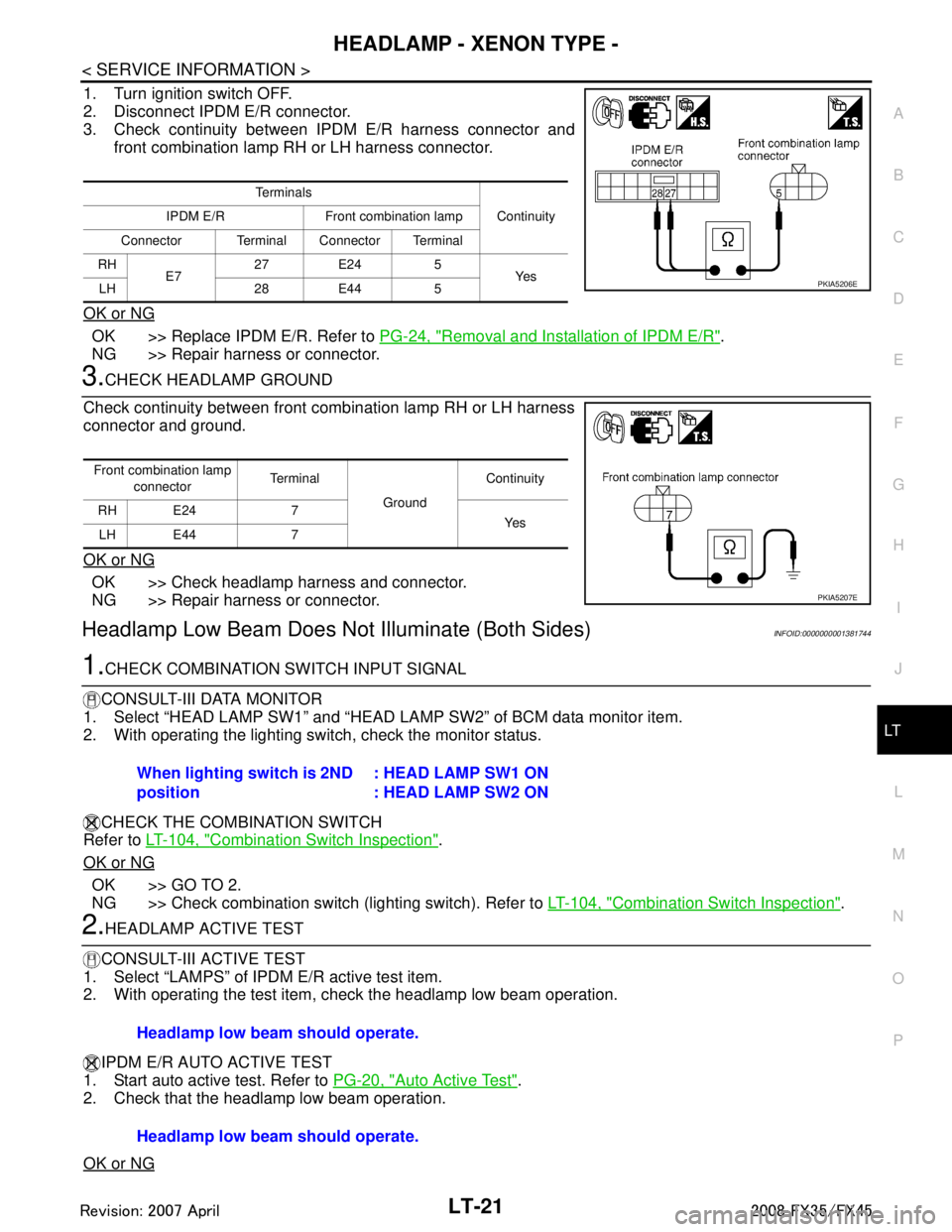
1. Turn ignition switch OFF.
2. Disconnect IPDM E/R connector.
3. Check continuity between IPDM E/R harness connector and front combination lamp RH or LH harness connector.
OK or NG
OK >> Replace IPDM E/R. Refer to PG-24, "Removal and Installation of IPDM E/R".
NG >> Repair harness or connector.
3.CHECK HEADLAMP GROUND
Check continuity between front combination lamp RH or LH harness
connector and ground.
OK or NG
OK >> Check headlamp harness and connector.
NG >> Repair harness or connector.
Headlamp Low Beam Does No t Illuminate (Both Sides)INFOID:0000000001381744
1.CHECK COMBINATION SWITCH INPUT SIGNAL
CONSULT-III DATA MONITOR
1. Select “HEAD LAMP SW1” and “HEAD LA MP SW2” of BCM data monitor item.
2. With operating the lighting switch, check the monitor status.
CHECK THE COMBINATION SWITCH
Refer to LT-104, "
Combination Switch Inspection".
OK or NG
OK >> GO TO 2.
NG >> Check combination switch (lighting switch). Refer to LT-104, "
Combination Switch Inspection".
2.HEADLAMP ACTIVE TEST
CONSULT-III ACTIVE TEST
1. Select “LAMPS” of IPDM E/R active test item.
2. With operating the test item, check the headlamp low beam operation.
IPDM E/R AUTO ACTIVE TEST
1. Start auto active test. Refer to PG-20, "
Auto Active Test".
2. Check that the headlamp low beam operation.
OK or NG
Te r m i n a l s
Continuity
IPDM E/R Front combination lamp
Connector Terminal Connector Terminal
RH E7 27 E24 5
Ye s
LH 28 E44 5
PKIA5206E
Front combination lamp
connector Terminal
Ground Continuity
RH E24 7 Ye s
LH E44 7
PKIA5207E
When lighting switch is 2ND
position : HEAD LAMP SW1 ON
: HEAD LAMP SW2 ON
Headlamp low beam should operate.
Headlamp low beam should operate.
3AA93ABC3ACD3AC03ACA3AC03AC63AC53A913A773A893A873A873A8E3A773A983AC73AC93AC03AC3
3A893A873A873A8F3A773A9D3AAF3A8A3A8C3A863A9D3AAF3A8B3A8C
Page 3124 of 3924

LT-22
< SERVICE INFORMATION >
HEADLAMP - XENON TYPE -
OK >> GO TO 3.
NG >> GO TO 4.
3.CHECK IPDM E/R
CONSULT-III DATA MONITOR
1. Select “HL LO REQ” of IPDM E/R data monitor item.
2. With operating the lighting switch, check the monitor status.
OK or NG
OK >> Replace IPDM E/R. Refer to PG-24, "Removal and Installation of IPDM E/R".
NG >> Replace BCM. Refer to BCS-13, "
Removal and Installation of BCM".
4.CHECK HEADLAMP INPUT SIGNAL
CONSULT-III ACTIVE TEST
1. Turn ignition switch OFF.
2. Disconnect front combination lamp RH and LH connectors.
3. Select “LAMPS” of IPDM E/R active test item.
4. With operating the test item, check voltage between front combi- nation lamp (RH and LH) harness connectors and ground.
IPDM E/R AUTO ACTIVE TEST
1. Turn ignition switch OFF.
2. Disconnect front combination lamp RH and LH connectors.
3. Start auto active test. Refer to PG-20, "
Auto Active Test".
4. With operating the test item, check voltage betw een front combination lamp (RH and LH) harness connec-
tors and ground.
OK or NG
OK >> GO TO 6.
NG >> GO TO 5.
5.CHECK HEADLAMP CIRCUIT When lighting switch is 2ND
position
: HL LO REQ ON
Te r m i n a l s
Vo l ta g e
(Approx.)
(+)
(-)
Front combination lamp
connector Te r m i n a l
RH E24 6 Ground Battery voltage
LH E44 6
Te r m i n a l s Vo l ta g e
(Approx.)
(+)
(-)
Front combination lamp
connector Te r m i n a l
RH E24 6 Ground Battery voltage
LH E44 6
PKIA5208E
3AA93ABC3ACD3AC03ACA3AC03AC63AC53A913A773A893A873A873A8E3A773A983AC73AC93AC03AC3
3A893A873A873A8F3A773A9D3AAF3A8A3A8C3A863A9D3AAF3A8B3A8C
Page 3125 of 3924

HEADLAMP - XENON TYPE -LT-23
< SERVICE INFORMATION >
C
DE
F
G H
I
J
L
M A
B
LT
N
O P
1. Turn ignition switch OFF.
2. Disconnect IPDM E/R connector.
3. Check continuity between IPDM E/R harness connector and front combination lamp (RH and LH) harness connectors.
OK or NG
OK >> Replace IPDM E/R. Refer to PG-24, "Removal and Installation of IPDM E/R".
NG >> Repair harness or connector.
6.CHECK HEADLAMP GROUND
1. Turn ignition switch OFF.
2. Check continuity between front combination lamp (RH and LH) harness connectors and ground.
OK or NG
OK >> Check headlamp harness and connectors, ballasts (HID control unit), and xenon bulbs. Refer to LT-27, "
Xenon
Headlamp Trouble Diagnosis".
NG >> Repair harness or connector.
Headlamp Low Beam Does Not Illuminate (One Side)INFOID:0000000001381745
1.CHECK BULB
Check ballast (HID control unit) and xenon bulb of lamp which does not illuminate. Refer to LT-27, "
Xenon
Headlamp Trouble Diagnosis".
OK or NG
OK >> GO TO 2.
NG >> Replace malfunctioning part.
2.CHECK HEADLAMP INPUT SIGNAL
1. Turn ignition switch OFF.
2. Disconnect front combination lamp RH or LH connector.
3. Turn ignition switch ON.
4. Lighting switch is turned 2ND position.
5. Check voltage between front combination lamp RH or LH har- ness connector and ground.
OK or NG
OK >> GO TO 4.
Te r m i n a l s Continuity
IPDM E/R Front combination lamp
Connector Terminal Connector Terminal
RH E7 20 E24 6
Ye s
LH 30 E44 6
PKIA5209E
Front combination lamp
connector Terminal
Ground Continuity
RH E24 7 Ye s
LH E44 7
PKIA5207E
Te r m i n a l s
Vol tag e
(Approx.)
(+)
(-)
Front combination lamp
connector Terminal
RH E24 6 Ground Battery voltage
LH E44 6
PKIA5208E
3AA93ABC3ACD3AC03ACA3AC03AC63AC53A913A773A893A873A873A8E3A773A983AC73AC93AC03AC3
3A893A873A873A8F3A773A9D3AAF3A8A3A8C3A863A9D3AAF3A8B3A8C
Page 3126 of 3924

LT-24
< SERVICE INFORMATION >
HEADLAMP - XENON TYPE -
NG >> GO TO 3.
3.CHECK HEADLAMP CIRCUIT
1. Turn ignition switch OFF.
2. Disconnect IPDM E/R connector.
3. Check continuity between IPDM E/R harness connector and front combination lamp RH or LH harness connector.
OK or NG
OK >> Replace IPDM E/R. Refer to PG-24, "Removal and Installation of IPDM E/R".
NG >> Repair harness or connector.
4.CHECK HEADLAMP GROUND
Check continuity between front comb ination lamp RH or LH harness
connector and ground.
OK or NG
OK >> Check headlamp harness and connector.
NG >> Repair harness or connector.
Headlamp RH Low Beam and Hi gh Beam Does Not IlluminateINFOID:0000000001381746
1.CHECK BULB
Inspect ballast (HID control unit) and xenon bulb of lamp which does not illuminate. Refer to LT-27, "
Xenon
Headlamp Trouble Diagnosis".
OK or NG
OK >> GO TO 2.
NG >> Replace malfunctioning part.
2. CHECK HEADLAMP GROUND
1. Turn ignition switch OFF.
2. Disconnect front combination lamp RH connector.
3. Check continuity between front combination lamp RH harness connector E24 terminal 7 and ground.
OK or NG
OK >> GO TO 3.
NG >> Repair harness or connector.
3.CHECK HEADLAMP CIRCUIT
Te r m i n a l s Continuity
IPDM E/R Front combination lamp
Connector Terminal Connector Terminal
RH E7 20 E24 6
Ye s
LH 30 E44 6
PKIA5209E
Front combination lamp
connector Te r m i n a l
Ground Continuity
RH E24 7 Ye s
LH E44 7
PKIA5207E
7 – Ground : Continuity should exist.
PKIA5207E
3AA93ABC3ACD3AC03ACA3AC03AC63AC53A913A773A893A873A873A8E3A773A983AC73AC93AC03AC3
3A893A873A873A8F3A773A9D3AAF3A8A3A8C3A863A9D3AAF3A8B3A8C
Page 3127 of 3924

HEADLAMP - XENON TYPE -LT-25
< SERVICE INFORMATION >
C
DE
F
G H
I
J
L
M A
B
LT
N
O P
1. Disconnect IPDM E/R connector.
2. Check continuity between IPDM E/R harness connector E7 ter- minal 27 and front combination lamp RH harness connector E24
terminal 5.
3. Check continuity between IPDM E/R harness connector E7 ter- minal 20 and front combination lamp RH harness connector E24
terminal 6.
OK or NG
OK >> Replace IPDM E/R. Refer to PG-24, "Removal and
Installation of IPDM E/R".
NG >> Repair harness or connector.
Headlamp LH Low Beam and High Beam Does Not IlluminateINFOID:0000000001381747
1.CHECK BULB
Inspect ballast (HID control unit) and xenon bulb of lamp which does not illuminate. Refer to LT-27, "
Xenon
Headlamp Trouble Diagnosis".
OK or NG
OK >> GO TO 2.
NG >> Replace malfunctioning part.
2.CHECK HEADLAMP GROUND
1. Turn ignition switch OFF.
2. Disconnect front combination lamp LH connector.
3. Check continuity between front combination lamp LH harness connector E44 terminal 7 and ground.
OK or NG
OK >> GO TO 3.
NG >> Repair harness or connector.
3.CHECK HEADLAMP CIRCUIT
1. Disconnect IPDM E/R connector.
2. Check continuity between IPDM E/R harness connector E7 ter- minal 28 and front combination lamp LH harness connector E44
terminal 5.27 – 5 : Continui
ty should exist.
PKIA7587E
20 – 6 : Continuity should exist.
PKIA5211E
7 – Ground : Continuity should exist.
PKIA5207E
28 – 5 : Continuity should exist.
PKIA5212E
3AA93ABC3ACD3AC03ACA3AC03AC63AC53A913A773A893A873A873A8E3A773A983AC73AC93AC03AC3
3A893A873A873A8F3A773A9D3AAF3A8A3A8C3A863A9D3AAF3A8B3A8C
Page 3128 of 3924

LT-26
< SERVICE INFORMATION >
HEADLAMP - XENON TYPE -
3. Check continuity between IPDM E/R harness connector E7 ter-minal 30 and front combination lamp LH harness connector E44
terminal 6.
OK or NG
OK >> Replace IPDM E/R. Refer to PG-24, "Removal and
Installation of IPDM E/R".
NG >> Repair harness or connector.
Headlamps Does Not Turn OFFINFOID:0000000001381748
1.CHECK HEADLAMP TURN OFF
Make sure that lighting switch is OFF. And check if headlamp turns off when ignition switch is turned OFF.
OK or NG
OK >> GO TO 3.
NG >> GO TO 2.
2.CHECK COMBINATION SWITCH INPUT SIGNAL
CONSULT-III DATA MONITOR
1. Select “HEAD LAMP1” and “HEAD LAMP2” of BCM data monitor item.
2. With operating the lighting switch, check the monitor status.
OK or NG
OK >> Replace IPDM E/R. Refer to PG-24, "Removal and Installation of IPDM E/R".
NG >> Check combination switch (lighting switch). Refer to LT-104, "
Combination Switch Inspection".
3.CHECKING CAN COMMUNICATIONS BETWEEN BCM AND IPDM E/R
Perform self-diagnosis for “BCM” with CONSULT-III.
Display of self-diagnosis results
NO DTC>> Replace IPDM E/R. Refer to PG-24, "Removal and Installation of IPDM E/R".
CAN COMM CIRCUIT>> Refer to LAN-43, "
CAN System Specification Chart".
General Information for Xenon Headlamp Trouble DiagnosisINFOID:0000000001328284
In most cases, malfunction of xenon headlamp - “does not ill uminate”, “flickers” or “dark” - is caused by a mal-
functioning xenon bulb. A malfunctioning HID control unit or lamp housing, however, may be a cause. Be sure
to perform trouble diagnosis following the steps described below.
Caution:INFOID:0000000001328285
Installation or removal of connector must be done with lighting switch OFF.
Disconnect the battery cable from the negative terminal or remove power fuse.
When the lamp is illuminated (when lighting switch is ON), never touch harness, HID control unit, inside of
lamp, or lamp metal parts.
To check illumination, temporarily install lamp in vehicle. Be sure to connect power at vehicle side connector.
If error can be traced directly to electrical system, fi rst check for items such as blown fuses and fusible links,
broken wires or loose connectors, dislocated terminals, and improper connections.
Never work with wet hands.
Using a tester for HID control unit circuit trouble diagnosis is prohibited.
Disassembling HID control unit or harnesses ( bulb socket harness, ECM harness) is prohibited.
Immediately after illumination, light intensity and color will fluctuate, but there is nothing wrong.
When bulb has come to end of its life, brightness will dr op significantly, it will flash repeatedly, or light color
will turn reddish. 30 – 6 : Continuity should exist.
PKIA5213E
When lighting switch is OFF : HEAD LAMP SW1 OFF
: HEAD LAMP SW2 OFF
3AA93ABC3ACD3AC03ACA3AC03AC63AC53A913A773A893A873A873A8E3A773A983AC73AC93AC03AC3
3A893A873A873A8F3A773A9D3AAF3A8A3A8C3A863A9D3AAF3A8B3A8C
Page 3134 of 3924
LT-32
< SERVICE INFORMATION >
DAYTIME LIGHT SYSTEM
DAYTIME LIGHT SYSTEM
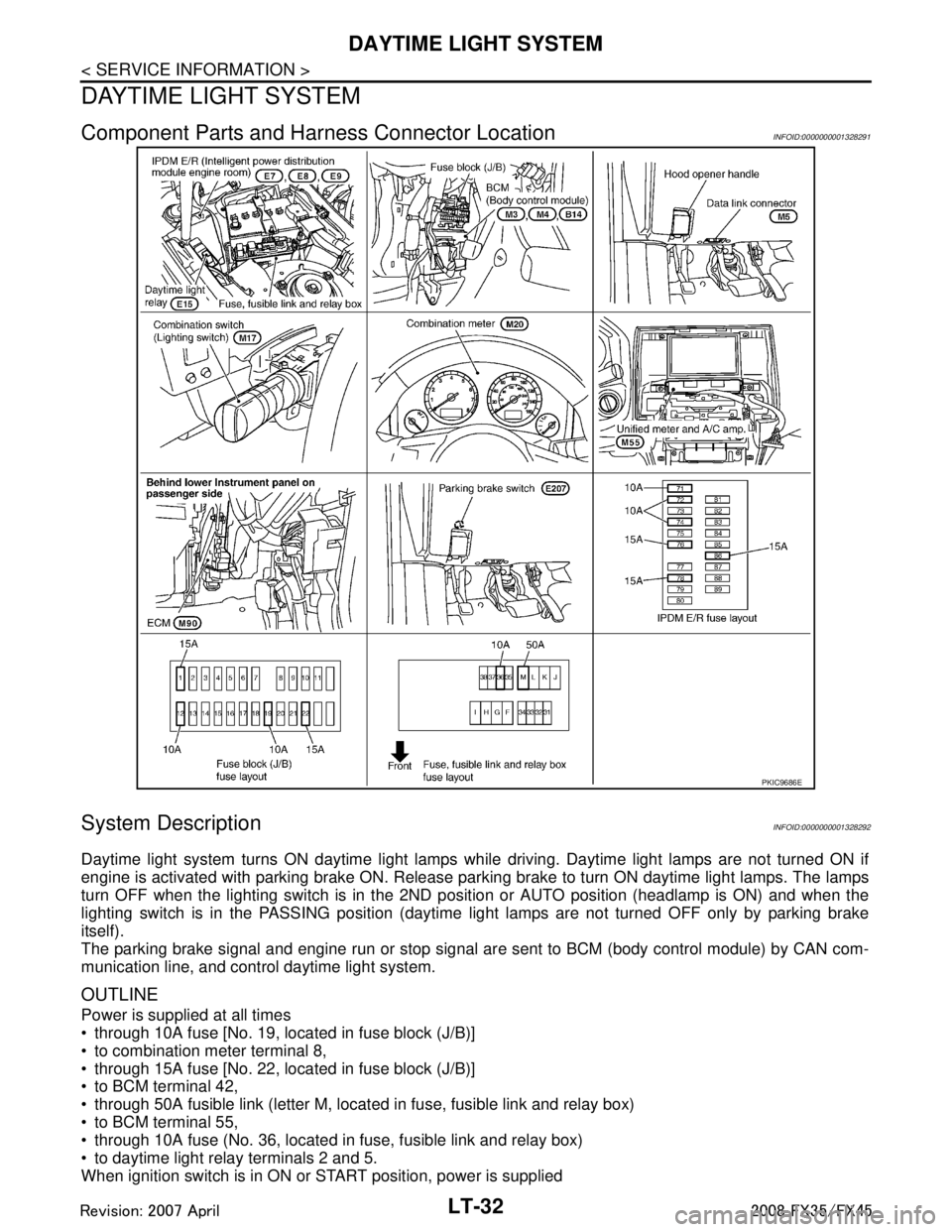
Component Parts and Harness Connector LocationINFOID:0000000001328291
System DescriptionINFOID:0000000001328292
Daytime light system turns ON daytime light lamps while driving. Daytime light lamps are not turned ON if
engine is activated with parking brake ON. Release parki ng brake to turn ON daytime light lamps. The lamps
turn OFF when the lighting switch is in the 2ND pos ition or AUTO position (headlamp is ON) and when the
lighting switch is in the PASSING position (daytime light lamps are not turned OFF only by parking brake
itself).
The parking brake signal and engine run or stop signal ar e sent to BCM (body control module) by CAN com-
munication line, and control daytime light system.
OUTLINE
Power is supplied at all times
through 10A fuse [No. 19, located in fuse block (J/B)]
to combination meter terminal 8,
through 15A fuse [No. 22, located in fuse block (J/B)]
to BCM terminal 42,
through 50A fusible link (letter M, located in fuse, fusible link and relay box)
to BCM terminal 55,
through 10A fuse (No. 36, located in fuse, fusible link and relay box)
to daytime light relay terminals 2 and 5.
When ignition switch is in ON or START position, power is supplied
PKIC9686E
3AA93ABC3ACD3AC03ACA3AC03AC63AC53A913A773A893A873A873A8E3A773A983AC73AC93AC03AC3
3A893A873A873A8F3A773A9D3AAF3A8A3A8C3A863A9D3AAF3A8B3A8C
Page 3135 of 3924
![INFINITI FX35 2008 Service Manual
DAYTIME LIGHT SYSTEMLT-33
< SERVICE INFORMATION >
C
DE
F
G H
I
J
L
M A
B
LT
N
O P
through 10A fuse [No. 12, located in fuse block (J/B)]
to combination meter terminal 7,
through 15A fuse [No. 1](/img/42/57017/w960_57017-3134.png "INFINITI FX35 2008 Service Manual
DAYTIME LIGHT SYSTEMLT-33
< SERVICE INFORMATION >
C
DE
F
G H
I
J
L
M A
B
LT
N
O P
through 10A fuse [No. 12, located in fuse block (J/B)]
to combination meter terminal 7,
through 15A fuse [No. 1")
DAYTIME LIGHT SYSTEMLT-33
< SERVICE INFORMATION >
C
DE
F
G H
I
J
L
M A
B
LT
N
O P
through 10A fuse [No. 12, located in fuse block (J/B)]
to combination meter terminal 7,
through 15A fuse [No. 1, located in fuse block (J/B)]
to BCM terminal 38.
Ground is supplied
to combination meter terminals 5, 6 and 15
through grounds M35, M45 and M85,
to BCM terminals 49 and 52
through grounds M35, M45 and M85.
DAYTIME LIGHT OPERATION
Once the parking brake is turned OFF after ignition swit ch ON, if the lighting switch is turned OFF while engine
running, the BCM sends daytime light r equest signal (ON) through CAN communication.
When receiving daytime light request signal (ON), combi nation meter turns ON daytime light relay. And power
is supplied
through daytime light relay terminal 1
to combination meter terminal 10,
through daytime light relay terminal 3
to parking lamp RH and LH terminals 1.
Ground is supplied
to combination meter terminals 5, 6 and 15
through grounds M35, M45 and M85,
to parking lamp RH and LH terminals 3
through grounds E21, E50 and E51.
With power and grounds supplied, the daytime light lamps illuminate.
COMBINATION SWITCH READING FUNCTION
Refer to BCS-4, "System Description".
AUTO LIGHT OPERATION
Refer to LT-47, "System Description".
CAN Communication System DescriptionINFOID:0000000001328293
CAN (Controller Area Network) is a serial communication li ne for real time application. It is an on-vehicle mul-
tiplex communication line with high data communication speed and excellent error detection ability. Many elec-
tronic control units are equipped onto a vehicle, and each control unit shares information and links with other
control units during operation (not independent). In CAN communication, control units are connected with 2
communication lines (CAN-H line, CAN-L line) allowing a high rate of information transmission with less wiring.
Each control unit transmits/receives data but selectively reads required data only.
CAN Communication UnitINFOID:0000000001328294
Refer to LAN-43, "CAN System Specification Chart".
3AA93ABC3ACD3AC03ACA3AC03AC63AC53A913A773A893A873A873A8E3A773A983AC73AC93AC03AC3
3A893A873A873A8F3A773A9D3AAF3A8A3A8C3A863A9D3AAF3A8B3A8C
Page 3141 of 3924
DAYTIME LIGHT SYSTEMLT-39
< SERVICE INFORMATION >
C
DE
F
G H
I
J
L
M A
B
LT
N
O P
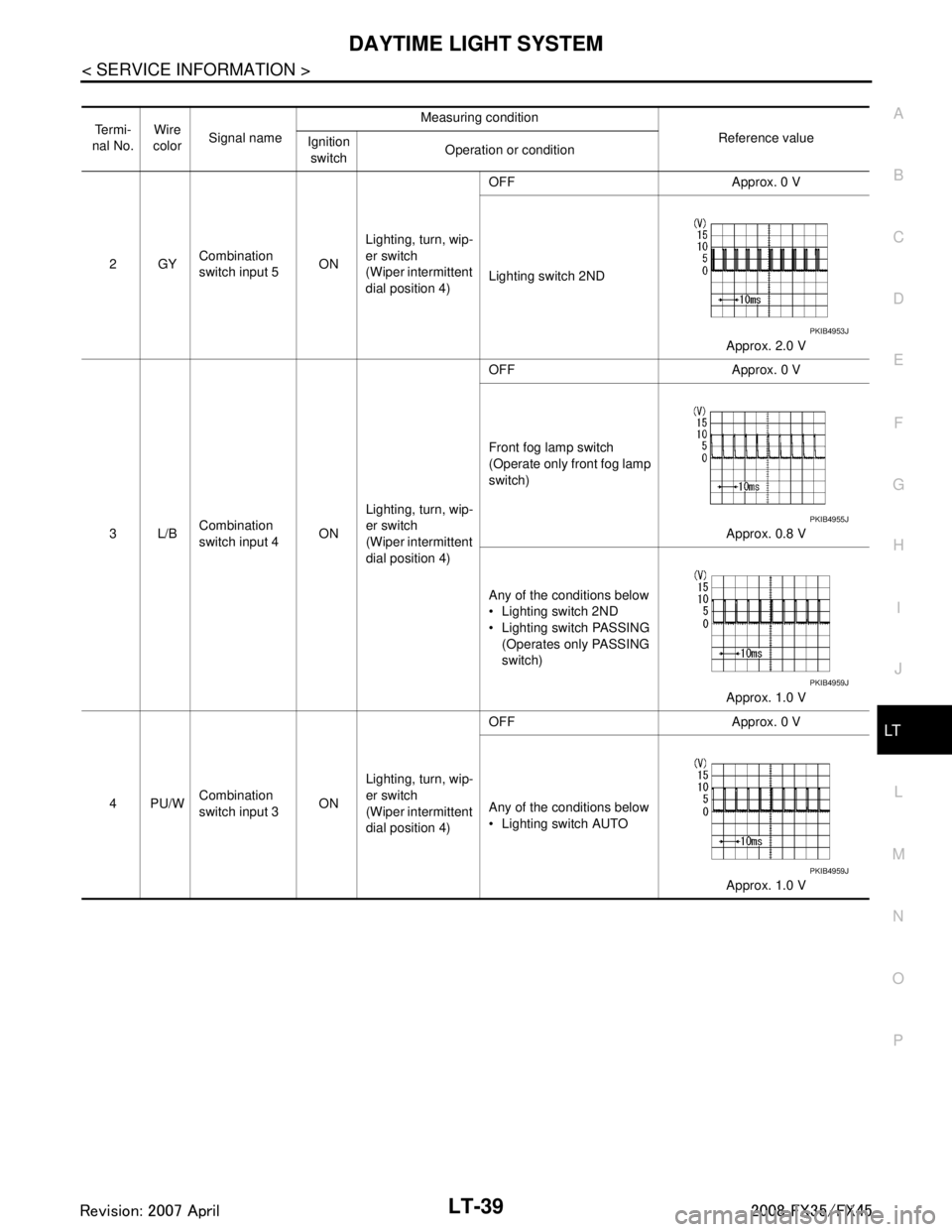
Te r m i -
nal No. Wire
color Signal name Measuring condition
Reference value
Ignition
switch Operation or condition
2GY Combination
switch input 5
ONLighting, turn, wip-
er switch
(Wiper intermittent
dial position 4) OFF Approx. 0 V
Lighting switch 2ND
Approx. 2.0 V
3L/B Combination
switch input 4
ONLighting, turn, wip-
er switch
(Wiper intermittent
dial position 4) OFF Approx. 0 V
Front fog lamp switch
(Operate only front fog lamp
switch)
Approx. 0.8 V
Any of the conditions below
Lighting switch 2ND
Lighting switch PASSING (Operates only PASSING
switch)
Approx. 1.0 V
4PU/W Combination
switch input 3 ONLighting, turn, wip-
er switch
(Wiper intermittent
dial position 4) OFF Approx. 0 V
Any of the conditions below
Lighting switch AUTO
Approx. 1.0 V
PKIB4953J
PKIB4955J
PKIB4959J
PKIB4959J
3AA93ABC3ACD3AC03ACA3AC03AC63AC53A913A773A893A873A873A8E3A773A983AC73AC93AC03AC3
3A893A873A873A8F3A773A9D3AAF3A8A3A8C3A863A9D3AAF3A8B3A8C
Page 3142 of 3924
LT-40
< SERVICE INFORMATION >
DAYTIME LIGHT SYSTEM
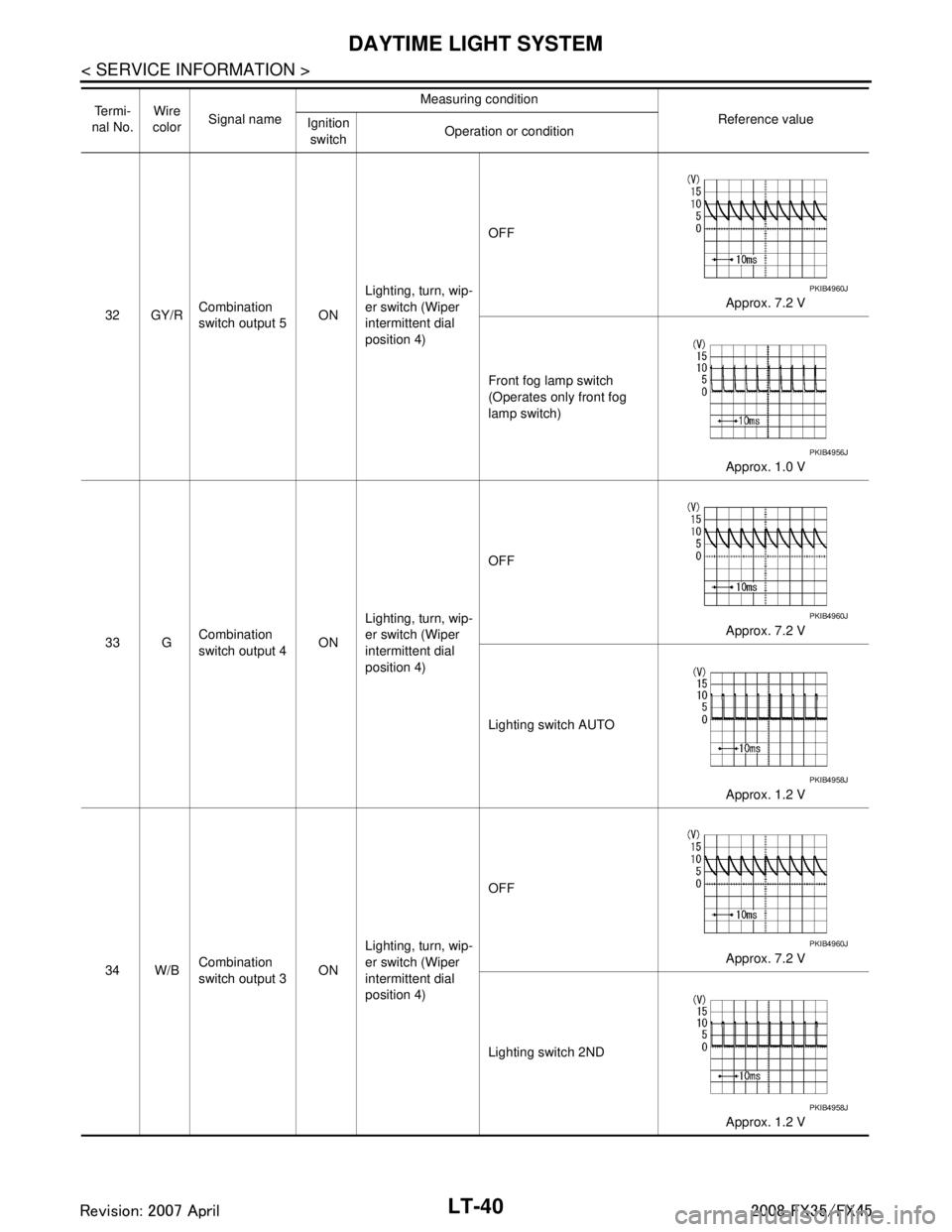
32 GY/RCombination
switch output 5 ONLighting, turn, wip-
er switch (Wiper
intermittent dial
position 4) OFF
Approx. 7.2 V
Front fog lamp switch
(Operates only front fog
lamp switch) Approx. 1.0 V
33 G Combination
switch output 4
ONLighting, turn, wip-
er switch (Wiper
intermittent dial
position 4) OFF
Approx. 7.2 V
Lighting switch AUTO Approx. 1.2 V
34 W/B Combination
switch output 3 ONLighting, turn, wip-
er switch (Wiper
intermittent dial
position 4) OFF
Approx. 7.2 V
Lighting switch 2ND Approx. 1.2 V
Te r m i -
nal No. Wire
color Signal name Measuring condition
Reference value
Ignition
switch Operation or condition
PKIB4960J
PKIB4956J
PKIB4960J
PKIB4958J
PKIB4960J
PKIB4958J
3AA93ABC3ACD3AC03ACA3AC03AC63AC53A913A773A893A873A873A8E3A773A983AC73AC93AC03AC3
3A893A873A873A8F3A773A9D3AAF3A8A3A8C3A863A9D3AAF3A8B3A8C