Body INFINITI FX35 2008 Service Manual
[x] Cancel search | Manufacturer: INFINITI, Model Year: 2008, Model line: FX35, Model: INFINITI FX35 2008Pages: 3924, PDF Size: 81.37 MB
Page 1025 of 3924
![INFINITI FX35 2008 Service Manual
BRC-10
< SERVICE INFORMATION >[VDC/TCS/ABS]
SYSTEM DESCRIPTION
SYSTEM DESCRIPTION
SchematicINFOID:0000000001327660
FunctionsINFOID:0000000001327661
VDC
In addition to the TCS/ABS function, the driv](/img/42/57017/w960_57017-1024.png "INFINITI FX35 2008 Service Manual
BRC-10
< SERVICE INFORMATION >[VDC/TCS/ABS]
SYSTEM DESCRIPTION
SYSTEM DESCRIPTION
SchematicINFOID:0000000001327660
FunctionsINFOID:0000000001327661
VDC
In addition to the TCS/ABS function, the driv")
BRC-10
< SERVICE INFORMATION >[VDC/TCS/ABS]
SYSTEM DESCRIPTION
SYSTEM DESCRIPTION
SchematicINFOID:0000000001327660
FunctionsINFOID:0000000001327661
VDC
In addition to the TCS/ABS function, the driver
steering amount and brake operation amount are detected
from steering angle sensor and pressure sensor, and the vehicle's driving status (amount of under steering /
over steering) is determined from information from G s ensor, wheel sensor, etc., and this information is used
to improve vehicle stability by controlling the braking and engine power to all four wheels.
SLIP indicator lamp flashes to inform the driver of VDC operation.
During VDC operation, body and brake pedal lightly vibrate and mechanical noises may be heard. This is
normal.
ABS warning lamp, VDC OFF indicator lamp, and SLIP indicator lamp might turn on when vehicle is subject
to strong shaking or large vibration, such as when vehi cle is on a turn table, a ship or a steep slope such as
bank while engine is running. In this case, restart engine on a normal road, and if ABS warning lamp, VDC
OFF indicator lamp, and SLIP indicator lamp turn off, there is no malfunction.
TCS
The wheel spin of the drive wheels is detected by ABS actuator and electric unit (control unit) from the wheel
speed signals from four wheels, so if wheel spin occurs , drive wheel right and left brake fluid pressure con-
trol and engine fuel cut are performed while throttle value is restricted to reduce the engi\
ne torque and
decrease the amount of wheel spin. In addition, the degree throttle is opened is controlled to achieve the
optimum engine torque.
Depending on road circumstances, the driver may have a sluggish feel. This is normal, because the opti-
mum traction has the highest priority under TCS operation.
TCS may be activated any time vehicle suddenly accelerates, suddenly down/upshifts, or is driven on a road with a varying surface friction coefficient.
During TCS operation, it informs a driver of sy stem operation by flashing SLIP indicator lamp.
ABS
The Anti-Lock Braking System is a function that detec ts wheel revolution while braking, and it improves han-
dling stability during sudden braking by electrically prev enting 4 wheel lock. Maneuverability is also improved
for avoiding obstacles.
If the electrical system malfunc tions, then the fail-safe function star ts, the ABS becomes inoperative, and
ABS warning lamp turns on.
Electrical system diagnosis by CONSULT-III is available.
During ABS operation, brake pedal lightly vibrates and a mechanical noise may be heard. This is normal.
When starting engine, or just after starting vehicle, brake pedal may vibrate or motor operating noises may be heard from engine compartment. This is a normal status of operation check.
SFIA1160E
3AA93ABC3ACD3AC03ACA3AC03AC63AC53A913A773A893A873A873A8E3A773A983AC73AC93AC03AC3
3A893A873A873A8F3A773A9D3AAF3A8A3A8C3A863A9D3AAF3A8B3A8C
Page 1047 of 3924
![INFINITI FX35 2008 Service Manual
BRC-32
< SERVICE INFORMATION >[VDC/TCS/ABS]
TROUBLE DIAGNOSIS
Basic Inspection
INFOID:0000000001327676
BRAKE FLUID AMOUNT, LEAKS, AND BRAKE PADS INSPECTION
1. Check fluid level in the brake reservoir](/img/42/57017/w960_57017-1046.png "INFINITI FX35 2008 Service Manual
BRC-32
< SERVICE INFORMATION >[VDC/TCS/ABS]
TROUBLE DIAGNOSIS
Basic Inspection
INFOID:0000000001327676
BRAKE FLUID AMOUNT, LEAKS, AND BRAKE PADS INSPECTION
1. Check fluid level in the brake reservoir")
BRC-32
< SERVICE INFORMATION >[VDC/TCS/ABS]
TROUBLE DIAGNOSIS
Basic Inspection
INFOID:0000000001327676
BRAKE FLUID AMOUNT, LEAKS, AND BRAKE PADS INSPECTION
1. Check fluid level in the brake reservoir tank. If fluid level is low, refill brake fluid.
2. Check brake piping and around ABS actuator and electric uni t (control unit) for leaks. If there is leaking or
oozing fluid, check the following items.
If ABS actuator and electric unit (control unit) connec tion is loose, tighten piping to the specified torque
and re-perform the leak inspection to make sure there are no leaks.
If there is damage to the connection flare nut or AB S actuator and electric unit (control unit) screw,
replace the damaged part and re-perform the leak inspection to make sure there are no leaks.
When there is fluid leaking or oozing from a part other than ABS actuator and electric unit (control unit)
connection, if fluid is just oozing out, use a clean cl oth to wipe off the oozing fluid and re-check for leaks.
If fluid is still oozing out, replace the damaged part.
When there is fluid leaking or oozing at ABS actuator and electric unit (control unit), if fluid is just oozing
out, use a clean cloth to wipe off oozing fluid and re-che ck for leaks. If fluid is still oozing out, replace
ABS actuator and electric unit (control unit) body.
CAUTION:
ABS actuator and electric unit (contr ol unit) body can not be disassembled.
3. Check brake pad degree of wear. Refer to BR-18, "
On-Vehicle Inspection" in “Front Disc Brake” and BR-
24, "On-Vehicle Inspection" in “Rear Disc Brake”
POWER SYSTEM TERMINAL LOOSENESS AND BATTERY INSPECTION
Make sure battery positive cable, negative cabl e and ground connection are not loose. If looseness is
detected, tighten the cables. In additi on, check the battery voltage to make sure it has not dropped and alter-
nator is normal.
ABS WARNING LAMP, VDC OFF INDICATOR LAMP, SLIP INDICATOR LAMP AND BRAKE WARN-
ING LAMP INSPECTION
Symptom Symptom description Result
Motor operation noise This is noise of motor in
side ABS actuator and electr ic unit (control unit).
Slight noise may occur during VDC, TCS, and ABS operation.
Normal
When the vehicle speed goes over 20 km/h (12.5 MPH), motor and valves
operating noise may be heard. It happens only once after ignition switch is
ON. This is a normal status of the system operation check.
System operation check noise When engine starts, slight “click” noise may be heard from engine room.
This is normal and is part of system operation check. Normal
VDC/TCS operation
(SLIP indicator lamp blinking) TCS may activate momentarily if wheel speed changes when driving over
location where friction coefficient varies, when up/downshifting, or when ful-
ly depressing accelerator pedal.
Normal
Cancel the VDC/TCS
function for the inspec-
tion on a chassis dyna-
mometer.
For inspection of speedometer or other instruments, press VDC OFF switch
to turn VDC/TCS function off.
When accelerator pedal is depressed on a chassis dynamometer (fixed
front-wheel type), vehicle speed will not increase. This is not normal. It is re-
sult of TCS being activated by stationary front wheels. Warning lamp may
also illuminate to indicate “sensor system error”. This is also normal, and is
the result of the stationary front wheels being detected. To be certain, restart
engine, and drive vehicle at 30 km/h (19 MPH) or more. Make sure warning
lamp does not illuminate.
ABS operation
(Longer stopping distance) On roads with low friction coefficients, such as snowy roads or gravel roads,
vehicles with ABS may require a longer stopping distance. Therefore, when
driving on such roads, avoid overconfidence and keep speed sufficiently
low.
Normal
Insufficient feeling of accelera-
tion Depending on road conditions, driver may feel that feeling of acceleration is
insufficient. This is because traction control, which controls engine and
brakes to achieve optimal traction, has the highest priority (for safety). As a
result, there may be times when acceleration is slightly less than usual for
the same accelerator pedal operation.
Normal
3AA93ABC3ACD3AC03ACA3AC03AC63AC53A913A773A893A873A873A8E3A773A983AC73AC93AC03AC3
3A893A873A873A8F3A773A9D3AAF3A8A3A8C3A863A9D3AAF3A8B3A8C
Page 1067 of 3924
![INFINITI FX35 2008 Service Manual
BRC-52
< SERVICE INFORMATION >[VDC/TCS/ABS]
WHEEL SENSORS
WHEEL SENSORS
Removal and InstallationINFOID:0000000001327698
REMOVAL
1. Disconnect wheel sensor connector.
2. Remove wheel sensor mounting b](/img/42/57017/w960_57017-1066.png "INFINITI FX35 2008 Service Manual
BRC-52
< SERVICE INFORMATION >[VDC/TCS/ABS]
WHEEL SENSORS
WHEEL SENSORS
Removal and InstallationINFOID:0000000001327698
REMOVAL
1. Disconnect wheel sensor connector.
2. Remove wheel sensor mounting b")
BRC-52
< SERVICE INFORMATION >[VDC/TCS/ABS]
WHEEL SENSORS
WHEEL SENSORS
Removal and InstallationINFOID:0000000001327698
REMOVAL
1. Disconnect wheel sensor connector.
2. Remove wheel sensor mounting bolts, grommets (front sensor) and clip.
3. Remove wheel sensor.
CAUTION:
Be careful of the followin
g when installing sensor.
As much as possible, avoid rotati ng sensor when removing it. Pull sensors out without pulling on
sensor harness.
Take care to avoid damaging sensor edges or roto r teeth. Remove wheel sensor first before remov-
ing front wheel hub and bearing assembly and rear fina l drive. This is to avoid damage to sensor wir-
ing and loss of sensor function.
INSTALLATION
Note the following, and install in the reverse order of removal.
CAUTION:
Be careful of the follow ing when installing sensor. Tighten in stallation bolts to specified torques.
When installing, make sure there is no foreign material such as iron chips on pick-up and mounting
hole of sensor. Make sure no foreign material h as been caught in the sensor rotor. Remove any for-
eign material and clean the mount.
When installing front sensor, be sure to press rubber grommets in until they lock at the three loca-
tions shown in the figure (2 at shock absorbers and 1 at body pa nel). When installed, harness must
not be twisted. White line on ha rness must be visible from front.
When installing rear sensor, attach harness at rear suspension member securely. Besides, harness
must not be twisted when installed.
PFIA0600E
3AA93ABC3ACD3AC03ACA3AC03AC63AC53A913A773A893A873A873A8E3A773A983AC73AC93AC03AC3
3A893A873A873A8F3A773A9D3AAF3A8A3A8C3A863A9D3AAF3A8B3A8C
Page 1094 of 3924
![INFINITI FX35 2008 Service Manual
WATER PUMPCO-23
< SERVICE INFORMATION > [VQ35DE]
C
D
E
F
G H
I
J
K L
M A
CO
NP
O
a. Remove lower mounting bolt.
CAUTION:
Be careful not to drop mounting bolt inside timing chain
case.
b. Loosen upper](/img/42/57017/w960_57017-1093.png "INFINITI FX35 2008 Service Manual
WATER PUMPCO-23
< SERVICE INFORMATION > [VQ35DE]
C
D
E
F
G H
I
J
K L
M A
CO
NP
O
a. Remove lower mounting bolt.
CAUTION:
Be careful not to drop mounting bolt inside timing chain
case.
b. Loosen upper")
WATER PUMPCO-23
< SERVICE INFORMATION > [VQ35DE]
C
D
E
F
G H
I
J
K L
M A
CO
NP
O
a. Remove lower mounting bolt.
CAUTION:
Be careful not to drop mounting bolt inside timing chain
case.
b. Loosen upper mounting bolt slowly, and then turn chain ten- sioner (primary) on the mounting bolt so that plunger is fully
expanded.
NOTE:
Even if plunger is fully expanded, it is not dropped from the body
of timing chain tensioner (primary).
c. Turn crankshaft pulley clockwise so that timing chain on the tim- ing chain tensioner (primary) side is loose.
d. Remove upper mounting bolt, and then remove timing chain ten- sioner (primary).
CAUTION:
Be careful not to drop mounting bolt inside timing chain
case.
8. Remove water pump as follows:
a. Remove three water pump mounting bolts. Secure a gap between water pump gear and timing chain, by turning crank-
shaft pulley counterclockwise until timing chain looseness on
water pump sprocket becomes maximum.
PBIC3575E
PBIC4820E
PBIC3576E
PBIC1193E
3AA93ABC3ACD3AC03ACA3AC03AC63AC53A913A773A893A873A873A8E3A773A983AC73AC93AC03AC3
3A893A873A873A8F3A773A9D3AAF3A8A3A8C3A863A9D3AAF3A8B3A8C
Page 1095 of 3924
![INFINITI FX35 2008 Service Manual
CO-24
< SERVICE INFORMATION >[VQ35DE]
WATER PUMP
b. Screw M8 bolts [pitch: 1.25 mm (0.0492 in) length: approx. 50
mm (1.97 in)] into water pumps upper and lower mounting bolt
holes until they reach t](/img/42/57017/w960_57017-1094.png "INFINITI FX35 2008 Service Manual
CO-24
< SERVICE INFORMATION >[VQ35DE]
WATER PUMP
b. Screw M8 bolts [pitch: 1.25 mm (0.0492 in) length: approx. 50
mm (1.97 in)] into water pumps upper and lower mounting bolt
holes until they reach t")
CO-24
< SERVICE INFORMATION >[VQ35DE]
WATER PUMP
b. Screw M8 bolts [pitch: 1.25 mm (0.0492 in) length: approx. 50
mm (1.97 in)] into water pumps upper and lower mounting bolt
holes until they reach timing chain case. Then, alternately
tighten each bolt for a half turn, and pull out water pump.
CAUTION:
Pull straight out while pr eventing vane from contacting
socket in installation area.
Remove water pump without causing sprocket to contact timing chain.
c. Remove M8 bolts and O-rings from water pump. CAUTION:
Do not disassemble water pump.
INSPECTION AFTER REMOVAL
Check for badly rusted or corroded water pump body assembly.
Check for rough operation due to excessive end play.
If anything is found, replace water pump.
INSTALLATION
1. Install new O-rings to water pump. Apply engine oil and engine coolant to O-rings as shown in the
figure.
Locate O-ring with white paint mark to engine front side.
2. Install water pump. CAUTION:
Do not allow cylinder block to nip O-rings when installing
water pump.
Make sure timing chain and water pump sprocket are engaged.
Insert water pump by tightening mounting bolts alternately and evenly.
3. Install timing chain tensioner (primary) as follows:
JLC357B
SLC943A
PBIC1397E
PBIC1058E
3AA93ABC3ACD3AC03ACA3AC03AC63AC53A913A773A893A873A873A8E3A773A983AC73AC93AC03AC3
3A893A873A873A8F3A773A9D3AAF3A8A3A8C3A863A9D3AAF3A8B3A8C
Page 1096 of 3924
![INFINITI FX35 2008 Service Manual
WATER PUMPCO-25
< SERVICE INFORMATION > [VQ35DE]
C
D
E
F
G H
I
J
K L
M A
CO
NP
O
a. Turn crankshaft pulley clockwise so that timing chain on the tim-
ing chain tensioner (primary) side is loose.
b. P](/img/42/57017/w960_57017-1095.png "INFINITI FX35 2008 Service Manual
WATER PUMPCO-25
< SERVICE INFORMATION > [VQ35DE]
C
D
E
F
G H
I
J
K L
M A
CO
NP
O
a. Turn crankshaft pulley clockwise so that timing chain on the tim-
ing chain tensioner (primary) side is loose.
b. P")
WATER PUMPCO-25
< SERVICE INFORMATION > [VQ35DE]
C
D
E
F
G H
I
J
K L
M A
CO
NP
O
a. Turn crankshaft pulley clockwise so that timing chain on the tim-
ing chain tensioner (primary) side is loose.
b. Pull plunger stopper tab up (or turn lever downward) so as to remove plunger stopper tab from the ratchet of plunger.
NOTE:
Plunger stopper tab and lever are synchronized.
c. Push plunger into the inside of tensioner body.
d. Hold plunger in the fully compressed position by engaging plunger stopper tab with the tip of ratchet.
e. To secure lever, insert stopper pin through hole of lever into ten- sioner body hole.
The lever parts and the tab are synchronized. Therefore, theplunger will be secured under this condition.
NOTE:
Figure shows the example of 1.2 mm (0.047 in) diam eter thin screwdriver being used as the stopper pin.
f. Install timing chain tensioner (primary). Remove dust and foreign material completely from backside of timing chain tensioner (primary) and
from installation area of rear timing chain case.
g. Remove stopper pin.
h. Make sure again that timing chain and water pump sprocket are engaged.
4. Install chain tensioner cover and water pump cover as follows:
a. Before installing, remove all traces of old liquid gasket from mat- ing surface of water pump cover and chain tensioner cover
using a scraper. Also remove traces of old liquid gasket from the
mating surface of front timing chain case.
PBIC4820E
PBIC3568E
PBIC3577E
SLC446B
3AA93ABC3ACD3AC03ACA3AC03AC63AC53A913A773A893A873A873A8E3A773A983AC73AC93AC03AC3
3A893A873A873A8F3A773A9D3AAF3A8A3A8C3A863A9D3AAF3A8B3A8C
Page 1122 of 3924
![INFINITI FX35 2008 Service Manual
WATER PUMPCO-51
< SERVICE INFORMATION > [VK45DE]
C
D
E
F
G H
I
J
K L
M A
CO
NP
O
Visually check that there is no significant dirt or rusting on water
pump body and vane.
Make sure there is no loo](/img/42/57017/w960_57017-1121.png "INFINITI FX35 2008 Service Manual
WATER PUMPCO-51
< SERVICE INFORMATION > [VK45DE]
C
D
E
F
G H
I
J
K L
M A
CO
NP
O
Visually check that there is no significant dirt or rusting on water
pump body and vane.
Make sure there is no loo")
WATER PUMPCO-51
< SERVICE INFORMATION > [VK45DE]
C
D
E
F
G H
I
J
K L
M A
CO
NP
O
Visually check that there is no significant dirt or rusting on water
pump body and vane.
Make sure there is no looseness in vane shaft, and that it turns
smoothly when rotated by hand.
If anything is found, replace water pump.
INSTALLATION
Install in the reverse order of removal.
INSPECTION AFTER INSTALLATION
Check for leaks of engine coolant using radiator cap tester adapter (commercial service tool) and radiator
cap tester (commercial service tool). Refer to CO-37, "
Inspection".
Start and warm up engine. Visually check if there is no leaks of engine coolant.
PBIC1539E
3AA93ABC3ACD3AC03ACA3AC03AC63AC53A913A773A893A873A873A8E3A773A983AC73AC93AC03AC3
3A893A873A873A8F3A773A9D3AAF3A8A3A8C3A863A9D3AAF3A8B3A8C
Page 1233 of 3924
REAR VIEW MONITORDI-107
< SERVICE INFORMATION >
C
DE
F
G H
I
J
L
M A
B
DI
N
O P
DATA MONITOR
Side Distance Guideline CorrectionINFOID:0000000001328535
This mode is used to modify the side distance guidelines if they are dislocated from the rear view monitor
image, because of variations of body/camera mounting conditions.
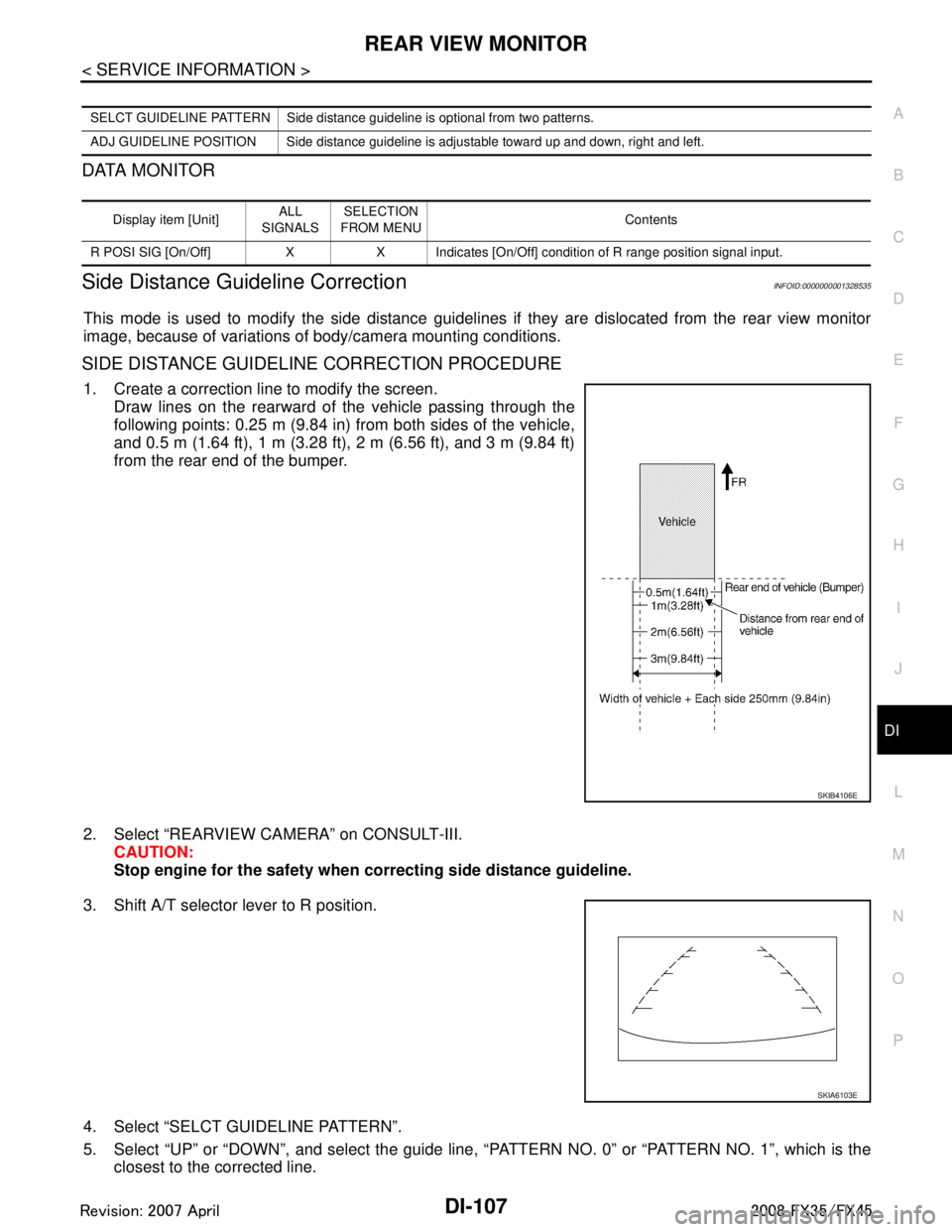
SIDE DISTANCE GUIDELINE CORRECTION PROCEDURE
1. Create a correction line to modify the screen.
Draw lines on the rearward of the vehicle passing through the
following points: 0.25 m (9.84 in) from both sides of the vehicle,
and 0.5 m (1.64 ft), 1 m (3.28 ft), 2 m (6.56 ft), and 3 m (9.84 ft)
from the rear end of the bumper.
2. Select “REARVIEW CAMERA” on CONSULT-III. CAUTION:
Stop engine for the safety when correcting side distance guideline.
3. Shift A/T selector lever to R position.
4. Select “SELCT GUIDELINE PATTERN”.
5. Select “UP” or “DOWN”, and select the guide line, “PATTERN NO. 0” or “PATTERN NO. 1”, which is the
closest to the corrected line.
SELCT GUIDELINE PATTERN Side distance guideline is optional from two patterns.
ADJ GUIDELINE POSITION Side distance guideline is adjustable toward up and down, right and left.
Display item [Unit] ALL
SIGNALS SELECTION
FROM MENU Contents
R POSI SIG [On/Off] X X Indicates [On/Off] condition of R range position signal input.
SKIB4106E
SKIA6103E
3AA93ABC3ACD3AC03ACA3AC03AC63AC53A913A773A893A873A873A8E3A773A983AC73AC93AC03AC3
3A893A873A873A8F3A773A9D3AAF3A8A3A8C3A863A9D3AAF3A8B3A8C
Page 1268 of 3924
![INFINITI FX35 2008 Service Manual
EC-28
< SERVICE INFORMATION >[VQ35DE]
PRECAUTIONS
B1 indicates the bank 1, B2 indicates the bank 2 as shown in
the figure.
Do not operate fuel pump when there is no fuel in lines.
Tighten fue](/img/42/57017/w960_57017-1267.png "INFINITI FX35 2008 Service Manual
EC-28
< SERVICE INFORMATION >[VQ35DE]
PRECAUTIONS
B1 indicates the bank 1, B2 indicates the bank 2 as shown in
the figure.
Do not operate fuel pump when there is no fuel in lines.
Tighten fue")
EC-28
< SERVICE INFORMATION >[VQ35DE]
PRECAUTIONS
B1 indicates the bank 1, B2 indicates the bank 2 as shown in
the figure.
Do not operate fuel pump when there is no fuel in lines.
Tighten fuel hose clamps to the specified torque.
Do not depress accelerator pedal when starting.
Immediately after starting, do not rev up engine unnecessar-
ily.
Do not rev up engine just prior to shutdown.
When installing C.B. ham radio or a mobile phone, be sure to
observe the following as it m ay adversely affect electronic
control systems depending on installation location.
- Keep the antenna as far as possi ble from the electronic con-
trol units.
- Keep the antenna feeder line more than 20 cm (8 in) away
from the harness of electronic controls.
Do not let them run parallel for a long distance.
- Adjust the antenna and feeder line so that the standing-wave
radio can be kept smaller.
- Be sure to ground the radio to vehicle body.
SEC893C
PBIB1569E
SEF709Y
SEF708Y
3AA93ABC3ACD3AC03ACA3AC03AC63AC53A913A773A893A873A873A8E3A773A983AC73AC93AC03AC3
3A893A873A873A8F3A773A9D3AAF3A8A3A8C3A863A9D3AAF3A8B3A8C
Page 1349 of 3924
![INFINITI FX35 2008 Service Manual
TROUBLE DIAGNOSISEC-109
< SERVICE INFORMATION > [VQ35DE]
C
D
E
F
G H
I
J
K L
M A
EC
NP
O
ECM Harness Connector Terminal LayoutINFOID:0000000001325934
ECM Terminal and Reference ValueINFOID:0000000001](/img/42/57017/w960_57017-1348.png "INFINITI FX35 2008 Service Manual
TROUBLE DIAGNOSISEC-109
< SERVICE INFORMATION > [VQ35DE]
C
D
E
F
G H
I
J
K L
M A
EC
NP
O
ECM Harness Connector Terminal LayoutINFOID:0000000001325934
ECM Terminal and Reference ValueINFOID:0000000001")
TROUBLE DIAGNOSISEC-109
< SERVICE INFORMATION > [VQ35DE]
C
D
E
F
G H
I
J
K L
M A
EC
NP
O
ECM Harness Connector Terminal LayoutINFOID:0000000001325934
ECM Terminal and Reference ValueINFOID:0000000001325935
PREPARATION
ECM is located behind the passenger side instrument lower panel.
For this inspection, remove passenger side instrument lower panel.
ECM INSPECTION TABLE
Specification data are reference values
and are measured between each terminal and ground.
Pulse signal is measured by CONSULT-III.
CAUTION:
Do not use ECM ground terminals wh en measuring input/output voltage. Doing so may result in dam-
age to the ECMs transistor. Use a ground ot her than ECM terminals, such as the ground.
PBIB3368E
PBIB1578E
TER-
MI-
NAL
NO. WIRE
COLOR ITEM CONDITION DATA (DC Voltage)
1 B ECM ground [Engine is running]
Idle speed Body ground
2R/L A/F sensor 1 heater
(bank 1) [Engine is running]
Warm-up condition
Idle speed Approximately 5V
3R Throttle contro
l motor relay
power supply [Ignition switch: ON] BATTERY VOLTAGE
(11 - 14V)
4L/W Throttle control motor
(Close) [Ignition switch: ON]
Engine stopped
Selector lever: D
Accelerator pedal: Fully released 0 - 14V
PBIB1584E
PBIB1104E
3AA93ABC3ACD3AC03ACA3AC03AC63AC53A913A773A893A873A873A8E3A773A983AC73AC93AC03AC3
3A893A873A873A8F3A773A9D3AAF3A8A3A8C3A863A9D3AAF3A8B3A8C