no start INFINITI FX35 2008 Service Manual
[x] Cancel search | Manufacturer: INFINITI, Model Year: 2008, Model line: FX35, Model: INFINITI FX35 2008Pages: 3924, PDF Size: 81.37 MB
Page 546 of 3924

REFRIGERANT LINESATC-141
< SERVICE INFORMATION >
C
DE
F
G H
I
K L
M A
B
AT C
N
O P
6. Do not stop when one leak is found. Continue to check for additional leaks at all system components.
If no leaks are found, perform steps 7 - 10.
7. Start the engine.
8. Set the A/C control as follows;
a. A/C switch: ON
b. Mode door position: VENT (Ventilation)
c. Intake position: Recirculation
d. Temperature setting: Max. cold
e. Fan speed: High
9. Run engine at 1,500 rpm for at least 2 minutes.
10. Stop the engine and perform leak check again following steps 4 through 6 above.
Refrigerant leaks should be chec ked immediately after stopping
the engine. Begin with the leak detector at the compressor. The
pressure on the high-pressure side will gradually drop after
refrigerant circulation stops and pressure on the low-pressure
side will gradually rise, as shown in the graph. Some leaks are
more easily detected when pressure is high.
11. Before connecting recovery/recycling recharging equipm ent to vehicle, check recovery/recycling recharg-
ing equipment gauges. No refrigerant pressure should be displayed. If pressure is displayed, recover
refrigerant from equipment lines and then check refrigerant purity.
12. Confirm refrigerant purity in supply tank using recovery/recycling recharging equipment and refrigerant
identifier.
13. Confirm refrigerant purity in vehicle A/C system us ing recovery/recycling recharging equipment and refrig-
erant identifier.
14. Discharge A/C system using approved refrigerant recove ry equipment. Repair the leaking fitting or com-
ponent if necessary.
15. Evacuate and recharge A/C system and perform the l eak test to confirm no refrigerant leaks.
16. Perform A/C performance test to ensure system works properly.
SHA839E
3AA93ABC3ACD3AC03ACA3AC03AC63AC53A913A773A893A873A873A8E3A773A983AC73AC93AC03AC3
3A893A873A873A8F3A773A9D3AAF3A8A3A8C3A863A9D3AAF3A8B3A8C
Page 582 of 3924

AUDIOAV-35
< SERVICE INFORMATION >
C
DE
F
G H
I
J
L
M A
B
AV
N
O P
STARTING THE SELF-DIAGNOSIS MODE
1. Turn ignition switch from OFF to ACC.
2. Within 10 seconds press and hold the switches “1” and “6” simultaneously for 3 seconds.
DIAGNOSIS FUNCTION
The following are checked: All the indicators (LED) in the A/C and AV switch.
Continuity of the switches by sounding the buzze r when the A/C and AV switch and audio steering wheel
switch is pressed.
Continuity of harness between A/C and AV switch and audio steering switch.
NOTE:
Rear window defogger switch operation is not checked. (No beep sound even under normal status)
EXITING THE SELF-DIAGNOSIS MODE
Turn ignition switch OFF.
Trouble DiagnosisINFOID:0000000001328684
The majority of the audio malfunctions are the result of outside causes (bad CD, electromagnetic interfer-
ence, etc.). Check the symptoms below to diagnose the malfunction.
The vehicle itself can be a source of noise if noise prevention parts or electrical equipment is malfunctioning.
Check if noise is caused and/or changed by engine speed, ignition switch turned to each position, and oper-
ation of each piece of electrical equipment, and then determine the cause.
Make sure that other operation except audio system can be performed with A/C and AV switch. If these
operations are inoperative with A/C and AV switch, refer to AV-79, "
Unable to Operate System with A/C and
AV Switch" (Without navigation system), or AV-127, "Unable to Operate System with A/C and AV Switch"
(With navigation system).
Refer to "SERVICE BULLETIN ITB04-055" for the diagnosis of satellite radio.
SKIB8660E
Symptom Possible malfunction location
Audio system does not work properly. Audio unit power supply circuit
Communication signal circuit between audio unit and display control unit
A/C and AV switch
Audio unit
No sound can be heard from all speakers. BOSE speaker amp. power supply and ground circuit
BOSE speaker amp. ON signal circuit
Audio unit
BOSE speaker amp.
No sound can be heard from one or several speakers. Audio signal circuit between audio unit and BOSE speaker amp.
Audio signal circuit between BOSE speaker amp. and speaker
Speaker
Tweeter
Audio unit
BOSE speaker amp.
No sound can be heard from woofer. Audio signal circuit between BOSE speaker amp. and woofer
Woofer
BOSE speaker amp.
3AA93ABC3ACD3AC03ACA3AC03AC63AC53A913A773A893A873A873A8E3A773A983AC73AC93AC03AC3
3A893A873A873A8F3A773A9D3AAF3A8A3A8C3A863A9D3AAF3A8B3A8C
Page 584 of 3924

AUDIOAV-37
< SERVICE INFORMATION >
C
DE
F
G H
I
J
L
M A
B
AV
N
O P
2. Check voltage between BOSE speaker amp. harness connector terminal or woofer harness connector terminal and ground.
OK or NG
OK >> INSPECTION END (Audio unit is OK.) GO TO 3. (BOSE speaker amp. and woofer)
NG >> Repair harness or connector between each unit and fuse.
3.CHECK GROUND CIRCUIT
1. Turn ignition switch OFF.
2. Disconnect BOSE speaker amp. and woofer connectors.
3. Check continuity between BOSE speaker amp. harness connec-
tor B212 terminal 17 and ground.
4. Check continuity between woofer harness connector B223 ter- minal 2 and ground.
OK or NG
OK >> INSPECTION END (System is OK.)
NG >> Repair harness or connector.
Audio Steering Wheel Switch InspectionINFOID:0000000001328686
1.CHECK A/C AND AV SWITCH SELF-DIAGNOSIS FUNCTION
1. Start A/C and AV switch self-diagnosis function. Refer to AV-34, "
A/C and AV Switch Self-Diagnosis Func-
tion".
2. Operate audio steering wheel switch.
Does audio steering wheel switch operate normally?
YES >> INSPECTION END
Te r m i n a l s
Ignition
switch Vo l ta g e
(+)
(–)
Connector Terminal
B212 1 Ground OFF Battery voltage
B223 1 Ground OFF Battery voltage
SKIA8931E
17 – Ground : Continuity should exist.
SKIA4312E
2 – Ground : Continuity should exist.
SKIB8692E
3AA93ABC3ACD3AC03ACA3AC03AC63AC53A913A773A893A873A873A8E3A773A983AC73AC93AC03AC3
3A893A873A873A8F3A773A9D3AAF3A8A3A8C3A863A9D3AAF3A8B3A8C
Page 586 of 3924

AUDIOAV-39
< SERVICE INFORMATION >
C
DE
F
G H
I
J
L
M A
B
AV
N
O P
2. Check continuity between spiral cable connector M15 terminals 24, 31, 32 and spiral cable connector M203 terminals 20, 17, 16.
OK or NG
OK >> GO TO 6.
NG >> Replace spiral cable.
6.CHECK AUDIO STEERING WHEEL SWITCH RESISTANCE
Check resistance audio steering wheel switch terminals.
*1: Without telephone system
*2: With telephone system
OK or NG
OK >> INSPECTION END
NG >> Replace audio steering wheel switch.
A/C and AV Switch InspectionINFOID:0000000001328687
1.A/C AND AV SWITCH SELF-DIAGNOSIS FUNCTION
1. Start A/C and AV switch self-diagnosis function. Refer to AV-34, "
A/C and AV Switch Self-Diagnosis Func-
tion".
2. Operate A/C and AV switch.
Does the A/C and AV switch is operated normally?
YES >> INSPECTION END (System is OK)
NO >> Replace A/C and AV switch.
BOSE Speaker Amp. InspectionINFOID:0000000001328688
1.CHECK HARNESS
1. Turn ignition switch OFF.
2. Disconnect audio unit and BOSE speaker amp. connectors. 24 – 20 : Continuity should exist.
31 – 17 : Continuity should exist.
32 – 16 : Continuity should exist.
SKIA5874E
Terminal Signal name Condition
Resistance
(Ω )
16 17Power
*1Depress power switch. Approx. 0
Mode
*2Depress mode switch. Approx. 0
Seek down Depress (station) down switch. Approx. 165
Volume (down) Depress volume down switch. Approx. 652
20 Mode
*1Depress mode switch. Approx. 0
PTT
*2Depress PTT switch. Approx. 0
Seek up Depress (station) up switch. Approx. 165
Volume (up) Depress volume up switch. Approx. 652
SKIA5010E
3AA93ABC3ACD3AC03ACA3AC03AC63AC53A913A773A893A873A873A8E3A773A983AC73AC93AC03AC3
3A893A873A873A8F3A773A9D3AAF3A8A3A8C3A863A9D3AAF3A8B3A8C
Page 587 of 3924

AV-40
< SERVICE INFORMATION >
AUDIO
3. Check continuity between audio unit harness connector M59 ter-minal 12 and BOSE speaker amp. harness connector B213 ter-
minal 31.
4. Check continuity between audio unit harness connector M59 ter- minal 12 and ground.
OK or NG
OK >> GO TO 2.
NG >> Repair harness or connector.
2.CHECK AMP. ON SIGNAL
1. Connect audio unit connector.
2. Turn ignition switch ACC.
3. Check voltage between audio unit harness connector M59 ter- minal 12 and ground.
OK or NG
OK >> INSPECTION END (System is OK.)
NG >> Replace audio unit.
Vehicle Speed Signal InspectionINFOID:0000000001328689
1.CHECK VEHICLE SPEED OPERATION
Start engine and drive vehicle.
Dose speedometer is operated normally?
YES >> GO TO 2.
NO >> Check combination meter trouble diagnosis. Refer to DI-15, "
Trouble Diagnosis".
2.CHECK HARNESS
1. Turn ignition switch OFF.
2. Disconnect audio unit and unified meter and A/C amp. connectors.
3. Check continuity between audio unit harness connector M60 ter- minal 22 and unified meter and A/C amp. harness connector
M56 terminal 34.
4. Check continuity between audio unit harness connector M60 ter- minal 22 and ground.
OK or NG
OK >> GO TO 3.
NG >> Repair harness or connector.
3.CHECK VEHICLE SPEED SIGNAL
1. Connect audio unit and unified meter and A/C amp. connectors.
2. Start engine and drive vehicle at more than 40 km/h (25 MPH). 12 – 31 : Continuity should exist.
12 – Ground : Continuity should not exist.
SKIA6816E
12 – Ground : Approx. 12 V
SKIA6818E
22 – 34 : Continuity should exist.
22 – Ground : Continuity should not exist.
SKIA6807E
3AA93ABC3ACD3AC03ACA3AC03AC63AC53A913A773A893A873A873A8E3A773A983AC73AC93AC03AC3
3A893A873A873A8F3A773A9D3AAF3A8A3A8C3A863A9D3AAF3A8B3A8C
Page 615 of 3924
AV-68
< SERVICE INFORMATION >
INTEGRATED DISPLAY SYSTEM
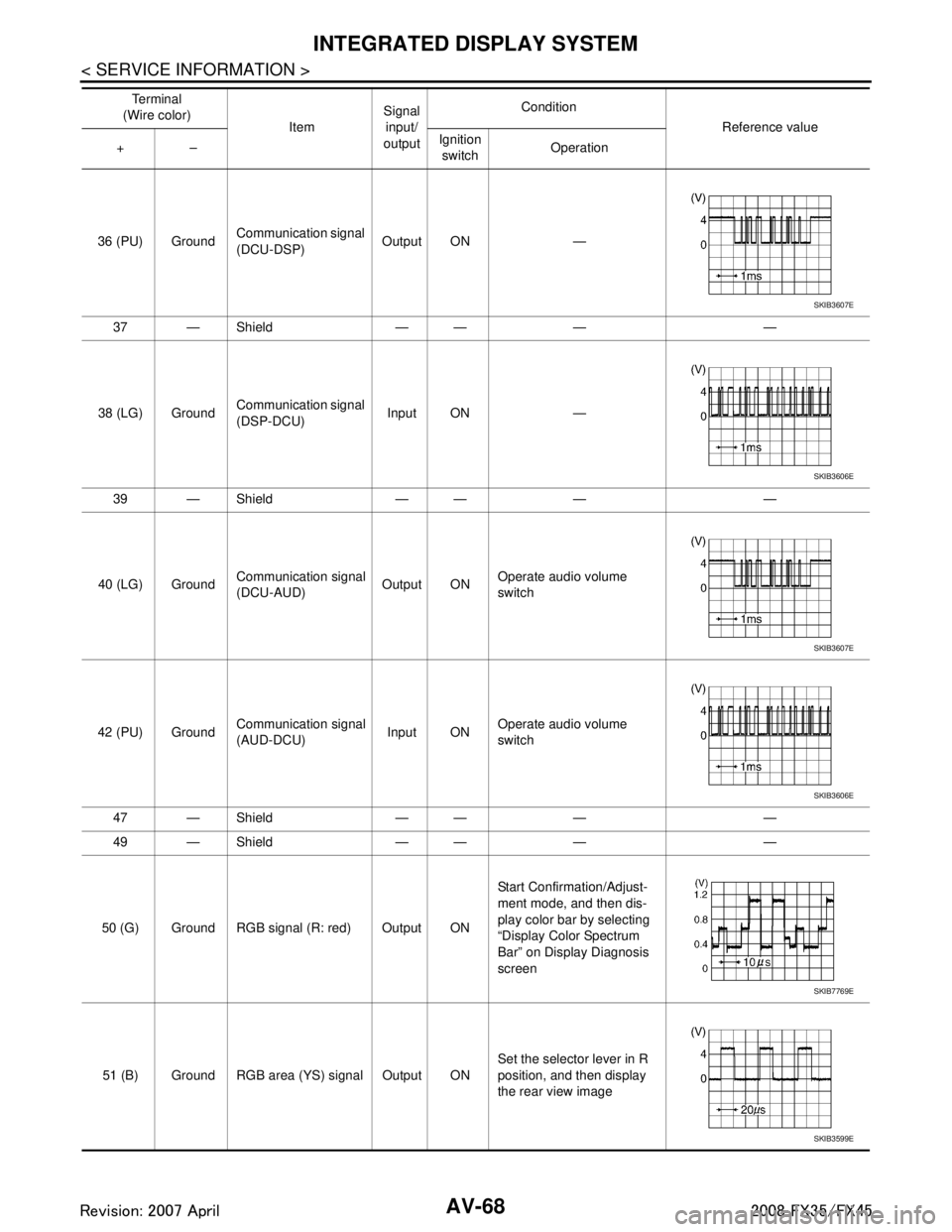
36 (PU) GroundCommunication signal
(DCU-DSP) Output ON —
37 — Shield — — — —
38 (LG) Ground Communication signal
(DSP-DCU)
Input ON —
39 — Shield — — — —
40 (LG) Ground Communication signal
(DCU-AUD) Output ONOperate audio volume
switch
42 (PU) Ground Communication signal
(AUD-DCU)
Input ONOperate audio volume
switch
47 — Shield — — — —
49 — Shield — — — —
50 (G) Ground RGB signal (R: red) Output ON Start Confirmation/Adjust-
ment mode, and then dis-
play color bar by selecting
“Display Color Spectrum
Bar” on Display Diagnosis
screen
51 (B) Ground RGB area (YS) signal Output ON Set the selector lever in R
position, and then display
the rear view image
Te r m i n a l
(Wire color) ItemSignal
input/
output Condition
Reference value
+– Ignition
switch Operation
SKIB3607E
SKIB3606E
SKIB3607E
SKIB3606E
SKIB7769E
SKIB3599E
3AA93ABC3ACD3AC03ACA3AC03AC63AC53A913A773A893A873A873A8E3A773A983AC73AC93AC03AC3
3A893A873A873A8F3A773A9D3AAF3A8A3A8C3A863A9D3AAF3A8B3A8C
Page 616 of 3924

INTEGRATED DISPLAY SYSTEMAV-69
< SERVICE INFORMATION >
C
DE
F
G H
I
J
L
M A
B
AV
N
O P
Terminal and Referenc e Value for DisplayINFOID:0000000001328719
52 (Y) Ground RGB signal (G: green) Output ON Start Confirmation/Adjust-
ment mode, and then dis-
play color bar by selecting
“Display Color Spectrum
Bar” on Display Diagnosis
screen
53 (W) Ground Ve r t i c a l
synchronizing (VP)
signal
Input ON —
54 (L) Ground RGB signal (B: blue) Output ON Start Confirmation/Adjust-
ment mode, and then dis-
play color bar by selecting
“Display Color Spectrum
Bar” on Display Diagnosis
screen
55 (R) Ground Horizontal
synchronizing (HP)
signal Input ON —
56 (G) Ground RGB synchronizing
signal Output ONWhen displaying RGB im-
age
Te r m i n a l
(Wire color) ItemSignal
input/
output Condition
Reference value
+– Ignition
switch Operation
SKIB7770E
SKIB3598E
SKIB7771E
SKIB3601E
SKIB3603E
Te r m i n a l
(Wire color) ItemSignal
input/
output Condition
Reference value
+– Ignition
switch Operation
1 (B) Ground Ground — ON — Approx. 0 V
2 (W/G) Ground Power supply (Invert-
er) Input ON — Approx. 9 V
3 (BR/W) Ground Power supply (Signal) Input ON — Approx. 9 V
3AA93ABC3ACD3AC03ACA3AC03AC63AC53A913A773A893A873A873A8E3A773A983AC73AC93AC03AC3
3A893A873A873A8F3A773A9D3AAF3A8A3A8C3A863A9D3AAF3A8B3A8C
Page 617 of 3924

AV-70
< SERVICE INFORMATION >
INTEGRATED DISPLAY SYSTEM
6 (Y) Ground RGB signal (G: green) Input ONStart Confirmation/Adjust-
ment mode, and then dis-
play color bar by selecting
“Display Color Spectrum
Bar” on Display Diagnosis
screen
7—Shield —— — —
8 (R) Ground Horizontal
synchronizing (HP)
signal
Output ON —
9 (B) Ground RGB area (YS) signal Input ON Set the selector lever in R
position, and then display
the rear view image
11 (PU) Ground Communication signal
(DCU-DSP) Input ON —
13 (P) Ground Ground (Inverter) — ON — Approx. 0 V
14 (P/L) Ground Ground (Signal) — ON — Approx. 0 V
17 (G) Ground RGB sign al (R: red) Input ON Start Confirmation/Adjust-
ment mode, and then dis-
play color bar by selecting
“Display Color Spectrum
Bar” on Display Diagnosis
screen
18 (L) Ground RGB signal (B: blue) Input ON Start Confirmation/Adjust-
ment mode, and then dis-
play color bar by selecting
“Display Color Spectrum
Bar” on Display Diagnosis
screen
Te r m i n a l
(Wire color) ItemSignal
input/
output Condition
Reference value
+– Ignition
switch Operation
SKIB7770E
SKIB3601E
SKIB3599E
SKIB3607E
SKIB7769E
SKIB7771E
3AA93ABC3ACD3AC03ACA3AC03AC63AC53A913A773A893A873A873A8E3A773A983AC73AC93AC03AC3
3A893A873A873A8F3A773A9D3AAF3A8A3A8C3A863A9D3AAF3A8B3A8C
Page 620 of 3924

INTEGRATED DISPLAY SYSTEMAV-73
< SERVICE INFORMATION >
C
DE
F
G H
I
J
L
M A
B
AV
N
O P
Self-Diagnosis Mode (DCU)INFOID:0000000001328723
OPERATION PROCEDURE
1. Start the engine.
2. Turn the audio system OFF.
3. While pressing the “4” button, turn the volume control dial clock- wise or counterclockwise for 30 clicks or more. (When the self-
diagnosis mode is started, a short beep will be heard.)
Shifting from current screen to previous screen is performedby pressing “BACK” button.
4. The initial trouble diagnosis screen will be shown, and items “Self Diagnosis (DCU)”, “Confirmation/Adjustment” and “CAN
DIAG SUPPORT MONITOR” will become selective.
5. Perform self-diagnosis by selecting the “Self Diagnosis (DCU)”. Self-diagnosis screen is displayed, and then self-diagnosisstarts.
The bar graph visible below self-diagnosis screen displays progress of the diagnosis.
Mode Description
Self Diagnosis (DCU) Display control unit diagnosis
Analyzes connection between the display control unit and each unit, and
operation of each unit.
Confirmation/
Adjustment Display Diagnosis
Color tone and shading of the display control unit-generated image can be
checked by the display of a color bar and a gray scale.
Vehicle Signals Diagnosis of signals that are input to display control unit can be performed
for Vehicle Speed, IGN, Reverse and Light.
Auto Climate Control Refer to AT C - 4 3 , "
Self-Diagnosis Function".
CAN DIAG SUPPOPT MONITOR The transmitting/receiving of CAN communication can be monitored.
SKIB8743E
SKIB7871E
SKIA4208E
3AA93ABC3ACD3AC03ACA3AC03AC63AC53A913A773A893A873A873A8E3A773A983AC73AC93AC03AC3
3A893A873A873A8F3A773A9D3AAF3A8A3A8C3A863A9D3AAF3A8B3A8C
Page 621 of 3924
AV-74
< SERVICE INFORMATION >
INTEGRATED DISPLAY SYSTEM
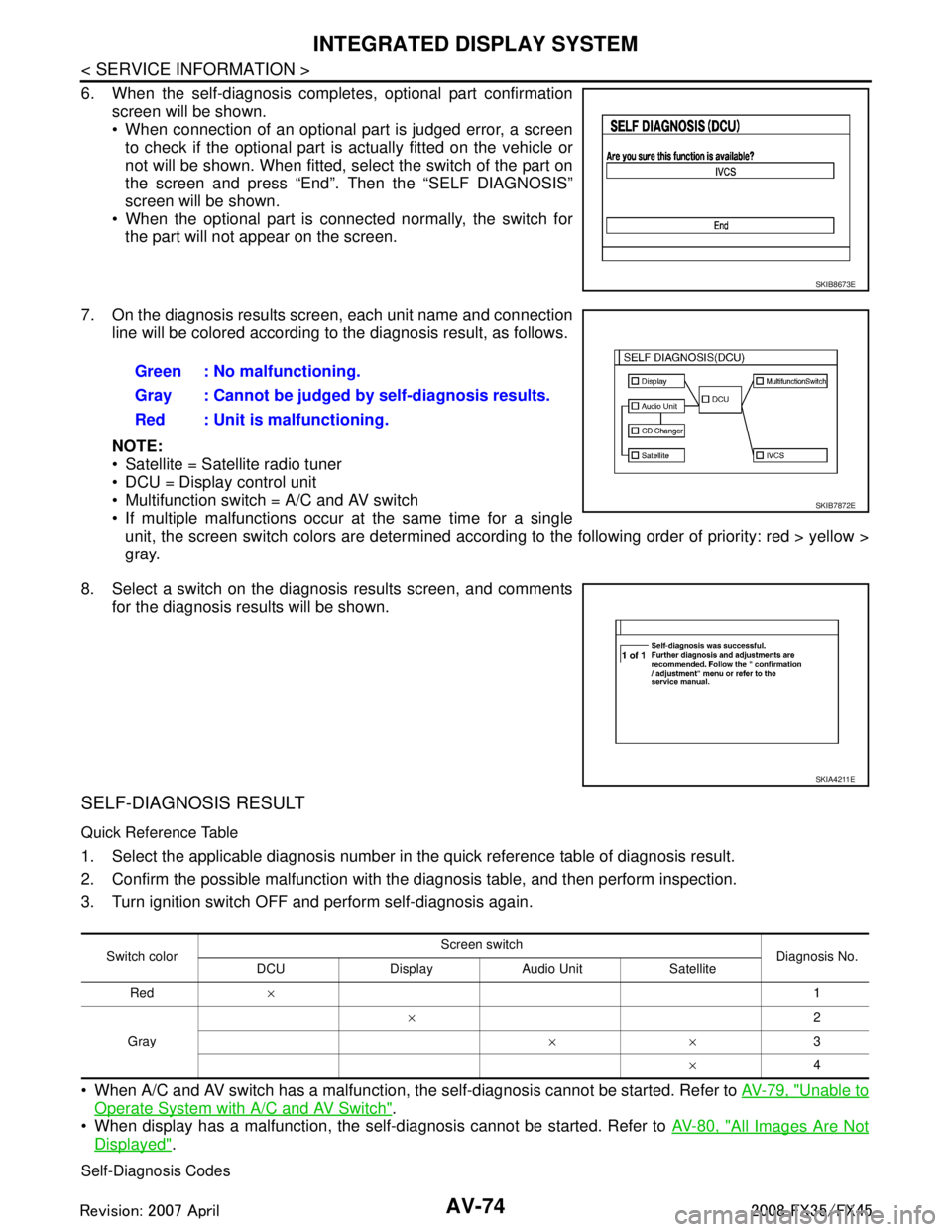
6. When the self-diagnosis completes, optional part confirmationscreen will be shown.
When connection of an optional part is judged error, a screento check if the optional part is actually fitted on the vehicle or
not will be shown. When fitted, sele ct the switch of the part on
the screen and press “End”. T hen the “SELF DIAGNOSIS”
screen will be shown.
When the optional part is connected normally, the switch for the part will not appear on the screen.
7. On the diagnosis results screen, each unit name and connection line will be colored according to the diagnosis result, as follows.
NOTE:
Satellite = Satellite radio tuner
DCU = Display control unit
Multifunction switch = A/C and AV switch
If multiple malfunctions occur at the same time for a singleunit, the screen switch colors are determined according to the following order of priority: red > yellow >
gray.
8. Select a switch on the diagnosis results screen, and comments for the diagnosis results will be shown.
SELF-DIAGNOSIS RESULT
Quick Reference Table
1. Select the applicable diagnosis number in the quick reference table of diagnosis result.
2. Confirm the possible malfunction with the diagnosis table, and then perform inspection.
3. Turn ignition switch OFF and perform self-diagnosis again.
When A/C and AV switch has a malfunction, the self-diagnosis cannot be started. Refer to AV-79, "
Unable to
Operate System with A/C and AV Switch".
When display has a malfunction, the self-diagnosis cannot be started. Refer to AV-80, "
All Images Are Not
Displayed".
Self-Diagnosis Codes
SKIB8673E
Green : No malfunctioning.
Gray : Cannot be judged by self-diagnosis results.
Red : Unit is malfunctioning.
SKIB7872E
SKIA4211E
Switch colorScreen switch
Diagnosis No.
DCU Display Audio Unit Satellite
Red × 1
Gray ×
2
×× 3
× 4
3AA93ABC3ACD3AC03ACA3AC03AC63AC53A913A773A893A873A873A8E3A773A983AC73AC93AC03AC3
3A893A873A873A8F3A773A9D3AAF3A8A3A8C3A863A9D3AAF3A8B3A8C