combination meter removal INFINITI FX35 2008 User Guide
[x] Cancel search | Manufacturer: INFINITI, Model Year: 2008, Model line: FX35, Model: INFINITI FX35 2008Pages: 3924, PDF Size: 81.37 MB
Page 1148 of 3924

DI-22
< SERVICE INFORMATION >
COMBINATION METERS
Check continuity between terminals 25, 26, 35 or 36 and 27.
FUEL LEVEL SENSOR UNIT
For removal, refer to FL-4, "Component".
Fuel Level Sensor Unit and Fuel Pump (Main)
Check the resistance between terminals 2 and 5.
*1 and *2: When float rod is in contact with stopper.
If the results of check are NG, check the fuel level sensor unit and
fuel pump (main) harness. Refer to "Fuel Level Sensor Unit and
Pump (Main) Harness".
Fuel Level Sensor Unit and Pump (Main) Harness
Check continuity at following terminals.
If the results of check are NG, replace fuel pump assembly. If the results of check are OK, replace fuel level sensor unit.
Fuel Level Sensor Unit (Sub)
Check resistance between terminals 1 and 2.
*1 and *2: When float rod is in contact with stopper.
Removal and Installation of Combination MeterINFOID:0000000001328453
Refer to IP-10, "Component Parts Location".
Terminal Condition Continuity
25
27Illumination control swit
ch (–) is pressed. Yes
Illumination control swit ch (–) is released. No
26 Illumination control swit
ch (+) is pressed. Yes
Illumination control swit ch (+) is released. No
35 Trip transfer switch is pressed. Yes
Trip transfer switch is released. No
36 Trip reset switch is pressed. Yes
Trip reset switch is released. No
SKIB8529E
Terminal Float position [mm (in)]
Resistance val-
ue [Ω]
25 *1 Full 236 (9.29) Approx. 3
*2 Empty 29 (1.14) Approx. 80
SKIB3550J
Terminal Continuity
2 - Signal terminal (A) Ye s
5 - Ground terminal (B)
SKIB3551J
Terminal Float position [mm (in)] Resistance val-
ue [Ω]
12 *1 Full 6 (0.24) Approx. 3
*2 Empty 203 (7.99) Approx. 48
SKIB8530E
3AA93ABC3ACD3AC03ACA3AC03AC63AC53A913A773A893A873A873A8E3A773A983AC73AC93AC03AC3
3A893A873A873A8F3A773A9D3AAF3A8A3A8C3A863A9D3AAF3A8B3A8C
Page 1150 of 3924
DI-24
< SERVICE INFORMATION >
COMBINATION METERS
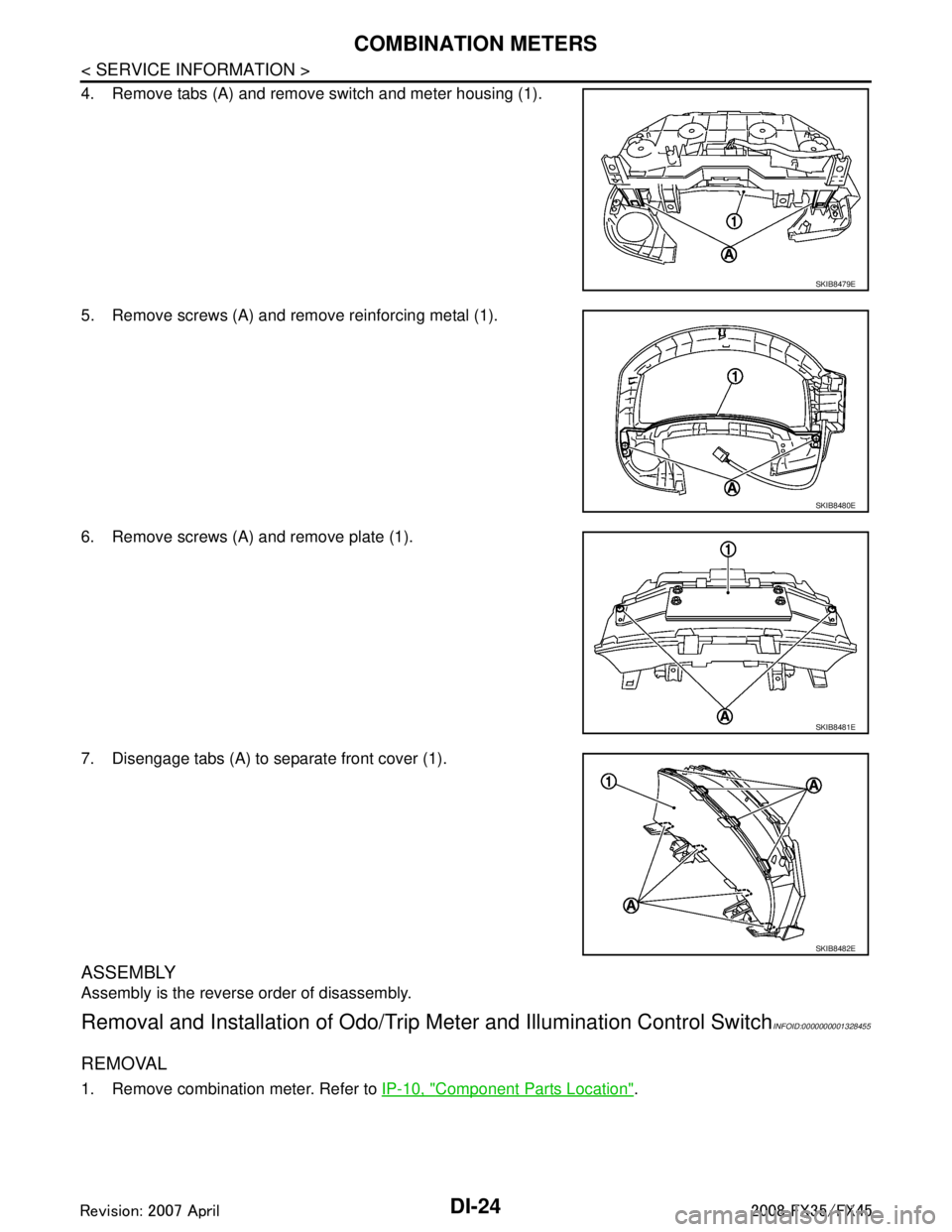
4. Remove tabs (A) and remove switch and meter housing (1).
5. Remove screws (A) and remove reinforcing metal (1).
6. Remove screws (A) and remove plate (1).
7. Disengage tabs (A) to separate front cover (1).
ASSEMBLY
Assembly is the reverse order of disassembly.
Removal and Installation of Odo/Trip Meter and Illumination Control SwitchINFOID:0000000001328455
REMOVAL
1. Remove combination meter. Refer to IP-10, "Component Parts Location".
SKIB8479E
SKIB8480E
SKIB8481E
SKIB8482E
3AA93ABC3ACD3AC03ACA3AC03AC63AC53A913A773A893A873A873A8E3A773A983AC73AC93AC03AC3
3A893A873A873A8F3A773A9D3AAF3A8A3A8C3A863A9D3AAF3A8B3A8C
Page 1151 of 3924
COMBINATION METERSDI-25
< SERVICE INFORMATION >
C
DE
F
G H
I
J
L
M A
B
DI
N
O P
2. Remove switch and meter housing. Refer to DI-23, "Disassem-
bly and Assembly of Combination Meter".
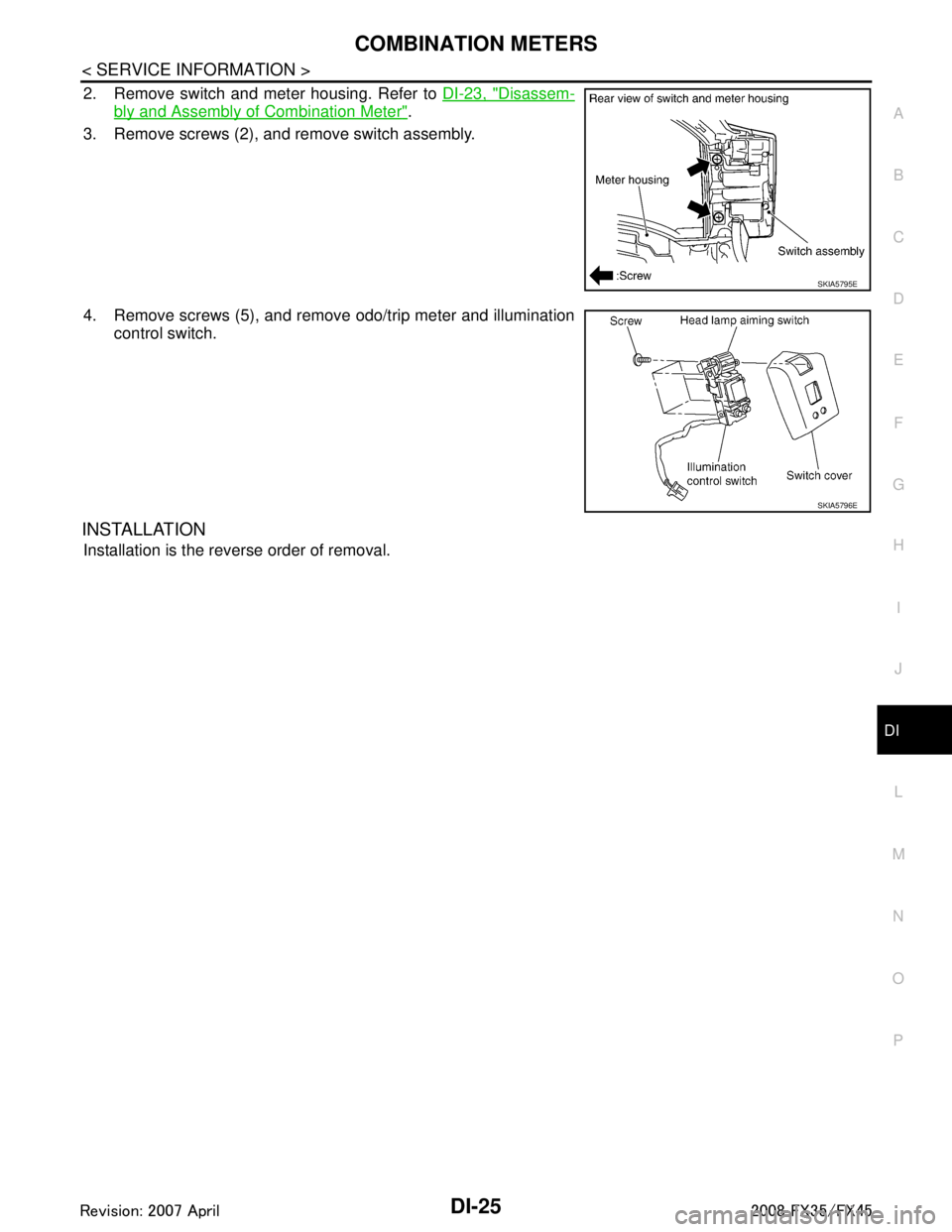
3. Remove screws (2), and remove switch assembly.
4. Remove screws (5), and remove odo/trip meter and illumination control switch.
INSTALLATION
Installation is the reverse order of removal.
SKIA5795E
SKIA5796E
3AA93ABC3ACD3AC03ACA3AC03AC63AC53A913A773A893A873A873A8E3A773A983AC73AC93AC03AC3
3A893A873A873A8F3A773A9D3AAF3A8A3A8C3A863A9D3AAF3A8B3A8C
Page 1157 of 3924
UNIFIED METER AND A/C AMPDI-31
< SERVICE INFORMATION >
C
DE
F
G H
I
J
L
M A
B
DI
N
O P
NO >> GO TO 6.
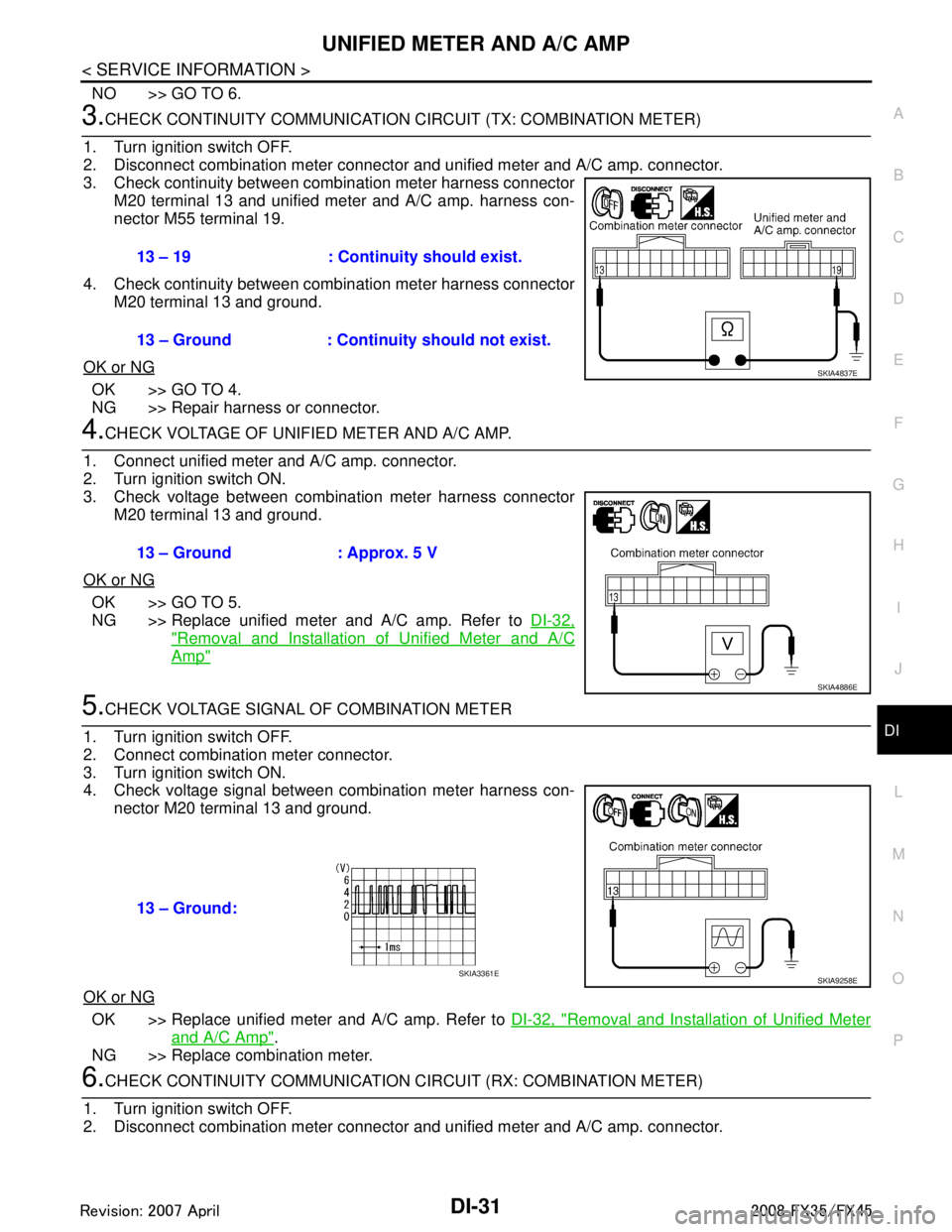
3.CHECK CONTINUITY COMM UNICATION CIRCUIT (TX: COMBINATION METER)
1. Turn ignition switch OFF.
2. Disconnect combination meter connector and unified meter and A/C amp. connector.
3. Check continuity between combination meter harness connector M20 terminal 13 and unified meter and A/C amp. harness con-
nector M55 terminal 19.
4. Check continuity between combination meter harness connector M20 terminal 13 and ground.
OK or NG
OK >> GO TO 4.
NG >> Repair harness or connector.
4.CHECK VOLTAGE OF UNIFIED METER AND A/C AMP.
1. Connect unified meter and A/C amp. connector.
2. Turn ignition switch ON.
3. Check voltage between combination meter harness connector M20 terminal 13 and ground.
OK or NG
OK >> GO TO 5.
NG >> Replace unified meter and A/C amp. Refer to DI-32,
"Removal and Installation of Unified Meter and A/C
Amp"
5.CHECK VOLTAGE SIGNAL OF COMBINATION METER
1. Turn ignition switch OFF.
2. Connect combination meter connector.
3. Turn ignition switch ON.
4. Check voltage signal between combination meter harness con- nector M20 terminal 13 and ground.
OK or NG
OK >> Replace unified meter and A/C amp. Refer to DI-32, "Removal and Installation of Unified Meter
and A/C Amp".
NG >> Replace combination meter.
6.CHECK CONTINUITY COMM UNICATION CIRCUIT (RX: COMBINATION METER)
1. Turn ignition switch OFF.
2. Disconnect combination meter connector and unified meter and A/C amp. connector.
13 – 19 : Continuity should exist.
13 – Ground : Continuity should not exist.
SKIA4837E
13 – Ground : Approx. 5 V
SKIA4886E
13 – Ground:
SKIA9258ESKIA3361E
3AA93ABC3ACD3AC03ACA3AC03AC63AC53A913A773A893A873A873A8E3A773A983AC73AC93AC03AC3
3A893A873A873A8F3A773A9D3AAF3A8A3A8C3A863A9D3AAF3A8B3A8C
Page 1158 of 3924

DI-32
< SERVICE INFORMATION >
UNIFIED METER AND A/C AMP
3. Check continuity between combination meter harness connectorM20 terminal 14 and unified meter and A/C amp. harness con-
nector M55 terminal 9.
4. Check continuity between combination meter harness connector M20 terminal 14 and ground.
OK or NG
OK >> GO TO 7.
NG >> Repair harness or connector.
7.CHECK VOLTAGE OF COMBINATION METER
1. Connect combination meter connector.
2. Turn ignition switch ON.
3. Check voltage between unified meter and A/C amp. harness connector M55 terminal 9 and ground.
OK or NG
OK >> GO TO 8.
NG >> Replace combination meter.
8.CHECK VOLTAGE SIGNAL OF UNIFIED METER AND A/C AMP.
1. Turn ignition switch OFF.
2. Connect unified meter and A/C amp. connector.
3. Turn ignition switch ON.
4. Check voltage signal between combination meter harness con- nector M20 terminal 14 and ground.
OK or NG
OK >> Replace combination meter.
NG >> Replace unified meter and A/C amp. Refer to DI-32, "
Removal and Installation of Unified Meter
and A/C Amp".
DTC [B2205] Vehicle Speed CircuitINFOID:0000000001328462
Symptom: Display “VEHICLE SPEED CIRC [B2205]” at the result of self-diagnosis for unified meter and A/C
amp.
Perform self-diagnosis of ABS actuator and electric unit (control unit), and repair or replace malfunctioning
parts. Refer to BRC-26, "
CONSULT-III Functions (ABS)".
Removal and Installation of Unified Meter and A/C AmpINFOID:0000000001328463
REMOVAL
14 – 9 : Continuity should exist.
14 – Ground : Continuity should not exist.
SKIA4836E
9 – Ground : Approx. 5 V
PKIB3587E
14 – Ground:
SKIA9260ESKIA3362E
3AA93ABC3ACD3AC03ACA3AC03AC63AC53A913A773A893A873A873A8E3A773A983AC73AC93AC03AC3
3A893A873A873A8F3A773A9D3AAF3A8A3A8C3A863A9D3AAF3A8B3A8C
Page 1170 of 3924
DI-44
< SERVICE INFORMATION >
WARNING LAMPS
2.CHECK IPDM E/R INPUT SIGNAL
1. Turn ignition switch ON.
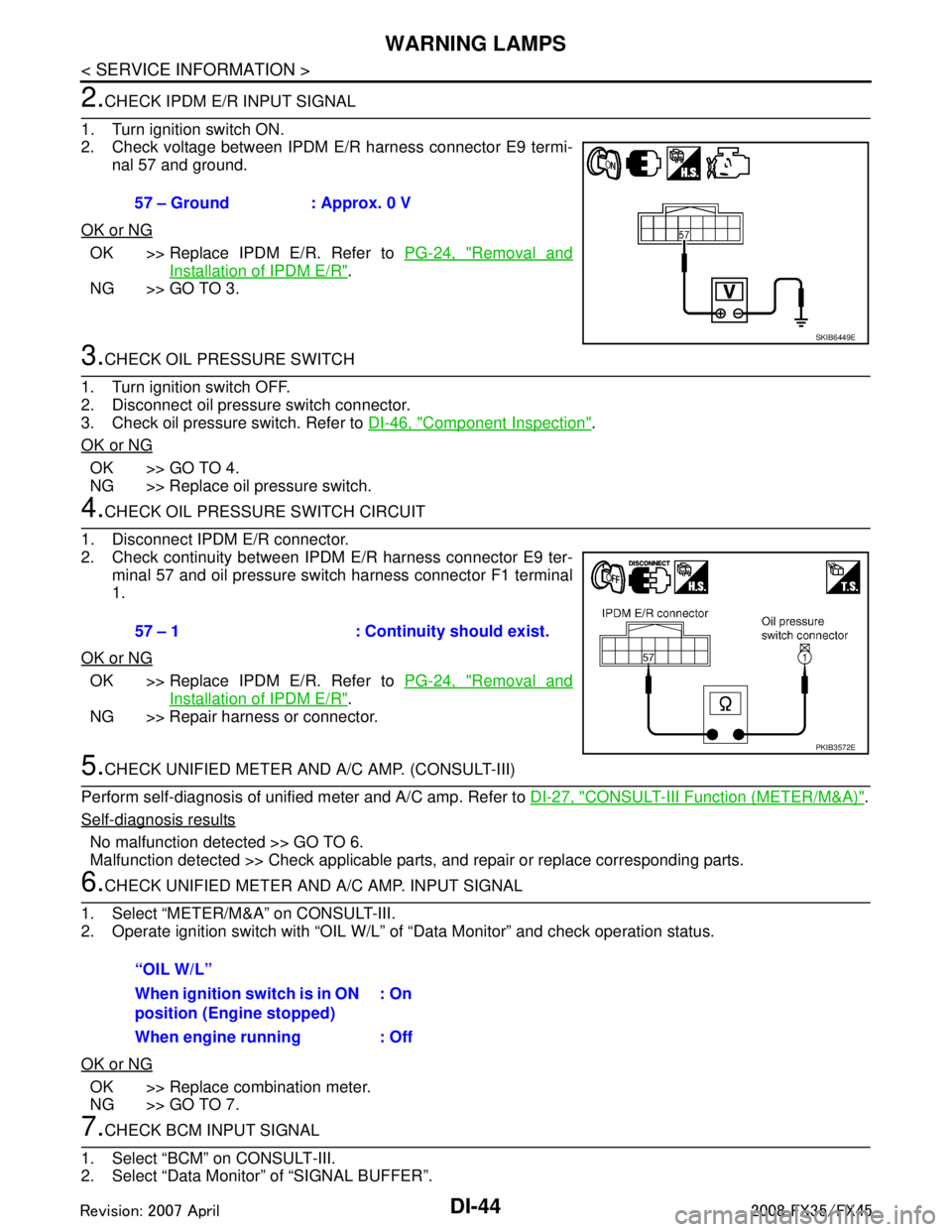
2. Check voltage between IPDM E/R harness connector E9 termi- nal 57 and ground.
OK or NG
OK >> Replace IPDM E/R. Refer to PG-24, "Removal and
Installation of IPDM E/R".
NG >> GO TO 3.
3.CHECK OIL PRESSURE SWITCH
1. Turn ignition switch OFF.
2. Disconnect oil pressure switch connector.
3. Check oil pressure switch. Refer to DI-46, "
Component Inspection".
OK or NG
OK >> GO TO 4.
NG >> Replace oil pressure switch.
4.CHECK OIL PRESSURE SWITCH CIRCUIT
1. Disconnect IPDM E/R connector.
2. Check continuity between IPDM E/R harness connector E9 ter- minal 57 and oil pressure switch harness connector F1 terminal
1.
OK or NG
OK >> Replace IPDM E/R. Refer to PG-24, "Removal and
Installation of IPDM E/R".
NG >> Repair harness or connector.
5.CHECK UNIFIED METER AND A/C AMP. (CONSULT-III)
Perform self-diagnosis of unified meter and A/C amp. Refer to DI-27, "
CONSULT-III Function (METER/M&A)".
Self-diagnosis results
No malfunction detected >> GO TO 6.
Malfunction detected >> Check applicable parts, and repair or replace corresponding parts.
6.CHECK UNIFIED METER AND A/C AMP. INPUT SIGNAL
1. Select “METER/M&A” on CONSULT-III.
2. Operate ignition switch with “OIL W/L” of “Data Monitor” and check operation status.
OK or NG
OK >> Replace combination meter.
NG >> GO TO 7.
7.CHECK BCM INPUT SIGNAL
1. Select “BCM” on CONSULT-III.
2. Select “Data Monitor” of “SIGNAL BUFFER”. 57 – Ground : Approx. 0 V
SKIB6449E
57 – 1 : Continuity should exist.
PKIB3572E
“OIL W/L”
When ignition switch is in ON
position (Engine stopped)
: On
When engine running : Off
3AA93ABC3ACD3AC03ACA3AC03AC63AC53A913A773A893A873A873A8E3A773A983AC73AC93AC03AC3
3A893A873A873A8F3A773A9D3AAF3A8A3A8C3A863A9D3AAF3A8B3A8C
Page 1189 of 3924
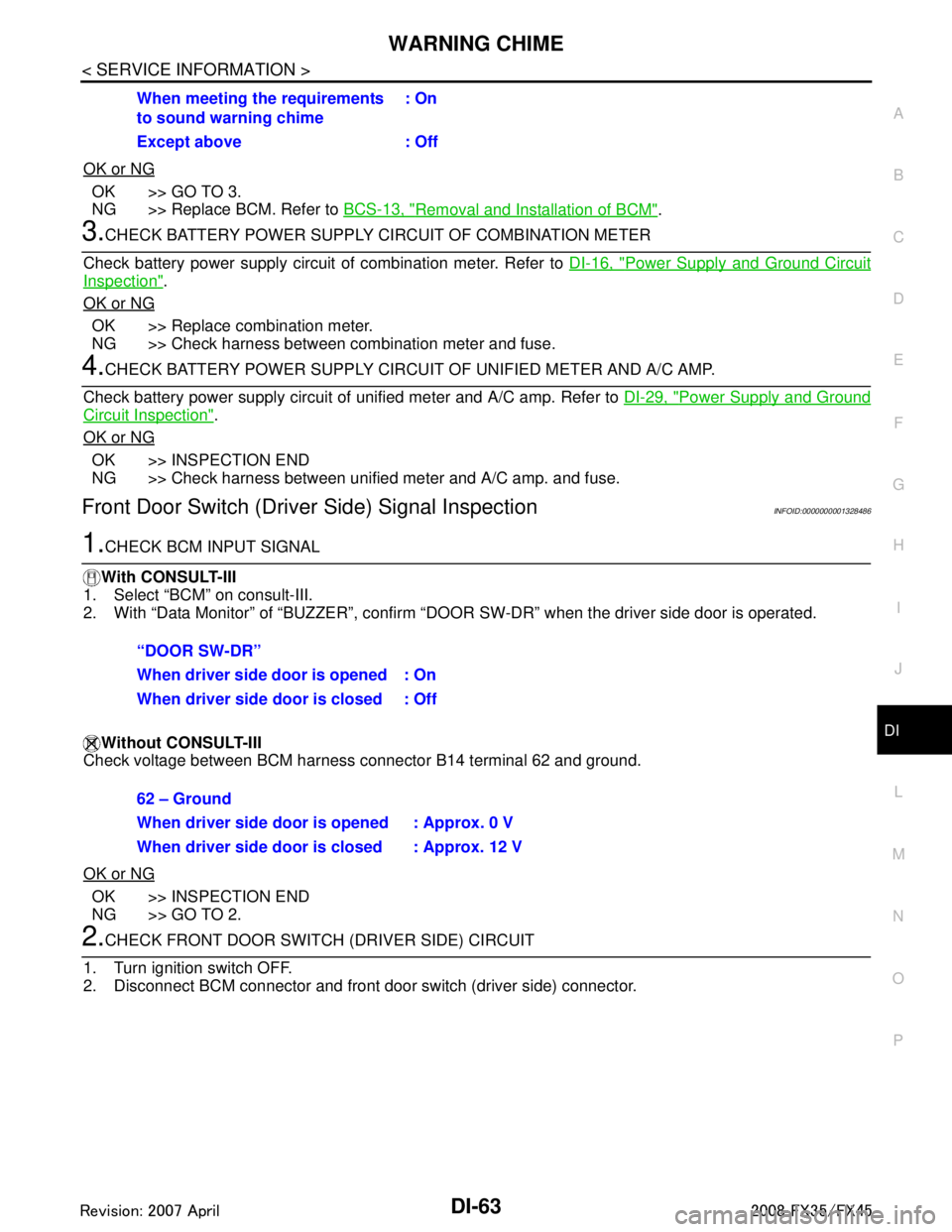
WARNING CHIMEDI-63
< SERVICE INFORMATION >
C
DE
F
G H
I
J
L
M A
B
DI
N
O P
OK or NG
OK >> GO TO 3.
NG >> Replace BCM. Refer to BCS-13, "
Removal and Installation of BCM".
3.CHECK BATTERY POWER SUPPLY CIRCUIT OF COMBINATION METER
Check battery power supply circuit of combination meter. Refer to DI-16, "
Power Supply and Ground Circuit
Inspection".
OK or NG
OK >> Replace combination meter.
NG >> Check harness between combination meter and fuse.
4.CHECK BATTERY POWER SUPPLY CIRCUI T OF UNIFIED METER AND A/C AMP.
Check battery power supply circuit of unified meter and A/C amp. Refer to DI-29, "
Power Supply and Ground
Circuit Inspection".
OK or NG
OK >> INSPECTION END
NG >> Check harness between unified meter and A/C amp. and fuse.
Front Door Switch (Drive r Side) Signal InspectionINFOID:0000000001328486
1.CHECK BCM INPUT SIGNAL
With CONSULT-III
1. Select “BCM” on consult-III.
2. With “Data Monitor” of “BUZZER”, confirm “D OOR SW-DR” when the driver side door is operated.
Without CONSULT-III
Check voltage between BCM harness connector B14 terminal 62 and ground.
OK or NG
OK >> INSPECTION END
NG >> GO TO 2.
2.CHECK FRONT DOOR SWIT CH (DRIVER SIDE) CIRCUIT
1. Turn ignition switch OFF.
2. Disconnect BCM connector and front door switch (driver side) connector. When meeting the requirements
to sound warning chime
: On
Except above : Off
“DOOR SW-DR”
When driver side door is opened : On
When driver side door is closed : Off
62 – Ground
When driver side door is opened : Approx. 0 V
When driver side door is closed : Approx. 12 V
3AA93ABC3ACD3AC03ACA3AC03AC63AC53A913A773A893A873A873A8E3A773A983AC73AC93AC03AC3
3A893A873A873A8F3A773A9D3AAF3A8A3A8C3A863A9D3AAF3A8B3A8C
Page 1192 of 3924

DI-66
< SERVICE INFORMATION >
WARNING CHIME
OK or NG
OK >> GO TO 3.
NG >> Replace key switch and ignition knob switch.
3.CHECK KEY SWITCH AND IGNITION KNOB SWITCH CIRCUIT
1. Disconnect BCM connector.
2. Check continuity between BCM harness connector M3 terminal 37 and key switch and ignition knob switch harness connector
M22 terminal 4.
3. Check continuity between BCM harness connector M3 terminal 37 and ground.
OK or NG
OK >> GO TO 4.
NG >> Repair harness or connector.
4.CHECK KEY SWITCH PO WER SUPPLY CIRCUIT
Check voltage between key switch and ignition knob switch harness
connector M22 terminal 3 and ground.
OK or NG
OK >> Replace BCM. Refer to BCS-13, "Removal and Installa-
tion of BCM".
NG >> Check harness between key switch and ignition knob switch and fuse.
Lighting Switch Signal InspectionINFOID:0000000001328489
1.CHECK BCM INPUT SIGNAL
1. Select “BCM” on CONSULT-III.
2. With “Data Monitor” of “BUZZER”, confirm “LIG HT SW 1ST” when the lighting switch is operated.
OK or NG
OK >> INSPECTION END
NG >> Check the lighting switch. Refer to LT-104, "
Combination Switch Inspection".
Seat Belt Buckle Switch (Driver Side) Signal InspectionINFOID:0000000001328490
1.CHECK UNIFIED METER AND A/C AMP. INPUT SIGNAL
1. Select “METER/M&A” on CONSULT-III.
2. With “Data Monitor” of “MET ER/M&A”, confirm “SEAT BELT W/L” when the seat belt is operated.
37 – 4 : Continuity should exist.
37 – Ground : Continuity should not exist.
PKIB3578E
3 – Ground : Battery voltage
SKIA5063E
“LIGHT SW 1ST”
Lighting switch ON (1st position) : On
Lighting switch OFF : Off
“SEAT BELT W/L”
3AA93ABC3ACD3AC03ACA3AC03AC63AC53A913A773A893A873A873A8E3A773A983AC73AC93AC03AC3
3A893A873A873A8F3A773A9D3AAF3A8A3A8C3A863A9D3AAF3A8B3A8C
Page 2444 of 3924

SQUEAK AND RATTLE TROUBLE DIAGNOSESEI-7
< SERVICE INFORMATION >
C
DE
F
G H
J
K L
M A
B
EI
N
O P
Insulates where slight movement is present. Ideal for instrument panel applications.
SILICONE GREASE
Used in place of UHMW tape that will be visible or not fit.
Note: Will only last a few months.
SILICONE SPRAY
Use when grease cannot be applied.
DUCT TAPE
Use to eliminate movement.
CONFIRM THE REPAIR
Confirm that the cause of a noise is repaired by test driving the vehicle. Operate the vehicle under the same
conditions as when the noise originally occurred. Refer to the notes on the Diagnostic Worksheet.
Generic Squeak and Rattle TroubleshootingINFOID:0000000001328057
Refer to Table of Contents for specific component removal and installation information.
INSTRUMENT PANEL
Most incidents are caused by contact and movement between:
1. The cluster lid A and instrument panel
2. Acrylic lens and combination meter housing
3. Instrument panel to front pillar garnish
4. Instrument panel to windshield
5. Instrument panel mounting pins
6. Wiring harnesses behind the combination meter
7. A/C defroster duct and duct joint
These incidents can usually be located by tapping or moving the components to duplicate the noise or by
pressing on the components while driving to stop the noi se. Most of these incidents can be repaired by apply-
ing felt cloth tape or silicon spray (in hard to reach areas). Urethane pads can be used to insulate wiring har-
ness.
CAUTION:
Do not use silicone spray to isolate a squeak or ra ttle. If you saturate the area with silicone, you will
not be able to recheck the repair.
CENTER CONSOLE
Components to pay attention to include:
1. Shifter assembly cover to finisher
2. A/C control unit and cluster lid C
3. Wiring harnesses behind audio and A/C control unit
The instrument panel repair and isolation pr ocedures also apply to the center console.
DOORS
Pay attention to the:
1. Finisher and inner panel making a slapping noise
2. Inside handle escutcheon to door finisher
3. Wiring harnesses tapping
4. Door striker out of alignment causing a popping noise on starts and stops
Tapping or moving the components or pressing on them while driving to duplicate the conditions can isolate
many of these incidents. You can usually insulate the ar eas with felt cloth tape or insulator foam blocks from
the Nissan Squeak and Rattle Kit (J-43980) to repair the noise.
TRUNK
Trunk noises are often caused by a loose jack or loose items put into the trunk by the owner.
In addition look for:
1. Trunk lid dumpers out of adjustment
2. Trunk lid striker out of adjustment
3. The trunk lid torsion bars knocking together
4. A loose license plate or bracket
3AA93ABC3ACD3AC03ACA3AC03AC63AC53A913A773A893A873A873A8E3A773A983AC73AC93AC03AC3
3A893A873A873A8F3A773A9D3AAF3A8A3A8C3A863A9D3AAF3A8B3A8C
Page 2920 of 3924

SQUEAK AND RATTLE TROUBLE DIAGNOSESGW-7
< SERVICE INFORMATION >
C
DE
F
G H
J
K L
M A
B
GW
N
O P
Insulates where slight movement is present. Ideal for instrument panel applications.
SILICONE GREASE
Used in place of UHMW tape that will be visible or not fit.
Note: Will only last a few months.
SILICONE SPRAY
Use when grease cannot be applied.
DUCT TAPE
Use to eliminate movement.
CONFIRM THE REPAIR
Confirm that the cause of a noise is repaired by test driving the vehicle.Operate the vehicle under the same
conditions as when the noise originallyoccurred. Refer to the notes on the Diagnostic Worksheet.
Generic Squeak and Rattle TroubleshootingINFOID:0000000001327958
Refer to Table of Contents for specific component removal and installationinformation.
INSTRUMENT PANEL
Most incidents are caused by contact and movement between:
1. The cluster lid A and instrument panel
2. Acrylic lens and combination meter housing
3. Instrument panel to front pillar garnish
4. Instrument panel to windshield
5. Instrument panel mounting pins
6. Wiring harnesses behind the combination meter
7. A/C defroster duct and duct joint
These incidents can usually be located by tapping or moving the components to duplicate the noise or by
pressing on the components while driving to stop the noi se. Most of these incidents can be repaired by apply-
ing felt cloth tape or silicon spray (in hard to reach areas). Urethane pads can be used to insulate wiring har-
ness.
CAUTION:
Do not use silicone spray to isolat e a squeak or rattle. If you saturatet he area with silicone, you will not
be able to recheck the repair.
CENTER CONSOLE
Components to pay attention to include:
1. Shifter assembly cover to finisher
2. A/C control unit and cluster lid C
3. Wiring harnesses behind audio and A/C control unit
The instrument panel repair and isolation procedures also apply to thecenter console.
DOORS
Pay attention to the:
1. Finisher and inner panel making a slapping noise
2. Inside handle escutcheon to door finisher
3. Wiring harnesses tapping
4. Door striker out of alignment causing a popping noise on startsand stops
Tapping or moving the components or pressing on them while driving to duplicate the conditions can isolate
many of these incidents. You can usually insulate the ar eas with felt cloth tape or insulator foam blocks from
the Nissan Squeak and Rattle Kit (J43980) to repair the noise.
TRUNK
Trunk noises are often caused by a loose jack or loose items put intothe trunk by the owner.
In addition look for:
1. Trunk lid dumpers out of adjustment
2. Trunk lid striker out of adjustment
3. The trunk lid torsion bars knocking together
4. A loose license plate or bracket
3AA93ABC3ACD3AC03ACA3AC03AC63AC53A913A773A893A873A873A8E3A773A983AC73AC93AC03AC3
3A893A873A873A8F3A773A9D3AAF3A8A3A8C3A863A9D3AAF3A8B3A8C