Body INFINITI FX35 2008 Service Manual
[x] Cancel search | Manufacturer: INFINITI, Model Year: 2008, Model line: FX35, Model: INFINITI FX35 2008Pages: 3924, PDF Size: 81.37 MB
Page 2969 of 3924
GW-56
< SERVICE INFORMATION >
REAR DOOR GLASS AND REGULATOR
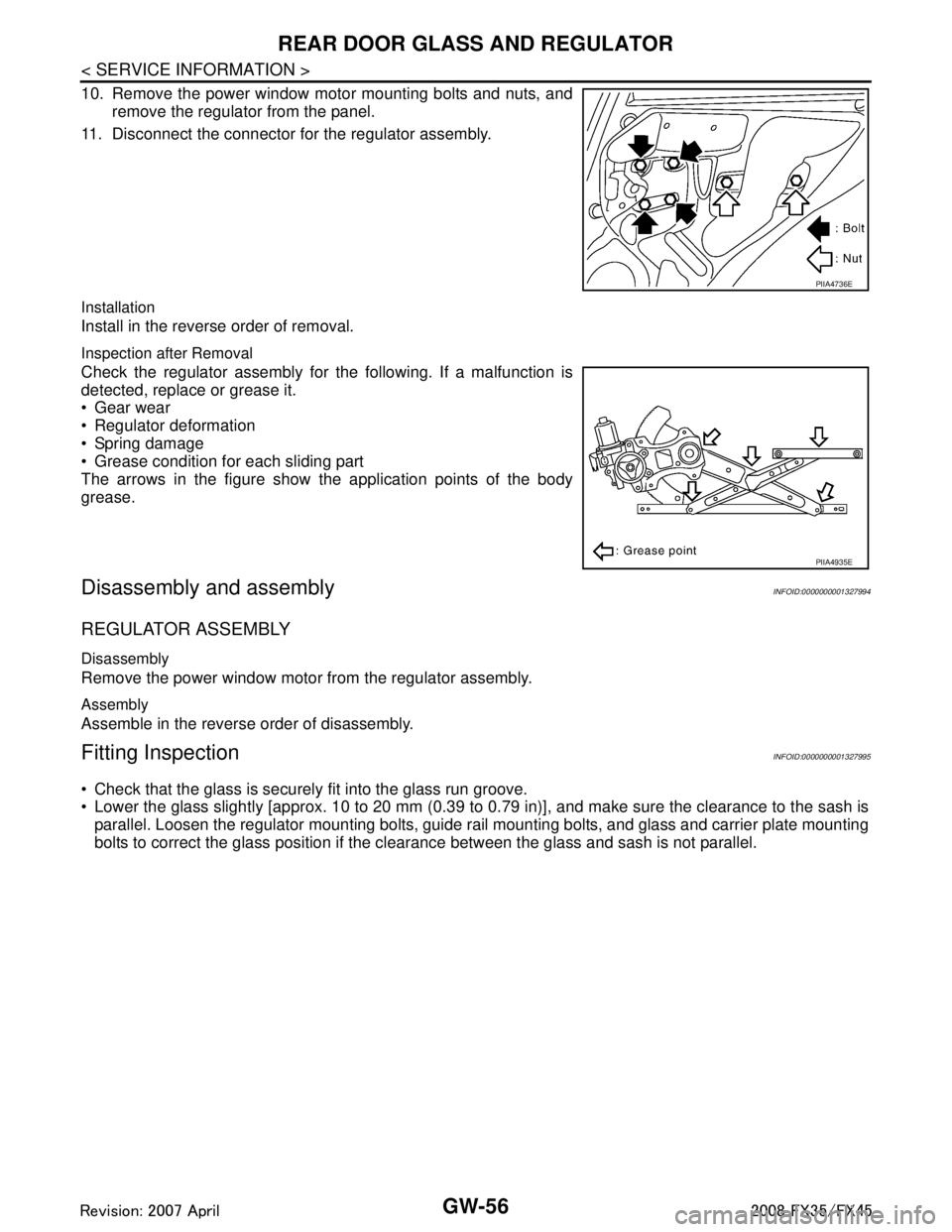
10. Remove the power window motor mounting bolts and nuts, andremove the regulator from the panel.
11. Disconnect the connector for the regulator assembly.
Installation
Install in the reverse order of removal.
Inspection after Removal
Check the regulator assembly for the following. If a malfunction is
detected, replace or grease it.
Gear wear
Regulator deformation
Spring damage
Grease condition for each sliding part
The arrows in the figure show the application points of the body
grease.
Disassembly and assemblyINFOID:0000000001327994
REGULATOR ASSEMBLY
Disassembly
Remove the power window motor from the regulator assembly.
Assembly
Assemble in the reverse order of disassembly.
Fitting InspectionINFOID:0000000001327995
Check that the glass is securely fit into the glass run groove.
Lower the glass slightly [approx. 10 to 20 mm (0.39 to 0.79 in)], and make sure the clearance to the sash is
parallel. Loosen the regulator mounting bolts, guide rail mounting bolts, and glass and carrier plate mounting
bolts to correct the glass position if the clearance between the glass and sash is not parallel.
PIIA4736E
PIIA4935E
3AA93ABC3ACD3AC03ACA3AC03AC63AC53A913A773A893A873A873A8E3A773A983AC73AC93AC03AC3
3A893A873A873A8F3A773A9D3AAF3A8A3A8C3A863A9D3AAF3A8B3A8C
Page 2973 of 3924
GW-60
< SERVICE INFORMATION >
REAR WINDOW DEFOGGER
REAR WINDOW DEFOGGER
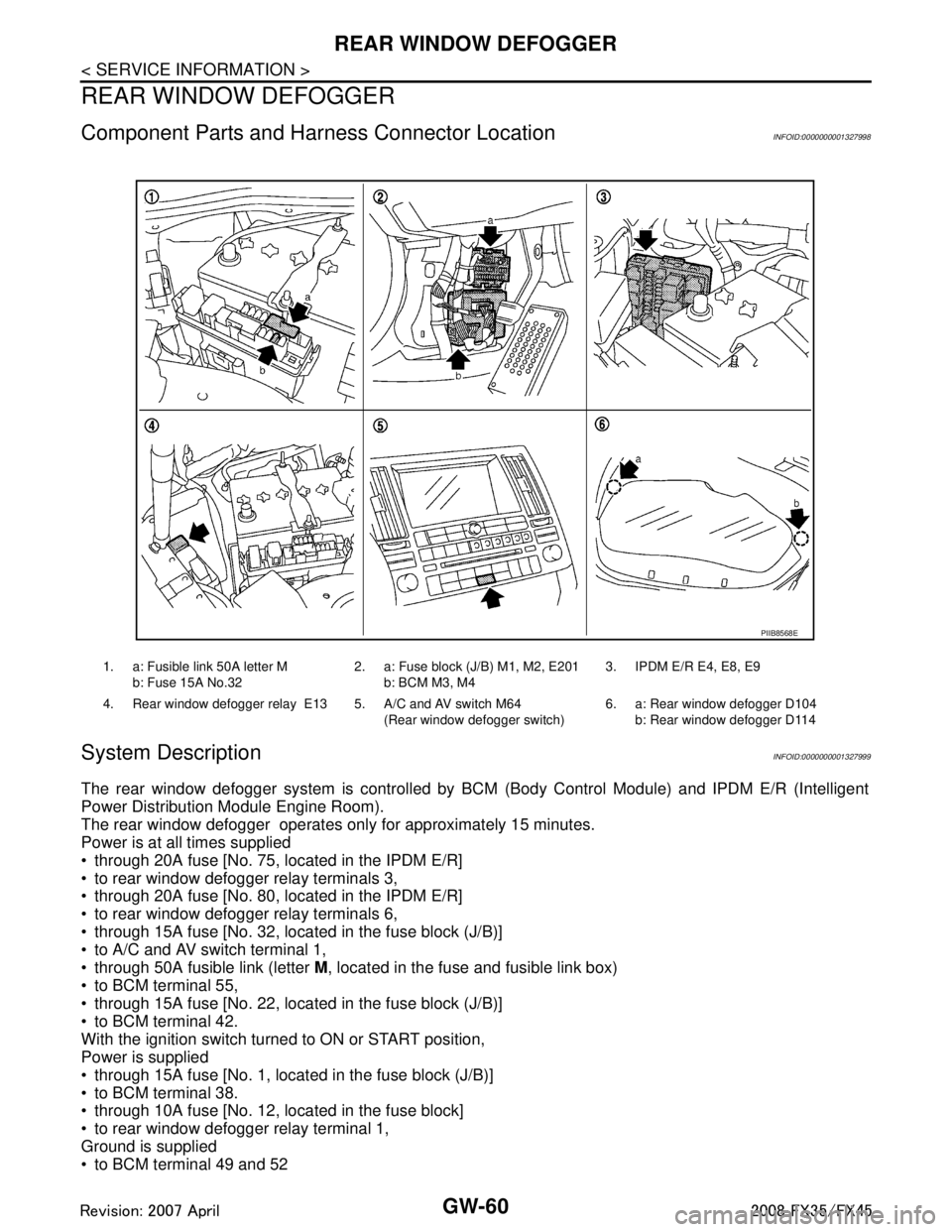
Component Parts and Harness Connector LocationINFOID:0000000001327998
System DescriptionINFOID:0000000001327999
The rear window defogger system is controlled by BC M (Body Control Module) and IPDM E/R (Intelligent
Power Distribution Module Engine Room).
The rear window defogger operates only for approximately 15 minutes.
Power is at all times supplied
through 20A fuse [No. 75, located in the IPDM E/R]
to rear window defogger relay terminals 3,
through 20A fuse [No. 80, located in the IPDM E/R]
to rear window defogger relay terminals 6,
through 15A fuse [No. 32, located in the fuse block (J/B)]
to A/C and AV switch terminal 1,
through 50A fusible link (letter M, located in the fuse and fusible link box)
to BCM terminal 55,
through 15A fuse [No. 22, located in the fuse block (J/B)]
to BCM terminal 42.
With the ignition switch turned to ON or START position,
Power is supplied
through 15A fuse [No. 1, located in the fuse block (J/B)]
to BCM terminal 38.
through 10A fuse [No. 12, located in the fuse block]
to rear window defogger relay terminal 1,
Ground is supplied
to BCM terminal 49 and 52
1. a: Fusible link 50A letter M
b: Fuse 15A No.32 2. a: Fuse block (J/B) M1, M2, E201
b: BCM M3, M4 3. IPDM E/R E4, E8, E9
4. Rear window defogger relay E13 5. A/C and AV switch M64 (Rear window defogger switch)6. a: Rear window defogger D104
b: Rear window defogger D114
PIIB8568E
3AA93ABC3ACD3AC03ACA3AC03AC63AC53A913A773A893A873A873A8E3A773A983AC73AC93AC03AC3
3A893A873A873A8F3A773A9D3AAF3A8A3A8C3A863A9D3AAF3A8B3A8C
Page 2974 of 3924

REAR WINDOW DEFOGGERGW-61
< SERVICE INFORMATION >
C
DE
F
G H
J
K L
M A
B
GW
N
O P
through body grounds M35, M45 and M85,
to A/C and AV switch terminal 5
through body grounds M35, M45 and M85,
to IPDM E/R terminals 38 and 60
through body grounds E21, E50 and E51.
When rear window defogger switch in A/C and AV switch is turned to ON,
Ground is supplied
to BCM terminal 9
through A/C and AV switch terminal 16
through A/C and AV switch terminal 5 and
through body grounds M35, M45 and M85.
Then rear window defogger switch is illuminated.
Then BCM recognizes that rear window defogger switch is turned to ON.
Then it sends rear window defogger switch signals to IPDM E/R, display control unit via DATA LINE (CAN H,
CAN L).
When display control unit receives rear window defogger switch signals, and display on the screen.
When IPDM E/R receives rear window defogger switch signals,
Ground is supplied
to rear window defogger relay terminal 2
through IPDM E/R terminal 52
through IPDM E/R terminals 38 and 60 and
through body grounds E21, E50 and E51.
And then rear window defogger relay is energized.
When rear window defogger relay is turned ON, signals are transmitted.
through rear window defogger relay terminals 5 and 7
to rear window defogger terminal 1
Rear window defogger terminal 2 is grounded through grounds B15 and B45.
With power and ground supplied, rear window def ogger filaments heat and defog the rear window.
When rear window defogger relay is turned to ON,
Power is supplied
through rear window defogger relay terminal 7
through fuse block (J/B) terminal 2C
through 15A fuse [No. 8, located in the fuse block (J/B)] and
through fuse block (J/B) terminal 5B
to door mirror defogger (driver side and passenger side) terminal 4.
Door mirror defogger (driver side and passenger side) terminal 3 is grounded through body grounds M35, M45
and M85.
With power and ground supplied, rear window defogger filaments heat and defog the rear window and door
mirror defogger filaments heat and defog the mirror.
CAN Communication System DescriptionINFOID:0000000001328000
CAN (Controller Area Network) is a serial communication li ne for real time application. It is an on-vehicle mul-
tiplex communication line with high data communication speed and excellent error detection ability. Many elec-
tronic control units are equipped onto a vehicle, and each control unit shares information and links with other
control units during operation (not independent). In CAN communication, control units are connected with 2
communication lines (CAN H line, CAN L line) allowing a high rate of information transmission with less wiring.
Each control unit transmits/receives data but selectively reads required data only.
CAN Communication UnitINFOID:0000000001328001
Refer to LAN-43, "CAN System Specification Chart".
3AA93ABC3ACD3AC03ACA3AC03AC63AC53A913A773A893A873A873A8E3A773A983AC73AC93AC03AC3
3A893A873A873A8F3A773A9D3AAF3A8A3A8C3A863A9D3AAF3A8B3A8C
Page 3000 of 3924

DOOR MIRRORGW-87
< SERVICE INFORMATION >
C
DE
F
G H
J
K L
M A
B
GW
N
O P
Removal and InstallationINFOID:0000000001328024
CAUTION:
Be careful not to damage the mirror body.
REMOVAL
1. Remove the front door finisher. Refer to EI-36.
2. Remove the corner cover inner.
3. Remove the door mirror harness connector.
4. Remove the door mirror mounting nuts, and remove the door mirror assembly.
INSTALLATION
Install in the reverse order of removal.
Disassembly and AssemblyINFOID:0000000001328025
DISASSEMBLY
1. Place the mirror body with mirror glass facing upward.
2. Put strip of protection tape on mirror body.
3. As shown in the figure insert a small flat-bladed screwdriver into the recess between mirror base (mirror holder) and mirror holder
bracket and push up pawls to remove mirror holder lower half
side.
NOTE:
When pushing up pawls do not attempt to use 1 recess only, be sure
to push up with both recesses.
Insert screwdriver into recesses, and push up while rotating (twist) to
make work easier.
4. Remove terminals of mirror heater attachment.
PIIA4738E
1. Door mirror assembly 2. Corn er cover inner 3. Clip (C101)
4. Nut
PIIA4002E
3AA93ABC3ACD3AC03ACA3AC03AC63AC53A913A773A893A873A873A8E3A773A983AC73AC93AC03AC3
3A893A873A873A8F3A773A9D3AAF3A8A3A8C3A863A9D3AAF3A8B3A8C
Page 3001 of 3924
GW-88
< SERVICE INFORMATION >
DOOR MIRROR
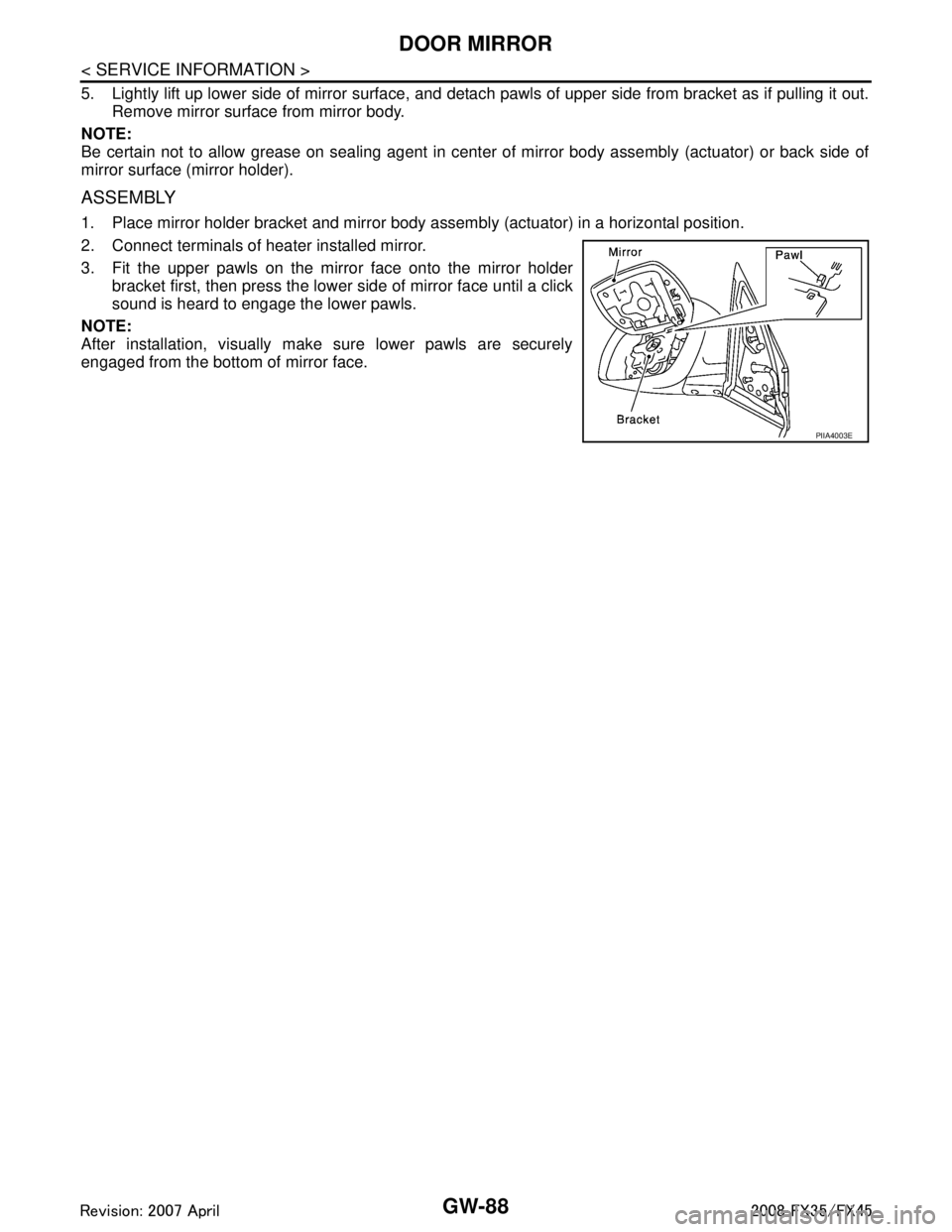
5. Lightly lift up lower side of mirror surface, and detach pawls of upper side from bracket as if pulling it out.
Remove mirror surface from mirror body.
NOTE:
Be certain not to allow grease on sealing agent in cent er of mirror body assembly (actuator) or back side of
mirror surface (mirror holder).
ASSEMBLY
1. Place mirror holder bracket and mirror body assembly (actuator) in a horizontal position.
2. Connect terminals of heater installed mirror.
3. Fit the upper pawls on the mirror face onto the mirror holder bracket first, then press the lower side of mirror face until a click
sound is heard to engage the lower pawls.
NOTE:
After installation, visually make sure lower pawls are securely
engaged from the bottom of mirror face.
PIIA4003E
3AA93ABC3ACD3AC03ACA3AC03AC63AC53A913A773A893A873A873A8E3A773A983AC73AC93AC03AC3
3A893A873A873A8F3A773A9D3AAF3A8A3A8C3A863A9D3AAF3A8B3A8C
Page 3002 of 3924

IP-1
BODY
C
DE
F
G H
J
K L
M
SECTION IP
A
B
IP
N
O P
CONTENTS
INSTRUMENT PANEL
SERVICE INFORMATION .. ..........................2
PRECAUTIONS .............................................. .....2
Precaution for Supplemental Restraint System
(SRS) "AIR BAG" and "SEAT BELT PRE-TEN-
SIONER" ............................................................. ......
2
Precaution .................................................................2
PREPARATION ...................................................3
Special Service Tool ........................................... ......3
Commercial Service Tool ..........................................3
SQUEAK AND RATTLE TROUBLE DIAG-
NOSES ...............................................................
4
Work Flow ............................................................ .....4
Generic Squeak and Rattle Troubleshooting ............6
Diagnostic Worksheet ...............................................8
INSTRUMENT PANEL ASSEMBLY .................10
Component Parts Location ......................................10
Removal and Installation .........................................11
Disassembly and Assembly .....................................16
3AA93ABC3ACD3AC03ACA3AC03AC63AC53A913A773A893A873A873A8E3A773A983AC73AC93AC03AC3
3A893A873A873A8F3A773A9D3AAF3A8A3A8C3A863A9D3AAF3A8B3A8C
Page 3006 of 3924
SQUEAK AND RATTLE TROUBLE DIAGNOSESIP-5
< SERVICE INFORMATION >
C
DE
F
G H
J
K L
M A
B
IP
N
O P
If the noise can be duplicated easily during the test drive, to help identify the source of the noise, try to dupli-
cate the noise with the vehicle stopped by doing one or all of the following:
1) Close a door.
2) Tap or push/pull around the area where the noise appears to be coming from.
3) Rev the engine.
4) Use a floor jack to recreate vehicle “twist”.
5) At idle, apply engine load (electrical load, half- clutch on M/T model, drive position on A/T model).
6) Raise the vehicle on a hoist and hit a tire with a rubber hammer.
Drive the vehicle and attempt to duplicate the conditions the customer states exist when the noise occurs.
If it is difficult to duplicate the noise, drive the vehicle slowly on an undulating or rough road to stress the vehicle body.
CHECK RELATED SERVICE BULLETINS
After verifying the customer concern or symptom, che ck ASIST for Technical Service Bulletins (TSBs) related
to that concern or symptom.
If a TSB relates to the symptom, follow the procedure to repair the noise.
LOCATE THE NOISE AND IDENTIFY THE ROOT CAUSE
1. Narrow down the noise to a general area. To help pinpoint the source of the noise, use a listening tool (Chassis Ear: J39570, Engine Ea r and mechanics stethoscope).
2. Narrow down the noise to a more specific area and identify the cause of the noise by:
Removing the components in the area that you suspect the noise is coming from.
Do not use too much force when removing clips and fasteners, otherwise clips and fastener can be broken
or lost during the repair, resulting in the creation of new noise.
Tapping or pushing/pulling the component that you suspect is causing the noise.
Do not tap or push/pull the component with excessive force, otherwise the noise will be eliminated only tem-
porarily.
Feeling for a vibration with your hand by touching t he component(s) that you suspect is (are) causing the
noise.
Placing a piece of paper between components that you suspect are causing the noise.
Looking for loose components and contact marks. Refer to IP-6, "
Generic Squeak and Rattle Troubleshooting".
REPAIR THE CAUSE
If the cause is a loose component, tighten the component securely.
If the cause is insufficient clearance between components:
- Separate components by repositioning or loosening and retightening the component, if possible.
- Insulate components with a suitable insulator such as urethane pads, foam blocks, felt cloth tape or ure-
thane tape. A NISSAN Squeak and Rattle Kit (J43980) is available through your authorized NISSAN Parts
Department.
CAUTION:
Do not use excessive force as many components are constructed of plastic and may be damaged.
NOTE:
Always check with the Parts Department for the latest parts information.
The following materials are contained in the NISS AN Squeak and Rattle Kit (J43980). Each item can be
ordered separately as needed.
URETHANE PADS [1.5 mm (0.059 in) thick]
Insulates connectors, harness, etc.
76268-9E005: 100 × 135 mm (3.94 × 5.31 in)/ 76884-71L01: 60 × 85 mm (2.36 × 3.35 in)/76884-71L02: 15 ×
25 mm (0.59 × 0.98 in)
INSULATOR (Foam blocks)
Insulates components from contact. Can be used to fill space behind a panel.
73982-9E000: 45 mm (1.77 in) thick, 50 × 50 mm (1.97 × 1.97 in)/73982-50Y00: 10 mm (0.39 in) think, 50
× 50 mm (1.97 × 1.97 in)
INSULATOR (Light foam block)
80845 - 71L00: 30 mm (1.18 in) thick, 30 × 50 mm (1.18 × 1.97 in)
FELT CLOTH TAPE
Used to insulate where movement does not oc cur.Ideal for instrument panel applications.
68370 - 4B000: 15 × 25 mm (0.59 × 0.98 in) pad / 68239-13E00: 5 mm (0.20 in) wide tape roll The following
materials, not found in the kit, can also be used to repair squeaks and rattles.
UHMW (TEFLON) TAPE
3AA93ABC3ACD3AC03ACA3AC03AC63AC53A913A773A893A873A873A8E3A773A983AC73AC93AC03AC3
3A893A873A873A8F3A773A9D3AAF3A8A3A8C3A863A9D3AAF3A8B3A8C
Page 3019 of 3924

IP-18
< SERVICE INFORMATION >
INSTRUMENT PANEL ASSEMBLY
Disassembly
1. Insert a remover into side between gaps console rear finisher and pull back to your side, and disconnectpawls below.
2. Disconnect harness connector and remove console rear finisher.
3. Insert a remover into side between gaps of console mask and pull back to your side.
4. Remove screws with power tool and remove console lid.
5. Remove screws fixing DVD player with power tool.
6. Disconnect harness connectors, and remove DVD player.
Assembly
Assemble in the reverse order of disassembly.
INSTRUMENT PASSENGER LOWER PANEL
1. Console lid 2. Console mask 3. Console body
4. DVD player bracket 5. DVD player 6. Console rear finisher
Clip Pawl
PIIB8538E
3AA93ABC3ACD3AC03ACA3AC03AC63AC53A913A773A893A873A873A8E3A773A983AC73AC93AC03AC3
3A893A873A873A8F3A773A9D3AAF3A8A3A8C3A863A9D3AAF3A8B3A8C
Page 3063 of 3924
![INFINITI FX35 2008 Service Manual
TROUBLE DIAGNOSISLAN-43
< SERVICE INFORMATION > [CAN]
C
D
E
F
G H
I
J
L
M A
B
LAN
N
O P
*: The error counter stops counting when it reaches “50” and holds “50” until it is deleted.
CAN System](/img/42/57017/w960_57017-3062.png "INFINITI FX35 2008 Service Manual
TROUBLE DIAGNOSISLAN-43
< SERVICE INFORMATION > [CAN]
C
D
E
F
G H
I
J
L
M A
B
LAN
N
O P
*: The error counter stops counting when it reaches “50” and holds “50” until it is deleted.
CAN System")
TROUBLE DIAGNOSISLAN-43
< SERVICE INFORMATION > [CAN]
C
D
E
F
G H
I
J
L
M A
B
LAN
N
O P
*: The error counter stops counting when it reaches “50” and holds “50” until it is deleted.
CAN System Specification ChartINFOID:0000000001328635
Determine CAN system type from the following specific ation chart. Then choose the correct diagnosis sheet.
NOTE:
Refer to LAN-14, "
Trouble Diagnosis Procedure" for how to use CAN system specification chart.
VEHICLE EQUIPMENT IDENTIFICATION INFORMATION
NOTE:
Unit name Diagnosis item Description Indicated items on CAN DIAG SUPPORT MONITOR
Normal Error
Result indi- cated Error
counter
(Reference) Result indi-
cated Error
counter
(Reference)
Display control
unit CAN_COMM Status of CAN controller
OK0
or
1 – 50* NG
1 – 50*
CAN_CIRC_1 Signal transmission status
UNKWN
CAN_CIRC_2 Signal receiving status from the
BCM
CAN_CIRC_3 Signal receiving status from the
ECM
CAN_CIRC_4 Not used even though indicated
CAN_CIRC_5 Signal receiving status from the uni-
fied meter and A/C amp. OK0
or
1 – 50* UNKWN 1 – 50*
CAN_CIRC_6 Not used even though indicated
CAN_CIRC_7 Signal receiving status from the
IPDM E/R
OK0
or
1 – 50* UNKWN 1 – 50*
CAN_CIRC_8 Not used even though indicated
CAN_CIRC_9
Body type Wagon
Axle 2WD AWD
Engine VQ35DE VK45DE
Transmission A/T
Brake control VDC
ICC system ×××
Intelligent Key system ×× ××××
Lane departure warning system ×××
CAN system type 12345678
Diagnosis sheet LAN-60
LAN-61LAN-62LAN-63LAN-64LAN-65LAN-66LAN-67
CAN communication signal chart “TYPE 1/TYPE 2” “TYPE 3” “TYPE 4/TYPE 5/
TYPE 7” “TYPE 6/
TYPE 8” “TYPE 4/
TYPE 5/
TYPE 7” “TYPE 6/
TYPE 8”
3AA93ABC3ACD3AC03ACA3AC03AC63AC53A913A773A893A873A873A8E3A773A983AC73AC93AC03AC3
3A893A873A873A8F3A773A9D3AAF3A8A3A8C3A863A9D3AAF3A8B3A8C
Page 3107 of 3924
HEADLAMP - XENON TYPE -LT-5
< SERVICE INFORMATION >
C
DE
F
G H
I
J
L
M A
B
LT
N
O P
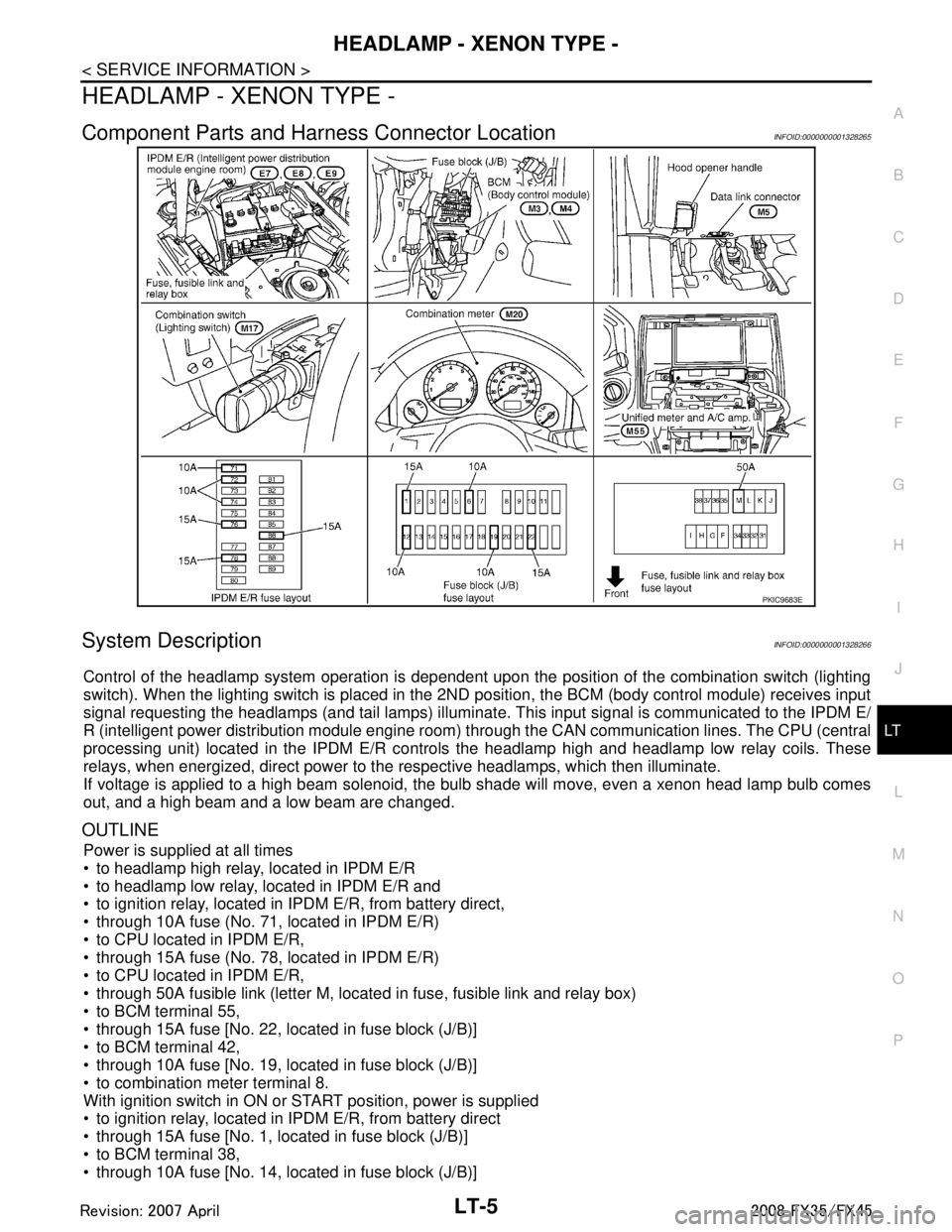
HEADLAMP - XENON TYPE -
Component Parts and Har ness Connector LocationINFOID:0000000001328265
System DescriptionINFOID:0000000001328266
Control of the headlamp system operation is dependent upon t he position of the combination switch (lighting
switch). When the lighting switch is placed in the 2ND position, the BCM (body control module) receives input
signal requesting the headlamps (and tail lamps) illuminate. This input signal is communicated to the IPDM E/
R (intelligent power distribution module engine room) through the CAN communication lines. The CPU (central
processing unit) located in the IPDM E/R contro ls the headlamp high and headlamp low relay coils. These
relays, when energized, direct power to the respective headlamps, which then illuminate.
If voltage is applied to a high beam solenoid, the bulb shade will move, even a xenon head lamp bulb comes
out, and a high beam and a low beam are changed.
OUTLINE
Power is supplied at all times
to headlamp high relay, located in IPDM E/R
to headlamp low relay, located in IPDM E/R and
to ignition relay, located in IPDM E/R, from battery direct,
through 10A fuse (No. 71, located in IPDM E/R)
to CPU located in IPDM E/R,
through 15A fuse (No. 78, located in IPDM E/R)
to CPU located in IPDM E/R,
through 50A fusible link (letter M, located in fuse, fusible link and relay box)
to BCM terminal 55,
through 15A fuse [No. 22, located in fuse block (J/B)]
to BCM terminal 42,
through 10A fuse [No. 19, located in fuse block (J/B)]
to combination meter terminal 8.
With ignition switch in ON or START position, power is supplied
to ignition relay, located in IPDM E/R, from battery direct
through 15A fuse [No. 1, located in fuse block (J/B)]
to BCM terminal 38,
through 10A fuse [No. 14, located in fuse block (J/B)]
PKIC9683E
3AA93ABC3ACD3AC03ACA3AC03AC63AC53A913A773A893A873A873A8E3A773A983AC73AC93AC03AC3
3A893A873A873A8F3A773A9D3AAF3A8A3A8C3A863A9D3AAF3A8B3A8C