Body INFINITI FX35 2008 Service Manual
[x] Cancel search | Manufacturer: INFINITI, Model Year: 2008, Model line: FX35, Model: INFINITI FX35 2008Pages: 3924, PDF Size: 81.37 MB
Page 2425 of 3924
![INFINITI FX35 2008 Service Manual
SNOW MODE SWITCHEC-1185
< SERVICE INFORMATION > [VK45DE]
C
D
E
F
G H
I
J
K L
M A
EC
NP
O
4. Also check harness for short to ground and short to power.
OK or NG
OK >> GO TO 9.
NG >> Repair open circui](/img/42/57017/w960_57017-2424.png "INFINITI FX35 2008 Service Manual
SNOW MODE SWITCHEC-1185
< SERVICE INFORMATION > [VK45DE]
C
D
E
F
G H
I
J
K L
M A
EC
NP
O
4. Also check harness for short to ground and short to power.
OK or NG
OK >> GO TO 9.
NG >> Repair open circui")
SNOW MODE SWITCHEC-1185
< SERVICE INFORMATION > [VK45DE]
C
D
E
F
G H
I
J
K L
M A
EC
NP
O
4. Also check harness for short to ground and short to power.
OK or NG
OK >> GO TO 9.
NG >> Repair open circuit or short to ground or short to power in harness or connectors.
7.CHECK GROUND CONNECTIONS
1. Turn ignition switch OFF.
2. Loosen and retighten three ground screws on the body. Refer to EC-723, "
Ground Inspection".
OK or NG
OK >> GO TO 8.
NG >> Repair or replace ground connections.
8.CHECK SNOW MODE INDICATOR LAMP GROUND CIRCUIT FOR OPEN AND SHORT
1. Check harness continuity between snow mode switch terminal 2 and ground. Refer to Wiring Diagram.
2. Also check harness for short to power.
OK or NG
OK >> GO TO 9.
NG >> Repair open circuit or short to power in harness or connectors.
9.CHECK SNOW MODE SWITCH
Refer to EC-1185, "
Component Inspection".
OK or NG
OK >> GO TO 10.
NG >> Replace snow mode switch.
10.CHECK INTERMITTENT INCIDENT
Refer to EC-717
.
>> INSPECTION END
Component InspectionINFOID:0000000001327081
SNOW MODE SWITCH
PBIB2195E
Continuity should exist.
3AA93ABC3ACD3AC03ACA3AC03AC63AC53A913A773A893A873A873A8E3A773A983AC73AC93AC03AC3
3A893A873A873A8F3A773A9D3AAF3A8A3A8C3A863A9D3AAF3A8B3A8C
Page 2438 of 3924

EI-1
BODY
C
DE
F
G H
J
K L
M
SECTION EI
A
B
EI
N
O P
CONTENTS
EXTERIOR & INTERIOR
SERVICE INFORMATION .. ..........................3
PRECAUTIONS .............................................. .....3
Precaution for Supplemental Restraint System
(SRS) "AIR BAG" and "SEAT BELT PRE-TEN-
SIONER" ............................................................. ......
3
Precaution for Procedure without Cowl Top Cover ......3
Precaution for Work ..................................................3
PREPARATION ...................................................4
Special Service Tool ........................................... ......4
Commercial Service Tool ..........................................4
SQUEAK AND RATTLE TROUBLE DIAG-
NOSES ................................................................
5
Work Flow ........................................................... ......5
Generic Squeak and Rattle Troubleshooting ............7
Diagnostic Worksheet ...............................................9
CLIP AND FASTENER .......................................11
Clip and Fastener ................................................ ....11
FRONT BUMPER ...............................................14
Component Parts Location .................................. ....14
Removal and Installation .........................................15
REAR BUMPER .................................................17
Component Parts Location .................................. ....17
Removal and Installation .........................................18
FRONT GRILLE .................................................22
Component Parts Location .................................. ....22
Removal and Installation .........................................22
COWL TOP .........................................................23
Component Parts Location .................................. ....23
Removal and Installation .........................................23
FENDER PROTECTOR ......................................24
Component Parts Location .................................. ....24
Removal and Installation .........................................24
DOOR OUTSIDE MOLDING .............................25
Component Parts Location .................................. ....25
Removal and Installation .........................................25
DOOR OUTSIDE LOWER MOLDING ...............26
Component Parts Location ......................................26
Removal and Installation .........................................26
DOOR PARTING SEAL ....................................27
Component Parts Location ......................................27
Removal and Installation .........................................27
CENTER MUD GUARD .....................................29
Component Parts Location ......................................29
Removal and Installation .........................................29
WINDSHIELD MOLDING ..................................30
Component Parts Location ......................................30
Removal and Installation .........................................30
BACK DOOR WINDOW MOLDING ..................31
Component Parts Location .................................. ....31
Removal and Installation .........................................31
ROOF SIDE MOLDING .....................................32
Component Parts Location ......................................32
Removal and Installation .........................................32
ROOF RAIL .......................................................33
Component Parts Location ......................................33
Removal and Installation .........................................33
BACK DOOR FINISHER ...................................35
Component Parts Location ......................................35
Removal and Installation .........................................35
DOOR FINISHER ..............................................36
Component Parts Location ......................................36
Removal and Installation .........................................36
BODY SIDE TRIM .............................................38
Component Parts Location ......................................38
Removal and Installation .........................................38
3AA93ABC3ACD3AC03ACA3AC03AC63AC53A913A773A893A873A873A8E3A773A983AC73AC93AC03AC3
3A893A873A873A8F3A773A9D3AAF3A8A3A8C3A863A9D3AAF3A8B3A8C
Page 2443 of 3924
EI-6
< SERVICE INFORMATION >
SQUEAK AND RATTLE TROUBLE DIAGNOSES
If the noise can be duplicated easily during the test drive, to help identify the source of the noise, try to dupli-
cate the noise with the vehicle stopped by doing one or all of the following:
1) Close a door.
2) Tap or push/pull around the area where the noise appears to be coming from.
3) Rev the engine.
4) Use a floor jack to recreate vehicle “twist”.
5) At idle, apply engine load (electrical load, half- clutch on M/T model, drive position on A/T model).
6) Raise the vehicle on a hoist and hit a tire with a rubber hammer.
Drive the vehicle and attempt to duplicate the conditions the customer states exist when the noise occurs.
If it is difficult to duplicate the noise, drive the v ehicle slowly on an undulating or rough road to stress the
vehicle body.
CHECK RELATED SERVICE BULLETINS
After verifying the customer concern or symptom, chec k ASIST for Technical Service Bulletins (TSBs) related
to that concern or symptom.
If a TSB relates to the symptom, follo w the procedure to repair the noise.
LOCATE THE NOISE AND IDENTIFY THE ROOT CAUSE
1. Narrow down the noise to a general area. To help pi npoint the source of the noise, use a listening tool
(Chassis Ear: J-39570,Engine Ear and mechanics stethoscope).
2. Narrow down the noise to a more specific area and identify the cause of the noise by:
Removing the components in the area that you suspect the noise is coming from.
Do not use too much force when removing clips and fasteners, otherwise clips and fastener can be broken
or lost during the repair, resulting in the creation of new noise.
Tapping or pushing/pulling the component that you suspect is causing the noise.
Do not tap or push/pull the component with excessive force, otherwise the noise will be eliminated only tem-
porarily.
Feeling for a vibration with your hand by touching the component(s) that you suspect is (are) causing the
noise.
Placing a piece of paper between components that you suspect are causing the noise.
Looking for loose components and contact marks. Refer to EI-7, "
Generic Squeak and Rattle Troubleshooting".
REPAIR THE CAUSE
If the cause is a loose component, tighten the component securely.
If the cause is insufficient clearance between components:
- Separate components by repositioning or loos ening and retightening the component, if possible.
- Insulate components with a suitable insulator such as urethane pads, foam blocks, felt cloth tape or ure-
thane tape. A Nissan Squeak and Rattle Kit (J-43980) is available through your authorized Nissan Parts
Department.
CAUTION:
Do not use excessive force as many components are constructed of plastic and may be damaged.
NOTE:
Always check with the Parts Departm ent for the latest parts information.
The following materials are contained in the Nissan Squeak and Rattle Kit (J-43980). Each item can be
ordered separately as needed.
URETHANE PADS [1.5 mm (0.059 in) thick]
Insulates connectors, harness, etc.
76268-9E005: 100 × 135 mm (3.94 × 5.31 in)/76884-71L01: 60 × 85 mm (2.36 × 3.35 in)/76884-71L02:15 ×
25 mm (0.59 × 0.98 in)
INSULATOR (Foam blocks)
Insulates components from contact. Can be used to fill space behind a panel.
73982-9E000: 45 mm (1.77 in) thick, 50 × 50 mm (1.97 × 1.97 in)/73982-50Y00: 10 mm (0.39 in) thick, 50
× 50 mm (1.97 × 1.97 in)
INSULATOR (Light foam block)
80845-71L00: 30 mm (1.18 in) thick, 30 × 50 mm (1.18 × 1.97 in)
FELT CLOTHTAPE
Used to insulate where movement does not occu r. Ideal for instrument panel applications.
68370-4B000: 15 × 25 mm (0.59 × 0.98 in) pad/68239-13E00: 5 mm (0.20 in) wide tape roll The following
materials, not found in the kit, can al so be used to repair squeaks and rattles.
UHMW(TEFLON) TAPE
3AA93ABC3ACD3AC03ACA3AC03AC63AC53A913A773A893A873A873A8E3A773A983AC73AC93AC03AC3
3A893A873A873A8F3A773A9D3AAF3A8A3A8C3A863A9D3AAF3A8B3A8C
Page 2460 of 3924
COWL TOPEI-23
< SERVICE INFORMATION >
C
DE
F
G H
J
K L
M A
B
EI
N
O P
COWL TOP
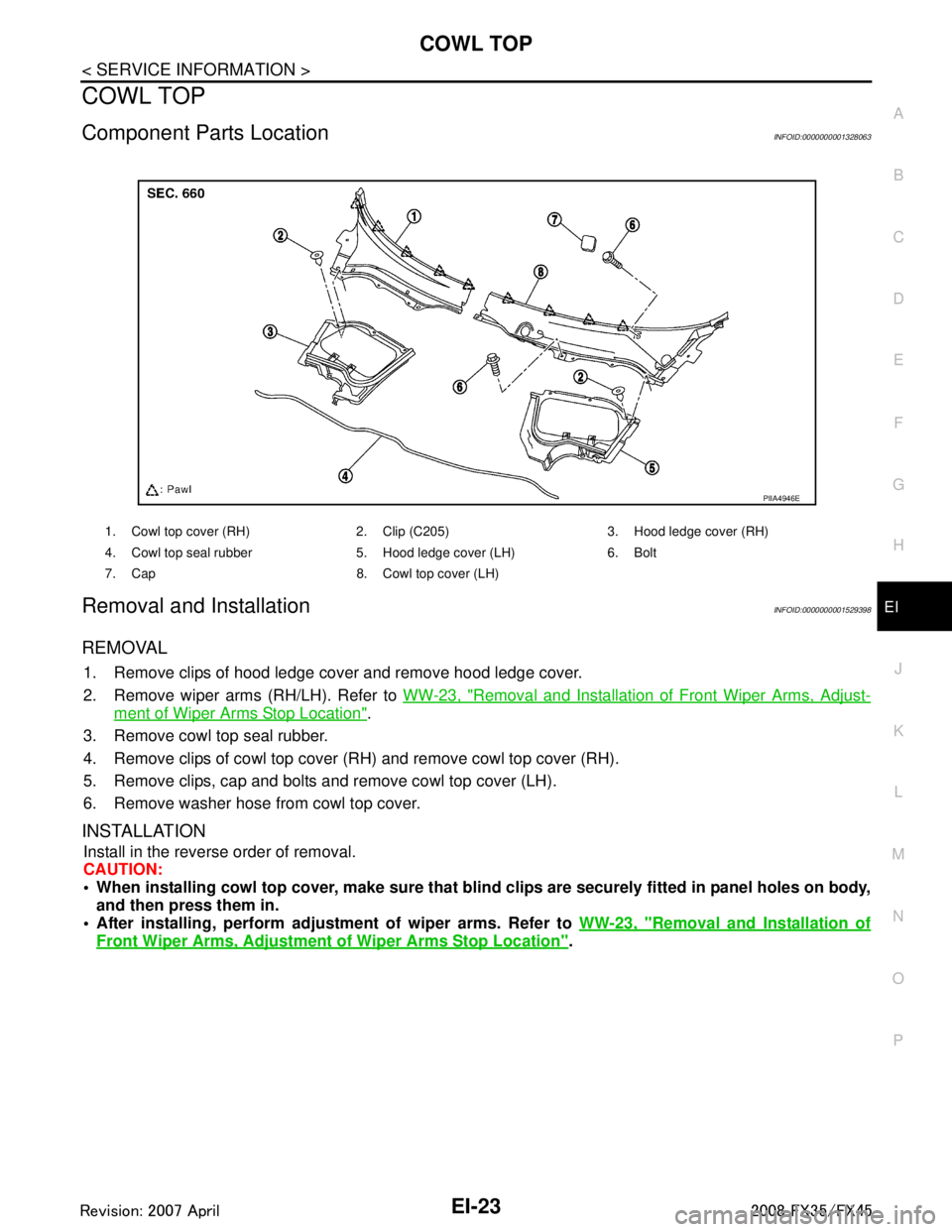
Component Parts LocationINFOID:0000000001328063
Removal and InstallationINFOID:0000000001529398
REMOVAL
1. Remove clips of hood ledge cover and remove hood ledge cover.
2. Remove wiper arms (RH/LH). Refer to WW-23, "
Removal and Installation of Front Wiper Arms, Adjust-
ment of Wiper Arms Stop Location".
3. Remove cowl top seal rubber.
4. Remove clips of cowl top cover (RH) and remove cowl top cover (RH).
5. Remove clips, cap and bolts and remove cowl top cover (LH).
6. Remove washer hose from cowl top cover.
INSTALLATION
Install in the reverse order of removal.
CAUTION:
When installing cowl top cover, m ake sure that blind clips are securely fitted in panel holes on body,
and then press them in.
After installing, perform adjust ment of wiper arms. Refer to WW-23, "
Removal and Installation of
Front Wiper Arms, Adjustment of Wiper Arms Stop Location".
1. Cowl top cover (RH) 2. Clip (C205) 3. Hood ledge cover (RH)
4. Cowl top seal rubber 5. Hood ledge cover (LH) 6. Bolt
7. Cap 8. Cowl top cover (LH)
PIIA4946E
3AA93ABC3ACD3AC03ACA3AC03AC63AC53A913A773A893A873A873A8E3A773A983AC73AC93AC03AC3
3A893A873A873A8F3A773A9D3AAF3A8A3A8C3A863A9D3AAF3A8B3A8C
Page 2466 of 3924
CENTER MUD GUARDEI-29
< SERVICE INFORMATION >
C
DE
F
G H
J
K L
M A
B
EI
N
O P
CENTER MUD GUARD
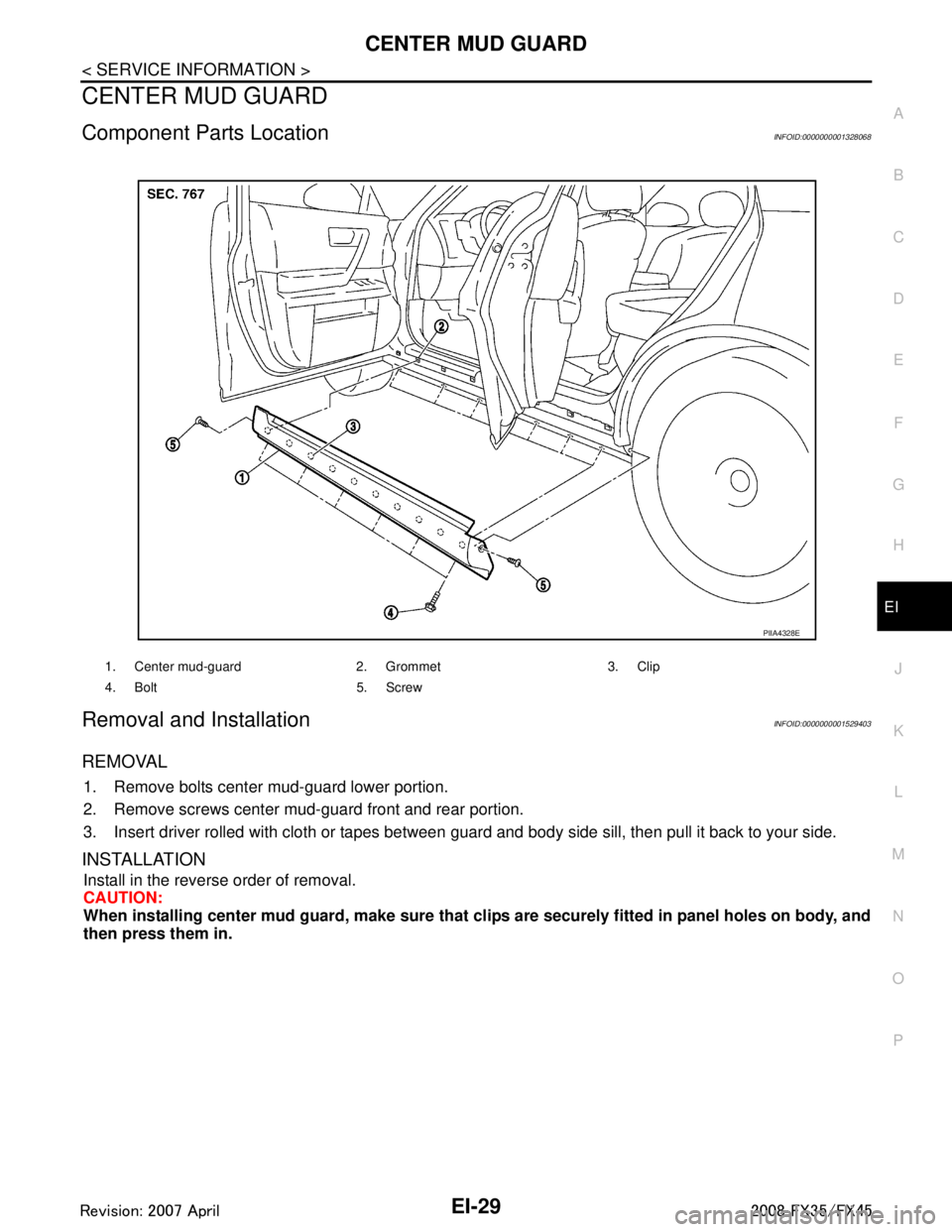
Component Parts LocationINFOID:0000000001328068
Removal and InstallationINFOID:0000000001529403
REMOVAL
1. Remove bolts center mud-guard lower portion.
2. Remove screws center mud-guard front and rear portion.
3. Insert driver rolled with cloth or tapes between guard and body side sill, then pull it back to your side.
INSTALLATION
Install in the reverse order of removal.
CAUTION:
When installing center mud guard, make sure that cl ips are securely fitted in panel holes on body, and
then press them in.
1. Center mud-guard 2. Grommet 3. Clip
4. Bolt 5. Screw
PIIA4328E
3AA93ABC3ACD3AC03ACA3AC03AC63AC53A913A773A893A873A873A8E3A773A983AC73AC93AC03AC3
3A893A873A873A8F3A773A9D3AAF3A8A3A8C3A863A9D3AAF3A8B3A8C
Page 2467 of 3924
EI-30
< SERVICE INFORMATION >
WINDSHIELD MOLDING
WINDSHIELD MOLDING
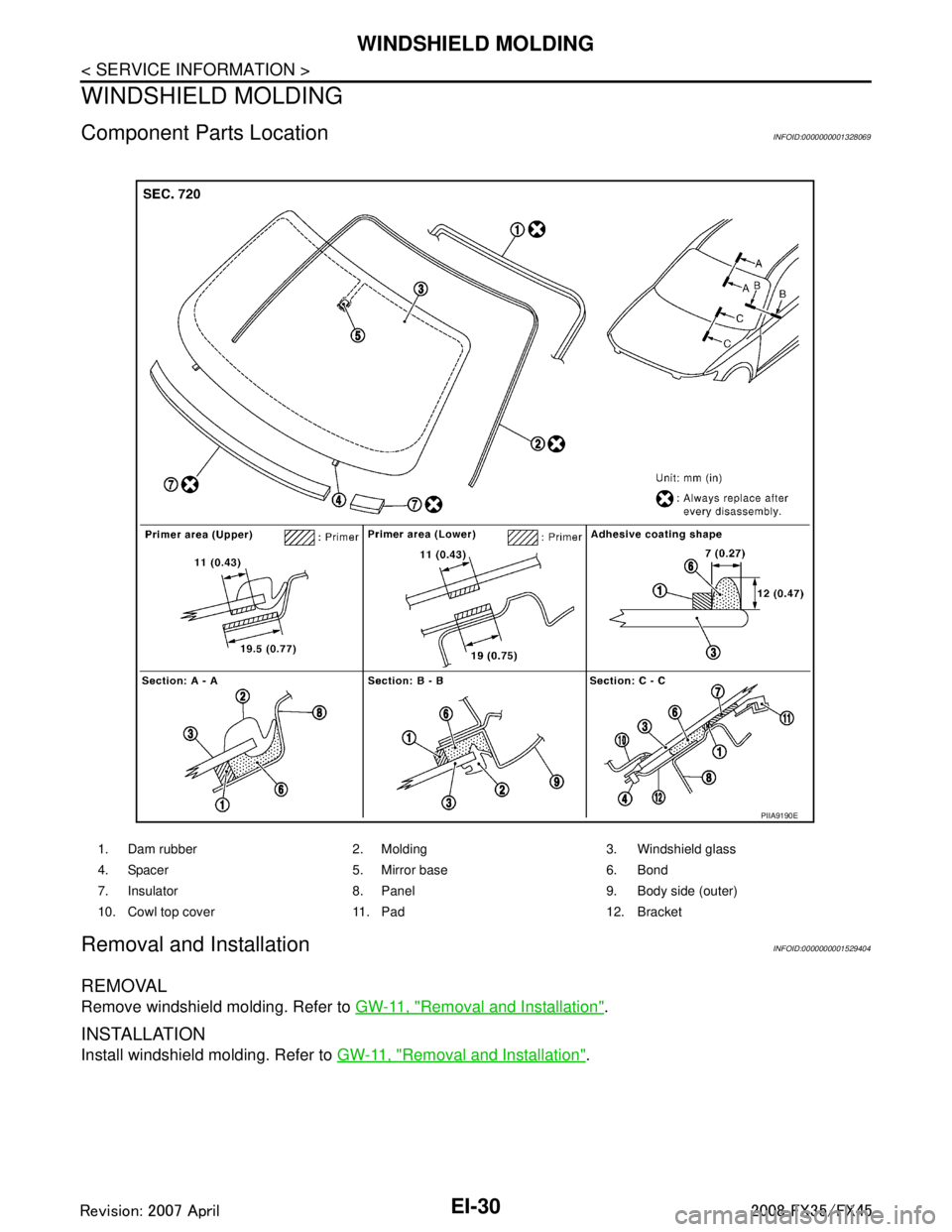
Component Parts LocationINFOID:0000000001328069
Removal and InstallationINFOID:0000000001529404
REMOVAL
Remove windshield molding. Refer to GW-11, "Removal and Installation".
INSTALLATION
Install windshield molding. Refer to GW-11, "Removal and Installation".
1. Dam rubber 2. Molding 3. Windshield glass
4. Spacer 5. Mirror base 6. Bond
7. Insulator 8. Panel 9. Body side (outer)
10. Cowl top cover 11. Pad 12. Bracket
PIIA9190E
3AA93ABC3ACD3AC03ACA3AC03AC63AC53A913A773A893A873A873A8E3A773A983AC73AC93AC03AC3
3A893A873A873A8F3A773A9D3AAF3A8A3A8C3A863A9D3AAF3A8B3A8C
Page 2475 of 3924
EI-38
< SERVICE INFORMATION >
BODY SIDE TRIM
BODY SIDE TRIM
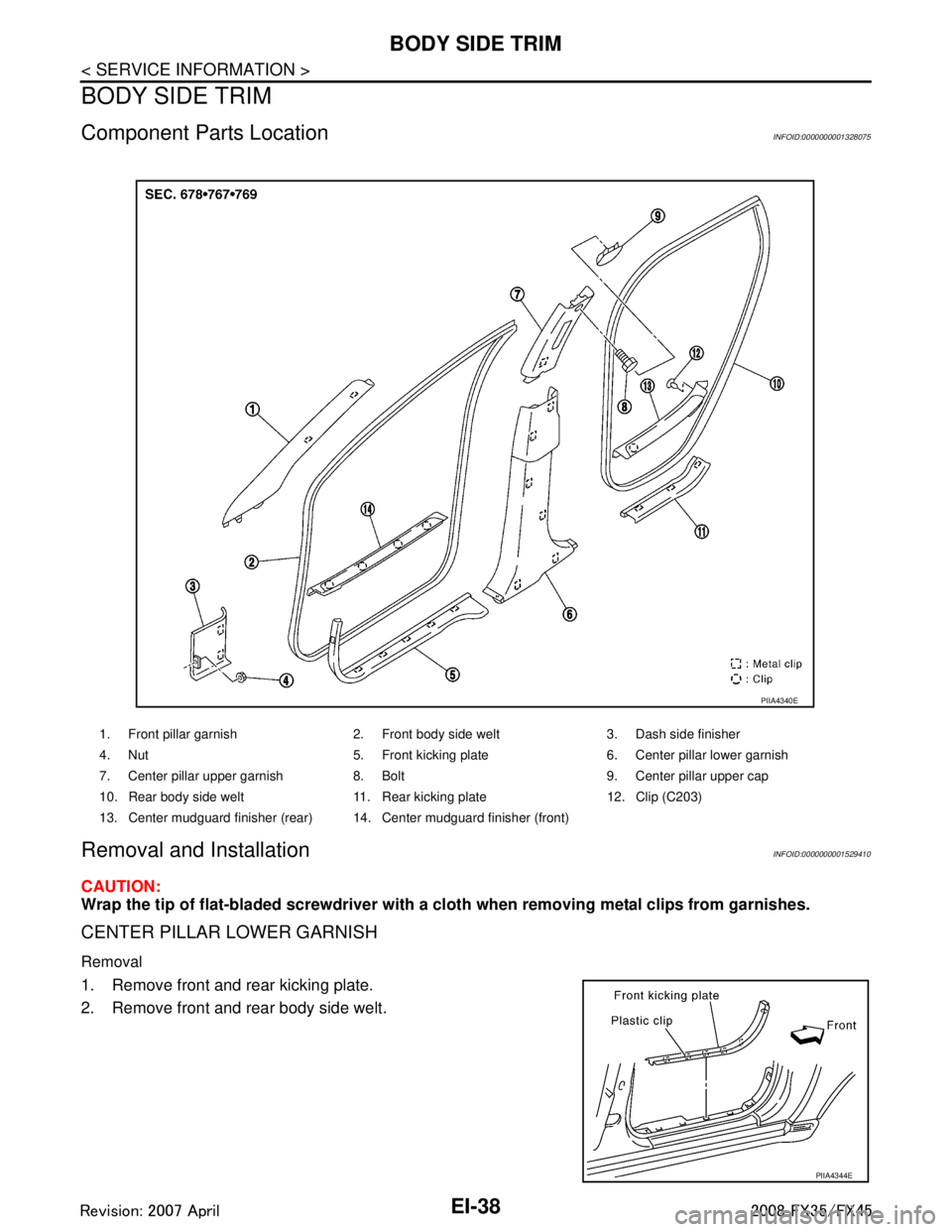
Component Parts LocationINFOID:0000000001328075
Removal and InstallationINFOID:0000000001529410
CAUTION:
Wrap the tip of flat-bladed screwdriver with a cloth when removing metal clips from garnishes.
CENTER PILLAR LOWER GARNISH
Removal
1. Remove front and rear kicking plate.
2. Remove front and rear body side welt.
1. Front pillar garnish 2. Front body side welt 3. Dash side finisher
4. Nut 5. Front kicking plate 6. Center pillar lower garnish
7. Center pillar upper garnish 8. Bolt 9. Center pillar upper cap
10. Rear body side welt 11. Rear kicking plate 12. Clip (C203)
13. Center mudguard finisher (rear) 14. Center mudguard finisher (front)
PIIA4340E
PIIA4344E
3AA93ABC3ACD3AC03ACA3AC03AC63AC53A913A773A893A873A873A8E3A773A983AC73AC93AC03AC3
3A893A873A873A8F3A773A9D3AAF3A8A3A8C3A863A9D3AAF3A8B3A8C
Page 2476 of 3924
BODY SIDE TRIMEI-39
< SERVICE INFORMATION >
C
DE
F
G H
J
K L
M A
B
EI
N
O P
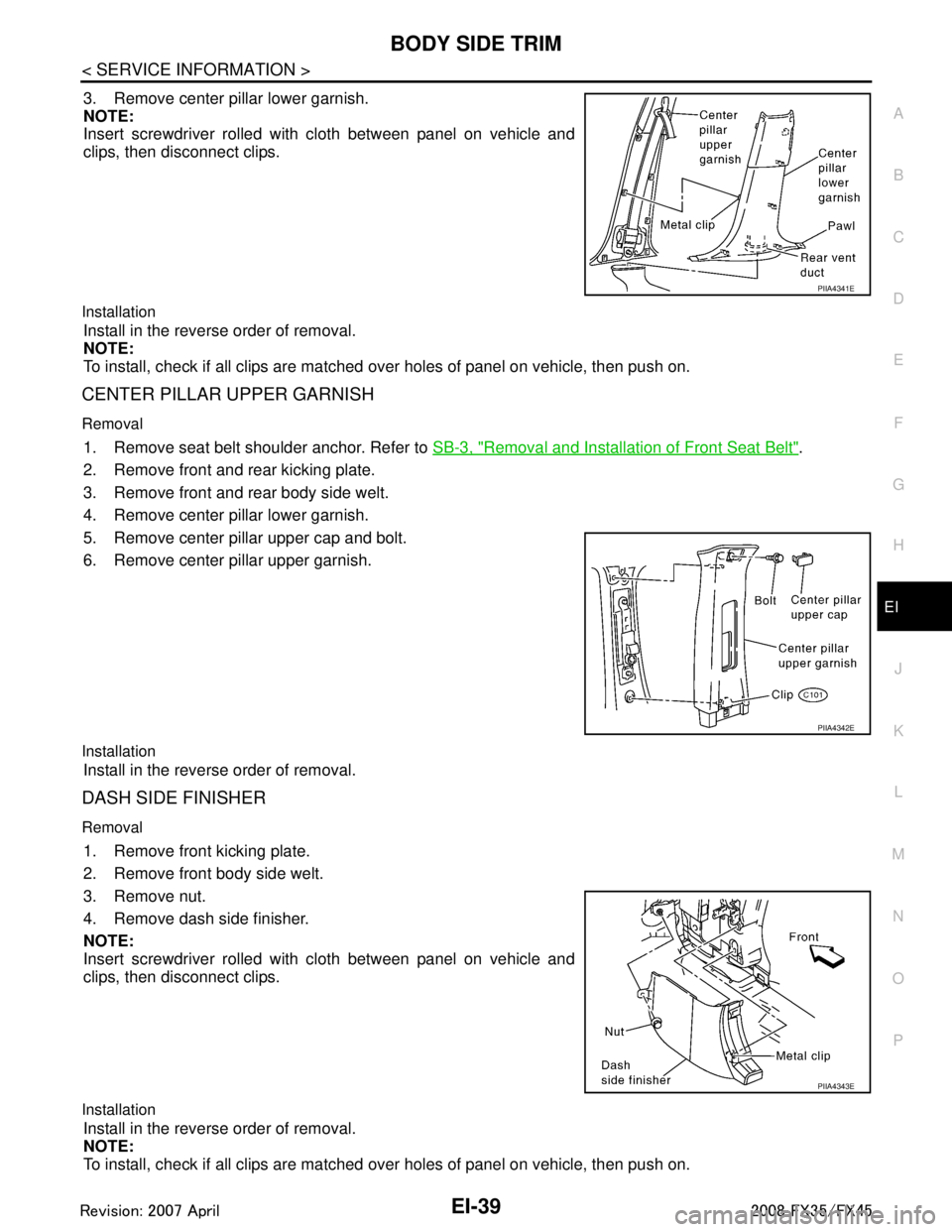
3. Remove center pillar lower garnish.
NOTE:
Insert screwdriver rolled with cloth between panel on vehicle and
clips, then disconnect clips.
Installation
Install in the reverse order of removal.
NOTE:
To install, check if all clips are matched over holes of panel on vehicle, then push on.
CENTER PILLAR UPPER GARNISH
Removal
1. Remove seat belt shoulder anchor. Refer to SB-3, "Removal and Installation of Front Seat Belt".
2. Remove front and rear kicking plate.
3. Remove front and rear body side welt.
4. Remove center pillar lower garnish.
5. Remove center pillar upper cap and bolt.
6. Remove center pillar upper garnish.
Installation
Install in the reverse order of removal.
DASH SIDE FINISHER
Removal
1. Remove front kicking plate.
2. Remove front body side welt.
3. Remove nut.
4. Remove dash side finisher.
NOTE:
Insert screwdriver rolled with cloth between panel on vehicle and
clips, then disconnect clips.
Installation
Install in the reverse order of removal.
NOTE:
To install, check if all clips are matched over holes of panel on vehicle, then push on.
PIIA4341E
PIIA4342E
PIIA4343E
3AA93ABC3ACD3AC03ACA3AC03AC63AC53A913A773A893A873A873A8E3A773A983AC73AC93AC03AC3
3A893A873A873A8F3A773A9D3AAF3A8A3A8C3A863A9D3AAF3A8B3A8C
Page 2477 of 3924
EI-40
< SERVICE INFORMATION >
BODY SIDE TRIM
FRONT PILLAR GARNISH
Removal
Remove front pillar garnish clips and remove front pillar garnish.
Installation
Install in the reverse order of removal.
KICKING PLATE
Removal
Remove kicking plate clips and remove kicking plate.
Installation
Install in the reverse order of removal.
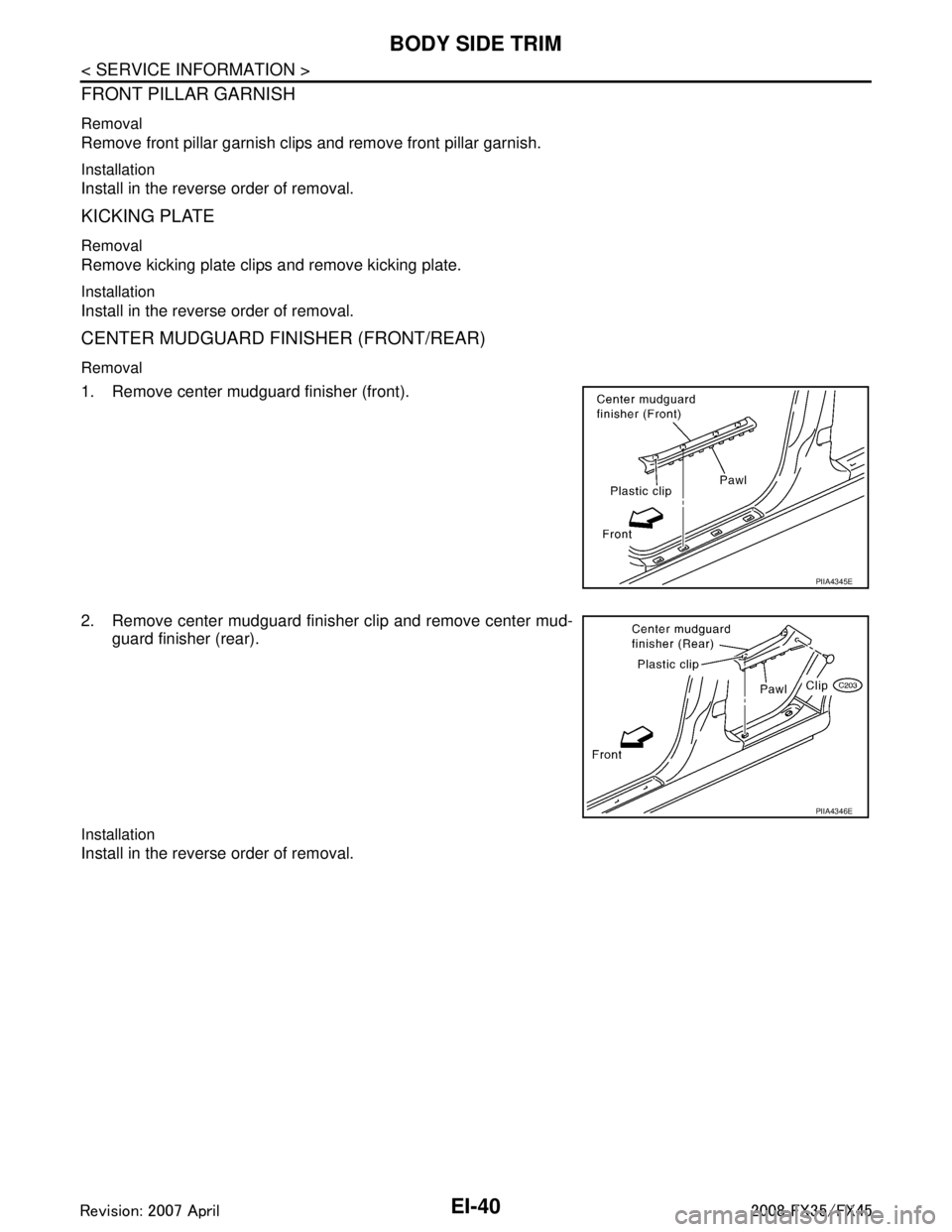
CENTER MUDGUARD FINISHER (FRONT/REAR)
Removal
1. Remove center mudguard finisher (front).
2. Remove center mudguard finisher clip and remove center mud-guard finisher (rear).
Installation
Install in the reverse order of removal.
PIIA4345E
PIIA4346E
3AA93ABC3ACD3AC03ACA3AC03AC63AC53A913A773A893A873A873A8E3A773A983AC73AC93AC03AC3
3A893A873A873A8F3A773A9D3AAF3A8A3A8C3A863A9D3AAF3A8B3A8C
Page 2478 of 3924
FLOOR TRIMEI-41
< SERVICE INFORMATION >
C
DE
F
G H
J
K L
M A
B
EI
N
O P
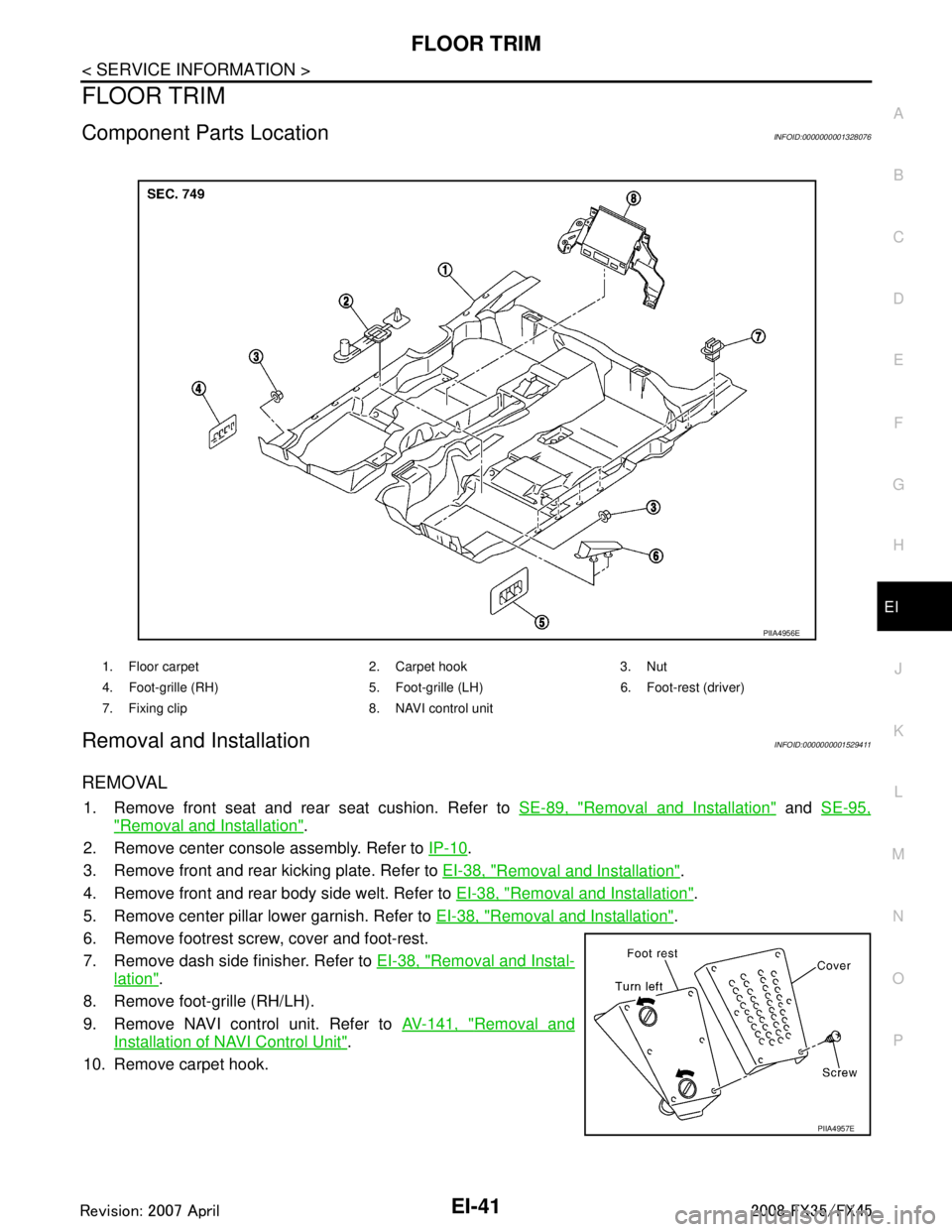
FLOOR TRIM
Component Parts LocationINFOID:0000000001328076
Removal and InstallationINFOID:0000000001529411
REMOVAL
1. Remove front seat and rear seat cushion. Refer to SE-89, "Removal and Installation" and SE-95,
"Removal and Installation".
2. Remove center console assembly. Refer to IP-10
.
3. Remove front and rear kicking plate. Refer to EI-38, "
Removal and Installation".
4. Remove front and rear body side welt. Refer to EI-38, "
Removal and Installation".
5. Remove center pillar lower garnish. Refer to EI-38, "
Removal and Installation".
6. Remove footrest screw, cover and foot-rest.
7. Remove dash side finisher. Refer to EI-38, "
Removal and Instal-
lation".
8. Remove foot-grille (RH/LH).
9. Remove NAVI control unit. Refer to AV-141, "
Removal and
Installation of NAVI Control Unit".
10. Remove carpet hook.
1. Floor carpet 2. Carpet hook 3. Nut
4. Foot-grille (RH) 5. Foot-gri lle (LH) 6. Foot-rest (driver)
7. Fixing clip 8. NAVI control unit
PIIA4956E
PIIA4957E
3AA93ABC3ACD3AC03ACA3AC03AC63AC53A913A773A893A873A873A8E3A773A983AC73AC93AC03AC3
3A893A873A873A8F3A773A9D3AAF3A8A3A8C3A863A9D3AAF3A8B3A8C