mount INFINITI FX35 2008 Service Manual
[x] Cancel search | Manufacturer: INFINITI, Model Year: 2008, Model line: FX35, Model: INFINITI FX35 2008Pages: 3924, PDF Size: 81.37 MB
Page 2724 of 3924
![INFINITI FX35 2008 Service Manual
EM-240
< SERVICE INFORMATION >[VK45DE]
ENGINE ASSEMBLY
Avoid damage to and oil/grease smearing or
spills onto engine mounting insulator.
4. Remove alternator. Refer to SC-19, "
System Description](/img/42/57017/w960_57017-2723.png "INFINITI FX35 2008 Service Manual
EM-240
< SERVICE INFORMATION >[VK45DE]
ENGINE ASSEMBLY
Avoid damage to and oil/grease smearing or
spills onto engine mounting insulator.
4. Remove alternator. Refer to SC-19, \"
System Description")
EM-240
< SERVICE INFORMATION >[VK45DE]
ENGINE ASSEMBLY
Avoid damage to and oil/grease smearing or
spills onto engine mounting insulator.
4. Remove alternator. Refer to SC-19, "
System Description".
5. Remove starter motor. Refer to SC-8, "
System Description".
6. Separate engine from transmission assembly. Refer to AT-243, "
Removal and Installation (AWD Models)".
7. Remove front final drive from engine. Refer to FFD-14, "
Removal and Installation (VQ35DE Models)".
8. Remove engine mounting insulators (RH and LH) and brackets (RH and LH) from engine with power tool.
9. Remove engine rear member and engine mounting insulator (rear) from transmission.
INSTALLATION
Note the following, and install in the reverse order of removal.
Do not allow engine mounting insulator to be damage and careful no engine oil gets on it.
For a location with a positioning pin, insert it securely into hole of mating part.
For a part with a specified installation orientation, refer to component figure in "Removal and Installation".
When installing engine mounting brackets (RH and LH) on cylinder
block, tighten two upper bolts (show n as “A” in the figure) first.
Then tighten two lower bolts (shown as “B” in the figure).
INSPECTION AFTER INSTALLATION
Inspection for Leaks
The followings are procedures for checking fluids leak, lubricates leak and exhaust gases leak.
Before starting engine, check oil/fluid levels incl uding engine coolant and engine oil. If less than required
quantity, fill to the specified level. Refer to MA-9, "
Fluids and Lubricants".
Use procedure below to check for fuel leakage.
- Turn ignition switch “ON” (with engine stopped). With fuel pressure applied to fuel piping, check for fuel leak-
age at connection points.
- Start engine. With engine speed increased, che ck again for fuel leakage at connection points.
Run engine to check for unusual noise and vibration.
Warm up engine thoroughly to make sure there is no leak age of fuel, exhaust gases, or any oil/fluids includ-
ing engine oil and engine coolant.
Bleed air from lines and hoses of applic able lines, such as in cooling system.
After cooling down engine, again check oil/fluid levels including engine oil and engine coolant. Refill to the specified level, if necessary.
Summary of the inspection items:
*: Transmission/transaxle/CVT fluid. power steering fluid, brake fluid, etc.
PBIC2365E
Items Before starting engine Engine running After engine stopped
Engine coolant Level Leakage Level
Engine oil Level Leakage Level
Other oils and fluid* Level Leakage Level
Fuel Leakage Leakage Leakage
Exhaust gases — Leakage —
3AA93ABC3ACD3AC03ACA3AC03AC63AC53A913A773A893A873A873A8E3A773A983AC73AC93AC03AC3
3A893A873A873A8F3A773A9D3AAF3A8A3A8C3A863A9D3AAF3A8B3A8C
Page 2726 of 3924
![INFINITI FX35 2008 Service Manual
EM-242
< SERVICE INFORMATION >[VK45DE]
CYLINDER BLOCK
Refer to
GI-8, "Component" for symbols in the figure.
Disassembly and AssemblyINFOID:0000000001325804
DISASSEMBLY
NOTE:
Explained here is how](/img/42/57017/w960_57017-2725.png "INFINITI FX35 2008 Service Manual
EM-242
< SERVICE INFORMATION >[VK45DE]
CYLINDER BLOCK
Refer to
GI-8, \"Component\" for symbols in the figure.
Disassembly and AssemblyINFOID:0000000001325804
DISASSEMBLY
NOTE:
Explained here is how")
EM-242
< SERVICE INFORMATION >[VK45DE]
CYLINDER BLOCK
Refer to
GI-8, "Component" for symbols in the figure.
Disassembly and AssemblyINFOID:0000000001325804
DISASSEMBLY
NOTE:
Explained here is how to disassemble with engine stand supporting transmission surface. When using differ-
ent type of engine stand, note with difference in steps and etc.
1. Remove engine assembly from vehicle, and separa te front suspension member, transmission and front
final drive from engine. Refer to EM-237, "
Component".
2. Remove the parts that may restrict installation of engine to widely use engine stand. NOTE:
The procedure is described assuming that you use wi dely use engine holding the surface, to which trans-
mission is installed.
a. Remove drive plate. Holding ring gear with ring gear stopper (SST).
Loosen mounting bolts diagonally order.
CAUTION:
Do not disassemble drive plate.
Do not place drive plate with signal plate facing down.
When handling signal plate, take care not to damage or scratch it.
Handle signal plate in a manner that prevents it from becoming magnetized.
b. Remove engine rear plate.
3. Lift engine with hoist to install it onto widely use engine stand. CAUTION:
Use engine stand that has a load capacity [approximately 240 kg ( 529 lb) or more] large enough for
supporting the engine weight.
If the load capacity of stand is not adequate, remo ve the following parts beforehand to reduce the poten-
tial risk of overturning stand.
- Intake manifolds (upper and lower): Refer to EM-175, "
Component".
- Exhaust manifold: Refer to EM-179, "
Component".
- Fuel tube and fuel injector assembly: Refer to EM-190, "
Component".
22. Main bearing 23. Rear plate 24. Crankshaft
25. Pilot converter 26. Drive plate 27. Thrust bearing
28. Side bolt 29. Reinforcement plate 30. Crankshaft position sensor (POS)
31. O-ring 32. Rear oil seal 33. Rear oil seal retainer
A.Refererence: Installed on transmis-
sion B. Refer to
EM-242
C. Right bank
D. Cylinder block heater (For Canada) E. Chamfered F. Crankshaft side : Engine front
PBIC1656E
PBIC2367E
3AA93ABC3ACD3AC03ACA3AC03AC63AC53A913A773A893A873A873A8E3A773A983AC73AC93AC03AC3
3A893A873A873A8F3A773A9D3AAF3A8A3A8C3A863A9D3AAF3A8B3A8C
Page 2734 of 3924
![INFINITI FX35 2008 Service Manual
EM-250
< SERVICE INFORMATION >[VK45DE]
CYLINDER BLOCK
c. Then tighten all connecting rod nuts 60 degrees clockwise.
(Angle tightening)
CAUTION:
Use angle wrench (SST) to ch eck tightening angle. Do n](/img/42/57017/w960_57017-2733.png "INFINITI FX35 2008 Service Manual
EM-250
< SERVICE INFORMATION >[VK45DE]
CYLINDER BLOCK
c. Then tighten all connecting rod nuts 60 degrees clockwise.
(Angle tightening)
CAUTION:
Use angle wrench (SST) to ch eck tightening angle. Do n")
EM-250
< SERVICE INFORMATION >[VK45DE]
CYLINDER BLOCK
c. Then tighten all connecting rod nuts 60 degrees clockwise.
(Angle tightening)
CAUTION:
Use angle wrench (SST) to ch eck tightening angle. Do not
make judgment by visual inspection.
After tightening connecting rod nuts, make sure that crank-
shaft rotates smoothly.
Check the connecting rod side clearance. Refer to EM-256,
"Inspection After Disassembly".
16. Install knock sensor. Install it with its connector facing the rear of engine.
Install the sub-harness with its shorter branch line to the rightbank.
CAUTION:
Do not tighten mounting bolts while holding connector.
If any impact by dropping is applied to knock sensor, replace it with new one.
NOTE:
Make sure that there is no foreign material on the cylinder block mating surface and the bac k surface of knock sensor.
Make sure that knock sensor does not interfere with other parts.
17. Note the following, and assemble in the re verse order of disassembly after this step.
Drive plate When installing drive plate to crankshaft, be sure to correctly
align crankshaft side guide pin and drive plate side guide pin
hole.
- If these are not aligned correctly, engine runs roughly and
“MIL” turns on.
Install drive plate, reinforcement plate and pilot converter (if not installed in step 4) as shown in the figure.
Face chamfered or rounded edge side to crankshaft.
Holding ring gear with ring gear stopper [SST: J-45476].
Tighten mounting bolts crosswise over several times.
When install pilot converter, using drift [outer diameter: approx. 35 mm (1.38 in)]. Press-fit as far as it will go.
CAUTION:
Make sure that guide pin is installed at the rear end of
crankshaft.
How to Select Piston and BearingINFOID:0000000001325805
DESCRIPTION
: 14.7 N·m (1.5 kg-m, 11 ft-lb)
PBIC0104E
PBIC0105E
PBIC0106E
PBIC1965E
3AA93ABC3ACD3AC03ACA3AC03AC63AC53A913A773A893A873A873A8E3A773A983AC73AC93AC03AC3
3A893A873A873A8F3A773A9D3AAF3A8A3A8C3A863A9D3AAF3A8B3A8C
Page 2763 of 3924
EXHAUST SYSTEMEX-3
< SERVICE INFORMATION >
C
DE
F
G H
I
J
K L
M A
EX
NP
O
EXHAUST SYSTEM
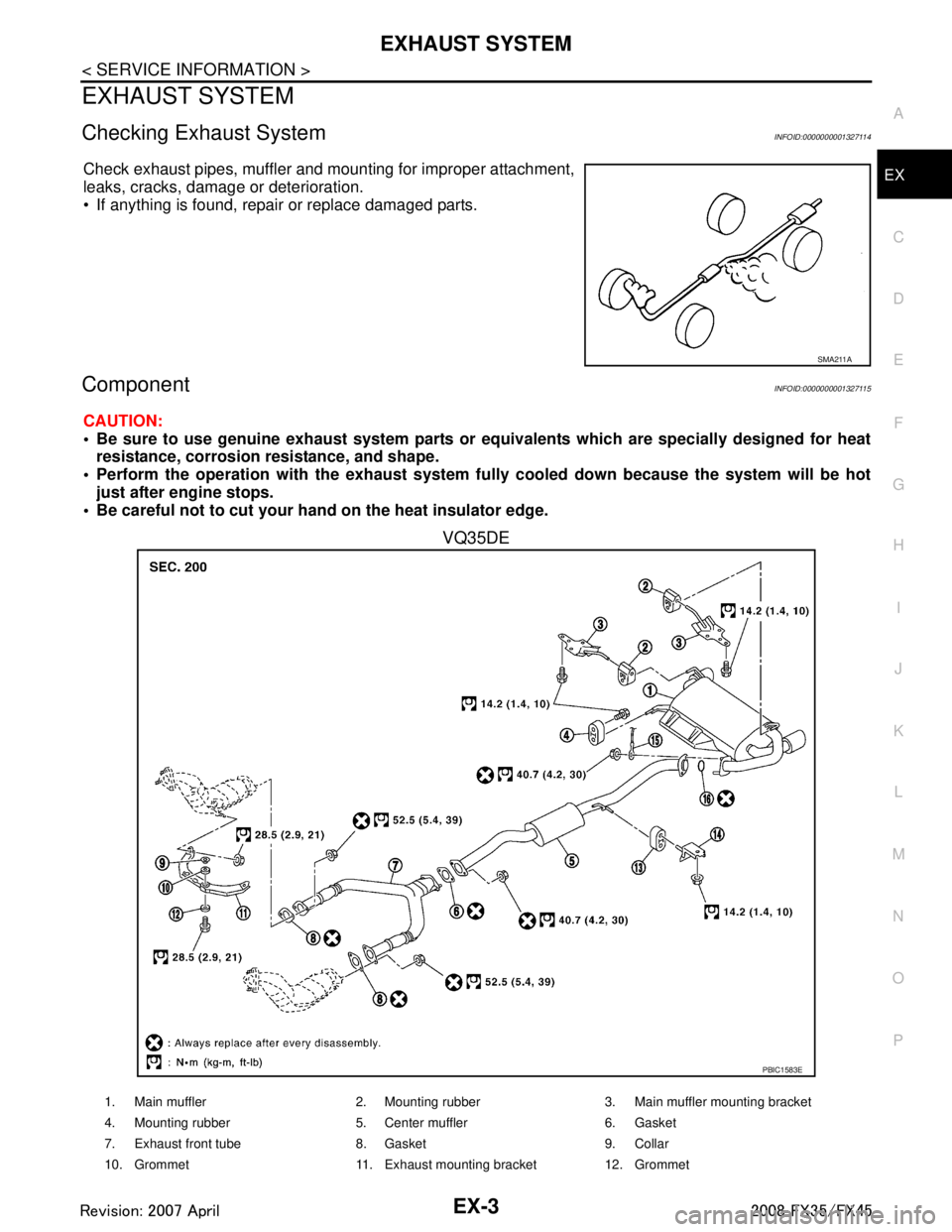
Checking Exhaust SystemINFOID:0000000001327114
Check exhaust pipes, muffler and mounting for improper attachment,
leaks, cracks, damage or deterioration.
• If anything is found, repair or replace damaged parts.
ComponentINFOID:0000000001327115
CAUTION:
• Be sure to use genuine exhaust system parts or
equivalents which are specially designed for heat
resistance, corrosion resistance, and shape.
Perform the operation with the exhaust system full y cooled down because the system will be hot
just after engine stops.
Be careful not to cut your hand on the heat insulator edge.
VQ35DE
SMA211A
PBIC1583E
1. Main muffler 2. Mounting rubber 3. Main muffler mounting bracket
4. Mounting rubber 5. Center muffler 6. Gasket
7. Exhaust front tube 8. Gasket 9. Collar
10. Grommet 11. Exhaust mounting bracket 12. Grommet
3AA93ABC3ACD3AC03ACA3AC03AC63AC53A913A773A893A873A873A8E3A773A983AC73AC93AC03AC3
3A893A873A873A8F3A773A9D3AAF3A8A3A8C3A863A9D3AAF3A8B3A8C
Page 2764 of 3924
EX-4
< SERVICE INFORMATION >
EXHAUST SYSTEM
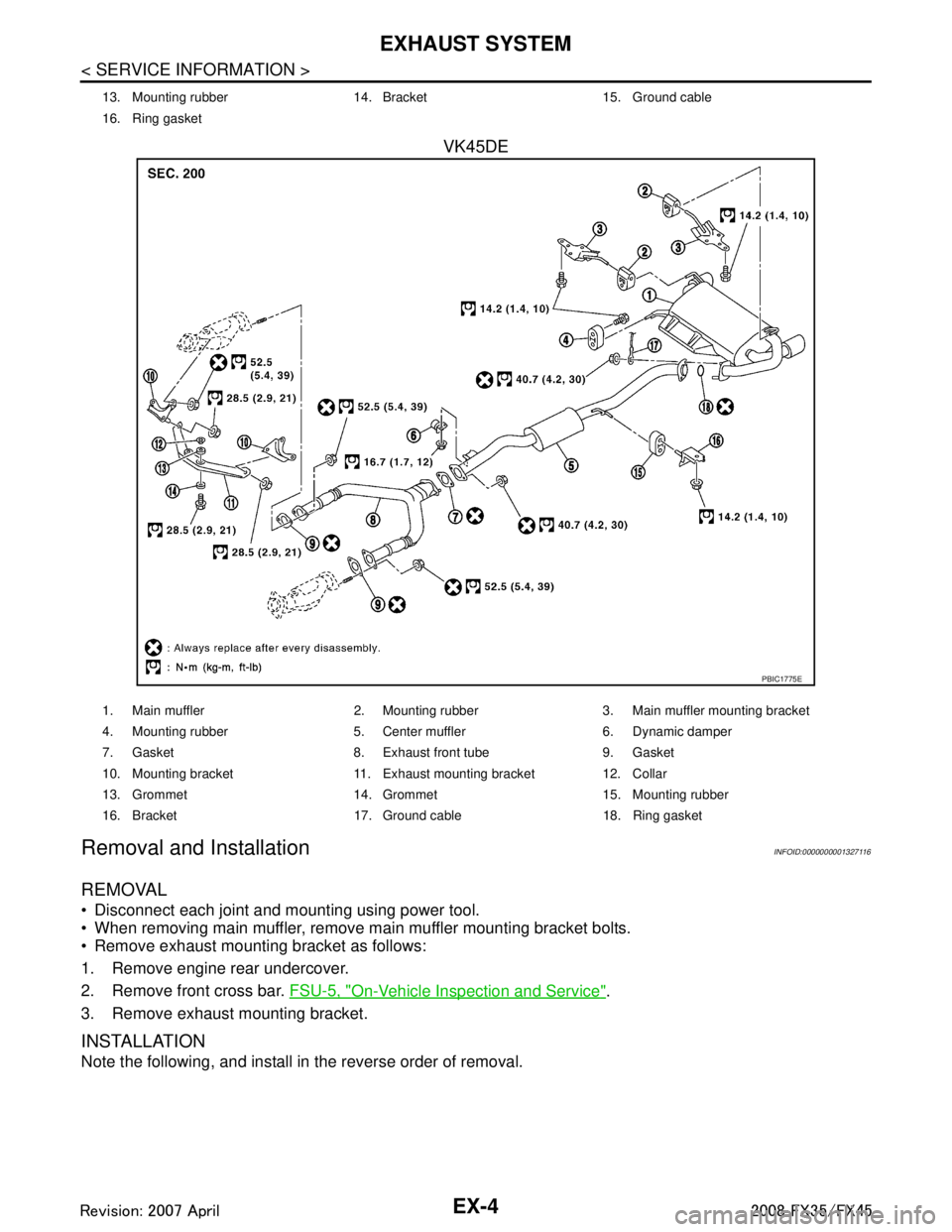
VK45DE
Removal and InstallationINFOID:0000000001327116
REMOVAL
Disconnect each joint and mounting using power tool.
When removing main muffler, remove main muffler mounting bracket bolts.
Remove exhaust mounting bracket as follows:
1. Remove engine rear undercover.
2. Remove front cross bar. FSU-5, "
On-Vehicle Inspection and Service".
3. Remove exhaust mounting bracket.
INSTALLATION
Note the following, and install in the reverse order of removal.
13. Mounting rubber 14. Bracket 15. Ground cable
16. Ring gasket
PBIC1775E
1. Main muffler 2. Mounting rubber 3. Main muffler mounting bracket
4. Mounting rubber 5. Center muffler 6. Dynamic damper
7. Gasket 8. Exhaust front tube 9. Gasket
10. Mounting bracket 11. Exhaust mounting bracket 12. Collar
13. Grommet 14. Grommet 15. Mounting rubber
16. Bracket 17. Ground cable 18. Ring gasket
3AA93ABC3ACD3AC03ACA3AC03AC63AC53A913A773A893A873A873A8E3A773A983AC73AC93AC03AC3
3A893A873A873A8F3A773A9D3AAF3A8A3A8C3A863A9D3AAF3A8B3A8C
Page 2765 of 3924
EXHAUST SYSTEMEX-5
< SERVICE INFORMATION >
C
DE
F
G H
I
J
K L
M A
EX
NP
O
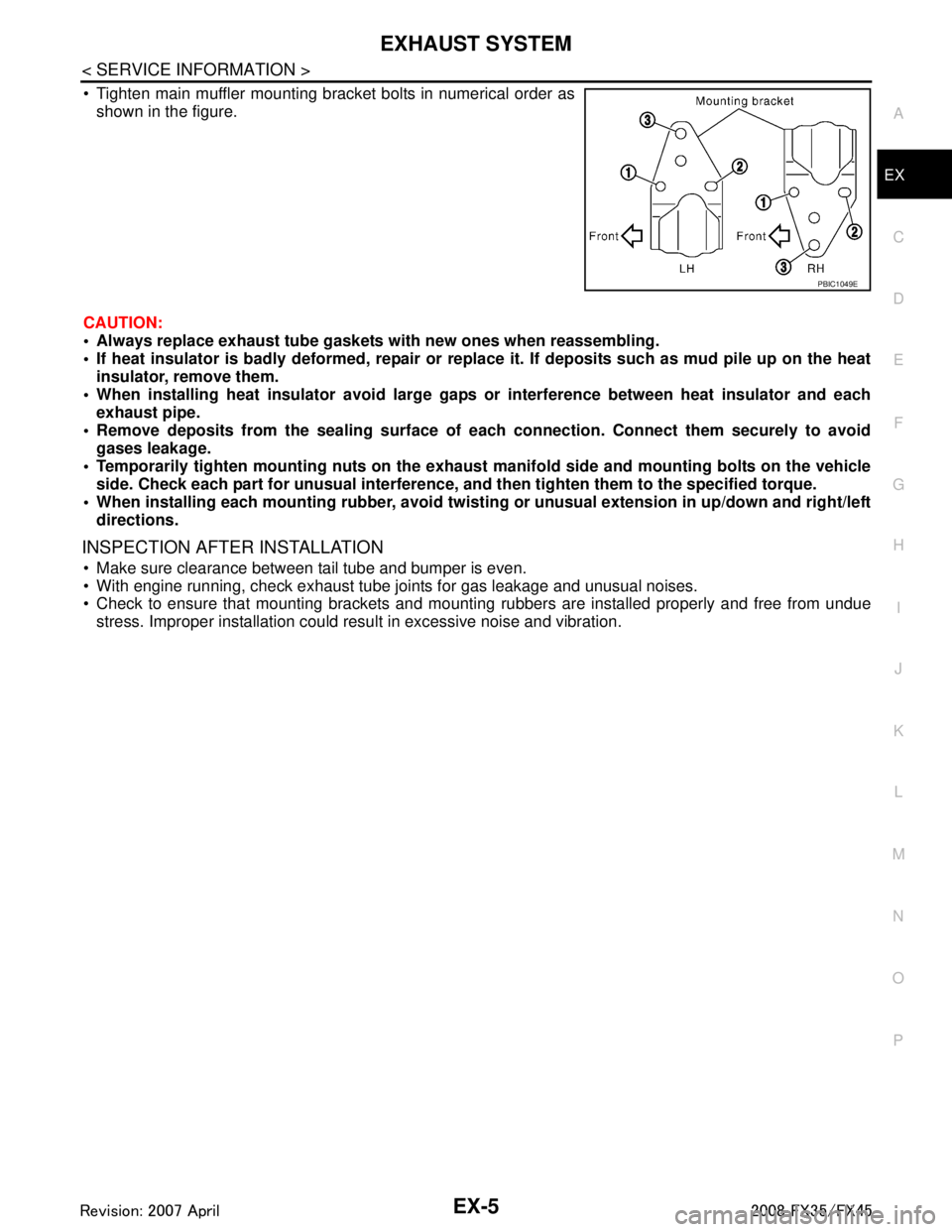
Tighten main muffler mounting bracket bolts in numerical order as
shown in the figure.
CAUTION:
Always replace exhaust tube gasket s with new ones when reassembling.
If heat insulator is badly deformed, repair or repl ace it. If deposits such as mud pile up on the heat
insulator, remove them.
When installing heat insulator avoid large gaps or interference between heat insulator and each
exhaust pipe.
Remove deposits from the sealing surface of each connection. Connect them securely to avoid
gases leakage.
Temporarily tighten mounting nuts on the exhaust manifold side and mounting bolts on the vehicle
side. Check each part for unusual interference, an d then tighten them to the specified torque.
When installing each mounting rubber, avoid twisting or unusual extension in up/down and right/left
directions.
INSPECTION AFTER INSTALLATION
Make sure clearance between tail tube and bumper is even.
With engine running, check exhaust tube joints for gas leakage and unusual noises.
Check to ensure that mounting brackets and mount ing rubbers are installed properly and free from undue
stress. Improper installation could resu lt in excessive noise and vibration.
PBIC1049E
3AA93ABC3ACD3AC03ACA3AC03AC63AC53A913A773A893A873A873A8E3A773A983AC73AC93AC03AC3
3A893A873A873A8F3A773A9D3AAF3A8A3A8C3A863A9D3AAF3A8B3A8C
Page 2769 of 3924
![INFINITI FX35 2008 Service Manual
FAX-4
< SERVICE INFORMATION >[2WD]
FRONT WHEEL HUB AND KNUCKLE
FRONT WHEEL HUB AND KNUCKLE
On-Vehicle InspectionINFOID:0000000001327506
Make sure the mounting conditions (looseness, back
lash) of ea](/img/42/57017/w960_57017-2768.png "INFINITI FX35 2008 Service Manual
FAX-4
< SERVICE INFORMATION >[2WD]
FRONT WHEEL HUB AND KNUCKLE
FRONT WHEEL HUB AND KNUCKLE
On-Vehicle InspectionINFOID:0000000001327506
Make sure the mounting conditions (looseness, back
lash) of ea")
FAX-4
< SERVICE INFORMATION >[2WD]
FRONT WHEEL HUB AND KNUCKLE
FRONT WHEEL HUB AND KNUCKLE
On-Vehicle InspectionINFOID:0000000001327506
Make sure the mounting conditions (looseness, back
lash) of each component and component status (wear,
damage) are normal.
WHEEL BEARING INSPECTION
Move wheel hub in the axial direction by hand. Che ck that there is no looseness of front wheel bearing.
Rotate wheel hub and make sure there is no unusual noi se or other irregular conditions. If there are any
irregular conditions, replace wheel hub and bearing assembly.
Removal and InstallationINFOID:0000000001327507
COMPONENTS
REMOVAL
1. Remove tires from vehicle with power tool.
2. Remove brake caliper with power tool. Hang it in a place where it will not interfere with work. Refer to BR-
18.
NOTE:
Avoid depressing brake pedal while brake caliper is removed.
3. Put alignment marks on disc rotor and wheel hub and bearing assembly, then remove disc rotor.
4. Remove wheel sensor from wheel hub and bearing assembly. Refer to BRC-52
.
CAUTION:
Do not pull on wheel sensor harness.
5. Remove cotter pin at steering outer socket, then loosen mount- ing nut.Axial end play : 0.05 mm (0.002 in) or less
1. Disc rotor 2. Wheel hub and bearing assembly 3. Splash guard
4. Steering knuckle 5. Cotter pin
Refer to
GI-8, "
Component", for the symbols in the figure.
PDIA1216E
SDIA1480E
3AA93ABC3ACD3AC03ACA3AC03AC63AC53A913A773A893A873A873A8E3A773A983AC73AC93AC03AC3
3A893A873A873A8F3A773A9D3AAF3A8A3A8C3A863A9D3AAF3A8B3A8C
Page 2770 of 3924
![INFINITI FX35 2008 Service Manual
FRONT WHEEL HUB AND KNUCKLEFAX-5
< SERVICE INFORMATION > [2WD]
C
EF
G H
I
J
K L
M A
B
FA X
N
O P
6. Use a ball joint remover (SST) to remove steering outer socket from steering knuckle. Be careful no](/img/42/57017/w960_57017-2769.png "INFINITI FX35 2008 Service Manual
FRONT WHEEL HUB AND KNUCKLEFAX-5
< SERVICE INFORMATION > [2WD]
C
EF
G H
I
J
K L
M A
B
FA X
N
O P
6. Use a ball joint remover (SST) to remove steering outer socket from steering knuckle. Be careful no")
FRONT WHEEL HUB AND KNUCKLEFAX-5
< SERVICE INFORMATION > [2WD]
C
EF
G H
I
J
K L
M A
B
FA X
N
O P
6. Use a ball joint remover (SST) to remove steering outer socket from steering knuckle. Be careful not to damage ball joint boot.
CAUTION:
Tighten temporarily mounting nut to prevent damage to
threads and to prevent ball jo int remover (SST) from com-
ing off.
7. Remove cotter pin at transve rse link, then loosen mounting nut.
8. Use a ball joint remover (SST) to remove transverse link from steering knuckle. Be careful not to damage ball joint boot.
CAUTION:
Tighten temporarily mounting nut to prevent damage to
threads and to prevent ball jo int remover (SST) from com-
ing off.
9. Remove fixing bolts and nuts between strut assembly and steer- ing knuckle with power tool.
10. Remove steering knuckle from vehicle.
11. Remove fixing bolts between steering knuckle and wheel hub and bearing assembly with power tool.
12. Remove splash guard and wheel hub and bearing assembly from steering knuckle.
INSPECTION AFTER REMOVAL
Check for deformity, cracks and damage on each parts, replace if necessary.
Ball Joint Inspection
Check for boot breakage, axial looseness, and torque of transverse link and steering outer socket ball joint.
Refer to FSU-13
, PS-17.
INSTALLATION
Refer to "Removal and Installation" for tightening torque. Install in the reverse order of removal.
NOTE:
Refer to component parts location and do not reuse non-reusable parts.
After removing/installing or replacing axle components, check wheel alignment. Refer to FSU-5, "
Wheel
Alignment Inspection".
After adjusting wheel alignment, adjust neutral position of steering angle sensor. Refer to BRC-8, "
Adjust-
ment of Steering Angle Sensor Neutral Position".
Check the following item after service
- Installation condition of wheel sensor harness
SDIA1434E
SDIA1435E
3AA93ABC3ACD3AC03ACA3AC03AC63AC53A913A773A893A873A873A8E3A773A983AC73AC93AC03AC3
3A893A873A873A8F3A773A9D3AAF3A8A3A8C3A863A9D3AAF3A8B3A8C
Page 2776 of 3924
![INFINITI FX35 2008 Service Manual
FRONT WHEEL HUB AND KNUCKLEFAX-11
< SERVICE INFORMATION > [AWD]
C
EF
G H
I
J
K L
M A
B
FA X
N
O P
FRONT WHEEL HUB AND KNUCKLE
On-Vehicle InspectionINFOID:0000000001327513
Make sure the mounting condi](/img/42/57017/w960_57017-2775.png "INFINITI FX35 2008 Service Manual
FRONT WHEEL HUB AND KNUCKLEFAX-11
< SERVICE INFORMATION > [AWD]
C
EF
G H
I
J
K L
M A
B
FA X
N
O P
FRONT WHEEL HUB AND KNUCKLE
On-Vehicle InspectionINFOID:0000000001327513
Make sure the mounting condi")
FRONT WHEEL HUB AND KNUCKLEFAX-11
< SERVICE INFORMATION > [AWD]
C
EF
G H
I
J
K L
M A
B
FA X
N
O P
FRONT WHEEL HUB AND KNUCKLE
On-Vehicle InspectionINFOID:0000000001327513
Make sure the mounting conditions (looseness, ba ck lash) of each component and component status (wear,
damage) are normal.
WHEEL BEARING INSPECTION
Move wheel hub in the axial direction by hand. Che ck that there is no looseness of front wheel bearing.
Rotate wheel hub and make sure there is no unusual noise or other irregular conditions. If there are any irregular conditions, replace wheel hub and bearing assembly.
Removal and InstallationINFOID:0000000001327514
COMPONENTS
REMOVAL
1. Remove tires from vehicle with power tool.
2. Remove brake caliper with power tool. Hang it in a place where it will not interfere with work. Refer to BR-
19, "Removal and Installation of Brake Caliper Assembly".
NOTE:
Avoid depressing brake pedal while brake caliper is removed.
3. Put alignment marks on disc rotor and wheel hub and bearing assembly, then remove disc rotor.
4. Remove wheel sensor from steering knuckle. Refer to BRC-52
CAUTION:
Do not pull on wheel sensor harness.
Axial end play : 0.05 mm (0.002 in) or less
1. Cotter pin 2. Washer 3. Disc rotor
4. Wheel hub and bearing assembly 5. Splash guard 6. Steering knuckle
Refer to
GI-8, "
Component", for the symbols in the figure.
PDIA1217E
SDIA1480E
3AA93ABC3ACD3AC03ACA3AC03AC63AC53A913A773A893A873A873A8E3A773A983AC73AC93AC03AC3
3A893A873A873A8F3A773A9D3AAF3A8A3A8C3A863A9D3AAF3A8B3A8C
Page 2777 of 3924
![INFINITI FX35 2008 Service Manual
FAX-12
< SERVICE INFORMATION >[AWD]
FRONT WHEEL HUB AND KNUCKLE
5. Remove cotter pin, then remove lock nut from drive shaft.
6. Remove steering outer socket and cotter pin
at steering knuckle, then](/img/42/57017/w960_57017-2776.png "INFINITI FX35 2008 Service Manual
FAX-12
< SERVICE INFORMATION >[AWD]
FRONT WHEEL HUB AND KNUCKLE
5. Remove cotter pin, then remove lock nut from drive shaft.
6. Remove steering outer socket and cotter pin
at steering knuckle, then")
FAX-12
< SERVICE INFORMATION >[AWD]
FRONT WHEEL HUB AND KNUCKLE
5. Remove cotter pin, then remove lock nut from drive shaft.
6. Remove steering outer socket and cotter pin
at steering knuckle, then loosen mounting nut.
7. Use a ball joint remover (SST) to remove steering outer socket from steering knuckle. Be careful not to damage ball joint boot.
CAUTION:
To prevent damage to threads and to prevent ball joint
remover (SST) from coming off suddenly, temporarily
tighten mounting nut.
8. Using a puller (suitable tool), remove wheel hub and bearing assembly from drive shaft. NOTE:
When removing wheel hub and bearing assembly, do not apply an excessive angle to drive shaft joint.
Also be careful not to excessively extend slide joint.
Do not hang over drive shaft with out support.
9. Remove wheel hub and bearing assembly fixing bolt.
10. Remove splash guard and wheel hub and bearing assembly from steering knuckle.
11. Remove strut assembly and steering knuckle fixing bolts and nuts.
12. Remove transverse link and steering knuckle fixing bolt and nut.
13. Remove steering knuckle from vehicle.
INSPECTION AFTER REMOVAL
Check for deformity, cracks and damage on each parts, replace if necessary.
Ball Joint Inspection
Check for boot breakage, axial looseness, and torque of transverse link and steering outer socket ball joint.
Refer to FSU-13
, PS-17.
INSTALLATION
CAUTION:
Be sure to replace the new differential side oil seal every removal of drive shaft. Refer to FFD-12
.
Refer to "Removal and Installation"for tightening torque. Install in the reverse order of removal. NOTE:
Refer to component parts location and do not reuse non-reusable parts.
To assemble disc rotor and wheel hub and bearing assembly, align the marks.
(When not using the alignment mark, refer to BR-19, "
Removal
and Installation of Brake Caliper Assembly".)
SGIA0488E
SDIA1480E
3AA93ABC3ACD3AC03ACA3AC03AC63AC53A913A773A893A873A873A8E3A773A983AC73AC93AC03AC3
3A893A873A873A8F3A773A9D3AAF3A8A3A8C3A863A9D3AAF3A8B3A8C