Body INFINITI FX35 2008 Owner's Manual
[x] Cancel search | Manufacturer: INFINITI, Model Year: 2008, Model line: FX35, Model: INFINITI FX35 2008Pages: 3924, PDF Size: 81.37 MB
Page 730 of 3924
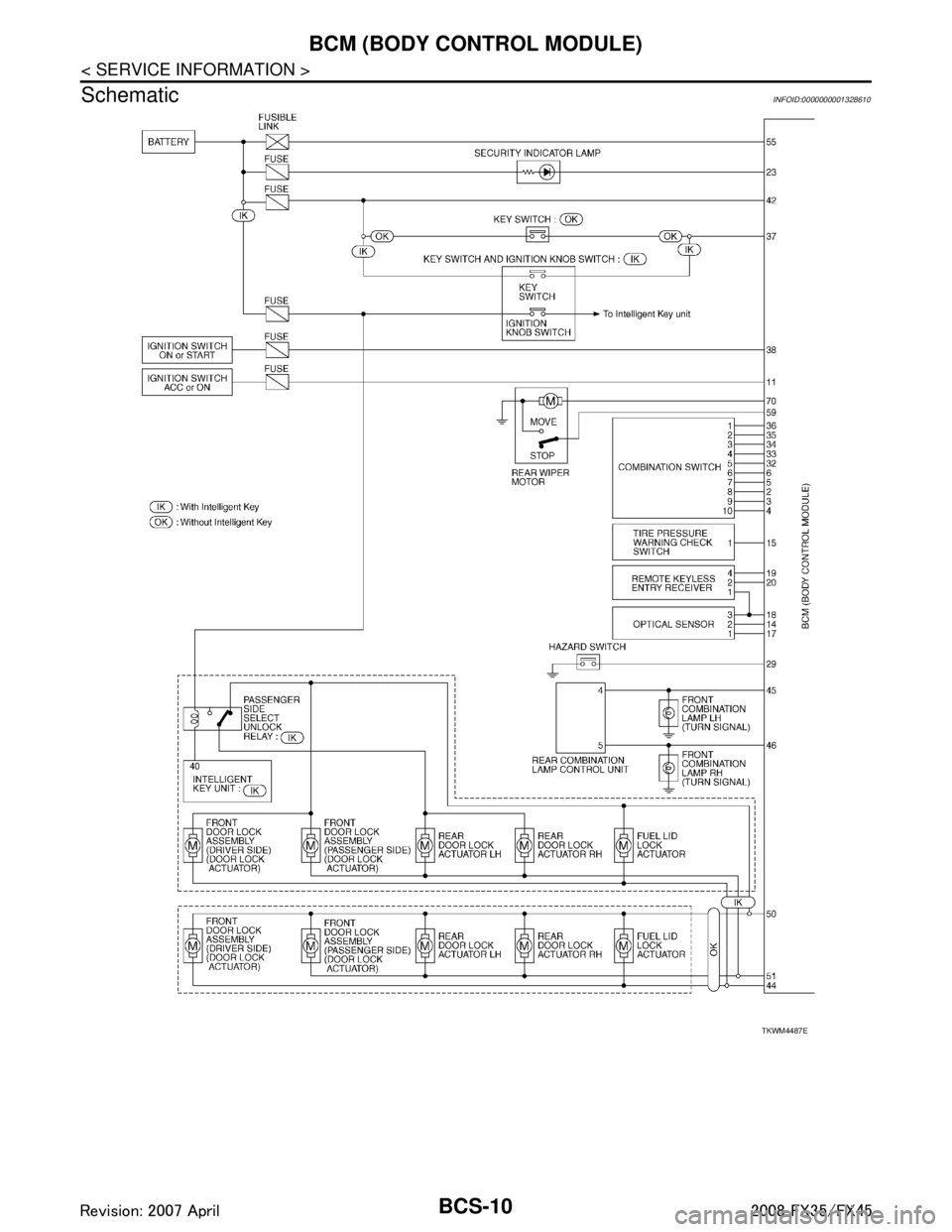
BCS-10
< SERVICE INFORMATION >
BCM (BODY CONTROL MODULE)
Schematic
INFOID:0000000001328610
TKWM4487E
3AA93ABC3ACD3AC03ACA3AC03AC63AC53A913A773A893A873A873A8E3A773A983AC73AC93AC03AC3
3A893A873A873A8F3A773A9D3AAF3A8A3A8C3A863A9D3AAF3A8B3A8C
Page 731 of 3924

BCM (BODY CONTROL MODULE)BCS-11
< SERVICE INFORMATION >
C
DE
F
G H
I
J
L
M A
B
BCS
N
O P
CONSULT-III Function (BCM)INFOID:0000000001328611
CONSULT-III can display each diagnostic item using the diagnostic test mode shown following.
TKWM4453E
3AA93ABC3ACD3AC03ACA3AC03AC63AC53A913A773A893A873A873A8E3A773A983AC73AC93AC03AC3
3A893A873A873A8F3A773A9D3AAF3A8A3A8C3A863A9D3AAF3A8B3A8C
Page 732 of 3924

BCS-12
< SERVICE INFORMATION >
BCM (BODY CONTROL MODULE)
ITEMS OF EACH PART
BCM can perform the following functions for each system.
NOTE:
CONSULT-III displays systems equipped in the vehicle.
×:Applicable
NOTE:
*1: Vehicle with remote keyless entry system display this item.
*2: Vehicle with Intelligent Key system display this item.
*3: This item is displayed, but does not function.
WORK SUPPORT
Display Item List
BCM Diagnostic test item Check item, diagnostic test mode Content
Inspection by part WORK SUPPORT Changes setting of each function.
SELF-DIAG RESULTS BCM performs self-diagnosis of CAN communication.
DATA MONITOR Displays the input data of BCM in real time.
CAN DIAG SUPPORT MNTR
The transmit/receive diagnosis result of CAN communication can be
read.
ACTIVE TEST Gives a drive signal to a load to check the operation.
ECU PART NUMBER ECM part number can be read.
CONFIGURATION (Not be used)
System and item CONSULT-III display Diagnostic test mode (Inspection by part)
WORK SUPPORT DATA MONITOR ACTIVE TEST
BCM BCM ×
Power door lock system DOOR LOCK ×××
Rear window defogger REAR DEFOGGER ××
Warning chime BUZZER ××
Room lamp timer INT LAMP ×××
Remote keyless entry system*
1MULTI REMOTE ENT ×××
Headlamp HEAD LAMP ×××
Wiper WIPER ×××
Turn signal lamp
Hazard lamp FLASHER
××
Blower fan switch signal
A/C switch signal AIR CONDITONER
×
Intelligent Key system*
2INTELLIGENT KEY ×
Combination switch COMB SW ×
NVIS IMMU ××
Room lamp battery saver BATTERY SAVER ×× ×
Trunk lid TRUNK*
3××
Vehicle security system THEFT ALM ×××
Retained power control RETAINED PWR ×××
Oil pressure swit ch SIGNAL BUFFER ××
Low tire pressure warning system AIR PRESSURE MONITOR ×××
Panic system PANIC ALARM ×
3AA93ABC3ACD3AC03ACA3AC03AC63AC53A913A773A893A873A873A8E3A773A983AC73AC93AC03AC3
3A893A873A873A8F3A773A9D3AAF3A8A3A8C3A863A9D3AAF3A8B3A8C
Page 733 of 3924

BCM (BODY CONTROL MODULE)BCS-13
< SERVICE INFORMATION >
C
DE
F
G H
I
J
L
M A
B
BCS
N
O P
SELF-DIAG RESULTS
U1000 CAN Communication CircuitINFOID:0000000001606767
1.PERFORM SELF DIAGNOSTIC
1. Turn ignition switch ON and wait for 2 seconds or more.
2. Check “Self Diagnostic Result” of BCM.
Is
“CAN COMM CIRCUIT” displayed?
YES >> Refer to LAN-14, "Trouble Diagnosis Flow Chart".
NO >> Refer to GI-25, "
How to Perform Efficient Diagnosis for an Electrical Incident".
Removal and Installation of BCMINFOID:0000000001328613
REMOVAL
1. Remove the dash side finisher (LH). Refer to EI-38.
2. Disconnect BCM connector.
3. Remove bracket mounting screws (3) to remove BCM and fuse block with bracket.
Item Description
RESET SETTING VALUE Return a value set with WORK SUPPORT of each system to a default value in factory shipment.
DTC DTC Detection Condition Possible cause
U1000: CAN COMM CIRCUIT When BCM cannot communicate CAN com-
munication signal continuously for 2 sec-
onds or more. Any item (or items) of the following listed below is
malfunctioning in CAN communication system.
Transmission
Receiving (ECM)
Receiving (IPDM E/R)
Receiving (METER/M&A)
Receiving (I-KEY)
SKIA4964E
3AA93ABC3ACD3AC03ACA3AC03AC63AC53A913A773A893A873A873A8E3A773A983AC73AC93AC03AC3
3A893A873A873A8F3A773A9D3AAF3A8A3A8C3A863A9D3AAF3A8B3A8C
Page 734 of 3924

BCS-14
< SERVICE INFORMATION >
BCM (BODY CONTROL MODULE)
4. Raise the pawl of fuse block and remove bracket from fuse blockto remove BCM.
INSTALLATION
Installation is the reverse order of removal.
NOTE:
When replacing BCM perform initialization of NATS s ystem and registration of all NATS ignition key IDs.
SKIA4965E
3AA93ABC3ACD3AC03ACA3AC03AC63AC53A913A773A893A873A873A8E3A773A983AC73AC93AC03AC3
3A893A873A873A8F3A773A9D3AAF3A8A3A8C3A863A9D3AAF3A8B3A8C
Page 735 of 3924

BL-1
BODY
C
DE
F
G H
J
K L
M
SECTION BL
A
B
BL
N
O P
CONTENTS
BODY, LOCK & SECURITY SYSTEM
SERVICE INFORMATION .. ..........................4
DTC INDEX ..................................................... .....4
INTELLGENT KEY UNIT U1000 ...............................4
INTELLGENT KEY UNIT B2013-B2014 ............. ......4
ECM P1610-P1615 ...................................................4
PRECAUTIONS ...................................................5
Precaution for Supplemental Restraint System
(SRS) "AIR BAG" and "SEAT BELT PRE-TEN-
SIONER" ............................................................. ......
5
Precaution Necessary for Steering Wheel Rota-
tion After Battery Disconnect .....................................
5
Precaution for Work ..................................................5
PREPARATION ...................................................6
Special Service Tool ........................................... ......6
Commercial Service Tool ..........................................6
SQUEAK AND RATTLE TROUBLE DIAGNO-
SIS .......................................................................
7
Work Flow ........................................................... ......7
Generic Squeak and Rattle Troubleshooting ............9
Diagnostic Worksheet .............................................11
HOOD .................................................................13
Fitting Adjustment ............................................... ....13
Removal and Installation of Hood Assembly ...........14
Removal and Installation of Hood Lock Control ......15
Hood Lock Control Inspection ............................. ....16
RADIATOR CORE SUPPORT ...........................18
Removal and Installation ..................................... ....18
FRONT FENDER ................................................20
Removal and Installation ..................................... ....20
POWER DOOR LOCK SYSTEM ........................21
Component Parts and Harness Connector Loca-
tion ...................................................................... ....
21
System Description .................................................22
CAN Communication System Description ...............23
CAN Communication Unit .................................... ....23
Schematic/With Intelligent Key ................................24
Wiring Diagram - D/LOCK -/With Intelligent Key .....25
Schematic/Without Intellig ent Key ...........................30
Wiring Diagram - D/LOCK -/Without Intelligent
Key ...................................................................... ....
31
Terminal and Reference Value for BCM ..................35
Terminal and Reference Value for Intelligent Key
Unit (With Intelligent Key System) ...........................
35
Work Flow ................................................................36
CONSULT-III Function (BCM) .................................36
Trouble Diagnosis Chart by Symptom .....................37
Check BCM Power Supply and Ground Circuit .......37
Check Door Switch ..................................................38
Check Key Switch ....................................................42
Check Door Lock and Unlock Switch ......................43
Check Door Lock Actuator (Driver Side) .................45
Check Door Lock Actuator (Passenger Side and
Rear LH/RH) ............................................................
45
Check Fuel Lid Lock Actuator ..................................46
Check Front Door Key Cylinder Switch (Lock) ........47
Check Front Door Key Cylinder Switch (Unlock) .....47
Check Select Unlock Relay Circuit ..........................48
REMOTE KEYLESS ENTRY SYSTEM .............50
Component Parts and Harness Connector Loca-
tion ...........................................................................
50
System Description ..................................................50
CAN Communication System Description ...............53
CAN Communication Unit ........................................53
Schematic ................................................................54
Wiring Diagram - KEYLES - ....................................55
Terminal and Reference Value for BCM ..................58
Terminal and Reference Value for IPDM E/R ..........59
CONSULT-III Function (BCM) .................................60
Work Flow ................................................................62
Trouble Diagnosis Chart by Symptom .....................62
Check Key Fob Battery and Function ......................63
Check ACC Switch ..................................................64
Check Door Switch ..................................................65
Check Key Switch ....................................................68
3AA93ABC3ACD3AC03ACA3AC03AC63AC53A913A773A893A873A873A8E3A773A983AC73AC93AC03AC3
3A893A873A873A8F3A773A9D3AAF3A8A3A8C3A863A9D3AAF3A8B3A8C
Page 737 of 3924

BL-3
C
DE
F
G H
J
K L
M A
B
BL
N
O P
Preliminary Check ...............................................
..
177
Trouble Diagnosis Symptom Chart .......................177
Diagnosis Procedure 1 ..........................................178
Diagnosis Procedure 2 ..........................................182
Diagnosis Procedure 3 ..........................................183
Diagnosis Procedure 4 ..........................................183
Diagnosis Procedure 5 ..........................................183
Diagnosis Procedure 6 ..........................................184
IVIS (INFINITI VEHICLE IMMOBILIZER SYS-
TEM-NATS) ......................................................
185
Component Parts and Harness Connector Loca-
tion ...................................................................... ..
185
System Description ...............................................185
System Composition .............................................186
ECM Re-Communicating Function ........................187
Wiring Diagram - NATS - ......................................188
Terminal and Reference Value for Steering Lock
Unit/with Intelligent Key System ............................
191
Terminal and Reference Value for Intelligent Key
Unit/with Intelligent Key System ............................
191
Terminal and Reference Value for BCM ............. ..192
CONSULT-III Function ..........................................192
Diagnosis Procedure .............................................194
Trouble Diagnosis Symptom Chart ...................... ..195
Security Indicator Inspection .................................195
Diagnosis Procedure 1 ..........................................195
Diagnosis Procedure 2 ..........................................197
Diagnosis Procedure 3 ..........................................197
Diagnosis Procedure 4 ..........................................197
Diagnosis Procedure 5 ..........................................198
Diagnosis Procedure 6 ..........................................200
Removal and Installation NATS Antenna Amp ......201
INTEGRATED HOMELINK TRANSMITTER ..202
Wiring Diagram - TRNSCV - ..................................202
Trouble Diagnosis ..................................................202
BODY REPAIR ................................................204
Body Exterior Paint Color ......................................204
Body Component Parts .........................................205
Corrosion Protection ..............................................208
Body Sealing .........................................................211
Body Construction .................................................215
Body Alignment .....................................................215
Handling Precaution for Plastics ............................225
Precaution in Repairing High Strength Steel .........228
Replacement Operation .........................................230
3AA93ABC3ACD3AC03ACA3AC03AC63AC53A913A773A893A873A873A8E3A773A983AC73AC93AC03AC3
3A893A873A873A8F3A773A9D3AAF3A8A3A8C3A863A9D3AAF3A8B3A8C
Page 742 of 3924

BL-8
< SERVICE INFORMATION >
SQUEAK AND RATTLE TROUBLE DIAGNOSIS
If the noise can be duplicated easily during the test drive, to help identify the source of the noise, try to dupli-
cate the noise with the vehicle stopped by doing one or all of the following:
1) Close a door.
2) Tap or push/pull around the area where the noise appears to be coming from.
3) Rev the engine.
4) Use a floor jack to recreate vehicle "twist".
5) At idle, apply engine load (electrical load, half- clutch on M/T model, drive position on A/T model).
6) Raise the vehicle on a hoist and hit a tire with a rubber hammer.
Drive the vehicle and attempt to duplicate the conditions the customer states exist when the noise occurs.
If it is difficult to duplicate the noise, drive the v ehicle slowly on an undulating or rough road to stress the
vehicle body.
CHECK RELATED SERVICE BULLETINS
After verifying the customer concern or symptom, chec k ASIST for Technical Service Bulletins (TSBs) related
to that concern or symptom.
If a TSB relates to the symptom, follo w the procedure to repair the noise.
LOCATE THE NOISE AND IDENTIFY THE ROOT CAUSE
1. Narrow down the noise to a general area. To help pi npoint the source of the noise, use a listening tool
(Chassis Ear: J-39570, Engine Ear and mechanics stethoscope).
2. Narrow down the noise to a more specific area and identify the cause of the noise by:
removing the components in the area that you suspect the noise is coming from.
Do not use too much force when removing clips and fasteners, otherwise clips and fastener can be broken
or lost during the repair, resulting in the creation of new noise.
tapping or pushing/pulling the component that you suspect is causing the noise.
Do not tap or push/pull the component with excessive force, otherwise the noise will only be eliminated tem-
porarily.
feeling for a vibration with your hand by touching the component(s) that you suspect is (are) causing the
noise.
placing a piece of paper between components that you suspect are causing the noise.
looking for loose components and contact marks. Refer to BL-9, "
Generic Squeak and Rattle Troubleshooting".
REPAIR THE CAUSE
If the cause is a loose component, tighten the component securely.
If the cause is insufficient clearance between components:
- separate components by repositioning or loos ening and retightening the component, if possible.
- insulate components with a suitable insulator such as urethane pads, foam blocks, felt cloth tape or urethane
tape. A Nissan Squeak and Rattle Kit (J-43980) is av ailable through your authorized Nissan Parts Depart-
ment.
CAUTION:
Do not use excessive force as many components are constructed of plastic and may be damaged.
NOTE:
Always check with the Parts Departm ent for the latest parts information.
The following materials are contained in the Nissan Squeak and Rattle Kit (J-43980). Each item can be
ordered separately as needed.
URETHANE PADS [1.5 mm (0.059 in) thick]
Insulates connectors, harness, etc.
76268-9E005: 100 × 135 mm (3.94 × 5.31 in)/76884-71L01: 60 × 85 mm (2.36 × 3.35 in)/76884-71L02: 15 ×
25 mm(0.59 × 0.98 in)
INSULATOR (Foam blocks)
Insulates components from contact. Can be used to fill space behind a panel.
73982-9E000: 45 mm (1.77 in) thick, 50 × 50 mm (1.97 × 1.97 in)/73982-50Y00: 10 mm (0.39 in) thick, 50
× 50 mm (1.97 × 1.97 in)
INSULATOR (Light foam block)
80845-71L00: 30 mm (1.18 in) thick, 30 × 50 mm (1.18 × 1.97 in)
FELT CLOTHTAPE
Used to insulate where movement does not occu r. Ideal for instrument panel applications.
68370-4B000: 15 × 25 mm (0.59 × 0.98 in) pad/68239-13E00: 5 mm (0.20 in) wide tape roll The following
materials, not found in the kit, can al so be used to repair squeaks and rattles.
UHMW(TEFLON) TAPE
3AA93ABC3ACD3AC03ACA3AC03AC63AC53A913A773A893A873A873A8E3A773A983AC73AC93AC03AC3
3A893A873A873A8F3A773A9D3AAF3A8A3A8C3A863A9D3AAF3A8B3A8C
Page 749 of 3924
HOODBL-15
< SERVICE INFORMATION >
C
DE
F
G H
J
K L
M A
B
BL
N
O P
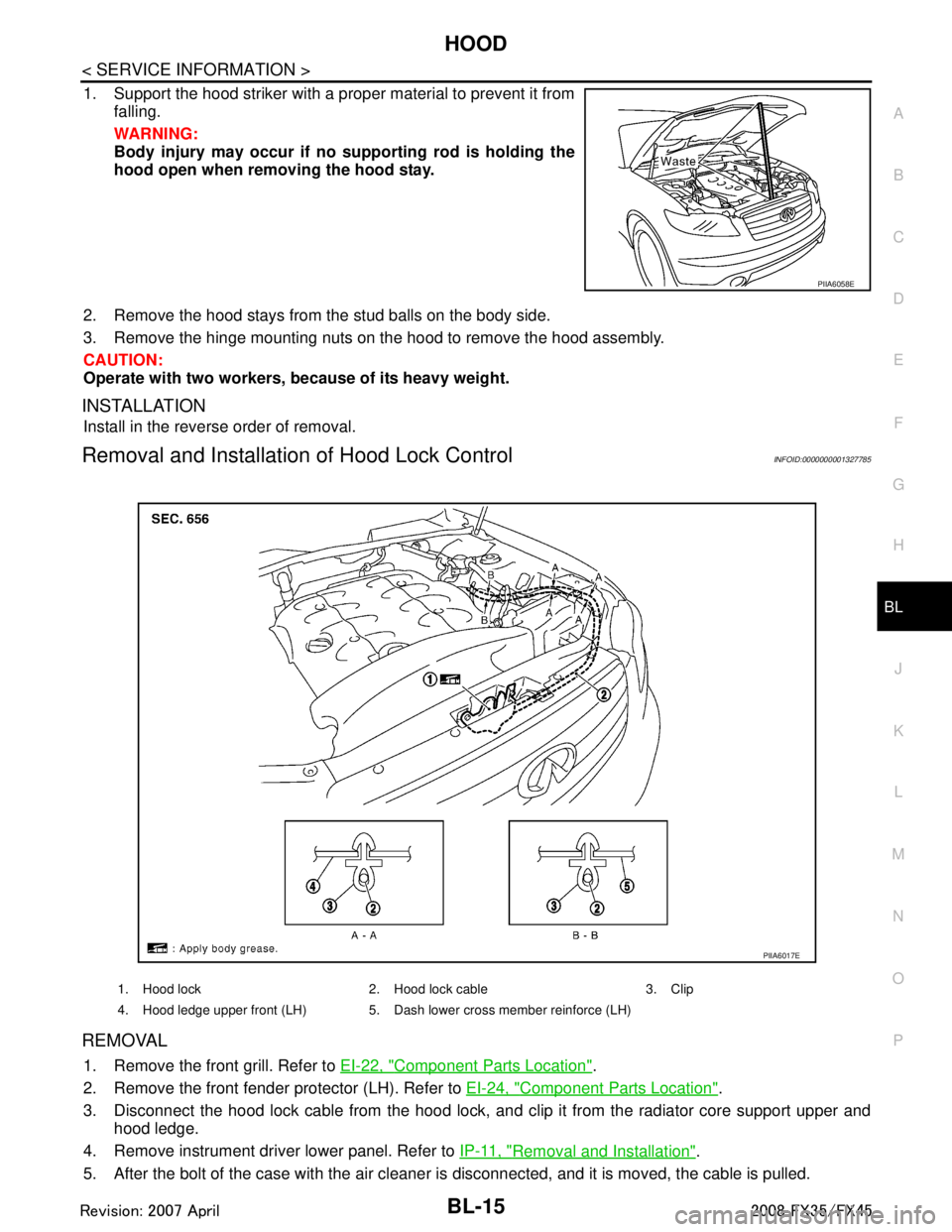
1. Support the hood striker with a proper material to prevent it from falling.
WARNING:
Body injury may occur if no supporting rod is holding the
hood open when removi ng the hood stay.
2. Remove the hood stays from the stud balls on the body side.
3. Remove the hinge mounting nuts on the hood to remove the hood assembly.
CAUTION:
Operate with two workers, because of its heavy weight.
INSTALLATION
Install in the reverse order of removal.
Removal and Installation of Hood Lock ControlINFOID:0000000001327785
REMOVAL
1. Remove the front grill. Refer to EI-22, "Component Parts Location".
2. Remove the front fender protector (LH). Refer to EI-24, "
Component Parts Location".
3. Disconnect the hood lock cable from the hood lock, and c lip it from the radiator core support upper and
hood ledge.
4. Remove instrument driver lower panel. Refer to IP-11, "
Removal and Installation".
5. After the bolt of the case with the air cleaner is disconnected, and it is moved, the cable is pulled.
PIIA6058E
1. Hood lock 2. Hood lock cable 3. Clip
4. Hood ledge upper front (LH) 5. Dash lower cross member reinforce (LH)
PIIA6017E
3AA93ABC3ACD3AC03ACA3AC03AC63AC53A913A773A893A873A873A8E3A773A983AC73AC93AC03AC3
3A893A873A873A8F3A773A9D3AAF3A8A3A8C3A863A9D3AAF3A8B3A8C
Page 754 of 3924

BL-20
< SERVICE INFORMATION >
FRONT FENDER
FRONT FENDER
Removal and InstallationINFOID:0000000001327788
REMOVAL
1. Remove the front bumper. Refer to EI-14, "Component Parts Location".
2. Remove the headlamp. Refer to LT-30, "
Removal and Installation".
3. Remove the front fender protector. Refer to EI-24, "
Component Parts Location".
4. Remove the mounting bolt and remove the front fender.
CAUTION:
While removing use a shop cloth to protect body from damaging.
INSTALLATION
Install in the reverse order of removal.
CAUTION:
After installing, apply touch-up paint (the body color) onto the head of the front fender mounting
bolts.
After installing, check front fender adjustment. Refer to BL-13, "
Fitting Adjustment" and BL-131, "Fit-
ting Adjustment".
1. Front fender 2. Bolt
PIIA6076E
3AA93ABC3ACD3AC03ACA3AC03AC63AC53A913A773A893A873A873A8E3A773A983AC73AC93AC03AC3
3A893A873A873A8F3A773A9D3AAF3A8A3A8C3A863A9D3AAF3A8B3A8C