low beam INFINITI FX35 2008 Owner's Guide
[x] Cancel search | Manufacturer: INFINITI, Model Year: 2008, Model line: FX35, Model: INFINITI FX35 2008Pages: 3924, PDF Size: 81.37 MB
Page 3120 of 3924

LT-18
< SERVICE INFORMATION >
HEADLAMP - XENON TYPE -
NOTE:
Perform monitoring of IPDM E/R data with ignition switch ON. When ignition switch is at ACC, display may not
be correct.
ACTIVE TEST
Headlamp Does Not Change To High Beam (Both Sides)INFOID:0000000001381742
1.CHECK COMBINATION SWITCH INPUT SIGNAL
CONSULT-III DATA MONITOR
1. Select “HI BEAM SW” of BCM data monitor item.
2. With operating the lighting switch, check the monitor status.
CHECK THE COMBINATION SWITCH
Refer to LT-104, "
Combination Switch Inspection".
OK or NG
OK >> GO TO 2.
NG >> Check combination switch (lighting switch). Refer to LT-104, "
Combination Switch Inspection".
2.HEADLAMP ACTIVE TEST
CONSULT-III ACTIVE TEST
1. Select “LAMPS” of IPDM E/R active test item.
2. With operating the test item, check the headlamp high beam operation.
IPDM E/R AUTO ACTIVE TEST
1. Start auto active test. Refer to PG-20, "
Auto Active Test".
2. Check that the headlamp high beam operation.
OK or NG
OK >> GO TO 3.
NG >> GO TO 4.
3.CHECK IPDM E/R
Item name CONSULT-III
screen display Display
or unit Monitor item selection
Description
ALL
SIGNALS MAIN
SIGNALS SELECTION
FROM MENU
Position lights request TAIL & CLR REQ ON/OFF ×× ×Signal status input from BCM
Headlamp low beam request HL LO REQ ON/OFF ×× ×Signal status input from BCM
Headlamp high beam request HL HI REQ ON/OFF ×× ×Signal status input from BCM
Front fog lights request FR FOG REQ ON/OFF ×× ×Signal status input from BCM
Te s t i t e mCONSULT-III
screen display Description
Headlamp relay (HI, LO) output
LAMPSAllows headlamp relay (HI, LO) to operate by switching operation (OFF, HI ON,
LO ON) at your option (Headlamp high beam repeats ON-OFF every 1 second).
Front fog lamp relay output Allows front fog lamp relay to operate by switching operation ON-OFF at your op-
tion.
Tail lamp relay output TAIL LAMP Allows tail lamp relay to operate by switching operation ON-OFF at your option.
When lighting switch is
HIGH BEAM : HI BEAM SW ON
Headlamp high beam should operate.
(Headlamp high beam repeats ON-OFF every 1 second).
Headlamp high beam should operate.
3AA93ABC3ACD3AC03ACA3AC03AC63AC53A913A773A893A873A873A8E3A773A983AC73AC93AC03AC3
3A893A873A873A8F3A773A9D3AAF3A8A3A8C3A863A9D3AAF3A8B3A8C
Page 3123 of 3924
HEADLAMP - XENON TYPE -LT-21
< SERVICE INFORMATION >
C
DE
F
G H
I
J
L
M A
B
LT
N
O P
1. Turn ignition switch OFF.
2. Disconnect IPDM E/R connector.
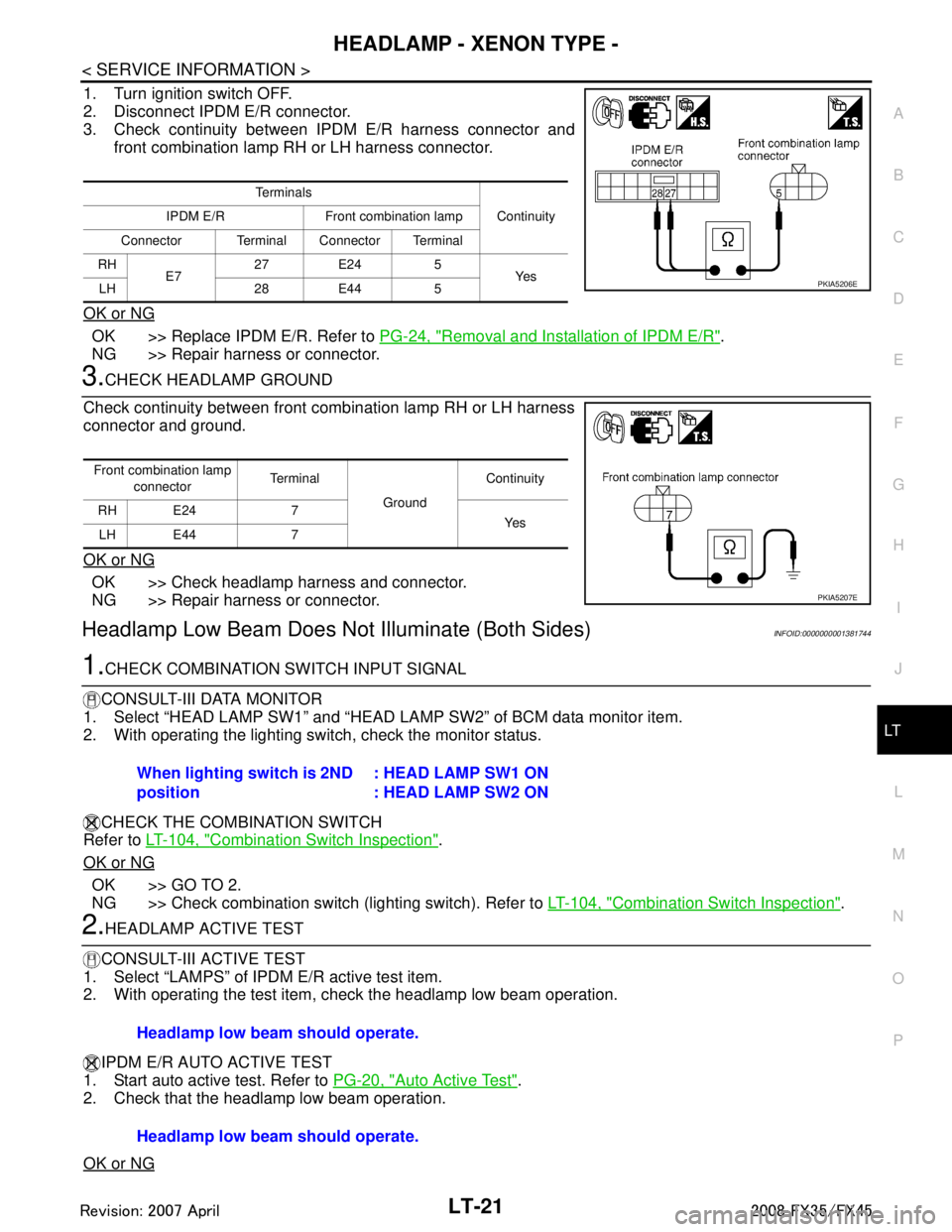
3. Check continuity between IPDM E/R harness connector and front combination lamp RH or LH harness connector.
OK or NG
OK >> Replace IPDM E/R. Refer to PG-24, "Removal and Installation of IPDM E/R".
NG >> Repair harness or connector.
3.CHECK HEADLAMP GROUND
Check continuity between front combination lamp RH or LH harness
connector and ground.
OK or NG
OK >> Check headlamp harness and connector.
NG >> Repair harness or connector.
Headlamp Low Beam Does No t Illuminate (Both Sides)INFOID:0000000001381744
1.CHECK COMBINATION SWITCH INPUT SIGNAL
CONSULT-III DATA MONITOR
1. Select “HEAD LAMP SW1” and “HEAD LA MP SW2” of BCM data monitor item.
2. With operating the lighting switch, check the monitor status.
CHECK THE COMBINATION SWITCH
Refer to LT-104, "
Combination Switch Inspection".
OK or NG
OK >> GO TO 2.
NG >> Check combination switch (lighting switch). Refer to LT-104, "
Combination Switch Inspection".
2.HEADLAMP ACTIVE TEST
CONSULT-III ACTIVE TEST
1. Select “LAMPS” of IPDM E/R active test item.
2. With operating the test item, check the headlamp low beam operation.
IPDM E/R AUTO ACTIVE TEST
1. Start auto active test. Refer to PG-20, "
Auto Active Test".
2. Check that the headlamp low beam operation.
OK or NG
Te r m i n a l s
Continuity
IPDM E/R Front combination lamp
Connector Terminal Connector Terminal
RH E7 27 E24 5
Ye s
LH 28 E44 5
PKIA5206E
Front combination lamp
connector Terminal
Ground Continuity
RH E24 7 Ye s
LH E44 7
PKIA5207E
When lighting switch is 2ND
position : HEAD LAMP SW1 ON
: HEAD LAMP SW2 ON
Headlamp low beam should operate.
Headlamp low beam should operate.
3AA93ABC3ACD3AC03ACA3AC03AC63AC53A913A773A893A873A873A8E3A773A983AC73AC93AC03AC3
3A893A873A873A8F3A773A9D3AAF3A8A3A8C3A863A9D3AAF3A8B3A8C
Page 3125 of 3924

HEADLAMP - XENON TYPE -LT-23
< SERVICE INFORMATION >
C
DE
F
G H
I
J
L
M A
B
LT
N
O P
1. Turn ignition switch OFF.
2. Disconnect IPDM E/R connector.
3. Check continuity between IPDM E/R harness connector and front combination lamp (RH and LH) harness connectors.
OK or NG
OK >> Replace IPDM E/R. Refer to PG-24, "Removal and Installation of IPDM E/R".
NG >> Repair harness or connector.
6.CHECK HEADLAMP GROUND
1. Turn ignition switch OFF.
2. Check continuity between front combination lamp (RH and LH) harness connectors and ground.
OK or NG
OK >> Check headlamp harness and connectors, ballasts (HID control unit), and xenon bulbs. Refer to LT-27, "
Xenon
Headlamp Trouble Diagnosis".
NG >> Repair harness or connector.
Headlamp Low Beam Does Not Illuminate (One Side)INFOID:0000000001381745
1.CHECK BULB
Check ballast (HID control unit) and xenon bulb of lamp which does not illuminate. Refer to LT-27, "
Xenon
Headlamp Trouble Diagnosis".
OK or NG
OK >> GO TO 2.
NG >> Replace malfunctioning part.
2.CHECK HEADLAMP INPUT SIGNAL
1. Turn ignition switch OFF.
2. Disconnect front combination lamp RH or LH connector.
3. Turn ignition switch ON.
4. Lighting switch is turned 2ND position.
5. Check voltage between front combination lamp RH or LH har- ness connector and ground.
OK or NG
OK >> GO TO 4.
Te r m i n a l s Continuity
IPDM E/R Front combination lamp
Connector Terminal Connector Terminal
RH E7 20 E24 6
Ye s
LH 30 E44 6
PKIA5209E
Front combination lamp
connector Terminal
Ground Continuity
RH E24 7 Ye s
LH E44 7
PKIA5207E
Te r m i n a l s
Vol tag e
(Approx.)
(+)
(-)
Front combination lamp
connector Terminal
RH E24 6 Ground Battery voltage
LH E44 6
PKIA5208E
3AA93ABC3ACD3AC03ACA3AC03AC63AC53A913A773A893A873A873A8E3A773A983AC73AC93AC03AC3
3A893A873A873A8F3A773A9D3AAF3A8A3A8C3A863A9D3AAF3A8B3A8C
Page 3126 of 3924

LT-24
< SERVICE INFORMATION >
HEADLAMP - XENON TYPE -
NG >> GO TO 3.
3.CHECK HEADLAMP CIRCUIT
1. Turn ignition switch OFF.
2. Disconnect IPDM E/R connector.
3. Check continuity between IPDM E/R harness connector and front combination lamp RH or LH harness connector.
OK or NG
OK >> Replace IPDM E/R. Refer to PG-24, "Removal and Installation of IPDM E/R".
NG >> Repair harness or connector.
4.CHECK HEADLAMP GROUND
Check continuity between front comb ination lamp RH or LH harness
connector and ground.
OK or NG
OK >> Check headlamp harness and connector.
NG >> Repair harness or connector.
Headlamp RH Low Beam and Hi gh Beam Does Not IlluminateINFOID:0000000001381746
1.CHECK BULB
Inspect ballast (HID control unit) and xenon bulb of lamp which does not illuminate. Refer to LT-27, "
Xenon
Headlamp Trouble Diagnosis".
OK or NG
OK >> GO TO 2.
NG >> Replace malfunctioning part.
2. CHECK HEADLAMP GROUND
1. Turn ignition switch OFF.
2. Disconnect front combination lamp RH connector.
3. Check continuity between front combination lamp RH harness connector E24 terminal 7 and ground.
OK or NG
OK >> GO TO 3.
NG >> Repair harness or connector.
3.CHECK HEADLAMP CIRCUIT
Te r m i n a l s Continuity
IPDM E/R Front combination lamp
Connector Terminal Connector Terminal
RH E7 20 E24 6
Ye s
LH 30 E44 6
PKIA5209E
Front combination lamp
connector Te r m i n a l
Ground Continuity
RH E24 7 Ye s
LH E44 7
PKIA5207E
7 – Ground : Continuity should exist.
PKIA5207E
3AA93ABC3ACD3AC03ACA3AC03AC63AC53A913A773A893A873A873A8E3A773A983AC73AC93AC03AC3
3A893A873A873A8F3A773A9D3AAF3A8A3A8C3A863A9D3AAF3A8B3A8C
Page 3127 of 3924

HEADLAMP - XENON TYPE -LT-25
< SERVICE INFORMATION >
C
DE
F
G H
I
J
L
M A
B
LT
N
O P
1. Disconnect IPDM E/R connector.
2. Check continuity between IPDM E/R harness connector E7 ter- minal 27 and front combination lamp RH harness connector E24
terminal 5.
3. Check continuity between IPDM E/R harness connector E7 ter- minal 20 and front combination lamp RH harness connector E24
terminal 6.
OK or NG
OK >> Replace IPDM E/R. Refer to PG-24, "Removal and
Installation of IPDM E/R".
NG >> Repair harness or connector.
Headlamp LH Low Beam and High Beam Does Not IlluminateINFOID:0000000001381747
1.CHECK BULB
Inspect ballast (HID control unit) and xenon bulb of lamp which does not illuminate. Refer to LT-27, "
Xenon
Headlamp Trouble Diagnosis".
OK or NG
OK >> GO TO 2.
NG >> Replace malfunctioning part.
2.CHECK HEADLAMP GROUND
1. Turn ignition switch OFF.
2. Disconnect front combination lamp LH connector.
3. Check continuity between front combination lamp LH harness connector E44 terminal 7 and ground.
OK or NG
OK >> GO TO 3.
NG >> Repair harness or connector.
3.CHECK HEADLAMP CIRCUIT
1. Disconnect IPDM E/R connector.
2. Check continuity between IPDM E/R harness connector E7 ter- minal 28 and front combination lamp LH harness connector E44
terminal 5.27 – 5 : Continui
ty should exist.
PKIA7587E
20 – 6 : Continuity should exist.
PKIA5211E
7 – Ground : Continuity should exist.
PKIA5207E
28 – 5 : Continuity should exist.
PKIA5212E
3AA93ABC3ACD3AC03ACA3AC03AC63AC53A913A773A893A873A873A8E3A773A983AC73AC93AC03AC3
3A893A873A873A8F3A773A9D3AAF3A8A3A8C3A863A9D3AAF3A8B3A8C
Page 3129 of 3924

HEADLAMP - XENON TYPE -LT-27
< SERVICE INFORMATION >
C
DE
F
G H
I
J
L
M A
B
LT
N
O P
Xenon Headlamp Trouble DiagnosisINFOID:0000000001328286
1.CHECK 1: XENON HEADLAMP LIGHTING
Install normal xenon bulb to corresponding xenon bulb headlamp, and check if lamp lights up.
OK or NG
OK >> Replace xenon bulb.
NG >> GO TO 2.
2.CHECK 2: XENON HEADLAMP LIGHTING
Install normal HID control unit to corresponding xenon headlamp, and check if lamp lights up.
OK or NG
OK >> Replace HID control unit.
NG >> GO TO 3.
3.CHECK 3: XENON HEADLAMP LIGHTING
Install normal xenon lamp housing assembly to corresponding xenon headlamp, and check if lamp lights up.
OK or NG
OK >> Replace xenon headlamp housing assembly. [Malfunction in starter (boosting circuit) in xenon headlamp housing]
NG >> INSPECTION END
Aiming AdjustmentINFOID:0000000001328287
PREPARATION BEFORE ADJUSTING
For details, refer to the regulations in your own country.
Before performing aiming adjustment, check the following.
1. Keep all tires inflated to correct pressures.
2. Place vehicle on level ground.
3. Set that there is no-load in vehicle other than the driv er (or equivalent weight placed in driver's position).
Coolant, engine oil filled up to correct level and full fuel tank.
LOW BEAM AND HIGH BEAM
PKIC9684E
3AA93ABC3ACD3AC03ACA3AC03AC63AC53A913A773A893A873A873A8E3A773A983AC73AC93AC03AC3
3A893A873A873A8F3A773A9D3AAF3A8A3A8C3A863A9D3AAF3A8B3A8C
Page 3130 of 3924

LT-28
< SERVICE INFORMATION >
HEADLAMP - XENON TYPE -
1. Turn headlamp low beam ON.CAUTION:
Be sure aiming switch is set to “0” when performing aiming
adjustment.
2. Use adjusting screws to perform aiming adjustment.
ADJUSTMENT USING AN ADJUSTMENT SCREEN (LIGHT/DARK BORDERLINE)
If the vehicle front body has been repaired and/or headlamp assembly has been replaced, check aiming.
Use the aiming chart shown in the figure.
Basic illumination area for adjustment should be within the range shown on the aiming chart. Adjust headlamp accordingly.
Bulb ReplacementINFOID:0000000001328288
HEADLAMP HIGH/LOW BEAM
PKIB3650E
PKIC9731E
3AA93ABC3ACD3AC03ACA3AC03AC63AC53A913A773A893A873A873A8E3A773A983AC73AC93AC03AC3
3A893A873A873A8F3A773A9D3AAF3A8A3A8C3A863A9D3AAF3A8B3A8C
Page 3131 of 3924

HEADLAMP - XENON TYPE -LT-29
< SERVICE INFORMATION >
C
DE
F
G H
I
J
L
M A
B
LT
N
O P
1. Turn lighting switch OFF.
2. Disconnect the battery cable from the negative terminal or remove power fuse.
3. Remove air cleaner case (when replacing LH bulb). Refer to EM-173
(VK45) or refer to EM-17 (VQ35).
4. Remove radiator reservoir tank (when replacing RH bulb). Refer to CO-40
(VK45) or refer to CO-13 (VQ35).
5. Turn plastic cap counterclockwise and unlock it.
6. Turn bulb socket counterclockwise and unlock it.
7. Unlock retaining spring and remove bulb from headlamp.
8. Installation is the reverse order of removal. NOTE:
After installation, perform aiming adjustment. Refer to LT-27, "
Aiming Adjustment".
DAYTIME/PARKING LAMP
1. Turn lighting switch OFF.
2. Remove air cleaner case (when replacing LH bulb of VK45).
Refer to EM-173
.
3. Turn bulb socket counterclockwise and unlock it.
4. Remove bulb from its socket.
5. Installation is the reverse order of removal.
FRONT TURN SIGNAL LAMP
1. Turn lighting switch OFF.
2. Turn bulb socket counterclockwise with suitable tool and unlock it.
3. Remove bulb from its socket.
4. Installation is the reverse order of removal.
FRONT SIDE MARKER LAMP
1. Turn lighting switch OFF.
2. Turn bulb socket counterclockwise and unlock it.
3. Remove bulb from its socket.
4. Installation is the reverse order of removal.
CAUTION:Headlamp high/low beam (Xenon) : 12 V - 35 W (D2S)
PKIC9730E
Daytime/Parking lamp : 12 V - 21/5 W
PKIC9732E
Front turn signal lamp : 12 V - 21 W (amber)
SKIA6182E
Front side marker lamp : 12 V - 3.8 W
SKIA5552E
3AA93ABC3ACD3AC03ACA3AC03AC63AC53A913A773A893A873A873A8E3A773A983AC73AC93AC03AC3
3A893A873A873A8F3A773A9D3AAF3A8A3A8C3A863A9D3AAF3A8B3A8C
Page 3145 of 3924

DAYTIME LIGHT SYSTEMLT-43
< SERVICE INFORMATION >
C
DE
F
G H
I
J
L
M A
B
LT
N
O P
1. Turn ignition switch OFF.
2. Disconnect combination meter connector.
3. Check continuity between combination meter harness connector M20 terminal 23 and parking brake switch harness connector
E207 terminal 1.
OK or NG
OK >> Replace combination meter.
NG >> Repair harness or connector.
CONSULT-III Functions (BCM)INFOID:0000000001328300
CONSULT-III can display each diagnostic item using the diagnostic test mode shown following.
CONSULT-III BASIC OPERATION
Refer to GI-34, "Description".
DATA MONITOR
Display Item List
1 – 23 : Continuity should exist.
SKIA5877E
BCM diagnosis part Diagnosis mode Description
HEADLAMP DATA MONITOR Displays BCM input data in real time.
ACTIVE TEST Operation of electrical loads can be checked by sending drive signal to them.
BCM SELF-DIAG RESULTS BCM performs self-diagnosis of CAN communication.
CAN DIAG SUPPORT MNTR The result of transmit/receive diagnosis of CAN communication can be read.
Monitor item Contents
IGN ON SW “ON/OFF” Displays “IGN position (ON)/OFF, ACC position (OFF)” judged from ignition switch sig-
nal.
ACC ON SW “ON/OFF” Displays “ACC (ON)/OFF, Ignition OFF (OFF)”
status judged from ignition switch sig-
nal.
HI BEAM SW “ON/OFF” Displays status (high beam switch: ON/Others: OFF) of high beam switch judged from
lighting switch signal.
HEAD LAMP SW 1 “ON/OFF” Displays status (headlamp switch 1: ON/Others: OFF) of headlamp switch 1 judged
from lighting switch signal.
HEAD LAMP SW 2 “ON/OFF” Displays status (headlamp switch 2: ON/Others: OFF) of headlamp switch 2 judged
from lighting switch signal.
LIGHT SW 1 ST “ON/OFF” Displays status (lighting switch 1ST or 2ND position: ON/Others: OFF) of lighting
switch judged from lighting switch signal.
AUTO LIGHT SW
NOTE 1 “ON/OFF” Displays status of lighting switch as judged from lighting switch signal. (AUTO position:
ON/Other than AUTO position: OFF)
PASSING SW “ON/OFF” Displays status (flash-to-pass switch: ON/Others: OFF) of flash-to-pass switch judged
from lighting switch signal.
FR FOG SW “ON/OFF” Displays status (front fog lamp switch: ON/Others: OFF) of front fog lamp switch
judged from lighting switch signal.
RR FOG SW
NOTE 3“OFF” —
DOOR SW - DR “ON/OFF” Displays status of driver door as judged from driver door switch signal. (Door is open:
ON/Door is closed: OFF)
DOOR SW - AS “ON/OFF” Displays status of passenger door as judged from passenger door switch signal. (Door
is open: ON/Door is closed: OFF)
DOOR SW - RR “ON/OFF” Displays status of rear door as judged from rear door switch (RH) signal. (Door is open:
ON/Door is closed: OFF)
3AA93ABC3ACD3AC03ACA3AC03AC63AC53A913A773A893A873A873A8E3A773A983AC73AC93AC03AC3
3A893A873A873A8F3A773A9D3AAF3A8A3A8C3A863A9D3AAF3A8B3A8C
Page 3158 of 3924
LT-56
< SERVICE INFORMATION >
AUTO LIGHT SYSTEM
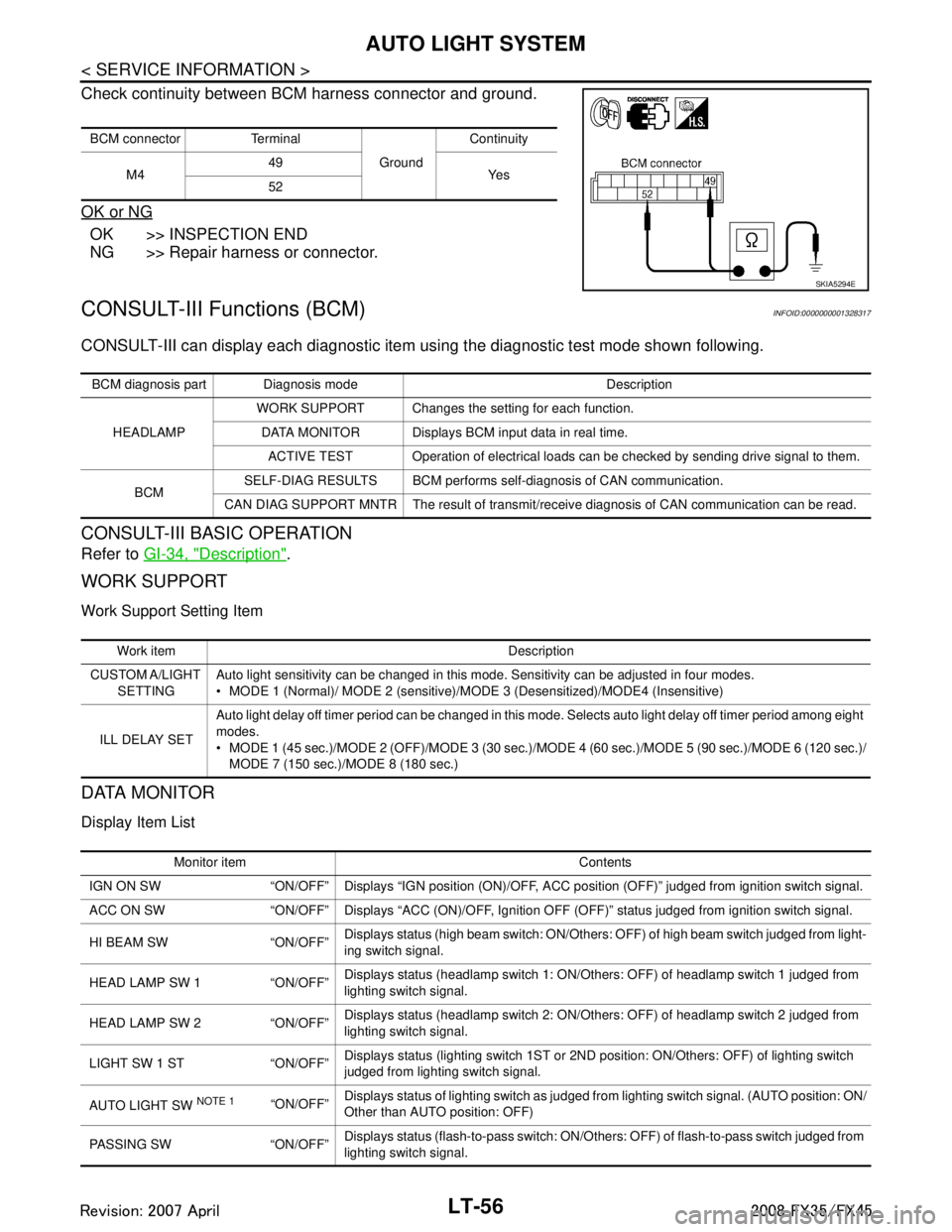
Check continuity between BCM harness connector and ground.
OK or NG
OK >> INSPECTION END
NG >> Repair harness or connector.
CONSULT-III Functions (BCM)INFOID:0000000001328317
CONSULT-III can display each diagnostic item using the diagnostic test mode shown following.
CONSULT-III BASIC OPERATION
Refer to GI-34, "Description".
WORK SUPPORT
Work Support Setting Item
DATA MONITOR
Display Item List
BCM connector Terminal
GroundContinuity
M4 49
Ye s
52
SKIA5294E
BCM diagnosis part Diagnosis mode Description
HEADLAMP WORK SUPPORT Changes the setting for each function.
DATA MONITOR Displays BCM input data in real time. ACTIVE TEST Operation of electrical loads can be checked by sending drive signal to them.
BCM SELF-DIAG RESULTS BCM performs self-diagnosis of CAN communication.
CAN DIAG SUPPORT MNTR The result of transmit/receive diagnosis of CAN communication can be read.
Work item Description
CUSTOM A/LIGHT SETTING Auto light sensitivity can be changed in this mode. Sensitivity can be adjusted in four modes.
MODE 1 (Normal)/ MODE 2 (sensitive)/MODE 3 (Desensitized)/MODE4 (Insensitive)
ILL DELAY SET Auto light delay off timer period can be changed in this mode. Selects auto light delay off timer period among eight
modes.
MODE 1 (45 sec.)/MODE 2 (OFF)/MODE
3 (30 sec.)/MODE 4 (60 sec.)/MODE 5 (90 sec.)/MODE 6 (120 sec.)/
MODE 7 (150 sec.)/ MODE 8 (180 sec.)
Monitor item Contents
IGN ON SW “ON/OFF” Displays “IGN posi tion (ON)/OFF, ACC position (OFF)” judged from ignition switch signal.
ACC ON SW “ON/OFF” Displays “ACC (ON)/O FF, Ignition OFF (OFF)” status judged from ignition switch signal.
HI BEAM SW “ON/OFF” Displays status (high beam switch: ON/Others: OFF) of high beam switch judged from light-
ing switch signal.
HEAD LAMP SW 1 “ON/OFF” Displays status (headlamp switch 1: ON/Others: OFF) of headlamp switch 1 judged from
lighting switch signal.
HEAD LAMP SW 2 “ON/OFF” Displays status (headlamp switch 2: ON/Others: OFF) of headlamp switch 2 judged from
lighting switch signal.
LIGHT SW 1 ST “ON/OFF” Displays status (lighting switch 1ST or 2ND position: ON/Others: OFF) of lighting switch
judged from lighting switch signal.
AUTO LIGHT SW
NOTE 1 “ON/OFF” Displays status of lighting switch as judged from lighting switch signal. (AUTO position: ON/
Other than AUTO position: OFF)
PASSING SW “ON/OFF” Displays status (flash-to-pass switch: ON/Others: OFF) of flash-to-pass switch judged from
lighting switch signal.
3AA93ABC3ACD3AC03ACA3AC03AC63AC53A913A773A893A873A873A8E3A773A983AC73AC93AC03AC3
3A893A873A873A8F3A773A9D3AAF3A8A3A8C3A863A9D3AAF3A8B3A8C