engine control system INFINITI FX35 2008 Workshop Manual
[x] Cancel search | Manufacturer: INFINITI, Model Year: 2008, Model line: FX35, Model: INFINITI FX35 2008Pages: 3924, PDF Size: 81.37 MB
Page 431 of 3924

ATC-26
< SERVICE INFORMATION >
AIR CONDITIONER CONTROL
The air mix doors are automatically controlled so that in-vehicle temperature is maintained at a predetermined
value by the temperature setting, ambient temper ature, in-vehicle temperature and amount of sunload.
FAN SPEED CONTROL
Blower speed is automatically controlled by the temperature setting, ambient temperature, in-vehicle tempera-
ture, intake temperature, amount of sunload and air mix door position.
With pressing AUTO switch, the blower motor starts to gradually increase air flow volume.
When engine coolant temperature is low, the blower moto r operation is delayed to prevent cool air from flow-
ing.
INTAKE DOOR CONTROL
The intake doors are automatically controlled by the tem perature setting, ambient temperature, in-vehicle tem-
perature, intake temperature, amount of s unload and ON/OFF operation of the compressor.
MODE DOOR CONTROL
The mode door is automatically controlled by the temperat ure setting, ambient temperature, in-vehicle temper-
ature, intake temperature and amount of sunload.
MAGNET CLUTCH CONTROL
When A/C switch, AUTO switch or DEF switch is pr essed, unified meter and A/C amp. transmits compressor
ON signal to BCM.
BCM sends compressor ON signal to ECM, via CAN communication.
ECM judges whether compressor can be turned ON, based on each sensor status (refrigerant-pressure sen-
sor signal, throttle angle, etc.). If it judges compre ssor can be turned ON, it sends compressor ON signal to
IPDM E/R, via CAN communication.
Upon receipt of compressor ON signal from ECM, IPDM E/R turns air conditioner relay ON to operate com-
pressor.
When sending compressor ON signal to IPDM E/R via CAN communication, ECM simultaneously sends com-
pressor feedback signal to unified meter and A/C amp. via CAN communication.
Unified meter and A/C amp., then, uses input compressor feedback signal to control air inlet.
SELF-DIAGNOSIS SYSTEM
The self-diagnosis system is built into the unified mete r and A/C amp. to quickly locate the cause of malfunc-
tions.
RJIA1957E
3AA93ABC3ACD3AC03ACA3AC03AC63AC53A913A773A893A873A873A8E3A773A983AC73AC93AC03AC3
3A893A873A873A8F3A773A9D3AAF3A8A3A8C3A863A9D3AAF3A8B3A8C
Page 448 of 3924

TROUBLE DIAGNOSISATC-43
< SERVICE INFORMATION >
C
DE
F
G H
I
K L
M A
B
AT C
N
O P
Self-Diagnosis FunctionINFOID:0000000001328181
DESCRIPTION
The self-diagnosis system diagnoses sensors, door motors, blower motor, etc. by system line. Refer to appli-
cable sections (items) for details. Shifting from norma l control to the self-diagnosis system is accomplished by
starting the engine (turning the ignition switch ON) and pr essing OFF switch for at least 5 seconds. The OFF
switch must be pressed within 10 seconds after starting the engine (ignition switch is turned ON). This system
will be canceled by either pressing AUTO switch or turn ing the ignition switch OFF. Shifting from one step is
accomplished by means of pressi ng temperature control switch (driver side), as required.
43 G/B A/C LAN signal ON —
45 PU/WECV (Electric Control Valve)
signal ONSelf-diagnosis. STEP-4
(Code No. 45)
46 L/W Power supply for IGN2 ON — Battery voltage
49 W/G Sensor ground ON — Approx. 0
50 LG Sunload sensor — — —
53 G Blower motor control signal ON Blower speed: 1st speed (man-
ual)
54 Y/R Power supply for each door
motor ON — Battery voltage
57 BR/Y Blower motor ON signal ON A/C switch: ON
(Blower motor operates.)
Approx. 0
OFF switch: ON
(A/C system: OFF)
Te r m i n a l
No. Wire
color ItemIgnition
switch Condition Vol tag e
(V)
SJIA1453J
SJIA1607E
SJIA1454J
SJIA1474J
3AA93ABC3ACD3AC03ACA3AC03AC63AC53A913A773A893A873A873A8E3A773A983AC73AC93AC03AC3
3A893A873A873A8F3A773A9D3AAF3A8A3A8C3A863A9D3AAF3A8B3A8C
Page 455 of 3924

ATC-50
< SERVICE INFORMATION >
TROUBLE DIAGNOSIS
4. Press the mode switch as desired.
When battery cable is disconnected or battery voltage is below 10 V, trimmer operation is canceled. Wind dis-
tribution ratio set becomes that of initial condition.
AUXILIARY MECHANISM: INLET PORT MEMORY FUNCTION
When ignition switch is turned from OFF to ON, inlet port memory function at manual mode can be set.
Operating procedures for this trimmer are as follows:1. Begin self-diagnosis STEP-5 mode. Refer to "Self-diagnosis Function".
2. Press (fan) UP switch to set system in auxiliary mode.
3. Press the intake switch as desired.
When battery cable is disconnected or battery voltage is below 10 V, memory function is canceled. Memory
function set becomes that of initial condition.
Operational CheckINFOID:0000000001328182
The purpose of the operational check is to c heck if the individual system operates properly.
CHECKING MEMORY FUNCTION
1. Press the temperature control (UP) switch (driver side) until 32°C (90 °F) is displayed.
2. Press OFF switch.
3. Turn ignition switch OFF.
4. Turn ignition switch ON.
5. Press the AUTO switch.
6. Confirm that the set temperature remains at previous temperature.
7. Press OFF switch.
If NG, go to trouble diagnosis procedure for ATC-85, "
Memory Function".
If OK, continue the check.
CHECKING BLOWER
SJIA1581E
LED status of
FRE position LED status of
REC position Setting status
Setting changeover
method
FRE REC
OFF OFF AUTO control AUTO control
Intake SW: ON
OFF ON AUTO control (Initial setting)
Manual REC status is memorized.
(Initial setting)
ON OFF Manual FRE status is memorized. AUTO control
ON ON Manual FRE status is memorized. Manual REC status is memorized.
Conditions : Engine running at normal operating temperature
3AA93ABC3ACD3AC03ACA3AC03AC63AC53A913A773A893A873A873A8E3A773A983AC73AC93AC03AC3
3A893A873A873A8F3A773A9D3AAF3A8A3A8C3A863A9D3AAF3A8B3A8C
Page 471 of 3924

ATC-66
< SERVICE INFORMATION >
TROUBLE DIAGNOSIS
Intake sensor
System Operation
Automatic Mode
In the automatic mode, the blower motor speed is calculated by the unified meter and A/C amp. based on the
input from the PBR, in-vehicle sensor, sunl oad sensor, intake sensor and ambient sensor.
When the air flow is increased, the duty ratio of the blower fan motor’s drive signal is changed at 8%/sec. to
prevent a sudden increase in air flow.
In addition to manual air flow control and the usual automat ic air flow control, starting air flow control, low
water temperature starting control and high passenger co mpartment temperature starting control are avail-
able.
Starting Fan Speed Control
Start up from COLD SOAK Condition (Automatic mode)
In a cold start up condition where the engine coolant temperature is below 56 °C (133 °F), the blower will not
operate for a short period of time (up to 150 seconds ). The exact start delay time varies depending on the
ambient and engine coolant temperature.
In the most extreme case (very low ambient) the blower starting delay will be 150 seconds as described
above. After this delay, the blower will operate at lo w speed until the engine coolant temperature rises above
56 °C (133 °F), and then the blower speed will increase to the objective speed.
Start up from usual or HOT SOAK Condition (Automatic mode)
The blower will begin operation momentarily after the AU TO switch is pressed. The blower speed will gradu-
ally rise to the objective speed over a time period of 3 seconds or less (actual time depends on the objective
blower speed).
Blower Speed Compensation
Sunload
When the in-vehicle temperature and the set temperature are very close, the blower will be operating at low
speed. The low speed will vary depending on the sunload. Du ring conditions of low or no sunload, the blower
speed is at duty ratio 25%. During high sunload conditi ons, the unified meter and A/C amp. raise the blower
speed (duty ratio 49%).
Fan Speed Control Specification
RJIA1995E
RJIA1996E
3AA93ABC3ACD3AC03ACA3AC03AC63AC53A913A773A893A873A873A8E3A773A983AC73AC93AC03AC3
3A893A873A873A8F3A773A9D3AAF3A8A3A8C3A863A9D3AAF3A8B3A8C
Page 513 of 3924

ATC-108
< SERVICE INFORMATION >
HEATER & COOLING UNIT ASSEMBLY
HEATER & COOLING UNIT ASSEMBLY
Removal and InstallationINFOID:0000000001328211
REMOVAL
1. Use a refrigerant collecting equipment (for HFC-134a) to discharge the refrigerant.
2. Drain coolant from cooling system. Refer to CO-10, "
Changing Engine Coolant" (VQ35DE) or CO-37,
"Changing Engine Coolant" (VK45DE).
3. Remove cowl top cover. Refer to EI-23
.
4. Remove high-pressure pipe 2 mounting clip.
5. Remove low-pressure flexible hose bracket mounting bolt. Refer to ATC-128, "
Removal and Installation of
Low-Pressure Flexible Hose".
6. Disconnect low-pressure pipe 1 and high-pressure pipe 2 from evaporator.
a. Set a disconnector [high-pressure side (SST: 9253089908), low- pressure side (SST: 9253089916)] on A/C piping.
b. Slide a disconnector toward vehicle front until it clicks.
c. Slide A/C piping toward vehicle front and disconnect it. CAUTION:
Cap or wrap the joint of low- pressure pipe 1, 2 and high-
pressure pipe 2, 3 with suitab le material such as vinyl tape
to avoid the entry of air.
7. Remove electric throttle control actuator (VQ35DE). Refer to EM-19
.
8. Disconnect two heater hoses from heater core.
9. Remove instrument panel and pad. Refer to IP-10
.
10. Remove blower unit. Refer to ATC-103
.
RJIA2037E
RJIA2077E
RJIA2041E
3AA93ABC3ACD3AC03ACA3AC03AC63AC53A913A773A893A873A873A8E3A773A983AC73AC93AC03AC3
3A893A873A873A8F3A773A9D3AAF3A8A3A8C3A863A9D3AAF3A8B3A8C
Page 546 of 3924

REFRIGERANT LINESATC-141
< SERVICE INFORMATION >
C
DE
F
G H
I
K L
M A
B
AT C
N
O P
6. Do not stop when one leak is found. Continue to check for additional leaks at all system components.
If no leaks are found, perform steps 7 - 10.
7. Start the engine.
8. Set the A/C control as follows;
a. A/C switch: ON
b. Mode door position: VENT (Ventilation)
c. Intake position: Recirculation
d. Temperature setting: Max. cold
e. Fan speed: High
9. Run engine at 1,500 rpm for at least 2 minutes.
10. Stop the engine and perform leak check again following steps 4 through 6 above.
Refrigerant leaks should be chec ked immediately after stopping
the engine. Begin with the leak detector at the compressor. The
pressure on the high-pressure side will gradually drop after
refrigerant circulation stops and pressure on the low-pressure
side will gradually rise, as shown in the graph. Some leaks are
more easily detected when pressure is high.
11. Before connecting recovery/recycling recharging equipm ent to vehicle, check recovery/recycling recharg-
ing equipment gauges. No refrigerant pressure should be displayed. If pressure is displayed, recover
refrigerant from equipment lines and then check refrigerant purity.
12. Confirm refrigerant purity in supply tank using recovery/recycling recharging equipment and refrigerant
identifier.
13. Confirm refrigerant purity in vehicle A/C system us ing recovery/recycling recharging equipment and refrig-
erant identifier.
14. Discharge A/C system using approved refrigerant recove ry equipment. Repair the leaking fitting or com-
ponent if necessary.
15. Evacuate and recharge A/C system and perform the l eak test to confirm no refrigerant leaks.
16. Perform A/C performance test to ensure system works properly.
SHA839E
3AA93ABC3ACD3AC03ACA3AC03AC63AC53A913A773A893A873A873A8E3A773A983AC73AC93AC03AC3
3A893A873A873A8F3A773A9D3AAF3A8A3A8C3A863A9D3AAF3A8B3A8C
Page 582 of 3924

AUDIOAV-35
< SERVICE INFORMATION >
C
DE
F
G H
I
J
L
M A
B
AV
N
O P
STARTING THE SELF-DIAGNOSIS MODE
1. Turn ignition switch from OFF to ACC.
2. Within 10 seconds press and hold the switches “1” and “6” simultaneously for 3 seconds.
DIAGNOSIS FUNCTION
The following are checked: All the indicators (LED) in the A/C and AV switch.
Continuity of the switches by sounding the buzze r when the A/C and AV switch and audio steering wheel
switch is pressed.
Continuity of harness between A/C and AV switch and audio steering switch.
NOTE:
Rear window defogger switch operation is not checked. (No beep sound even under normal status)
EXITING THE SELF-DIAGNOSIS MODE
Turn ignition switch OFF.
Trouble DiagnosisINFOID:0000000001328684
The majority of the audio malfunctions are the result of outside causes (bad CD, electromagnetic interfer-
ence, etc.). Check the symptoms below to diagnose the malfunction.
The vehicle itself can be a source of noise if noise prevention parts or electrical equipment is malfunctioning.
Check if noise is caused and/or changed by engine speed, ignition switch turned to each position, and oper-
ation of each piece of electrical equipment, and then determine the cause.
Make sure that other operation except audio system can be performed with A/C and AV switch. If these
operations are inoperative with A/C and AV switch, refer to AV-79, "
Unable to Operate System with A/C and
AV Switch" (Without navigation system), or AV-127, "Unable to Operate System with A/C and AV Switch"
(With navigation system).
Refer to "SERVICE BULLETIN ITB04-055" for the diagnosis of satellite radio.
SKIB8660E
Symptom Possible malfunction location
Audio system does not work properly. Audio unit power supply circuit
Communication signal circuit between audio unit and display control unit
A/C and AV switch
Audio unit
No sound can be heard from all speakers. BOSE speaker amp. power supply and ground circuit
BOSE speaker amp. ON signal circuit
Audio unit
BOSE speaker amp.
No sound can be heard from one or several speakers. Audio signal circuit between audio unit and BOSE speaker amp.
Audio signal circuit between BOSE speaker amp. and speaker
Speaker
Tweeter
Audio unit
BOSE speaker amp.
No sound can be heard from woofer. Audio signal circuit between BOSE speaker amp. and woofer
Woofer
BOSE speaker amp.
3AA93ABC3ACD3AC03ACA3AC03AC63AC53A913A773A893A873A873A8E3A773A983AC73AC93AC03AC3
3A893A873A873A8F3A773A9D3AAF3A8A3A8C3A863A9D3AAF3A8B3A8C
Page 620 of 3924

INTEGRATED DISPLAY SYSTEMAV-73
< SERVICE INFORMATION >
C
DE
F
G H
I
J
L
M A
B
AV
N
O P
Self-Diagnosis Mode (DCU)INFOID:0000000001328723
OPERATION PROCEDURE
1. Start the engine.
2. Turn the audio system OFF.
3. While pressing the “4” button, turn the volume control dial clock- wise or counterclockwise for 30 clicks or more. (When the self-
diagnosis mode is started, a short beep will be heard.)
Shifting from current screen to previous screen is performedby pressing “BACK” button.
4. The initial trouble diagnosis screen will be shown, and items “Self Diagnosis (DCU)”, “Confirmation/Adjustment” and “CAN
DIAG SUPPORT MONITOR” will become selective.
5. Perform self-diagnosis by selecting the “Self Diagnosis (DCU)”. Self-diagnosis screen is displayed, and then self-diagnosisstarts.
The bar graph visible below self-diagnosis screen displays progress of the diagnosis.
Mode Description
Self Diagnosis (DCU) Display control unit diagnosis
Analyzes connection between the display control unit and each unit, and
operation of each unit.
Confirmation/
Adjustment Display Diagnosis
Color tone and shading of the display control unit-generated image can be
checked by the display of a color bar and a gray scale.
Vehicle Signals Diagnosis of signals that are input to display control unit can be performed
for Vehicle Speed, IGN, Reverse and Light.
Auto Climate Control Refer to AT C - 4 3 , "
Self-Diagnosis Function".
CAN DIAG SUPPOPT MONITOR The transmitting/receiving of CAN communication can be monitored.
SKIB8743E
SKIB7871E
SKIA4208E
3AA93ABC3ACD3AC03ACA3AC03AC63AC53A913A773A893A873A873A8E3A773A983AC73AC93AC03AC3
3A893A873A873A8F3A773A9D3AAF3A8A3A8C3A863A9D3AAF3A8B3A8C
Page 622 of 3924

INTEGRATED DISPLAY SYSTEMAV-75
< SERVICE INFORMATION >
C
DE
F
G H
I
J
L
M A
B
AV
N
O P
Confirmation/Adjustment ModeINFOID:0000000001328724
OPERATION PROCEDURE
1. Start the engine.
2. Turn the audio system OFF.
3. While pressing the “4” button, turn the volume control dial clock- wise or counterclockwise for 30 clicks or more. (When the self-
diagnosis mode is started, a short beep will be heard.)
Shifting from current screen to previous screen is performedby pressing “BACK” button.
Diagnosis
No. Possible cause Action to take
1 Display control unit malfunction is detected. Replace display control unit.
2 Malfunction is detected on communication signal between
display control unit and display. 1. Check communication circuit between display control
unit and display.
2. Check communication signal between display control unit and display.
3. If the results from the above checkup show no mal-
function, replace either display control unit or display,
and then start self-diagnosis.
4. If self-diagnosis results still show any malfunction, re-
place the other unit.
3 Audio unit power supply circuit malfunction is detected.
Malfunction is detected on communication signal be-
tween display control unit and audio unit. 1. Check audio unit power supply circuit.
2. Check communication circuit between display control
unit and audio unit.
3. Check communication signal between display control unit and audio unit.
4. If the results from the above checkup show no mal-
function, replace either display control unit or audio
unit, and then start self-diagnosis.
5. If self-diagnosis results still show any malfunction, re-
place the other unit.
4 Satellite radio tuner power supply and ground circuit mal-
function is detected.
Malfunction is detected on communication signal be- tween audio unit and satellite radio tuner. 1. Check satellite radio tuner power supply and ground
circuit.
2. Check communication circuit between audio unit and
satellite radio tuner.
3. Check communication signal between audio unit and satellite radio tuner.
4. If the results from the above checkup show no mal- function, replace either audio unit or satellite radio tun-
er, and then start self-diagnosis.
5. If self-diagnosis results still show any malfunction, re- place the other unit.
SKIB8743E
3AA93ABC3ACD3AC03ACA3AC03AC63AC53A913A773A893A873A873A8E3A773A983AC73AC93AC03AC3
3A893A873A873A8F3A773A9D3AAF3A8A3A8C3A863A9D3AAF3A8B3A8C
Page 624 of 3924
INTEGRATED DISPLAY SYSTEMAV-77
< SERVICE INFORMATION >
C
DE
F
G H
I
J
L
M A
B
AV
N
O P
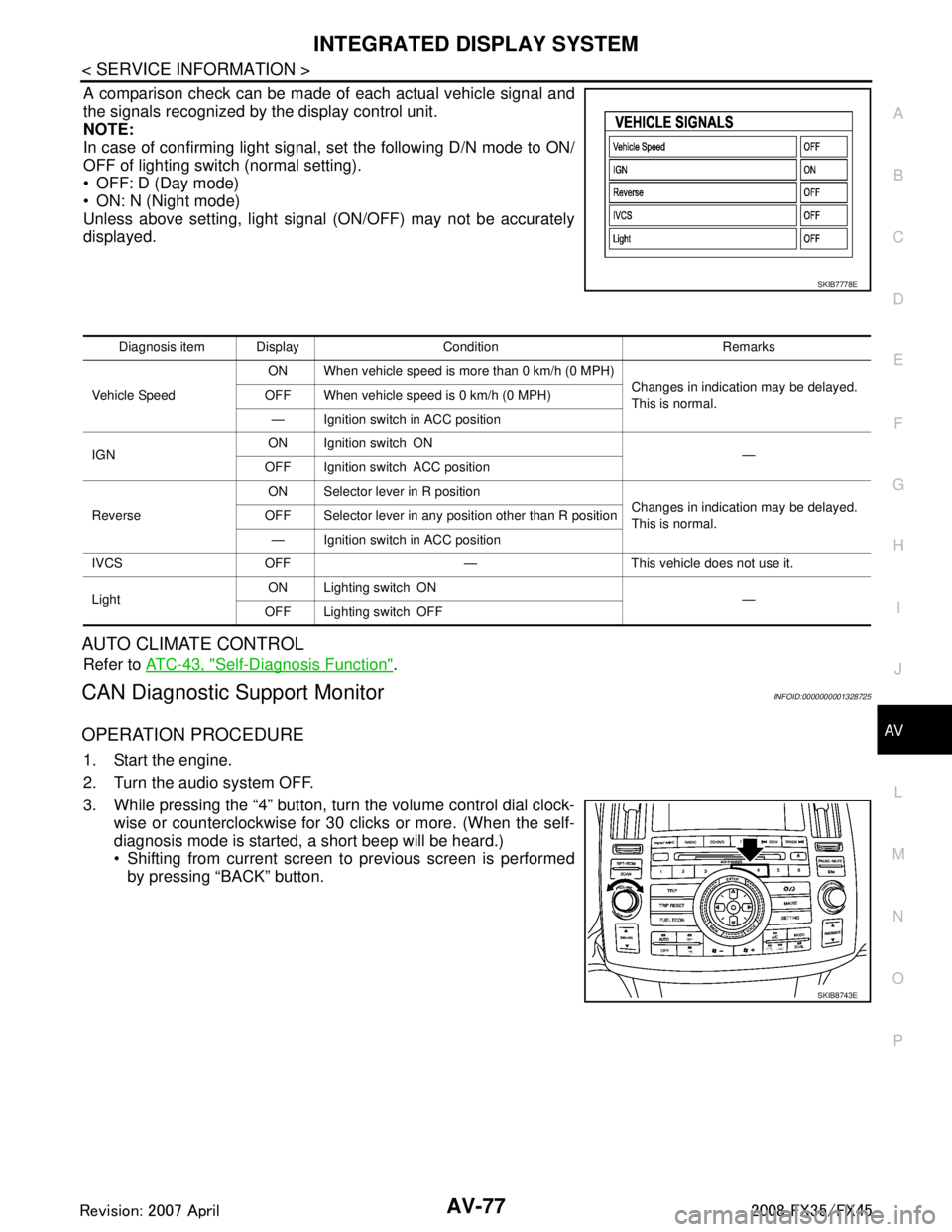
A comparison check can be made of each actual vehicle signal and
the signals recognized by the display control unit.
NOTE:
In case of confirming light signal, set the following D/N mode to ON/
OFF of lighting switch (normal setting).
OFF: D (Day mode)
ON: N (Night mode)
Unless above setting, light signal (ON/OFF) may not be accurately
displayed.
AUTO CLIMATE CONTROL
Refer to ATC-43, "Self-Diagnosis Function".
CAN Diagnostic Support MonitorINFOID:0000000001328725
OPERATION PROCEDURE
1. Start the engine.
2. Turn the audio system OFF.
3. While pressing the “4” button, turn the volume control dial clock-
wise or counterclockwise for 30 clicks or more. (When the self-
diagnosis mode is started, a short beep will be heard.)
Shifting from current screen to previous screen is performedby pressing “BACK” button.
SKIB7778E
Diagnosis item Display Condition Remarks
Vehicle Speed ON When vehicle speed is more than 0 km/h (0 MPH)
Changes in indication may be delayed.
This is normal.
OFF When vehicle speed is 0 km/h (0 MPH)
— Ignition switch in ACC position
IGN ON Ignition switch ON
—
OFF Ignition switch ACC position
Reverse ON Selector lever in R position
Changes in indication may be delayed.
This is normal.
OFF Selector lever in any position other than R position
— Ignition switch in ACC position
IVCS OFF — This vehicle does not use it.
Light ON Lighting switch ON
—
OFF Lighting switch OFF
SKIB8743E
3AA93ABC3ACD3AC03ACA3AC03AC63AC53A913A773A893A873A873A8E3A773A983AC73AC93AC03AC3
3A893A873A873A8F3A773A9D3AAF3A8A3A8C3A863A9D3AAF3A8B3A8C