wiring INFINITI FX35 2008 Workshop Manual
[x] Cancel search | Manufacturer: INFINITI, Model Year: 2008, Model line: FX35, Model: INFINITI FX35 2008Pages: 3924, PDF Size: 81.37 MB
Page 737 of 3924

BL-3
C
DE
F
G H
J
K L
M A
B
BL
N
O P
Preliminary Check ...............................................
..
177
Trouble Diagnosis Symptom Chart .......................177
Diagnosis Procedure 1 ..........................................178
Diagnosis Procedure 2 ..........................................182
Diagnosis Procedure 3 ..........................................183
Diagnosis Procedure 4 ..........................................183
Diagnosis Procedure 5 ..........................................183
Diagnosis Procedure 6 ..........................................184
IVIS (INFINITI VEHICLE IMMOBILIZER SYS-
TEM-NATS) ......................................................
185
Component Parts and Harness Connector Loca-
tion ...................................................................... ..
185
System Description ...............................................185
System Composition .............................................186
ECM Re-Communicating Function ........................187
Wiring Diagram - NATS - ......................................188
Terminal and Reference Value for Steering Lock
Unit/with Intelligent Key System ............................
191
Terminal and Reference Value for Intelligent Key
Unit/with Intelligent Key System ............................
191
Terminal and Reference Value for BCM ............. ..192
CONSULT-III Function ..........................................192
Diagnosis Procedure .............................................194
Trouble Diagnosis Symptom Chart ...................... ..195
Security Indicator Inspection .................................195
Diagnosis Procedure 1 ..........................................195
Diagnosis Procedure 2 ..........................................197
Diagnosis Procedure 3 ..........................................197
Diagnosis Procedure 4 ..........................................197
Diagnosis Procedure 5 ..........................................198
Diagnosis Procedure 6 ..........................................200
Removal and Installation NATS Antenna Amp ......201
INTEGRATED HOMELINK TRANSMITTER ..202
Wiring Diagram - TRNSCV - ..................................202
Trouble Diagnosis ..................................................202
BODY REPAIR ................................................204
Body Exterior Paint Color ......................................204
Body Component Parts .........................................205
Corrosion Protection ..............................................208
Body Sealing .........................................................211
Body Construction .................................................215
Body Alignment .....................................................215
Handling Precaution for Plastics ............................225
Precaution in Repairing High Strength Steel .........228
Replacement Operation .........................................230
3AA93ABC3ACD3AC03ACA3AC03AC63AC53A913A773A893A873A873A8E3A773A983AC73AC93AC03AC3
3A893A873A873A8F3A773A9D3AAF3A8A3A8C3A863A9D3AAF3A8B3A8C
Page 739 of 3924

PRECAUTIONSBL-5
< SERVICE INFORMATION >
C
DE
F
G H
J
K L
M A
B
BL
N
O P
PRECAUTIONS
Precaution for Supplemental Restraint System (SRS) "AIR BAG" and "SEAT BELT
PRE-TENSIONER"
INFOID:0000000001612892
The Supplemental Restraint System such as “A IR BAG” and “SEAT BELT PRE-TENSIONER”, used along
with a front seat belt, helps to reduce the risk or severi ty of injury to the driver and front passenger for certain
types of collision. This system includes seat belt switch inputs and dual stage front air bag modules. The SRS
system uses the seat belt switches to determine the front air bag deployment, and may only deploy one front
air bag, depending on the severity of a collision and whether the front occupants are belted or unbelted.
Information necessary to service the system safely is included in the “SUPPLEMENTAL RESTRAINT SYS-
TEM” and “SEAT BELTS” of this Service Manual.
WARNING:
• To avoid rendering the SRS inoper ative, which could increase the risk of personal injury or death in
the event of a collision which would result in air bag inflation, all maintenance must be performed by
an authorized NISSAN/INFINITI dealer.
Improper maintenance, including in correct removal and installation of the SRS, can lead to personal
injury caused by unintentional act ivation of the system. For removal of Spiral Cable and Air Bag
Module, see the “SUPPLEMEN TAL RESTRAINT SYSTEM”.
Do not use electrical test equipm ent on any circuit related to the SRS unless instructed to in this
Service Manual. SRS wiring harnesses can be identi fied by yellow and/or orange harnesses or har-
ness connectors.
Precaution Necessary for Steering Wh eel Rotation After Battery Disconnect
INFOID:0000000001612889
NOTE:
This Procedure is applied only to models with Intell igent Key system and NVIS/IVIS (NISSAN/INFINITI
VEHICLE IMMOBILIZER SYSTEM - NATS).
Remove and install all control units after disconnecti ng both battery cables with the ignition knob in the
″ LOCK ″ position.
Always use CONSULT-III to perform self-diagnosis as a part of each function inspection after finishing work.
If DTC is detected, perform trouble diagnosis according to self-diagnostic results.
For models equipped with the Intelligent Key system and NVIS/IVIS, an electrically controlled steering lock
mechanism is adopted on the key cylinder.
For this reason, if the battery is disconnected or if the battery is discharged, the steering wheel will lock and
steering wheel rotation will become impossible.
If steering wheel rotation is required when battery pow er is interrupted, follow the procedure below before
starting the repair operation.
OPERATION PROCEDURE
1. Connect both battery cables. NOTE:
Supply power using jumper cables if battery is discharged.
2. Use the Intelligent Key or mechanical key to turn the ignition switch to the ″ACC ″ position. At this time, the
steering lock will be released.
3. Disconnect both battery cables. The steering lock will remain released and the steering wheel can be
rotated.
4. Perform the necessary repair operation.
5. When the repair work is completed, return the ignition switch to the ″LOCK ″ position before connecting
the battery cables. (At this time, the steering lock mechanism will engage.)
6. Perform a self-diagnosis check of all control units using CONSULT-III.
Precaution for WorkINFOID:0000000001327777
After removing and installing the opening/closing parts, be sure to carry out fitting adjustments to check their
operation.
Check the lubrication level, damage, and wear of each part. If necessary, grease or replace it.
3AA93ABC3ACD3AC03ACA3AC03AC63AC53A913A773A893A873A873A8E3A773A983AC73AC93AC03AC3
3A893A873A873A8F3A773A9D3AAF3A8A3A8C3A863A9D3AAF3A8B3A8C
Page 743 of 3924

SQUEAK AND RATTLE TROUBLE DIAGNOSISBL-9
< SERVICE INFORMATION >
C
DE
F
G H
J
K L
M A
B
BL
N
O P
Insulates where slight movement is present. Ideal for instrument panel applications.
SILICONE GREASE
Used in place of UHMW tape that will be visible or not fit.
Note: Will only last a few months.
SILICONE SPRAY
Use when grease cannot be applied.
DUCT TAPE
Use to eliminate movement.
CONFIRM THE REPAIR
Confirm that the cause of a noise is repaired by test driving the vehicle. Operate the vehicle under the same
conditions as when the noise originally occurred. Refer to the notes on the Diagnostic Worksheet.
Generic Squeak and Rattle TroubleshootingINFOID:0000000001327781
Refer to Table of Contents for specific component removal and installation information.
INSTRUMENT PANEL
Most incidents are caused by contact and movement between:
1. The cluster lid A and instrument panel
2. Acrylic lens and combination meter housing
3. Instrument panel to front pillar garnish
4. Instrument panel to windshield
5. Instrument panel mounting pins
6. Wiring harnesses behind the combination meter
7. A/C defroster duct and duct joint
These incidents can usually be located by tapping or moving the components to duplicate the noise or by
pressing on the components while driving to stop the noi se. Most of these incidents can be repaired by apply-
ing felt cloth tape or silicon spray (in hard to reach areas). Urethane pads can be used to insulate wiring har-
ness.
CAUTION:
Do not use silicone spray to isolate a squeak or ra ttle. If you saturate the area with silicone, you will
not be able to recheck the repair.
CENTER CONSOLE
Components to pay attention to include:
1. Shifter assembly cover to finisher
2. A/C control unit and cluster lid C
3. Wiring harnesses behind audio and A/C control unit
The instrument panel repair and isolation pr ocedures also apply to the center console.
DOORS
Pay attention to the:
1. Finisher and inner panel making a slapping noise
2. Inside handle escutcheon to door finisher
3. Wiring harnesses tapping
4. Door striker out of alignment causing a popping noise on starts and stops
Tapping or moving the components or pressing on them while driving to duplicate the conditions can isolate
many of these incidents. You can usually insulate the ar eas with felt cloth tape or insulator foam blocks from
the Nissan Squeak and Rattle Kit (J-43980) to repair the noise.
TRUNK
Trunk noises are often caused by a loose jack or loose items put into the trunk by the owner.
In addition look for:
1. Trunk lid dumpers out of adjustment
2. Trunk lid striker out of adjustment
3. The trunk lid torsion bars knocking together
4. A loose license plate or bracket
3AA93ABC3ACD3AC03ACA3AC03AC63AC53A913A773A893A873A873A8E3A773A983AC73AC93AC03AC3
3A893A873A873A8F3A773A9D3AAF3A8A3A8C3A863A9D3AAF3A8B3A8C
Page 757 of 3924

POWER DOOR LOCK SYSTEMBL-23
< SERVICE INFORMATION >
C
DE
F
G H
J
K L
M A
B
BL
N
O P
When the front door switch (passenger side) is ON (door is OPEN), ground is supplied
to BCM terminal 12
through front door switch (passenger side) terminal 1
through front door switch (passenger side) case ground.
When the rear door switch LH is ON (door is OPEN), ground is supplied
to BCM terminal 63
through front door switch LH terminal 1
through rear door switch LH case ground.
When the rear door switch RH is ON (door is OPEN), ground is supplied
to BCM terminal 13
through front door switch RH terminal 1
through rear door switch RH case ground.
When the back door switch is ON (door is OPEN), ground is supplied
to BCM terminal 58
through back door closure motor (door switch) terminal 7 and 8
through grounds B15 and B45.
OUTLINE
Functions Available by Operating the Door Lock and Unlo ck Switches on Driver's Door and Passenger's Door
Interlocked with the locking operation of door lock and unlock switch, door lock actuators of all doors and
fuel lid lock actuator are locked.
Interlocked with the unlocking operation of door lock and unlock switch, door lock actuators of all doors and
fuel lid lock actuator are unlocked.
Functions Available by Operating th e Key Cylinder Switch on Driver's
Interlocked with the locking operation of door key cyli nder, door lock actuators of all doors and fuel lid lock
actuator are locked.
Select Unlo ck Operation
When door key cylinder is unlocked, door lock actuator driver side and fuel lid lock actuator are unlocked.
When door key cylinder is unlocked for the second time within 5 seconds after the first operation, door lock
actuators on all doors are unlocked.
Select unlock operation mode can be changed using “DOOR LOCK-UNLOCK SET”\
mode in “WORK SUP-
PORT”. Refer to BL-36, "
CONSULT-III Function (BCM)".
Select unlock operation mode can be changed also on the display.
Key Reminder Door System
When door lock and unlock switch is operated to lock doors with ignition key put in key cylinder and any door
open, all door lock actuators are locked and then unlocked.
Key reminder door mode can be changed using “WOR K SUPPORT” mode in “ANTI-LOCK OUT SET”.
Refer to BL-36, "
CONSULT-III Function (BCM)".
CAN Communication System DescriptionINFOID:0000000001327791
CAN (Controller Area Network) is a serial communication li ne for real time application. It is an on-vehicle mul-
tiplex communication line with high data communication speed and excellent error detection ability. Many elec-
tronic control units are equipped onto a vehicle, and each control unit shares information and links with other
control units during operation (not independent). In CAN communication, control units are connected with 2
communication lines (CAN H line, CAN L line) allowing a high rate of information transmission with less wiring.
Each control unit transmits/receives data but selectively reads required data only.
CAN Communication UnitINFOID:0000000001327792
Refer to LAN-43, "CAN System Specification Chart".
3AA93ABC3ACD3AC03ACA3AC03AC63AC53A913A773A893A873A873A8E3A773A983AC73AC93AC03AC3
3A893A873A873A8F3A773A9D3AAF3A8A3A8C3A863A9D3AAF3A8B3A8C
Page 759 of 3924
POWER DOOR LOCK SYSTEMBL-25
< SERVICE INFORMATION >
C
DE
F
G H
J
K L
M A
B
BL
N
O P
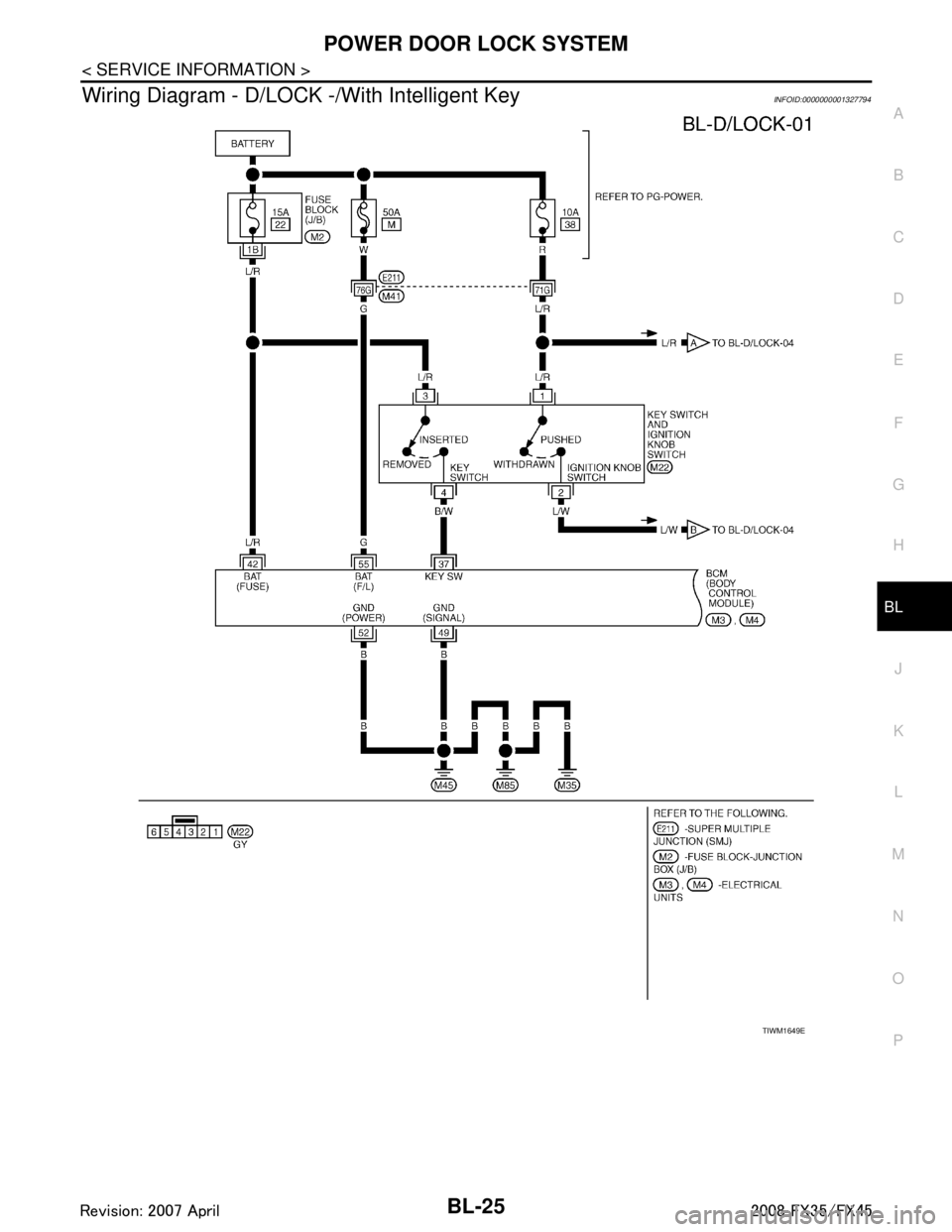
Wiring Diagram - D/LOCK -/With Intelligent KeyINFOID:0000000001327794
TIWM1649E
3AA93ABC3ACD3AC03ACA3AC03AC63AC53A913A773A893A873A873A8E3A773A983AC73AC93AC03AC3
3A893A873A873A8F3A773A9D3AAF3A8A3A8C3A863A9D3AAF3A8B3A8C
Page 765 of 3924

POWER DOOR LOCK SYSTEMBL-31
< SERVICE INFORMATION >
C
DE
F
G H
J
K L
M A
B
BL
N
O P
Wiring Diagram - D/LOCK -/Without Intelligent KeyINFOID:0000000001327796
TIWM1653E
3AA93ABC3ACD3AC03ACA3AC03AC63AC53A913A773A893A873A873A8E3A773A983AC73AC93AC03AC3
3A893A873A873A8F3A773A9D3AAF3A8A3A8C3A863A9D3AAF3A8B3A8C
Page 787 of 3924

REMOTE KEYLESS ENTRY SYSTEMBL-53
< SERVICE INFORMATION >
C
DE
F
G H
J
K L
M A
B
BL
N
O P
door switch OFF (when all the doors are closed);
Remote keyless entry system turns on interior lamp (for 30 seconds) with input of UNLOCK signal from key
fob. For detailed description, refer to LT-138
.
CAN Communication System DescriptionINFOID:0000000001327814
CAN (Controller Area Network) is a serial communication li ne for real time application. It is an on-vehicle mul-
tiplex communication line with high data communication speed and excellent error detection ability. Many elec-
tronic control units are equipped onto a vehicle, and each control unit shares information and links with other
control units during operation (not independent). In CAN communication, control units are connected with 2
communication lines (CAN H line, CAN L line) allowing a high rate of information transmission with less wiring.
Each control unit transmits/receives data but selectively reads required data only.
CAN Communication UnitINFOID:0000000001327815
Refer to LAN-43, "CAN System Specification Chart".
3AA93ABC3ACD3AC03ACA3AC03AC63AC53A913A773A893A873A873A8E3A773A983AC73AC93AC03AC3
3A893A873A873A8F3A773A9D3AAF3A8A3A8C3A863A9D3AAF3A8B3A8C
Page 789 of 3924

REMOTE KEYLESS ENTRY SYSTEMBL-55
< SERVICE INFORMATION >
C
DE
F
G H
J
K L
M A
B
BL
N
O P
Wiring Diagram - KEYLES -INFOID:0000000001327817
TIWM1656E
3AA93ABC3ACD3AC03ACA3AC03AC63AC53A913A773A893A873A873A8E3A773A983AC73AC93AC03AC3
3A893A873A873A8F3A773A9D3AAF3A8A3A8C3A863A9D3AAF3A8B3A8C
Page 806 of 3924

BL-72
< SERVICE INFORMATION >
REMOTE KEYLESS ENTRY SYSTEM
3. Check continuity between IPDM E/R connector E9 terminal 51and horn relay connector E10 terminal 1.
OK or NG
OK >> Check harness connection.
NG >> Repair or replace harness.
Check Hazard Warn ing Lamp FunctionINFOID:0000000001327829
1.CHECK HAZARD WARNING LAMP
Do hazard warning lamp flash with hazard switch?
YES or NO
YES >> Hazard warning lamp circuit is OK.
NO >> Check hazard circuit. Refer to LT- 7 8
.
Check Horn FunctionINFOID:0000000001327830
First perform the “SELF-DIAG RESULTS” in “BCM” wi th CONSULT-III, then perform the trouble diagnosis of
malfunction system indicated “SELF-DIAG RESULTS” of “BCM”. Refer to BCS-13, "
U1000 CAN Communica-
tion Circuit".
1.CHECK HORN FUNCTION
Does horn sound with horn switch?
YES or NO
YES >> Horn circuit is OK.
NO >> Check horn circuit. Refer to WW-48, "
Wiring Diagram - HORN -".
Check Headlamp FunctionINFOID:0000000001327831
First perform the “SELF-DIAG RESULTS” in “BCM” wi th CONSULT-III, then perform the trouble diagnosis of
malfunction system indicated “SELF-DIAG RESULTS” of “BCM”. Refer to BCS-13, "
U1000 CAN Communica-
tion Circuit".
1.CHECK HEADLAMP FUNCTION
Does headlamp come on when turning lighting switch “ON”?
YES or NO
YES >> Headlamp operation circuit is OK.
NO >> Check headlamp system. Refer to LT- 5 , "
System Description".
Check Map Lamp and Ignition Keyhole Illumination FunctionINFOID:0000000001327832
1.CHECK MAP LAMP AND IGNITION KEYHOLE ILLUMINATION FUNCTION
When map lamp switch is in “DOOR” position, open the front door (LH or RH).
OK or NG
51 (SB) – 1 (SB) : Continuity should exist.
PIIA6404E
Map lamp and ignition keyhole illumination should illuminate.
3AA93ABC3ACD3AC03ACA3AC03AC63AC53A913A773A893A873A873A8E3A773A983AC73AC93AC03AC3
3A893A873A873A8F3A773A9D3AAF3A8A3A8C3A863A9D3AAF3A8B3A8C
Page 817 of 3924

INTELLIGENT KEY SYSTEMBL-83
< SERVICE INFORMATION >
C
DE
F
G H
J
K L
M A
B
BL
N
O P
Intelligent Key remote controller button and door reques t switch operations change the engine startup function
settings (startup enabled/disabled) for each Intelligent Key independently.
Settings Change Procedure1. With the ignition switch is in the LOCK positi on (ignition knob not pressed), hold down both the LOCK and
UNLOCK remote control buttons on the Intelligent Key at the same time for at least 10 seconds (The yard-
stick is that the Intelligent Key LED flashes 20 times.)
2. Within 5 seconds of releasing the Intelligent Key remote controller buttons, press the driver door request
switch.
3. The KEY warning lamp in combination meter lights up for 3 seconds (engine starting enabled → starting
disabled: lights up red, engine starting disabled → flashes green). This completes the settings change.
Changing Settings Using CONSULT-III
The settings for the Intelligent Key system func tions can be changed using CONSULT-III (WORK SUPPORT).
Refer to BL-104, "
CONSULT-III Application Item".
NOTE:
Once a function setting is changed, it will remain effective even if the battery is disconnected.
Changing Settings Using Display Unit
The settings of the Intelligent Key system can be changed, using CONSULT-III, display unit, Intelligent Key
and door request switch in the cent er of the instrument panel.
NOTE:
Once a function setting is changed, it will remain effective even if the battery is disconnected.
INTELLIGENT KEY REGISTRATION
Intelligent Key-ID registration is executed using the CONSULT-III. Up to 4 can be registered.
CAUTION:
After a new Intelligent Key-ID is regi stered, be sure to check the function.
When registering an additional Intelligent Key-ID , take any Intelligent Keys already registered and
Intelligent Keys for any other vehicles out of the vehicle before starting.
CONSULT-III can be used to check and delete Intelligent Key-IDs.
For future information, see the CO NSULT-III Operation Manual NATS.
STEERING LOCK UNIT REGISTRATION
Steering Lock Unit ID Registration
CAUTION:
The method for registering a steering lock unit ID depends on the status of the steering lock unit and
Intelligent Key unit (new or old unit).
After registration is completed, press ignition knob with a portable unit in the vehicle so that it can
be rotated, and confirm that it cannot be rotated even when ignition switch is pressed without a por-
table unit in the vehicle.
For further information, see the CONS ULT-III Operation Manual NATS.
CAN Communication System DescriptionINFOID:0000000001327838
CAN (Controller Area Network) is a serial communication li ne for real time application. It is an on-vehicle mul-
tiplex communication line with high data communication speed and excellent error detection ability. Many elec-
tronic control units are equipped onto a vehicle, and each control unit shares information and links with other
control units during operation (not independent). In CAN communication, control units are connected with 2
communication lines (CAN H line, CAN L line) allowing a high rate of information transmission with less wiring.
Each control unit transmits/receives data but selectively reads required data only.
Setting item Description
Intelligent Key Lock Response-Sound The sound pattern of the Intelligent Key operation can be set as desired. (Setting value:
OFF, Beeper or Horn chirp)
Intelligent Key Unlock Response-Beep
Sound The beep sound when unlocking door with the Intelligent Key operation can be turned ON
or OFF.
Intelligent Key Engine Start Function This function can be performed to ON or OFF.
Intelligent Key Lock/Unlock Function The door handle request switch lock/unlock operation with the Intelligent Key can be can-
celed or activated.
Return All Settings to Default The all settings made by VEHICLE ELECTRONICS will return to default.
3AA93ABC3ACD3AC03ACA3AC03AC63AC53A913A773A893A873A873A8E3A773A983AC73AC93AC03AC3
3A893A873A873A8F3A773A9D3AAF3A8A3A8C3A863A9D3AAF3A8B3A8C